


Nowadays, AI video tools are growing rapidly to help create engaging videos. Among them, Higgsfield AI is a platform that helps users create cinematic videos from text or images. It focuses on short, engaging content with AI scenes and camera control. However, many users look for alternatives due to speed limits, creative control needs, and support for longer videos. Hence, this article on Higgsfield AI reviews helps beginners understand real user experiences.
Part 1. What is Higgsfield AI?
Higgsfield AI is an AI-powered video-generation and content-creation platform for creating cinematic short videos. It started in 2023 to help people create great social media posts. This app turns your simple text or photos into smooth and cinematic scenes. The platform is used by millions of social media teams and professional video creators worldwide.
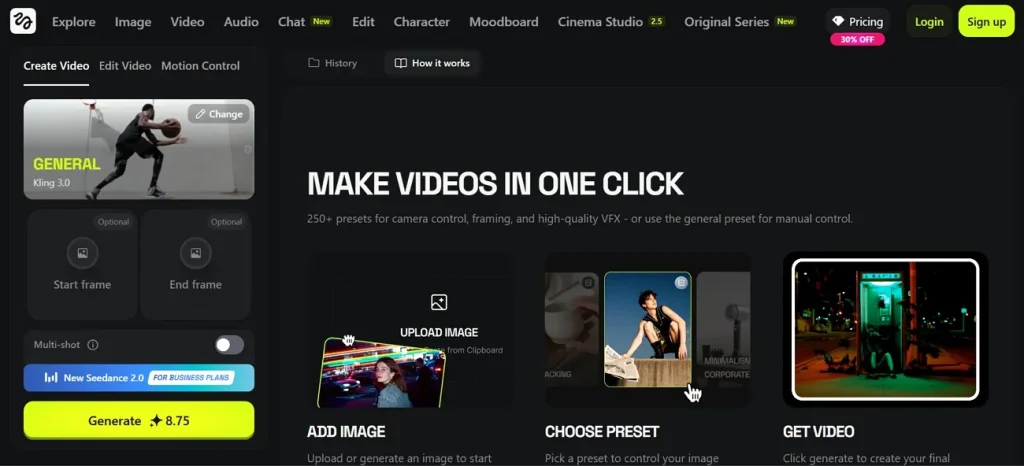
Apart from video generation, the platform also offers advanced tools like Soul Cinema for cinematic-quality visuals and Soul 2.0 for photorealistic image creation. It includes LipSync Studio for realistic talking avatars and Face Swap for customizable character effects. These features make it a complete cinematic AI creation platform.
Higgsfield.ai Reviews: Key Features Explained
Higgsfield.AI reviews show why creators prefer this platform for social media videos. Below are the top features explained clearly for beginners and professionals alike:
- Text To Video: Generates short 10 to 30 second videos from text prompts using advanced AI video like Kling and Wan, for realism.
- Image To Video: Transforms static photos into smooth animated videos while preserving clarity, reflections, and natural motion effects perfectly.
- Cinema Studio Control: Provides a professional filmmaking workspace with director-style camera controls, including pan, tilt, dolly, tracking, and crane shots.
- Camera Style Library: Offers 50+ cinematic camera presets, including whip pan, FPV drone, and bullet time motion effects.
- Motion or Expression Control: Enables precise control of character movement, expressions, and timing within short AI-generated video scenes up to 30 seconds.
Higgsfield AI Reviews: User Feedback (Pros & Cons)
Apart from the capabilities of Higgsfield AI, this specific section shares some pros and cons about this platform highlighted through various user reviews:
Pros
- Users report that LipSync Studio creates fast, natural animations easily.
- Several users also say Cinema Studio gives strong creative camera control.
- Some users also report that a wide range of model choices greatly improves creative flexibility.
Cons
- Many users report that motion becomes unstable in complex video scenes.
- Several users mention that complex actions sometimes produce chaotic motion results.
Part 2. Best Alternative to Higgsfield AI
Based on this Higgsfield AI review, most users want to explore better-performing alternatives. For this, MagicLight AI is a great choice for users who want quick and simple video creation. This dedicated platform features 11 languages and 9 story models in its dedicated video generation functionality for flexible content creation.
While generating AI videos, you can adjust expressions, poses, and body types of characters with 50 preset options. The platform also generates videos instantly using 14 models via a simple 1-click workflow. For precision, editors can create videos from scripts up to 12,000 words with full story control. After creating an AI video, you can export it in 1080p HD quality.
Key Features
- Director Modes: Use 8 director modes to control storytelling style and cinematic video presentation.
- Style Selection: Select from Midjourney V7 and MagicLight versions for different visual video styles.
- Magic Claw: Comes with a dedicated function to create, publish, and track a complete video idea within a single platform.
Detailed Guide to Generate AI Videos with MagicLight AI with Ease
If you want to create AI videos easily, this particular part provides a complete guide for it:
Step 1. Access Story to Video Function
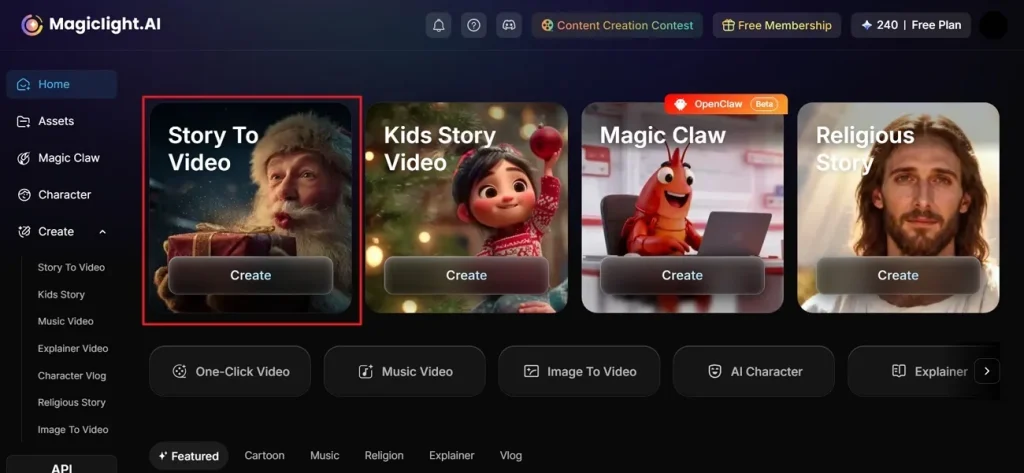
To start with, visit MagicLight AI on your desired web browser and opt for Story To Video.
Step 2. Add Your Prompt and Create a Video
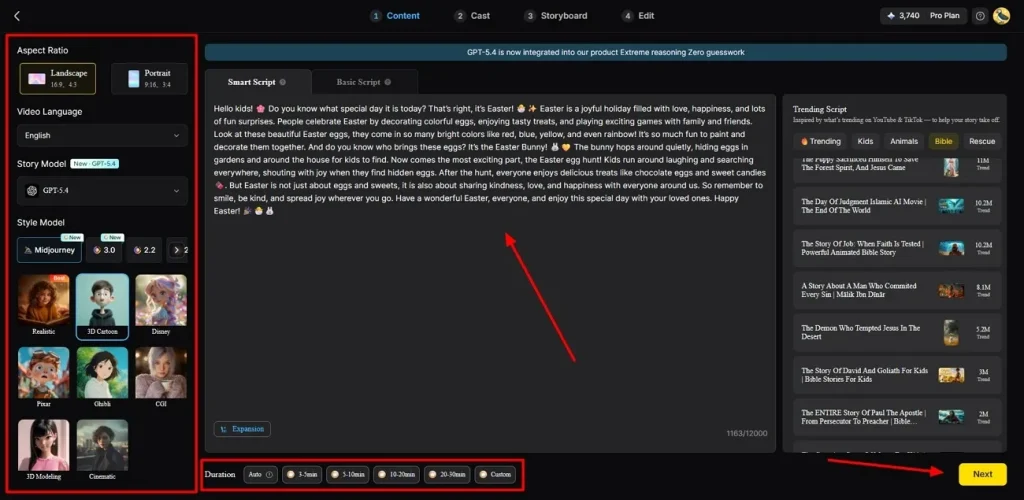
After accessing it, type your idea into the provided Text Box and select your preferred Video Language. Afterward, adjust the Aspect Ratio and select an AI Story Model, such as GPT-4, from the 9 options. Next, choose a Style Model like Disney or 3D cartoon, set the Video length, and click Next.
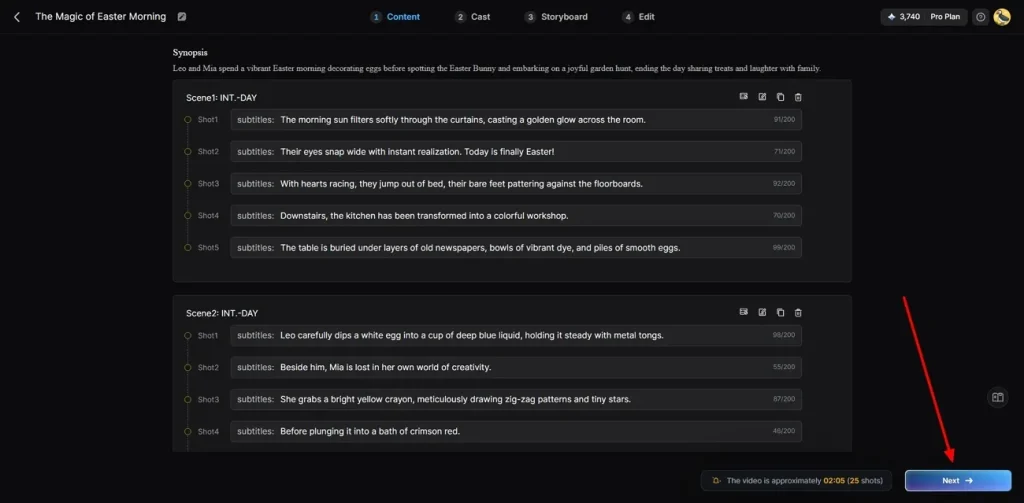
Step 3. Preview AI-Generated Video Summary
When creating scenes automatically, preview the summary carefully. If everything looks right, click the Next button to continue with the next step.
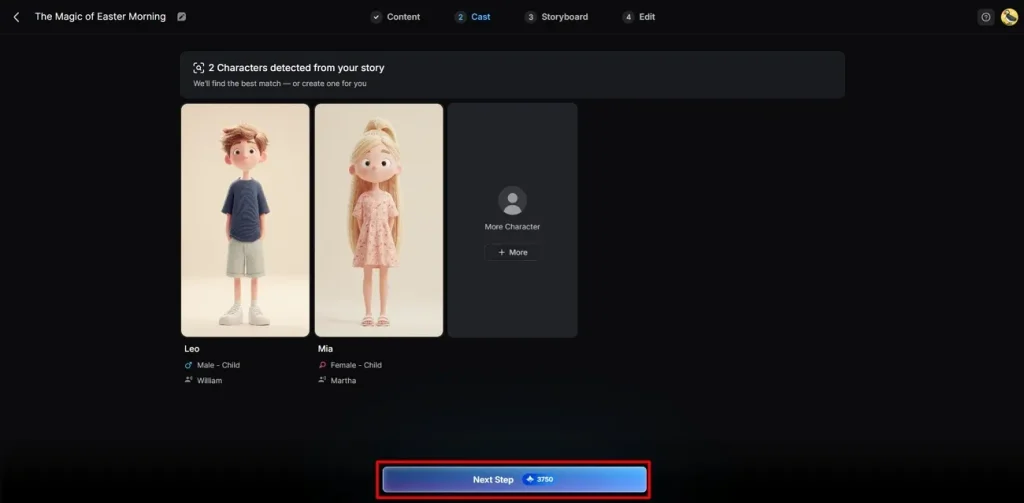
Step 4. Choose or Add Characters
Afterward, the tool provides multiple characters based on your video needs. You can select from existing characters or create new ones using the More Characters option. Once everything is ready, opt for the Next Step button.
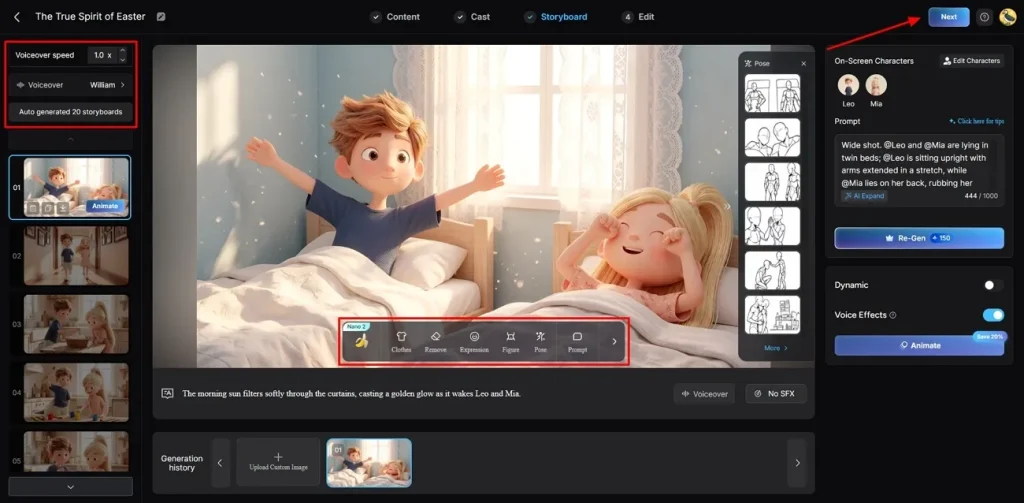
Step 5. Customize Character Appearance
With the storyboard-generated screen, modify the character Voiceover Speed, with the given options on the left panel. Further, you can also change Clothes, Expressions, and Figure in each frame. Once you confirm the setting for each frame, click Next to proceed.
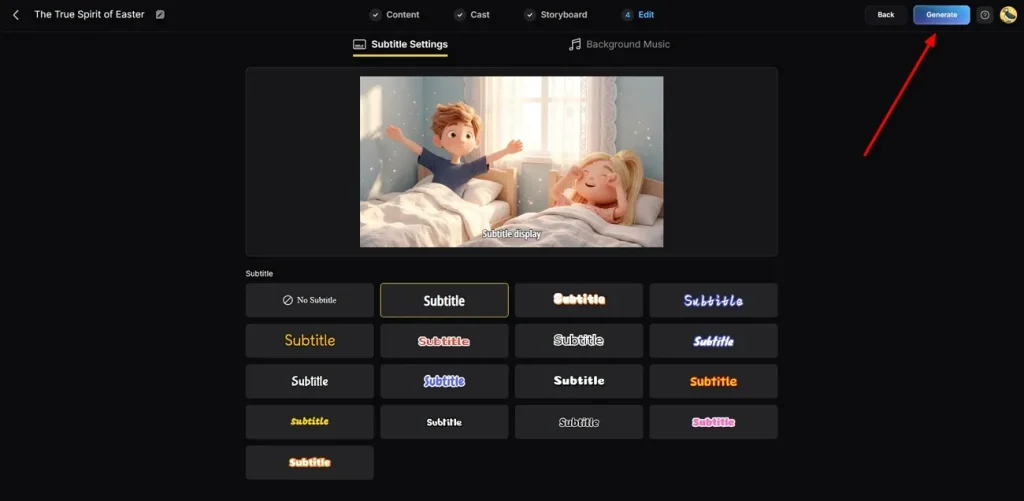
Step 6. Add Captions and Background Music
At this point, navigate to Subtitle Settings to include subtitles in your video. Next, select Background Music that matches the mood, then press Generate for the final output.
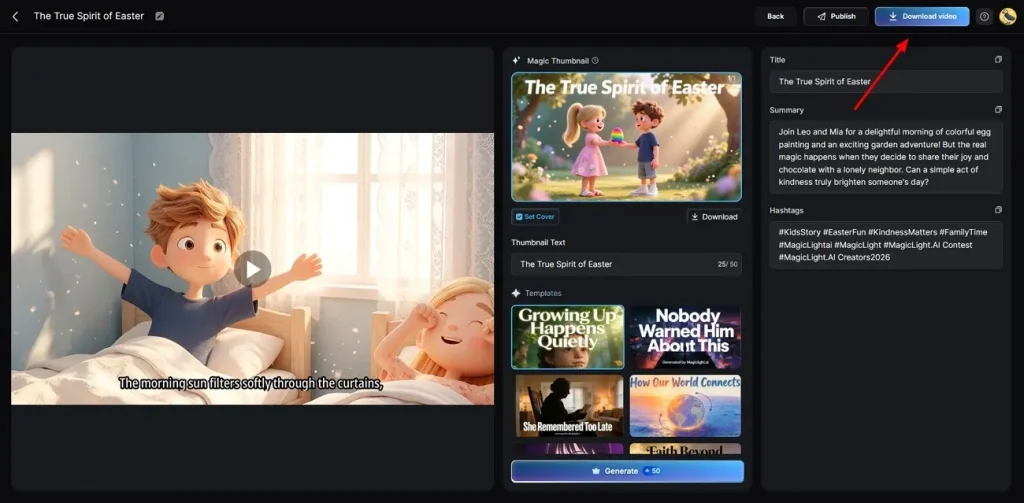
Step 7. Download the Generated AI Video
At last, preview the finished video carefully to check the final result and add your preferred Hashtags or Thumbnail Text. Once you are satisfied, opt for the Download button to save it to your device.
Why Use MagicLight AI to Generate AI Videos
Several Higgsfield.AI reviews highlight the need for faster and easier video creation tools and find MagicLight AI as a better option. So, below are the reasons why MagicLight AI works better for everyday video creation:
- Voice Options: MagicLight AI provides 37 voice options with a voice cloning support feature. So, users can match voice with characters to create natural and engaging storytelling videos.
- Long Videos: It even supports long videos up to 50 minutes with consistent output quality. This is ideal for course stories and full episodes, rather than just short clips.
- Script Conversion: MagicLight AI automatically converts scripts into full videos with scenes and characters. You can add voiceover subtitles and transitions to complete the video without editing effort.
- Nano Control: Nano storyboard allows detailed control over scenes, timing, and character actions. Users can easily adjust poses, clothing, and expressions with 50 preset options.
- HD Export: The platform supports exporting videos in high-quality 1080p resolution easily. It ensures clear visuals and sharp output for social media and large screens.
Conclusion
In summary, Higgsfield AI offers strong tools for creating cinematic short videos with good control. This Higgsfield AI reviews guide shows it works well for social media content creators. However, some users face issues with speed and complex video stability. Therefore, they look for effortless and faster alternatives. In such cases, MagicLight AI becomes a better option to create long, detailed videos easily with less effort.
FAQs on Higgsfield AI
1. Is Higgsfield AI safe to use?
Higgsfield AI is generally safe when used on official platform sources only. It follows standard security practices, but users should avoid sharing sensitive data. MagicLight AI also offers a secure environment for stable, controlled video creation.
2. Is Higgsfield AI good for video generation?
Higgsfield AI is suitable for producing short cinematic videos with high visual quality. It offers creative and camera control to social media content creators. However, the performance can be affected by complexity and immediate clarification during the generation.
3. Why is Higgsfield AI slow sometimes?
Higgsfield AI can slow down due to high server demand and heavy processing tasks. Complex scenes and longer prompts also increase rendering time significantly for users. MagicLight AI offers a faster workflow with optimized generation and a simpler processing system.
4. Can beginners use Higgsfield AI easily?
Beginners can use Higgsfield AI, but may face a learning curve initially. The interface includes advanced tools that require some understanding of video creation. However, MagicLight AI is more beginner-friendly with simple steps and a guided workflow system.
5. Is Higgsfield AI worth the price?
Higgsfield AI is worth it for users needing cinematic short video outputs. It offers powerful features, but pricing may feel high for casual creators.





![How to Make a Marketing Video 2026 [Step-by-Step Guide]](https://magiclight.ai/wp-2/wp-content/uploads/marketing-goal-planning-guide-300x200.png)