


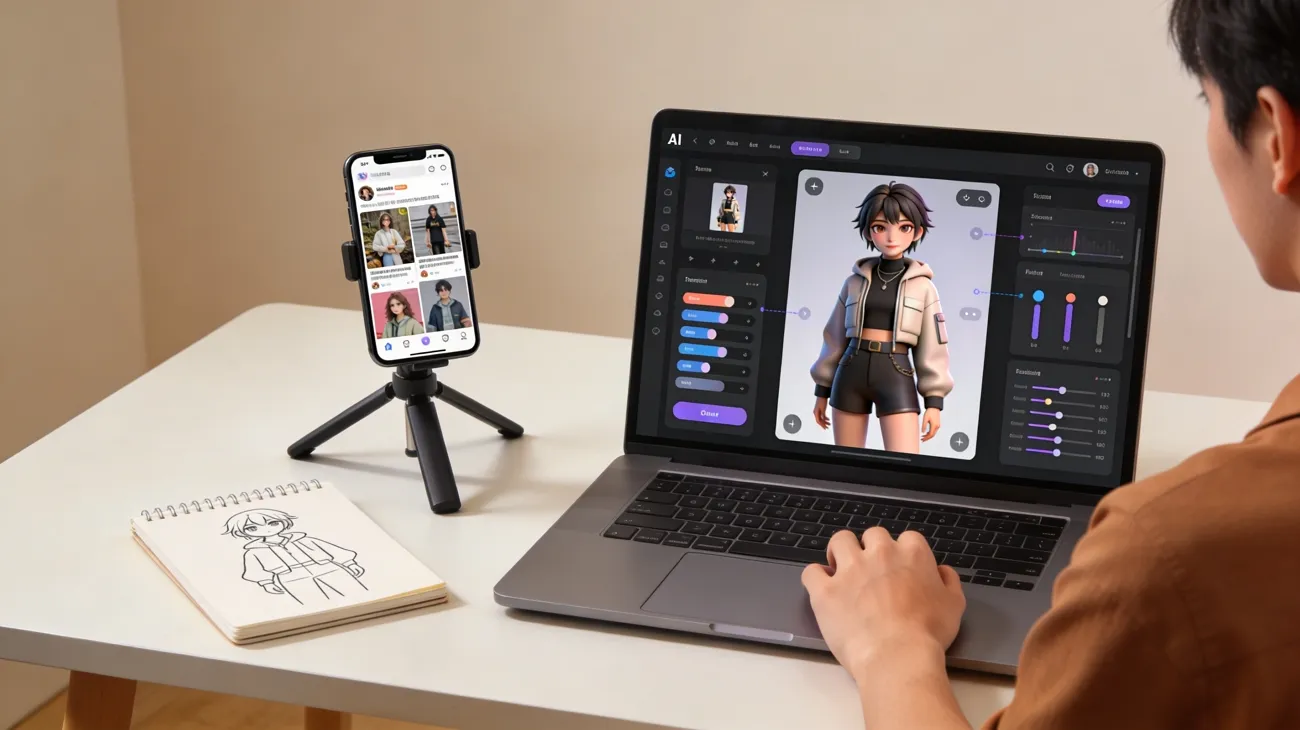
An AI influencer is a digital persona created using advanced AI software. It looks real and can interact with users on social platforms easily. Moreover, many brands use them for marketing because they stay active and consistent.
These virtual characters are created using tools that design faces and personalities. Understanding how to create an AI influencer helps beginners join this trend. Thus, this guide will show you the easiest steps to build your first virtual star.
Part 1. Best AI Tool to Create an AI Model Influencer Easily
Many creators struggle to make consistent and engaging influencer content online. Along with that, most available tools are difficult and require advanced editing knowledge. Here, MagicLight AI solves this problem and helps with how to create an AI influencer on Instagram with ease. This is an advanced platform that supports full story to video creation with long scripts up to 12,000 words.
Moreover, it lets users choose video settings and Aspect Ratios for better influencer videos. For testing multiple voices, the tool provides 37 voiceovers, including voice cloning for realistic AI influencer narration output. While generating, you can complete AI influencer videos instantly using one click across 14 models. MagicLight AI provides 40 background music options for enhancing the AI influencer video quality experience.
Key Features
- Consistency Lock: Maintains consistent AI influencer appearance across scenes using an advanced character locking system.
- Magic Claw: The dedicated video generation facility offers a coherent video creation, publication, and tracking system within a single platform.
- Style Models: Offers multiple visual styles like Midjourney V7, MagicLight 3.0, to design an AI influencer look matching the niche and personality traits
Comprehensive Guide to Generate an AI influencer Video with MagicLight AI
Go through the given guide to design videos that attract viewers quickly online:
Step 1. Start a New Project in MagicLight AI
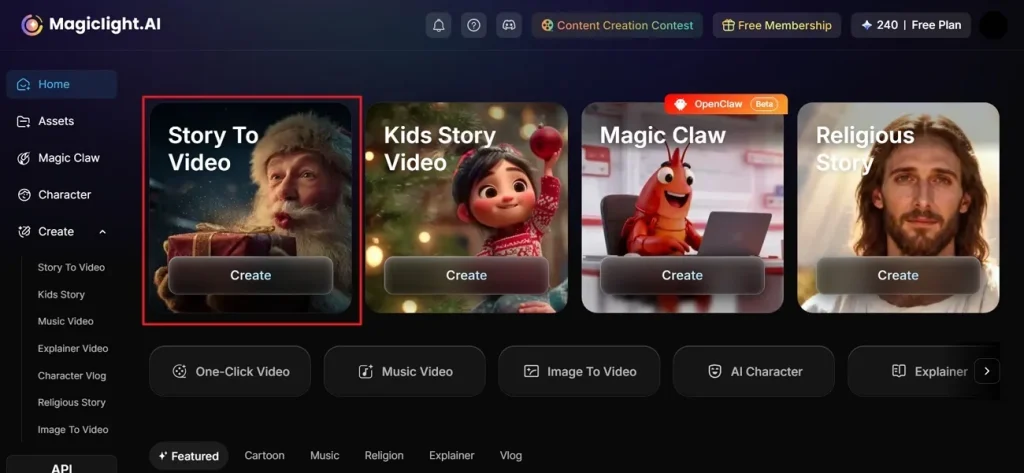
Access MagicLight AI and press the Story To Video feature from the main screen.
Step 2. Add Prompt and Generate an AI influencer Video
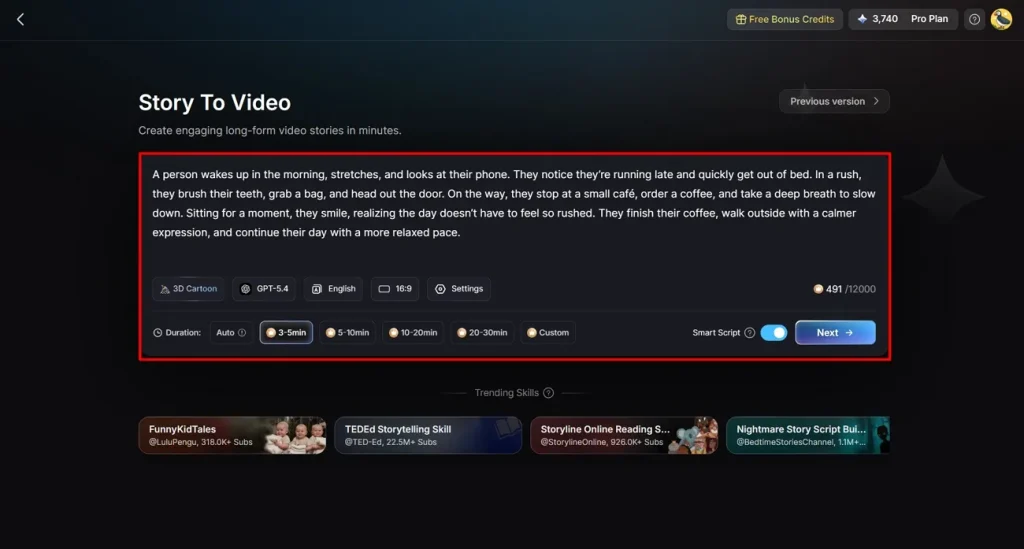
Later on, type your idea into the Text Box and choose your preferred Video Language. Adjust the Aspect Ratio from the side panel and continue smoothly. After that, select an AI Story Model like GPT-5.4 and move forward. Next, pick a Style, set the Video Length, and click the Next button.
Step 3. Preview AI-Generated Influencer Video Scenes
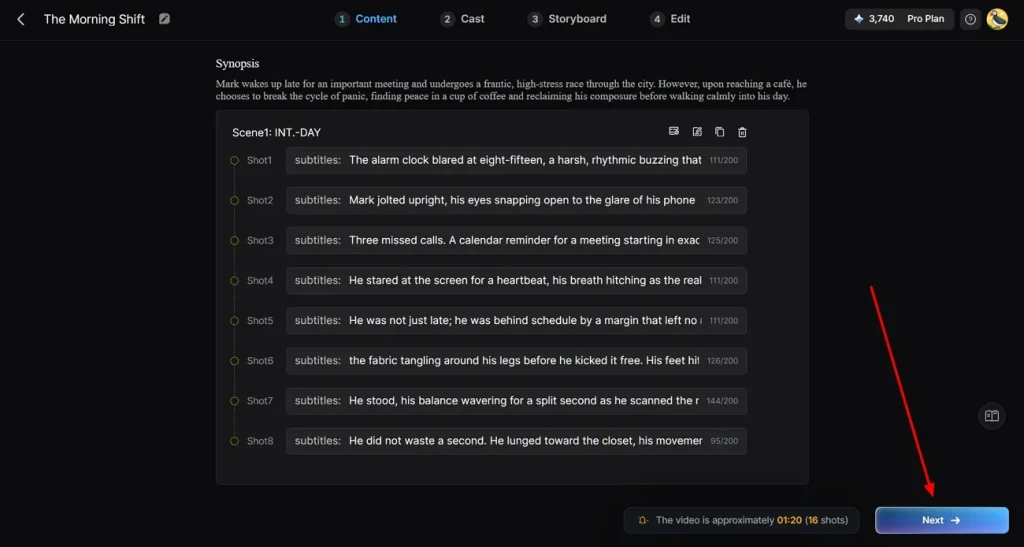
Afterward, preview the generated AI scenes to see how your video looks. Once satisfied, click the Next button to continue with the next step.
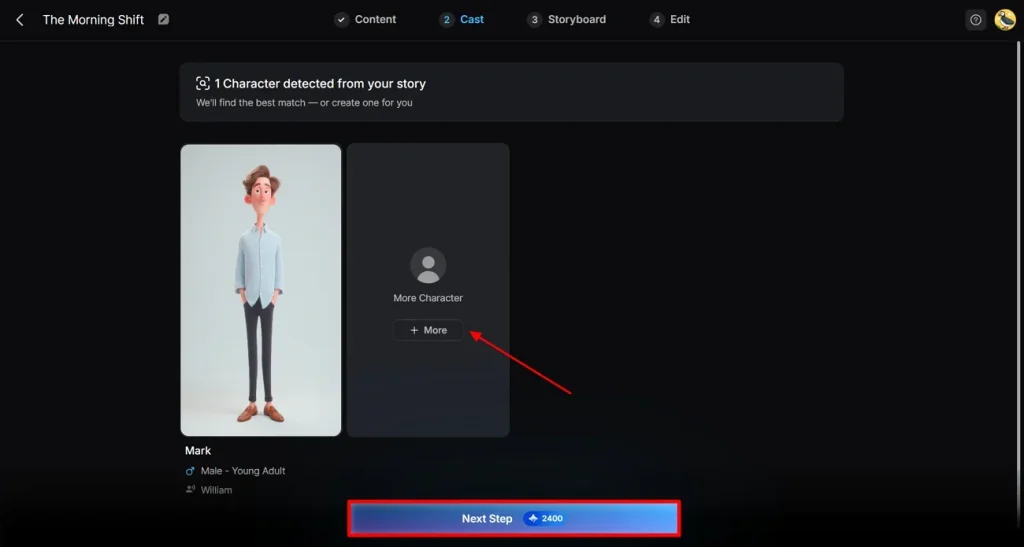
Step 4. Select or Add AI Influencer Characters
Choose from existing AI characters or create new ones using the More Characters option. After selecting your character, click Next Step to generate your final video.
Step 5. Customize AI Influencer Appearance
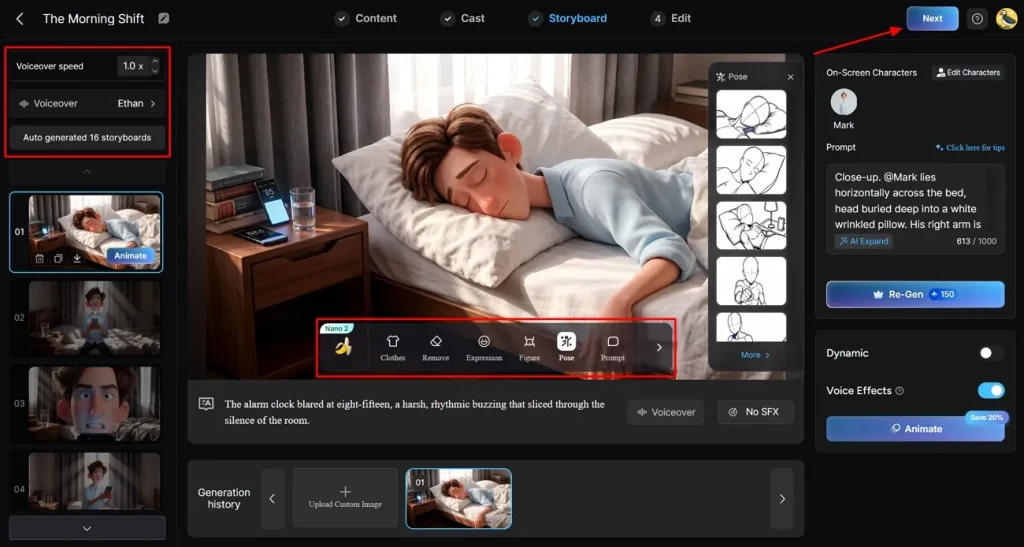
As you access the storyboard screen, adjust your character’s Voiceover Speed to match your video’s pace. Additionally, you can personalize their Clothing or Body Figure and click the Next button.
Step 6. Add Subtitles and Background Music in AI Video
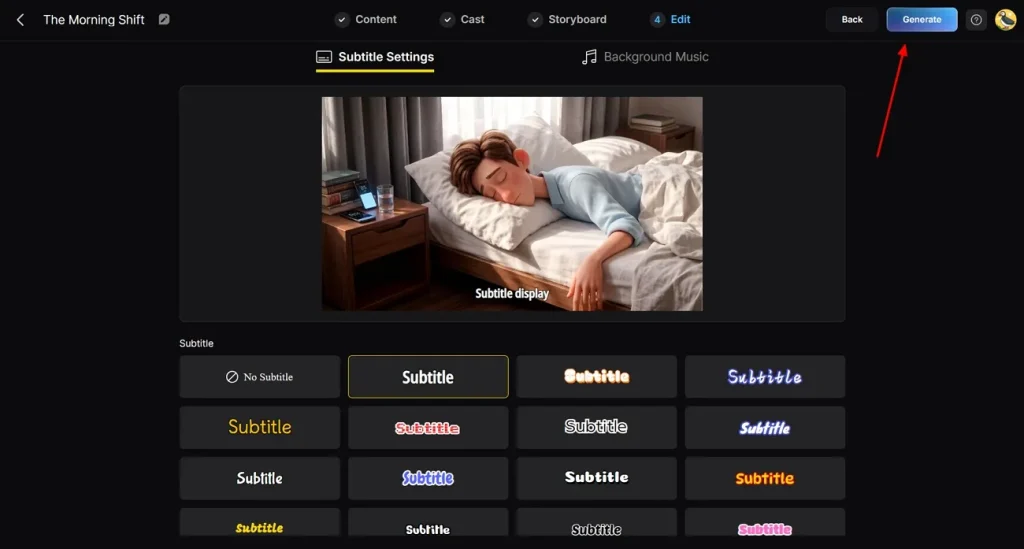
Subsequently, head to the Subtitle Settings to add captions in the AI influencer video. For background sound, go to the Background Music section to set the tone of your video, then click Generate.
Step 7. Watch and Download the AI Influencer Video
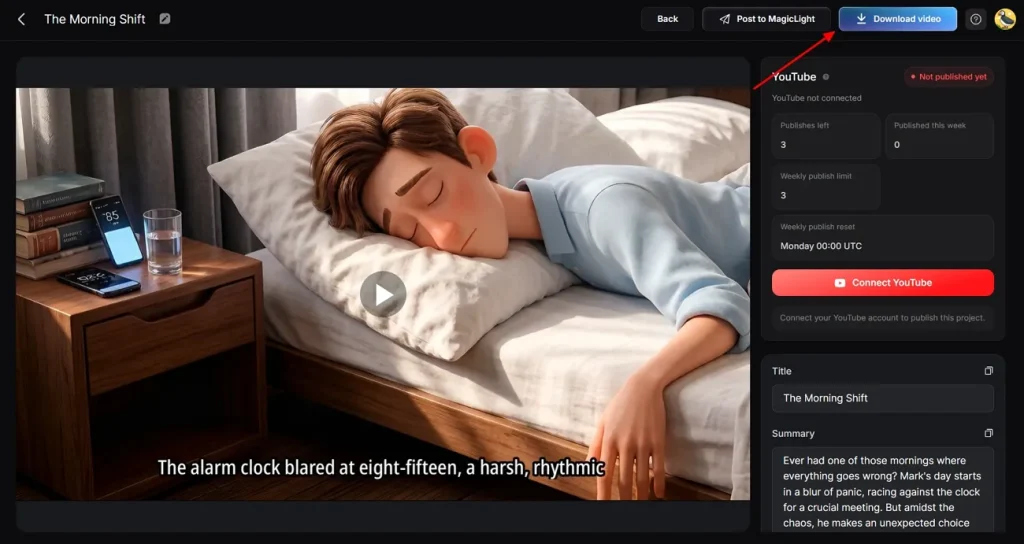
After completing the above task, you can now preview your AI-generated video. Once satisfied, opt for Download to export the AI influencer video to your device.
Why Choose MagicLight AI to Generate an AI Influencer Video
MagicLight AI helps beginners understand how to create an AI influencer model on Instagram easily. This section explains the main advantages that make this tool powerful for influencer creation:
- Animation Convert: Storyboard can be converted into animation using 16 different AI models instantly. This improves motion quality and helps build professional influencer-style video content.
- Language Support: MagicLight AI supports 11 languages for global audience targeting and content reach. So, creators can build multilingual AI influencers for wider engagement globally.
- Music Library: The platform provides 40 background music options for enhancing video emotion and mood. This improves storytelling impact in AI influencer videos for better engagement.
- Story Models: MagicLight AI provides 9 story models to structure content in different creative formats easily. It also improves storytelling flow for influencer videos across all platforms.
- Long Videos: The tool even supports video generation up to 50 minutes long with consistent quality output. This makes it perfect for full series, courses, and long influencer content creation.
Part 2. How to Create an AI Model Influencer Easily
A strong AI influencer needs good design planning and a structured workflow approach. Here are the main steps explaining how to create an AI-generated influencer:
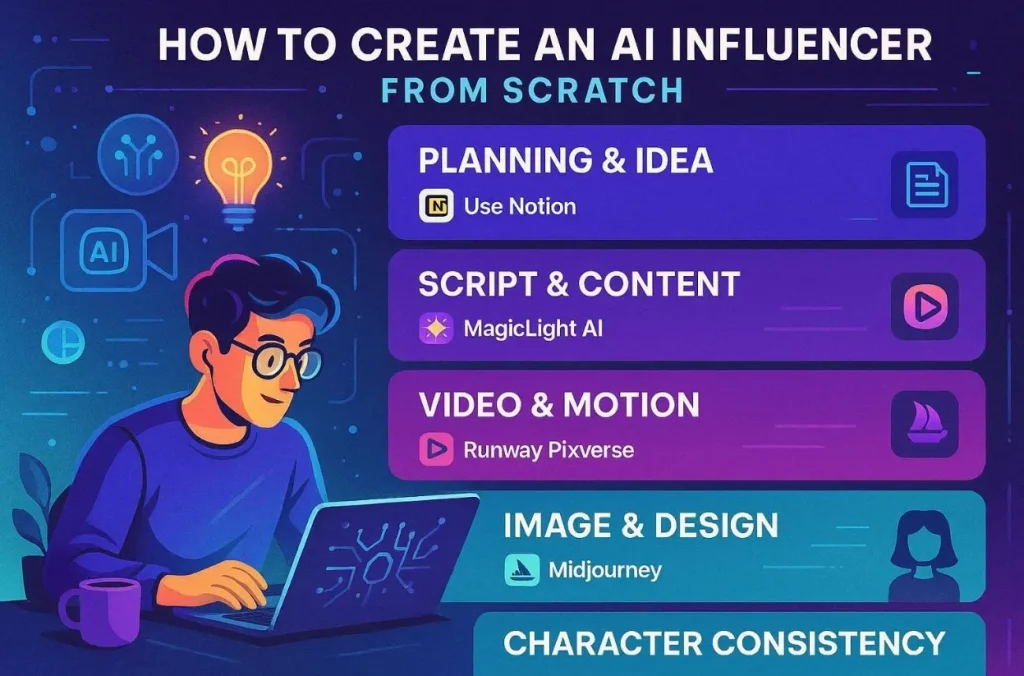
What You Need to Create an AI Influencer from Scratch
Many creators search for how to create an AI influencer for free successfully online. So, below are the basic requirements you need before starting your influencer creation process:
- Planning and Idea: Set up proper planning to help define your influencer niche audience and overall content direction clearly. For this task, use Notion, Google Docs, and AI chat tools efficiently.
- Script and Content Writing: Engaging scripts and captions are important to attract and retain audience attention. So, you should use ChatGPT and AI writing tools to make content creation faster and easier.
- Video and Motion Creation: Motion videos help bring your AI influencer character to life across platforms. To create them, you can use MagicLight AI and Hailuo for short clips.
- Image Creation and Design: Realistic visuals are important for building a strong and consistent influencer identity. Therefore, Midjourney and DALL-E generate high-quality faces, outfits, and styles.
- Character Consistency Management: Consistent appearance builds trust and keeps your influencer recognizable across content. For this purpose, use the Alici AI and MagicLight AI tools properly.
How to Create an AI Influencer from Scratch: Full Guide
Making an AI influencer from scratch does not require coding or film skills. You only need a clear plan and the right AI generation tools. Let’s explore the complete guide on how to create an AI model influencer with simple tools:
Step 1. Define the Influencer Persona
Describe your influencer niche, audience, and platform clearly before starting the creation process. Write a character bible, including name, age, personality, backstory, and visual style details. Then use an AI assistant for brainstorming ideas, names, content angles, and themes quickly.
Step 2. Create the Visual Character
Generate multiple portrait variations using AI tools based on your persona brief. Select the best images where the face style and lighting look consistent and visually strong. Furthermore, create hero images and lock the character’s identity in your chosen AI platform to maintain consistency.
Step 3. Set Up Voice and Script
Choose a voice style based on personality, such as a friendly or expert tone. Next, write short scripts of 15 to 45 seconds for videos, including tips, stories, or product mentions, clearly. Match voice tone with influencer persona for natural audience connection and better engagement.
Step 4. Lock Character Consistency
Set up a character consistency system inside your selected AI platform, properly configured. Generate test images in different poses, outfits, and environments carefully for accuracy. Ensure the same face identity appears consistent across all generated outputs without errors. After that, build a reusable gallery of images for posts, reels, and thumbnail content use.
Step 5. Generate AI Influencer Videos
Upload 3 to 5 hero images into the avatar tool for talking-head video generation. Paste scripts, choose voice, and set vertical format for quick export of reels. Generate motion clips using templates, walking, posing, or talking actions in the platform. At last, export videos directly, ready for posting on social media platforms, and instantly share.
Conclusion
Starting an AI influencer can help you grow your presence online. This guide explained how to create an AI influencer with clear and simple way. Beginners can follow this process without facing technical or creative difficulties. However, creating consistent and HD videos can still be challenging for many. Thus, MagicLight AI helps automate tasks, maintain quality, and support faster influencer growth online.
FAQs on How to Create an AI Influencer
1. Is it legal to create AI influencers?
Yes, you can legally create an AI influencer when using original or properly licensed content. Always avoid copying the real faces of people or voices without permission. Moreover, follow platform policies and clearly disclose AI-generated content to users.
2. Can AI influencers make money?
AI influencers have an opportunity to make money from brand deals and promotions. Affiliate marketing and digital content are also sources of their income. Alongside that, monetization can be simplified with time and consistency of growth in the audience.
3. How to create an AI-generated influencer now?
It is recommended to use MagicLight AI to build a perfect virtual model very fast. Pick a unique name and design a pretty face with this smart tool. The tool creates high-quality videos that look very real for your fans.
4. Can beginners create AI influencers easily?
Yes, beginners can create AI influencers using the simple AI tools available. Most platforms like MagicLight AI offer templates and automated video generation features. You only need a good idea to build your first famous online character.
5. What is the best AI tool for influencer creation?
MagicLight AI is the top choice for making consistent and beautiful digital stars. It keeps the face the same in every photo or long video post. This tool is perfect for users who want to grow their brand fast.




![How to Make a Marketing Video 2026 [Step-by-Step Guide]](https://magiclight.ai/wp-2/wp-content/uploads/marketing-goal-planning-guide-300x200.png)