



Marketing videos help businesses introduce an idea and service in a way people can understand. Too much information in one video can make its main message harder to follow. Your video should speak to the people most likely to care about what you are offering. Learning how to make a marketing video means settling these basics before any real production work begins.
Part 1. Plan Your Marketing Video Before You Create It
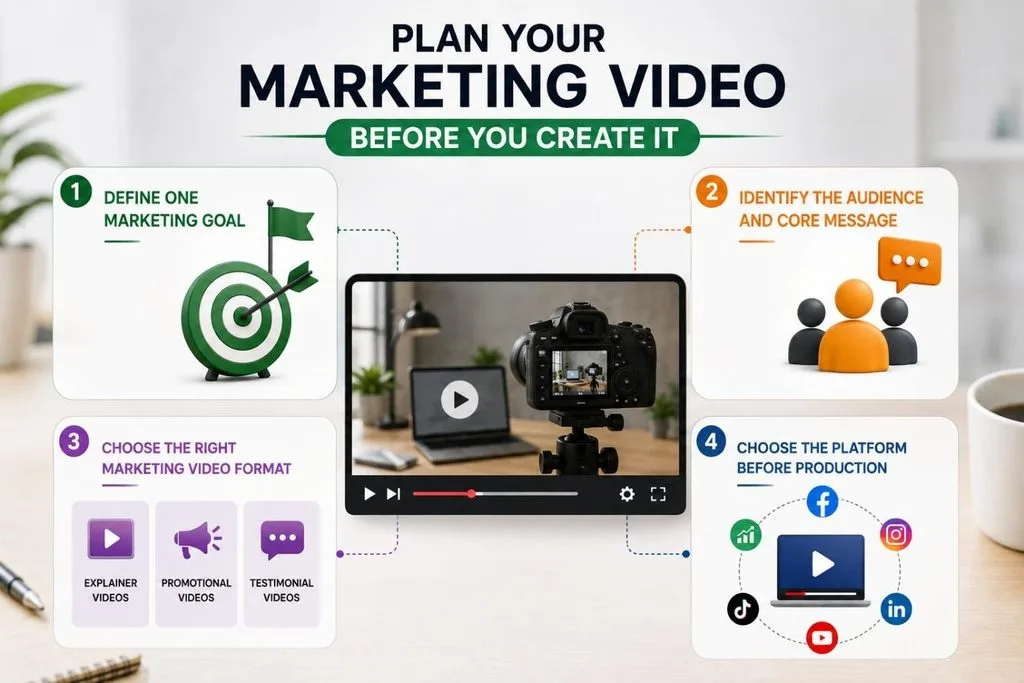
Before making your video, you need to settle 4 things that will affect everything you do later. These choices help you know what you are making and who you are making the video for.
Define One Marketing Goal
An awareness video looks very different from one created to drive clicks, sales, or other conversions. Your main goal will shape how long the video is, how it sounds, and its CTA. Trying to serve several goals in one video can make each of them less effective. Measure awareness through reach and viewing metrics, while conversions are measured by the action viewers take.
Identify the Audience and Core Message
Narrowing the audience removes guesswork from the decisions that follow. Finance directors reviewing software need different pacing and proof than shoppers moving through a social feed. The core message needs to fit into one sentence without losing the point behind the video. Knowing how to make a good marketing video starts with keeping that message clear throughout the video.
Choose the Right Marketing Video Format
Format should follow the goal and audience rather than personal preference. The table below shows practical length ranges and suitable placements for common marketing video formats:
| Format | Typical Length | Best Placement | Works Best For |
| Explainer | 60–90 seconds | Website and YouTube | Explaining complex products or services |
| Product Demo | 30–90 seconds | Product page and LinkedIn | Showing a product or feature in action |
| Testimonial | 30–60 seconds | Landing page and website | Building trust before a decision |
| Short-form Social | 15–60 seconds | TikTok, Reels, and Shorts | Reach and new-audience discovery |
| Animated Brand Story | 60–90 seconds | YouTube and website | Brand awareness and storytelling |
| Webinar | 30–60 minutes | Landing page or webinar platform | Lead generation and deeper education |
Animated marketing videos can explain products or ideas clearly without requiring live-action filming or on-camera talent. They also offer more freedom to present stories, features, and concepts through custom visuals.
Choose the Platform Before Production
Video length, size, and captions should fit the platform where you will share it. Making this choice early saves time that would otherwise go into reformatting the finished video.
YouTube supports longer content, while LinkedIn is commonly used to reach professional and B2B audiences. This platform-first approach simplifies how to make marketing videos that fit each channel from the start.
Part 2. How to Make a Marketing Video in 7 Practical Steps
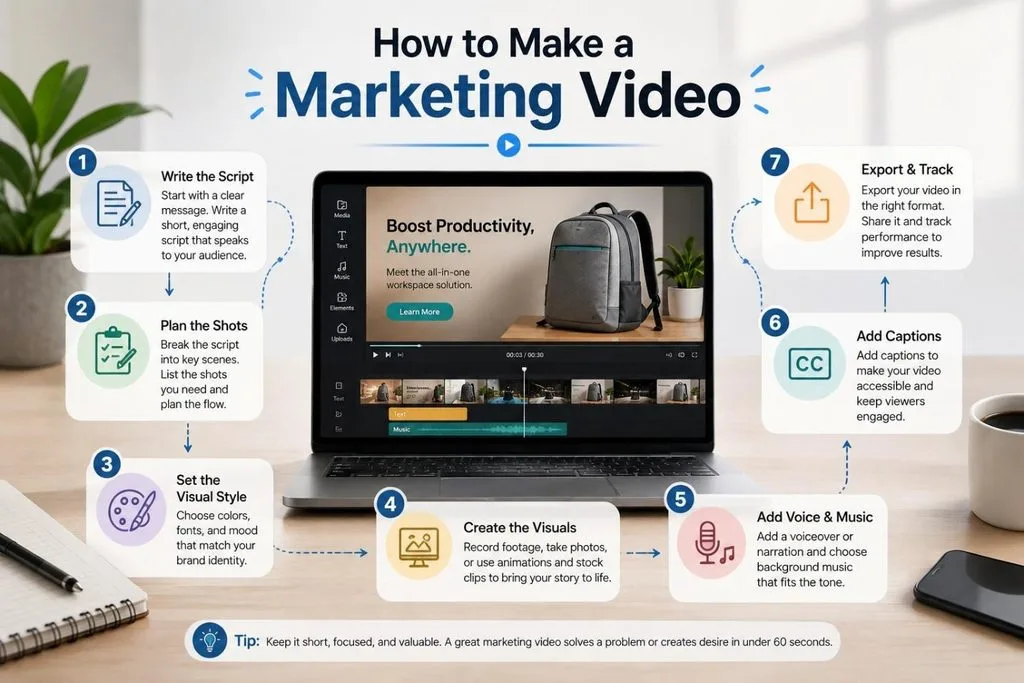
After the planning is complete, you can move through production without making major changes along the way. These 7 steps work for filmed, animated, and AI-generated videos across different marketing formats and platforms. Following each production step in order helps explain how to make a good marketing video:
Step 1. Write the script around one clear message and start with something that grabs attention.
Step 2. Split the script into shots and match each line with the right visual.
Step 3. Decide how the video should look by choosing its colors and typography. Then choose filmed, animated, or generated visuals.
Step 4. Create the visuals and make sure each shot supports the script instead of adding unnecessary footage.
Step 5. Record the voiceover and choose music that matches the video's pace and visuals.
Step 6. Add captions and check whether the opening still works when viewers watch without sound.
Step 7. Export the correct aspect ratio for each platform, then track retention and click-through alongside views.
Part 3. How to Make Marketing Videos With MagicLight AI
Marketing teams can now create complete videos without relying on cameras, studios, and large production crews. This is where MagicLight AI turns written ideas and scripts into ready-to-edit scenes for marketing campaigns. Prompts can reach 12,000 characters, with video lengths extending up to 50 minutes.
MagicLight AI offers 20 AI video models, including Gemini 3.5 Flash, Seedance 2.5, and Kling 2.1 Master. For anyone exploring how to make animated marketing videos, the platform brings creation into one workflow.
Key Features for Marketing Work
- Story Models: Choose from 9 story models built for different marketing narratives and styles. Each model shapes pacing, story flow, and presentation across the entire marketing video.
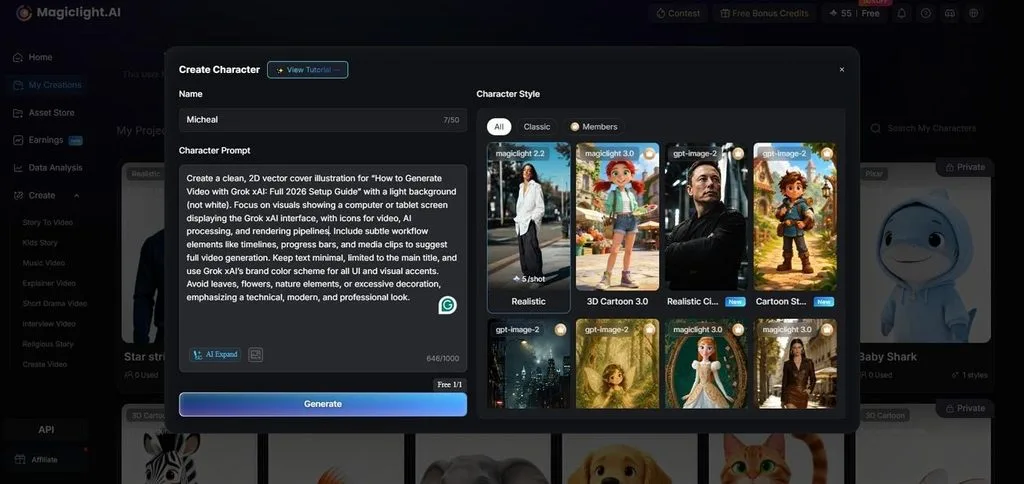
- AI Character Creation: Describe a presenter with a written prompt containing up to 1,000 characters. Uploaded photos can also become reusable characters for future videos and marketing campaigns.
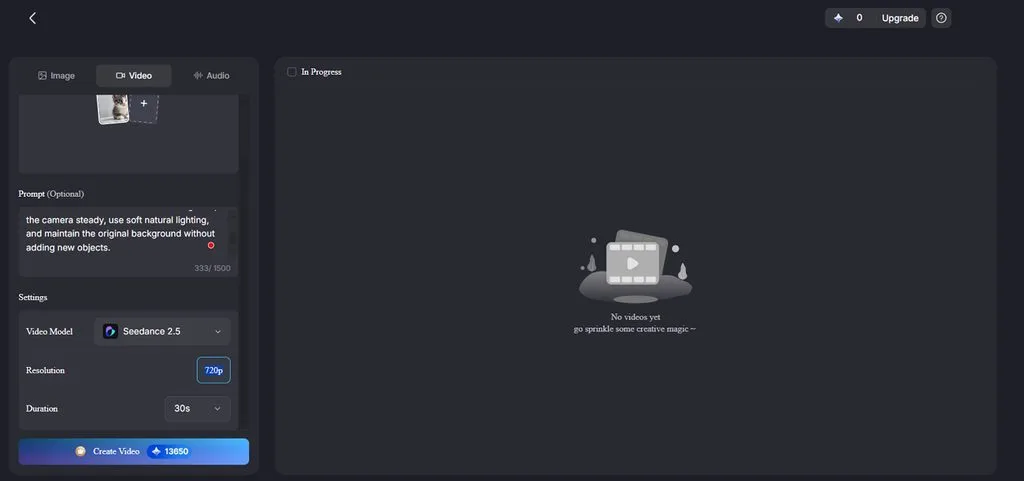
3. Image to Video: Turn a product image into video using prompts containing up to 1,500 characters directly. Videos can run for up to 30 seconds, depending on the model selected.
4. Voiceover and Subtitles: Narration comes with 37 voices filtered by age, gender, and accent options. Voice cloning is available, along with 16 caption styles for the final export.
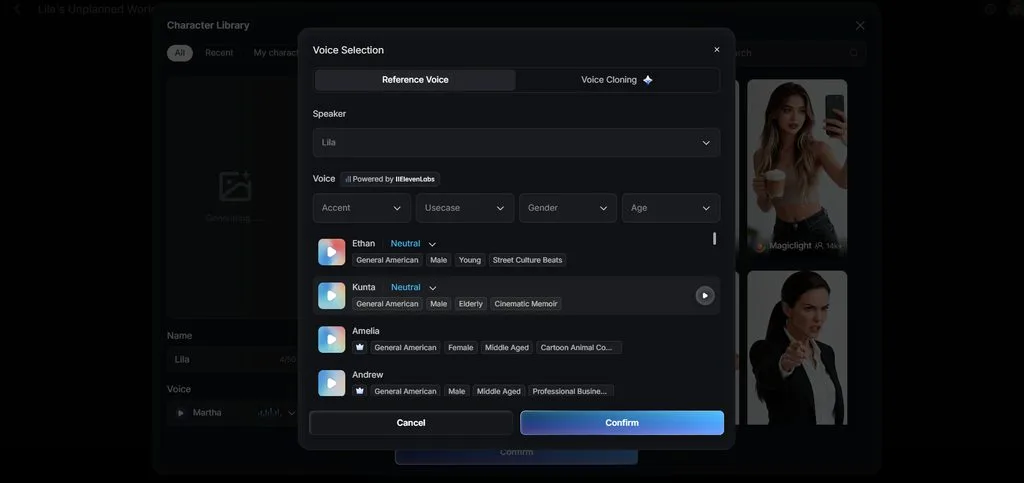
5. Storyboard Scene Control: Adjust individual scenes using 50 poses and detailed timing controls. Storyboard controls help refine specific moments and improve the presentation before final rendering.
How to Make a Marketing Video Using MagicLight AI
MagicLight AI turns your campaign idea into a complete video without requiring separate editing software. Follow the steps below to learn how to make a marketing video with MagicLight AI:
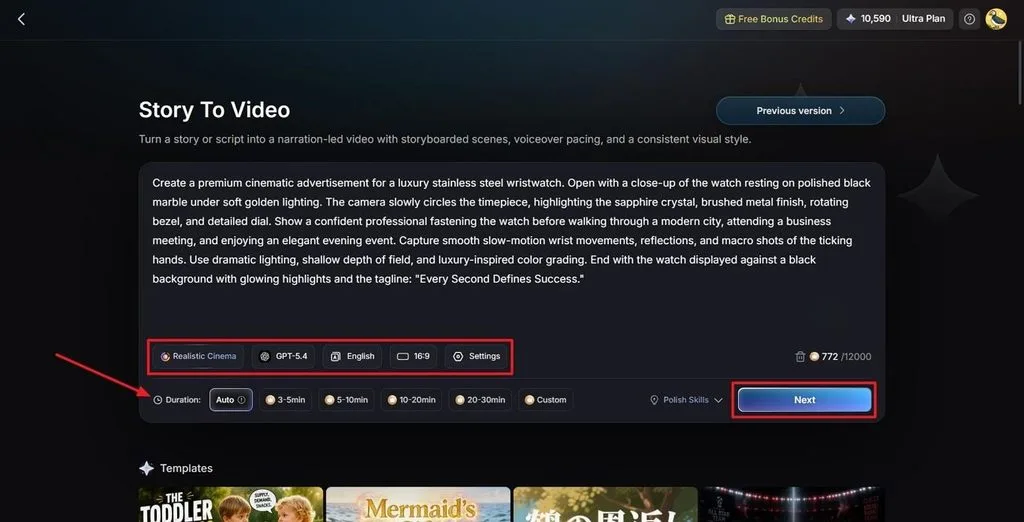
Step 1. Add Your Marketing Video Idea
Start by describing your marketing video in the Text Box. Pick a visual style model and an AI Story Model, then set the Video Language, Aspect Ratio, and Video Duration. Click Next when the settings match your campaign.
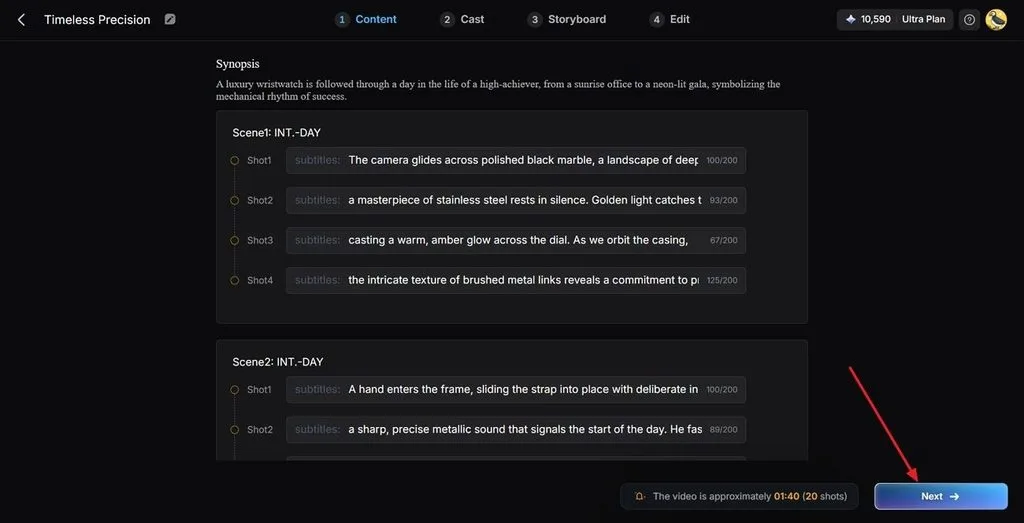
Step 2. Check the Generated Marketing Scenes
Review the scenes created from your idea and read through the Synopsis breakdown. Use the Controls at the top if a scene needs changes. When the sequence looks right, click Next.
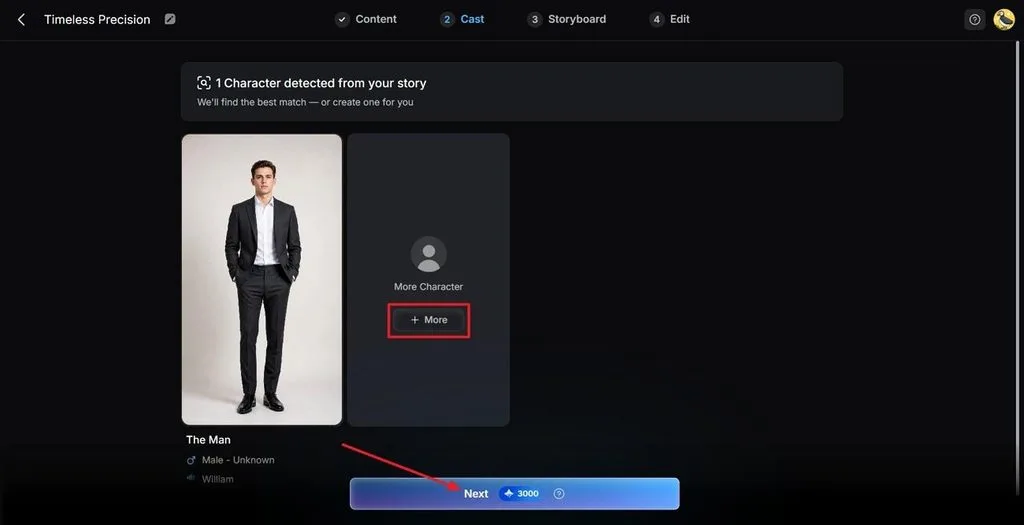
Step 3. Select a Character for Your Video
MagicLight AI reads your content and suggests characters that fit the marketing video. Click More to see additional options and select the character you want. Press Next Step to move forward.
Step 4. Fine-Tune the Marketing Video Storyboard
Go through each scene in the generated Storyboard and check how everything appears. Make changes to Clothes, Poses, and Expressions using the Controls below. Click Next at the top after finishing your changes.
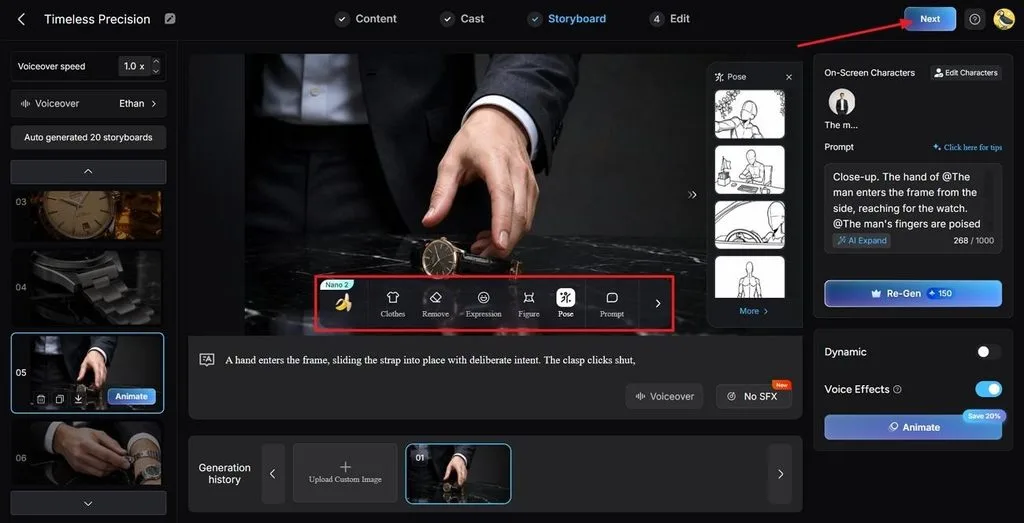
Step 5. Pick the Subtitle Style
Select a Subtitle Style that fits the look and message of your marketing video. Once selected, click Generate in the top-right corner to create the video.
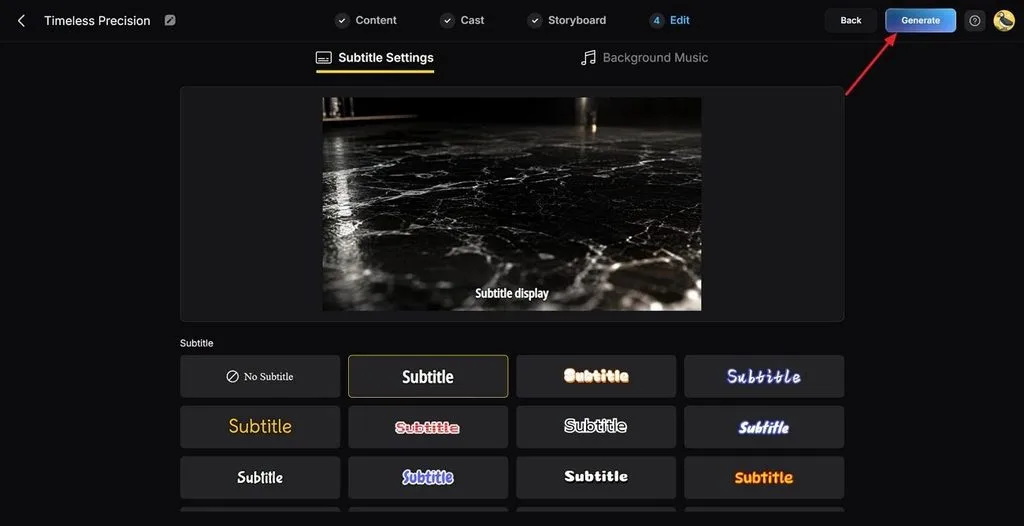
Step 6. Review and Save Your Marketing Video
Watch the finished marketing video and check the Cover, Thumbnail, and Hashtags before saving it. Once you are happy with the result, click Download Video to save the final version.
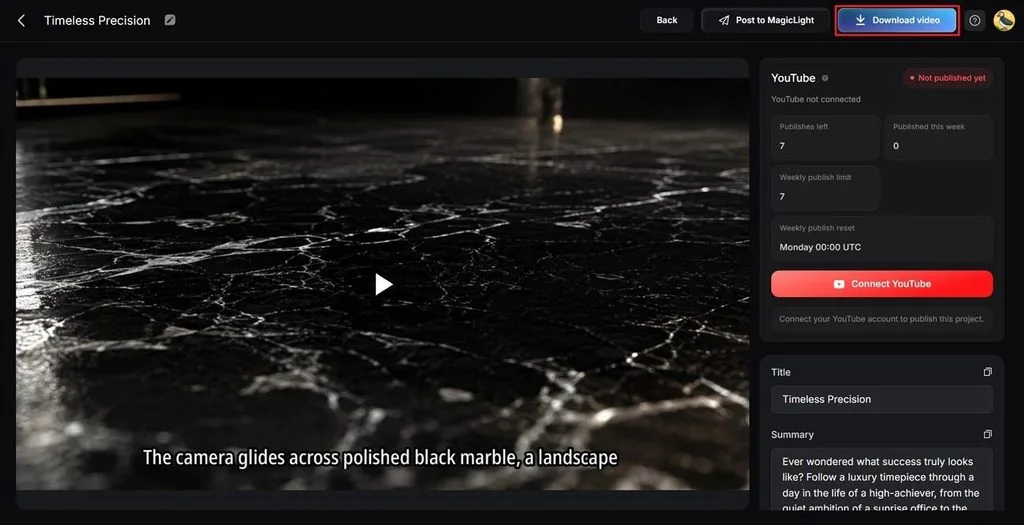
Part 4. Why Choose MagicLight AI to Make Marketing Videos?
After learning how to make a successful marketing video, consider what MagicLight AI offers as an AI marketing video generator. The table below shows how its features can support different marketing video production needs:
| Marketing Requirement | What MagicLight AI Provides |
| A Consistent Brand Presenter | Characters can be saved and reused across different campaigns. |
| Multiple Platform Formats | 9:16 and 16:9 aspect ratios support different platform and publishing requirements. |
| Localized Market Versions | Narration is available in 11 languages with 37 voice options. |
| Muted Autoplay on Feeds | 16 subtitle styles help keep videos clear without sound. |
| Testing Multiple Hooks | Individual scenes can be adjusted without rebuilding the entire video. |
| No Filming Required | Written scripts can be turned into videos without a camera or crew. |
| Short and Long Formats | Projects can run for up to 50 minutes at supported resolutions. |
Part 5. Tips For Successful Marketing Videos in 2026
Video marketing trends have changed, with shorter videos now attracting stronger engagement across many platforms. To learn how to make a good marketing video, use these current engagement practices:
- Opening Hook: Start with the main point instead of spending the opening seconds on your brand.
- Sound-Off Viewing: Captions keep the message clear when viewers watch without turning on the sound.
- Video Length: Keep short videos brief for engagement, while longer gated videos can support lead generation.
- Platform Lengths: Create each version around the video length that works best for its specific platform.
- Test Different Openings: Try 3 hooks and compare their results before spending time polishing one.
- Conversion Pages: Adding video to landing pages can help viewers understand the offer before taking action.
Conclusion
To conclude, learning how to make a marketing video starts with one goal, audience, and message. Format and length should follow those choices instead of personal preference or guesswork alone. Teams without cameras can still create useful marketing videos directly from written scripts. MagicLight AI makes this process easier without requiring expensive equipment or traditional production setups.
FAQs on How to Make Marketing Videos
- How long should a marketing video be?
Most marketing videos work well between 30 seconds and 2 minutes for many audiences. Short social videos often stay shorter, while explainers and webinars can run longer.
- Can I make a marketing video without filming anything?
Yes, you can create marketing videos without cameras, studios, or traditional filming equipment. MagicLight AI turns written material into scenes, characters, and narration for marketing campaigns.
- What should every good marketing video include?
A good marketing video needs a strong hook, one message, captions, and one CTA. Knowing how to make good marketing videos also means avoiding extra messages that distract viewers.
- Can I turn a product image into an animated marketing video?
Yes, image-to-video tools animate a still while preserving its detail. Magiclight AI handles this alongside script-led production, so a product photograph becomes a moving shot inside the same project as the rest of the campaign.


![How to Write a Script for a Short Film in 2026 [Beginner’s Guide]](https://magiclight.ai/wp-2/wp-content/uploads/short-film-screenplay-writing-guide-300x169.webp)


