YouTube Shorts give creators more room to experiment with ideas without producing long videos. A Short can begin with one simple idea and grow into something worth watching. The opening matters since viewers decide within moments whether they want to keep watching.
Short videos also work better when every part helps move the main idea forward naturally. This guide shows how to make a YouTube Short from the first idea to publishing.
Part 1. How to Make a YouTube Short
Short videos no longer require hours of work or a complicated editing process. The process of learning how to make YouTube Shorts can start with one simple video idea. MagicLight AI takes that idea through each stage until your YouTube Short is ready.
Overview of MagicLight AI
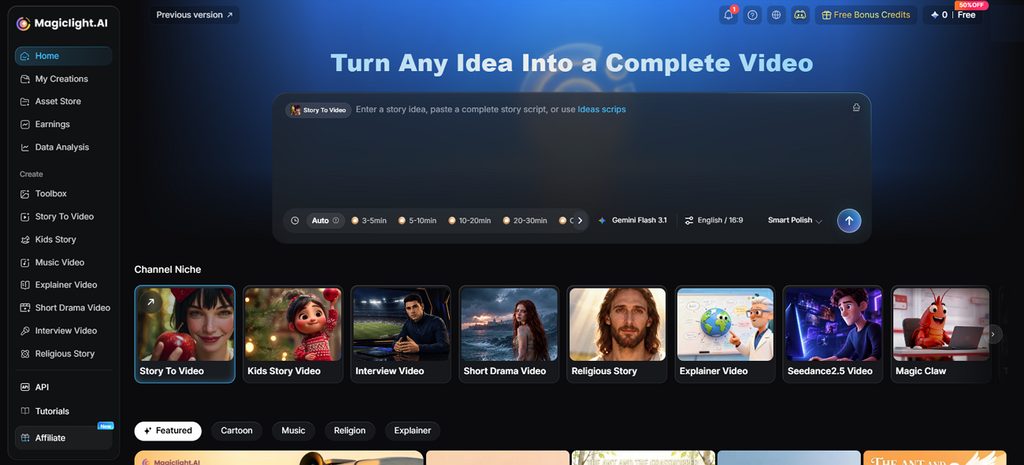
Short-form storytelling is a natural fit for MagicLight AI, an AI video platform built around animated stories with consistent characters. Its AI Reels Maker targets YouTube Shorts, TikTok, and Instagram Reels. Creators exploring how to make a short on YouTube can start there without a camera or an editing timeline.
Bigger ideas can begin in MagicLight Agent, which plans a video through conversation. Story to Video takes over when a full script already exists and builds it scene by scene. Every finished clip downloads as a regular video file, ready for YouTube.
Key Features
- Idea-to-Script Writing: Turn a simple YouTube Short idea into a complete script with a strong opening. You can rewrite any part before moving forward with the video with the help of 14 story models.
- MagicLight Agent: Give the AI video agent your Short idea and let it prepare the production plan. It can develop the script, storyboard, characters, and visual direction before video creation begins.
- Vertical and Widescreen Formats: Choose 9:16 for YouTube Shorts that fit naturally on mobile screens. The 16:9 option works well when you also want to create widescreen videos.
- Voices and Subtitles: Pick from 37 AI voices and 16 subtitle styles for your Short. Voiceover, subtitles, and sound can come together in the finished video.
- Recurring Characters: Keep the same host or character looking consistent across different scenes and future Shorts. This makes it easier to build a recognizable video series for your channel.
What to Consider When Making a YouTube Short
A few platform rules decide whether a clip counts as a Short and how far it can travel. Anyone learning how to make shorts on YouTube should plan around these points before generating anything:
- Length of Up to 3 Minutes: Shorts can be square or vertical and run for up to 3 minutes. Try to catch the viewer’s interest within the opening seconds.
- Vertical 9:16 Framing: The 9:16 format uses the full mobile screen and suits short videos. YouTube accepts Shorts at resolutions up to 1080p.
- Viewer Retention: Watch time matters when people come across your Short. Give them a reason to stay from the opening moment through the final scene.
- Music Rights: Songs available for Shorts may have usage limits, with many allowing up to 90 seconds. Royalty-free tracks offer another option when choosing background music.
- Content Disclosure and Originality: Realistic altered content and generated music may require disclosure during upload. Repetitive or mass-produced content without meaningful original input may not qualify for monetization.
- Views and Engaged Views: Each play or replay can count as a view on YouTube. Monetization uses engaged views, which measure viewers who continue watching rather than counting loops.
Guide to Making a YouTube Short With MagicLight AI
Knowing how to make a YouTube Short starts with turning ideas into videos. Follow the steps below to create your Short and prepare it for publishing:
Step 1. Enter Your Short Script
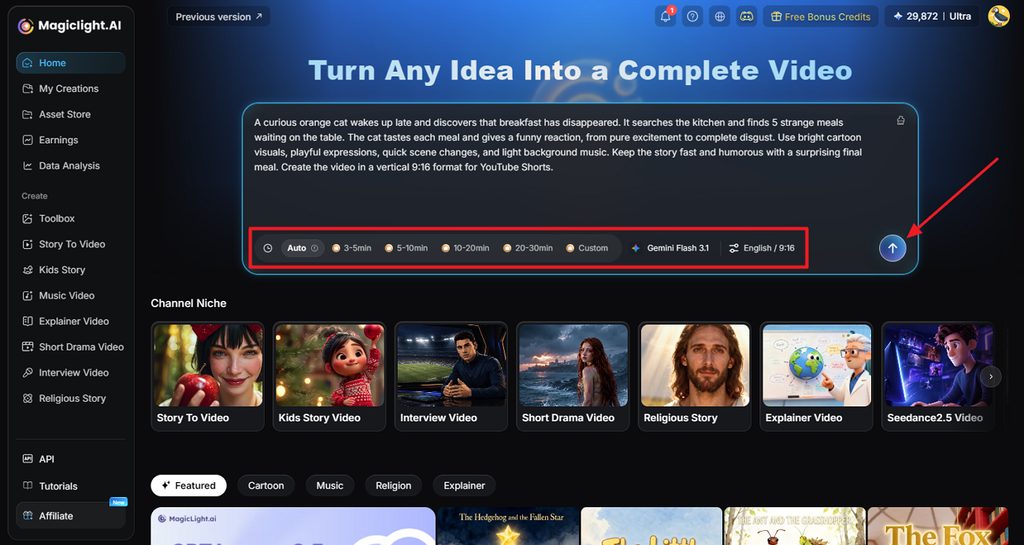
In Story to Video, enter the script you want to turn into a YouTube Short. Choose the duration, model, language, and 9:16 aspect ratio, then click Send to continue.
Step 2. Review and Confirm the Script
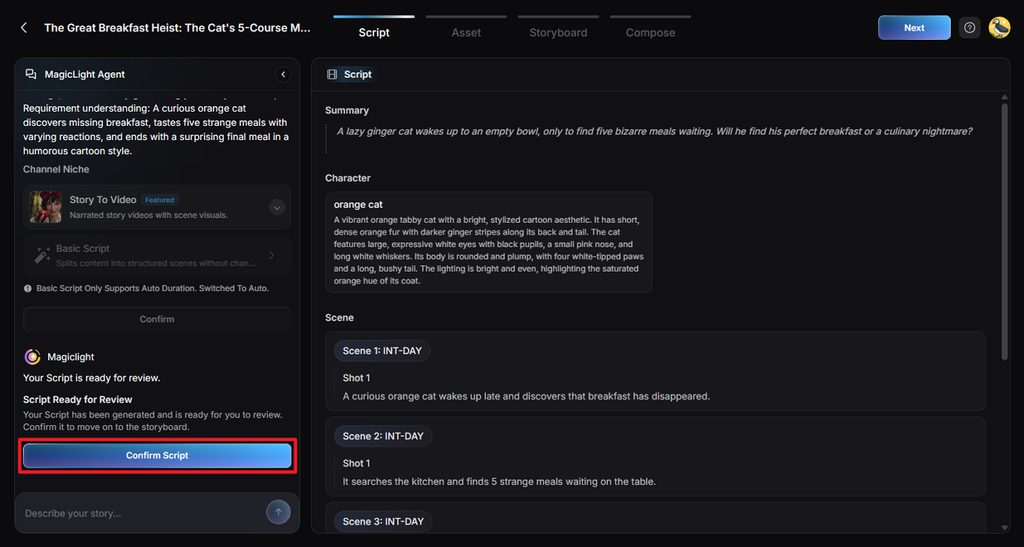
MagicLight Agent organizes your script into Summary, Characters, Scenes, and Shots for the video. Review each section, make any changes you need, then click Confirm Script to continue.
Step 3. Choose the Style and Review Character Assets
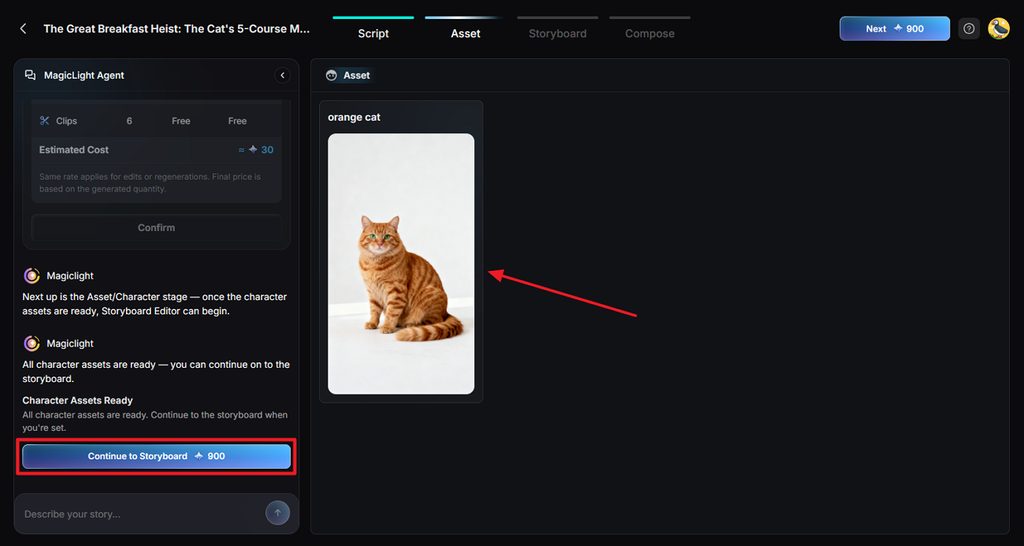
Select a Visual Style that suits your YouTube Short, then review the generated character assets. Make any needed changes to their appearance, then click Continue to Storyboard to move forward.
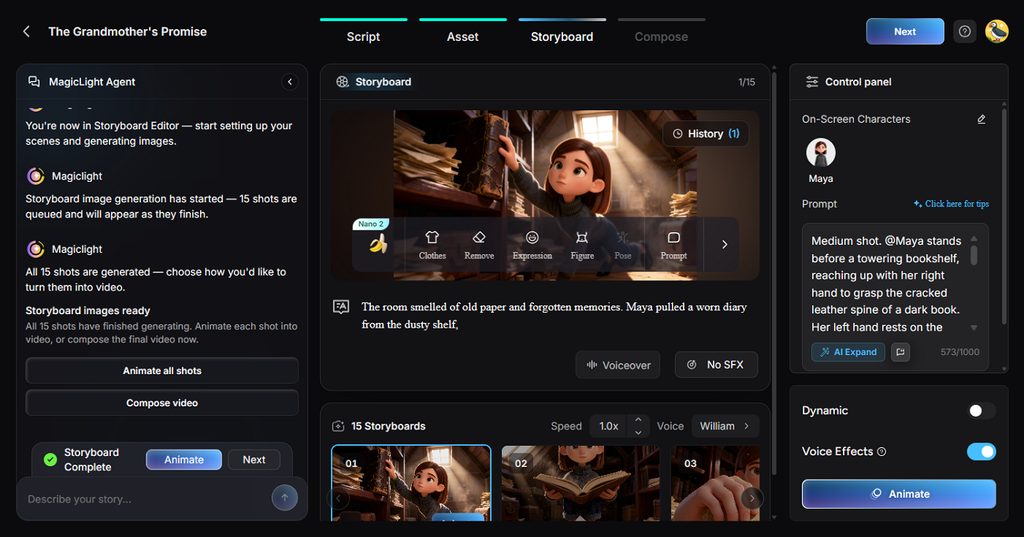
Step 4. Edit and Animate the Storyboard
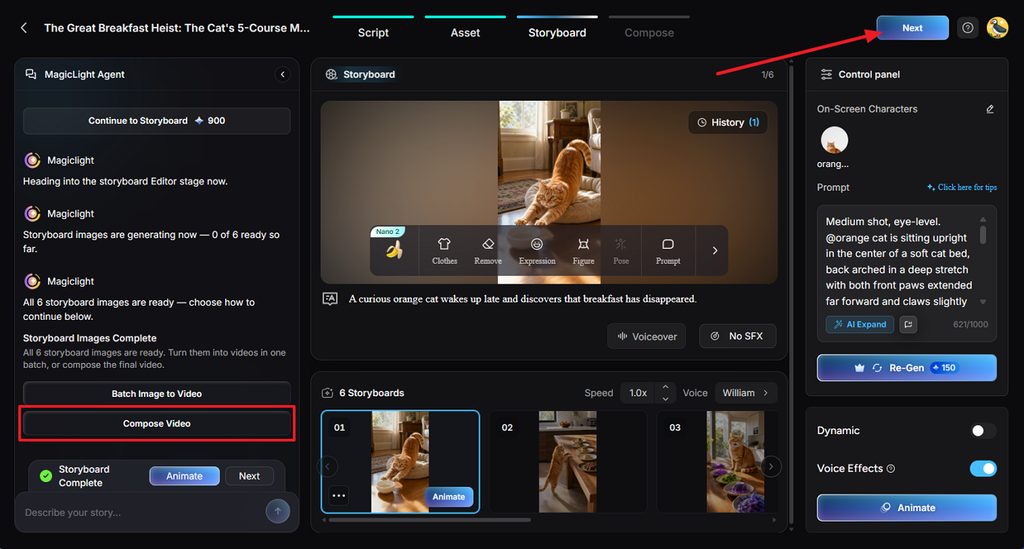
Review each storyboard shot and adjust the Clothes, Expression, Figure, Pose, or Prompt when needed. You can also change voices and effects before choosing Compose video.
Step 5. Add Subtitles and Background Music
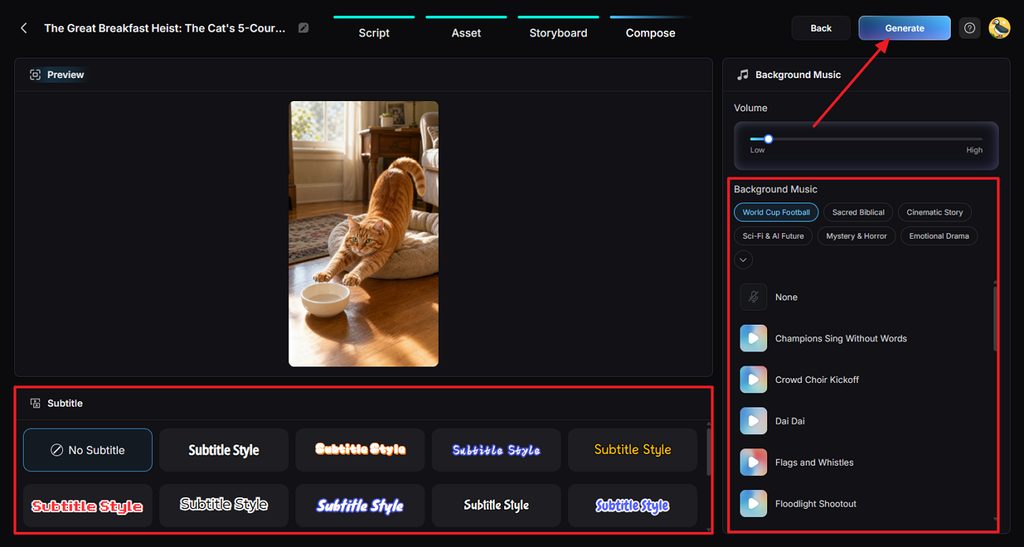
Preview your Short and choose a Subtitle Style, or select No Subtitle when preferred. Adjust the Background Music and volume, then click Generate to create the final video.
Step 6. Download or Connect YouTube
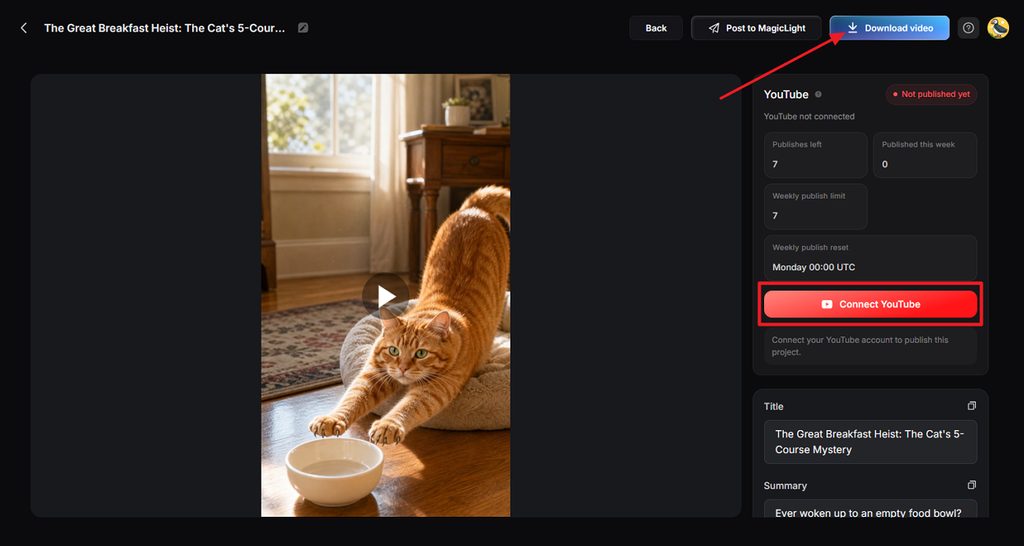
Watch the finished Short and check the scenes, voice, subtitles, music, and overall flow. Click Download video to save the file, or use Connect YouTube to continue with your YouTube account.
Part 2. Why Use MagicLight AI for YouTube Shorts
Creators exploring how to create Shorts on YouTube can benefit from MagicLight AI tools. Below are the main reasons to consider MagicLight AI for your YouTube Shorts:
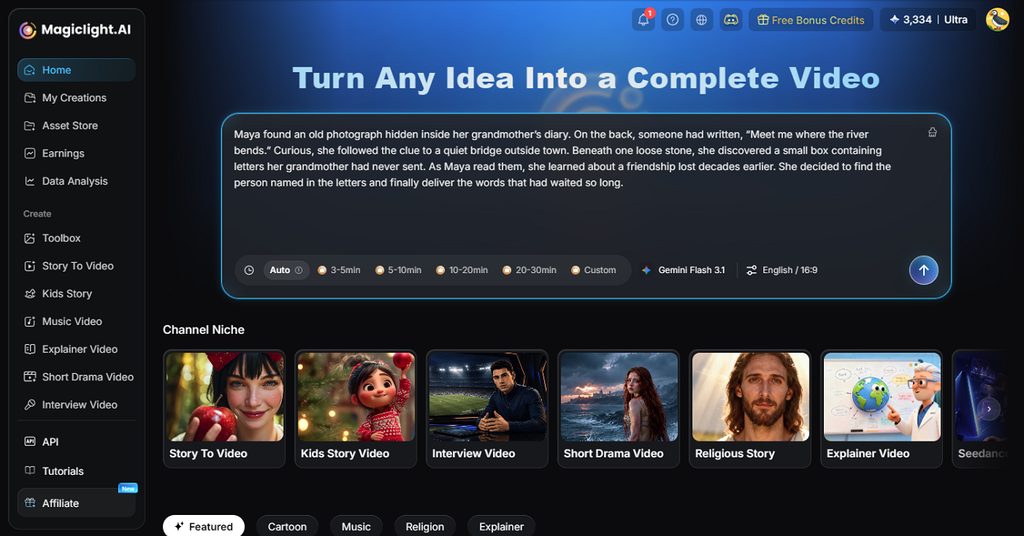
- Story to Video Gives More Room
Story to Video accepts prompts up to 12,000 characters for detailed Short scripts. This extra space helps creators develop complete stories without splitting ideas across prompts. Longer prompts also keep important details together throughout the video creation process.
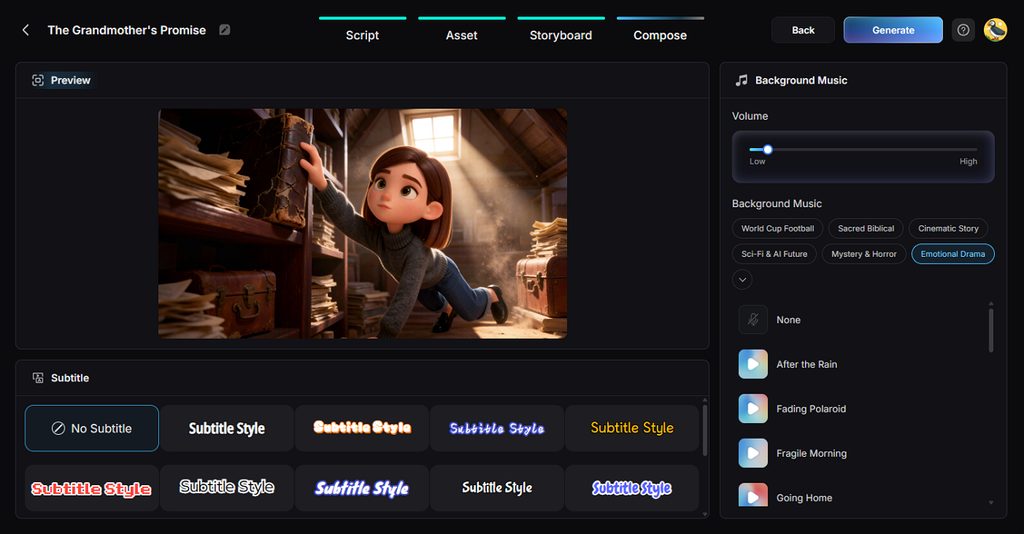
- Caption Styles Keep Shorts Readable
MagicLight AI offers 16 caption styles for matching different YouTube Short formats and themes. Captions help viewers follow spoken lines when they watch videos without any sound. Different styles also let creators match captions with each channel's visual identity better.
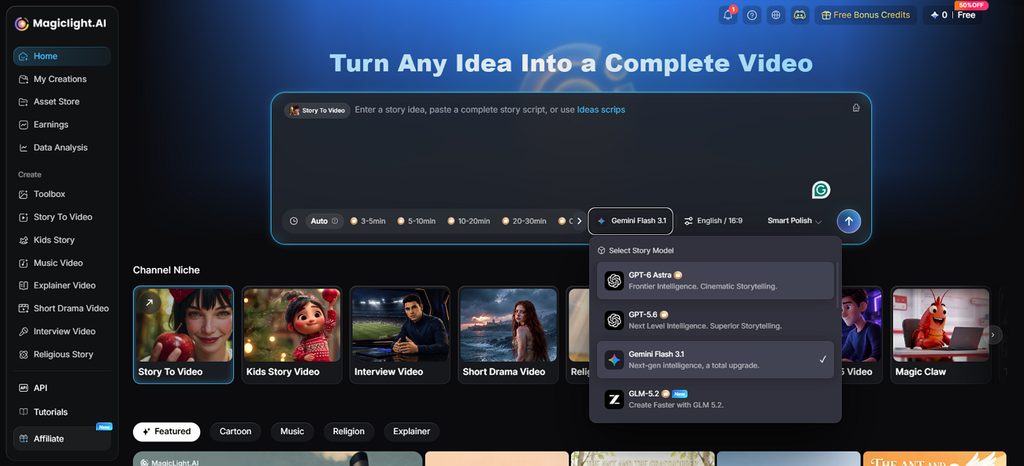
- Story Models Give More Writing Options
MagicLight AI includes 14 story models for developing scripts and dialogue for YouTube Shorts. Available models include GPT-6 Astra and Gemini Flash 3.1, among other writing options. Creators can choose different models when building longer stories or testing dialogue approaches.
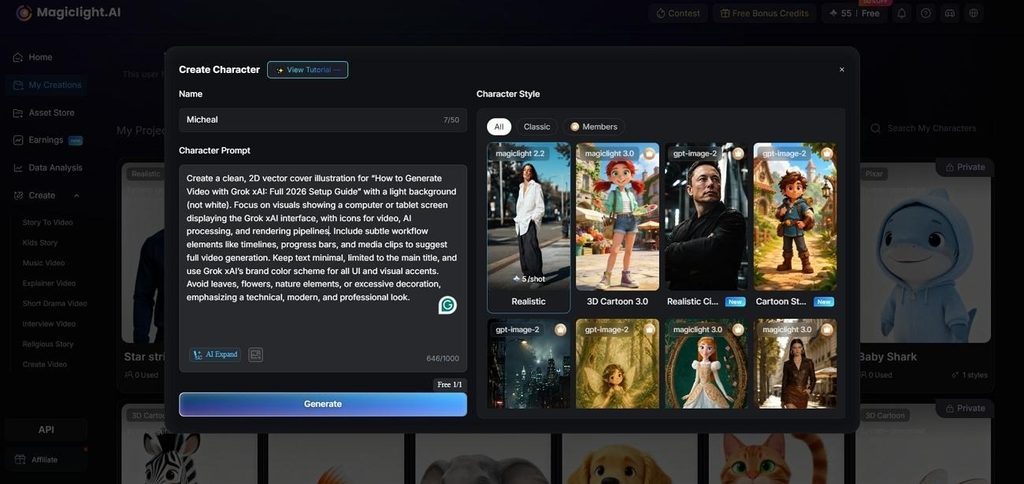
- Character Creation Supports Original Ideas
Creators can describe characters using prompts containing up to 1,000 characters each time. Reference images can guide character appearance when a specific look is already planned. Saved characters can return in later Shorts to keep recurring videos visually connected.
- Reaction Faces Strengthen Each Scene
Nano Storyboard lets creators choose expressions and poses before building individual video scenes. More than 50 poses help match character reactions with each joke or punchline. These controls make reactions feel more suited to the intended moment on screen.
Conclusion
To conclude, knowing how to make a YouTube Short starts with one strong idea. The right format helps turn that idea into content viewers can enjoy watching fully. MagicLight AI brings the main creation steps together and lets users make AI video free. Start with your own concept, shape each scene, and prepare the Short for YouTube publishing.
Frequently Asked Questions on How to Make a YouTube Short
1. How do I make a YouTube Short as a beginner?
Start with one simple idea and shape it into a short vertical video first. MagicLight AI can help prepare the script and visuals without requiring editing experience beforehand.
2. What should I include in a YouTube Short?
Give your Short a strong opening that quickly tells viewers what comes next. Keep the main idea focused so viewers can follow the video from start to finish.
3. Can AI create a YouTube Short from a script?
Yes, MagicLight AI can turn your written script into a complete YouTube Short. It can prepare scenes, characters, voices, subtitles, and music within the same video project.
4. What is the easiest way to make YouTube Shorts without editing skills?
MagicLight AI offers a simple option for creating Shorts without traditional video editing skills. Users researching how to make a short on YouTube can start directly from scripts.
5. What AI tool can I use to create YouTube Shorts?
MagicLight AI provides Story to Video to turn written ideas into YouTube Shorts directly. It also supports vertical videos, recurring characters, subtitles, voices, and different visual styles.


![How to Write a Commercial Script in 2026 [Full Guide]](https://magiclight.ai/wp-2/wp-content/uploads/commercial-script-writing-full-guide-300x169.png)