


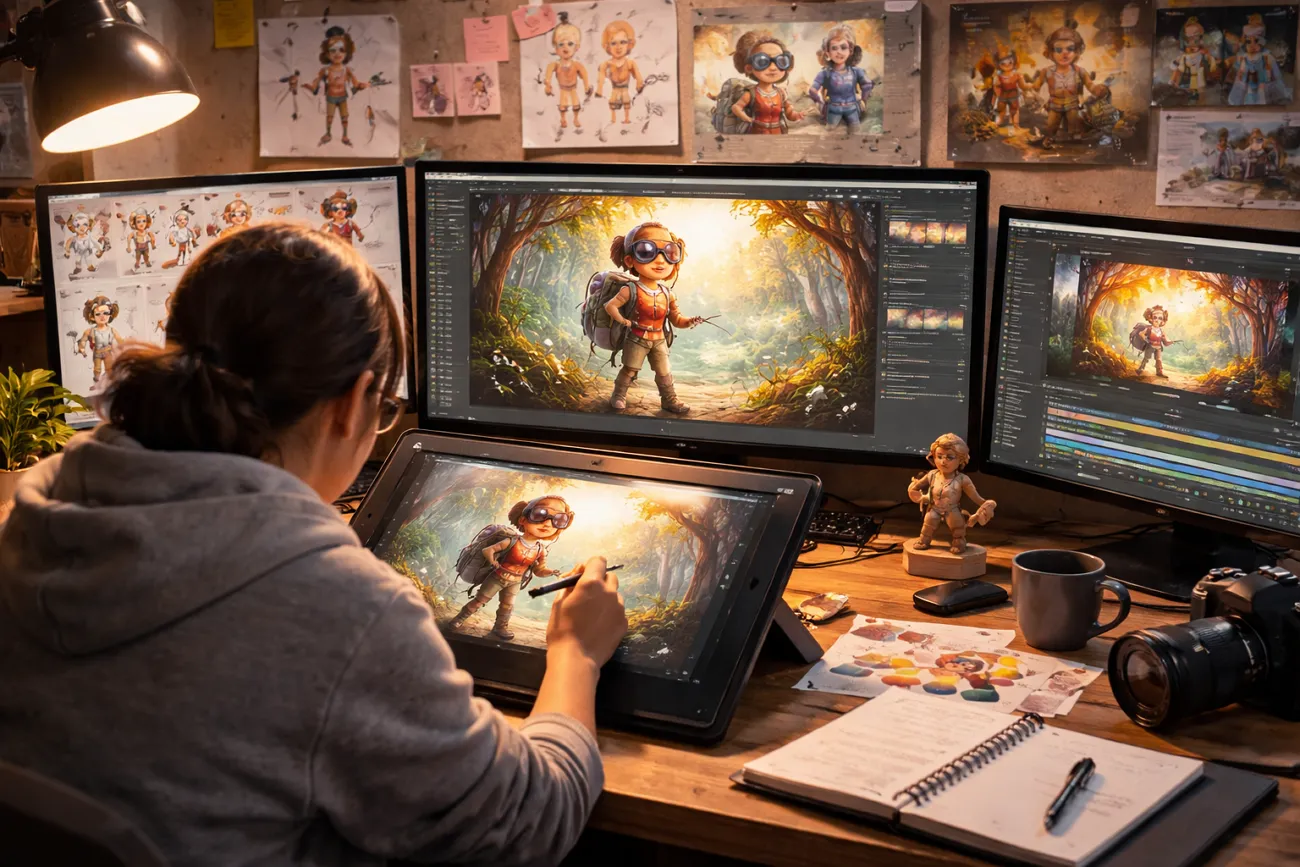
Animation is loved around the world because it makes stories feel alive. People love watching animation because it feels fun, colorful, and full of creativity. It allows stories to be told in ways that are easy to understand.
That is why many beginners want to try making animated videos. Still, they think animation needs high skills or expensive software to start. In reality, simple tools now make animation easier for everyone to try. Thus, this guide explains how to make an animated film in simple steps.
Part 1. Simple Workflow to Make an Animated Film from Idea to Finished Video
Learning how to make an easy animated film becomes simple with a structured process. Below are the key steps that help turn your concept into a complete animation:
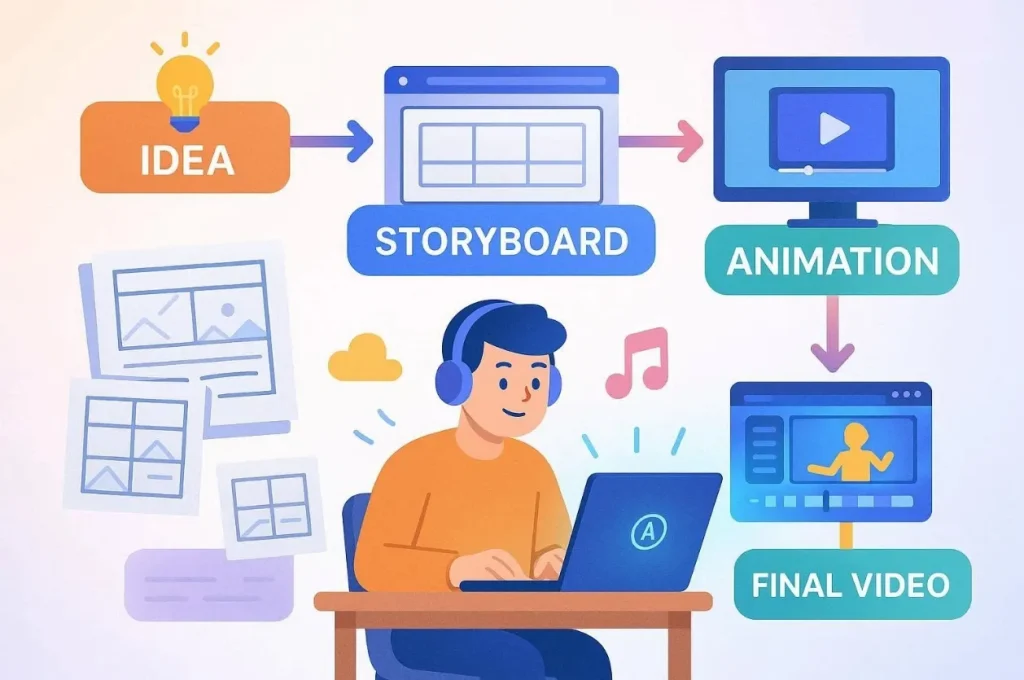
Step 1. Idea Development and Concept Planning Stage
Every animated film starts with a strong idea and clear direction. You must pick a clear style, like comedy or a cool drama show. Find your main fans so the message fits what they like to watch. Write one short sentence that tells the whole plot of your film.
Step 2. Writing the Complete Animated Film Script
After the idea is ready, convert it into a full script with many clear action scenes. Include clear scenes, dialogues, and a simple storytelling flow for better understanding. So, start your film with a big hook to keep the fans watching more.
Step 3. Creating Visual Storyboards for Scene Planning
Storyboarding helps you visualize your film before animation begins. Create rough drawings to see how your film will look on the screen. Draw a simple sketch for every scene to show the main action clearly. This step helps you see the whole story before you start the art.
Step 4. Defining Animation Style and Design Elements
Choose an animation style such as 2D, 3D, cartoon, or realistic. Later on, design your characters and select colors that match your story’s mood. Make your characters look unique and keep the backgrounds the same each time. Decide on every visual detail before you move to the final production stage.
Step 5. Choose the Right Tool to Make an Animated Film
Choosing the right animation tool is very important while learning how to make an anime short film. Among the best options, MagicLight AI is a powerful AI tool for creating animated videos quickly. In this dedicated tool, you can input long stories of up to 12,000 words for film creation. MagicLight AI generates a full animated video instantly using one-click video creation models.
For multiple style choices, creators can choose multiple animation styles like MagicLight 2.0 and 3.0. The tool even supports 50 pose options for detailed character movement and expression control. In addition, you can also create characters with name, age, type, and personality customization options.
Key Features
- Story Models: Provides 9 story models for structured and creative animation storytelling workflows.
- Video Length: Create animated films with duration selection up to 50 minutes easily.
- Nano Editing: Refine scenes using Nano adjustments like pose, clothing, and expressions.
Detailed Guide to Generating an Animated Film from Scratch with Minimal Effort
Adhere to the given guide to learn how to make an animated short film by yourself with MagicLight AI:
Step 1. Create a New Animated Project
Visit MagicLight.AI and navigate to the Story To Video feature.
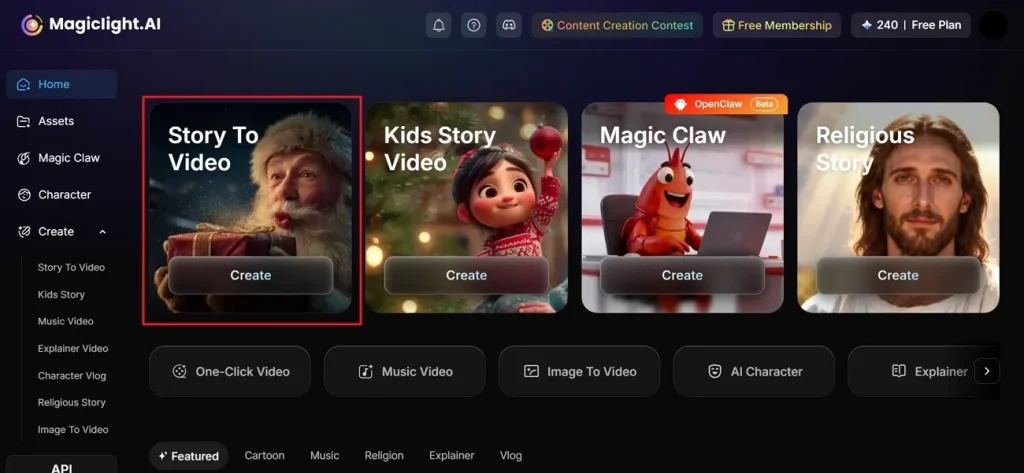
Step 2. Type Idea and Generate an Animated Film
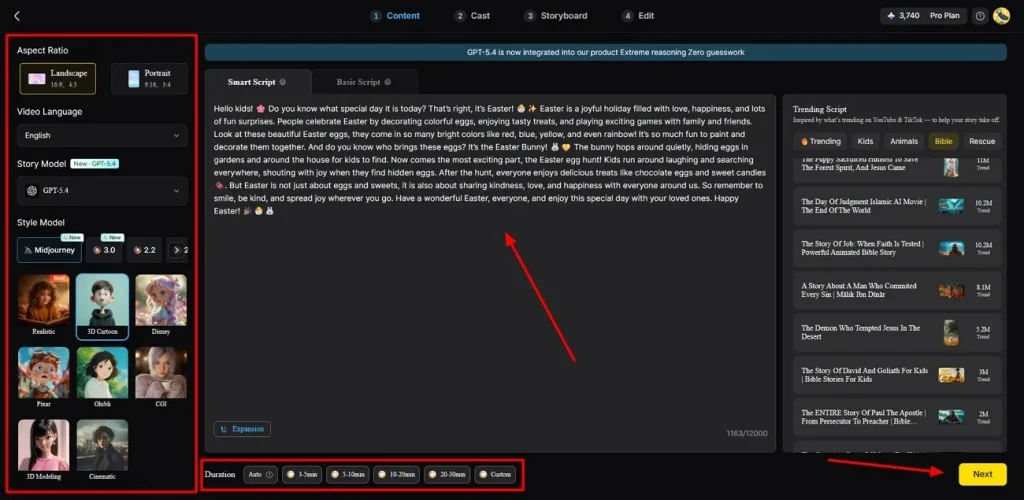
Now, in the provided Text Box, type your prompt and choose your preferred Video Language based on your needs. After that, opt for Aspect Ratio and adjust it from the side panel. Next, choose a preferred Story Model such as GPT-4 and set Video Duration, then hit the Next button.
Step 3. Check out the AI-Generated Animated Video Scenes
After that, the tool allows you to preview the generated AI-animated video scenes. When you clear all the provided summaries,press the Next button to move forward.
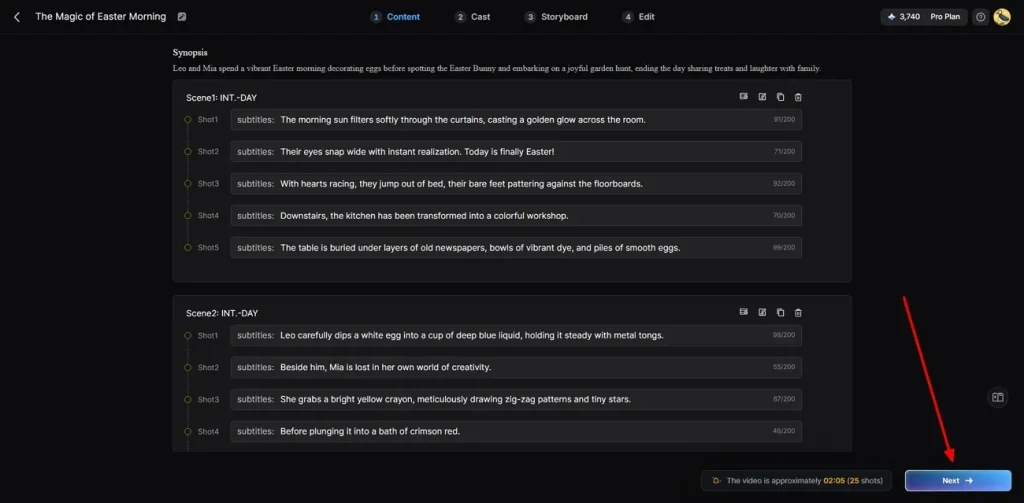
Step 4. Add More Characters for Video
At this point, MagicLight AI provides you with different AI characters according to your video demand. You can either select from the given or add a new one using the More Characters option. Once you pick your animated character, opt for Next Step to generate your final video.
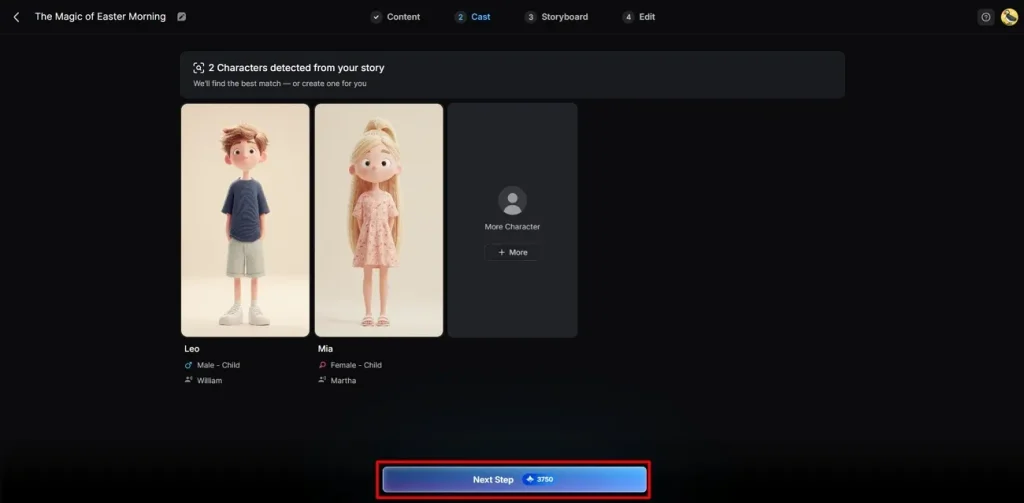
Step 5. Modify Animated Character Looks
With a storyboard-generated feature, you can adjust the Voiceover Speed of the animated character. To customize more, you can change their Clothes, Expression, and Body Figure. Once you have ensured all the settings, continue further using the Next button.
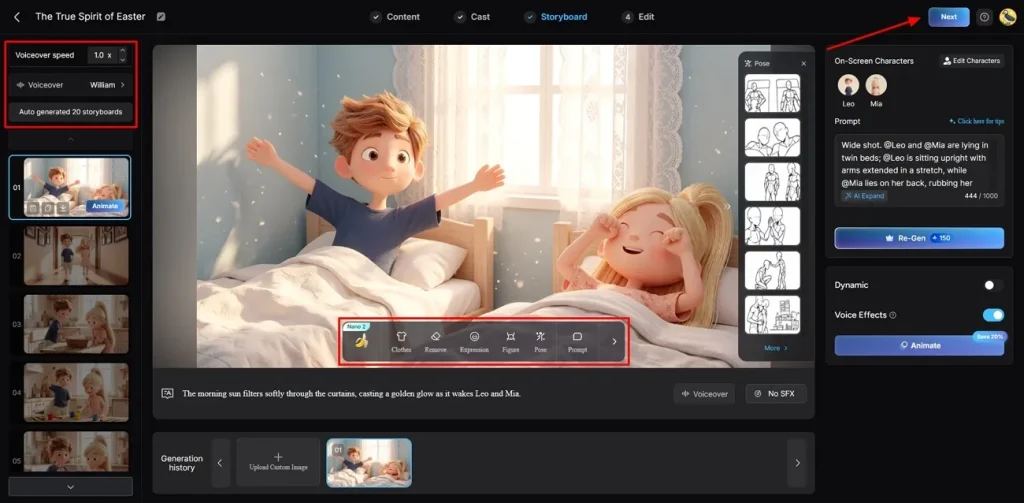
Step 6. Add Caption and Background Sound in Animated Video
Following this, navigate to the Subtitle Settings to add text in the animated video. If you want to add sound, opt for the Background Music section to set the tone of your video and press Generate.
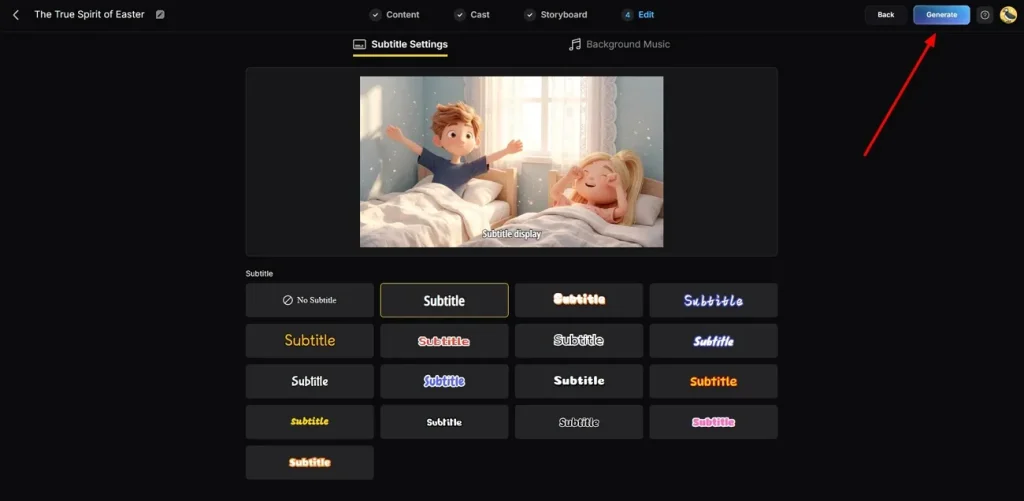
Step 7. Preview and Export the Animated Video
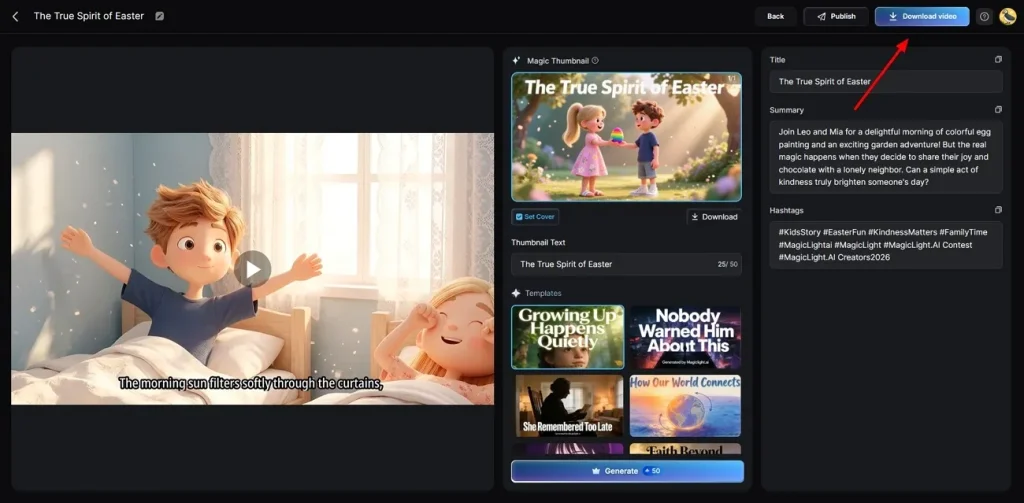
Once your animation is generated, preview it using the preview feature. When all the things are clear, hit Download to save the animated video to your device.
Part 2. Why MagicLight AI Is the Best Option to Make Animated Films Fast
Creators exploring how to make an animated short film want simple solutions. Below are the important reasons MagicLight AI accelerates animated film production:
- Long Duration: You can create animated films with duration options up to 50 minutes in one project. This allows full storytelling videos without splitting scenes into multiple short video parts.
- Voice Features: Access 37 voiceover options with voice cloning for realistic character dialogue creation. It ensures consistent voices across scenes and improves emotional storytelling in animated films.
- Fast Creation: Generate animated films instantly using 1-click video creation with 14 powerful AI models. This reduces manual work and speeds up the entire animation production process significantly.
- Magic Claw: Use Magic Claw to create, publish, and track videos in one workflow system. It includes scheduling, auto-publishing, and performance tracking, like views and engagement.
- Music Support: MagicLight AI also helps create an emotional connection and improves the complete viewing experience of animated films. Thus, you can choose from 40 background music options to enhance mood and storytelling impact.
Conclusion
To summarize, animation becomes much simpler when you follow a clear workflow from start to finish. Now you understand how to make an animated film using practical steps. Yet, beginners may still find production and editing time-consuming and challenging. That’s why MagicLight AI offers an effortless way to turn ideas into professional-quality animated films.
FAQs on How to Make an Animated Film
1. How to make an animated film for free without experience?
You can use MagicLight AI to create animated films easily and quickly. It provides templates, story models, and one-click video generation for beginners.
2. How long does it take to make an animated film?
Old methods take many months, but modern tools make the process much faster. You can finish a full short film in just a few short minutes. This saves you a lot of time and helps you share ideas quickly.
3. How much does it cost to make an animated film?
Making a movie used to be very pricey for most young creative people. Now, MagicLight AI offers a cheap way to build high-quality video scenes. You can produce videos without expensive software or hiring professional animators.
4. Do beginners need experience to make an animated film?
No, beginners do not need any special training to start their work. Modern tools do the hard parts so you can focus on stories. Anyone can become a creator by following a few simple steps.
5. Is MagicLight AI the best option to make an animated film?
Yes, MagicLight AI is the top choice for fast and animated video work. Its AI tools, story models, and Nano adjustments save time efficiently. This tool makes the whole process smooth and fun for every single user.





![How to Make a Marketing Video 2026 [Step-by-Step Guide]](https://magiclight.ai/wp-2/wp-content/uploads/marketing-goal-planning-guide-300x200.png)