


Crafting unique worlds in Infinite Craft often feels like solving a giant puzzle. Many players want to build their favorite characters but do not know where to start. Therefore, learning how to make anime in Infinite Craftopens up many fun, creative paths.
You can start with basic elements and then move toward very complex ideas. Thus, this guide will show you the fastest ways to get the best results. Apart from that, we also explore using MagicLight AI to speed up your entire creative process.
Part 1. What Are the Basic Combinations to Create Anime in Infinite Craft?
You need to master the basic building blocks to start your creative journey. So, follow these simple element mixtures to unlock your first favorite animated character blocks:
Basic Combination Path to Create Anime in Infinite Craft
| Step | Combination | Result |
| 1 | Water + Water | Lake |
| 2 | Water + Lake | Ocean |
| 3 | Earth + Ocean | Island |
| 4 | Island + Island | Continent |
| 5 | Water + Earth | Plant |
| 6 | Water + Ocean | Fish |
| 7 | Plant + Fish | Seaweed |
| 8 | Seaweed + Fish | Sushi |
| 9 | Land + Sushi | Japan |
| 10 | Water + Fire | Steam |
| 11 | Steam + Japan | Anime |
Alternate Quick Route to Create Anime in Infinite Craft
| Step | Combination | Result |
| 1 | Water + Water | Lake |
| 2 | Lake + Lake | Ocean |
| 3 | Ocean + Earth | Island |
| 4 | Island + Earth | Land |
| 5 | Land + Sushi | Japan |
| 6 | Water + Fire | Steam |
| 7 | Steam + Japan | Anime |
How to Make Animals in Infinite Craft Quickest Combination Path (7 Steps)
Apart from the anime, many players also want to know how to make animals in Infinite Craft. So, adhere to these 7 simple steps to create your very first furry virtual creature:
Step 1. Mix a Water block with an Earth block to create a fresh green plant.
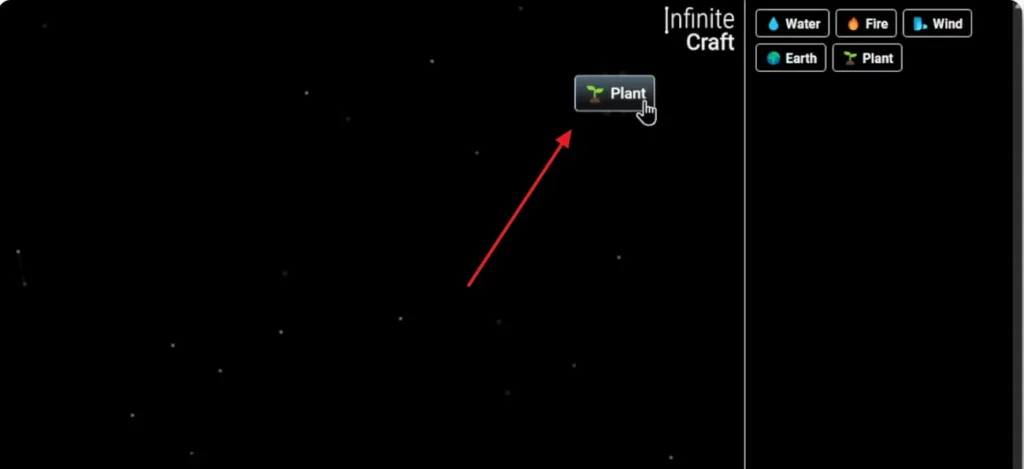
Step 2. Next, combine the Wind element with your plant to make a fluffy white Dandelion seed.
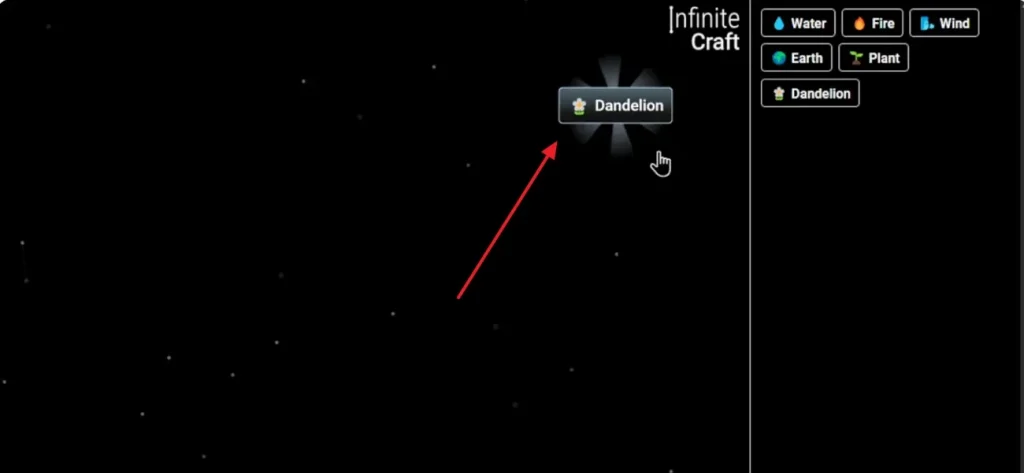
Step 3. After that, put the Dandelion together with an Earth block to grow a bright flower.
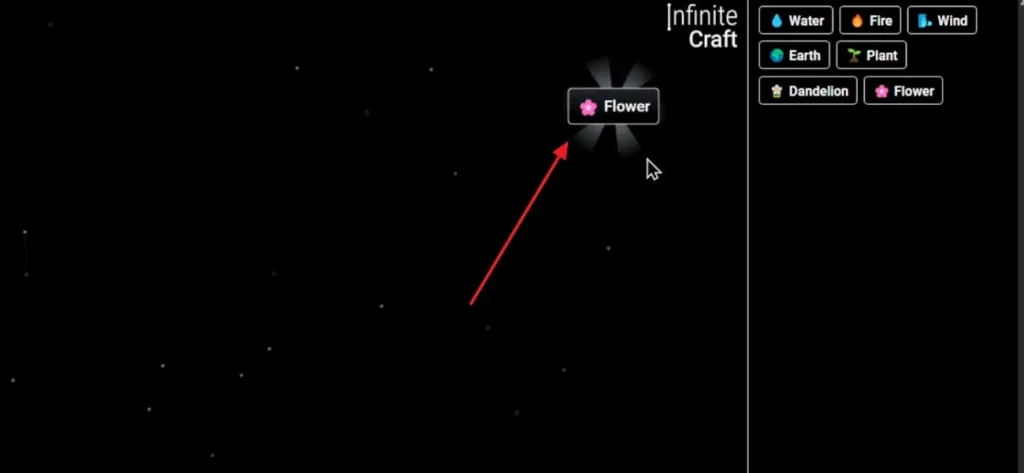
Step 4. Later on, merge your Green plant with the Flower to design a lovely garden.
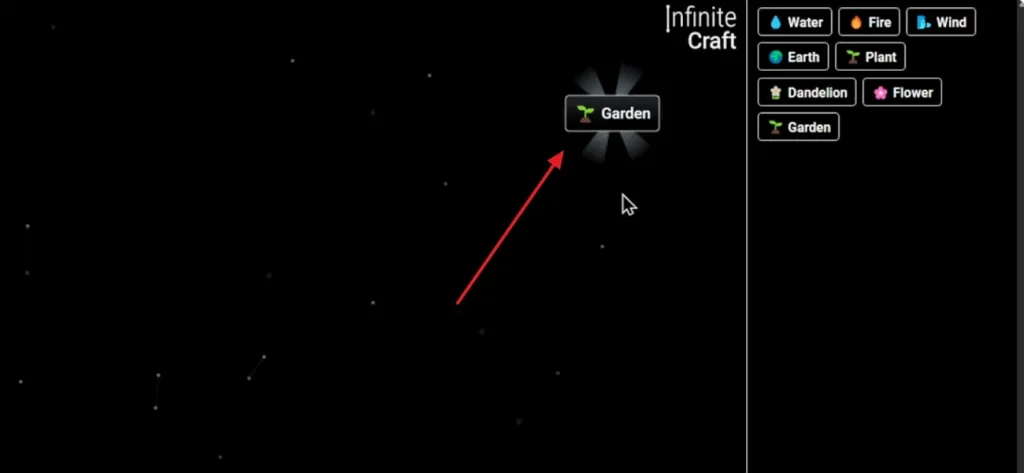
Step 5. Following this, place 2 Garden blocks together to build a much larger and open Park.
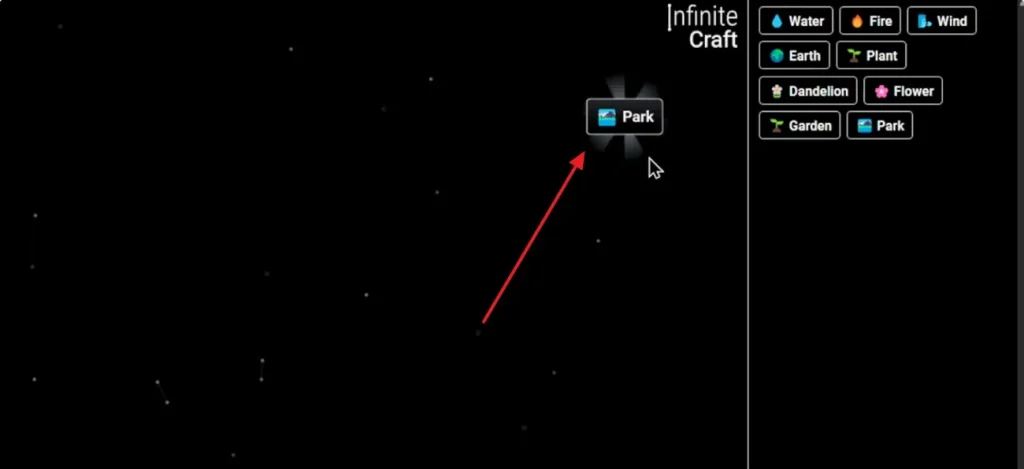
Step 6. Upon creating the park, use your Garden and the Park to access a Zoo block.
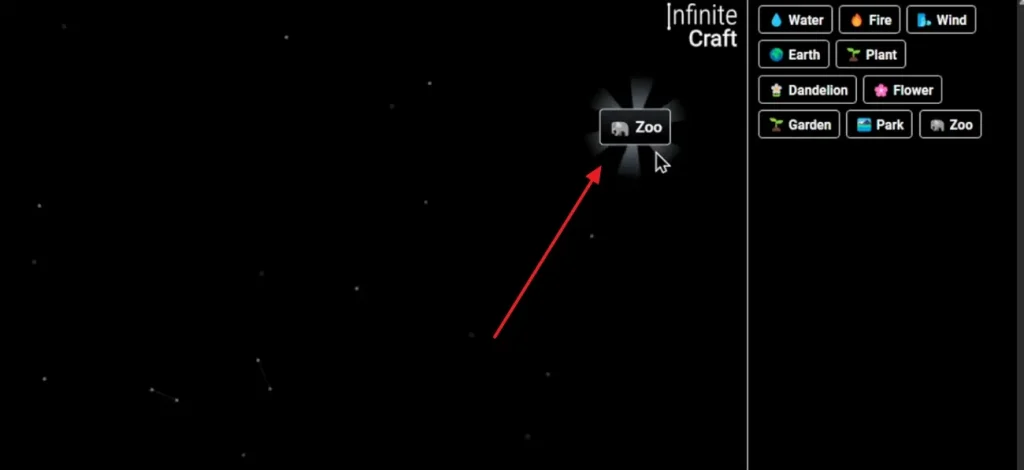
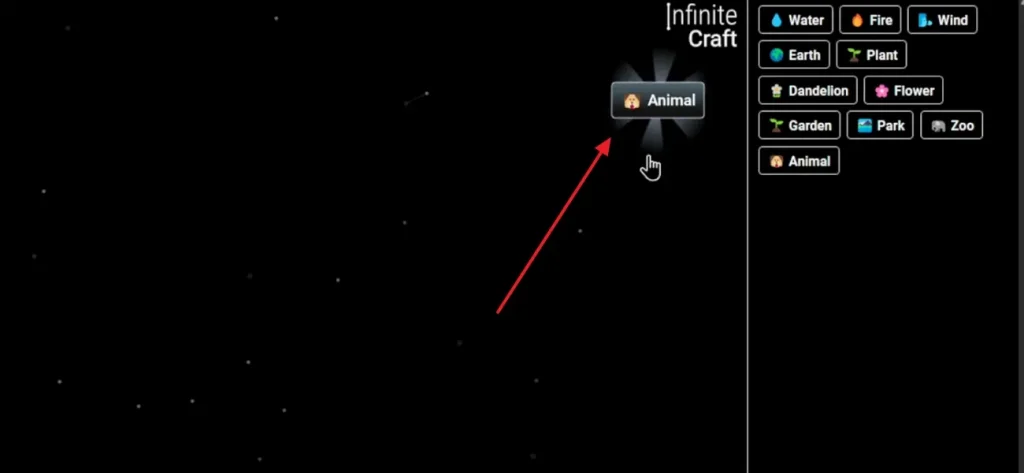
Step 7. Now, add one last Earth block to the Zoo to finally unlock the Animal item.
Part 2. Why Use MagicLight AI to Create Faster Than Using Combos
While manual combinations are fun, learning how to make animals in Infinite Craft is only the start. Combining blocks one by one is fun, but it can be very slow and repetitive. This is where using MagicLight AI becomes a much smarter and faster choice for creators. Magic Claw streamlines the entire workflow by enabling AI-assisted video creation, automated scheduling and publishing, and built-in performance tracking in one seamless system.
Instead of spending hours mixing combinations, you can turn your ideas into vivid animated videos instantly. MagicLight AI’s Story to Video feature allows you to convert short prompts into full scenes effortlessly. It also supports extensive projects of up to 50 minutes with a 12,000‑character limit. For precision, this innovative tool provides 9 intelligent AI models, including GPT‑5.4 and Gemini‑3, to suit every concept.
Key Features
- Dual Scripts: Provides “Smart Script” and “Basic Script” modes to support different writing styles and flexible creative workflows.
- Voice Options: Offers 37 native voice selections to accurately match character tone, emotion, and delivery.
- Aspect Ratio: Enables “Landscape” or “Portrait” formats to optimize videos for all major content platforms.
Guide to Use MagicLight AI to Create Faster Videos
As explored, many creators who learn how to make animals in Infinite Craft step by step want faster results. Thus, follow these upcoming steps carefully to understand how to create animated videos efficiently with MagicLight AI:
Step 1. Open the Tool to Create Videos
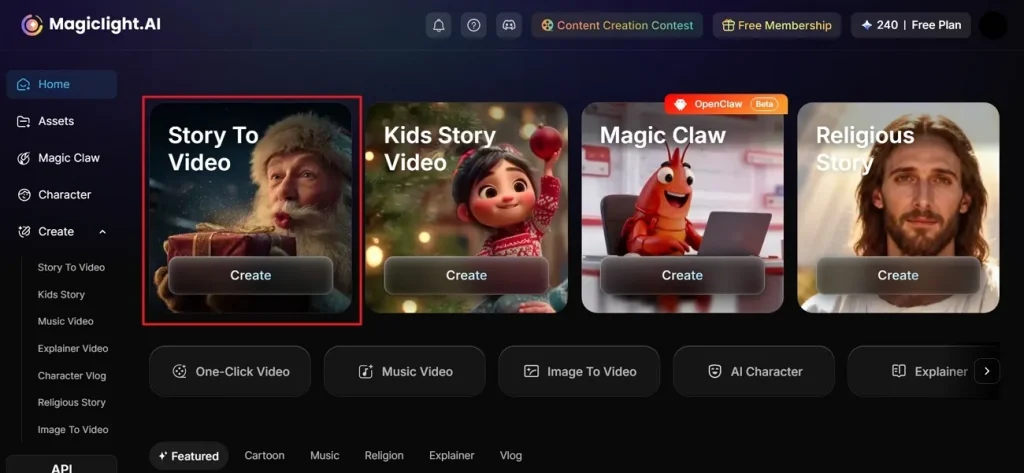
Start by visiting MagicLight AI and selecting the Story to Video option from the homepage.
Step 2. Describe Your Idea and Choose Settings
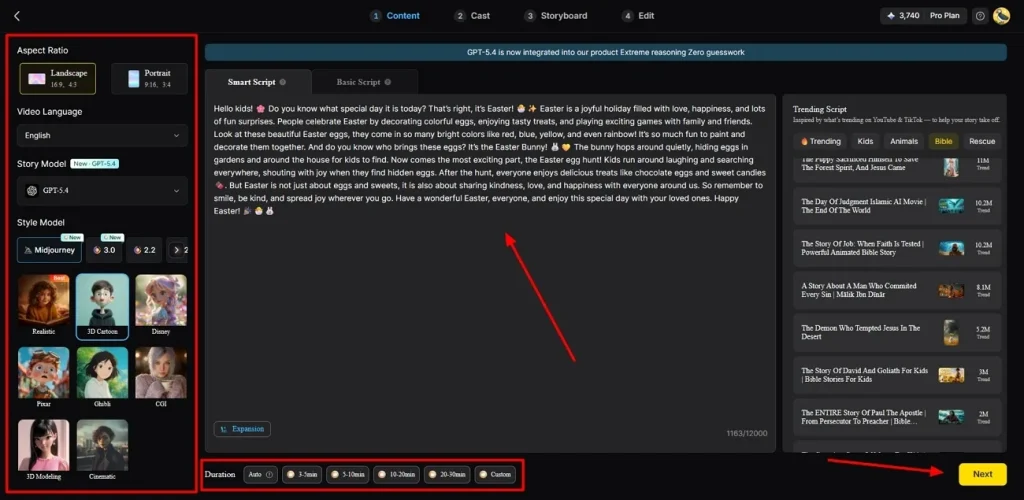
Type your idea into the Text Box and pick your preferred Video Language. After that, adjust the Aspect Ratio in the side panel and choose a story model such as GPT-5.4. Upon doing this, select a Style, set the Video length, and click Next.
Step 3. Go Through the Auto-Created Scenes
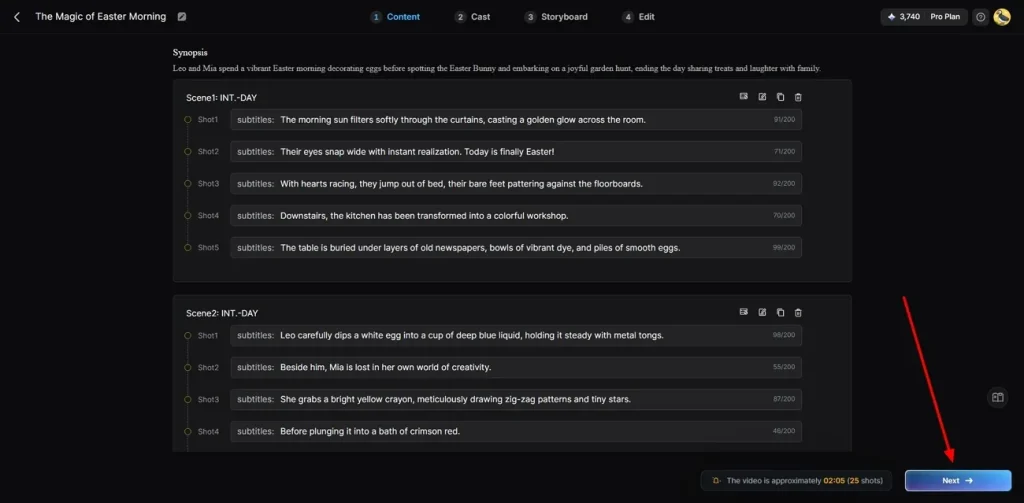
Once the tool has created your video scenes, review the summary carefully and click Next.
Step 4. Pick or Decide on Characters
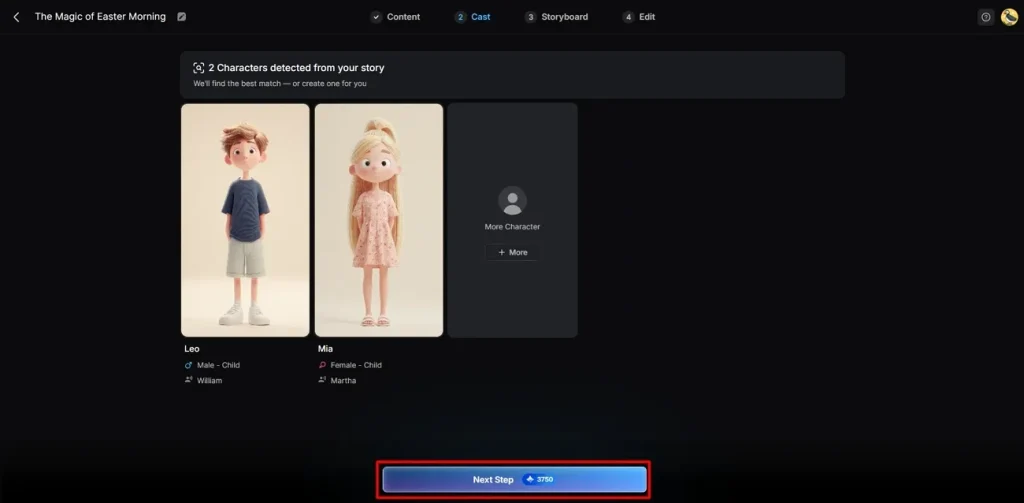
Following that, choose from the available characters or add a new one using the More Characters option. When ready, you need to move forward by pressing the Next Step button.
Step 5. Customize Character Voice and Expressions
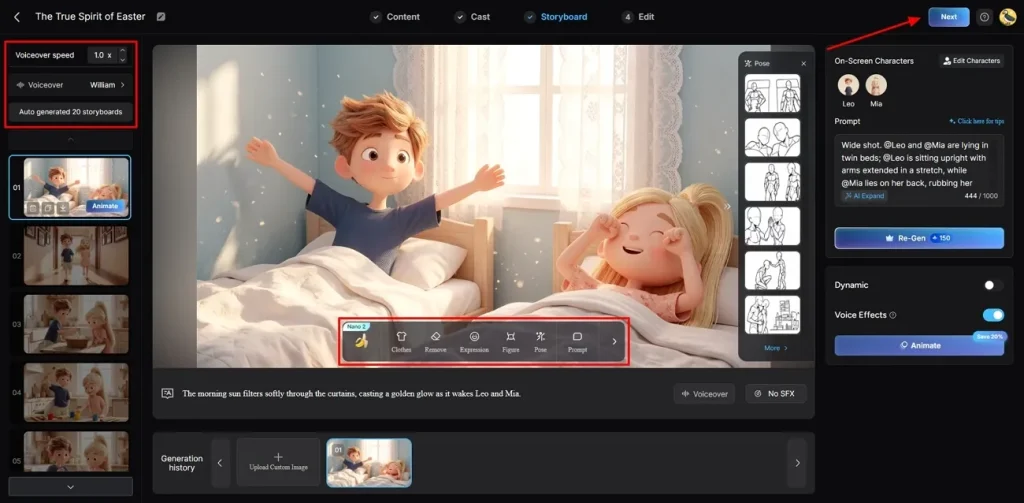
As you access the storyboard screen, adjust your character’s Voiceover Speed to match the pace of your video. In addition, you can personalize their Clothing or Body Figure and click the Next button.
Step 6. Add Subtitles and Background Music
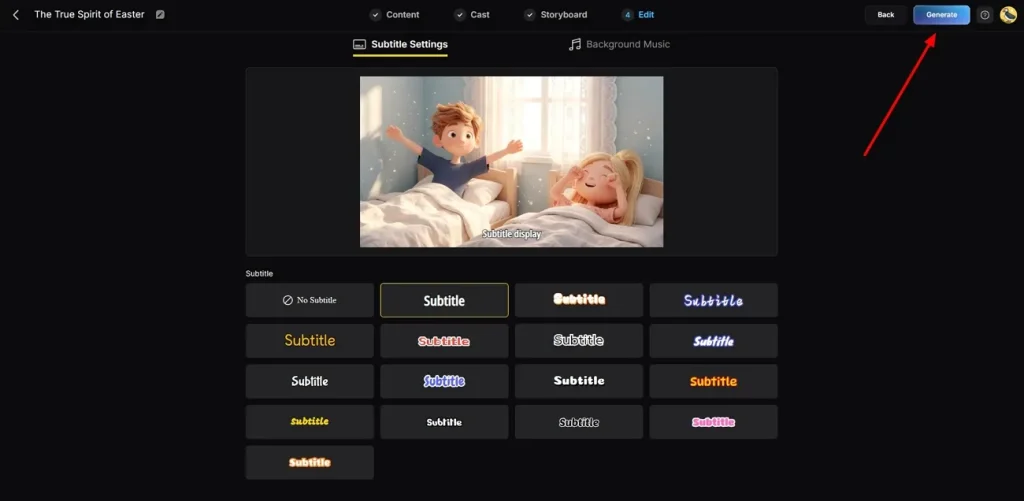
Subsequently, access the Subtitle Settings to insert video captions. For audio, head to the Background Music section to set the tone of your video, then click Generate.
Step 7. Preview and Download Your Video
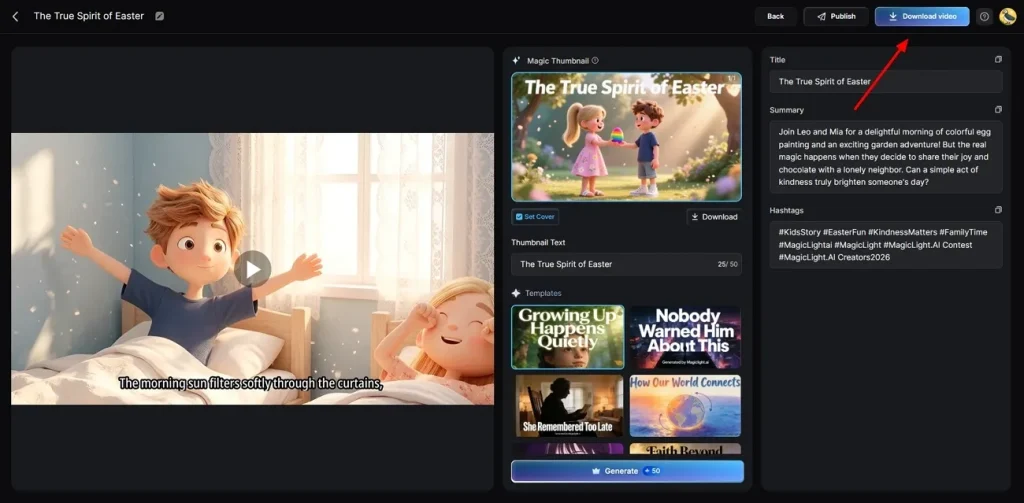
Upon completing the above task, you can now preview your AI-generated video. As your video looks fine, click Download to save the video to your device.
Part 3. 5 Infinite Craft Tips for Beginners and Advanced Players
Apart from the above, creators who learn how to make an animal in Infinite Craftstill face crafting challenges later. So, explore these useful tips below to improve crafting speed and unlock better results:
- Hub Focus: Always prioritize element hubs like Planet, Life, and Time for rapid growth. These strong foundations unlock wider branches faster, helping players reach advanced crafting outcomes without delays.
- Be Creative: Experiment with weird pairings that do not seem to have any real logic. The game often rewards strange combinations with very rare and funny first discoveries.
- Broad Topics: Build large topic blocks, such as Continent or Religion, for future flexibility. These general pieces act like launchpads, guiding you quickly toward cultural or rare combinations.
- Log Progress: Write down your favorite successful chains to reuse them for future difficult recipes. Noting these patterns helps you solve new puzzles without constantly checking the internet.
- Organize Space: Keep your main workspace clean by removing all the items you rarely use. Also, grouping related elements makes it much easier to find your best pieces.
Conclusion
To summarize, creating anime worlds becomes easier once you understand how to make anime in Infinite Craft clearly. By following simple combinations, you can unlock creative paths and build unique characters easily. However, manual steps can slow progress when creating complex anime ideas and detailed scenes. To save time and create faster animated content, using MagicLight AI helps turn your creative ideas into full animations effortlessly.
FAQs on How to Make Anime in Infinite Craft
1. Why should I choose MagicLight AI over manual workflows?
MagicLight AI significantly reduces the time needed to create full animated videos efficiently. It eliminates repetitive manual crafting, allowing creators to focus more on storytelling creativity freely. Using its advanced AI tools, you can bring ideas alive much faster than combos.
2. Is Infinite Craft hard to learn?
The basic mechanics of the game are actually very simple for every new player. You just need to combine two different blocks to discover a brand new item. Also, the game rewards experimentation, encouraging creativity and discovery through continuous logical or random combinations.
3. Do I need experience to create videos with MagicLight AI?
You do not need any professional video editing skills to use this modern tool. The clean interface allows beginners to generate amazing content with just a few clicks. Simply enter your story and let the advanced AI handle the difficult technical work.
4. Can I make all anime versions in Infinite Craft?
The game allows you to create many popular series by mixing anime with keywords. You can unlock famous shows like Naruto or One Piece using specific craft combinations. Yet, using MagicLight AI helps you visualize these different versions in a much shorter time.
5. Is Infinite Craft hard for beginners to create anime items?
Beginners may initially find creating anime items challenging due to complex combinations. Yet, following guides and tips helps unlock basic and advanced elements more systematically. Over time, crafting becomes natural upon transforming challenges into creative opportunities for every player.





![How to Make a Marketing Video 2026 [Step-by-Step Guide]](https://magiclight.ai/wp-2/wp-content/uploads/marketing-goal-planning-guide-300x200.png)