


Music and animation come together to create a very powerful emotional experience. Every dedicated fan wants to share their favorite stories through high-quality musical clips. Yet, the process can feel confusing and tough without proper guidance or tools.
Beginners struggle to sync clips and choose fitting audio tracks efficiently. Still, with the right workflow, anyone can turn favorite anime scenes into professional music videos. So, this guide explores how to make anime music videos easily while providing tips to enhance creativity.
Part 1. How to Make an Anime Music Video in Minutes (Step-by-Step)
Creating a visually engaging project requires understanding the key steps properly before starting. You need to follow a clear and organized plan to learn how to make anime music videos efficiently:
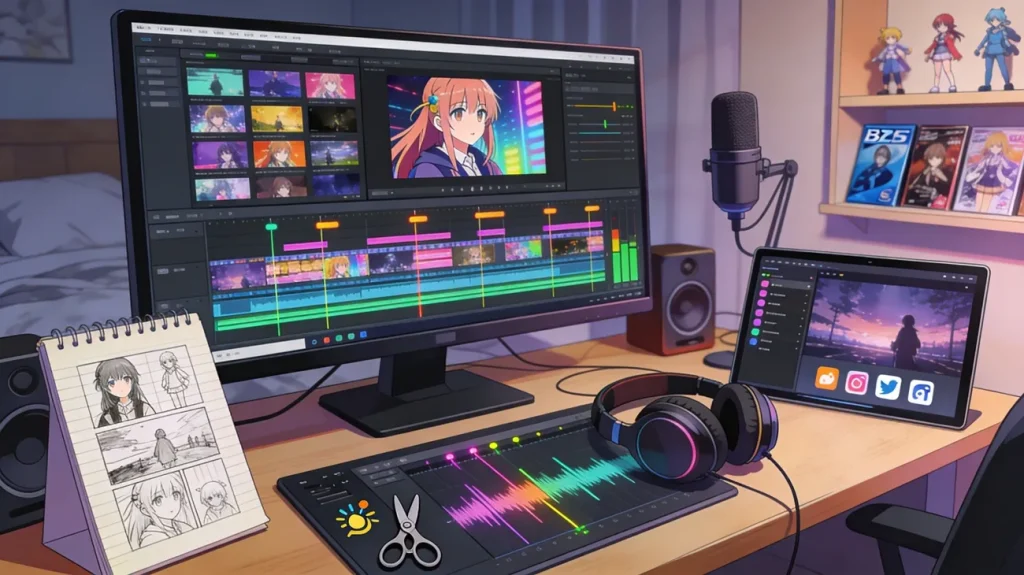
- Plan Your Concept: Begin by choosing the story or emotion your video will focus strongly on. Additionally, identify which anime scenes effectively capture your intended feeling or character moments to enhance engagement.
- Select Your Music: Carefully pick a song that matches the rhythm and emotion of your chosen scenes. The right track sets the pace, defining how each scene transitions with consistent energy throughout.
- Gather and Trim Clips: Collect scenes from your selected anime series while ensuring they match the predefined emotional tone. Trim clips precisely to highlight expressions or specific key story movements clearly.
- Sync Music and Visuals: Align every scene with the beat, noting changes in tone or melody carefully. Plus, pay attention to emotional highs and lows and consistently match them with corresponding visual intensity.
- Review Your Masterpiece: Finally, check the final video for any small timing errors or low-quality shots. Then export the project and post your finished work on social media to receive feedback from other fans.
Choose the Right Anime Music Video Maker
While learning to make an anime music video, many beginners still struggle with editing speed and maintaining smooth timing accuracy throughout the video. This stage creates the perfect need for an intelligent assistant like MagicLight AI. Its Music Video feature is a strong choice for creators who want a faster, more complete workflow. The tool helps you build a music-driven project from start to finish without jumping between many separate tools.
With this feature, you can generate music based on your own input and the genre you choose. The platform supports 11 languages, so it works well for different audiences and creative needs. Moreover, users can even pick from 15 prebuilt songs to start their project much faster. You also get 15 prebuilt songs, style options like MagicLight 2.2 and MagicLight 2.0, and flexible ratios, like 16:9 or 9:16.
Key Features
- Storyboard Preview: View an automatically generated storyboard to see how your musical story flows visually first.
- Nano Adjustments: Use advanced tools to fine-tune character clothing and unique facial expressions very easily.
- Subtitle Settings: Customize your captions with sixteen unique styles to make them readable and very stylish.
Guide to Make an Anime Music Video via MagicLight AI
Adhere to the practical steps to find out how to make an anime music video using this powerful tool:
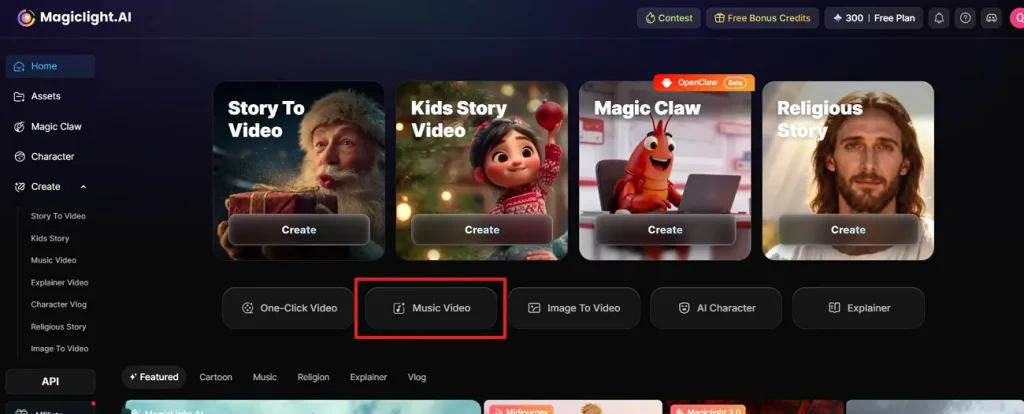
Step 1. Open the Music Video Workspace
Begin by accessing MagicLight AI and navigating to the Music Video option to enter the specialized workflow.
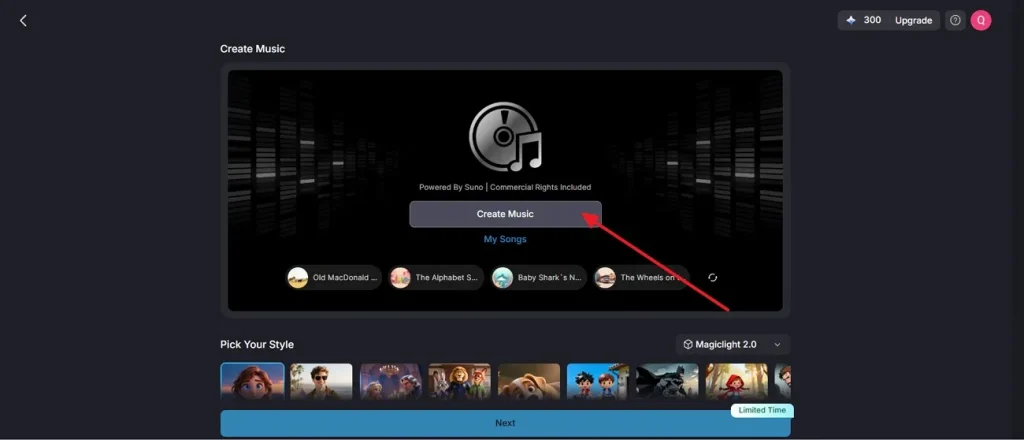
Step 2. Start Building Your Audio Track
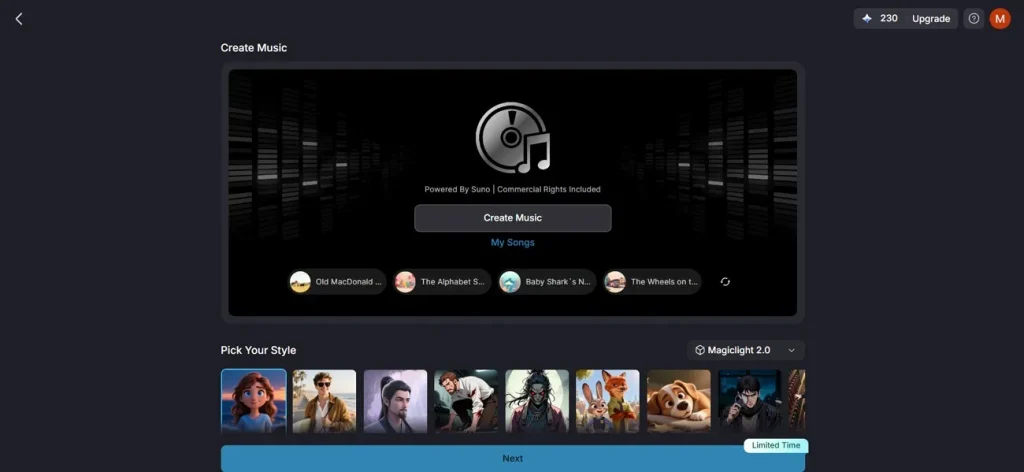
Later, click the Create Music button to start the song generation process. You can then use this audio track as a foundation for your video project.
Step 3. Add Lyrics and Choose a Music Style
Following that, enter your lyrics or a descriptive prompt into the Text Field provided. Then pick a suitable Music Genre preset that matches your creative direction and generate the track accordingly.
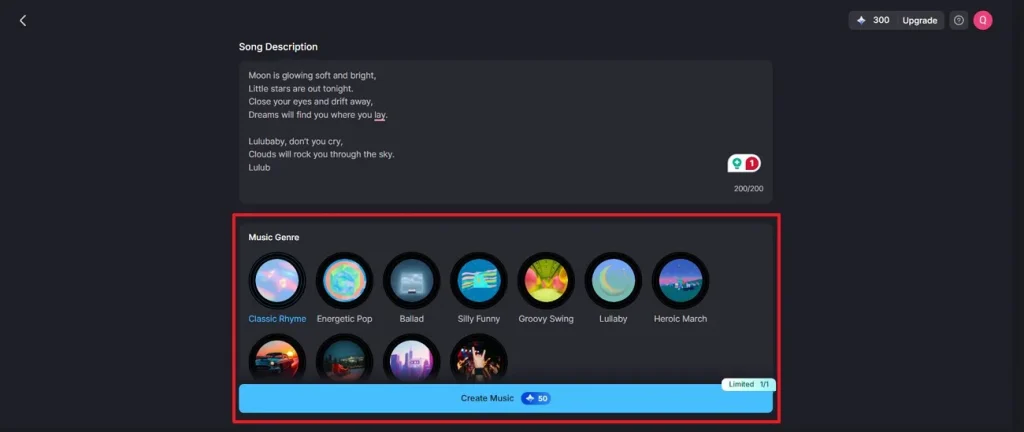
Step 4. Pick and Attach the Generated Song
Next, head over to the My Songs section after the music is created to view all generated versions. Select the track that fits best and use the Select Music option to link it to your ongoing project.
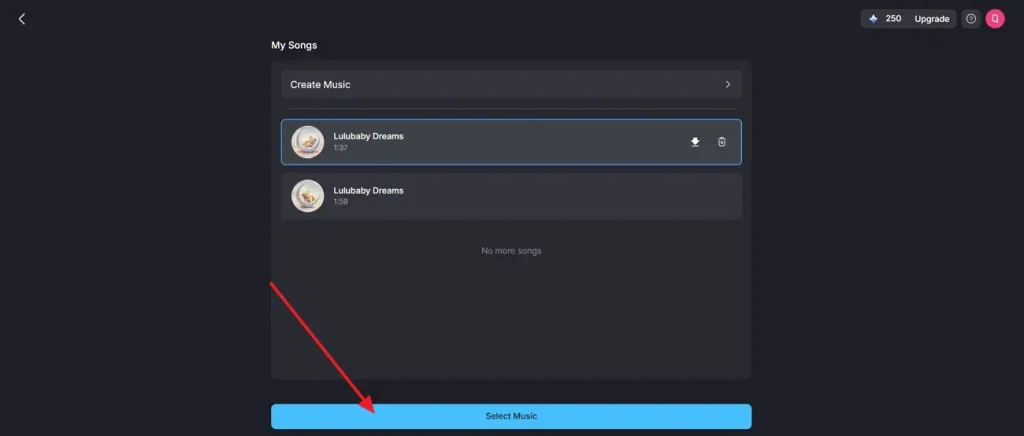
Step 5. Adjust Visual Preferences and Output Settings
Now, define how your video will look by selecting a Visual Model and other options like Artistic Style. Upon configuring everything, you need to click Next to continue.
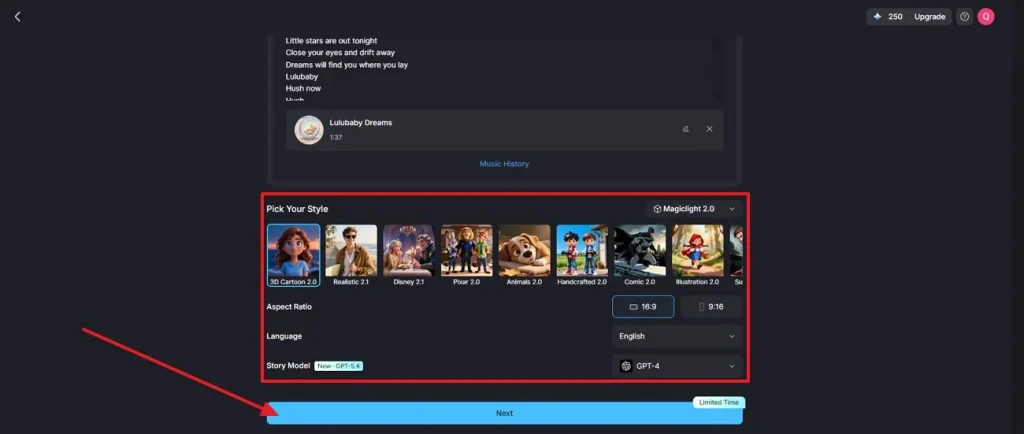
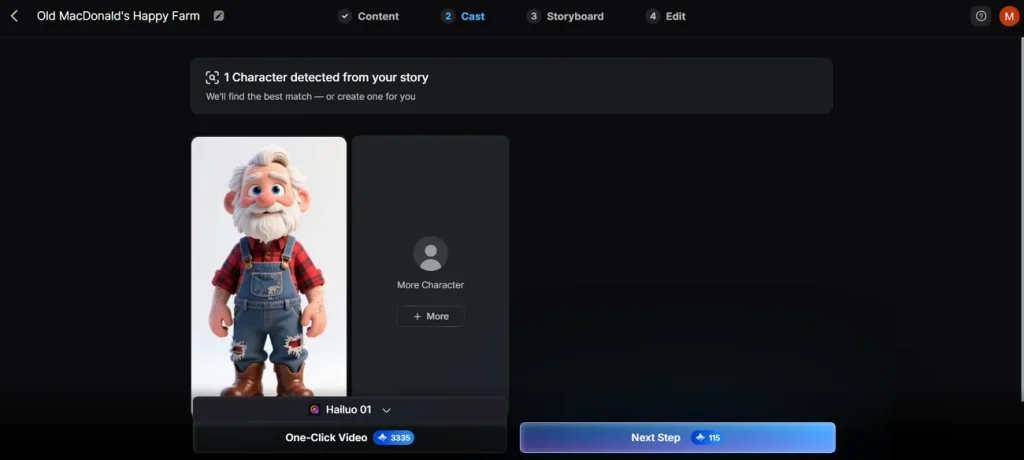
Step 6. Review Characters and Confirm Casting
At this stage, examine the automatically detected characters and verify their assigned roles. You can introduce additional characters if necessary, then proceed by selecting Next Step.
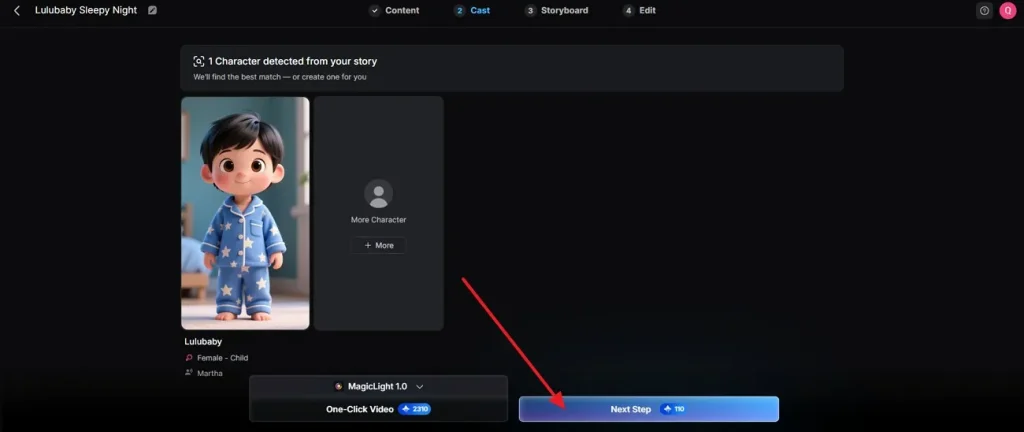
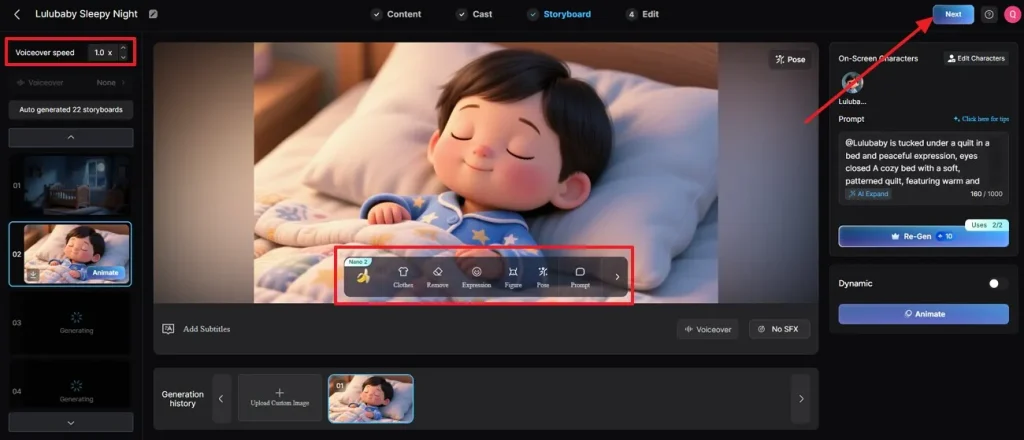
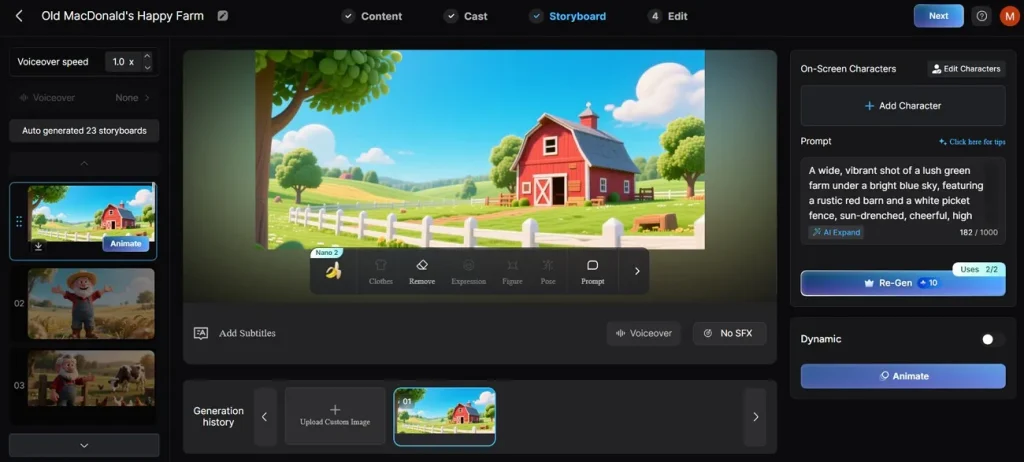
Step 7. Customize the Storyboard and Finalize the Video
Subsequently, fine-tune your storyboard by adjusting poses and applying animation tweaks. Once satisfied, click Next to move into the final editing phase and export your completed video.
Part 2. Why Use MagicLight AI to Make Anime Music Videos?
As you know, the quality of your project improves significantly with advanced digital tools. Beyond the basic setup of learning how to make an anime music video, this platform offers specialized technical features that give your videos a professional edge:
- Extensive Pose Library: You can access 15 different character poses to match the rhythmic energy of your audio track perfectly. These options allow you to create dynamic movement that follows the flow of your musical beats.
- Multi-Model Animation: It even lets you select from 16 specialized animation models to convert your still storyboard into a moving masterpiece. So, this variety allows you to pick the specific motion style that best fits your music genre.
- Custom Cover Templates: Users can choose from 21 different artistic templates to create eye-catching thumbnails for their video projects. It helps their content attract more viewers on competitive social media platforms like YouTube.
- Integrated Publishing Tools: MagicLight AI uses the native system to publish and track the performance of your videos in one place. Thus, this streamlined workflow eliminates the need for external software when sharing your creations with the world.
Conclusion
In summary, mastering how to make anime music videos takes clear planning and smart tool choices. Anyone can now create stunning clips using simple steps and creative workflows efficiently. However, manual editing tasks can be extremely difficult and slow for most beginners. Thus, you should use MagicLight AI to generate your professional musical videos much faster.
FAQs on How to Make Anime Music Videos
1. What software is best for anime music video editing?
MagicLight AI stands out as the top choice for creating anime music videos quickly. It automates syncing and animation, saving hours of manual work efficiently. Moreover, beginners love its simple interface and powerful AI models for professional results.
2. What songs are best for AMVs?
Most often, such videos have strong-beat songs with emotional lyrics. You should still match the song's mood with anime scenes to create a better emotional impact. Plus, famous genres include rock and instrumental tracks that effectively enhance storytelling and engagement.
3. How to make an anime music video on mobile?
You can either access MagicLight AI through your mobile browser or use its app to create videos. The simple screen works perfectly on smaller screens for editing while on the go. Simply import your ideas and let the smart tool handle the heavy processing.
4. How to sync music with anime clips?
MagicLight AI automatically aligns visuals with music beats during video generation. The smart system detects audio changes to ensure transitions happen at the right time. Additionally, preview tools help verify smooth transitions before final export and sharing.
5. Can I monetize anime music videos on YouTube?
Monetizing anime music videos depends on copyright rules and content ownership permissions strictly. Therefore, you must ensure that you have the proper rights to use music. Furthermore, original animations created with tools like MagicLight AI significantly increase approval chances.





![How to Make a Marketing Video 2026 [Step-by-Step Guide]](https://magiclight.ai/wp-2/wp-content/uploads/marketing-goal-planning-guide-300x200.png)