


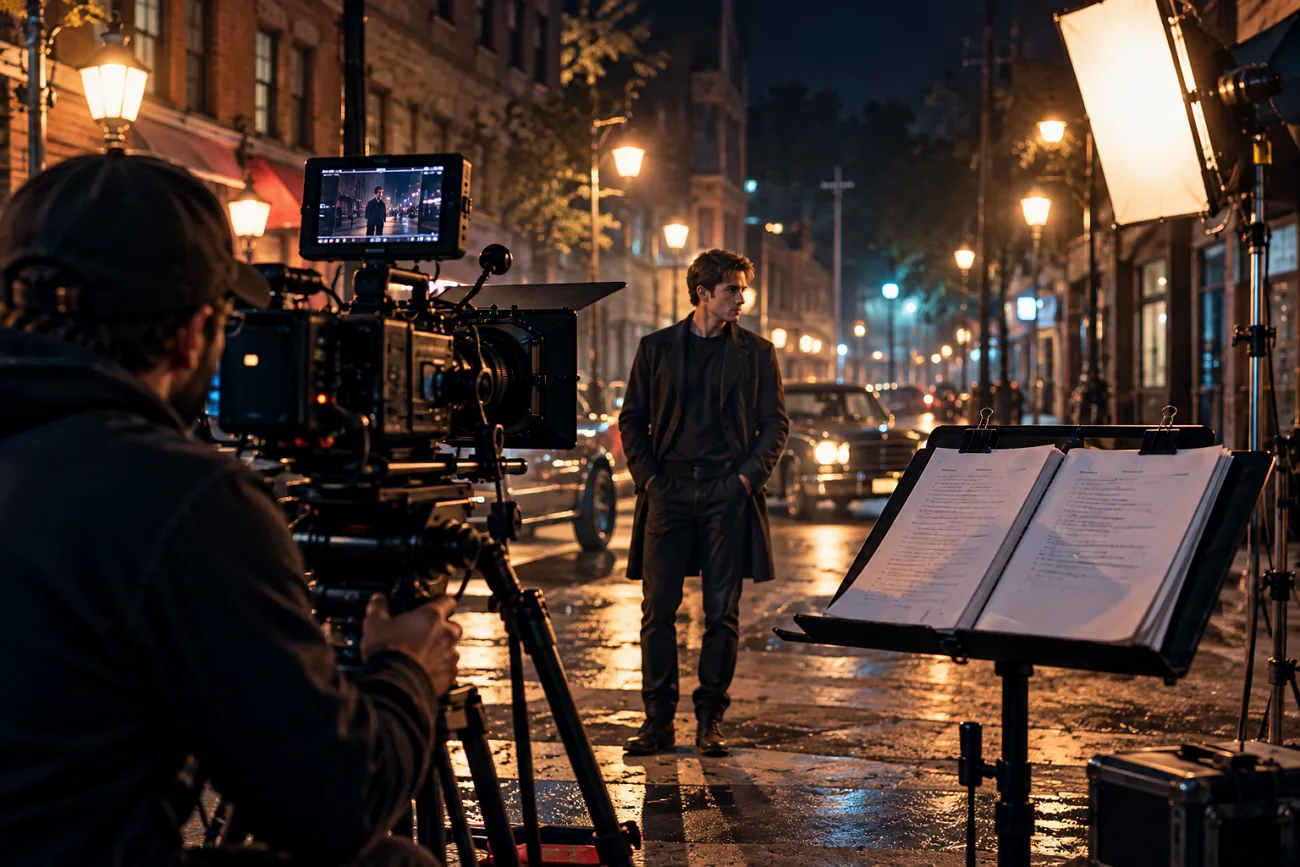
A movie starts with a script that puts the story on paper before filming begins. That script becomes the plan for what the audience will eventually watch unfold on the big screen. Screenplay formatting keeps the script readable and helps everyone understand how each scene should play out.
Some writers now use AI tools when they need help getting parts of a script done. This guide covers how to write a movie script and take it through the final draft.
Part 1. How to Write a Movie Script for Beginners
Knowing how to write a script starts with getting your main idea down first. From there, you can work through the story until you have a complete script.
Write the Movie Script Step by Step
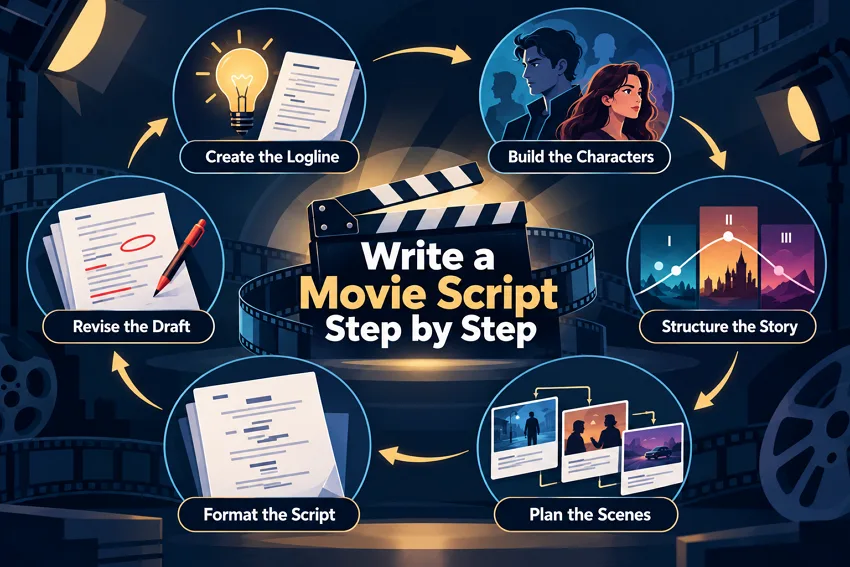
A good movie script usually starts with a basic idea before writing scenes. The steps below take you from that first idea to a finished script:
Step 1. Put the main story into 1 sentence. Say who the main character is and what gets in the way. The Nicholl Fellowships and some other competitions ask for a logline with each entry.
Step 2. Work out what your main character wants and give them a flaw. The opponent needs their own goal too. These details matter when figuring out how to write a film script and where scenes stay tied to the lead’s goal.
Step 3. A traditional three-act feature often uses roughly 25–30 pages for Act 1, a longer middle act, and about 25–30 pages for Act 3. Treat these ranges as planning guidelines rather than fixed rules.
Step 4. Put all the scenes in order before writing them out. Add 1 line about what changes in each scene. For anyone learning how to write a screenplay for a movie, this is also a good point to cut scenes that add little.
Step 5. Learning how to write screenplay pages starts with using the standard format. Use 12-point Courier, with around 1.5-inch left and roughly 1-inch margins elsewhere. The table below shows where each screenplay element goes on the page:
| Element | What It Does | Example |
| Scene Heading | Sets interior or exterior, place, and time | INT. DINER - NIGHT |
| Action | Describes what the audience sees | Rain streaks the window. |
| Character Cue | Names the speaker above the dialogue | MAYA |
| Dialogue | Holds the spoken lines | I missed the last bus. |
| Parenthetical | Adds brief direction under the cue | (whispering) |
| Transition | Marks an edit, set flush right | FADE TO BLACK. |
Step 6. Write the whole draft before you start changing things. Have a few people read it out loud, since awkward dialogue is easier to hear.
Use AI Tools to Write a Movie Script
Some tools can help with different parts of a script, while others can turn it into video. Here are 4 types of tools you can use while working on your script:
- AI Agent: it works through your movie-writing process step by step—from developing the core idea and character arcs to structuring acts, outlining scenes, writing dialogue, and refining the final screenplay. You stay in control while the Agent handles the repetitive work and keeps the story connected.
- Screenplay Writers: Squibler’s AI Script Writer can draft formatted scenes and dialogue on its free plan. Saga also has a free tier and can take a logline through a beat sheet and coverage.
- Proofing and Breakdown Tools: WriterDuet’s ScreenplayProof checks spelling, grammar, and screenplay formatting through a paid per-script analysis.
- Script-to-Video Platforms: These platforms turn finished pages into animated scenes with characters and voices. Writers can then see how a draft might look before production.
For writers learning how to write a screenplay for a film with visuals in mind, the last type can be useful. MagicLight AI fits into this group because its Story to Video tool can turn a completed script into an animated film.
Part 2. How AI Tools Can Help You Write and Create a Movie Script
Knowing how to write a cinema script gets easier when the right tools handle extra work. Look at the table below to see where these tools can save you time:
| Stage | How AI Can Help | Writer Handles |
| Story Idea | Gives possible loglines and story ideas | Picks the idea worth developing |
| Outline | Creates beat sheets and scene lists | Sets the story order and pacing |
| Dialogue | Suggests lines or different versions | Chooses how each character speaks |
| Formatting | Checks layout and points out errors | Reviews the final script |
| Visualization | Turns written scenes into visual drafts | Makes the final creative choices |
Industry rules still keep human writers at the center as AI use grows. The 2026 WGA MBA preserves the AI protections negotiated in 2023 and adds new safeguards related to licensing writers' work for commercial generative AI training. AI output does not count as literary material under those current contract terms.
Writers also need company approval before using AI during their writing process. Anyone learning how to write screenwriting should also check competition rules before using AI. Nicholl rejects AI-written content, while Oscar writing categories require screenplays written by humans.
Part 3. Best Alternative AI Tool to Write a Movie Script
Writers can now turn finished scripts into animated scenes before moving into full production. MagicLight AI does this through Story to Video, which accepts scripts up to 12,000 characters. Watching those scenes can help writers catch pacing problems before the production work begins.
It can also help beginners understand how to write a film script for visuals. New accounts include free credits, giving writers a chance to try the platform first. Paid plans include watermark-free 1080p exports along with commercial rights for finished video projects.
Key Features
- MagicLight Agent: Give the AI video agent your movie idea and let it prepare the project. It can work on the script, storyboard, characters, and visual direction before video creation begins.
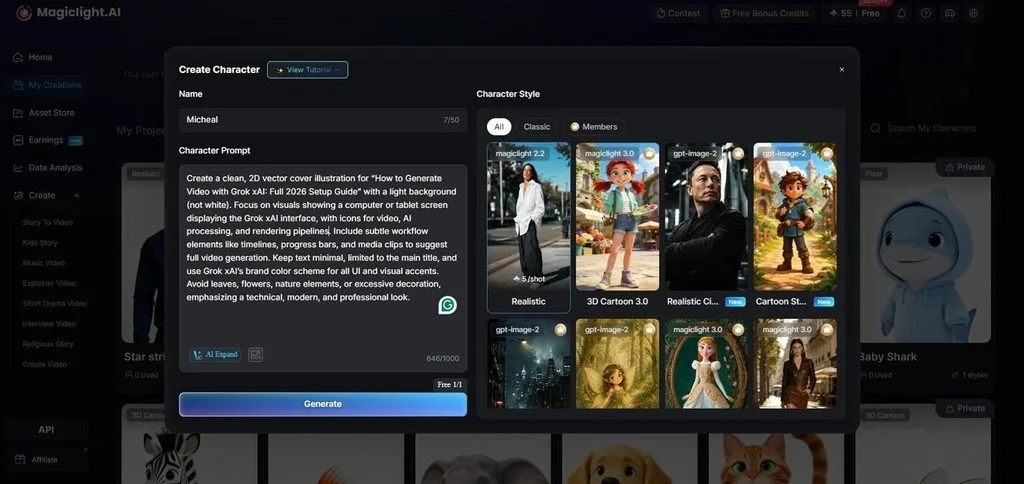
- AI Character Creation: Build characters from written descriptions of up to 1,000 characters. Reference images can also be uploaded, and saved characters can be used again in later scenes or stories.
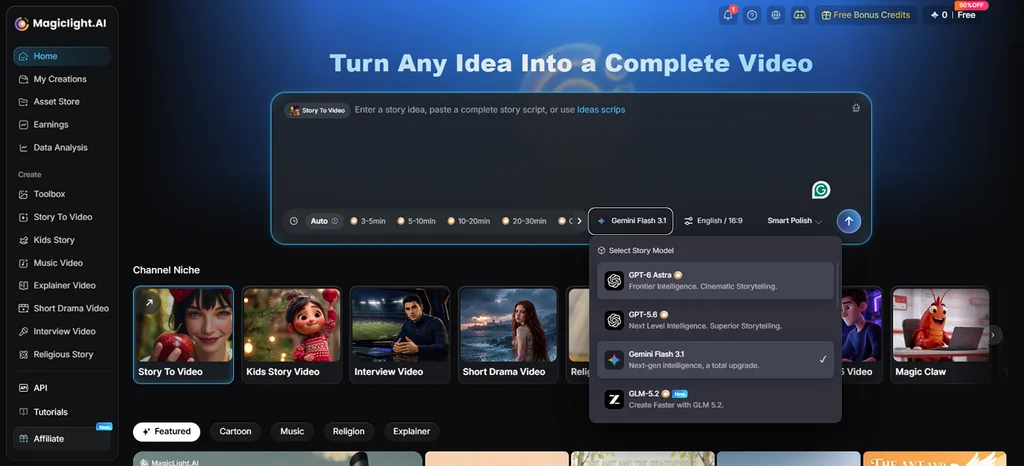
- Story Models: MagicLight AI includes 14 story models for writing scripts and dialogue. GPT-6 Astra gives writers another option for developing longer stories and scenes.
- Storyboard Editor: Make changes to individual scenes before generating the video. Clothes, expressions, and more than 50 poses are available when setting up how a character should look or move.
- Voices and Subtitles: Choose from 37 AI voices and 16 subtitle styles for your video. The finished video can include voiceover, subtitles, and sound together.
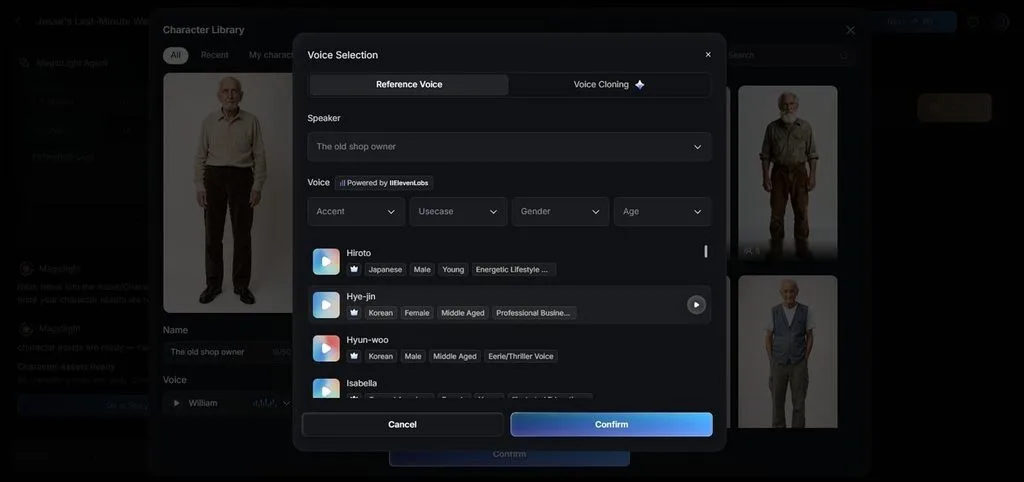
How to Turn a Movie Script Into a Video With MagicLight AI
After learning how to write a script for a movie, you can visualize it. Follow the steps below to turn your finished script into a complete animated video.
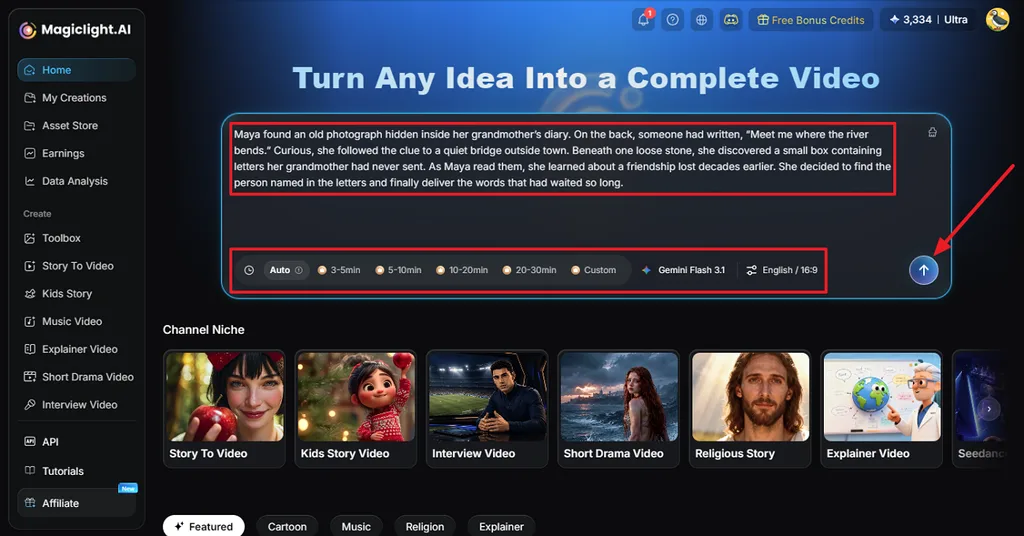
Step 1. Enter Your Movie Script
Open Story to Video and enter the movie script you want to turn into a video. Choose the duration, model, language, and aspect ratio, then click Send to continue.
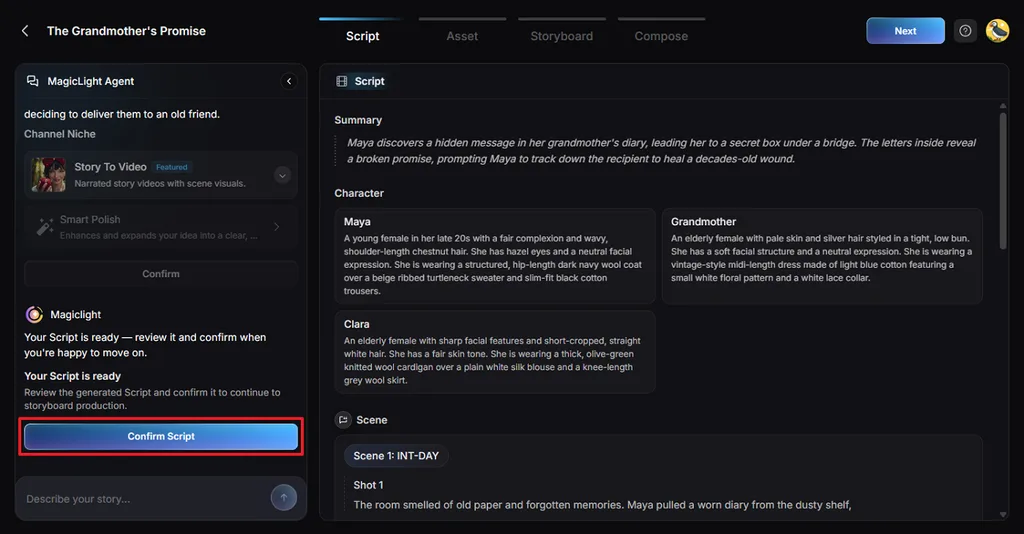
Step 2. Review and Confirm the Script
MagicLight Agent organizes the script into a Summary, Characters, Scenes, and Shots. Check these details against your original story, make any needed changes, then click Confirm Script.
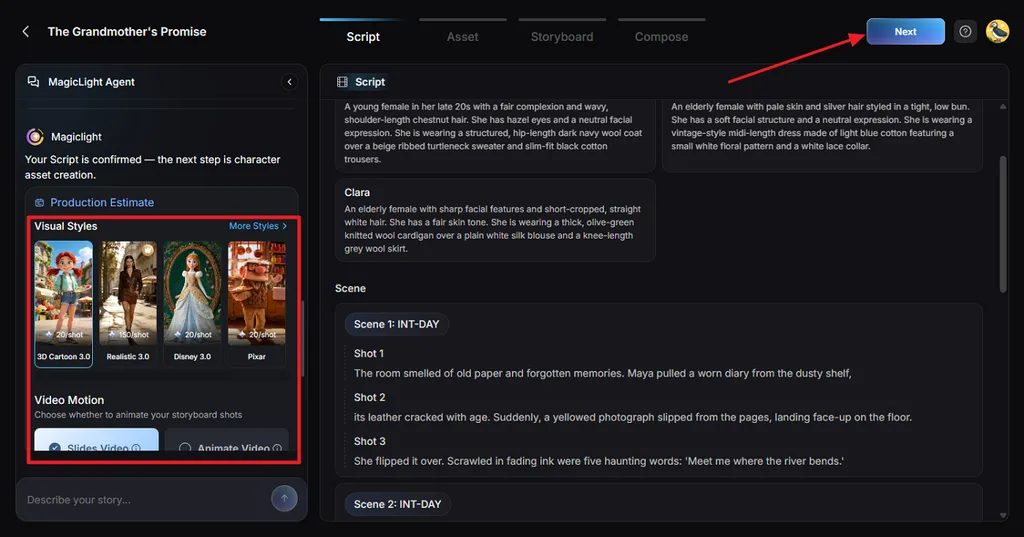
Step 3. Choose the Production Settings
Pick a Visual Style that matches the look you want for your movie. Choose between Slides Video and Animate Video, adjust the available settings, and confirm your choices.
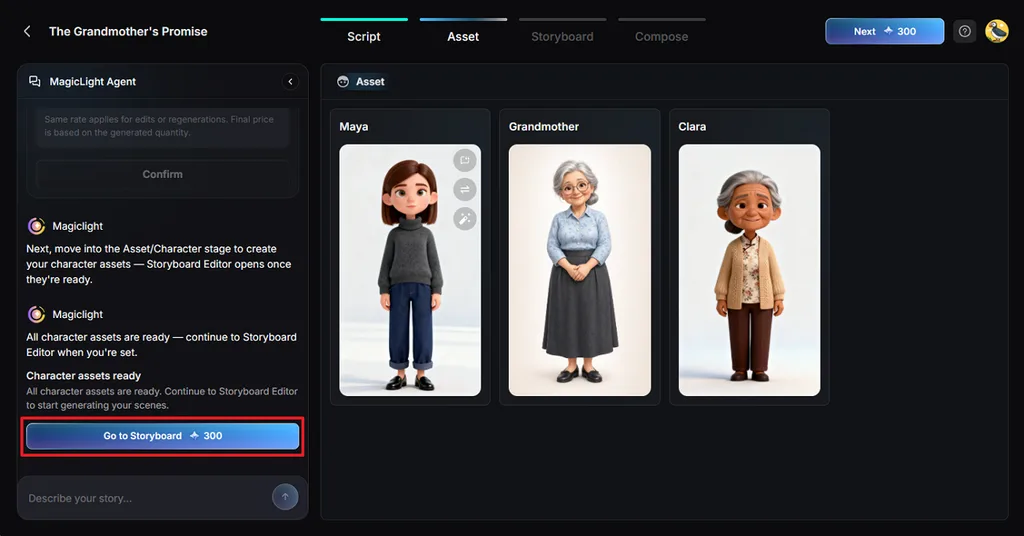
Step 4. Review the Character Assets
Review the generated character assets based on the people in your script. Check each character image, make changes where needed, then click Go to Storyboard.
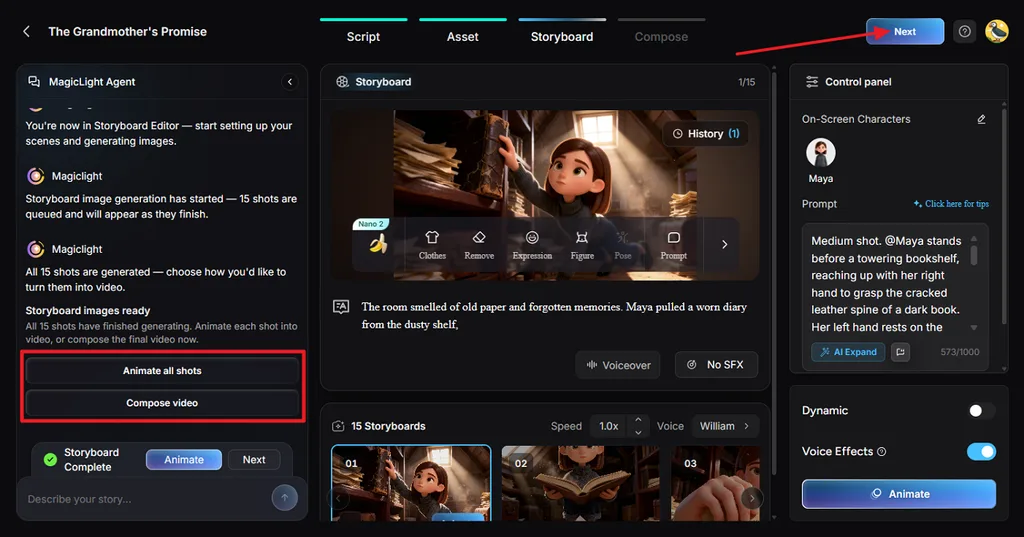
Step 5. Edit and Animate the Storyboard
Go through every storyboard shot and change Clothes, Expression, Figure, Pose, or Prompt where needed. You can also adjust voices and effects before selecting Animate all shots or Compose video.
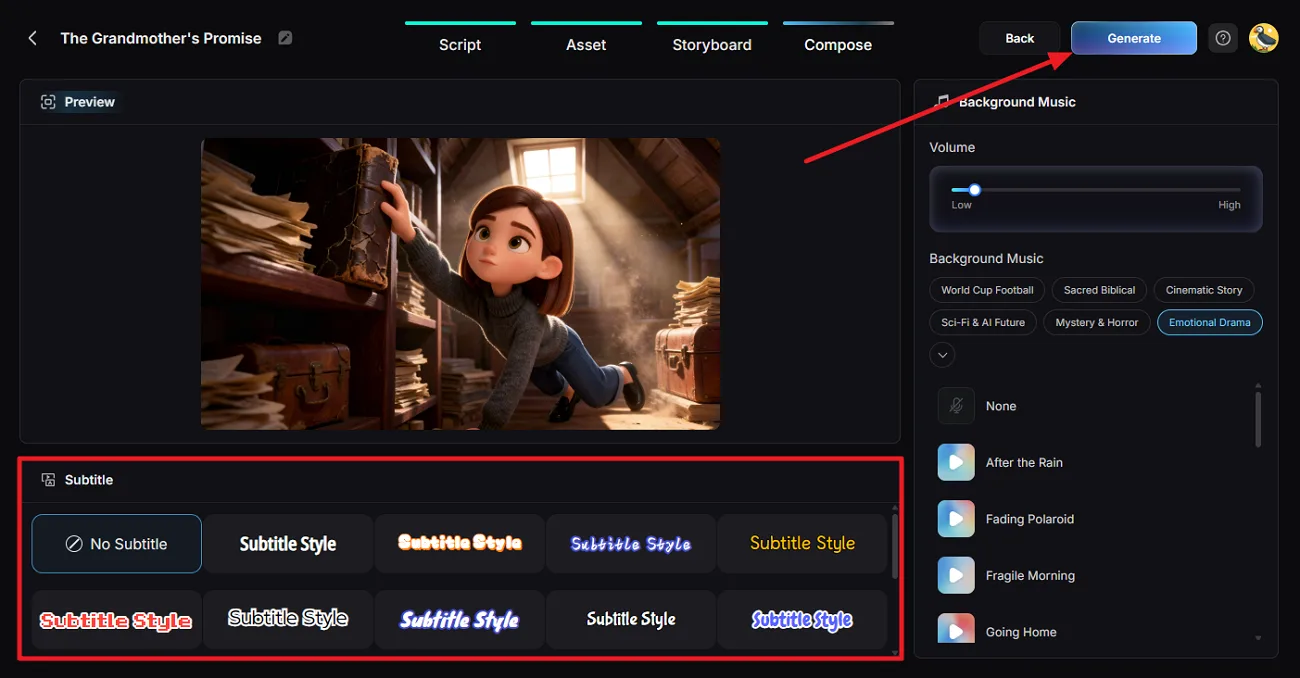
Step 6. Compose and Generate the Movie
Preview the movie and choose a Subtitle Style, or select No Subtitle if you prefer. Adjust the Background Music and volume, then click Generate to create the video.
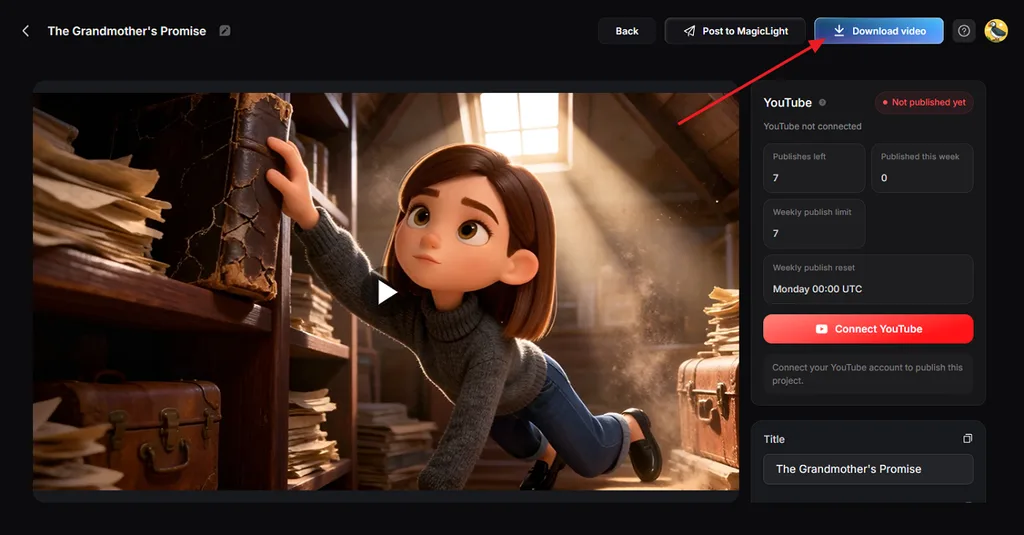
Step 7. Download the Finished Movie
Watch the finished movie and check its scenes, voices, music, subtitles, and pacing. When everything looks right, click Download video to save the finished file.
Conclusion
To summarize, learning how to write a movie script starts with planning characters and scenes. A strong logline, clear structure, and proper formatting keep the finished screenplay easy to follow. AI tools can support brainstorming, checking, and visualization while writers remain responsible for creative decisions. MagicLight AI can turn finished scripts into animated storytelling videos with consistent characters and voices.
FAQs on How to Write a Movie Script
- How do I write a movie script?
Start with a simple logline that explains your main character and conflict. Then plan the characters, story structure, and scenes before writing full pages. Finish the complete draft before revising dialogue, pacing, formatting, and weak scenes.
- Is there a fast way to write a movie script?
Learning how to write a script for a movie starts with planning. MagicLight AI can shorten early work by helping build your story quickly. Story to Video turns the finished story into animated scenes for review.
- How long should a movie script be?
Most feature movie scripts usually run between 90 and 120 pages total. One script page often represents about one minute of finished screen time. Nicholl Fellowships accept feature screenplays between 80 and 125 pages for entry.
- Which is the best AI video tool to create a movie from a script?
MagicLight AI can turn a completed movie script into an animated video. Its Story to Video workflow supports consistent characters, voices, and subtitle styles. Writers can review the result before deciding what needs changing or improving.
![6 Best Picture Modification Apps in 2026 to Try [New List]](https://magiclight.ai/wp-2/wp-content/uploads/best-picture-modification-apps-for-photos.jpg-300x200.webp)
![How to Turn Audio File Into Video in 2026 [Full Guide]](https://magiclight.ai/wp-2/wp-content/uploads/audio-to-video-conversion-guide.jpg-300x169.webp)
![How to Make an AI Movie in 2026 [Step-by-Step Guide]](https://magiclight.ai/wp-2/wp-content/uploads/ai-movie-creation-journey-posters.jpg-3-300x169.webp)
