


AI movie generators can turn your written ideas into videos without needing a camera crew. You can start with a simple story idea or use a complete script. Some tools create short clips that you can put together into a movie. Others like MagicLight AI help you create longer stories with the same characters throughout. Each tool gives you different options for movie length and editing your scenes. This guide compares 5 tools to help you find the best AI movie generator in 2026.
Part 1. 5 Best AI Movie Generator Tools
Each AI movie tool has something different to offer when you want to bring a story to life. Let's explore 5 options to help you find the best AI movie creator for your next project.
- MagicLight AI
Best For: Storytellers turning scripts into full AI movies.
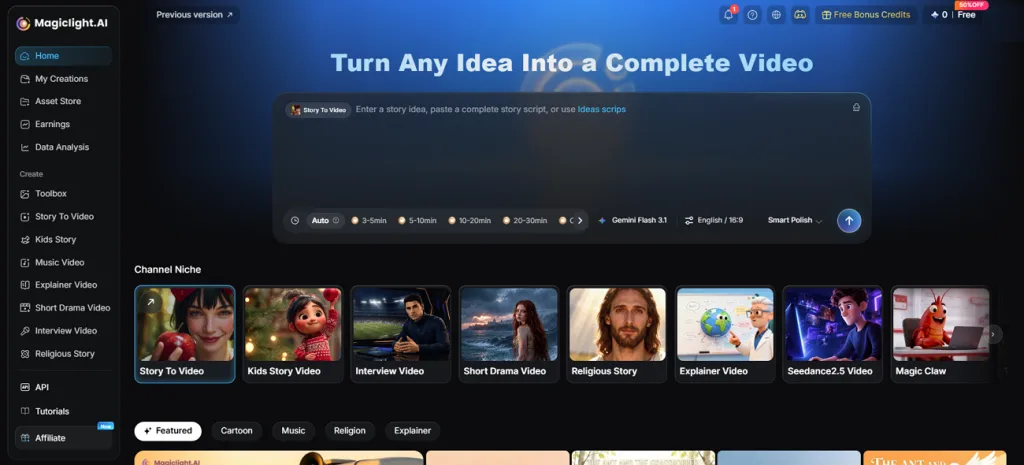
You can bring your written stories to the screen with MagicLight AI without filming anything yourself. The Story to Video feature accepts up to 12,000 characters and turns your script into a movie with different scenes.
The tool also supports scripts and narration in 11 languages for creators making movies in different languages. MagicLight AI lets you create videos up to 50 minutes long on paid plans. Your characters can appear across different scenes without changing their look as the story continues.
Key Features
- MagicLight Agent: The AI video agent can build a complete plot from your short story idea. You can review its suggestions before moving ahead with the full script.
- Character Assets: MagicLight AI lets you describe your character's appearance using up to 1000 characters. The saved character design helps keep its look the same throughout your movie.
- Music and Subtitles: Make your movies visually interesting by adding captions using the 16 different styles. Improve viewership by including background music out of the 40 options.
- Movie Looks: The tool offers 50+ styles to give your movie a fresh appearance. Different styles can change the look of your characters and movie scenes.
- Image to Video: You can write up to 1500 characters to describe your video scene. The tool can turn your image into a video lasting 30 seconds.
Pros
- Clone your voice for narration across different movie episodes.
- Redraw individual storyboard frames using the Re Gen feature.
- Reuse saved characters across different movies to help maintain their appearance.
Cons
- Video exports support 1080p resolution but not 4K quality.
- Kling AI
Best For: Creators making short films with character dialogue.
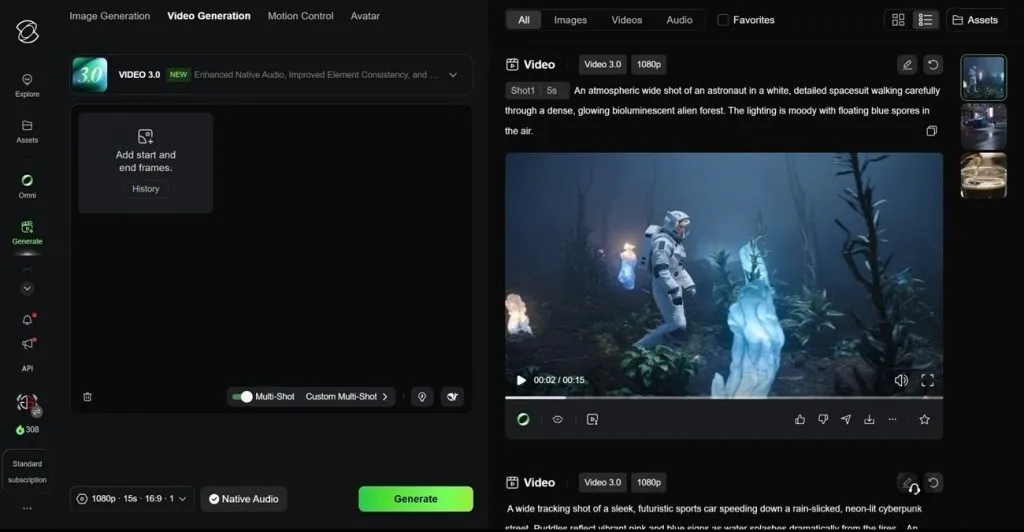
Kling AI helps creators film short conversations from different camera angles without using real actors. Its VIDEO 3.0 model creates clips lasting up to 15 seconds with clear character dialogue. It could be the best AI movie generator for scenes that need natural speech and movement.
Key Features
- The Multi Shot feature lets you switch between 6 camera angles within 1 video.
- Saved character references help preserve facial features and clothing across newly generated shots.
- Each clip can be extended several times until the video reaches 3 minutes long.
Pros
- Sound and video are generated together without separate recording.
- Native 4K output gives editors more room for cropping.
Cons
- Longer movies need many separate clips joined during editing.
- Characters must be saved as Elements before consistent reuse.
- Runway
Best For: Directors editing scenes after creating AI videos.
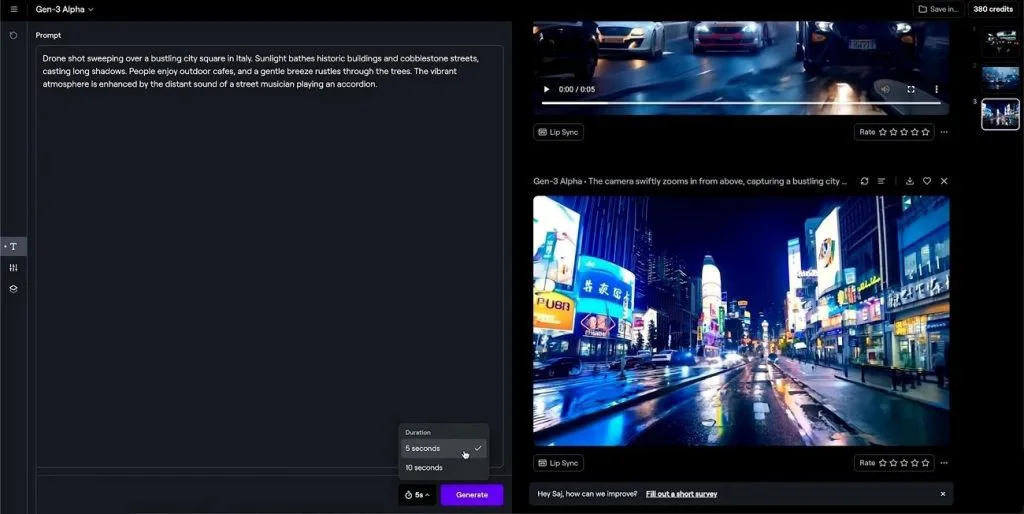
Runway's main strength is making changes to an existing movie scene. Directors can use Gen 4.5 to create shots with more control over their final appearance. The best AI movie creator should also handle edits well, and Runway offers several options here.
Key Features
- You can upload a storyboard image to guide how Gen 4.5 creates your scene.
- Aleph 2.0 lets you change existing backgrounds without making the entire scene again.
- Act Two uses recorded acting to copy facial expressions and gestures onto animated characters.
Pros
- Existing footage can be changed without generating everything again.
- Recorded performances help animated characters move like real actors.
Cons
- Gen 4.5 clips stop at 10 seconds per generation.
- Videos start at 720p and need upscaling for projection.
- InVideo AI
Best For: Creators who prefer editing ready-made video drafts.
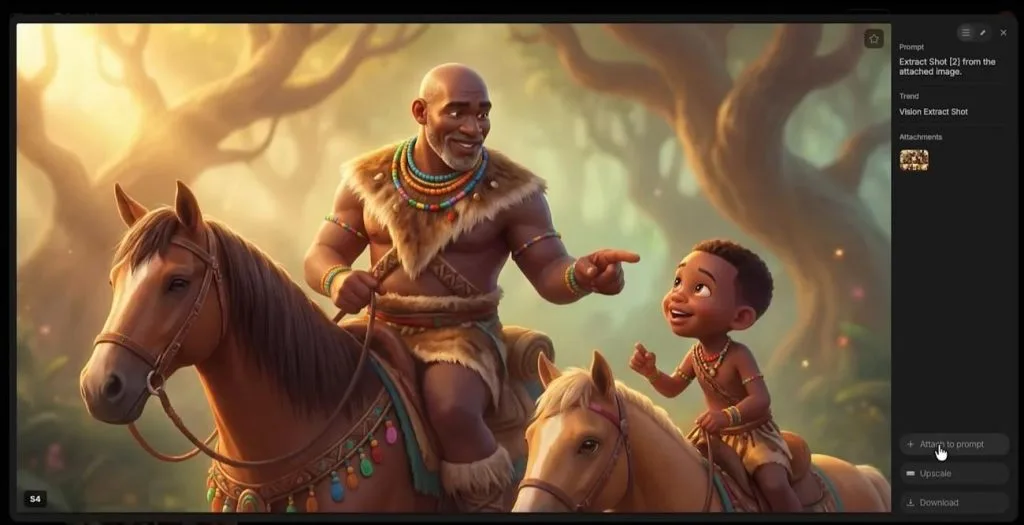
A simple text prompt in InVideo AI can produce a video with narration and captions. The platform also adds background music to make your first draft feel more complete. For creators looking for the best AI movie generator, InVideo's agent helps maintain character and voice consistency across scenes.
Key Features
- The tool checks each video segment and recreates scenes with noticeable character changes.
- Voice descriptions let you create a narrator with a specific accent and tone.
- Agent Two can choose different AI video models to create each scene.
Pros
- Magic Box lets you edit drafts through simple commands.
- Voice cloning saves your recorded voice for future narration.
Cons
- Scenes with multiple characters may mix their facial features.
- Finished drafts give you less control over individual shots.
- Zapier
Best For: Teams creating regular videos through connected apps.
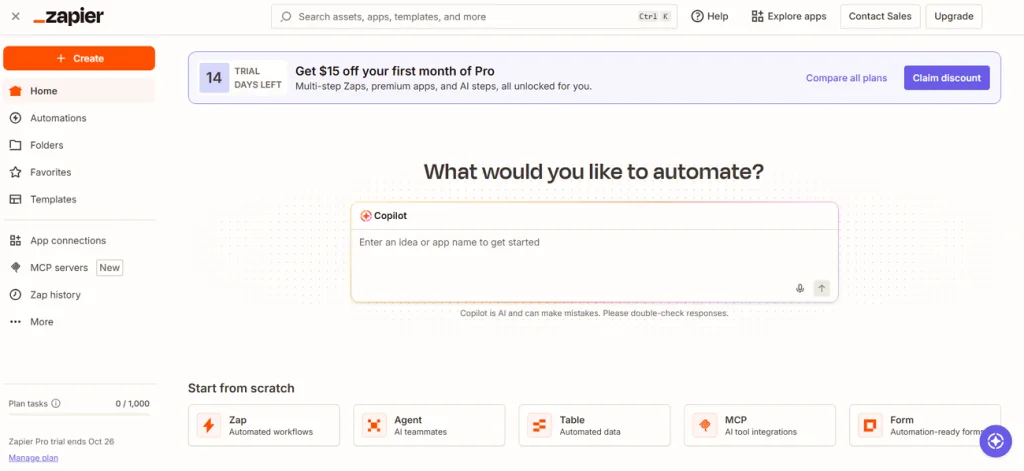
Zapier is a workflow automation platform that connects AI video generators and other apps to simplify recurring video production tasks. It can send scripts to video tools and share finished videos without repeating each task manually. Although it is not the best AI movie creator for making scenes directly, it helps keep video production moving.
Key Features
- HeyGen templates can automatically create avatar videos using information from connected apps.
- Creatomate can automatically combine ChatGPT scripts with generated images using saved video templates.
- Zapier Agents can work across 9,000+ apps to manage video creation tasks.
Pros
- New spreadsheet entries can start video creation without manual input.
- Finished HeyGen videos can reach Google Drive through Zapier.
Cons
- Video quality depends on the generator connected to Zapier.
- Saved templates limit how much you can change scenes.
Compare All AI Movie Generators
Finding the best AI movie generator depends on the type of movie you want to create. The table below shows how these 5 tools compare in features and video creation options:
| Tool | Movie Creation | Character Consistency | Video Length | Editing Control |
| MagicLight AI | Full scripts turned into scenes | Saved characters reused | Up to 50 minutes on paid plans | Edit individual storyboard scenes |
| Kling AI | Short clips with multiple camera cuts | Saved Elements keep characters consistent | Up to 15 seconds per generation | Camera cuts and clip extensions |
| Runway | Individual shots and AI sequences | Reference images help maintain appearance | Up to 10 seconds with Gen 4.5 | Change backgrounds and characters |
| InVideo AI | Complete video drafts from prompts | Agent Two maintains faces and voices | Depends on plan and workflow | Edit drafts using text commands |
| Zapier | Connects apps to create videos | Depends on connected video tool | Depends on connected video tool | Automated tasks through connected apps |
Part 2: How to Create AI Movies With the Best AI Movie Generator
MagicLight AI brings your story to life with its AI movie maker and gives you the tools to create scenes from your script. Follow the steps below to make your movie with the best AI movie creator:
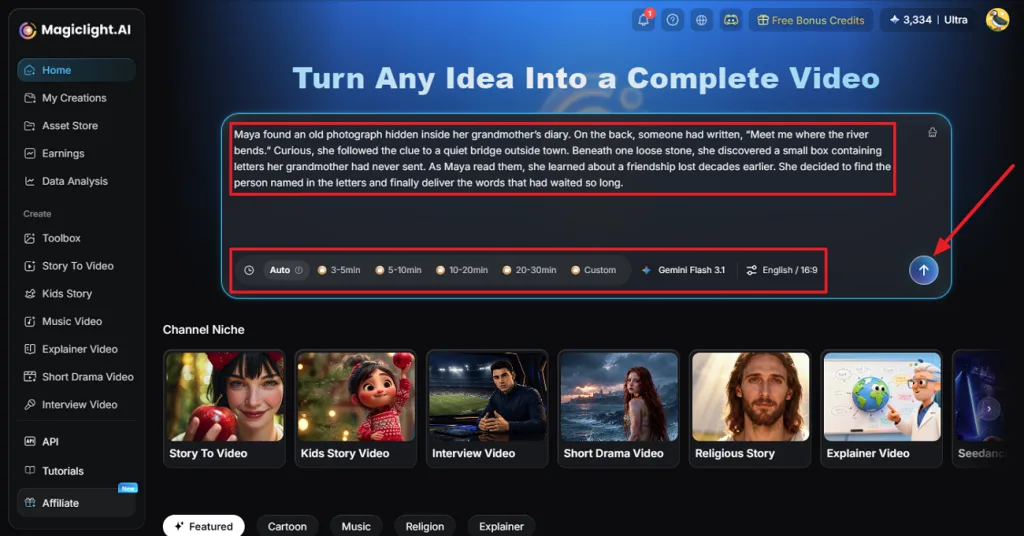
Step 1. Enter Your Movie Idea
First, open Magiclight AI and describe the movie you want to create. Choose the video length and click Send to pass your idea to MagicLight Agent.
Step 2. Develop Your Story With MagicLight Agent
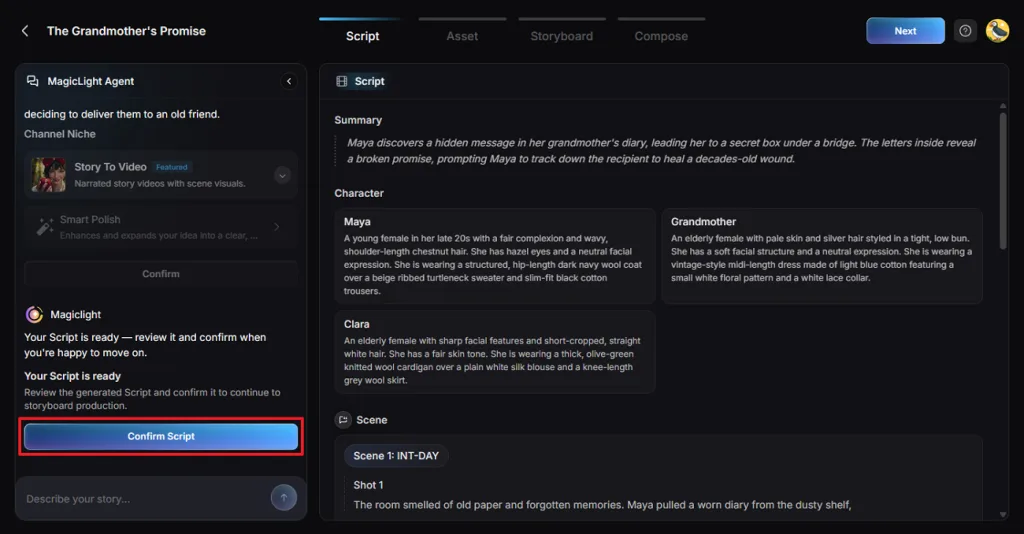
MagicLight Agent reads your idea and suggests how to turn it into a complete story. Review the summary and scenes and press Confirm Script to move further.
Step 3. Choose the Production Settings
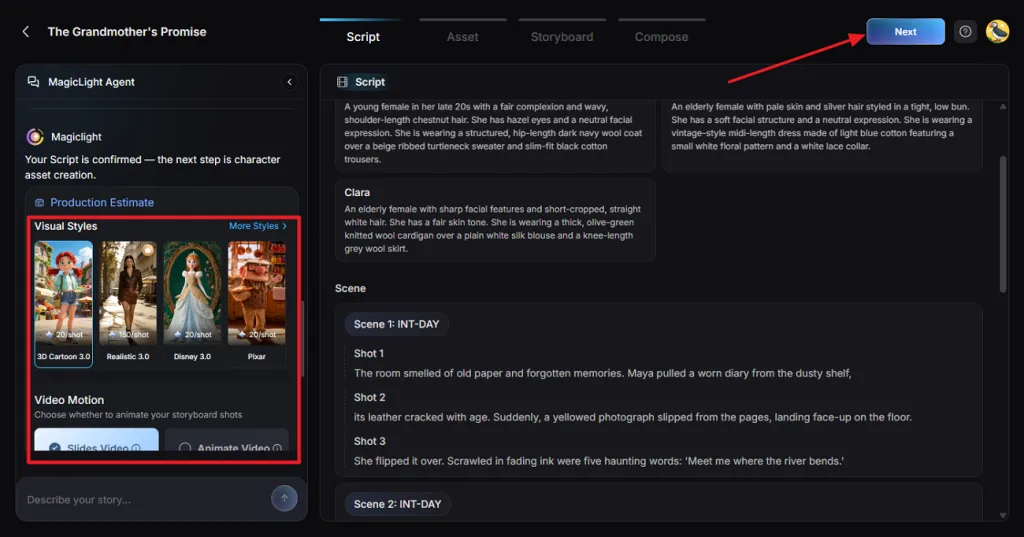
Select a look for your movie from Visual Styles in the Production Estimate section. Choose Animate Video for moving scenes and Slides Video for still images. Review the available settings and click Confirm.
Step 4. Review Your Character Assets
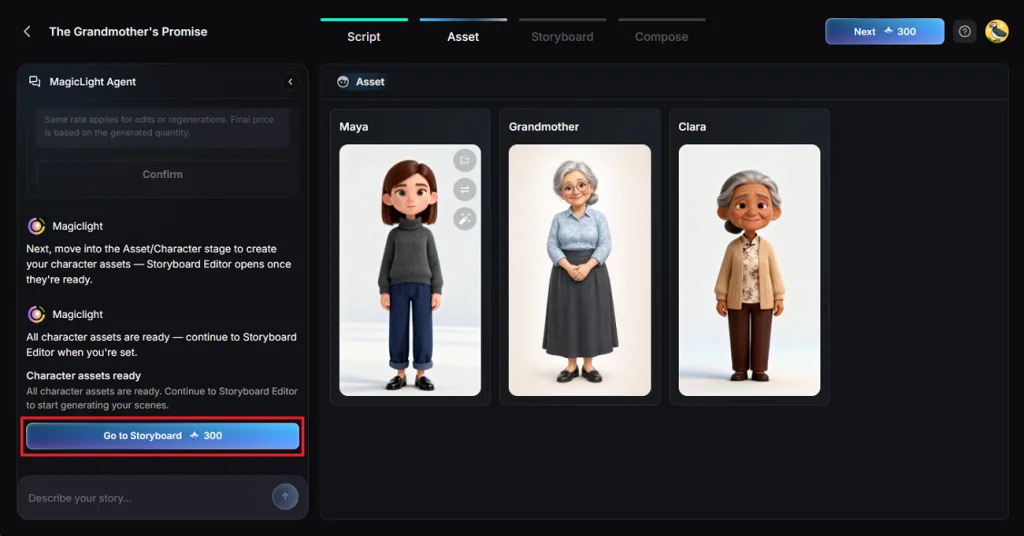
Check the character images created in the Asset section. You can adjust any design that doesn't match the character you imagined. Once everything looks right, click Go to Storyboard.
Step 5. Edit and Animate the Storyboard
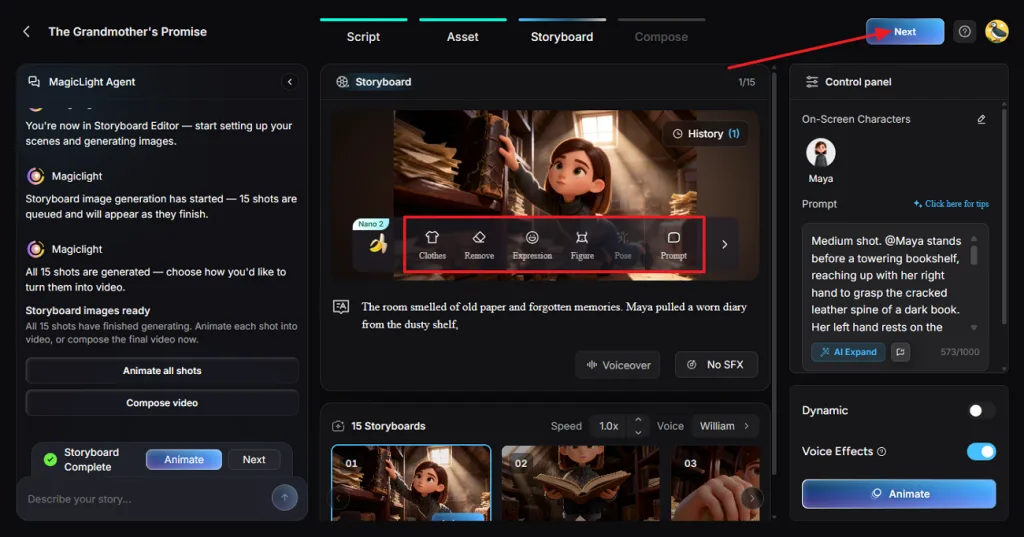
Review each storyboard shot and change the characters' clothes, expressions, and poses where needed. Once everything looks right, click Next to continue.
Step 6. Add Music and Generate the Movie
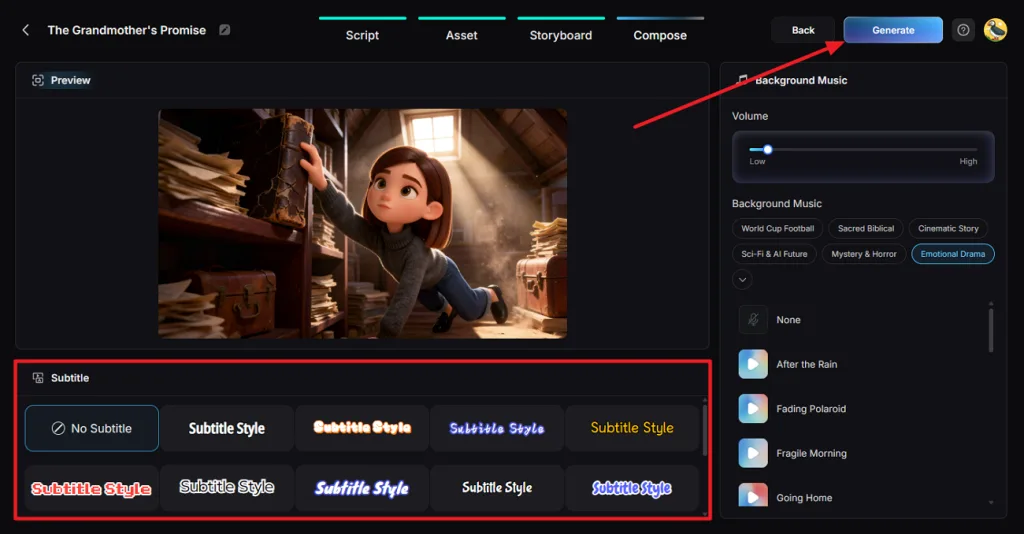
In Compose, choose Background Music that suits your movie and select a Subtitle style. Click Generate to continue.
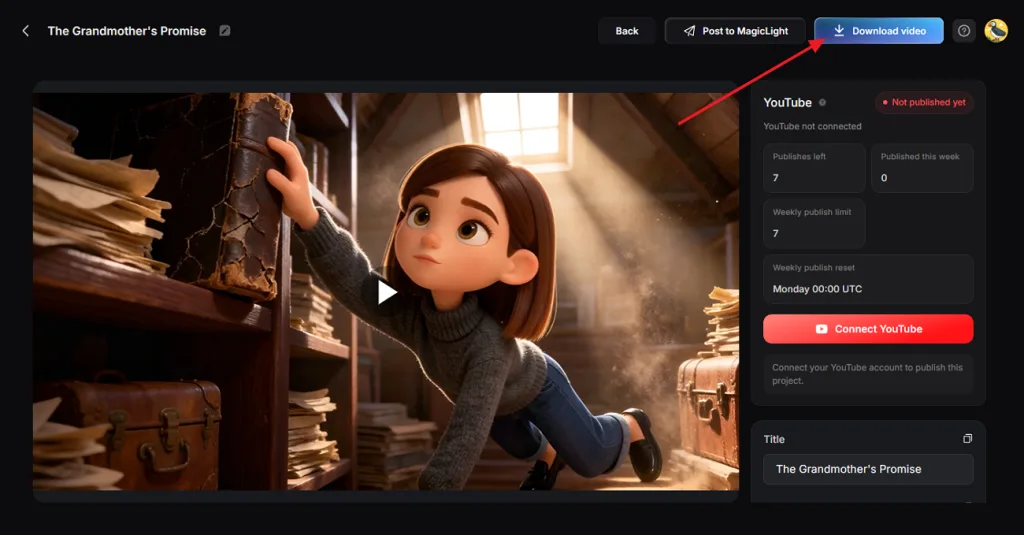
Step 7. Preview and Download Your Movie
After the video generated notice appears, watch your movie. Check the animation and sound before saving it. Click Download Video to get the finished file.
Conclusion
Finding the best AI movie generator depends on the kind of movie you want to make. Kling AI and Runway work well for short scenes that need more creative control. InVideo AI helps create quick video drafts, and Zapier connects tools to simplify production tasks. If you want to turn your stories into complete movies with consistent characters and narration, try MagicLight AI.
FAQs About the Best AI Movie Generator
- What is the best AI film generator for beginners?
MagicLight AI is a good choice for beginners who want to create movies without experience. Its Agent helps develop stories before guiding users through characters and scenes with simple controls.
- Can I create a whole movie with AI?
Yes, MagicLight AI can turn your written stories into movies with narration and music included. Its paid plans support videos up to 50 minutes long for more detailed storytelling projects.
- Is there a 100% free AI video maker?
Some AI video makers offer free plans, but they usually limit how much you create. MagicLight AI offers free access without requiring a payment card to get started making videos.
- What should you consider when choosing an AI movie generator?
The best AI movie creator should support your preferred movie length and keep characters consistent. Also check its editing options and whether it supports narration and music for your movie.
![6 Best Picture Modification Apps in 2026 to Try [New List]](https://magiclight.ai/wp-2/wp-content/uploads/best-picture-modification-apps-for-photos.jpg-300x200.webp)
![How to Turn Audio File Into Video in 2026 [Full Guide]](https://magiclight.ai/wp-2/wp-content/uploads/audio-to-video-conversion-guide.jpg-300x169.webp)
![How to Make an AI Movie in 2026 [Step-by-Step Guide]](https://magiclight.ai/wp-2/wp-content/uploads/ai-movie-creation-journey-posters.jpg-3-300x169.webp)

