


Creators often compare AI video tools when looking for better ways to produce content. In 2026, Kling vs Higgsfield compares 2 different approaches to creating videos with AI. Kling provides a video model with its own studio for generating different creative video clips.
Meanwhile, Higgsfield combines Kling 3.0 with other video engines, camera controls, and creative tools. For complete story-based projects, MagicLight AI provides another way to create longer AI videos. This guide compares their features, workflows, pricing, creative control, and uses for different video creators.
Part 1. Kling vs Higgsfield: What’s the Difference?
The main Higgsfield vs Kling differences appear in their models, tools, pricing, and access. To understand how these options compare for video creation, look at the table below:
| Feature | Kling | Higgsfield |
| Product Type | AI video model with its own creation platform | Multi-model AI creative platform |
| Video Models | Kling 3.0, Kling 3.0 Omni, and earlier Kling models | Kling 3.0 and video models from multiple providers |
| Creative Tools | Motion Control, Elements, multi-shot, and reference controls | Camera controls, model selection, character tools, and creative presets |
| Kling 3.0 Duration | 3 to 15 seconds | 3 to 15 seconds |
| Kling 3.0 Audio | Native audio generation | Native audio available through Kling 3.0 |
| Multi-Shot | Supported in Kling 3.0 | Supported when using Kling 3.0 |
| 4K Video | Available with supported Kling 3.0 options | Kling 3.0 4K generation available |
| Pricing Model | Credit-based subscriptions and credit purchases | Credit-based plans and usage pricing |
| Free Access | Free access available with usage limits | Limited free Kling 3.0 generations available |
Higgsfield hosts Kling 3.0, allowing both platforms to create similar footage from matching prompts. Kling costs less per finished second, while Higgsfield provides extra models and camera presets.
Part 2. Kling vs Higgsfield: Features and Creative Workflows
Higgsfield includes Kling 3.0, so both platforms can create similar videos from matching prompts. However, Kling vs Higgsfield differs more when comparing pricing, available models, and creative controls. To see how each platform handles video creation, compare their features and creative workflows below:
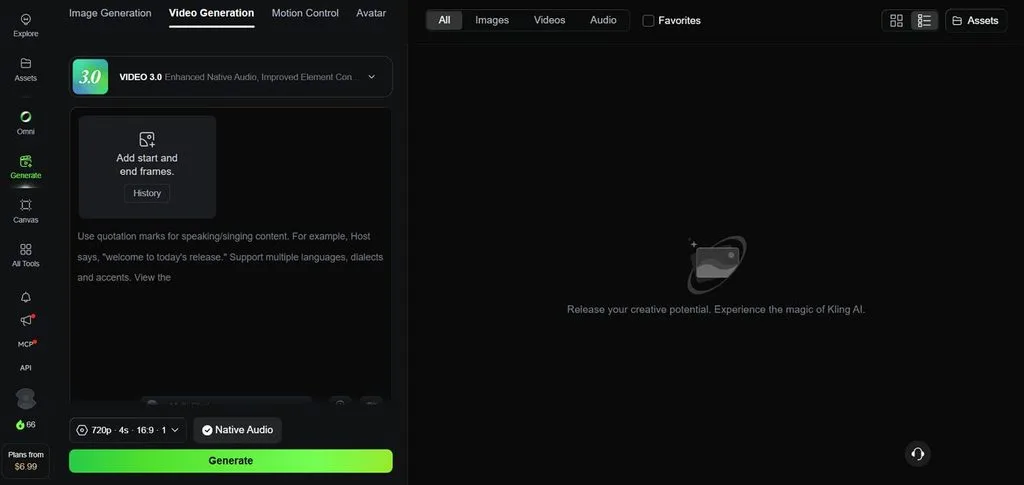
Kling: Features and Workflow
Kling’s studio focuses on detailed control over its video models, subjects, shots, and audio. The features below show how its main creative tools support different parts of video creation:
- Multi-Shot Sequences: Kling 3.0 can automatically plan connected shots or let creators set individual scenes and durations.
- Element References: Use reference images or videos to keep characters, products, and subjects consistent across generations.
- Native Audio Controls: Kling 3.0 generates native audio, while silent output can reduce the required credit cost.
- Flexible Video Duration: Create videos from 3 to 15 seconds based on the required scene length.
Higgsfield: Features and Workflow
Higgsfield combines multiple AI video models with creative tools built around flexible production and control. Its wider toolset gives creators different ways to shape characters, shots, motion, and visuals:
- Camera Presets: More than 50 camera moves provide dolly shots, fast zooms, and other cinematic controls.
- Many Engines, One Platform: Kling 3.0, Veo 3.1, Seedance, Wan, and Hailuo share credits across different video generation workflows.
- Soul ID Characters: Soul ID maintains one character identity across generations for presenters, mascots, or branded content.
- Lipsync Studio and Image Models: Talking clips support 8+ languages, while Nano Banana Pro and Seedream provide image generation tools.
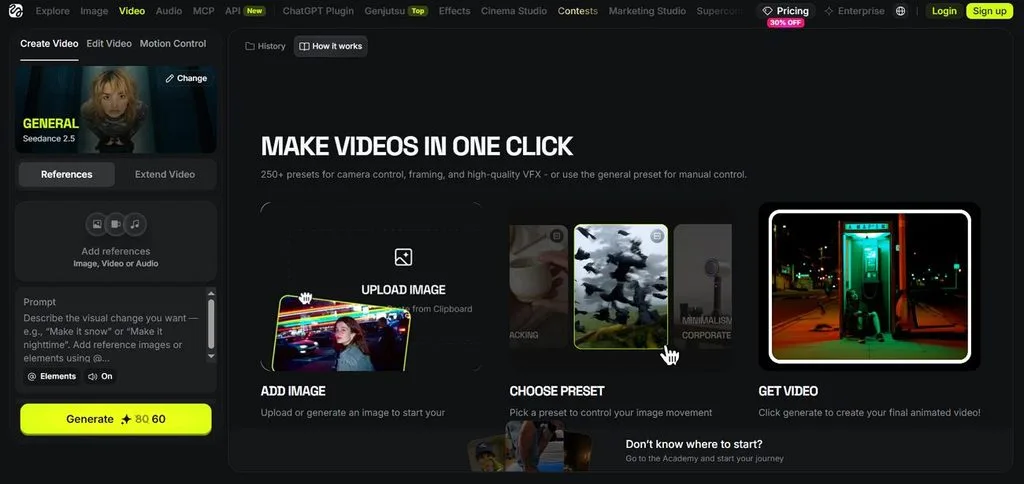
Kling focuses on refining one model through elements, motion references, and shot planning. Higgsfield lets creators test one prompt across two or three different video engines. Each version can use a camera preset before creators select the strongest final result.
Part 3. Kling vs Higgsfield: Which Fits Different Creators?
The right choice in Higgsfield AI vs Kling depends on each creator’s specific needs. To see which platform fits different creators, compare their ideal use cases in the table below:
| Creator Type | Better Fit | Why |
| Budget-Conscious Solo Creator | Kling | Lower cost per second when Kling is the only model needed |
| Ad and Product Team | Higgsfield | Camera presets make polished product moves quick |
| Multi-Model Experimenter | Higgsfield | Kling, Veo, and Seedance under one balance |
| Motion-Focused Animator | Kling | Motion Control and Motion Brush in the native studio |
| Brand Mascot or Presenter Series | Higgsfield | Soul ID keeps one character consistent |
Higgsfield changed its terms in July 2026 after concerns about its content license clause. User content may still train its models unless enterprise contracts provide different data terms. Credits reset each billing cycle, making regular monthly use more practical for active creators.
Part 4. Best Alternative to Kling and Higgsfield for Video Creation
The Kling AI vs Higgsfield comparison covers tools designed for creating individual video clips. For complete stories, creators may need one platform connecting planning, visuals, voices, and editing. MagicLight AI turns a single idea into a complete story video through one workflow.
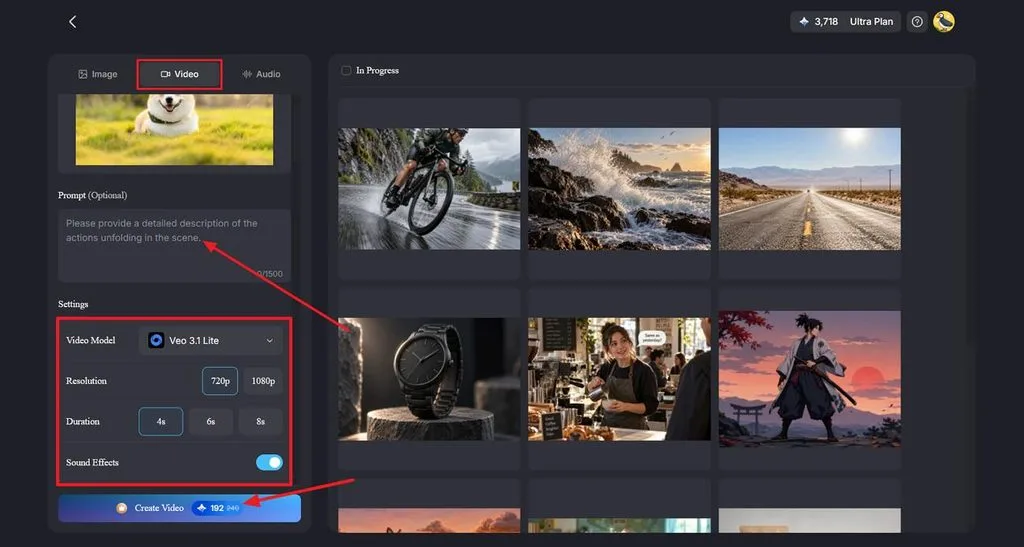
It provides a basic interface where you can input a reference image, add a 1500-character prompt and choose the appropriate model for video generation. You can find around 20 different AI video engines, including Kling 3.0, for flexible scene generation.
Guide: How to Create a Story-Based Video With MagicLight AI
MagicLight AI makes it simple to create a storytelling video from one idea. The steps below show how to turn your story idea into a video:
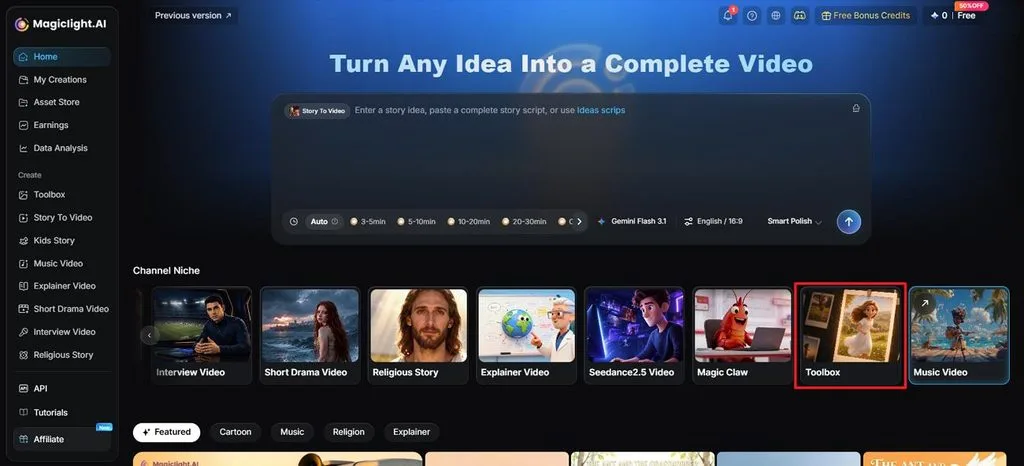
Step 1. Open MagicLight AI Toolbox
Start with launching MagicLight AI, where you need to look for the Toolbox option.
Step 2. Add Video Parameters in MagicLight AI
In the following interface, redirect onto the Video tab. Add an appropriate reference image, followed by a 1500-character prompt explaining the video dynamics. You can select any video model out of the available options, along with defining the aspect ratio and duration. If prompted, enable the option of adding sound effects to your video.
Step 3. Generate and Download From Platform
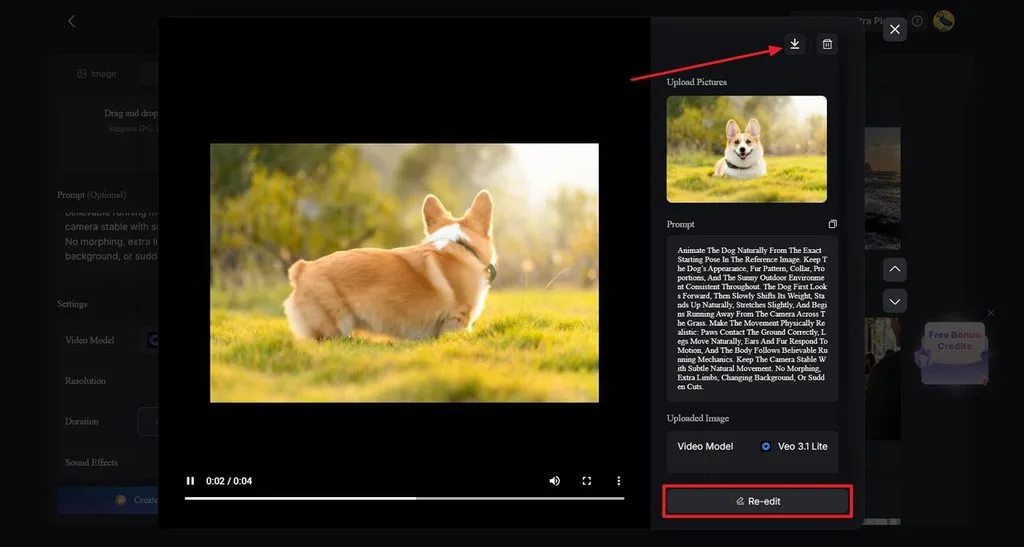
After clicking Generate, wait until MagicLight AI creates the video for you. Click to view the results, and if you are satisfied with it, simply choose the Download icon to save it. Choose Re-edit if you wish to make changes to your generation.
Conclusion
In summary, Kling vs Higgsfield compares focused generation with broader creative tools for creators. Kling gives creators native motion controls, flexible shots, and direct access to its models. Higgsfield AI brings multiple video models, camera presets, and character tools into one platform. MagicLight AI offers scripting, characters, voices, and models like Kling 3.0 for complete video creation workflows.
Frequently Asked Questions
- Is Kling available on Higgsfield?
Kling 3.0 became available through Higgsfield in February 2026 for direct video generation. Videos can run 3 to 15 seconds with 5 shots and optional 4K output. Kling’s highest plan offered lower finished-second costs than comparable Higgsfield plans during testing.
- Does Kling 3.0 support audio and multi-shot videos?
Kling 3.0 creates native audio with 5 languages, while silent generations require fewer credits. Multi-shot mode creates connected scenes within 15 seconds using automatic or manual shot planning.
- What is Higgsfield best used for?
Higgsfield works well for advertising and social teams needing controlled cinematic camera movements. Camera presets and Soul ID characters support product videos, fashion content, and recurring presenters. Kling 3.0, Veo 3.1, and Seedance also make testing different video models simpler.
- Is there an alternative to Kling and Higgsfield for creating complete story-based videos?
MagicLight AI starts with an Agent that develops scripts from simple story ideas directly. Story to Video builds connected scenes with consistent characters, narration, background music, and captions. Kling 3.0 remains available among its engines, while paid plans support 50-minute video projects.


![How to Write a Script for a Short Film in 2026 [Beginner’s Guide]](https://magiclight.ai/wp-2/wp-content/uploads/short-film-screenplay-writing-guide-300x169.webp)


