


Kling and Veo are powerful AI video models that create sound alongside generated video content. Comparing Kling vs Veo 3 reveals important differences between their latest available video models. Kling 3.0 comes from Kuaishou, while Google DeepMind develops the latest Veo 3.1 model.
Both models handle video length, realistic motion, spoken dialogue, and generation costs differently. MagicLight AI brings both model families together within one workspace for easier video creation. This guide explains their main differences, useful features, best uses, and available workflow options.
Part 1. Kling vs Veo 3: What Are the Main Differences?
Comparing Veo 3 vs Kling starts with looking at their latest available versions. Kling 3.0 arrived in 2026, while Veo 3.1 became available in late 2025. The table below compares their main differences across important AI video creation features:
| Feature | Kling 3.0 | Veo 3.1 |
| Developer | Kuaishou | Google DeepMind |
| Clip Length per Generation | Up to 15 seconds | 4, 6, or 8 seconds, with extension support |
| Resolution | Up to 1080p natively, with 4K support | 720p, 1080p, or 4K |
| Native Audio | Dialogue, sound effects, music, and ambient sound | Synced dialogue, sound effects, and ambient audio |
| Scene Tools | Automatic or custom multi-shot generation | First/last frames, scene extension, and camera controls |
| Character References | Reference images or video for consistent subjects | Reference images for characters, scenes, or objects |
| Free Access | Limited free credits available | Limited access depends on Google product or plan |
| Paid Pricing | Credit-based pricing depending on model and settings | Pricing varies by tier, resolution, plus audio; Veo 3.1 starts from $0.20 per generation |
Artificial Analysis ranked Kling 3.0 Pro 12th with 1,095 Elo in September 2026 testing. Veo 3.1 ranked 14th with 1,088 Elo, placing both models relatively close in performance. Higher-ranked models included Gemini Omni Flash, which held a stronger position on the leaderboard.
Kling offers access through its website and mobile apps for AI video generation projects. Veo 3.1 is available through Google services, including Flow, Gemini API, and Vertex AI.
Part 2. Kling vs Veo 3: Features and Best Use Cases
The Kling vs Veo 3 comparison depends on how both models perform for different projects. Kling handles motion and multi-shot scenes, while Veo focuses on prompts and spoken dialogue.
Kling 3.0 Features and Best Uses
Kuaishou designed Kling 3.0 to create longer clips with natural motion and flexible scene control. Its main features support creators working on stories, advertisements, product videos, and cinematic scenes.
- Up to 15 Seconds: Each generation supports durations from 3 to 15 seconds for longer video scenes and sequences.
- Multi-Shot Mode: Automatic mode plans different shots, while custom mode gives creators greater control over scenes.
- Elements for Consistency: Multiple images or video references help maintain consistent characters, objects, and scenes across generations.
- Multilingual Audio: Kling supports 5 languages for dialogue, including several English accents for different speaking styles.
Best For: Action scenes, product motion, trailers, multilingual social ads.
Veo 3.1 Features and Best Uses
Veo 3.1 focuses on detailed prompts, native audio, realistic visuals, and controlled video generation tools. For Kling AI vs. Veo 3, these capabilities make Veo useful for carefully directed scenes.
- Native Audio: Dialogue, sound effects, and ambient sounds appear alongside matching visuals during each video generation.
- Frame Guidance: Creators can set first and last frames or provide images for visual consistency.
- Video Extension: Standard clips run 4, 6, or 8 seconds, while extension supports longer video sequences.
- Quality Choices: Different Veo 3.1 models balance generation speed, video quality, resolution, and cost.
Best For: Dialogue videos, branded ads, explainers, cinematic scenes, and controlled shots.
Quick Picks by Project
Each video project needs different strengths based on motion, dialogue, clip length, or creative control. Now, look at the table below to find suitable models for different video projects:
| Project Type | Better Fit | Reason |
| Sports or Action Ad | Kling 3.0 | Natural motion for fast action scenes |
| Talking-Head Explainer | Veo 3.1 | Native audio with synchronized dialogue |
| Multilingual Social Ad | Kling 3.0 | Dialogue support across 5 languages |
| Brand Shot With Exact Framing | Veo 3.1 | Detailed prompts with first and last frame control |
| 15-Second Multi-Shot Teaser | Kling 3.0 | Multiple shots within a single generation |
| 4K Hero Clip | Veo 3.1 | Supports 4K output on eligible models |
Part 3. Best Tool to Combine Kling and Veo 3 in One Workflow
Creators comparing Veo 3 vs Kling can use both models for different video creation needs. Using separate platforms can increase costs while making scenes harder to manage across projects.
MagicLight AI turns a 1,500-character prompt with up to 5 reference images into videos. Creators can generate videos up to 30 seconds while choosing models suited to different visual needs. Its library includes 20 AI video models, covering Kling and Veo, with Veo 3.1 available.
The Image to Video workflow makes it easier to animate images without switching between separate platforms. For longer projects, Story to Video builds complete scenes, while the Long Video Generator supports videos up to 50 minutes.
Guide: How to Use Kling and Veo Engines in One MagicLight AI Workflow
MagicLight AI lets creators use Kling and Veo engines together within one simple workflow. Follow the steps below to create videos using both engines for different creative needs:
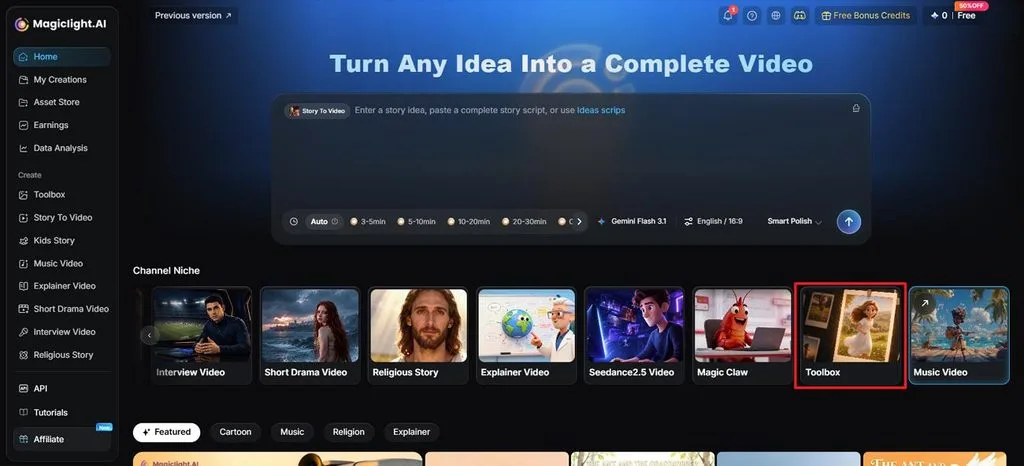
Step 1. Open the Video Creation Tool
Go to MagicLight AI, open Toolbox, and choose the tool for creating videos from images.
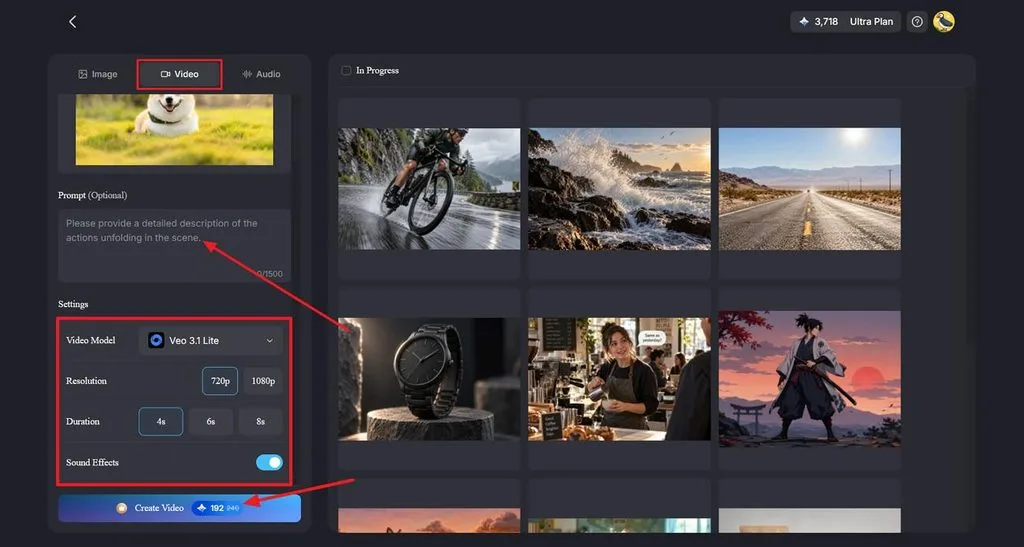
Step 2. Add Your Image and Video Details
In the Video tab, upload your image, then write a prompt describing the movement, action, and camera direction. Select a Kling or Veo model from the available video models, then choose your preferred resolution and duration. Enable sound effects when the selected model supports audio, then click Create Video.
Step 3. Review and Save Your Video
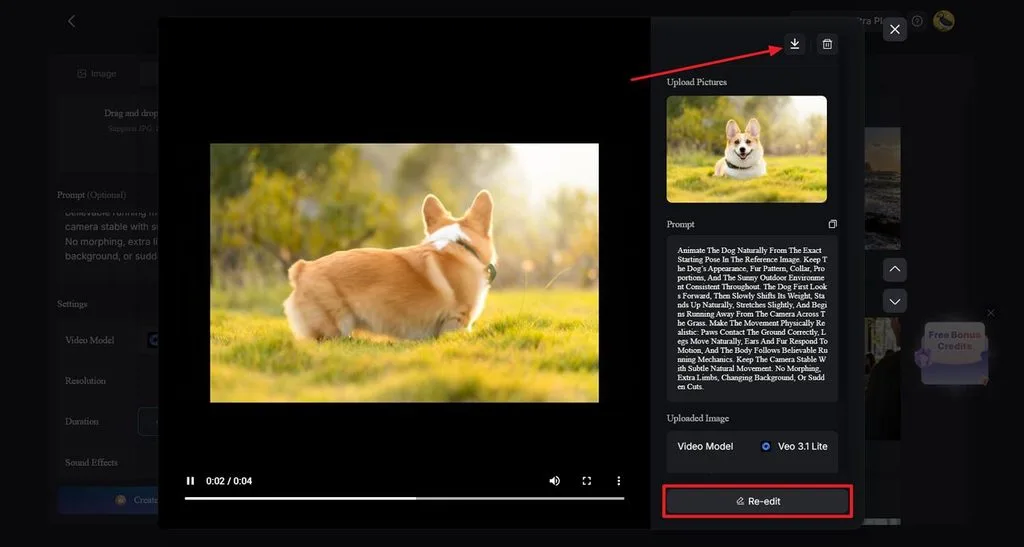
Preview the generated result to check the motion, subject consistency, and overall visual quality. Use Re-edit to adjust your prompt or settings when necessary. Once everything looks right, select the Download icon to save the finished video.
Conclusion
In summary, Kling vs Veo 3 offers different strengths for various types of video projects. Kling handles longer clips, natural motion, multi-shot control, and multilingual dialogue for creative video projects. Veo supports detailed prompts, synchronized speech, controlled framing, and high-resolution output for polished video projects. MagicLight AI combines both model families, helping creators animate images within one convenient video workflow.
Frequently Asked Questions
- Which is better for realistic AI videos, Kling or Veo 3?
Both models create realistic videos, but their strengths work better for different scene types. Veo handles detailed prompts with spoken scenes, while Kling delivers smoother physical motion. Kling suits action scenes, while Veo works better for realistic dialogue-focused video projects.
- Does Kling or Veo 3 have better AI audio?
Veo provides synchronized dialogue, sound effects, and ambient audio inside each generated video. Kling supports dialogue across 5 languages, making multilingual video projects easier to create.
- Which tool is better for creating story-based AI videos?
Kling supports multi-shot generation, making short story sequences easier to create within clips. Veo works well for dialogue-focused scenes, with extension tools supporting longer video sequences.
- Is there an alternative to Kling and Veo 3 for complete AI video creation?
MagicLight AI simplifies the Kling AI vs. Veo 3 comparison by offering both within one workspace. Its tools animate images and maintain characters, creating longer videos from simple creative ideas. Paid plans support projects reaching 50 minutes, providing more room for longer video stories.


![How to Write a Script for a Short Film in 2026 [Beginner’s Guide]](https://magiclight.ai/wp-2/wp-content/uploads/short-film-screenplay-writing-guide-300x169.webp)


