


Most video platforms expect people to control every step through a standard editing interface manually. LibTV takes another approach by supporting both human creators and AI agents for video production. Creators can use its visual canvas, while AI agents access the same generation pipeline directly.
This shared system sets LibTV apart from many standard AI video creation tools. Our LibTV review covers its workspace, creative nodes, supported models, features, and export limits. You will also discover an alternative that offers another approach to creating AI video content.
Part 1. What is LibTV?
LibTV is an AI video platform from LiblibAI, expanding its work beyond image sharing. Its core offering combines a video-creation workspace plus an agent-callable API for varied production needs. The platform serves creators, marketers, filmmakers, agencies, and developers working across different video production projects.
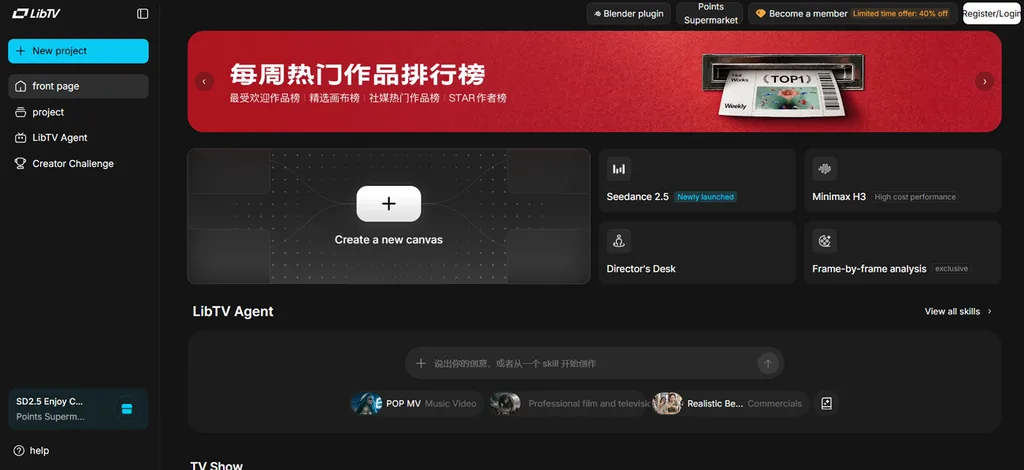
Its interface uses a spatial working environment instead of the timeline structure found in editors. Specialized editing tools include portrait adjustment, virtual character integration, 720° panoramas, and subtitle erasure. This approach supports visual planning and automated production without restricting LibTV to one creator type.
Key Features of LibTV
- Infinite Canvas Workflow: Canvas workflows connect 5 node types covering text, image, video, audio, and scripts into reusable templates.
- Script to Storyboard: Written scripts become storyboard scripts, batch images, and video clips, while keeping each stage independently adjustable.
- Professional Creative Controls: Creative tools provide three-view sheets, 360° presentations, 9/25-grid storyboard splitting, lighting, cameras, and master shots.
- Image to Video: Reference images become videos, while Plot Deduction explores events happening before and after each scene.
- Model Access: Available models include Seedance 2.5 and Kling alongside language, image, and audio options under one account.
- Agent Skill Pack: Open-source “libtv-skills” connects AI agents through OpenAPI using API keys and natural-language generation instructions.
Pros and Cons of LibTV
LibTV provides creative tools that support creators across different video production workflows. However, some platform limitations can affect the experience for new and experienced users.
Pros
- Individual storyboard stages stay editable after initial generation.
- Existing sessions support continued work across multiple generations.
- Open-source agent skills support custom automated production workflows.
- Multi-scene projects support connected generation across production stages.
Cons
- API lacks project renaming, deletion, and migration controls.
- Chinese interface creates difficulties for users without Chinese language knowledge.
- Agents lack detailed control over individual canvas nodes.
- Built-in editing cannot handle complete final video assembly.
Part 2. How to Start Creating with LibTV
Creating your first LibTV project involves arranging content across its flexible canvas workspace. Now, follow the steps below to build and generate your first video project:
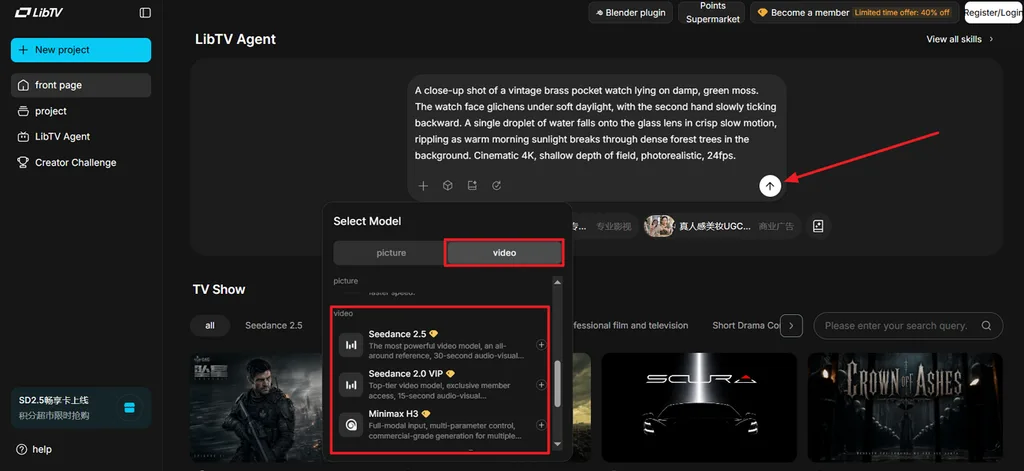
Step 1. Once you enter the main interface, enter the video script and press Select Model. Next, switch to the Video tab and choose a model. After that, press the Send button to move towards the storyboard.
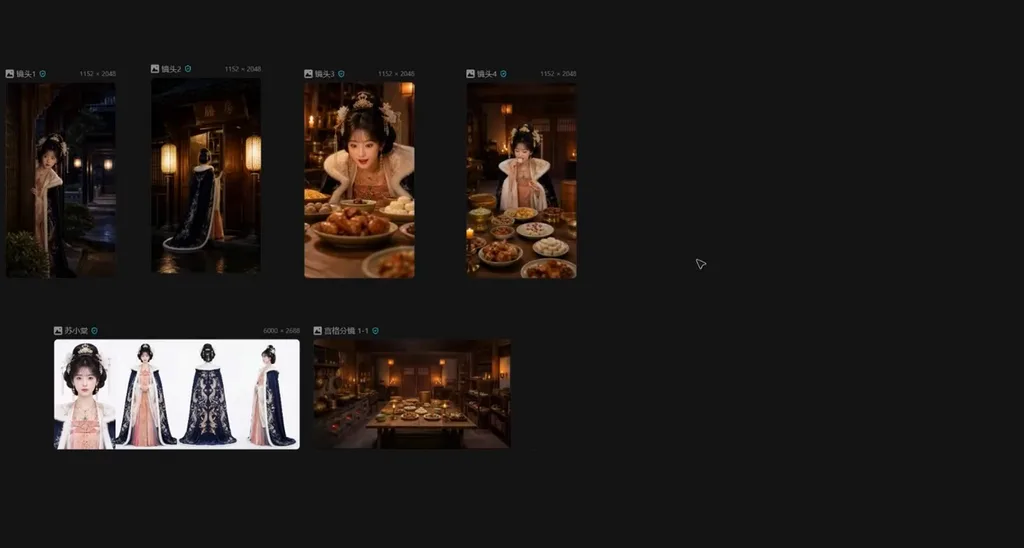
Step 2. Review the story scenes in the storyboard and make any adjustments in a specific scene by clicking on that. Once done, start the video generation process.
Step 3. After the video is generated, play the video in the Preview panel and press Download to save the video.
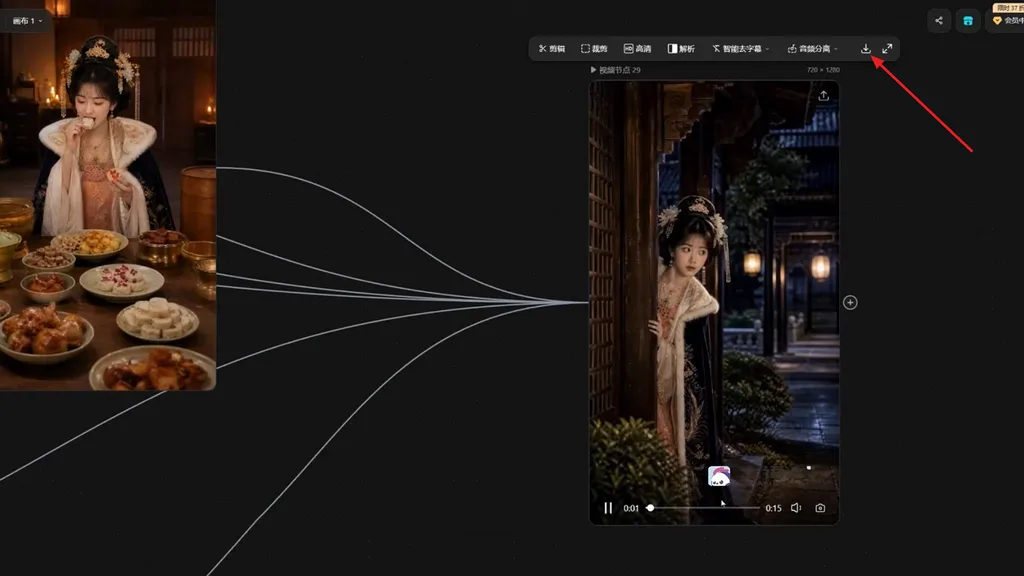
Developers have a second route worth knowing about here. Installing the libtv-skills package into an agent such as OpenClaw or Claude Code allows the entire sequence above to run from a single natural-language instruction instead.
Part 3. Best LibTV Alternatives for AI Video Creation
LibTV creates individual video assets, but final assembly can still require another editing application. Users may need to combine clips, narration, captions, and covers after completing their generations elsewhere. Such extra editing work can push creators toward alternatives offering a more complete production process. This is where MagicLight AI comes in with an end-to-end approach for video creation.
Its image-to-video feature transforms still visuals into engaging video scenes with controlled movement and depth. MagicLight AI also supports 11 languages, helping creators produce videos for audiences across regions. For creators wanting fewer editing steps, MagicLight AI provides a practical alternative to LibTV.
Key Features of MagicLight AI
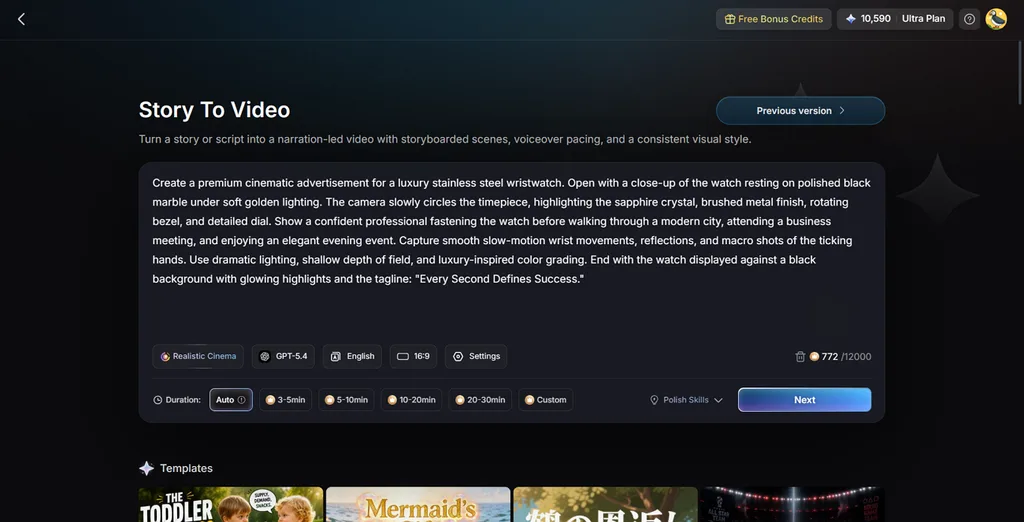
1. Story to Video: Scripts accept up to 12,000 characters and produce videos reaching 50 minutes. Structure and pacing adapt to the selected settings and needs of each video project.
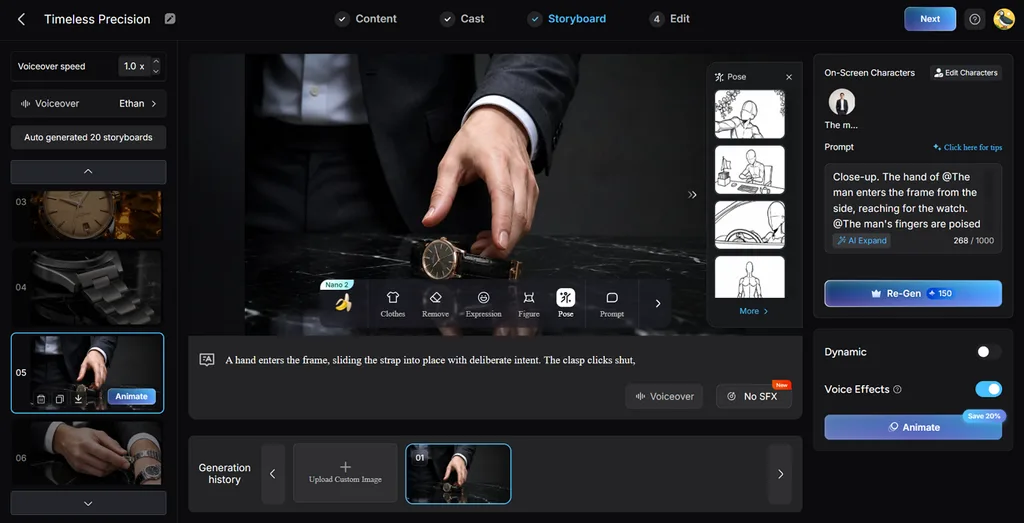
2. Nano Storyboard: Each scene appears separated, letting users rewrite every prompt before starting generation. Wardrobe, facial expression, physique, and 50 pose options remain adjustable per shot.
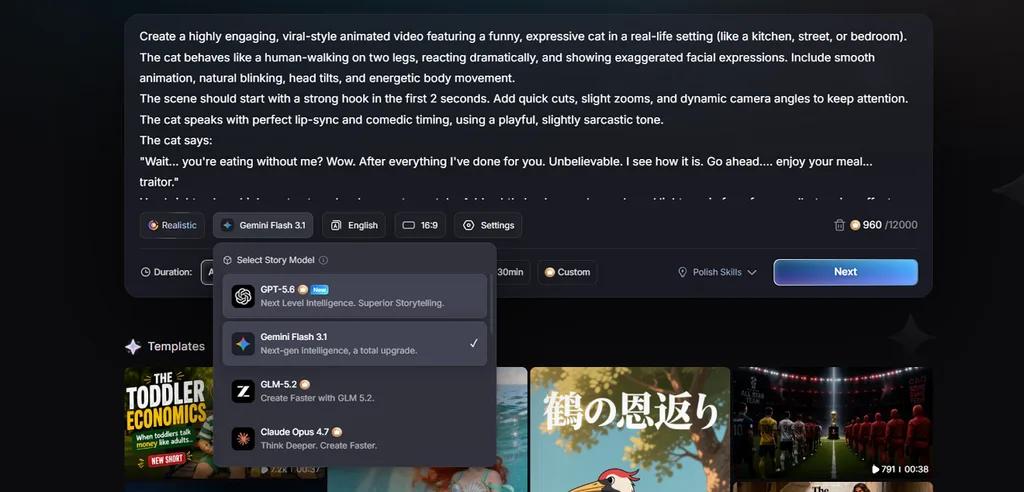
3. Story Models: MagicLight AI offers 9 models, including Gemini Flash 3 and Qwen 3.5. Each model creates stories suited to different creative styles and project requirements.
4. AI Character Creation: Describe characters within 1,000 characters or upload pictures as visual references instead. Saved characters enter your library, keeping the same face across later projects.
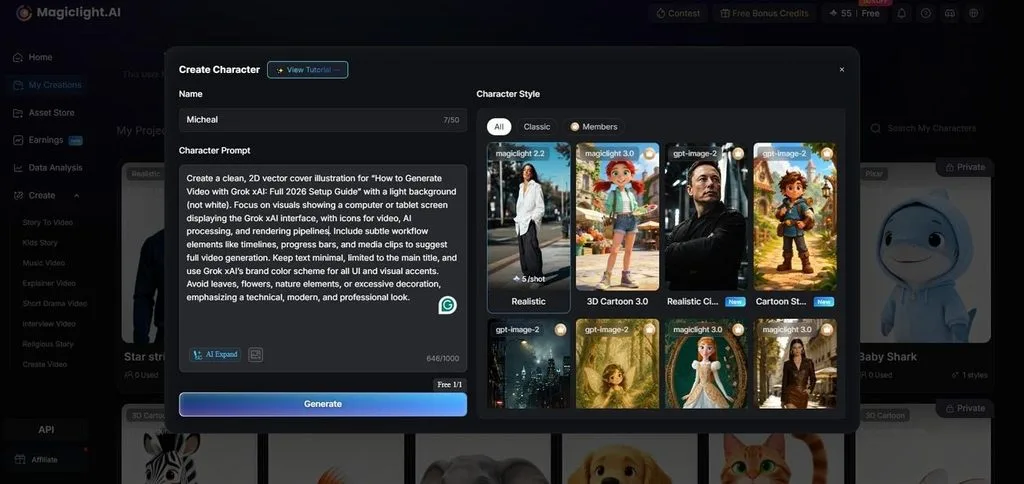
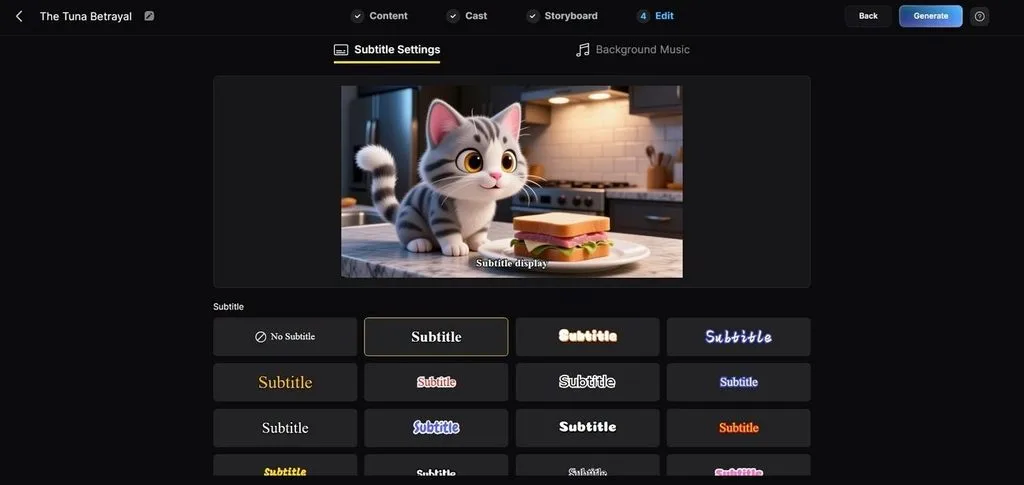
5. Subtitle and Export Settings: Subtitle options include 16 styles, while projects offer 40 background music tracks. Videos export at 720p or 1080p, with covers generated from 21 templates.
Part 4. Comparison Table Between LibTV and MagicLight AI
LibTV offers more production control, while MagicLight AI focuses on a simpler creation process. The table below compares both platforms across key features, workflows, controls, and video outputs:
| Feature | LibTV | Magiclight AI |
| Workspace | Infinite canvas with connected nodes | 12,000-character script-led project view |
| Storyboard | Generated, then arranged on canvas | Generated and editable in sequence |
| Final Assembly | Export clips to an outside editor | Finished video downloads directly |
| Narration | Audio nodes available on canvas | 37 voices with cloning at export |
| Character Consistency | Three-view sheets and reference control | Saved cast reused across projects, consistent characters across scenes |
| Model Access | Seedance 2.5 and Kling series | 20 AI Models including Seedance 2.5, Gemini 3.5 Flash, and more |
| Agent Support | Open-source skill pack over OpenAPI | Built-in conversational agent |
| Learning Curve | Steep for anyone new to Node Canvases | Minimal, since the script leads |
| Free Access | Registration is free; generation uses points | Free plan without a card |
| Best Suited To | Creators who want stage-by-stage control | Creators who want a finished piece |
Conclusion
To conclude, LibTV combines canvas-based creation, model access, and agent support for video production workflows. Its node system gives creators more control, but final assembly can require extra editing work. Creators seeking simpler workflows may prefer tools that can make free AI videos from scripts. If you want finished videos with fewer editing steps, use MagicLight AI for your projects.
FAQs on LibTV
- Can I use LibTV for free?
LibTV registration costs nothing, but video generation uses memberships and a model-points-based payment system. Creator challenges and promotional discounts can change costs, so check LibTV for current pricing information. MagicLight AI offers free signup without cards, while paid tiers include commercial usage rights.
- How is LibTV different from traditional AI video generators?
Traditional generators accept prompts and return clips while keeping their generation pipelines hidden from users. LibTV exposes its pipeline through connectable canvas nodes, giving users control over each production stage. Its API gives AI agents access to these capabilities, unlike many conventional video generation tools.
- What types of videos can I create with LibTV?
LibTV supports short dramas, advertisements, film concepts, television, anime, games, comics, and educational content. Storyboard sequences also suit its grid tools, while longer narratives still require assembly in other applications. MagicLight AI creates finished videos reaching 50 minutes, reducing the need for manual clip assembly.


![How to Write a Script for a Short Film in 2026 [Beginner’s Guide]](https://magiclight.ai/wp-2/wp-content/uploads/short-film-screenplay-writing-guide-300x169.webp)


