


Today, producing videos through traditional methods often requires significant time, technical expertise, and budget. This creates a massive challenge for creators who need to publish content regularly to stay visible and relevant. From scripting and editing to rendering and optimization, the entire process can slow down creativity and delay execution.
Here, Perchance AI Video Generator automates your complex tasks, transforming simple ideas into compelling videos. With this generator in hand, users can now focus more on creativity, generating content that drives global attention. To gain complete command of its capabilities, keep your eyes on the following article till end.
Part 1. Perchance AI Video Generator: Introduction
AI Video Generator Perchance is an online AI feature that allows you to turn short text prompts into automatically generated videos. This video generator is one of many tools that users can open in the browser and use for free. It runs within the broader Perchance.org ecosystem, a site for custom AI and random generators.
Perchance AI Video Generator Free: Key Features To Know
As more users turn to free video creation tools, knowing what a platform offers makes using it even easier. In this context, we’ve highlighted the key features of Perchance AI Video Generator to shift your interest towards it:
- Completely Free and No Sign‑Up: You can use the video generator without paying, creating an account, or buying credits; it's free.
- Text‑to‑Video from Simple Prompts: Without any editing skills required, simply write a short description and let AI create a video out of it.
- Optional Image‑to‑Video Animation: Some versions let you upload a picture and then animate it into a short moving clip.
- No Software Installation (Web‑Based): The generator completely runs in your browser, so there is nothing to download or install on your device.
- Customizable Video Settings: Users can adjust video duration, style mode, animation style, animation intensity, and voiceover within the same interface.
- Fast Preview and Quick Iteration: After you click generate, the tool usually creates a short preview within seconds to a minute.
- Downloadable MP4 Without Watermarks: Once you’re satisfied with the results, you can download the video file (usually MP4) without a watermark.
Perchance AI Video Generator Pros and Cons
Before reaching a conclusion about adopting the Perchance AI Video Generator online free tool, it is important to weigh its pros and cons:
Pros
- You can open the generator page and start making videos immediately without installing it.
- The interface is simple: you just type a description, choose basic options, and click Generate.
- Since it's free, users can test many different prompts, styles, and ideas for the perfect result.
- Perchance is convenient for generating short or animated snippets that you can later download.
- There are a lot of shared Perchance video pages, so you can study how others perform it.
Cons
- Some videos look creative and usable, but others may be blurry, low‑resolution, or have artifacts.
- As it uses shared online servers and external AI models, generation might take a long time.
- A few Perchance video pages are experimental, meaning they may output some of the frames.
Perchance AI Video Generator Not Working: Common Issues You Face
Remember, being aware of potential problems ensures a smoother video creation experience on any platform. In terms of Perchance AI Video Generator not working, you might be facing the following issues specifically:
1. “Generate” Button Does Nothing: Sometimes you click Generate, and it keeps saying “starting” or “generating,” and no video ever appears.
2. You Get Only an Image, not a Video: Many video pages return a single picture or a styled thumbnail instead of a moving clip itself.
3. Video Won’t Play: On some Perchance generators, you see a thumbnail, but there is no play button, and clicking it does nothing.
4. Download, or Export Does Not Work: Buttons like download or export may show an error or do nothing at all.
5. Error Messages About Server or Connection: You might see messages like “there was a problem connecting to the server” or “something went wrong on the server.”
Part 2. Why You Should Try Other Tools Instead of Perchance AI
Despite wasting time on Perchance AI Video Generator free issues, isn’t it better to switch to another tool for a stable workflow? At this point, consider MagicLight AI as an alternative that allows you to paste very long scripts up to 1200 words. Here, creators can choose from different terrains (environments or backgrounds) before they start generating a video. The tool supports 11 different languages, and you can pick from 9 story models.
Most importantly, it has an option to adjust the aspect ratio, so your video fits the platform's needs. Besides this, you can select between different visual models such as Midjourney V7, MagicLight 3.0, or 2.2. Surprisingly, it enables creators to set the video length to up to 50 minutes, making it easier for both long and short clips. Additionally, its Magic Claw feature streamlines video creation, scheduling, publishing, and performance tracking in one unified workflow.
Key Features
- Character Creation and Selection: You can create or choose characters, set their names, age type, and pick a voice from 37 options.
- Storyboard Preview and Editing: The tool automatically creates a storyboard for your script, making it easy to edit the prompts and scenes.
- Subtitles, Music, and Quality Settings: It offers a range of subtitle styles, different background music tracks, and export resolution options.
Ultimate Guide to Generate Videos Using MagicLight AI
Creating an AI video can be extremely easy if you follow the guided tutorial as demonstrated below:
Step 1. Create a New Video Project
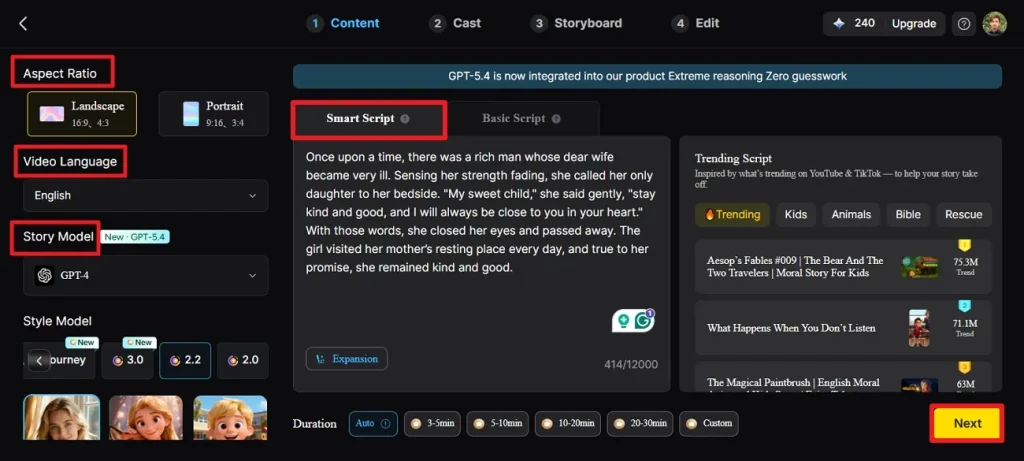
Open the Story-to-Video tool, then select your required aspect ratio and video length. Choose an appropriate language, along with your preferred story style. Once done, type your script into the Smart Script box and press the Next button.
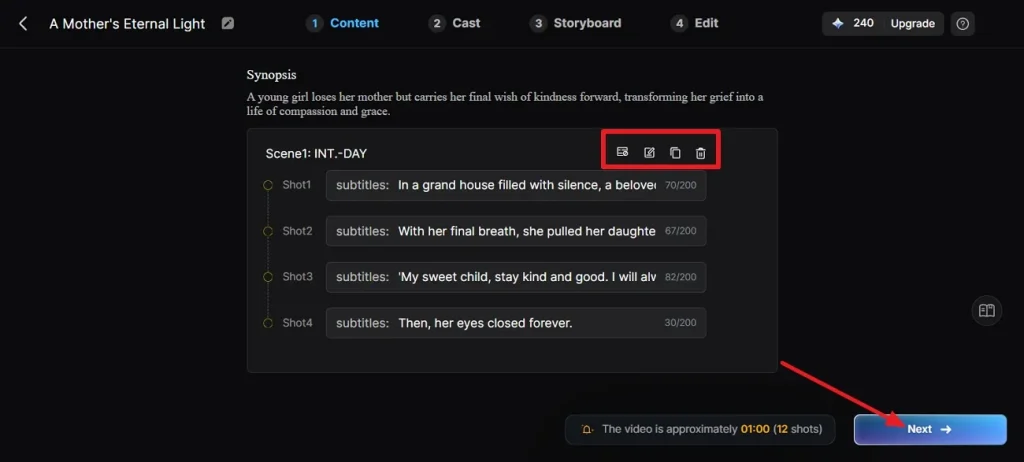
Step 2. Analyze the Scene Breakdown
Now, review the generated scene and use the controls at the top to modify it if any changes are required. Click Next to proceed with the creation process.
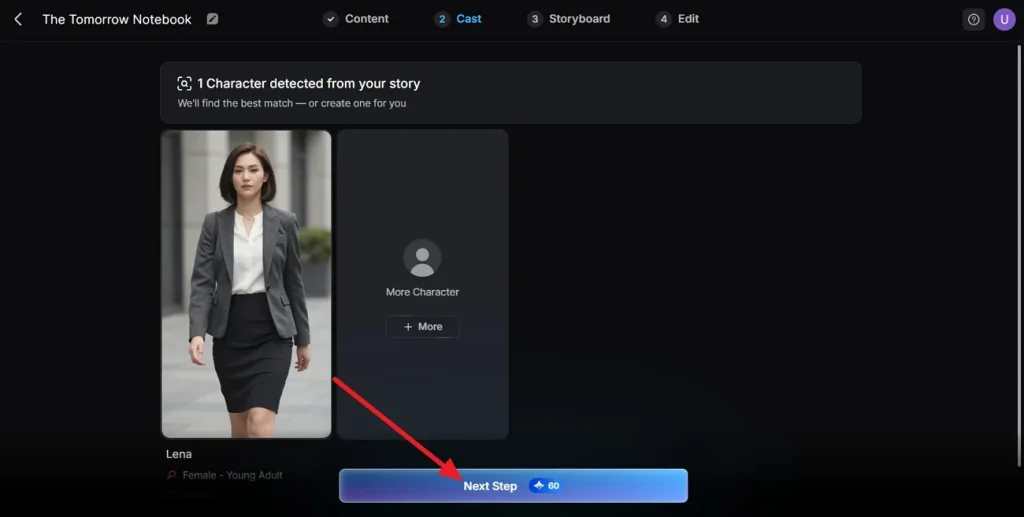
Step 3. Choose a Character for the Video
After this, the system will automatically suggest character options; select one and press Next Step.
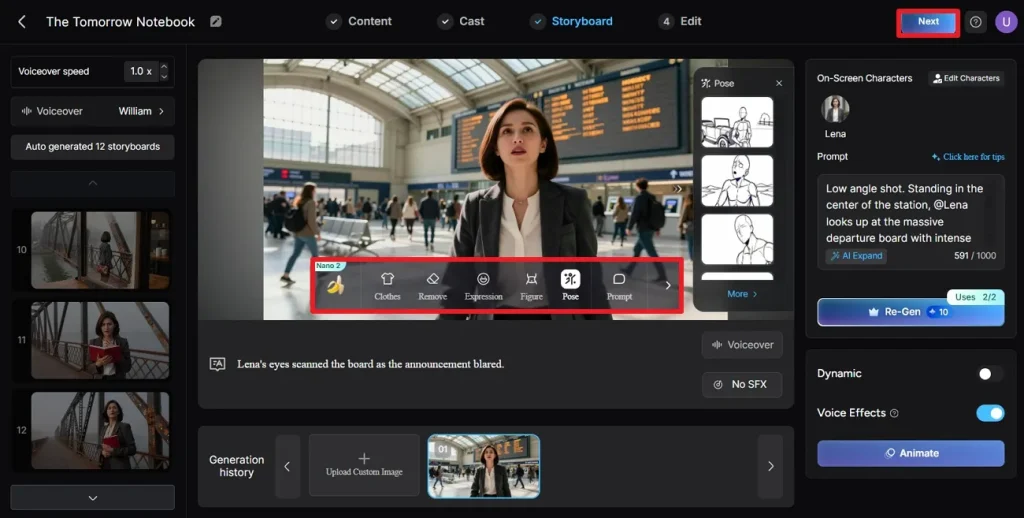
Step 4. Adjust the Storyboard
Preview and modify each using the provided controls, then click Next to move on.
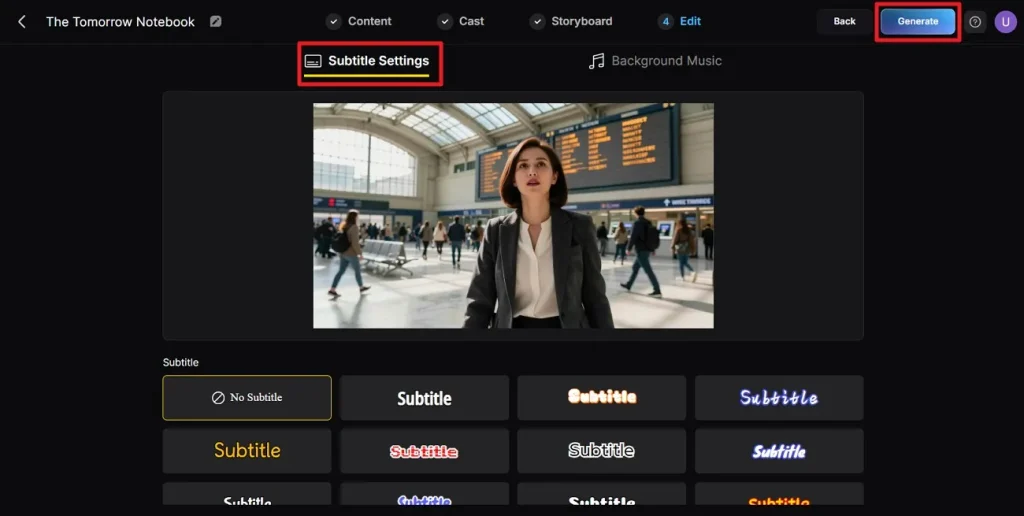
Step 5. Insert Subtitles to Your Video
Now, choose a subtitle style for your video, then press the Generate button once it's finalized.
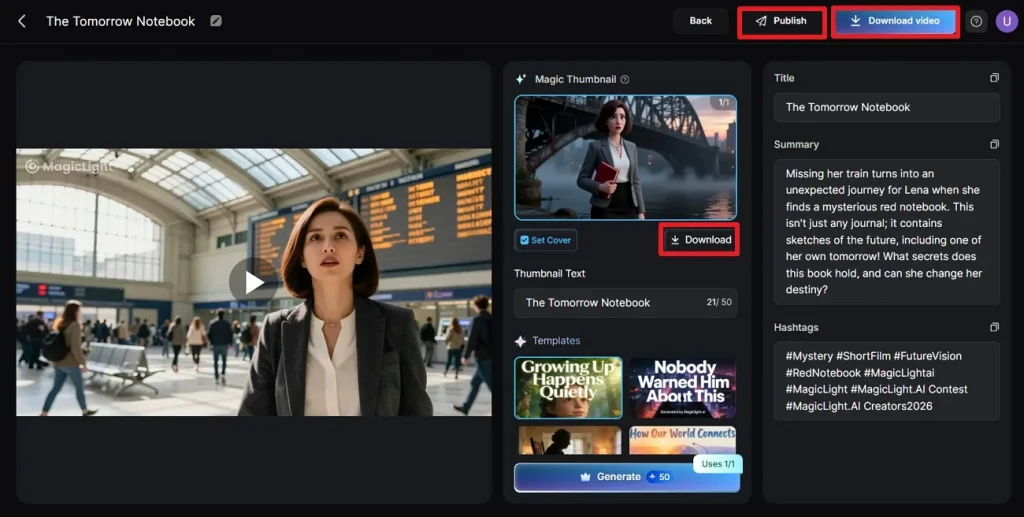
Step 6. Examine the Video and Download It
Once video generation is complete, preview it and click the Download button to save it.
Conclusion
In conclusion, you’ve seen that Perchance AI Video Generator offers a simple and very accessible way to transform text into visuals online. Its ease of use and creative flexibility allow users to experiment with visual storytelling without needing expensive software. However, it is recommended to switch to a more refined video-creation experience with MagicLight AI for better control and higher-quality results.
FAQs on Perchance AI Video Generator
1. Is Perchance.org's AI video generator safe?
No, the Perchance AI Video Generator free isn’t a safe option at all; thus, use MagicLight AI as a safer option.
2. Why is Perchance AI video generator not working sometimes?
This platform might not work sometimes due to server issues, limited functionalities, or the tool not being a true generator.
3. What are the best alternatives to Perchance AI video generator?
Among many, MagicLight AI is a highly recommended alternative as it provides a large text description space and more control for modifications.
4. Do I need to sign up for Perchance AI tools?
Not at all, you don't usually need to sign up for Perchance AI tools, because most generators work without an account.
5. Can I use Perchance AI video generator online for free?
Yes, you can use the Perchance AI video generator online for free, as it is a browser-based tool that typically doesn’t require sign-up.





![How to Make a Marketing Video 2026 [Step-by-Step Guide]](https://magiclight.ai/wp-2/wp-content/uploads/marketing-goal-planning-guide-300x200.png)