AI music generators have moved beyond basic synthetic vocals, with many platforms now producing convincing singing, phrasing, vibrato, and expressive performances. The bigger differences often appear after a track is created, especially around licensing, ownership, and commercial use.
Choosing the best AI song generator means looking beyond sound quality alone. Free plans may restrict commercial releases or require upgrades for broader usage rights. Understanding these terms helps creators choose a platform that fits both their music and publishing goals.
Part 1. 6 Best AI Song Generators for Creators To Try
Not every AI music tool is built for the same job. Some handle vocals better, others focus on instrumentals, while a few offer stronger licensing or release options. The 6 best AI song generators below are organized by those strengths, so you can compare each tool before choosing one.
1. MagicLight AI
Best For: Musicians who need a publishable video, not only a finished audio file.
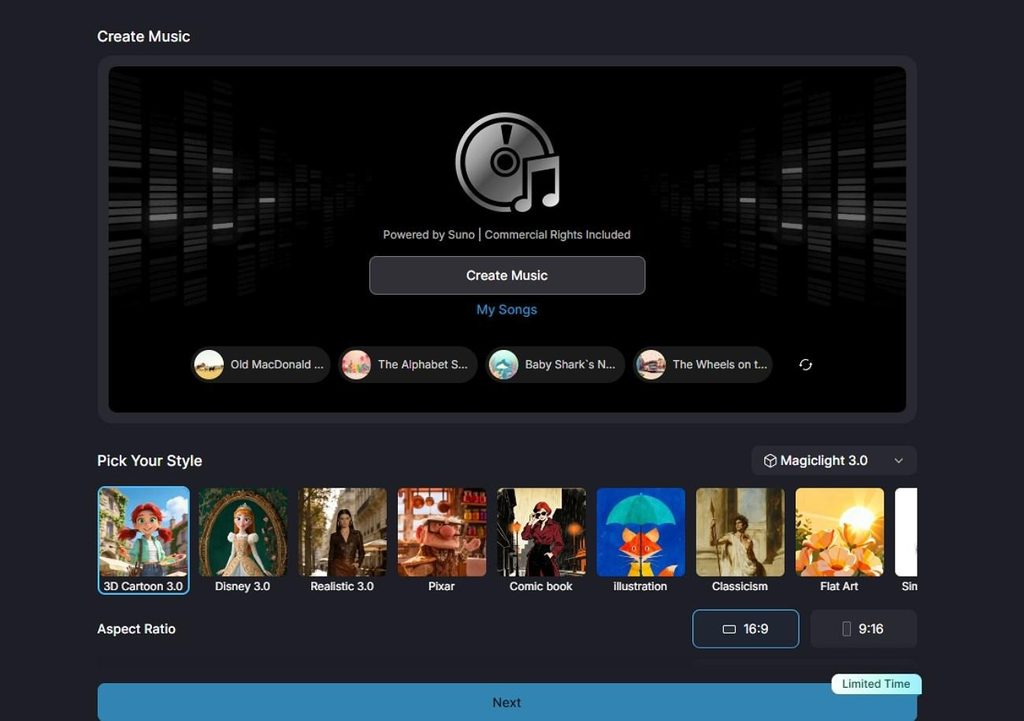
MagicLight AI takes a broader approach than a standard AI song generator by pairing music creation with video production from the start. Instead of generating audio first and sending it elsewhere for editing, the platform can make a finished music video around the track, complete with timed scenes, characters, captions, and cover artwork.
Song creation begins with a genre and a short brief, or you can choose from 15 ready-made songs when speed matters more than customization. From there, MagicLight aligns the visuals to the audio and carries the project through to export, giving creators a more direct route from an idea to publishable music content.
Key Features
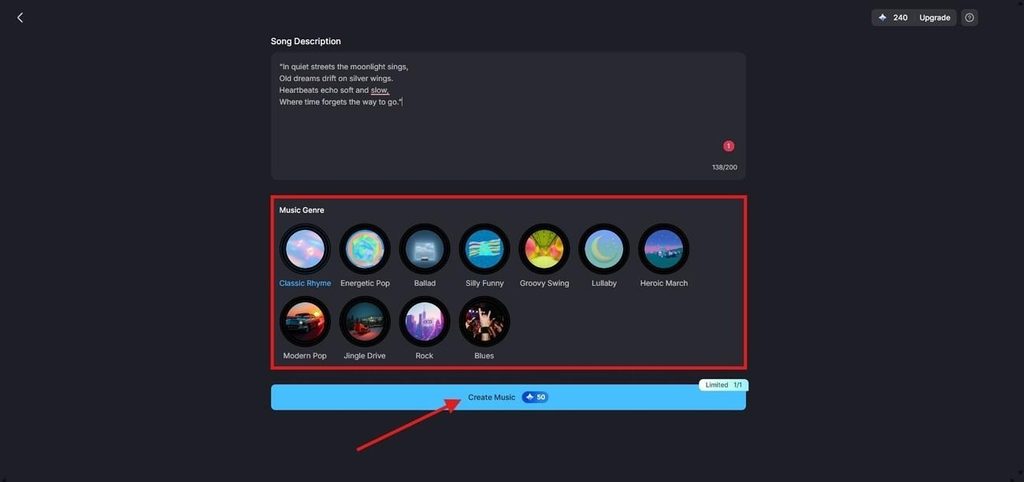
- Song Prompt: Describe the track in up to 200 characters, choose a genre, and generate music from a short creative brief.
- Ready-Made Songs: Choose from 15 prebuilt tracks when you want to skip song generation and move straight into video production.
- Performance Controls: Nano Storyboard includes 50 pose options, plus controls for clothing, expressions, body type, and scene-level character adjustments.
- Subtitle Styling: Add on-screen lyrics using 16 subtitle styles, with broader MagicLight workflows also supporting content in 11 languages.
- Export and Usage Rights: Finished videos can be exported in 720p or 1080p, while paid plans include commercial usage rights.
Pros
- Audio and visuals are produced in one place rather than two.
- Output downloads normally, with no export restriction attached.
- Characters and styling stay consistent across an entire release.
Con
- Audio quality trails platforms built purely for music generation.
2. Suno
Best For: Songwriters who want expressive AI vocals and complete songs from a single prompt.
Suno stands out for natural-sounding vocals, especially in phrasing, dynamics, and emotional delivery. Its newer models also improve fidelity and control across genres. For creators comparing the best AI song generator with vocals, Suno remains a strong option for generating complete tracks with both vocals and instrumentation.

Key Features
- Free access provides 50 credits daily, covering roughly 10 songs.
- Remix and extend tools rework an existing generation without starting again.
- Paid plans open near $10 monthly and add commercial rights.
Pros
- Vocal delivery is the most natural across mainstream genres.
- Genre coverage is broader than any competitor listed here.
Cons
- Nothing produced on the free tier may be used commercially.
- A Munich court ruled against Suno in a GEMA case in July 2026.
3. Udio
Best For: Producers prioritizing audio fidelity above every other factor.
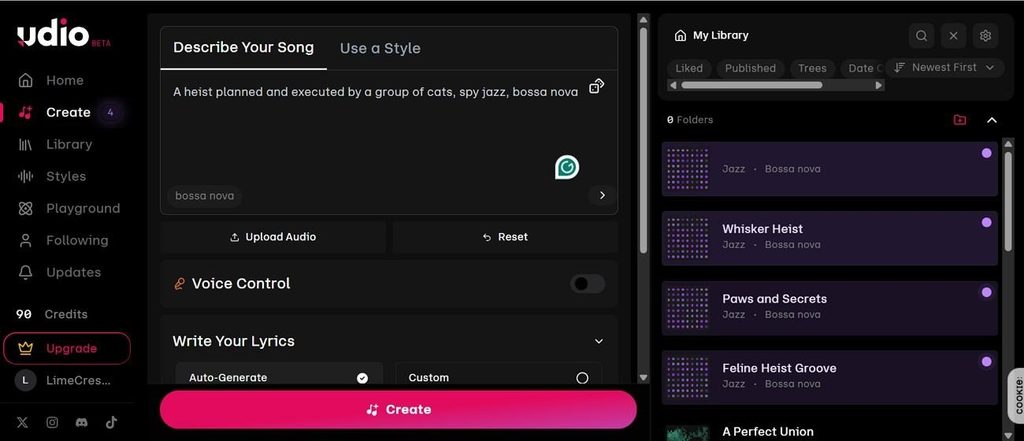
High-resolution output is one of Udio’s strongest advantages, with support for 48 kHz stereo audio and improved clarity across instruments and vocals. Its style controls also help with genre blending and reference-based creation, while Allegro v1.5 offers faster generation for users who want quicker iteration.
Key Features
- Stems separate vocals from instrumentation for later editing.
- Genre blending handles combinations that confuse competing models.
- Its Sessions timeline reorders song structure section by section.
Pros
- Mix polish and instrument separation lead this comparison.
- Structural editing gives real control over song arrangement.
Cons
- Downloads remain disabled for most accounts after licensing settlements.
- A walled platform is planned, so tracks would stream without leaving it.
4. MusicGPT
Best For: Creators wanting several audio tools behind a single login.
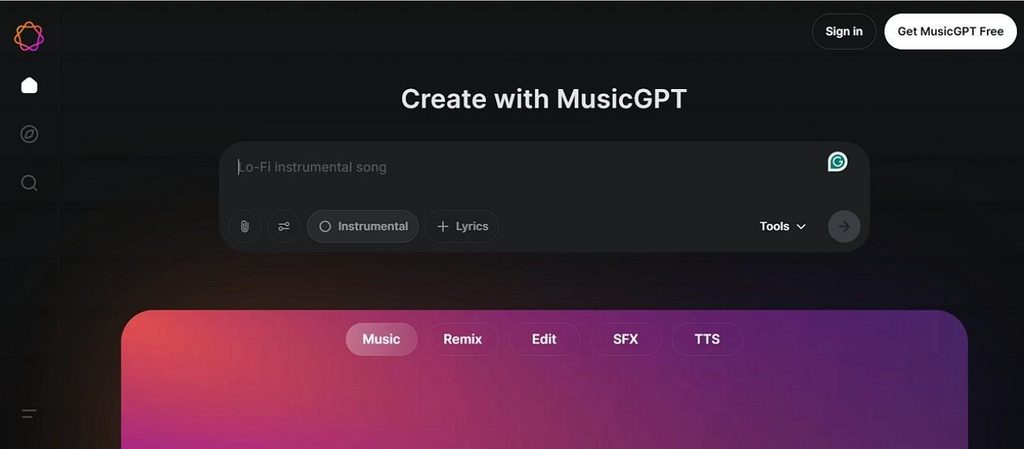
MusicGPT is built more like an all-in-one AI music workspace than a single-purpose song generator. It covers songwriting, lyrics, voice tools, stem splitting, sound effects, and audio editing in one place. For users comparing the best AI song generator, its developer API also adds value for custom production workflows.
Key Features
- A lyrics generator writes verses and hooks with rhyme-scheme awareness.
- The free plan carries 500 monthly credits for personal use only.
- Web, iOS, and Android apps share one account and credit balance.
Pros
- The surrounding toolkit removes the need for separate subscriptions.
- Paid entry starts lower than most dedicated music platforms.
Cons
- Published pricing varies noticeably between listings and sources.
- Free generations carry no commercial rights at all.
5. Boomy
Best For: First-time users creating songs with minimal technical effort.
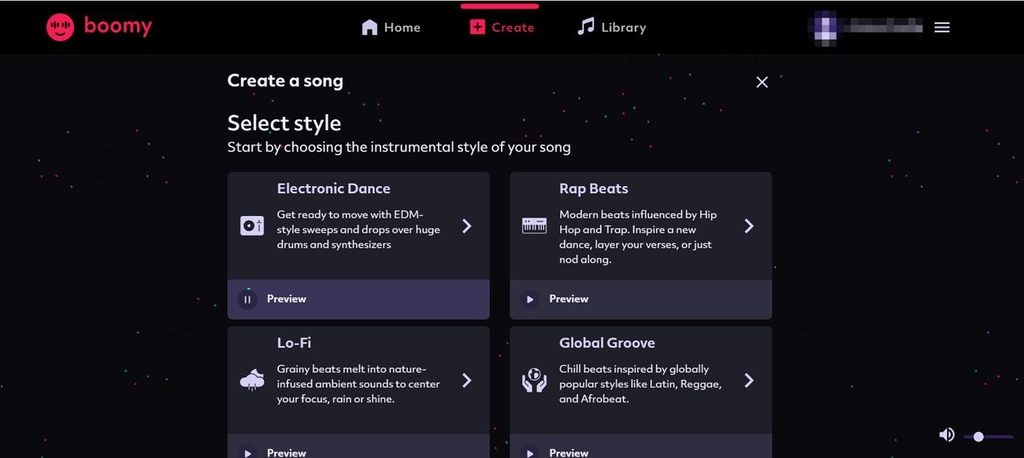
Speed to a released track is what Boomy optimizes for above everything else. Choosing a style produces a finished song in under a minute. It offers a simple AI song generator for absolute beginners, despite its paid download requirements.
Key Features
- Distribution to streaming services requires an external music distributor.
- Commercial rights apply to eligible downloaded paid-plan tracks.
- Creator plans begin near $9.99 monthly for regular output.
Pros
- Nothing here requires any musical or technical background.
- Release to streaming now requires a separate distributor.
Cons
- Boomy retains copyright by default, while paid downloads receive commercial rights.
- Free accounts cannot download anything they generate.
6. Soundraw
Best For: YouTubers and podcasters needing legally safe background music.
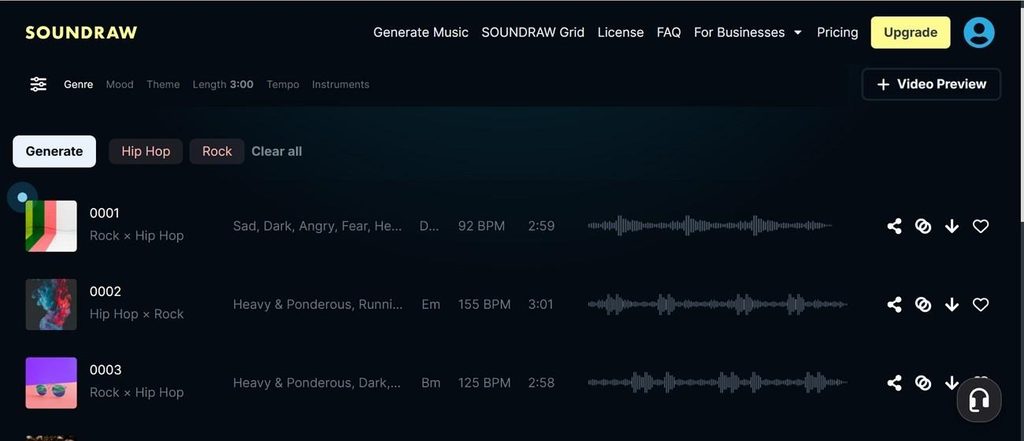
Licensing clarity is one of Soundraw’s strongest advantages. Music downloaded and used in eligible projects during an active subscription can generally remain in those projects after cancellation, including monetized videos and podcasts. Some uses, such as music-only channels, lo-fi content, and certain distribution cases, follow different rules.
Key Features
- Sliders adjust tempo, energy, mood and length in real time.
- Stem downloads arrive separated for editing in a DAW.
- Paid plans open near $11 monthly with unlimited MP3 downloads.
Pros
- Eligible licenses continue after cancellation, depending on your Soundraw plan.
- Real-time editing tailors a track to exact video timing.
Cons
- Vocals are not produced at all, since output stays instrumental.
- Generation allows previews, while standard music downloads require paying.
Compare All AI Song Generators
Choosing the best free AI song generator depends on more than how the final track sounds. The table below compares vocals, free access, commercial rights, and each platform’s main advantage, making it easier to see which tool fits your release plans:
| Tool | Vocals | Free Tier | Commercial Use | Standout Strength |
| MagicLight AI | Generated with video | Free plan, no card | Paid plans | Music becomes a finished video |
| Suno | Strongest in class | 50 credits daily | Paid plans | Complete songs with vocals |
| Udio | High fidelity | Daily credits | Paid plans | Mix quality and stem separation |
| MusicGPT | Included | 500 monthly credits | Paid plans | Breadth of surrounding tools |
| Boomy | Basic | Paid downloads | Commercial rights | External distribution required |
| Soundraw | None | Preview access | Plan-based licensing | Commercial-use focused licensing |
Part 2. How to Choose the Best AI Song Generator
The right AI song generator depends on what happens after the track is created, not just how convincing the audio sounds. Before choosing a platform, compare these 5 practical factors to avoid ending up with music you cannot publish, export, or monetize:
- Vocal and Instrumental Support: Decide whether the project needs sung vocals, instrumentals, or both. Instrumental-only tools will not suit tracks built around lyrics or lead vocals.
- Publishing Format: Consider where the finished song will appear. Streaming services mainly need audio, while YouTube and social platforms often benefit from accompanying visuals.
- Music Ownership and Licensing: Check who owns the generated recording and what rights come with it. Royalty-sharing arrangements differ significantly from standard commercial-use licenses.
- Download and Export Access: Confirm that the selected plan lets you export finished tracks. A song that remains locked inside the platform has limited practical value.
- Commercial Rights on Free Plans: Review whether free generations can be monetized or distributed commercially. For the best free AI song generator, licensing can matter as much as sound quality.
Part 3. What Makes MagicLight.AI the Best AI Song Generator?
MagicLight AI stands out because it connects music creation with video production in one workflow. Instead of exporting a track and editing visuals elsewhere, creators can generate music, add characters, shape scenes, and produce the final video together. Its accessible free entry and commercial options on paid plans also make it practical for ongoing projects.
How to Make a Song and Video
MagicLight AI keeps the song and video workflow connected from the start. Begin by generating the track, then use the following steps to shape its visuals, characters, and storyboard before producing the final video:
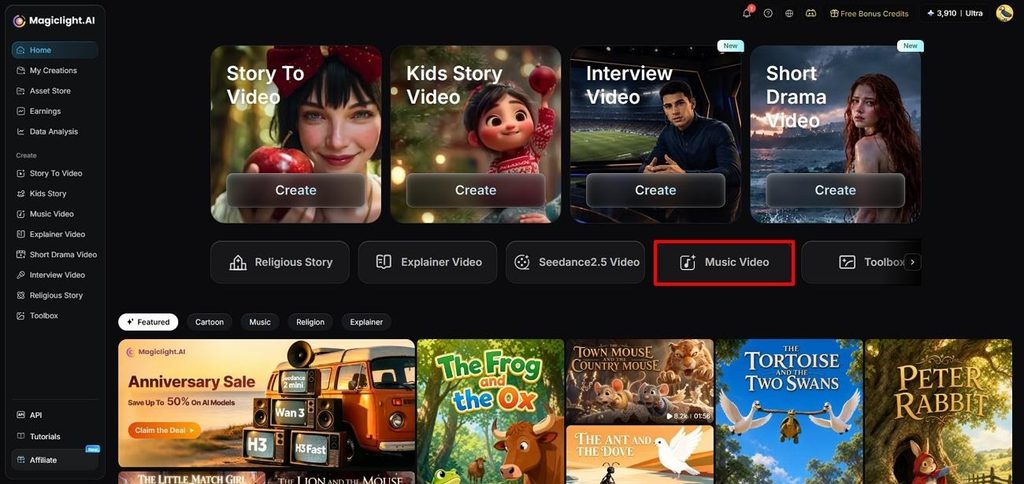
Step 1. Open the Music Video Tool
Go to the MagicLight AI dashboard and select Music Video from the main screen to begin a new music video project.
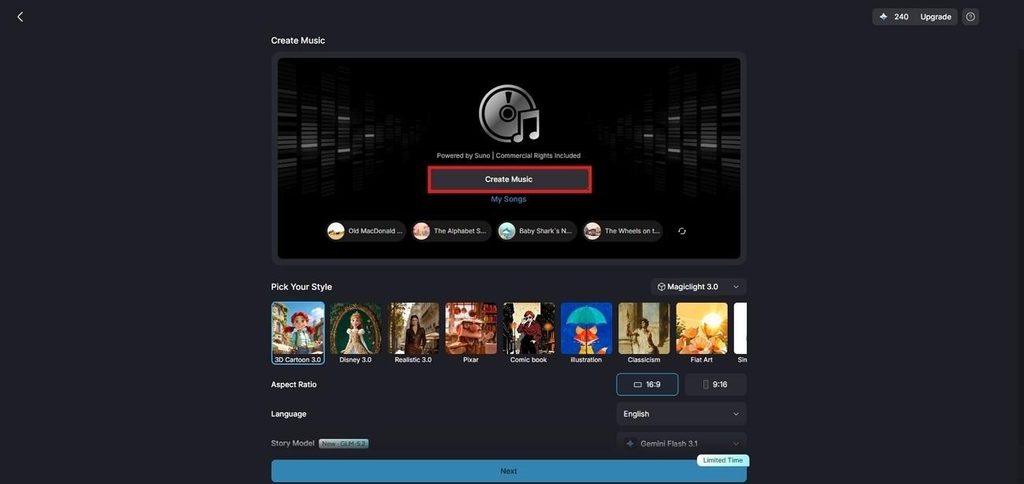
Step 2. Start Creating the Music
Click Create Music to open MagicLight’s Suno-powered music generator. This lets you generate the soundtrack before setting up the video visuals.
Step 3. Add Lyrics and Choose a Genre
Enter your lyrics or describe the song you want in the prompt field. Pick a suitable Music Genre, then press Create Music to generate the track.
Step 4. Select a Generated Song
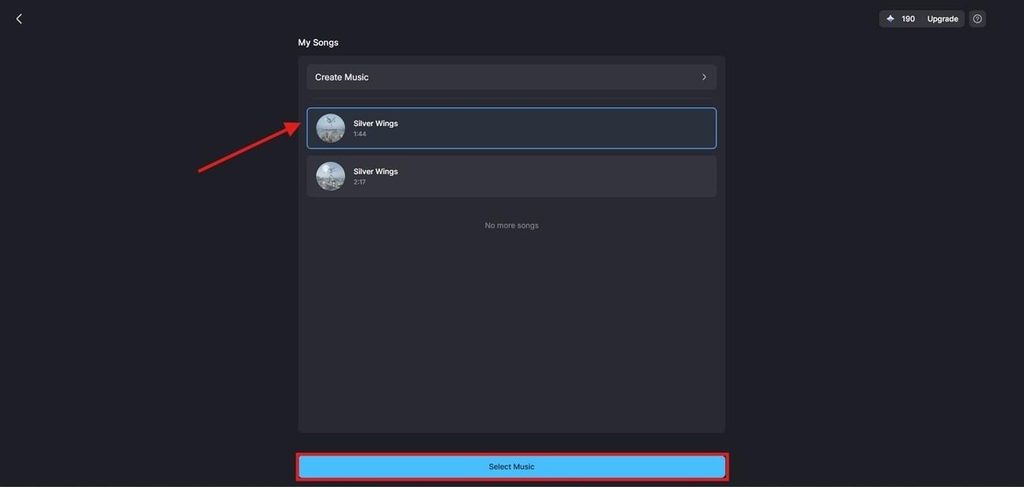
Open My Songs after generation finishes and listen to the available versions. Choose the track you want, then click Select Music to continue.
Step 5. Configure the Video Style
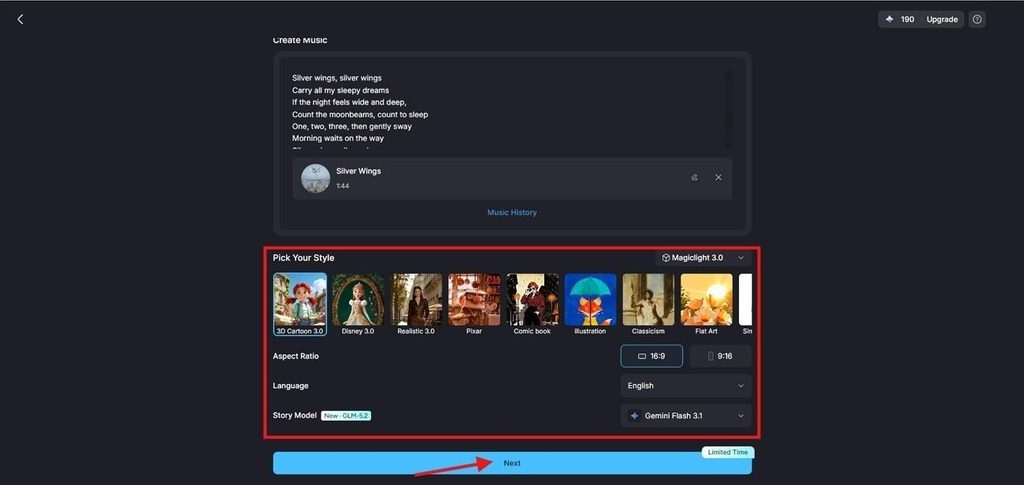
Choose an AI Story Model and Visual Style that fit the song. Set the Aspect Ratio and Language, then click Next to move forward.
Step 6. Review the Suggested Characters
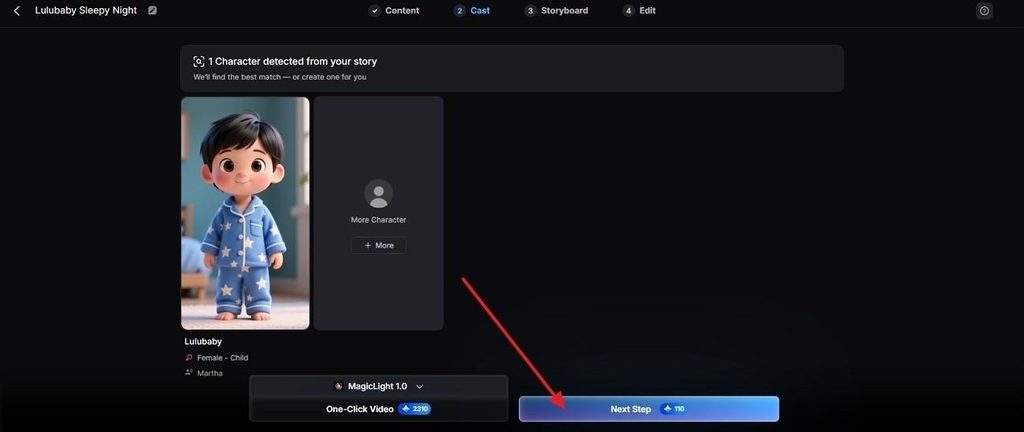
MagicLight AI suggests characters based on the project content and selected settings. Pick one of the available options or use More Characters, then click Next Step.
Step 7. Refine the Storyboard and Finish
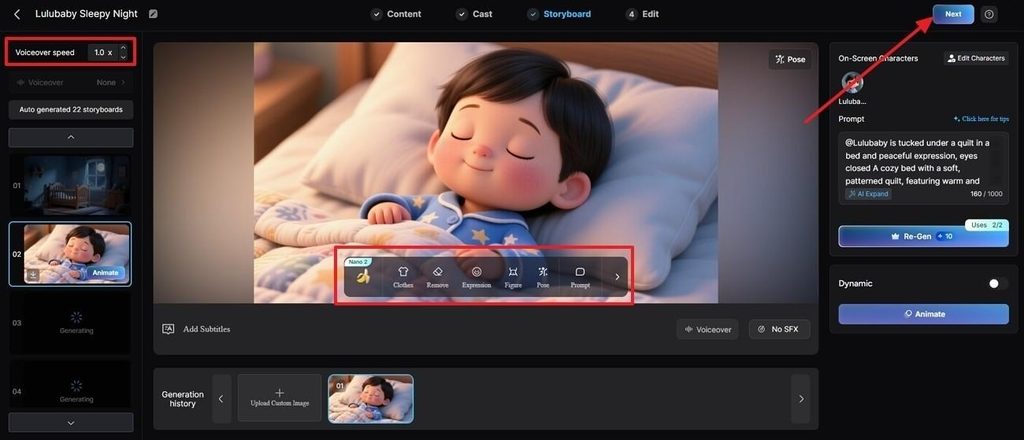
Review each scene in Nano Storyboard and adjust clothing, poses, expressions, or other visible details where needed. Set the voiceover speed if required, then click Next to continue editing and complete the music video.
Conclusion
The right tool depends on whether you prioritize stronger vocals, cleaner mixes, simple distribution, or flexible licensing. Even the best AI song generator may restrict commercial use on free plans, making usage rights important before publishing. For creators who want to pair finished songs with complete visual stories, MagicLight AI provides another option for turning music into engaging video content.
Frequently Asked Questions on Best AI Song Generator
1. What is the best AI song generator?
Answering what the best AI song generator is depends on the output you need. Suno leads in vocals and Soundraw in licensing, while MagicLight AI suits anyone whose song has to reach an audience as a video.
2. Can MagicLight AI create songs for free?
Yes, the free plan opens without a card and covers music generation alongside video. Commercial usage rights arrive with paid tiers, which matters for monetized channels and any client work.
3. How to create AI songs only with vocal samples?
MagicLight AI accepts an uploaded track rather than requiring generation from scratch. Supply your own vocal recording, choose a visual style, and the platform builds scenes timed to that audio.
4. Can we upload the song created by an AI song generator on YouTube?
Only on a paid plan, since free tiers across this category prohibit commercial use. MagicLight AI exports a finished video at 1080p with commercial rights included, which is what a monetized upload actually requires.

![How to Write a Script for a Video 2026 [Full Guide]](https://magiclight.ai/wp-2/wp-content/uploads/video-script-writing-setup-300x199.jpg)

![6 Best Free AI Video Generators [Compared]](https://magiclight.ai/wp-2/wp-content/uploads/ai-video-generation-workflow-300x196.png)