An indie game studio has heroes to design, store-page artwork to finish, and a trailer approaching. Getting everything ready takes time when a small team has limited resources available. Stable Diffusion offers flexible local models, while Leonardo AI makes image creation accessible through a browser. Both have their strengths, but the right choice depends on budget, creative needs, and technical experience.
Choosing between Stable Diffusion vs Leonardo AI involves comparing image quality, editing tools, pricing, and licensing. Once the artwork is finished, MagicLight AI can bring those still images into animated scenes.
Part 1. Stable Diffusion vs Leonardo AI: Features, Image Quality, and Pricing
Stable Diffusion and Leonardo AI both create images from text prompts, but their workflows differ considerably. Stability AI offers downloadable model weights, while Leonardo AI handles image generation through its browser-based platform. Let's compare their features, image quality, creative controls, and pricing to see where each stands.
Image Generation Capabilities
Stable Diffusion offers downloadable AI models, while Leonardo AI provides image generation through a browser-based platform. Both create images from text prompts, but their model selection and rendering methods differ in several ways:
- Available Models: Stable Diffusion includes SD 1.5, SDXL, and SD 3.5, while Leonardo AI offers Lucid Origin, Phoenix, and FLUX models for different visual styles.
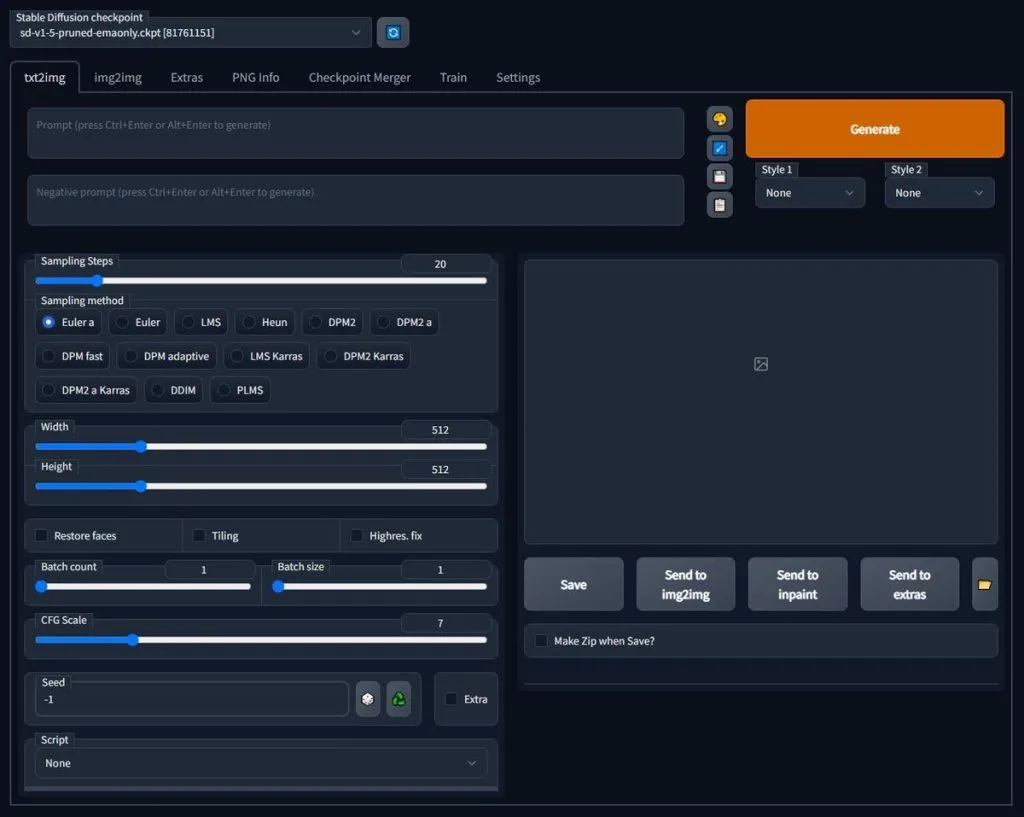
- Model Flexibility: Stable Diffusion supports community fine-tuned checkpoints and LoRAs from platforms like Hugging Face and Civitai. Leonardo AI offers built-in model choices and customization features within its hosted environment.
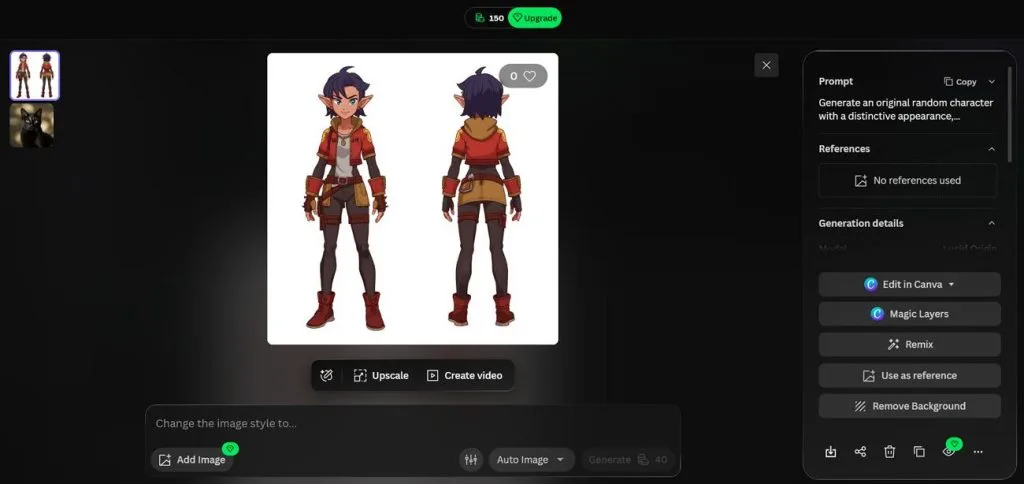
- Rendering Options: Stable Diffusion models can run locally through compatible tools like ComfyUI, Forge, or AUTOMATIC1111. Leonardo AI handles image generation through its cloud infrastructure, removing the need for a dedicated GPU.
Image Quality and Artistic Styles
Image quality depends on the selected model, prompt, and settings rather than the platform alone. For game artwork, the Leonardo AI vs Stable Diffusion comparison comes down to realistic details, artistic flexibility, and readable lettering. The table below shows how both options handle these creative requirements:
| Style or Need | Stable Diffusion | Leonardo AI | Edge |
| Lifelike Photos | SD 3.5 supports realistic images, with results varying by model and settings. | Lucid Realism specializes in photorealistic and cinematic visuals. | Depends on model |
| Specific Art Styles | Custom checkpoints and LoRAs support specialized looks, including pixel art and illustrations. | Lucid Origin, Phoenix, and other models offer different visual styles. | Stable Diffusion for flexibility |
| Legible Text | SD 3.5 improves typography over older versions, though spelling can still vary. | GPT Image 2.5 and Phoenix support text rendering for posters and titles. | Leonardo AI for model choice |
Custom Models and Personalization
Custom models help artists maintain consistent characters, products, or visual styles across different images. Stable Diffusion supports flexible local training, while Leonardo AI offers a more guided process through its platform. Below are the main personalization options available in both tools:
- Local LoRA Training: Kohya's sd-scripts let users train custom characters or artistic styles using their own image datasets. SDXL LoRA training can run with 8GB VRAM using memory-saving settings, although 10GB or more is recommended.
- Personal Models: Leonardo AI lets paid users train custom Elements (LoRAs) for characters, products, and artistic styles. These Elements work with compatible models, while its training interface provides additional settings for greater control.
AI Editing and Enhancement Tools
Editing features help fix unwanted details without generating an entirely new image. In the Stable Diffusion vs Leonardo AI comparison, both offer ways to remove objects, adjust visuals, and improve resolution. Look at the table below to see how their editing capabilities differ:
| Editing Task | Stable Diffusion | Leonardo AI |
| Object Removal | Inpainting masks, local workflows | Canvas Editor, masked regeneration |
| Text-Based Editing | InstructPix2Pix, guided editing workflows | Prompt-based editing, supported AI models |
| Image Upscaling | ESRGAN, Real-ESRGAN, tiled upscaling | Universal Upscaler, image enhancement |
Control and Customization Options
Stable Diffusion offers detailed control over image composition through local interfaces and ControlNet workflows. Leonardo AI provides similar guidance features through a browser-based interface, although the available controls depend on the selected model. These are the main customization options worth comparing:
- Render Settings: ComfyUI and AUTOMATIC1111 support seeds, sampling methods, step counts, and guidance settings. ComfyUI also connects these controls into reusable node-based workflows.
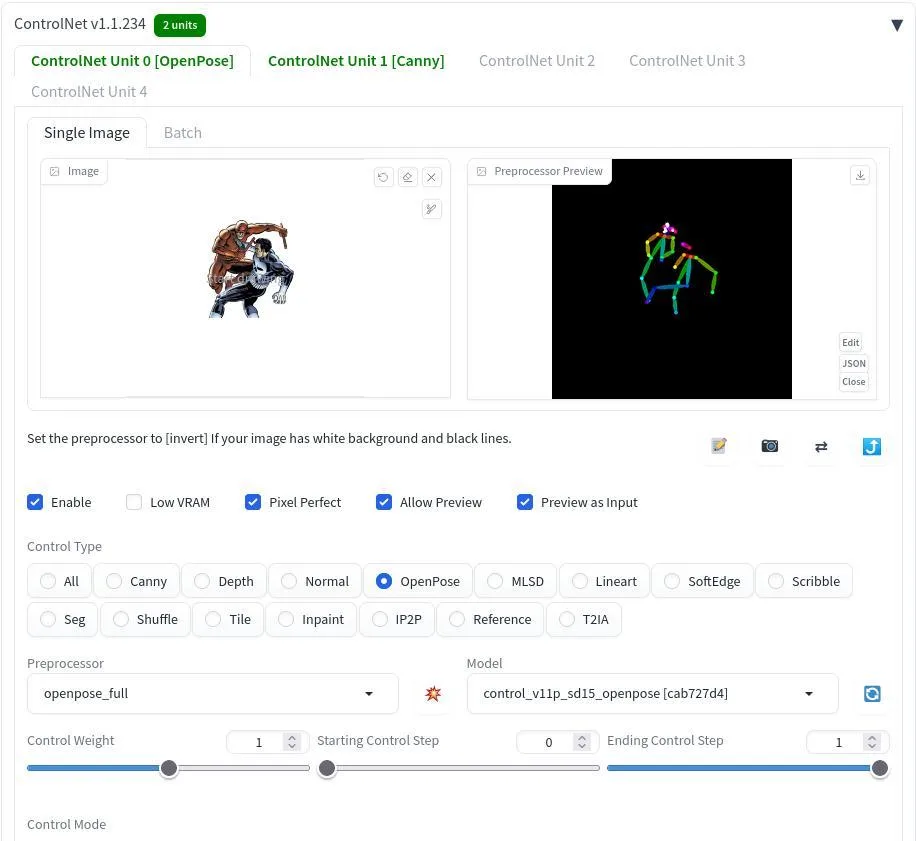
- Structure Guides: ControlNet supports pose, depth, and edge-based guidance through compatible models and preprocessors. Stability AI also released Canny and Depth ControlNets for Stable Diffusion 3.5 Large.
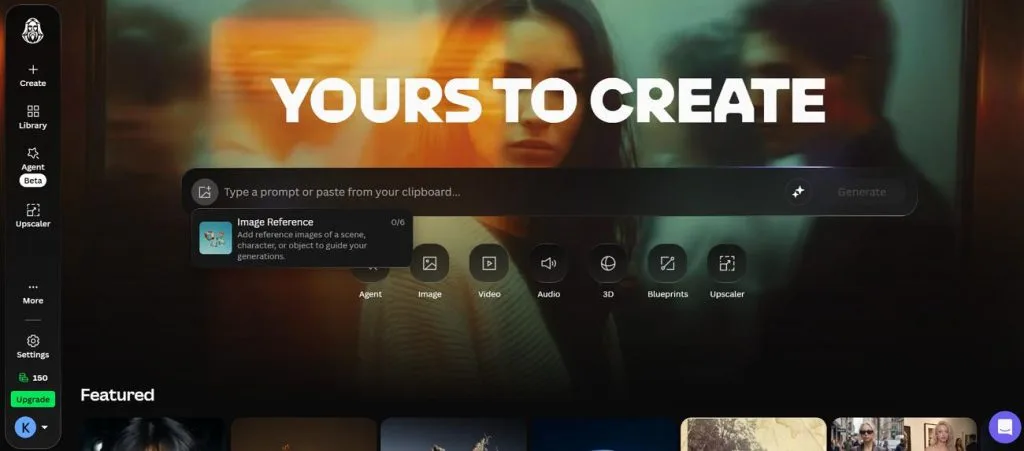
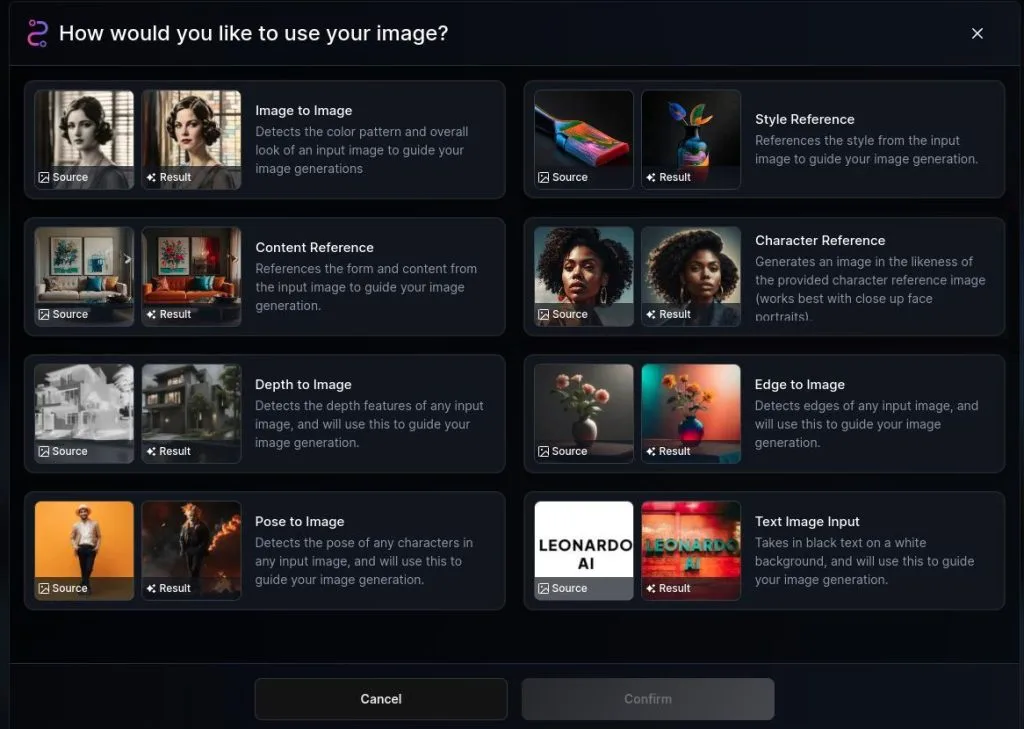
- Image Guidance: Leonardo AI offers Style, Content, and Character References, alongside pose, depth, and edge guidance options. Availability varies by model, so Character Reference should not be described as universally supported.
Pricing and Free Plans
Stable Diffusion can run locally without per-image generation fees, although hardware and electricity still cost money. Leonardo AI uses a token-based system with free daily credits and paid subscriptions. The table below compares their pricing structures, included features, and practical limitations:
| Plan | Price | Included Features | Limitations | Ideal User |
| Stable Diffusion Local | $0 | Downloadable weights, unlimited local renders | GPU required; model-specific licensing | GPU-equipped artists |
| Stability AI API | $0.01/credit | SD 3.5 Medium at 3.5 credits/image | 25 starter credits; usage charges | App developers |
| Leonardo AI Free | $0 | 150 tokens/day, basic generation | Public images, Auto model access | Beginners |
| Leonardo AI Essential | $12/month | 8,500 tokens/month, private images, custom models | No unlimited relaxed generation | Solo creators |
| Leonardo AI Premium | $30/month | 25,000 tokens/month, unlimited relaxed images | Selected models only | Freelancers |
| Leonardo AI Ultimate | $60/month | 60,000 tokens/month, relaxed image/video generation | Selected models; queue limits | Creative studios |
Commercial Use and Licensing
Commercial licensing matters when artists sell AI-generated images or use them for client projects. Stability AI sets conditions based on model licenses and business revenue, while Leonardo AI distinguishes between free and paid accounts. Below are the main licensing differences to consider:
- Stability Community License: Stable Diffusion 3.5 models allow free commercial use for businesses earning under $1 million annually. Higher-revenue businesses need Enterprise licensing for commercial deployment, while specific commercial uses require registration.
- Older Checkpoints: SDXL 1.0 uses the CreativeML Open RAIL++-M License, allowing commercial projects without the same revenue threshold. However, users must follow its restrictions and check licensing terms for community-trained models.
- Leonardo Output Rights: Free users can commercially use generated images, although Leonardo AI retains ownership and makes them publicly accessible. Paid subscribers receive ownership rights to their generated content and can keep images private, subject to applicable law.
Part 2. Stable Diffusion vs Leonardo AI: From Image Creation to Real-World Projects
Creating attractive images is useful, but real projects demand consistency, flexibility, and manageable production time. Let's explore how these tools fit into everyday production workflows.
Designing Characters and Digital Artwork
Keeping characters recognizable across different poses, outfits, and scenes can be difficult with basic text prompts. When comparing Leonardo AI vs Stable Diffusion, the main difference lies in how each handles character consistency. Both offer useful methods, but the amount of setup and creative control varies:
- Stable Diffusion Route: Artists can train character LoRAs to maintain recognizable features across different images. ControlNet OpenPose helps guide body positions, while IP-Adapter uses reference images to influence appearance.
- Leonardo AI Route: Character Reference helps maintain facial similarities using an uploaded image across multiple generations. Custom Elements trained on character images can provide greater consistency without requiring local hardware.
Creating Marketing and Social Media Visuals
Marketing campaigns often need multiple ad versions, consistent product images, and artwork sized for different platforms. Stable Diffusion gives teams more control over local production, while Leonardo AI offers ready-to-use creative tools. Let’s compare how both handle common marketing tasks:
| Marketing Need | Stable Diffusion | Leonardo AI | Edge |
| Multiple Ad Variants | Local batch generation, no per-image fees | Token-based renders, relaxed mode for eligible models | Stable Diffusion |
| Product Backgrounds | API background replacement, relighting | Background removal, canvas inpainting | Both |
| Team Collaboration | Local file sharing, external review tools | Shared team tokens, private generations, team workspace | Leonardo AI |
Developing Game Assets and Concept Art
Game artists need consistent environments, textures, item icons, and promotional artwork throughout development. Stable Diffusion supports flexible local workflows, while Leonardo AI provides accessible tools for creating game assets. Here is how their features support different stages of game asset production:
- Seamless Textures: AUTOMATIC1111 offers a tiling option for creating repeatable floor, wall, and terrain textures with fewer visible seams.
- Depth-Guided Layouts: Stable Diffusion's Depth ControlNet and Leonardo AI's compatible depth guidance tools help preserve scene structure during image generation.
- Large Key Art: Stable Diffusion 3.5 Large's Blur ControlNet supports tiled upscaling for detailed artwork, depending on hardware and workflow settings.
- Repeatable Asset Jobs: Leonardo AI Blueprints provide reusable, predefined workflows for generating game assets with different inputs.
Turning AI Images Into Videos With MagicLight AI
Creating artwork with an AI image generator is useful, but static visuals cannot tell everything. Game trailers need moving characters, engaging scenes, and smooth transitions to capture viewer attention. Once the artwork is ready, MagicLight AI helps turn those images into animated video scenes.
Its library includes 20 AI video models, including Kling 3.0 and Seedance 2.5, for creators. Users can bring their characters to life while exploring different animation styles and movements. Follow the steps below to transform your finished AI artwork into a compelling video:
Step 1. Open the Image to Video Tool
Head to MagicLight AI and find Toolbox in the main menu. From there, open Image to Video to begin creating your animation. Under the Video tab, pick Reference to Video from the 4 generation modes.
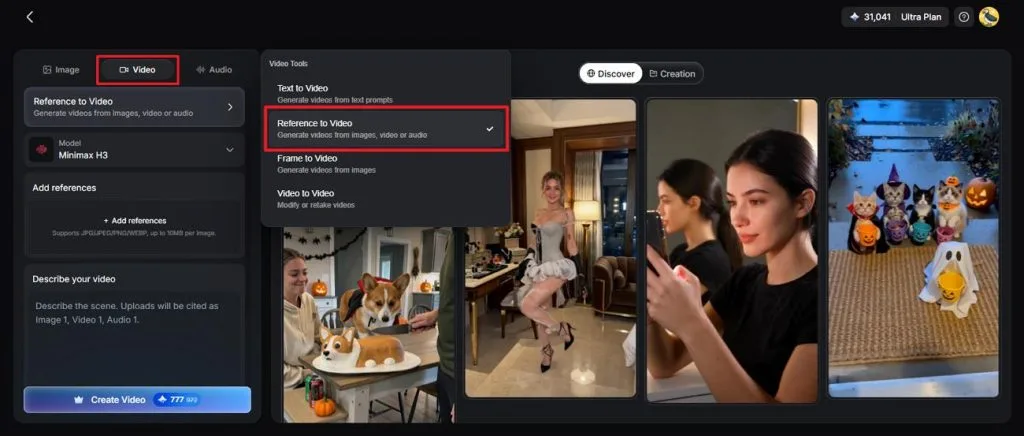
Step 2. Add Your Image and Customize the Video
Add your artwork and write a prompt explaining how the character should move or how the camera should follow the action. Next, select your preferred AI Video Model and adjust the Resolution and Duration before pressing Create Video.
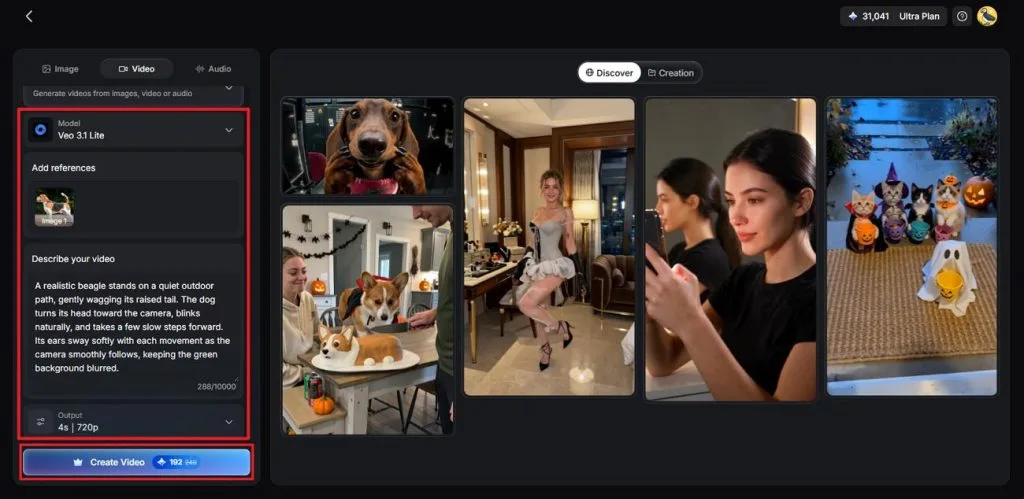
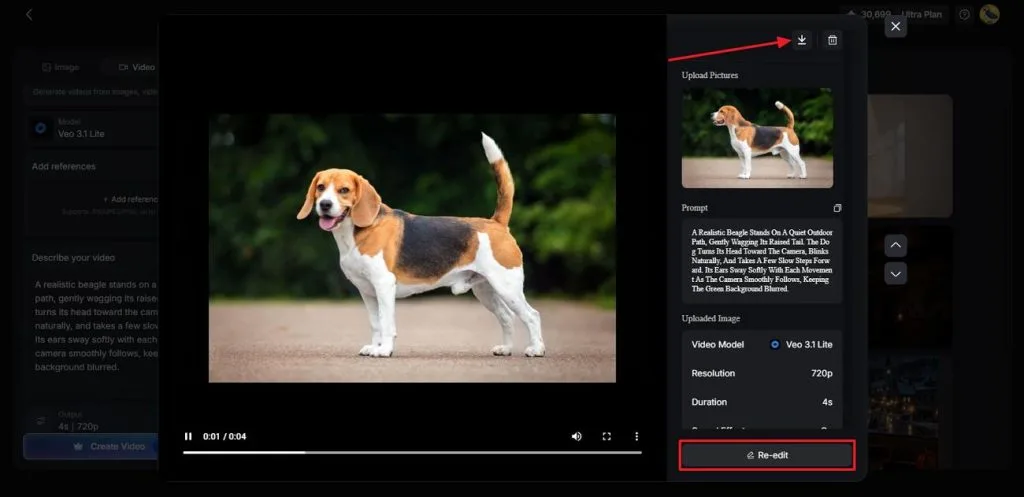
Step 3. Review and Save Your Animation
Watch the finished clip to see how naturally your character moves through the scene. If something looks off, use Re-edit to refine the motion or change the settings. Once everything looks right, hit the Download icon to save the final video.
Conclusion
To conclude, picking between Stable Diffusion vs Leonardo AI depends on your budget, experience, and creative requirements. Stable Diffusion gives artists local control and flexible models, provided they have suitable hardware. Leonardo AI makes everyday image creation easier with hosted models, editing tools, and private generations on paid plans. For projects that need moving characters or animated stories, MagicLight AI is worth trying.
Frequently Asked Questions
- Which is better, Stable Diffusion or Leonardo AI?
Choosing Leonardo AI vs Stable Diffusion depends on your workflow and available hardware. Stable Diffusion suits experienced artists who prefer local models and detailed creative control. Leonardo AI works better for beginners wanting browser-based generation without complicated technical setup.
- Is Stable Diffusion free to use compared with Leonardo AI?
Stable Diffusion models can run locally without generation fees under applicable licensing terms. However, running them requires suitable hardware, electricity, and sometimes additional technical setup work. Leonardo AI provides 150 free tokens daily, although free generations remain publicly accessible.
- What is a good alternative to Stable Diffusion and Leonardo AI for AI video creation?
MagicLight AI helps creators animate finished artwork without building complicated local video workflows. Its Image to Video tool adds movement, while MagicLight Agent supports longer stories. New users receive free credits, with the Standard plan costing $7.50/month when billed annually.