


Creating AI videos becomes frustrating when your chosen model cannot handle your project requirements. Many tools produce inconsistent characters, short clips, or lower quality than expected during production. Switching between different tools wastes valuable time and creates extra editing work before finished videos. This guide compares the best text-to-video AI models using practical features that matter for creators.
Part 1. How to Choose the Best Text-to-Video AI Model
Choosing the right text-to-video AI model depends on features that affect your final video quality and workflow. Now, let's explore the 5 key factors before choosing the right model for your creative projects.
- Prompt Interpretation: Good prompt interpretation creates videos that closely match your written instructions without repeated generations.
- Maximum Output Length: Longer maximum clip lengths reduce repeated generations when creating longer videos from one prompt.
- Character and Scene Consistency: Strong character consistency keeps people, clothing, and scenes looking the same throughout every video.
- Native Audio Support: Native audio support generates dialogue, music, or sound effects together with your video automatically.
- Resolution and Export Options: Higher resolution and flexible export options produce better videos for different platforms and devices.
Part 2. 6 Best Text-to-Video AI Models in 2026
Every model offers different strengths depending on your creative goals and video production requirements. Below, we introduce the best text to video AI models and explain what makes each one different.
1. MagicLight AI
Best for: Creators turning written stories, scripts, or episodic content into long-form narrated video.
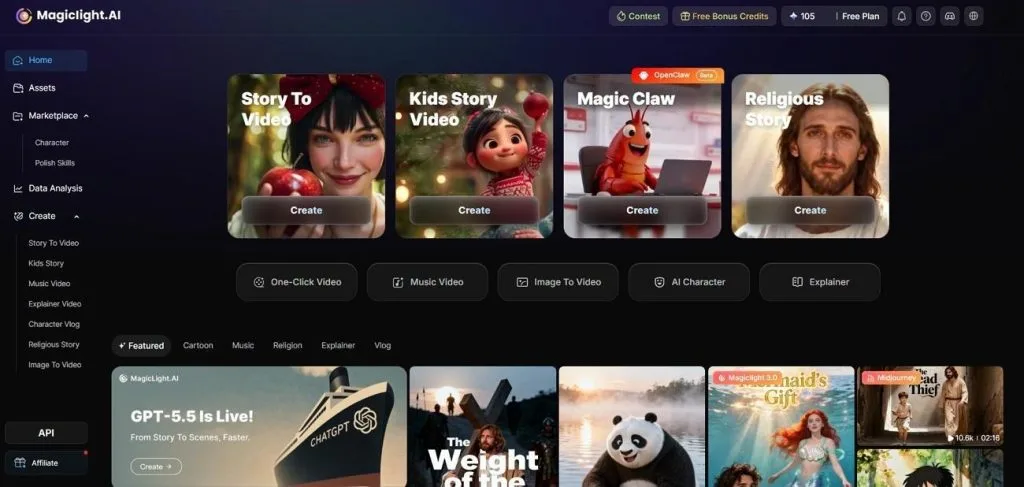
MagicLight AI creates complete videos from written scripts instead of separate text prompts for creators. It generates scenes, voiceovers, and videos within one simple creation workflow from the beginning. You can choose from 37 voice options or clone your own voice for personalized video narration.
Support for 11 languages helps creators produce videos for audiences across different regions worldwide. Simple text prompts control characters, camera movements, emotions, and scene actions without technical experience required. MagicLight AI works especially well for explainers, educational videos, children's stories, and narrative content creators.
Key Features
- Long-Form Video Support: Generates videos up to 50 minutes using prompts of up to 12,000 characters to eliminate manual clip assembly.
- Nano Storyboard Editing: Breaks every scene into editable steps with 50 poses and timing adjustments before you render the video.
- Character Consistency: Create characters that maintain the same appearance and facial features across every scene.
- Visual Style Range: Style families span Midjourney V7 and MagicLight's own 3.0, 2.2, and 2.0 models, covering realistic, Disney, Pixar, anime, and illustrated looks.
- Publish-Ready Export: Subtitles, background music, and an automatically generated cover ship with the finished 1080p video.
Pros
- Creates complete story-driven videos from one script instead of separate prompts.
- Review scene order and pacing before generating the final video.
- Paid plans include commercial rights across web, iOS, and Android.
Con
- Maximum video resolution is 1080p and native 4K is unavailable.
2. Google Veo 3
Best for: Users producing short, realistic videos with synchronized audio for social media and marketing projects.
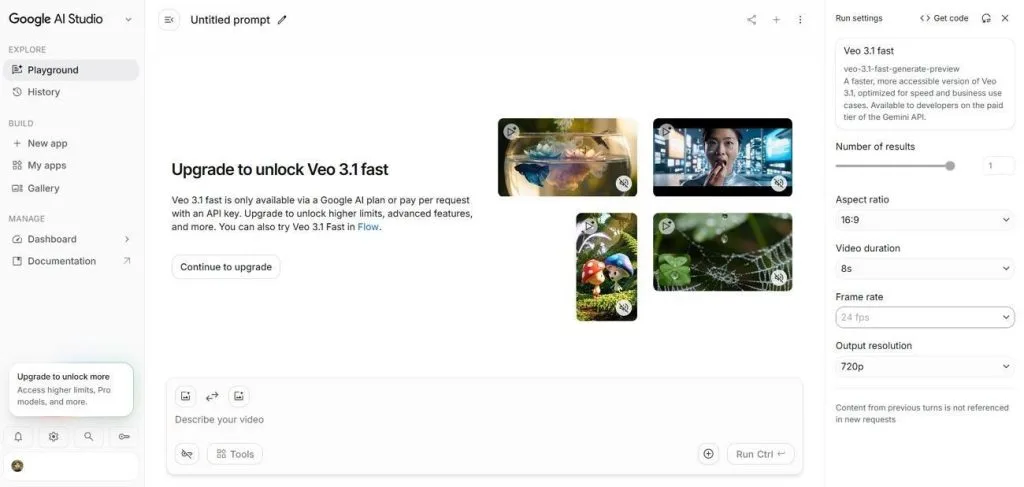
Google Veo 3 focuses on creating realistic videos with natural motion from simple text prompts. It understands detailed instructions well, producing scenes that closely match user descriptions with minimal revisions. Access is available through Gemini, Google Flow, and the Gemini API for creators worldwide.
Key Features
- Generates dialogue, sound effects, and background ambiance together with every video automatically.
- Exports videos with optional 4K upscaling for sharper final video quality across supported projects.
- Understands detailed prompts accurately, producing realistic movements and natural object interactions consistently.
Pros
- Creates synchronized audio without requiring separate editing or software.
- Produces realistic videos with accurate motion and natural physics.
Cons
- Supports only 8-second clips, requiring multiple generations later.
- Requires a paid Google AI subscription, starting at $20 per month.
3. Kling AI 2.0
Best for: Producing cinematic short videos with smooth visual storytelling and dramatic scenes.
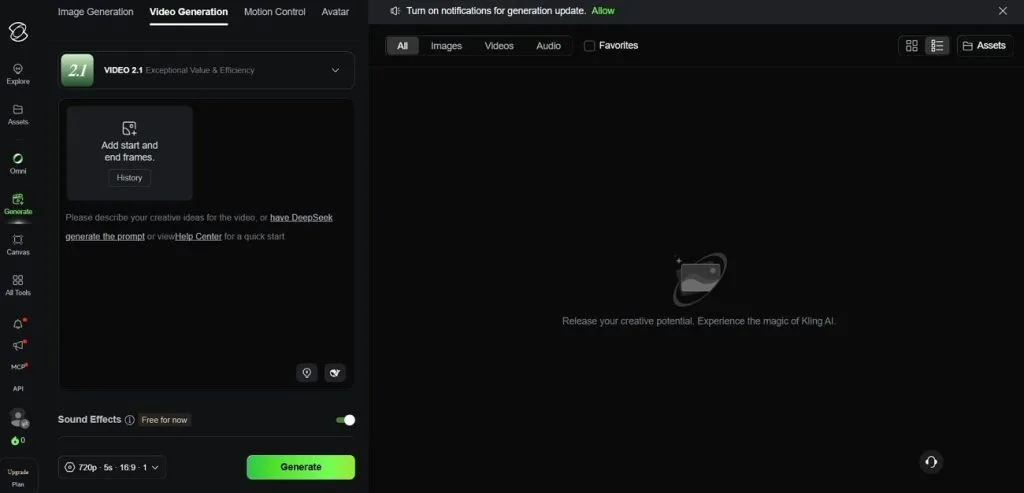
Kling AI is a text to video AI model that creates cinematic videos from text prompts. It focuses on delivering polished visual results without requiring advanced video production skills from creators. Users can also choose newer Kling versions with additional capabilities beyond Kling AI 2.0.
Key Features
- Master engine delivers cinematic camera movement and smoother motion across generated videos.
- Extend feature lengthens 10-second clips into videos approaching 3 minutes naturally.
- Creates realistic human expressions and dynamic action scenes with consistent visual quality.
Pros
- Supports Start and End Frames for precise transitions.
- Includes Multi-Elements editing for flexible scene customization.
Cons
- Free outputs are watermarked and for noncommercial use.
- Lacks native audio and 4K available in Kling 3.0.
4. Runway (Gen-4.5)
Best for: Cinematic AI videos requiring realistic motion, smooth animation, and detailed visual storytelling.
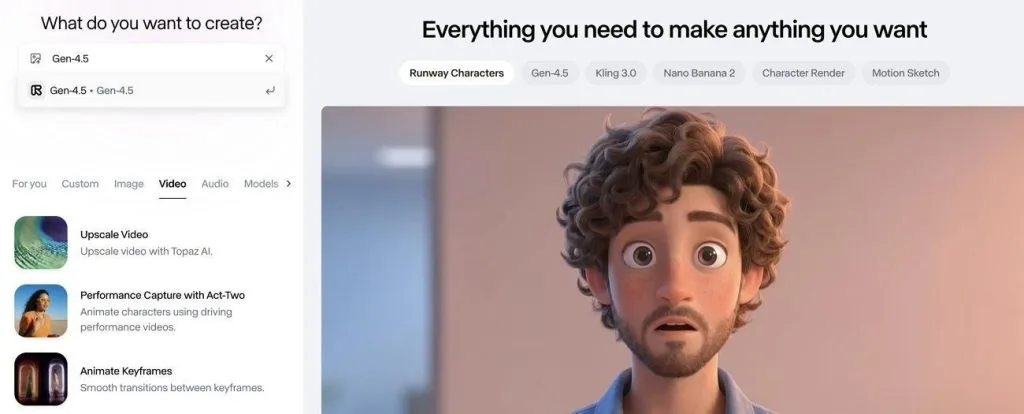
An AI video generator creates cinematic videos from simple text and image prompts. Runway’s Gen-4.5 focuses on realistic animation, smooth motion, and detailed scenes for professional-looking video results. It develops world models simulating realistic environments, movements, and interactions throughout generated videos.
Key Features
- Users can create videos in 16:9 and other video formats.
- Creates 720p videos with optional 4K upscaling support.
- Generates videos from both text prompts and reference images easily.
Pros
- Built-in editor combines multiple generated clips seamlessly.
- Longer prompts reduce repeated scene adjustments during creation.
Cons
- Multiple regenerations increase production time and overall costs.
- Higher pricing limits frequent testing for smaller creators.
5. Pika 2.5
Best for: Stylized anime videos, playful edits, and engaging short social media content.
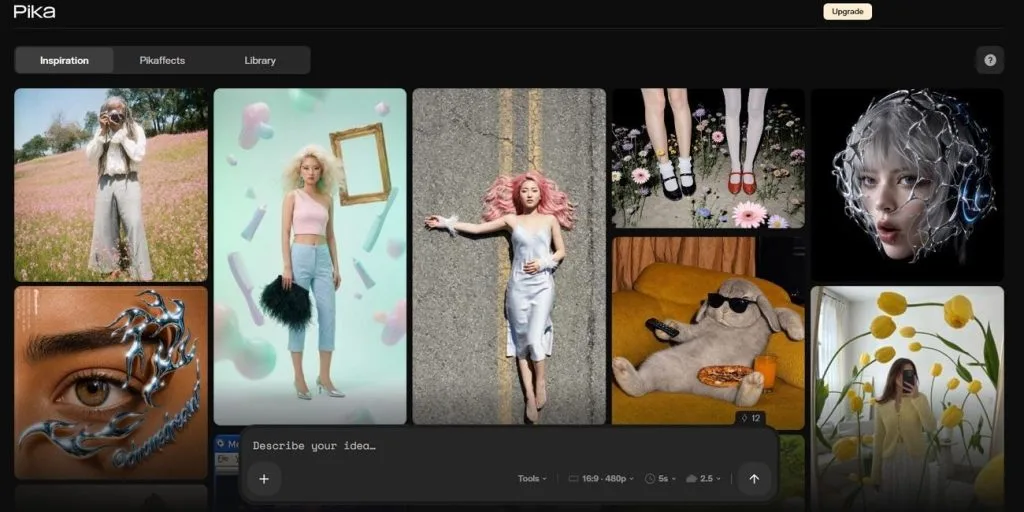
This is a widely used best text-to-video AI model that creates stylized videos with fast generation speeds consistently. Pika 2.5 supports quick testing, helping creators refine multiple ideas without long waiting times between generations. Short video formats make it suitable for social platforms requiring frequent content publishing and experimentation.
Key Features
- Supports text-to-video and image-to-video for flexible animation creation workflows.
- Optimized for Shorts and other vertical video platforms.
- Animates still images using camera movements and stylized visual effects.
Pros
- Keyframe tools create longer controlled video sequences.
- Edit tools modify objects inside generated videos.
Cons
- Complex scenes offer weaker control than cinematic AI models.
- High-resolution renders consume credits quickly during frequent use.
6. Luma Dream Machine
Best for: Professional video projects requiring advanced color editing and precise motion control after production.
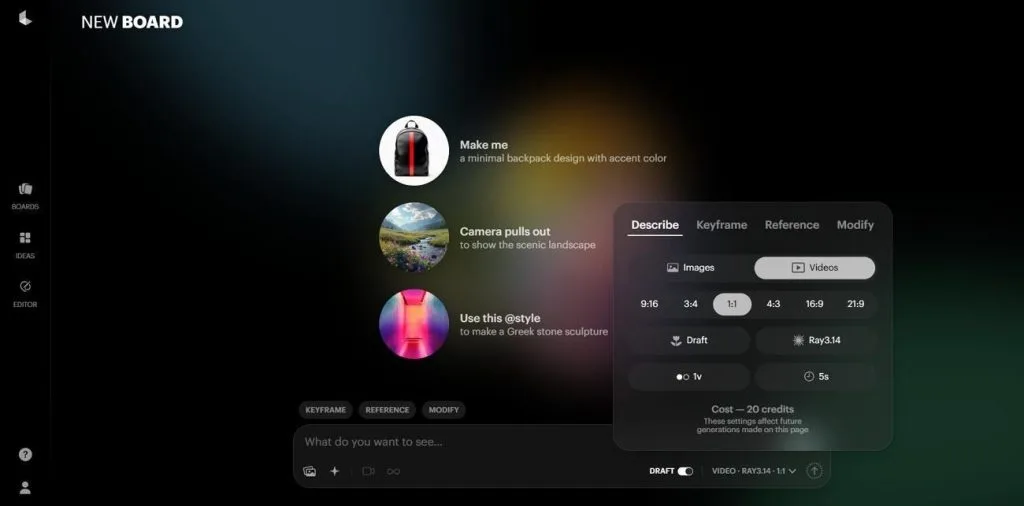
Luma Dream Machine creates realistic videos with strong motion control for professional creative projects. It uses the Ray3 model family to improve video quality, speed, and generation efficiency consistently. Users can generate realistic videos while preparing projects for advanced editing after rendering finishes.
Key Features
- Creates native 16-bit HDR videos with EXR export for professional editing workflows.
- Supports start and end keyframes with visual annotations for precise motion control.
- Ray3.14 generates faster 1080p videos with optional neural upscaling to 4K resolution.
Pros
- Character references improve consistency across multiple generated scenes.
- Faster Ray3.14 generation reduces waiting times for creators.
Cons
- Generates no audio, requiring separate sound editing afterward.
- Free plan limits quality and commercial usage significantly.
Comparison: Text-to-Video AI Models at a Glance
Every model performs differently depending on your video goals, workflow, and creative project requirements. The table below compares text-to-video AI models using their most important features and capabilities:
| Model | Max Output Length | Native Resolution | Native Audio | Character Consistency | Best Use Case |
| MagicLight AI | Up to 50 min, by plan | 1080p | Voiceover and music | Excellent across scenes | Script-based storytelling |
| Google Veo 3 | ~8 seconds | 4K | Dialogue, effects, ambience | Within a clip | Realistic videos with synced audio |
| Kling AI 2.0 | 10 sec (up to ~3 min with Extend) | 720p free, 1080p and 4K paid | None in 2.0 | Within a clip | Cinematic camera movement |
| Runway (Gen-4.5) | 2–10 seconds | 720p, upscales to 4K | None | Within a clip | Realistic cinematic shots |
| Pika 2.5 | 3–5 sec (up to 25 sec with Pikaframes) | 480p free, 1080p paid | Sound effects only | Limited across clips | Stylized social videos |
| Luma Dream Machine | 5 or 10 sec | 4K (upscaled) | None | Within a clip, reference on Ray3 | Professional post-production |
Part 3. What Makes MagicLight AI the Best Text-to-Video AI Model for Storytelling?
Most text-to-video models create separate clips that need extra editing for complete stories afterward. MagicLight AI plans the complete story before rendering, improving pacing and scene continuity naturally together. It supports videos up to 50 minutes from one script without repeated generations or stitching. Characters stay consistent across scenes, creating complete stories instead of disconnected video clips naturally.
How to Create a Video From Text Using AI in MagicLight AI?
Now, follow the steps below to create videos using the best text-to-video AI model for storytelling:
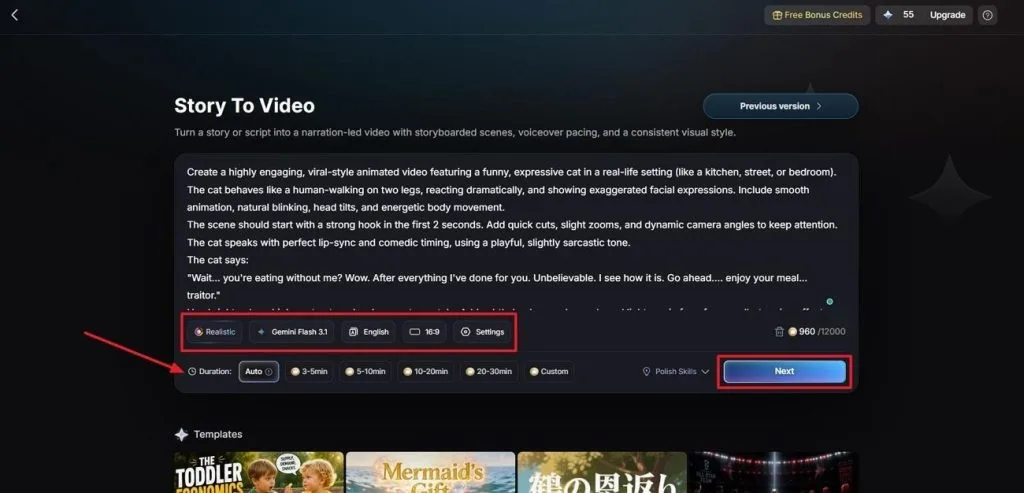
Step 1. Write Your Story Idea
Open Story to Video and paste or type your prompt into the Text Box. Next, select a Visual Style Model, choose an AI Story Model, and pick a preferred Video Language and Aspect Ratio. Adjust the Video Duration and press Next to continue.
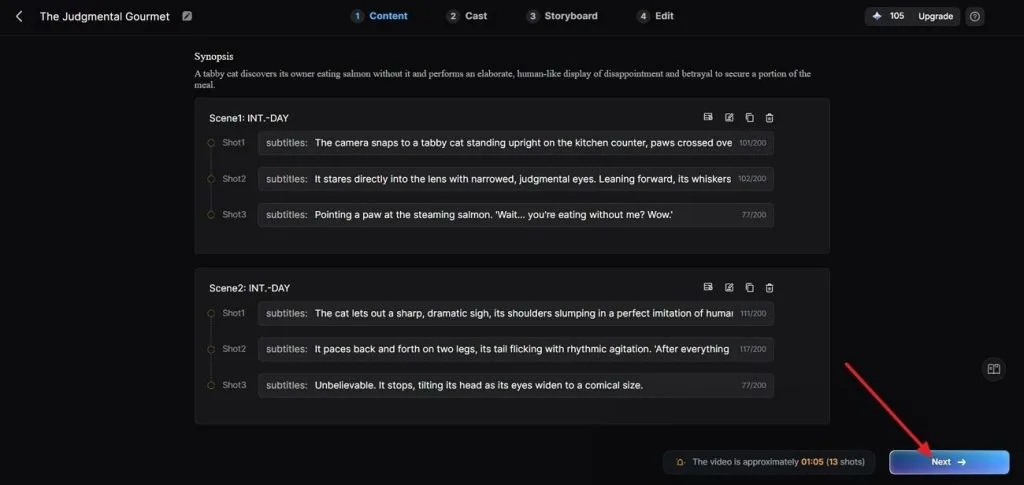
Step 2. Review the Breakdown of Scenes
After that, review all the scenes and the Synopsis breakdown. Use the Controls at the top if any adjustments are required. After the scene layout is finalized, press Next to proceed further.
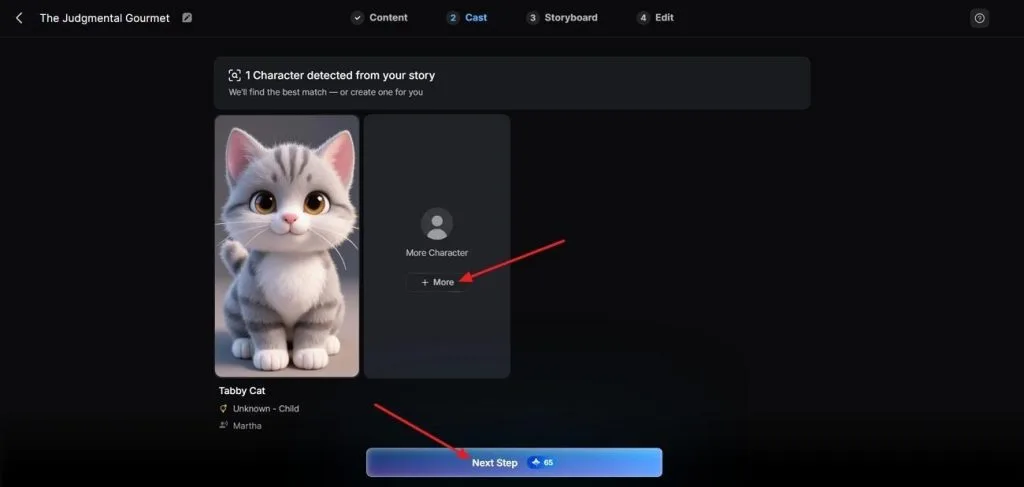
Step 3. Pick a Character for Your Video
Next, MagicLight AI will analyze your script and suggest some characters based on it. To explore more character options, click the More button. When the character is finalized, press Next Step.
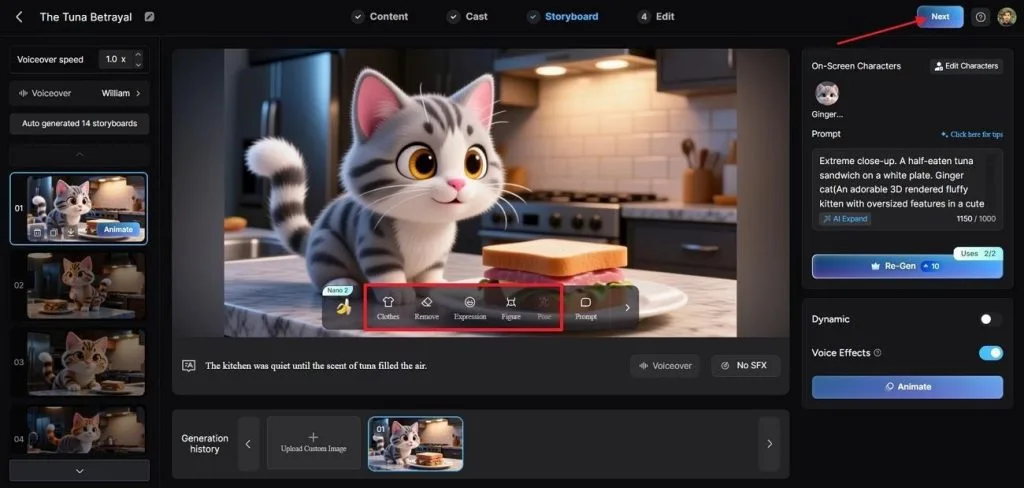
Step 4. Review Scenes in The Storyboard
Afterward, review all the scenes and make amendments in Clothes, Poses, and Expressions if needed. Once the Storyboard is finalized, press the Next button.
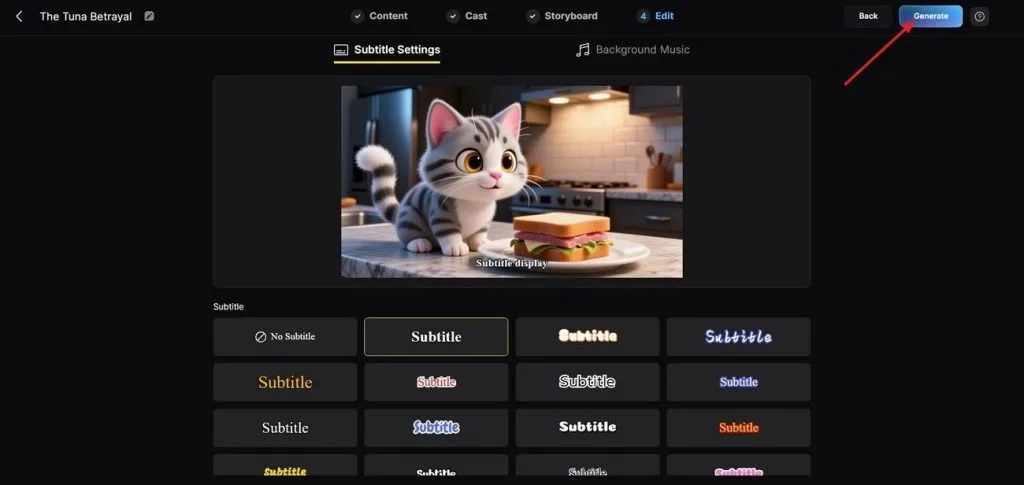
Step 5. Select a Subtitle Style
Pick a Subtitle style from multiple options and click the Generate button in the top right corner.
Step 6. Save The Final Generated Video
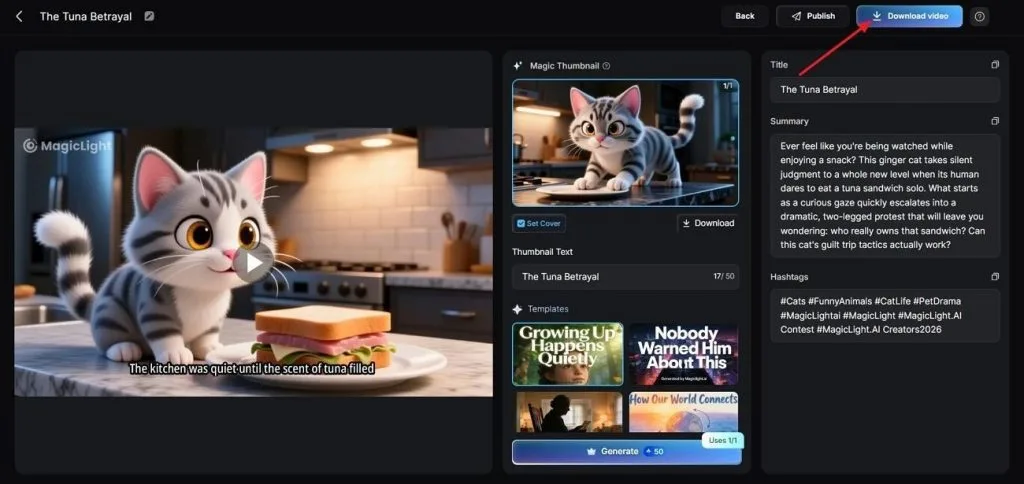
After the video is generated, preview the video and review the Cover, Thumbnail, and Hashtags. Next, click Download Video to download the video.
Conclusion
In summary, text-to-video AI models offer different strengths for different video creation needs and projects. Choose the model matching your content style, workflow, and production requirements for better results consistently. MagicLight AI remains the best choice for creating complete stories with consistent characters from scripts.
FAQs on Best Text-to-Video AI Models
1. What is the best text-to-video AI model in 2026?
MagicLight AI is the best choice for creating complete stories with consistent characters throughout. Veo 3 works better for short, realistic videos with synchronized audio and natural motion.
2. Are text-to-video AI models free?
Most models offer limited free plans instead of completely free video generation for everyone. MagicLight AI provides free credits, while others limit quality, features, or commercial usage.
3. Which text-to-video AI model creates the most realistic videos?
Google Veo 3 and Runway Gen-4.5 create the most realistic AI videos with natural motion. Both models focus on short clips instead of complete long-form video storytelling projects.
4. What is the difference between text-to-video AI models?
Models differ in video length, audio support, quality, and character consistency across scenes. Some create short clips, while others produce complete videos from written scripts automatically.
5. Which text-to-video AI model is best for YouTube creators?
MagicLight AI suits YouTube creators producing longer videos from complete written scripts. It supports multilingual narration and consistent characters throughout every generated video scene.


![How to Write a Script for a Short Film in 2026 [Beginner’s Guide]](https://magiclight.ai/wp-2/wp-content/uploads/short-film-screenplay-writing-guide-300x169.webp)


