
Buzzy AI calls itself “the world’s first agentic canvas,” a board where scripts, references, and over a dozen video models meet. Shots move through a storyboard, a chosen engine and plain-language edits that change light, camera angle, or background without a timeline. Results depend on the engine behind each shot, and every second of video draws on a shared credit balance.
Its pages focus on films, ads, and social clips, and its story workflow never mentions narration or voice-over. For narrated stories, MagicLight AI generates the script, the cast, the voices and every scene in one project.
Part 1. What Are Buzzy AI's Features, Workflow, and Pricing?
Buzzy AI runs in the browser and treats every video as a complete project rather than a one-off clip. Its Creative Agent can turn a script, treatment, reference image, or rough idea into a visual plan, with ready-made workflows and a community gallery available for extra direction and inspiration.
Key Features and Creative Workflow
Most of the work stays on the same canvas, including references, shot planning, generation, and edits. A creator can sketch out a scene, try the model that fits it best, then go back and change what did not work. The features below show how Buzzy AI supports that process from planning through revision:
- Agentic Canvas: Keeps characters, objects, locations, and finished shots on one board, while shared references help subjects stay consistent across scenes.
- Model Library: Includes Kling, Seedance, Veo, MiniMax, Wan, Hailuo, Sora, and Runway under one login, plus 5 image models.
- Chat-Based Video Editing: Uses plain-language prompts to change lighting, camera moves, backgrounds, or objects in MP4 and MOV clips while preserving motion.
- Skills and Templates: Includes pre-built Skills for films, ads, and animation, plus templates like “Retake the shot,” “VFX Motion control,” and “UGC Ads.”
- Trend Agent and Bot: Tracks social trends continuously, while the Buzzy AI bot connects with Telegram or WhatsApp through a QR code.
Once the scenes are generated, they can be watched in order, and any weak shot can go back into chat for another pass or a fresh version. For film and story projects, Buzzy AI works with 4- or 8-second scene lengths, which means longer videos are put together from a series of shorter generations.
Pricing, Video Quality, and Export Options
Buzzy uses a credit system, and video generation spends those credits as footage is created. Its terms use 10 credits per second as one example, so 2,000 credits on the Basic plan would equal about 200 seconds at that rate. The table below shows what each plan includes, along with its main export limits:
| Plan | Monthly Price | Monthly Credits |
| Free | $0 | Limited sign-up allowance |
| Basic | $19 | 2,000 |
| Pro | $34 | 3,600 |
| Ultra | $56 | 6,000 |
| Infinite | $169 | 20,000 |
This Buzzy AI review finds that output quality depends heavily on the model chosen for each shot. Projects usually start at 720p and 16:9, while export limits vary across sources. Some pages mention 4K support, though hands-on testing reports lower ceilings. Watermarks and higher-resolution exports also appear to depend on the plan used.
Pros and Cons of Buzzy AI
Looking beyond the feature list, this Buzzy AI review highlights several useful strengths alongside limits that become clearer in daily use.
Pros
- Switch between several video engines inside the same Buzzy workspace.
- Change lighting, backgrounds, camera moves, or objects directly through chat.
- Keep characters, locations, and the overall look consistent between scenes.
- Explore community projects to see how other creators built their videos.
Cons
- Credit usage changes with model, duration, resolution, and generation settings.
- Unused subscription credits generally expire when each billing cycle ends.
- Subscription payments are non-refundable except in limited approved circumstances.
- Commercial rights depend on Buzzy’s terms and individual model licenses.
Part 2. Best Alternatives to Buzzy AI for Video Creation
The best Buzzy AI alternative depends on what the project still needs after generation. Buzzy works well for multi-shot films, ads, and visual planning, but some workflows need stronger narration, voice, or end-to-end story tools. The options below cover those gaps from different angles:
Main Advantages for AI Video Creators
Buzzy AI is most useful when a project needs more than one generated clip. Its storyboard, shared references, creative workflows, and MCP connection suit several types of video creators especially well.
- Short Film Creators: Multi-camera storyboards, shared references, and per-shot model choices help keep longer visual sequences connected.
- Ad and UGC Teams: Ready-made ad workflows and prompt-based edits make it easier to create new product, background, or scene variations.
- Social Media Creators: The Buzzy AI bot reviews shared TikTok and YouTube links, learns a creator’s preferences, and collects relevant inspiration around the clock.
- AI Assistant Users: Claude, ChatGPT, Cursor, and other supported clients can generate videos, storyboards, ads, and Buzzy projects through MCP.
Potential Limitations and Learning Curve
The canvas requires more setup than a prompt box, and newcomers face a dozen engines, each with its own prompt habits and costs. Retakes add up, since a 30-second shot at the example rate costs 300 credits per attempt. Switching models partway through can still introduce visual drift, and you need to check faces and costumes in every shot.
Billing also takes some reading, since the terms describe weekly or annual cycles while the pricing page lists monthly rates. Renewals happen without a prompt, and cancellation needs at least 24 hours’ notice before the cycle ends.
Buzzy AI vs. Traditional AI Video Generators
Instead of stopping after one generated clip, Buzzy AI keeps each project connected across planning, model selection, editing, and billing. Traditional generators often focus on a single prompt-to-video step, while Buzzy adds a broader production layer. A side-by-side comparison below shows where those differences matter most:
| Aspect | Buzzy AI | Traditional Video Generators |
| Starting Point | A project canvas fed by a script, image, or idea | A single text or image prompt |
| Models | More than a dozen engines behind one login | One in-house model |
| Planning | Multi-camera storyboards before generation | Each clip planned on its own |
| Consistency | Shared references across shots | Repeated reference uploads per clip |
| Revisions | Chat edits to light, camera, or objects | A new generation for most fixes |
| Billing | One credit pool for every engine | Credits or plans for one model |
For one-off social clips, a traditional generator is often the simpler choice. Buzzy AI makes more sense for multi-shot ads and films, where one canvas keeps every shot, reference, and revision connected throughout production.
When to Consider MagicLight.AI for Story-Based Video Creation
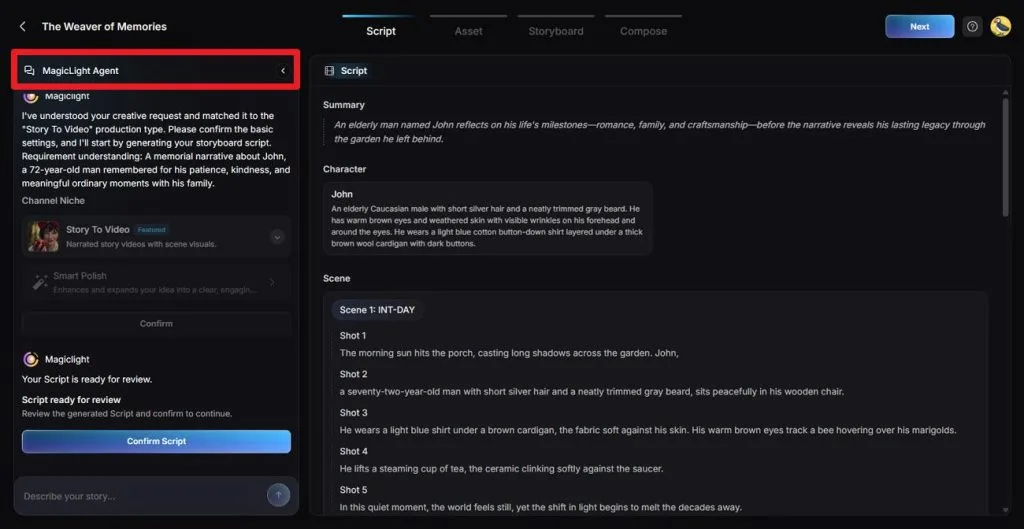
Buzzy AI’s documented story workflow centers more on visual generation, with scenes built a few seconds at a time. Narrated stories usually need a tighter pipeline for script, characters, voices, music, and captions. MagicLight AI brings those pieces into one project, while MagicLight Agent develops the plot, creates character cards, and breaks scenes into numbered shots.
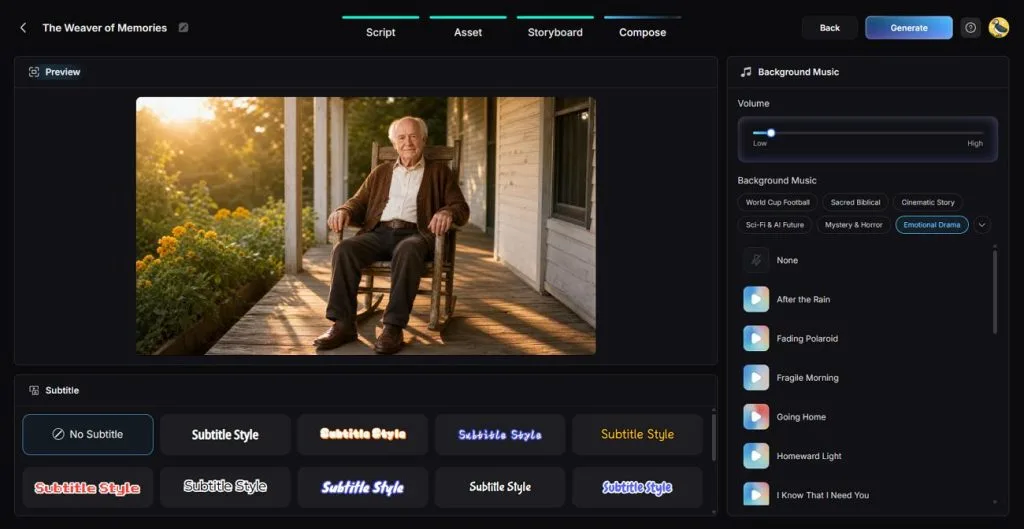
After approval, Story to Video animates each shot and adds voices, music, and subtitles during composition. Character designs stay fixed from the Asset stage to support consistency across scenes and later episodes. MagicLight also offers 37 voice narrations, voice cloning, and 11 languages, while the Long Video Generator supports creating projects up to 50 minutes.
- MagicLight Agent: Turns an idea into a script, format, and budget tier before video generation begins.
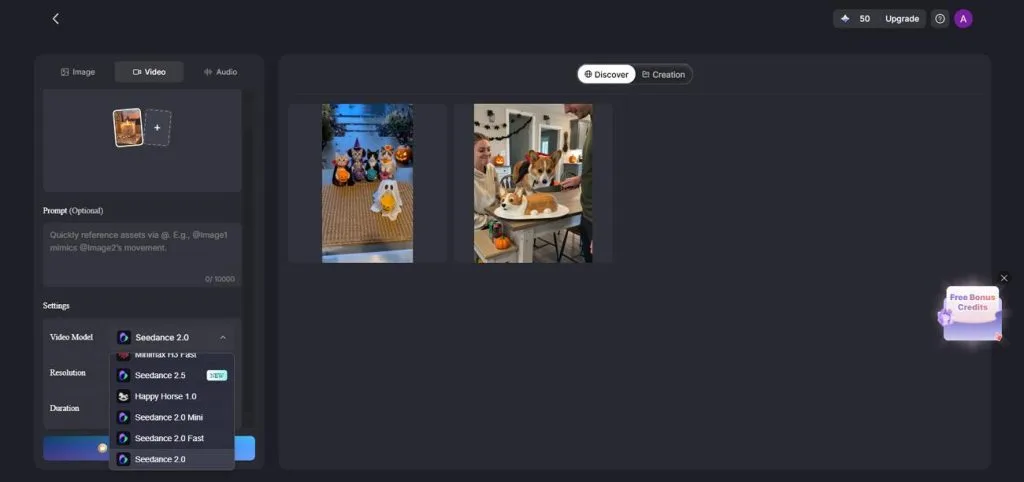
- Multi-Model Video Generation: Offers 20 video models, including Kling 3.0 and Seedance 2.5, for different motion and scene styles.
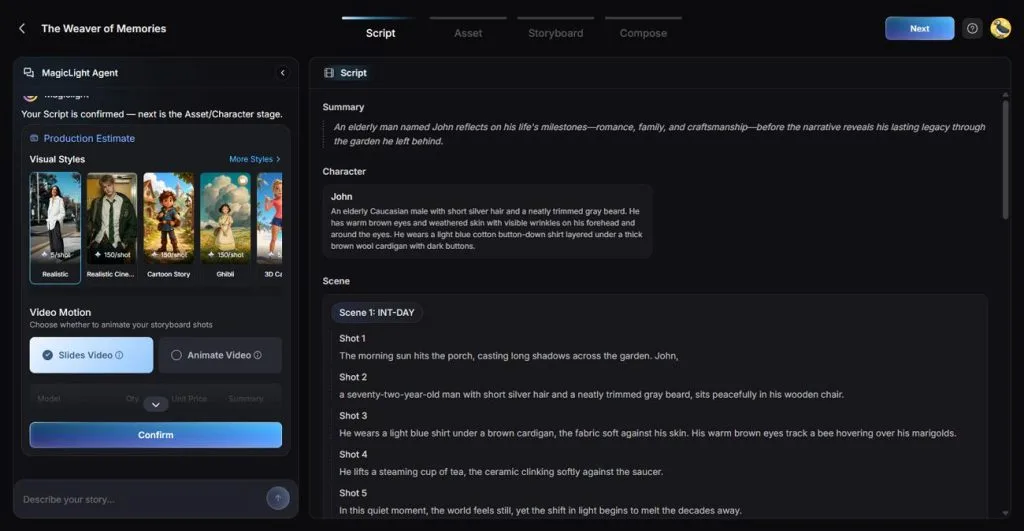
- Consistent Visual Styling: Includes more than 52 looks, from realistic and anime to 3D cartoon and cinematic styles.
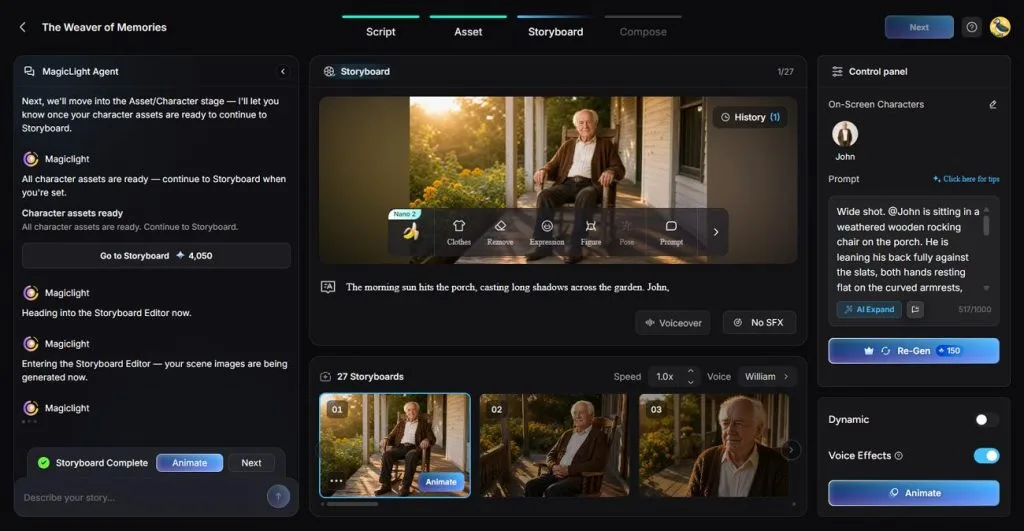
- Scene-Level Storyboard Control: Its Nano Storyboard lets creators review each scene, choose from 50+ poses, and adjust expressions, camera views, or other visual details.
- Built-In Audio and Captions: Adds 40 background tracks and 16 subtitle styles without moving the project elsewhere.
Conclusion
To conclude, Buzzy earns its place with a planning canvas, a broad model library, and chat edits that fix single shots without a full redo. Its weak spots are credit planning, finishing audio, and licensing terms that agencies need to read closely. The Buzzy AI review verdict favors multi-shot ads and films, and narrated stories fit MagicLight AI, where script, cast, and voice share one project.
Frequently Asked Questions
1. What is Buzzy AI used for?
Buzzy AI is used for multi-shot AI films, ads, animations, music videos, and faceless social reels built on a shared canvas. Its chat editor relights footage and swaps backgrounds or objects, and its agent scouts social trends for new video ideas.
2. Can Buzzy AI keep characters consistent across multiple scenes?
Shared references on the canvas keep characters, costumes, and locations consistent, and Pro and higher plans add real-face uploads. Results still vary by engine, and a model switch partway through a project can introduce visual drift between shots.
3. What is a good alternative to Buzzy AI for creating story-based videos?
For story-based videos, MagicLight AI comes recommended because its Agent drafts the story, designs the characters, and plans every shot before animation. Voices, music, and subtitles join the same project, and paid plans can run a story up to 50 minutes long.