


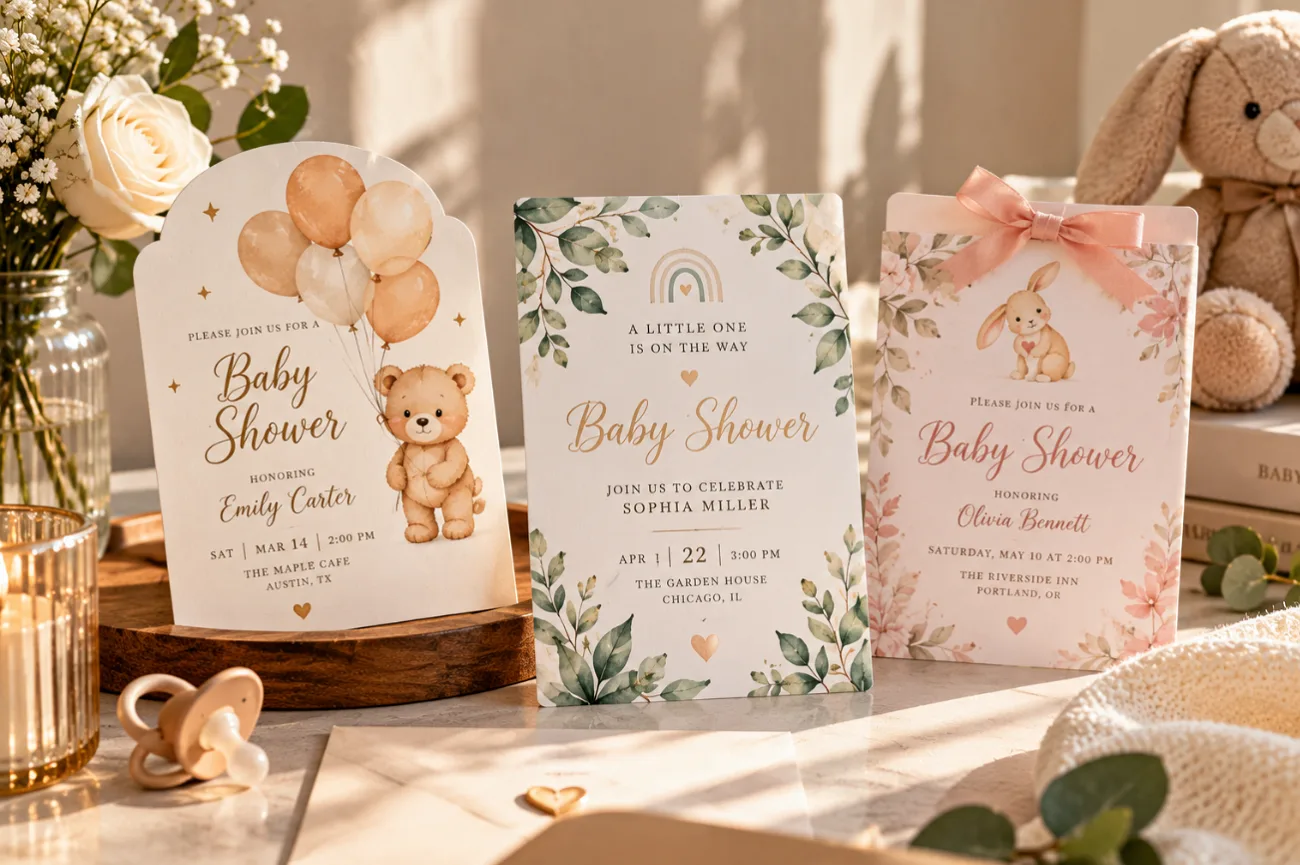
Guests get their first feel for a baby shower from the invitation, usually weeks before the celebration. The artwork sets the mood, while the wording covers the date, time, location, and RSVP details. Well-planned baby shower invitations handle both without making the card feel crowded.
Florals and woodland animals remain popular, even as new themes come and go. Today, many designs start with an online template editor or AI AI image generator. Whatever tool you use, check every name, date, address, and reply detail before sending them.
Part 1. 20 Best Baby Shower Invitation Ideas by Category
Finding the right design gets easier when you start with the mood of the celebration. These 20 baby shower invites are grouped into 5 categories, with 4 ideas in each. Browse the categories below and choose the idea that best fits your shower:
Trending Baby Shower Invitation Themes for 2026
This roundup of baby shower themes flags cowboy and farmers-market parties as rising picks. Parisian and cocktail-pun showers appear on the same list, each with its own color story.
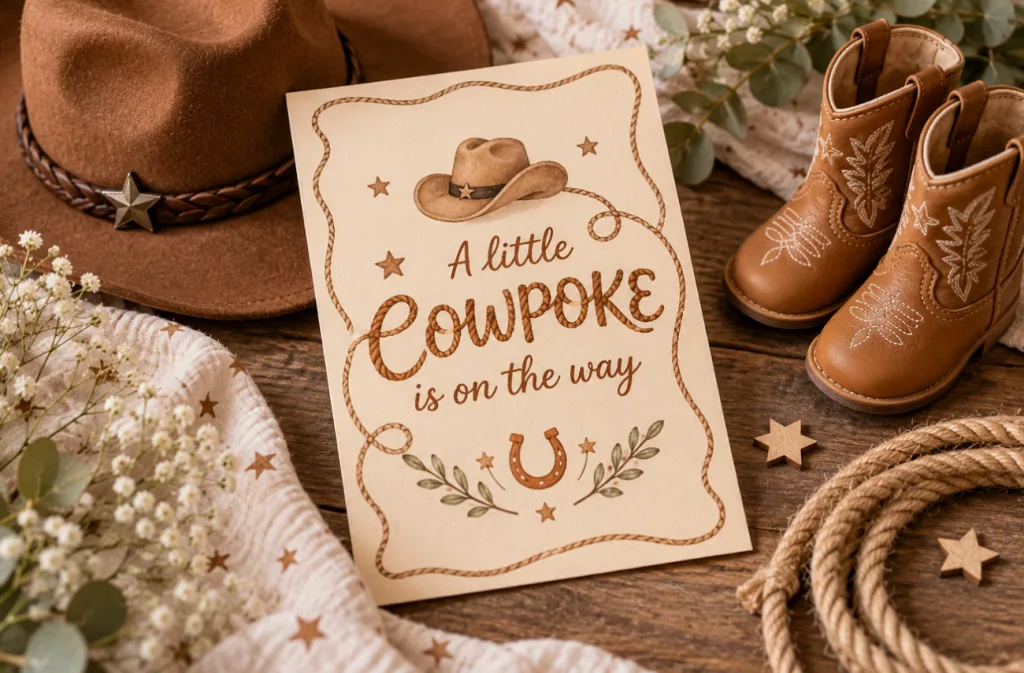
Image name: little-cowboy-shower-invitation.jpg
Image alt: western card with tiny boots
1. Little Cowboy or Cowgirl
Tiny boots and a felt hat sit on a sand-colored card with rope lettering. The headline reads “A little cowpoke is on the way.”
2. Locally Grown Market
Watercolor crates of peas and berries frame the details under a stamped “Locally Grown” label. Kraft paper and green ink keep the farmers-market feel.
3. Parisian Cafe
Pink-striped awnings and a sketched Eiffel Tower set the Paris mood. This design works as an invitation for baby shower brunches with croissants and macarons.
4. A Tini One Is on the Way
Martini glasses with single olives anchor this black and gold cocktail-party card. Printing a mocktail menu keeps the parent-to-be part of every toast.
Classic and Timeless Baby Shower Invitations
Storks and hot air balloons decorated the shower invitations baby boomers mailed to friends, and both still look timeless today. Florals and forest animals round out this group of dependable classics.
1. Baby in Bloom Florals
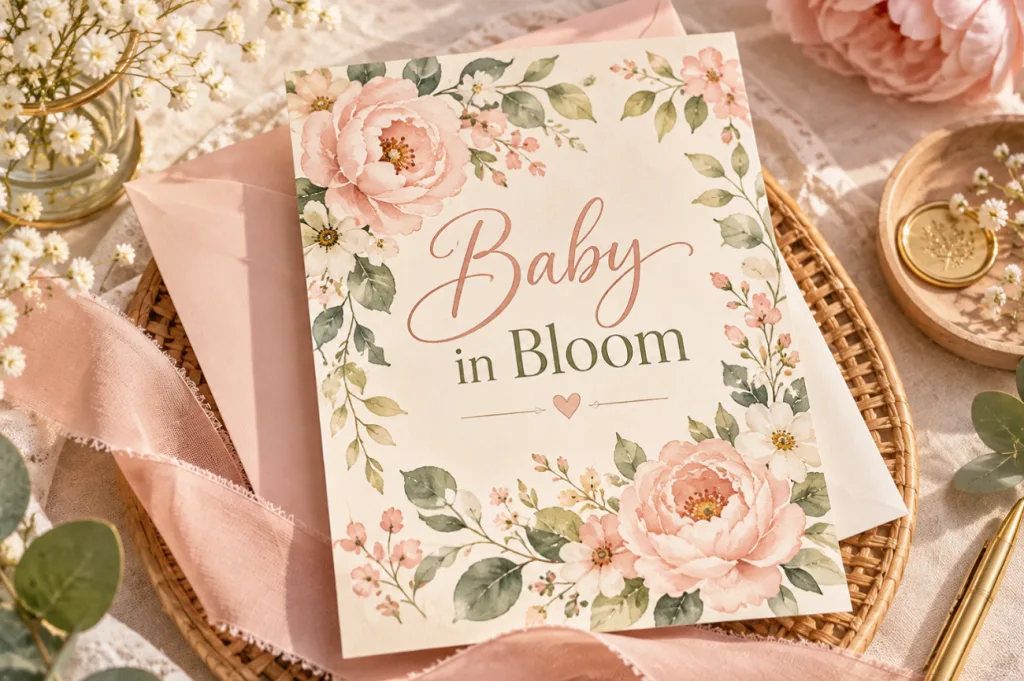
Loose watercolor peonies in blush and sage circle the honoree’s name. The header “Baby in Bloom” ties the card to a spring garden party.
2. Woodland Friends
Sleepy foxes and fawns rest under pine branches in rust and moss green. Pinecone stickers on kraft envelopes carry the theme into the mailbox.
3. Vintage Stork Delivery
An ink-drawn stork carries a bundle across cream stock, with the date inside a postmark. Sepia lettering gives the whole design an heirloom feel.
4. Hot Air Balloon Voyage
Patchwork hot air balloons drift over clouds, trailing a banner that carries the details. Mustard and pale blue keep the palette open for any baby.
Gender-Neutral Baby Shower Invitations
Neutral palettes work for parents keeping the sex a surprise and for those who skip pink and blue. Soft gold and sage give invitations for baby shower guests a warm look that leans toward neither.
1. Over the Moon
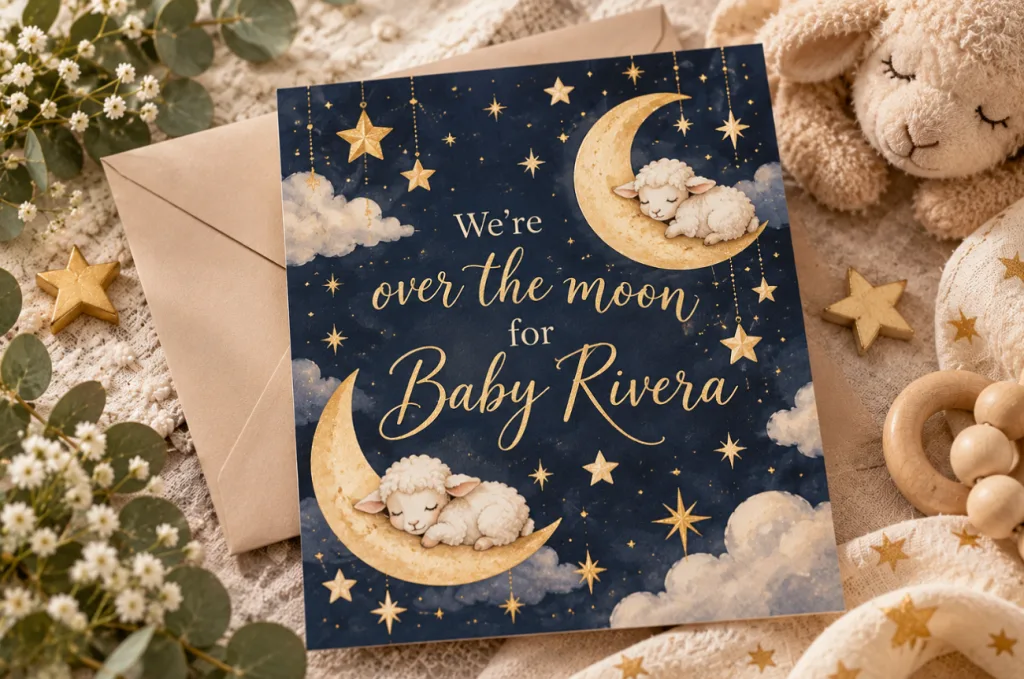
Crescent moons cradle sleeping lambs among gold stars on a deep navy card. Its header reads “We’re over the moon for Baby Rivera.”
2. Twinkle Little Star
Hand-drawn gold stars scatter across a cloud-gray card under the rhyme’s opening line. Matching star stickers can seal any envelopes headed out by mail.
3. Little Cutie Citrus
Bright clementines frame the line “A little cutie is on the way” on white stock. That palette stays cheerful without signaling boy or girl.
4. Boho Rainbow
Muted rainbow arches in terracotta and mustard sit over clean serif type on oat-colored stock. Dried pampas grass at the party echoes those earthy tones.
Seasonal Baby Shower Invitations
Season-led designs borrow their palette from the month of the party and its weather. For outdoor dates, invites for baby shower parties can add a rain plan in small print.
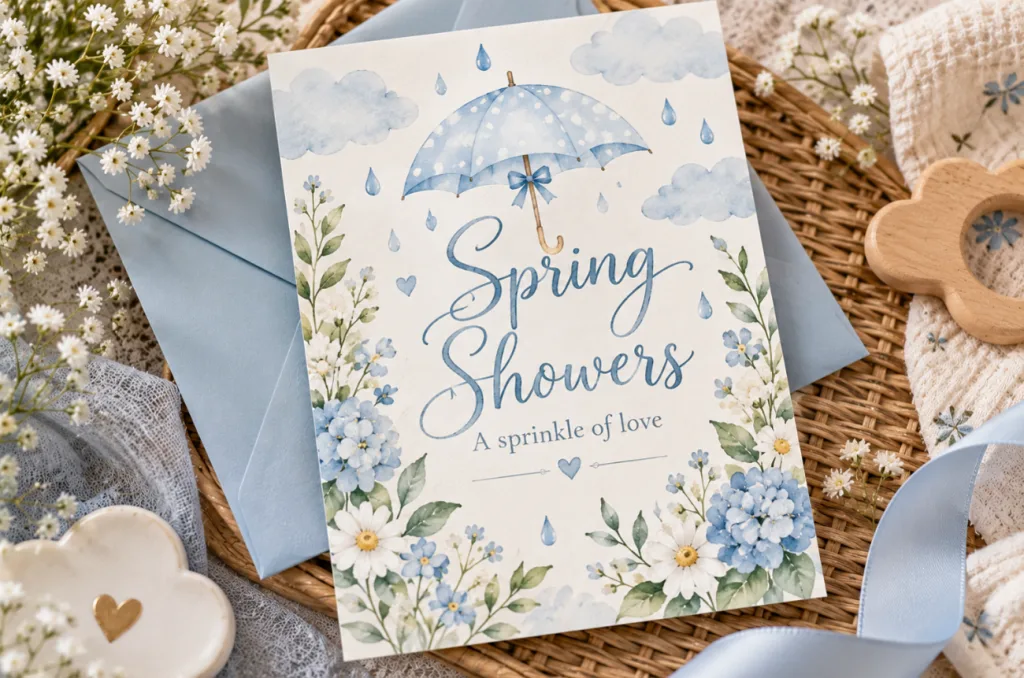
1. Spring Showers
Raindrops and a small umbrella play on the word “shower” in pale blue watercolor. Its tagline, “A sprinkle of love,” extends the pun.
2. Sweet Little Peach
Ripe peaches and leafy branches in coral and sage frame a soft summer card. Script lettering above the name reads “Sweet as a peach.”
3. Little Pumpkin
Autumn leaves cradle a small pumpkin under the header “Our little pumpkin is almost here.” Copper ink keeps the card cozy for an October date.
4. Little Snowflake
Snowflakes and knit mittens sit on an icy blue card with touches of silver foil. White script reading “Our little snowflake” finishes the winter look.
Playful and Personal Baby Shower Invitations
Gentle puns and personal details turn a card into an invitation baby shower guests keep on the fridge. The four ideas here lean on wordplay or on the family’s own story.
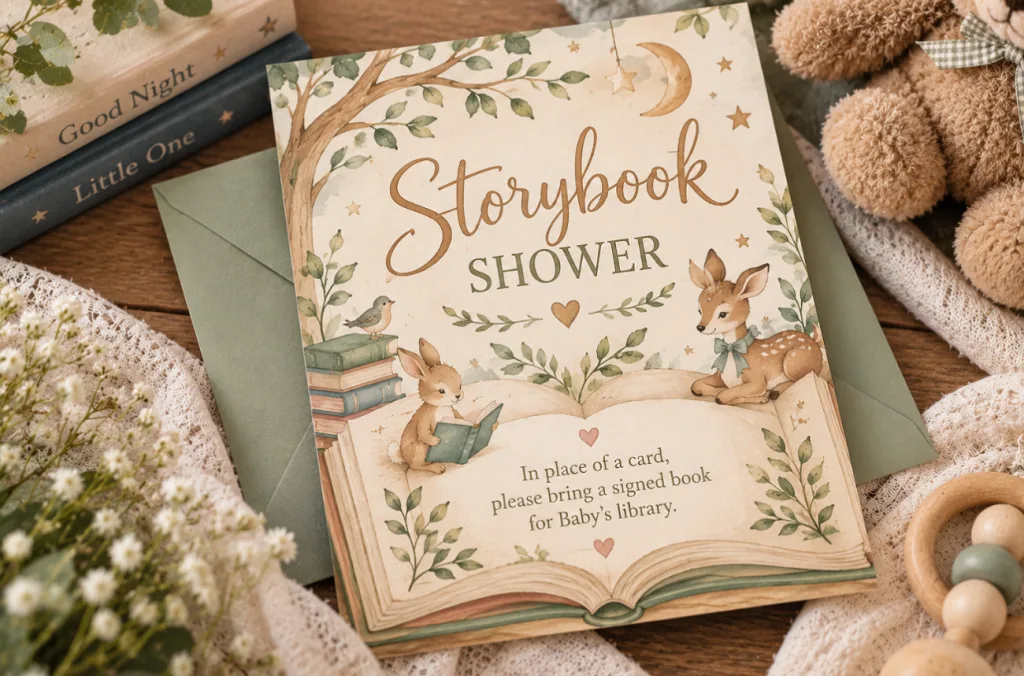
1. Storybook Shower
Open storybook pages fill the background behind the party details. A note asks each guest for a signed book in place of a card.
2. We Can Bearly Wait
Plush teddy bears hold balloons beside “We can bearly wait” in rounded letters. Honey and cream tones keep the design warm in any season.
3. Ultrasound or Maternity Photo
Ultrasound scans or maternity photos fill the upper half, with details in a white band underneath. The finished card doubles as a keepsake for grandparents.
4. Baby-Q Couples Shower
Checkered borders and a smoking grill announce a code “Baby-Q” for both parents’ friends. Lawn games listed on the card set a relaxed tone.
Part 2. Best Way to Create Baby Shower Invitations Online
A search for “babyshower invitations” brings up plenty of ready-made designs, but choosing a template is only one part of the process. Before working on the artwork, settle the format, wording, and timing first. The 4 points below cover what to decide before your invitations go out:
- Pick How You’ll Send It: Choose digital, print, or both. Digital invitations can include an RSVP link, while printed 5x7 cards work well for guests who prefer traditional mail.
- Build the Invitation Design: Start with a ready-made template or use an image generator to create artwork around your chosen baby shower theme.
- Check Names, Dates, and Addresses: Proofread every line before sending. Keep important wording on a separate text layer where possible, since generated lettering may contain mistakes.
- Plan the Send and RSVP Dates: Send invitations 3 to 6 weeks before the shower and aim to collect RSVPs about two weeks before the event.
For the artwork step, MagicLight AI offers an Image Generator feature. It turns a written theme and optional reference photos into original invitation art, ready for printing or texting.
Part 3. Generate Baby Shower Invitations Online with MagicLight AI
MagicLight AI’s Toolbox brings image and video creation tools together in one workspace. Hosts who cannot find suitable baby shower invites among ready-made templates can use the Image tool to create something more personal. Add a theme, upload visual references, select an image model, and shape the artwork around the celebration.
- Add Multiple Visual References: Upload nursery photos, fabric swatches, or other references, with each image supporting files of up to 20MB in WEBP, PNG, JPG, or JPEG format.
- Choose From 5 Image Models: MagicLight AI offers 5 image models, including 3 GPT Image versions, Seedream 5.0 Pro, and Nano Banana 2, giving you several ways to interpret the same invitation theme.
- Animate the Finished Invitation: Use Image to Video to turn a static baby shower card into a short moving invitation, adding effects such as drifting stars before sharing it digitally.
How to Generate a Baby Shower Invitation in MagicLight AI
Start by choosing the right theme, layout, and details for the celebration. Follow the steps below to design your baby shower invites in MagicLight AI and prepare the finished artwork for sharing:
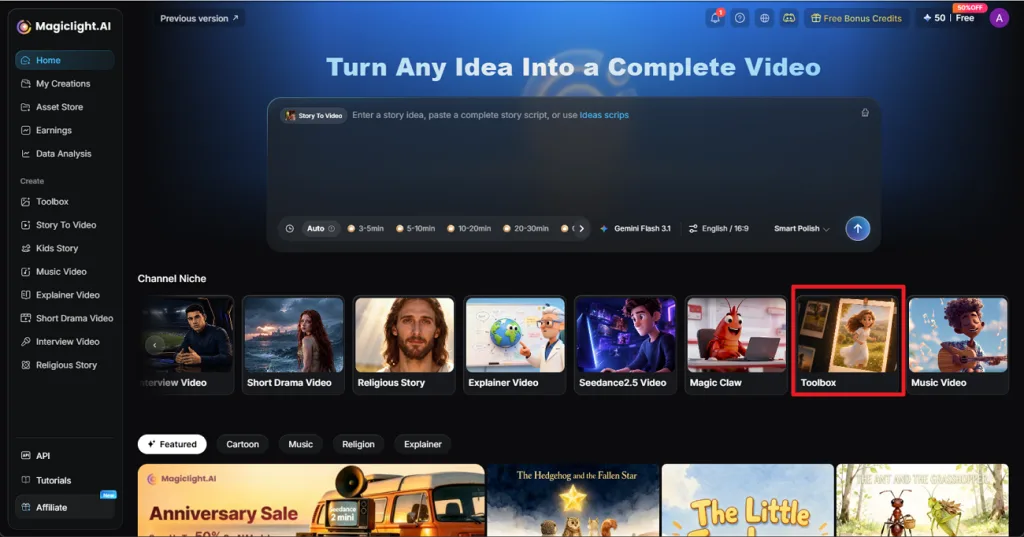
Step 1. Open the Image Tool
From the MagicLight AI sidebar, choose Toolbox, then open the Image tab. Add a nursery photo or fabric swatch using Upload images if you want the invitation to follow specific colors or visual details.
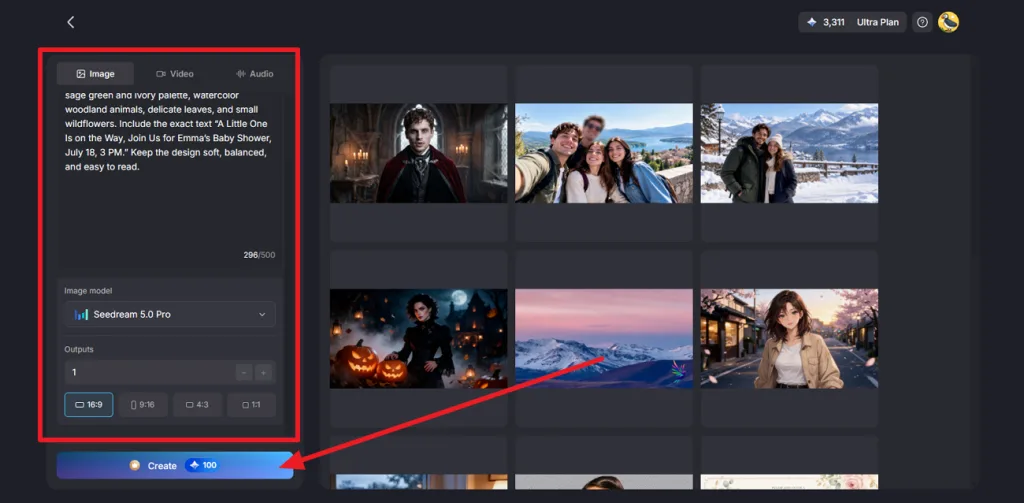
Step 2. Add the Invitation Details and Generate
Describe the theme, color palette, artwork, and exact invitation wording in the prompt box. Select an Image Model, choose the number of Outputs, and set 9:16 for phone sharing or 1:1 for a square design. Click Create to generate the invitation.
Step 3. Check and Download the Invitation
Open the generated design and carefully check every name, date, time, and other detail. Generate another version if the text contains an error. Once the baby shower invitation looks right, press the Download icon to save it for digital sharing or printing.
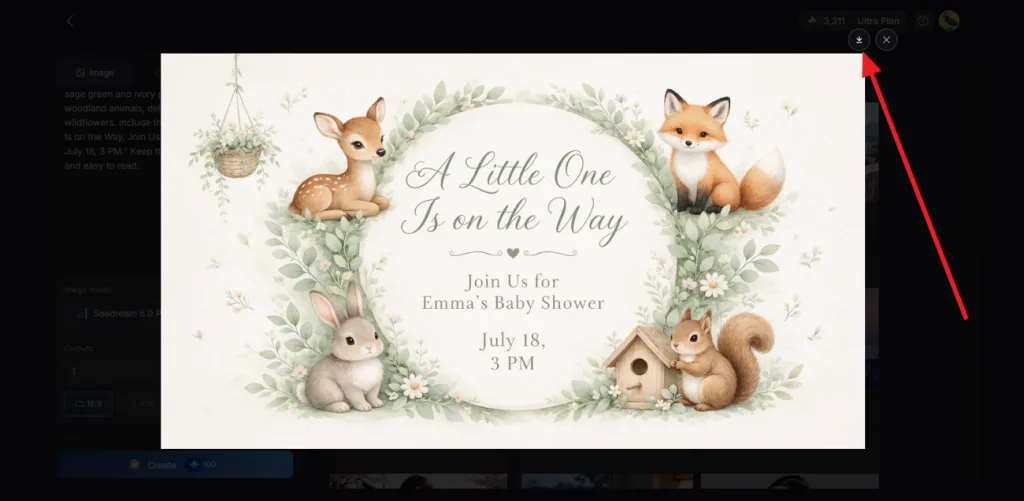
Conclusion
The best baby shower invitations combine a thoughtful theme with clear, accurate event details. From gender-neutral designs to seasonal favorites, each style offers a personal way to celebrate the upcoming arrival. MagicLight AI helps turn these ideas into custom invitation artwork using simple prompts. You can also use its Image to Video feature to create animated invitations for digital sharing.
FAQs on Baby Shower Invitations
1. What should be included on a baby shower invitation?
The card needs the parent-to-be’s name, the hosts, the date and start time, the full address, and an RSVP contact with a deadline. Emily Post permits registry details on baby shower invitations, although hosts can also share them through a separate enclosure.
2. Can I create baby shower invitations online?
The whole process runs in a browser, starting from a template site found by searching “babys shower invites” or from an AI image generator. MagicLight AI’s Image tab produces original invitation art from a written theme, ready to download for printing or texting.
3. What are the most popular baby shower invitation themes in 2026?
Babylist’s 2026 theme roundup marks “Little Cowboy” western parties and the farmers-market “Locally Grown” theme as rising, with Parisian designs also on its list. Classic Baby in Bloom florals and woodland animals stay common this year, and both translate cleanly into invitation artwork.
4. Can I create gender-neutral baby shower invitations with AI?
AI image generators handle neutral designs well once the prompt names a palette, such as sage with crescent moons. MagicLight AI’s Nano Banana 2 page credits the model with respecting “negative prompts with high precision.” That covers a line such as “no pink or blue.”
![How to Remove People from Photos in 2026 [Full Guide]](https://magiclight.ai/wp-2/wp-content/uploads/remove-people-from-photos-guide.jpg-300x197.webp)
![6 Best Picture Modification Apps in 2026 to Try [New List]](https://magiclight.ai/wp-2/wp-content/uploads/best-picture-modification-apps-for-photos.jpg-300x200.webp)
![How to Turn Audio File Into Video in 2026 [Full Guide]](https://magiclight.ai/wp-2/wp-content/uploads/audio-to-video-conversion-guide.jpg-300x169.webp)
![How to Make an AI Movie in 2026 [Step-by-Step Guide]](https://magiclight.ai/wp-2/wp-content/uploads/ai-movie-creation-journey-posters.jpg-3-300x169.webp)