


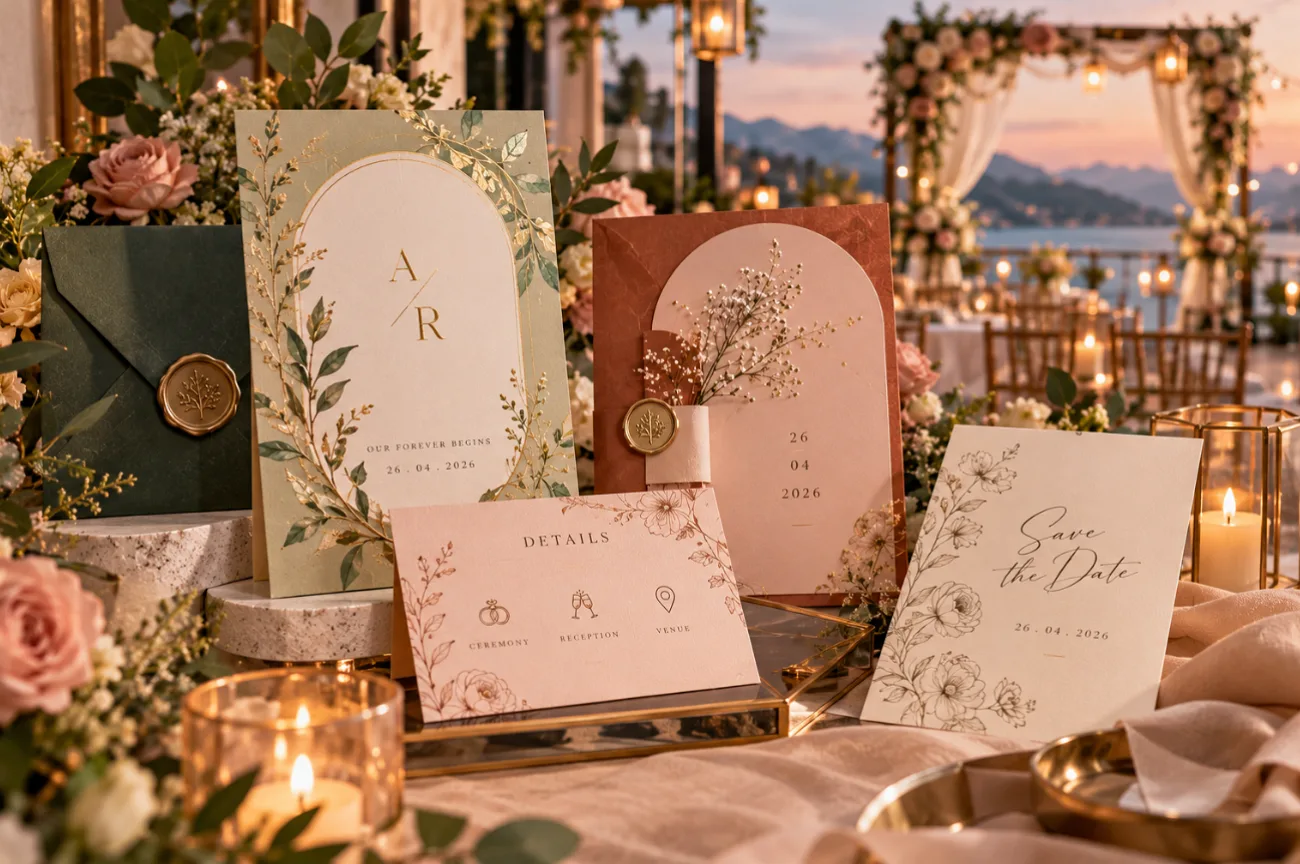
Wedding invitations are easy to leave until later but the deadline comes around quickly. Most couples send them 6 to 8 weeks before the wedding. If the ceremony is at a lakeside lodge in late May, late March is a good time to have everything addressed and ready to post.
For the design, look to the wedding itself for ideas. A sketch of the lodge or colors taken from the setting can make the card feel personal. Templates work well too, while MagicLight AI can help create something more individual. Just check the names and dates carefully before printing.
Part 1. 20 Best Wedding Invitation Ideas by Category
Venue and dress code narrow the choice before color does, since a ballroom and a beach call for different paper, type, and tone. Each design pairs a palette with a motif or print method, and nearly all these wedding invites work in print or on phones.
Trending Wedding Invitation Styles for 2026
Several stationers’ trend reports for 2026 share a few themes. Touchable paper, shapes beyond the rectangle, and design built around the couple’s story appear across them.
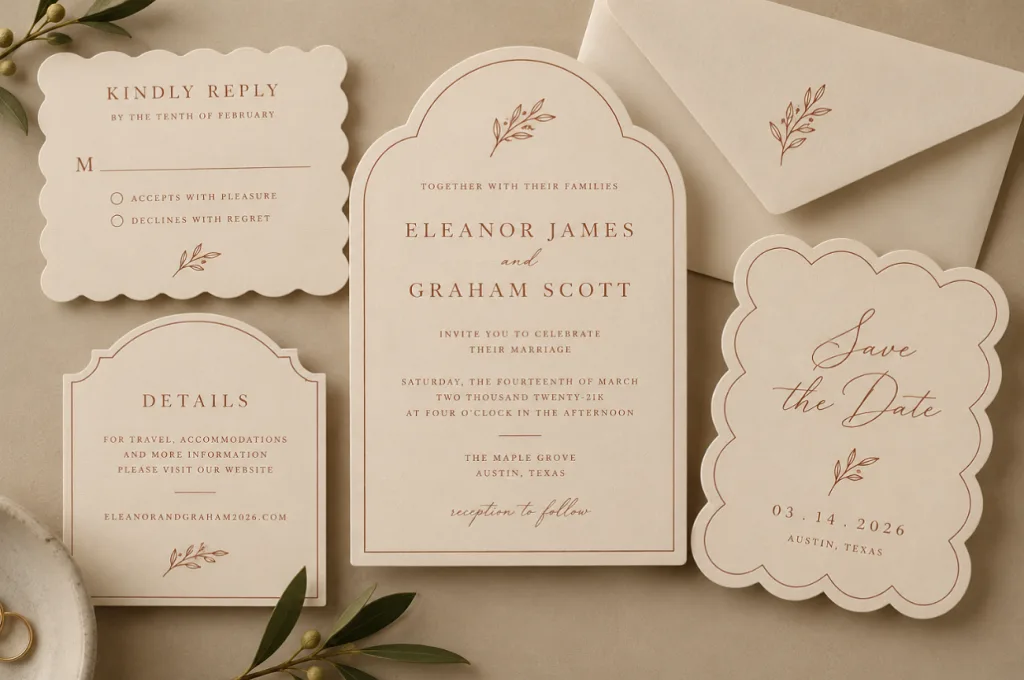
1. Arched and Scalloped Shapes
Die-cut arches and scalloped edges replace the plain rectangle on many 2026 suites. Cream stock with one ink color keeps the outline as the main feature.
2. Vellum Wrap With Wax Seal
A translucent vellum jacket softens the printed card beneath it, and a wax seal holds the wrap closed. Sage or oxblood wax repeats the wedding colors outside.
3. Magazine-Style Typography
Oversized sans-serif names and an off-center layout borrow the look of a fashion magazine cover. Black ink on bright white paper keeps that editorial edge crisp.
4. Illustrated Venue Portrait
A pen-and-ink drawing of the venue, whether a chapel, a barn, or a city hall, crowns the card. The same sketch reappears on menus and welcome signs.
Classic and Formal Wedding Invitations
Formal suites keep to etiquette, with spelled-out dates and traditional request lines. A card in this style is often the wedding invitation wedding guests keep in a memory box for years.
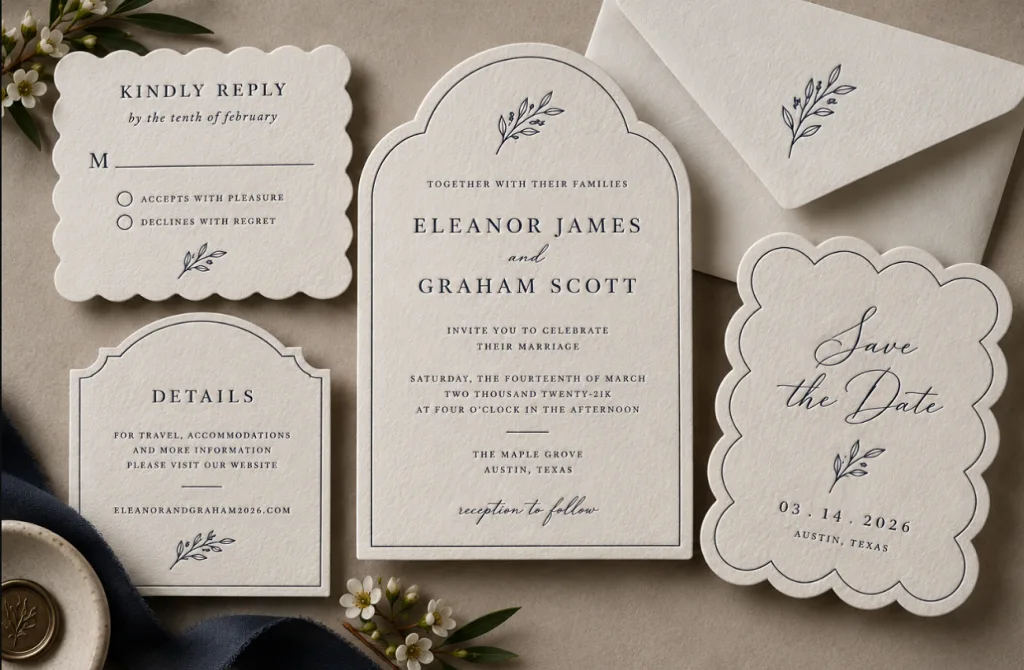
1. Letterpress on Cotton Paper
Deep letterpress impressions on heavy cotton stock leave a texture guests can feel with a fingertip. A single navy or charcoal ink keeps the effect quiet.
2. Black-Tie Monochrome
Black card stock with silver lettering signals an evening affair before anyone reads the details. Envelopes in matching black, addressed in white ink, complete the evening mood.
3. Gold Foil Crest
A custom crest built from the couple’s initials is pressed in gold foil above the names. The crest then returns on napkins, signs, and the cake topper.
4. Etiquette Script Classic
Copperplate script and a fully spelled-out date keep to formal tradition, down to the year written in words. Emily Post reserves “the honor of your presence” for ceremonies in a house of worship.
Romantic and Botanical Wedding Invitations
Florals, greenery, and ribbon give couples warm, inviting wedding invitations that work across seasons and venues. The 2026 palette shifts these designs toward earth tones and deep jewel colors.
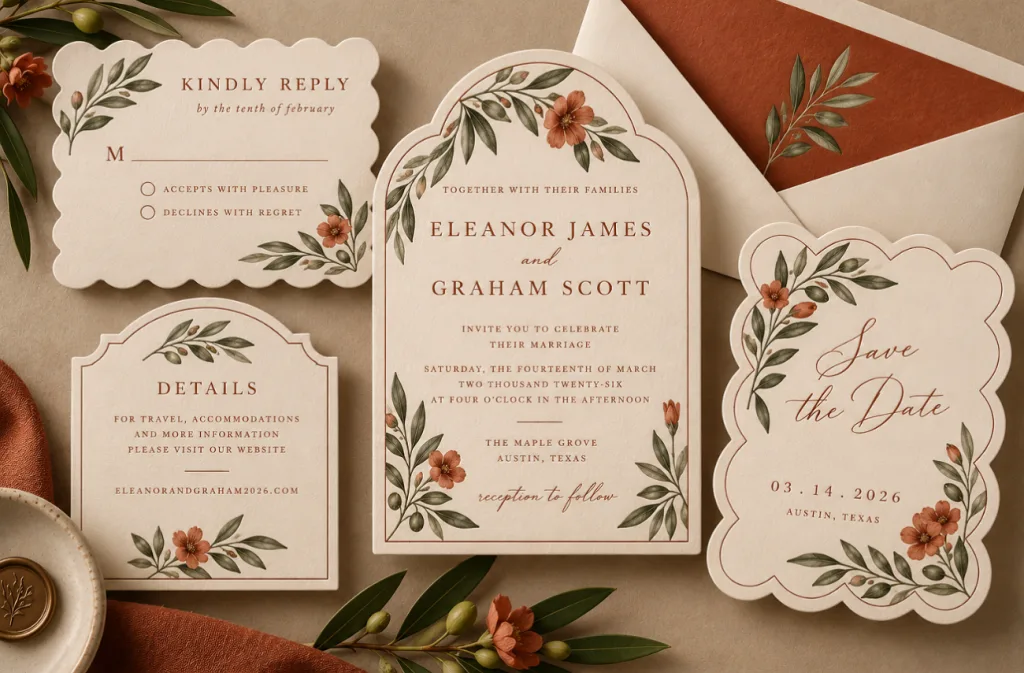
1. Terracotta and Olive Botanicals
Olive branches and terracotta blooms carry the earthy palette that 2026 color forecasts put first. Cream envelopes with rust liners finish the warm look.
2. Coquette Bows and Ribbon
Satin ribbon threaded through the card or printed bows in blush and cream lend a soft, romantic finish. Lace borders and a swan motif extend the coquette look.
3. Jewel-Tone Florals
Plum dahlias and sapphire delphiniums on a deep green ground feel rich, especially with gold foil accents. Deep-colored envelopes push the maximalist mood one step further.
4. Plantable Seed Paper
Cards printed on seed paper can be planted after the wedding, sprouting wildflowers in a guest’s garden. One-color printing sits well on its soft, flecked surface.
Destination and Seasonal Wedding Invitations
Season and location often supply the artwork, whether the setting is a coastline, a desert, or a snowy lodge. The lakeside lodge wedding takes its card straight from the view off the dock.
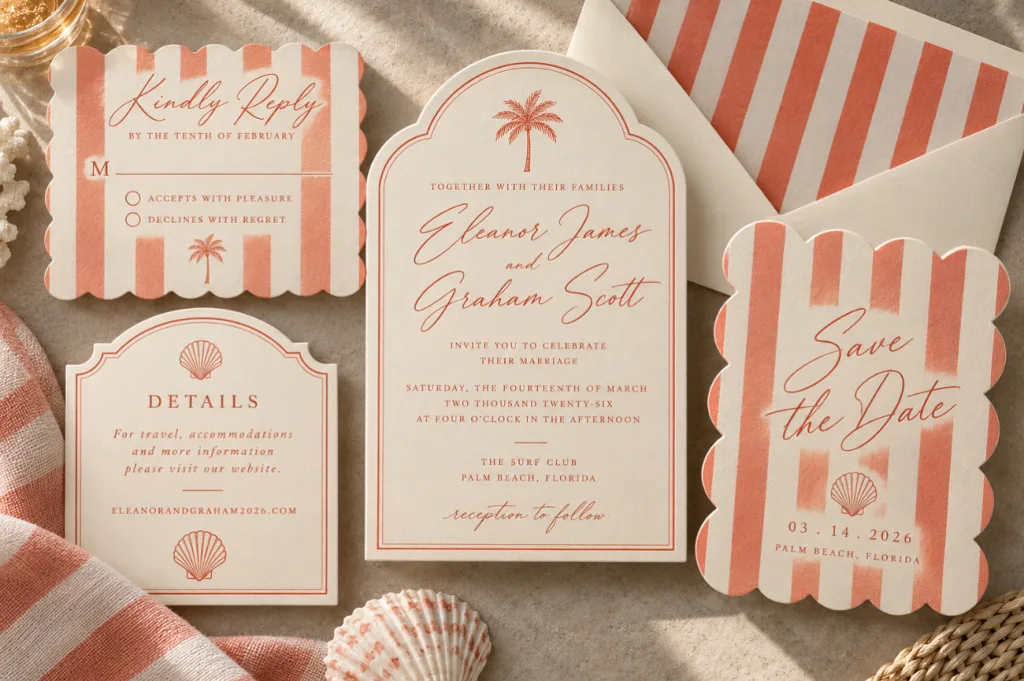
1. Cabana Stripes for the Coast
Coral and white cabana stripes with a beach-club script set the mood for a coastal ceremony. Matching striped liners carry the pattern into the envelope.
2. Lakeside Watercolor
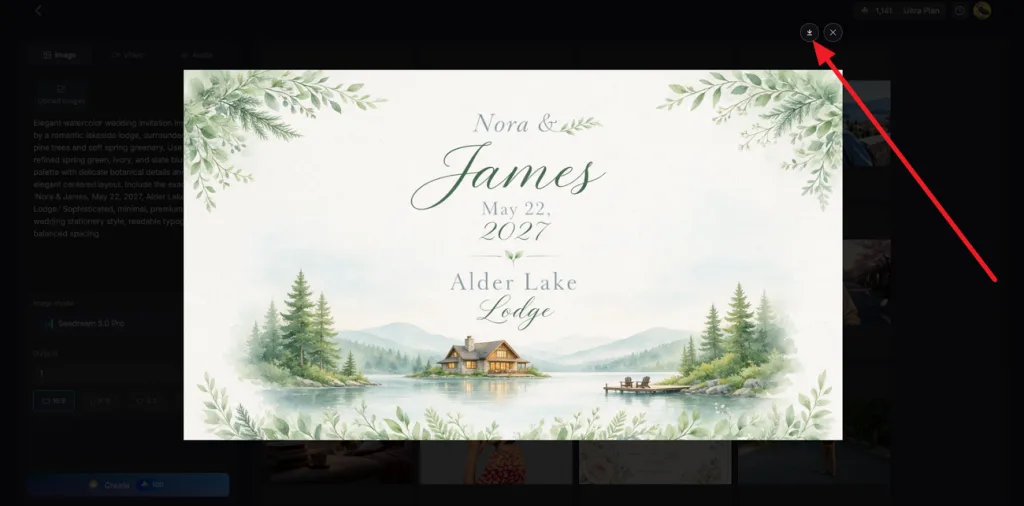
A watercolor lake ringed by pines sits above the text, with the lodge’s porch drawn small in one corner. Spring green and slate blue match a late-May date.
3. Desert Golden Hour
A terracotta and sand gradient sky frames a single saguaro silhouette for a desert ceremony. Copper foil on the names catches light like the late sun.
4. Winter Velvet and Candlelight
Velvet ribbon in forest green or burgundy wraps a card printed with tapered candles and pine sprigs. Silver ink on the details glows under evening light.
Personal and Digital Wedding Invitations
Photos, second languages, and screens bring the couple’s own story into the card. Digital delivery also handles replies, since a link or QR code leads guests straight to an RSVP form.
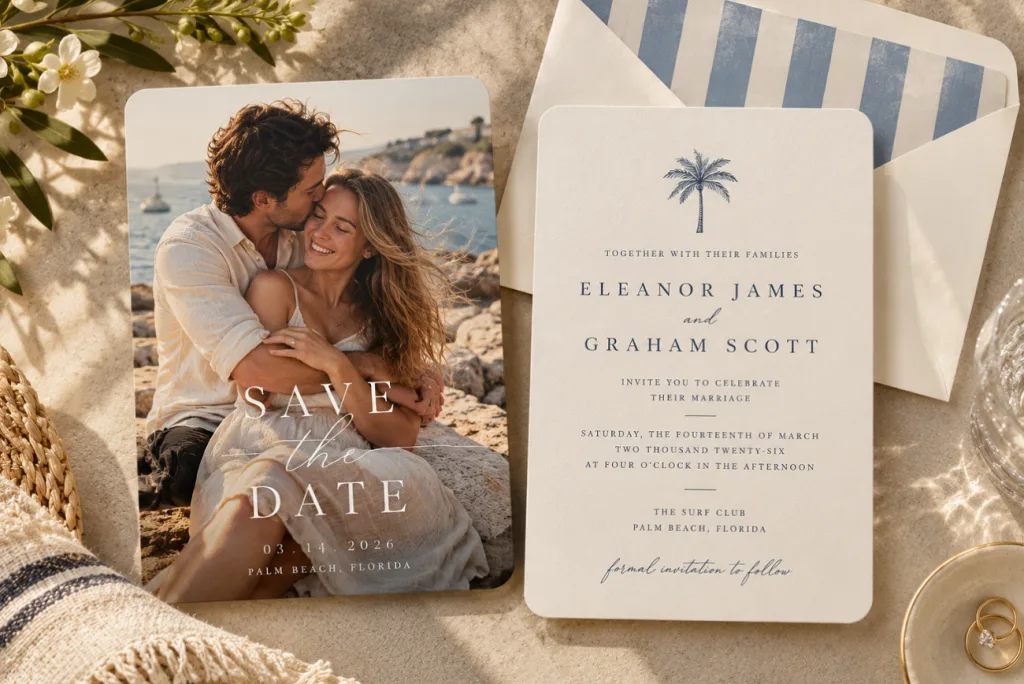
1. Editorial Photo Cover
A candid, magazine-style shot from the engagement session fills the front, with the details printed on the back. Paper Culture’s 2026 report notes the same art-directed approach on save-the-dates.
2. Dual-Language Card
Side-by-side text in two languages welcomes both families in their own words, a detail Paperlust highlights for 2026. Matching type weights keep the two columns visually balanced.
3. QR Code RSVP Card
A small QR code on the details card sends guests to the RSVP form and wedding website. With digital replies, The Knot says mailing closer to six weeks out works.
4. Animated E-Invite
A moving wedding invite, with petals drifting over the names or a venue door swinging open, travels by text or email. Relatives who prefer mail still get a printed card.
Part 2. Best Way to Create Wedding Invitations Online
Searching for “inviting wedding invitations” gives you plenty to browse, but picking a nice template is only the beginning. A few practical choices need sorting out before you start designing or send anything to print. The points below cover the wording, format, artwork, and timing:
- Finalize Wording Before Designing: Confirm the names, date, time, venue, and RSVP details with both families before starting the design.
- Choose Print, Digital, or Both: Digital invitations can include RSVP links and avoid postage costs. Printed invitations work well for guests who prefer traditional mail.
- Pick a Template or AI Artwork: Templates offer ready-made wedding invitation layouts, while AI image generators create custom artwork from text descriptions.
- Mail 6 to 8 Weeks Ahead: Send invitations 6 to 8 weeks before the wedding, or 9 to 10 weeks for overseas guests. Include an online RSVP option for easy guest management.
For custom artwork, MagicLight AI offers an AI image generator in its Toolbox. Enter a text prompt and optionally add reference photos to guide the design. Download the finished image for printing or sharing by text.
Part 3. Generate Wedding Invitation Online with MagicLight AI
Alongside its story video tools, MagicLight AI keeps an Image tab in the Toolbox for one-off designs such as a wedding invitation. A written description, reference photos, and a choice of 5 image models shape each result.
- Space for Detailed Instructions: The 500-character prompt lets you specify colors, design elements, layout, names, and dates. Use quotation marks for text that should appear on the invitation.
- Multiple Reference Photos: Upload venue photos or fabric samples to guide the design's colors and style. Supported formats include PNG, WEBP, JPG, and JPEG, with a 20MB limit per image.
- 5 Image Models For Diversity: Choose from 6 image models, including Nano Banana 2 and 3 GPT Image versions and Seedream 5.0 pro. Try the same prompt with two models to compare text accuracy and design quality.
How to Generate a Wedding Invitation in MagicLight AI
Creating custom wedding invitations becomes easier when the venue photo and event details are ready beforehand. Follow the steps below to turn those details into a personalized wedding invitation with MagicLight AI:
Step 1. Upload the Venue Photo
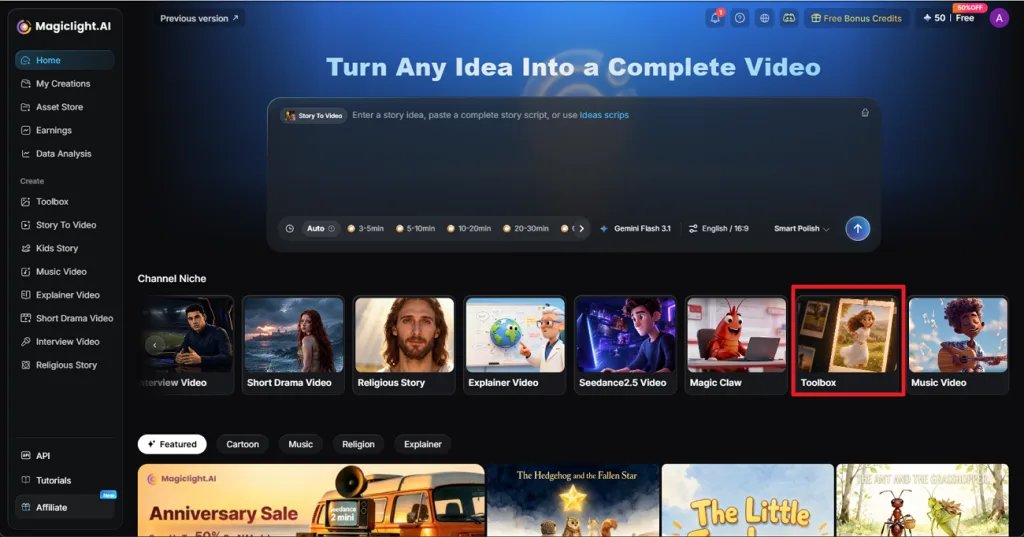
From the MagicLight AI main interface, open the Toolbox and select Image. Click Upload images to add your venue photo, such as the lodge or lakeside view. You can also upload a second reference, such as a fabric swatch, to guide the colors.
Step 2. Describe and Generate the Invitation
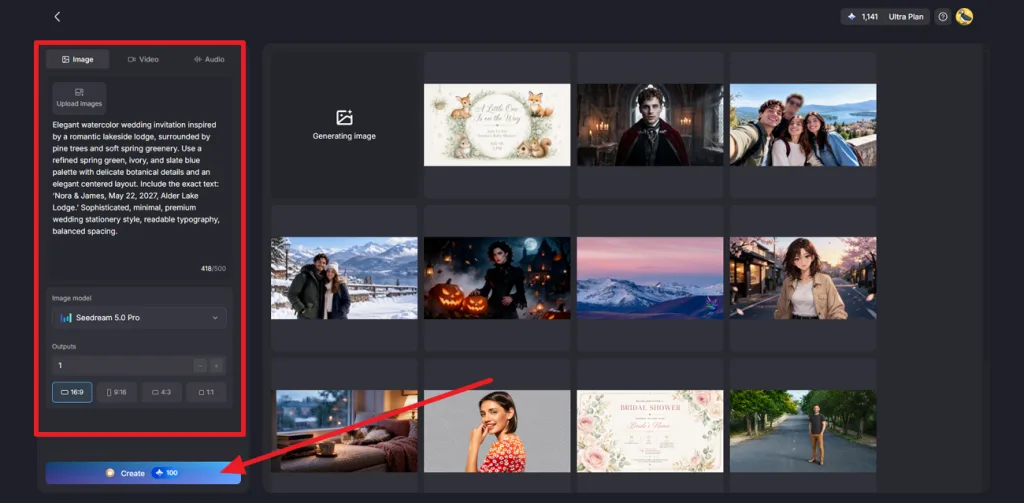
Write a prompt describing the design, colors, and exact invitation wording within the 500-character limit. Choose an Image Model, set the number of Outputs, and select an Aspect Ratio such as 4:3 for landscape or 9:16 for mobile. Click Create to generate the designs.
Step 3. Proofread and Download the Design
Open your preferred design and carefully check every name, date, venue, and other detail for errors. Regenerate the image if any wording needs correction. Once everything looks right, click the Download icon to save the invitation. You can also open Image to Video from the Video tab to add motion and create an animated version for sharing digitally.
Conclusion
To conclude, wedding invitations set the tone for the celebration while giving guests the details they need. From classic letterpress and botanical designs to digital and animated options, the right format should reflect your venue, style, and plans. For couples who want original artwork without standard templates, MagicLight AI offers a simple way to create personalized designs.
FAQs on Wedding Invitations
- What should be included on a wedding invitation?
A wedding invitation names the hosts and the couple, then gives the date, time, venue, city, and RSVP details. Emily Post advises leaving registry and gift information off the invitation entirely. Use separate inserts for maps, hotel blocks, and the wedding website.
- What makes your wedding invitations unique?
Personal touches make wedding invitations unique, such as a venue illustration, a monogram, or a greeting in the family's language. Details like letterpress printing, vellum wraps, die-cut arches, or plantable seed paper add texture. AI-generated artwork offers custom designs beyond standard templates.
- Can I create wedding invitations online?
You can design, proof, and deliver everything in a browser, with a print shop or text message handling the final step. MagicLight AI’s Toolbox Image tab draws original artwork from a written prompt and reference photos, ready to download.
- What are the most popular wedding invitation styles in 2026?
Trend reports for 2026 from Paperlust and Paper Culture favor earthy palettes, arched shapes, vellum wraps, wax seals, and tactile printing. Personal touches, including venue illustrations and QR codes for online replies, show up on many wedding invitations this year.
- Can AI generate personalized wedding invitation designs?
AI image models can turn a description of the venue, color palette, and wording into an original invitation design. MagicLight AI offers 5 image models in its Image tab, and you can use a venue photo as a reference. Still, review generated names and dates carefully before using the final design
![How to Remove People from Photos in 2026 [Full Guide]](https://magiclight.ai/wp-2/wp-content/uploads/remove-people-from-photos-guide.jpg-300x197.webp)
![6 Best Picture Modification Apps in 2026 to Try [New List]](https://magiclight.ai/wp-2/wp-content/uploads/best-picture-modification-apps-for-photos.jpg-300x200.webp)
![How to Turn Audio File Into Video in 2026 [Full Guide]](https://magiclight.ai/wp-2/wp-content/uploads/audio-to-video-conversion-guide.jpg-300x169.webp)