Online creation platforms are becoming easier for every user worldwide. People now look for easy tools to create digital content online. Some users also explore Flora AI to turn ideas into visual stories quickly, but it can feel limited for advanced workflow control.
However, many creators now prefer smarter tools like MagicLight AI for better workflow control. Its new Magic Claw feature helps users create, publish, and track videos through a chat-style assistant. Therefore, this guide explains how it works, its features, and how it serves better than Flora AI.
Part 1. What is Flora.ai?
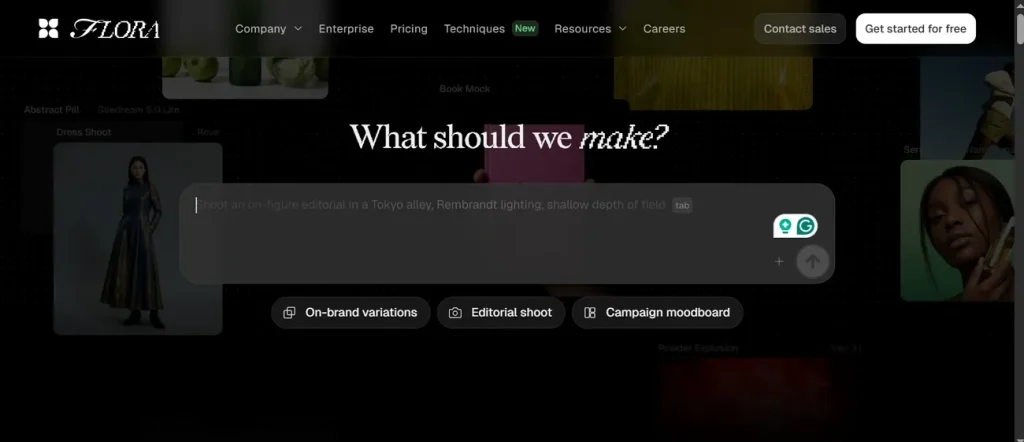
Flora.AI is a creative AI workspace that helps design visual content easily. It works as a node canvas linking text, image, and video steps. The tool connects different AI models to create and refine media outputs smoothly. It is mainly built for agencies, studios, and professional design teams. This platform has 50+ different tools and is mainly made for design agencies and professional creative teams.
Key Features Overview
- Infinite Canvas: Flora AI uses an infinite canvas to connect text, image, and video steps visually. Users can organize large creative projects clearly without limits or fixed layouts.
- Node Workflow: A node-based system lets users connect prompts, models, edits, and outputs together. Each node performs one task, making workflows structured, reusable, and easy to manage.
- Multi Model: Flora AI supports 50+ models for text, image, and video generation. Users can switch or combine models easily without leaving the same workspace.
- Batch Scaling: One approved design can generate hundreds of variations using the same workflow system. It helps scale marketing content production while keeping brand style consistent.
- Style Consistency: Reference images help maintain the colors, style, and design across all generated assets. This keeps branding consistent when creating large batches of visual content.
Pros
- Reusable templates speed up tasks while maintaining a consistent visual style and branding.
- Strong control options help adjust style, motion, and output settings precisely.
Cons
- Rendering complex or multi-model workflows can take longer and affect overall speed.
- Motion quality in longer or complex scenes may appear less realistic or slightly inconsistent.
Part 2. Best Flora AI Alternative You Should Try
After understanding Flora AI video generator features, many creators look for faster and easier solutions. Some users prefer complete video creation instead of complex node-based workflows. For this need, MagicLight AI is a powerful option that generates full videos from your text. This advanced AI-powered tool creates full videos instantly using 14 models in a single click. It also supports 11 languages that make content accessible for global audiences.
When creating long-form videos, the tool allows you to create videos up to 50 minutes. This Flora AI alternative includes 9 story models to generate different narrative styles and creative outputs. Moreover, users can generate music based on input with 15 prebuilt songs and genre options.
Key Features
- Style Selection: Choose from 13+ models like MagicLight 3.0 and Midjourney V7 styles.
- Storyboard Preview: Automatically generates storyboard previews that users can edit and regenerate easily.
- Voice Options: Access 37 voiceovers with voice cloning for realistic narration and character voices.
Step-by-Step Guide to Create an AI Video Through MagicLight AI
Let’s explore the given guide below to generate an AI video with minimal effort:
Step 1. Access the Tool and Start Project
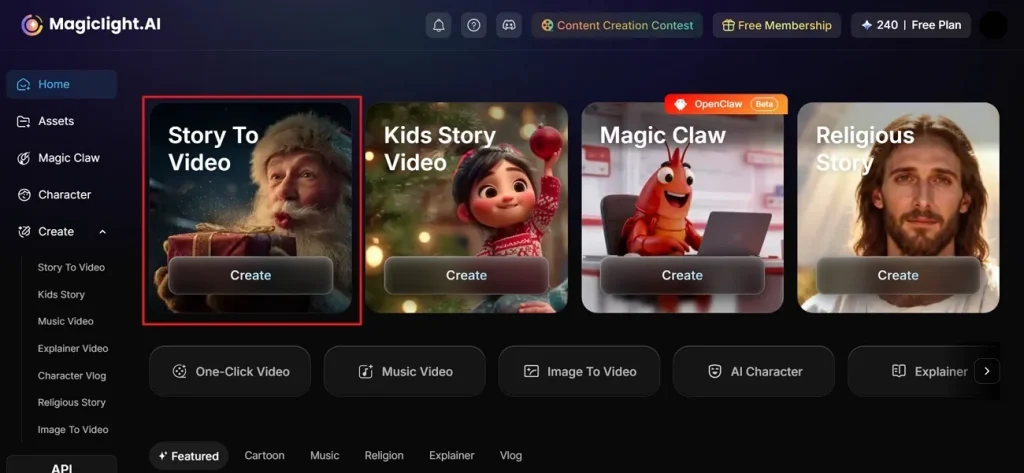
Go to the official webpage of MagicLight.AI and opt for the Story to Video feature from the main screen.
Step 2. Insert Prompt and Settings to Generate Video
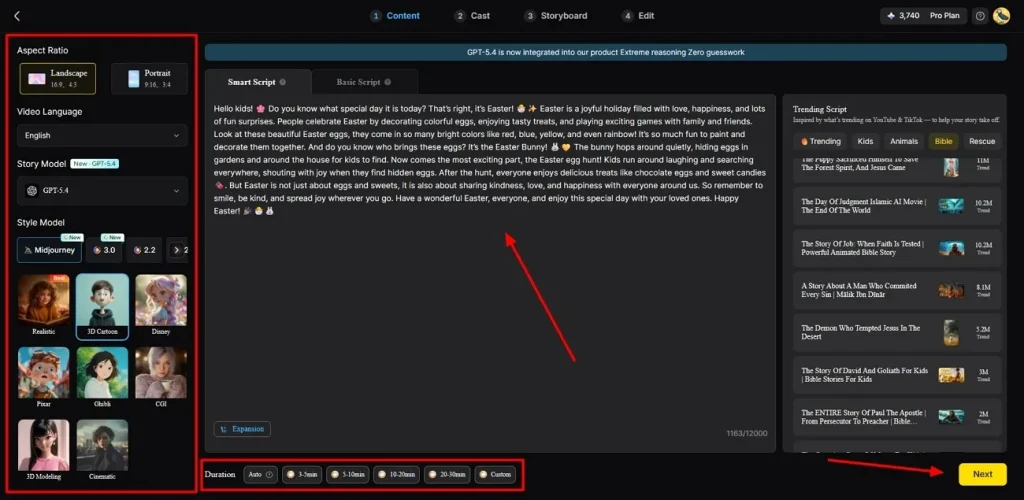
Upon accessing it, enter your idea in the provided Text Box and modify the Video Language if you want. Once done, set the Aspect Ratio according to video demand. Next, select your preferred AI Story Model, such as GPT-4, to get your cinematic video. After that, opt for Video Duration and change it, then click the Next button.
Step 3. Check out Storyboard AI Video Scenes
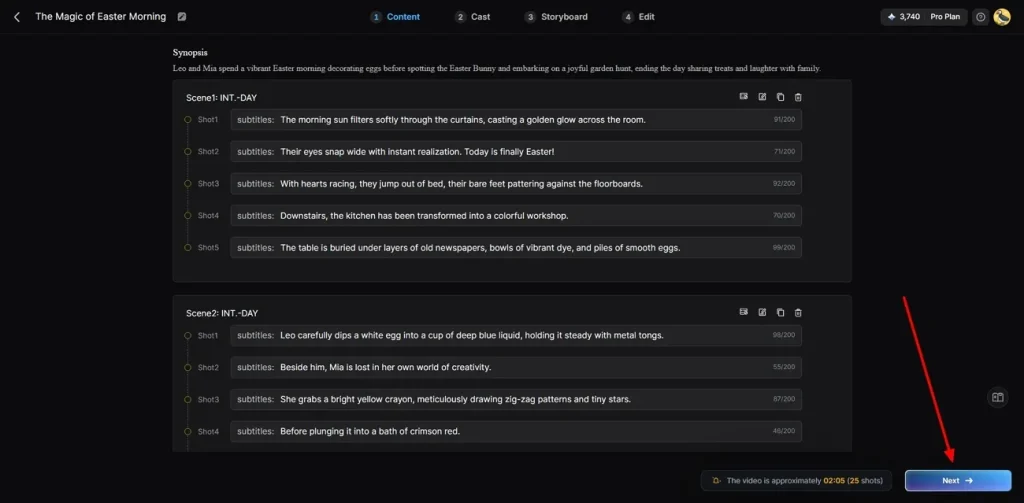
Now, the MagicLight AI generates a summary of your AI video that you can check before final creation. You can also edit it if you need it according to your demand. When you are sure, click the Next button to proceed.
Step 4. Select or Add More Characters in Video
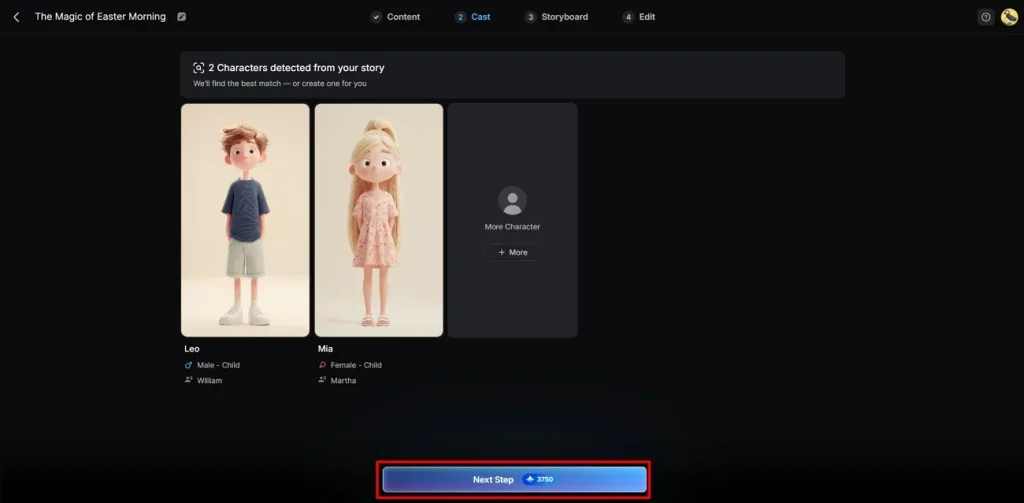
Following this, the tool provides AI characters for your video, letting you select existing ones or create a new character by clicking More Character. After picking your character, click Next Step to continue video generation.
Step 5. Change AI Character Clothes and Voice
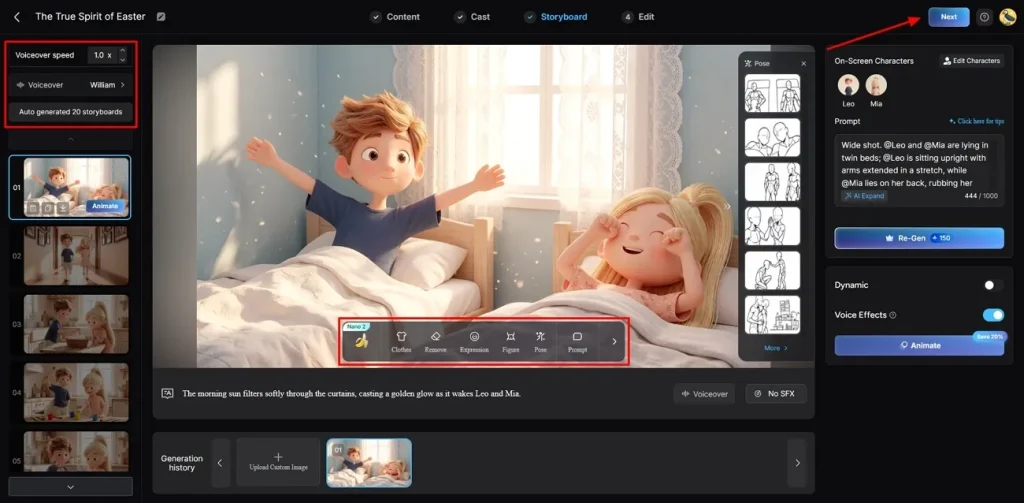
In the storyboard interface, adjust your character’s Voiceover Speed to match your video’s pace from the left panel. Furthermore, you can customize their Clothing or Body Figure using the given options, then click the Next button.
Step 6. Add Subtitles and Background Sound in Video
Afterward, go to the Subtitle Settings to add video captions. For background music, head to the Background Music option to set the tone of your video, then opt for Generate.
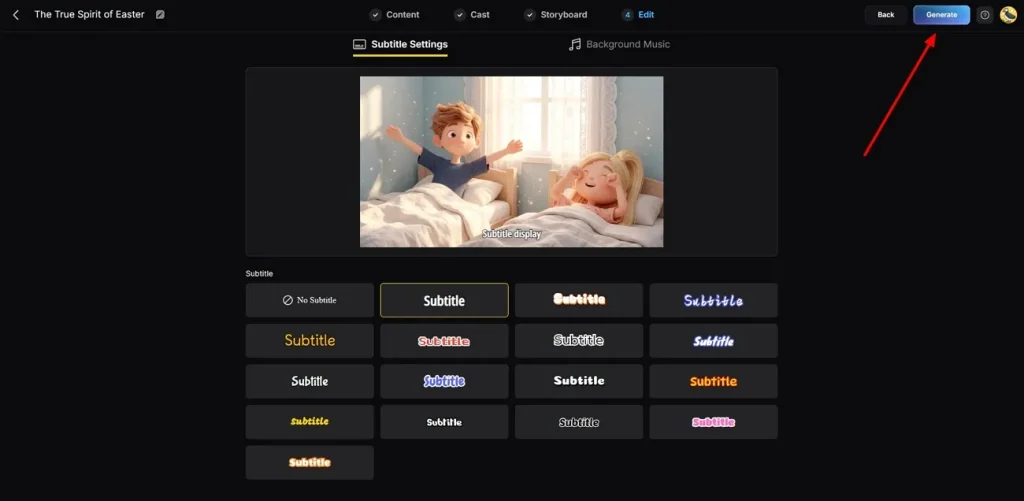
Step 7. Preview and Export Your AI Video
At last, you can now preview your AI-generated video using the preview option. In addition, you can add your preferred Hashtags or Thumbnail Text. Once you are satisfied with the output, opt for the Download button to export it to your device.
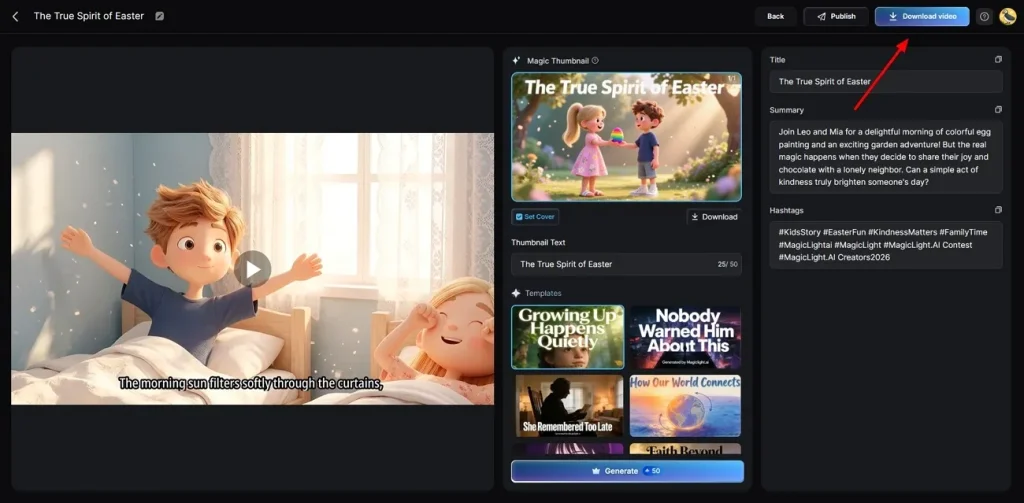
Conclusion
Wrapping up, Flora AI helps users create visual content through structured AI workflows and node-based design systems. It supports creativity, but some users still face complexity and slower learning curves. Therefore, many creators look for faster and simpler solutions for video production needs. So, MagicLight AI becomes a better choice, offering complete video creation, a simple workflow, and strong automation features overall.
FAQs on Flora.ai
1. What is Flora AI used for?
Flora AI is used for creating visual content using text-image workflows. It helps designers connect models to build structured creative projects easily. Users generate images and videos through an interactive node-based canvas system.
2. Is Flora AI free or paid?
You can start with a free plan that gives you many starting credits. However, big teams often pay for more tools and much higher monthly limits. MagicLight AI also offers a free version for you to try out today.
3. What are the best Flora AI alternatives?
MagicLight AI is one of the best Flora AI alternatives for video creation. It makes full movies from your text with advanced storytelling features. Most users prefer it for simpler workflows and complete video production tools.
4. Is Flora AI safe to use for beginners?
Flora AI is generally safe for beginners using basic creative features online. Its interface may feel complex due to the node-based workflow structure. In comparison, MagicLight AI is also a safe and very simple tool for young creators.

![How to Create a TikTok Video for Beginners [2026 Guide]](https://magiclight.ai/wp-2/wp-content/uploads/tiktok-video-creation-guide-300x169.png)
![How to Blur Faces in Photos Like a Pro [2026 Guide]](https://magiclight.ai/wp-2/wp-content/uploads/blur-faces-in-photos-with-ai-300x198.png)