Many users plan to create a video but do not have the time or the necessary skills to complete the task. They want to type an idea and let the tool work the rest. This is where Gemini Omni comes into play. Google introduced this new AI model to create videos with higher quality and better results.
However, is it truly a breakthrough or simply another addition to the growing AI race? This guide covers everything you need to know about this tool and what it means for everyday users.
Part 1. Why Gemini Omni Stands Out From Other AI Video Models
The platform brings a more refined and intelligent approach to creative workflows. Its ability to understand context and support efficient production makes it stand out in a crowded space. Below are some key reasons why the Gemini Omni model attracts growing attention among creators:
- Advanced Understanding: This tool can process and connect different forms of input with strong contextual awareness. This deeper understanding helps users build more accurate and meaningful creative outputs.
- Fast Processing and Response Speed: Its responsive performance reduces waiting time and helps users move from idea to execution more smoothly.
- Creative Flexibility Across Use Cases: Gemini Omni supports a wide range of professional and creative tasks. The model adapts to different user goals as per the requirements,
- Improved Decision Support: It demonstrates stronger reasoning abilities beyond simple prompting. This helps users organize ideas and make better-informed content decisions.
Part 2. Best Gemini Omni Features for AI Video Creation
Mentioned below are some of the video creation features of this platform that make it one of the unique options:
Video Generation Capabilities
This platform can transform simple prompts into fully structured videos with smooth transitions. It understands context well and helps creators produce high-quality visuals. It also reduces the need for manual editing and saves production time for users.
Text Rendering
The model can accurately generate readable and well-styled text within video frames. This makes it useful for titles and captions that stay clear. Creators can use it for branding or highlighting key messages.
Chat-Based Editing
Users can refine their videos through a conversational interface instead of traditional timeline editing. You can type the changes according to your preferences. It is especially helpful for beginners unfamiliar with complex editing software.
Templates and Remixing
Gemini Omni video offers ready-made templates that speed up content creation for different formats. It also allows editing existing videos and makes repurposing them easier. This helps creators maintain consistency across multiple projects.
Native Audio Generation
Omni is solely focused on multimodal video generation and editing, while native audio generation operates under Veo 3.1. However, both models work simultaneously to bring the right set of music and sound effects. The platform helps create a unique experience without needing other audio tools. This adds a professional touch without extra editing effort.
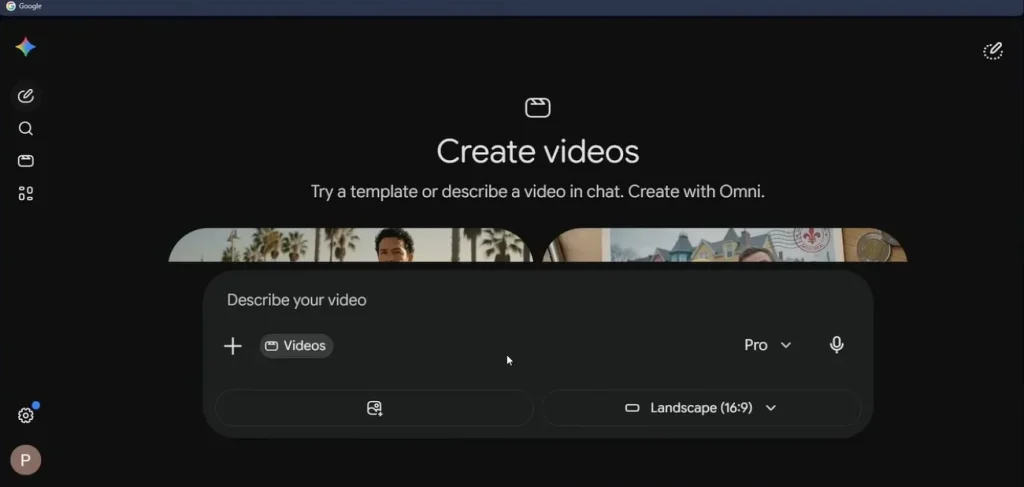
Part 3. The Real Strengths and Weaknesses of Gemini Omni
While Gemini Omni video models bring some impressive advantages to AI video creation, it also has a few limitations that creators should keep in mind:
Where Gemini Omni Excels
- It produces video scenes for users with minimal user input.
- The platform makes the process easier for beginners by offering simple interface.
- Offers strong integration of text and audio in a single workflow.
- Supports fast generation for social media and short-form content.
- Reduces the need for multiple editing tools by combining key functions in one system.
Where Gemini Omni Falls Short
- May struggle with highly complex or cinematic-level storytelling consistency.
- It offers limited control compared to professional editing software.
- Occasional inaccuracies in rendering fine details like text or facial expressions.
- Performance can vary depending on prompt quality and specificity.
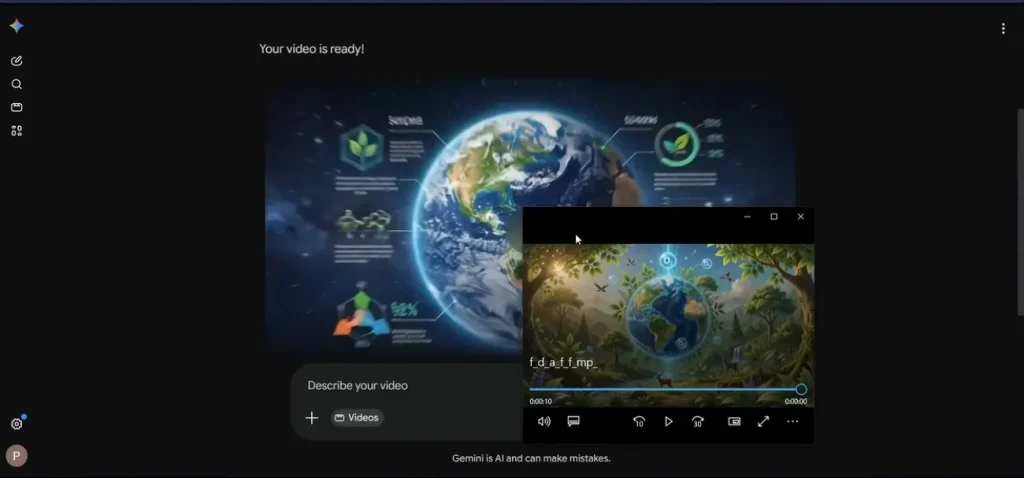
Part 4. Why MagicLight AI Is the Best Alternative for AI Video Creation
MagicLight AI is one of the most reliable options for users looking for a more beginner-friendly and practical Google Omni model alternative. The tool focuses on making video creation fast and accessible without requiring advanced editing skills. It streamlines the entire workflow into a simple prompt-to-video process. Users get the ability to select from different style options for high-quality visuals.
This makes it useful for short-form content like social media reels. Additionally, its built-in automation tools help users turn ideas into structured narratives. It also integrates features like script-to-video generation and audio synchronization.
Key Features
- Story to Video: MagicLight AI transforms written ideas or scripts into structured videos with scenes and smooth storytelling. This saves hours of manual editing and keeps your narrative flow intact.
- Animated Character Generation: The platform can create characters that match different styles and themes. You can choose from different styles and looks depending on your project needs.
- Lip Sync: Users get the ability to match the mouth movements with spoken dialogue or voiceovers. This makes your videos feel professional and believable for storytelling.
- Multiple Language Support: It allows users to create visuals in 11 languages for multiple types of audiences. Users can create one video and instantly generate versions in different languages.
Steps to Convert Stories to Videos Using MagicLight AI
Provided below are the steps for using this Google Gemini Omni alternative for video creation:
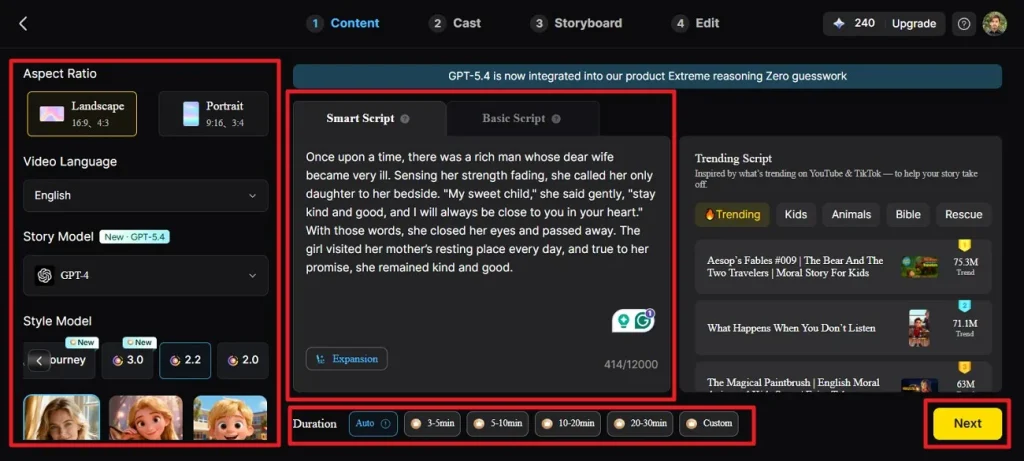
Step 1. Set Up Your Video Project
Start by launching the Story to Video feature and selecting the aspect ratio and video duration. Now choose the language and AI model for your video from the options provided. Choose the visual style and paste your script or story into the provided box before clicking Next.
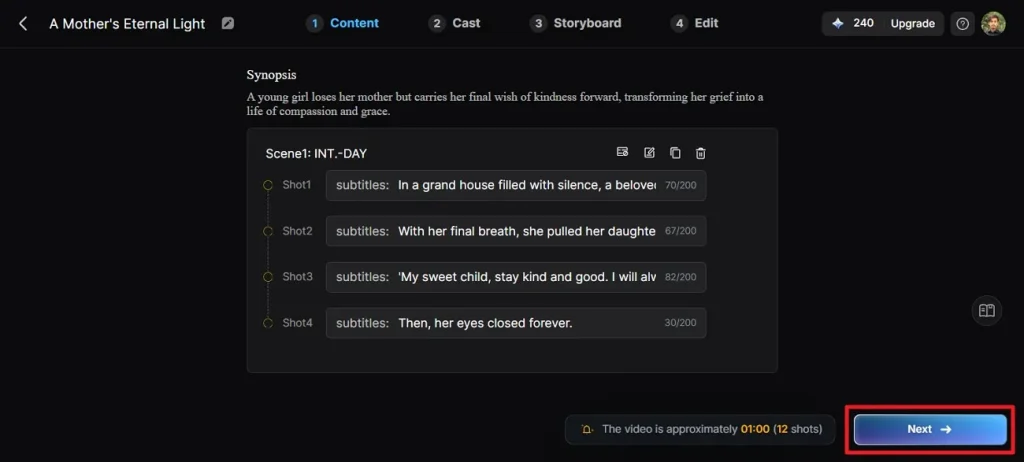
Step 2. Check Scene Format
You will see the scene breakdown for your video in the following interface. Next, make adjustments using the editing controls and continue by selecting Next once satisfied.
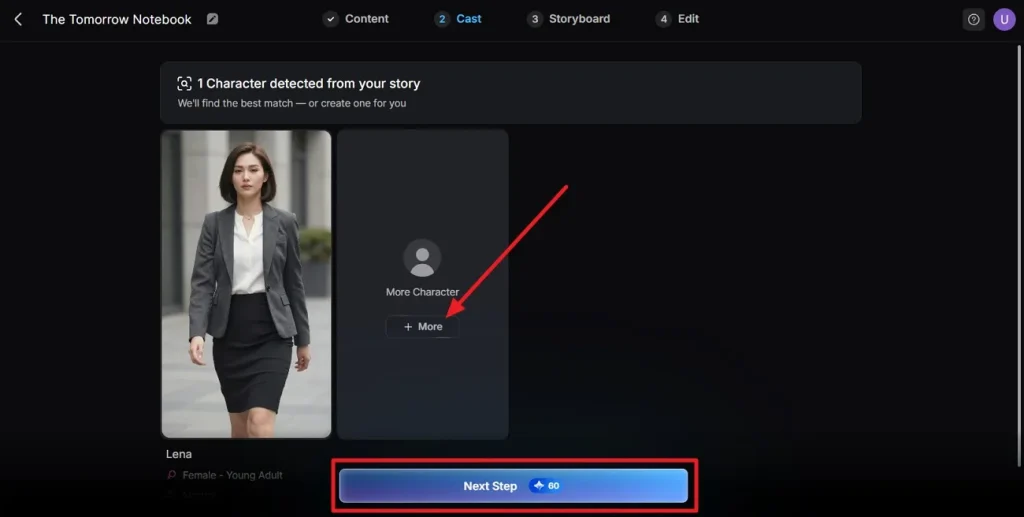
Step 3. Choose Your Characters
MagicLight AI automatically identifies characters mentioned in your story and presents matching options. Pick the characters that best fit your narrative and proceed by clicking Next Step.
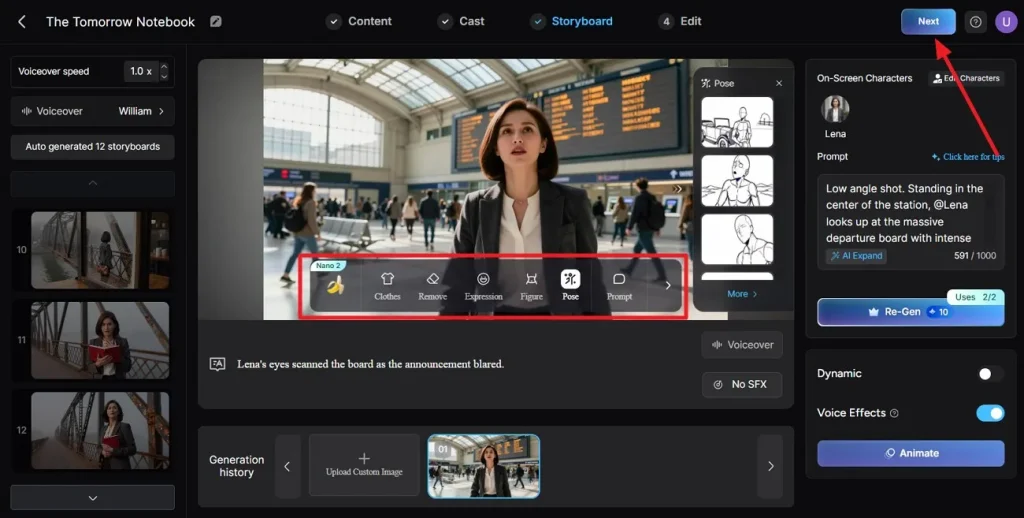
Step 4. Refine the Storyboard
Check each storyboard scene to ensure the visuals align with your storyline. You can modify details such as poses and appearances. Press the Next button to continue.
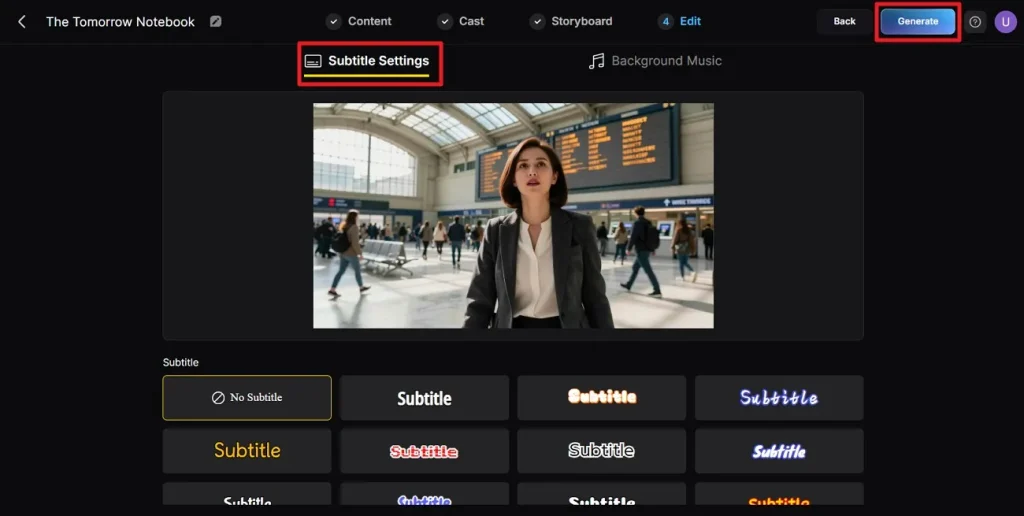
Step 5. Customize Subtitle Settings
Select subtitle style or add background music to your video in this interface using the designated option. Click the Generate Video button to run the process.
Step 6. Preview and Export
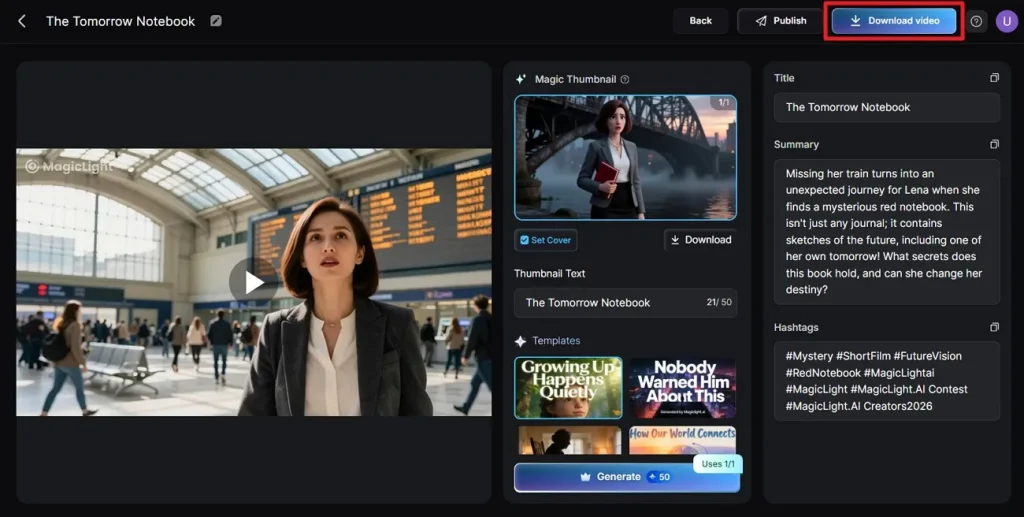
Check the generated results in the following window and make changes according to your preferences. Click the Download Video button to download the generated video to your device.
Conclusion
In conclusion, this article provided a detailed guide on everything you need to know about Gemini Omni. It discussed its various aspects to help you make an informed decision. One such tool that provides the functionality Gemini Omni lacks is MagicLight AI. The tool offers a complete solution for generating and editing videos from text and photos in no time.
Frequently Asked Questions
1. What is the Gemini Omni video model?
It is a new model used to create videos from text and photos. Users can choose different options and generate visual content in no time.
2. Is the Gemini Omni App free?
The tool offers a paid subscription for its users to generate videos. It offers different pricing plans tailored to users' needs.
3. Is Gemini Omni better than Seedance 2.0?
Both tools offer features to meet users' diverse creative needs. Gemini Omni stands out for conversational editing, while Seedance 2.0 is often preferred for creators focused on cinematic motion quality.
4. How to make the perfect AI video of a longer length?
One such tool that lets you create long videos is MagicLight AI. The tool allows users to create videos up to 50 minutes in length with consistent characters and scenes.

![How to Create a TikTok Video for Beginners [2026 Guide]](https://magiclight.ai/wp-2/wp-content/uploads/tiktok-video-creation-guide-300x169.png)
![How to Blur Faces in Photos Like a Pro [2026 Guide]](https://magiclight.ai/wp-2/wp-content/uploads/blur-faces-in-photos-with-ai-300x198.png)