Today, AI-powered creative tools have changed the way digital content is edited or optimized. Among many, GoEnhance AI is one of the most used solutions that promises improved output qualities. As competition increases in the AI space, users are cautious about which tools add value to work. To gain a detailed knowledge of GoEnhance AI and compare it with a powerful AI alternative, keep reading the guide.
Part 1. What Is GoEnhance AI?
GoEnhance AI is an online platform that utilizes AI to generate, restyle, and improve videos or images in your browser. In fact, you can turn normal clips into anime or cartoon-style videos and clean up low-quality media. All of this is handled online without needing to install any heavy software.
Key Features of GoEnhance AI
- Video‑to‑Video Transformation: The platform allows you to upload a video and convert it into different styles, such as Anime or Cartoon.
- Text-to-Video Generation: Simply type a text prompt, and GoEnhance AI will generate a short video clip that aligns with your description.
- Image and Video Enhancement (Upscale and Clean): It incorporates AI to sharpen details that upscale low-resolution photos and videos to HD-level.
- AI Video Upscaler for HD/4K: The AI Video Upscaler boosts video resolution to clear HD or 4K in a few minutes, with textures and motions reconstructed.
- Noise and Grain Removal: GoEnhance offers a denoise facility that cleans ISO noise and compression artifacts, trying to keep details fine.
- Smooth Frame Interpolation: This frame interpolation is beneficial when slow-motion effects or 60 fps exports are needed from choppy clips.
Part 2. How to Use GoEnhance AI?
For those exploring the article for the GoEnhance AI review, getting started is straightforward. The guidelines below will guide you on how to use GoEnhance AI and make the most of its capabilities:
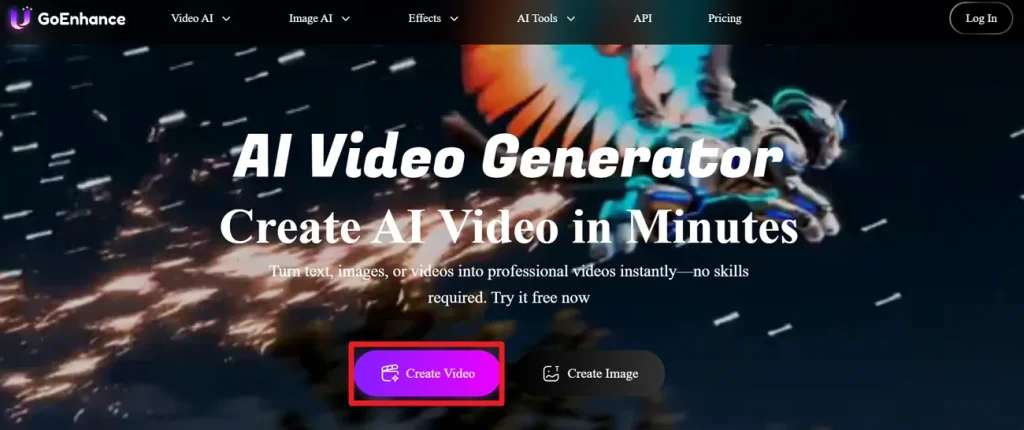
Step 1. Visit the main page for GoEnhance AI, then press the Create Video button to begin the process.
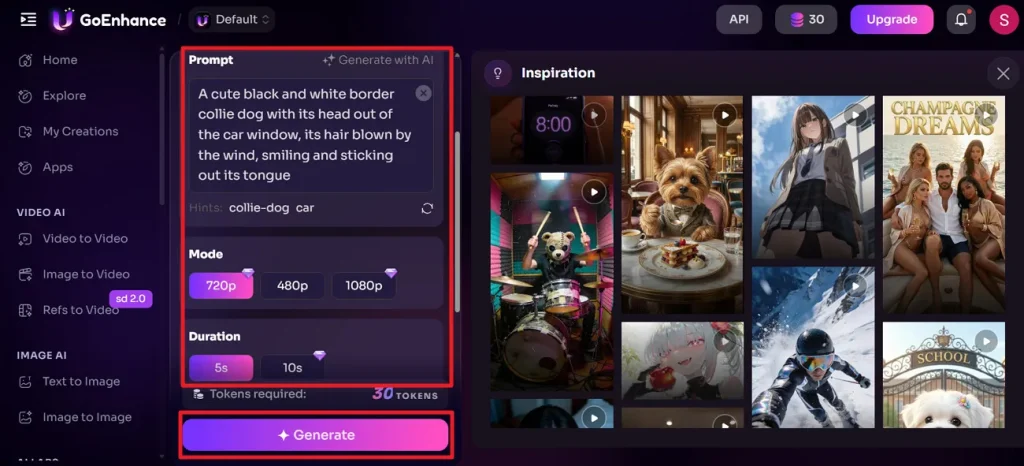
Step 2. Later, choose Image to Video, enter a Prompt, then specify Mode and Duration accordingly. Finally, click the Generate button to generate a video based on your description.
Part 3. Why Creators Choose MagicLight AI Over GoEnhance AI?
Many creators redirect towards MagicLight AI over GoEnhance due to its more refined creative workflow and broader control. It's an all-in-one AI video platform that takes you from a rough idea to a finished 2D or 3D animation. Instead of juggling separate tools for scriptwriting, storyboard, or character consistency, use MagicLight AI to chain all of them together. What’s more impressive is its ability to focus on long-term, story-driven content.
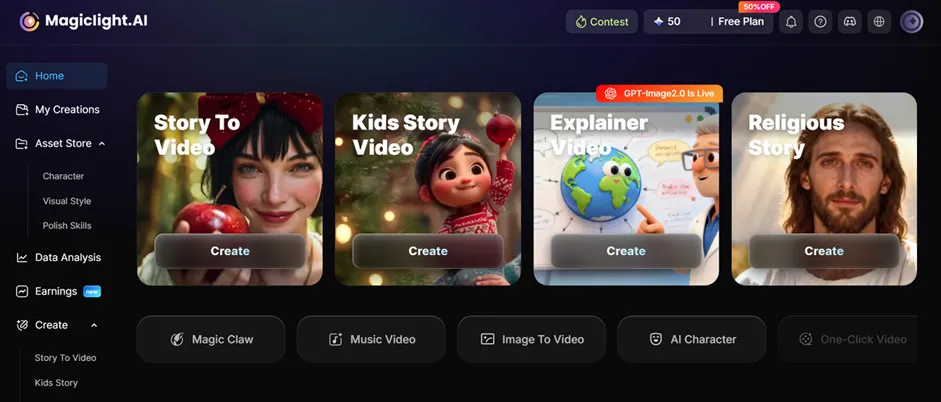
The generator supports video up to 50 minutes, auto-builds structured narratives, and remains stable across scenes. Surprisingly, it helps you schedule and publish videos, tracking performance all from the same workflow. With the assistance of 19+ different AI models, it turns an auto-generated storyboard into an animation in a blink. Tutorials are available during rendering, so new users can also follow along with the system's explanations.
Key Features of MagicLight AI
- Built‑in AI Voiceovers and Music: Integrates 37 voiceover options (with voice cloning) that can be filtered by accent, gender, and scenario.
- Multi‑Language Storytelling and AI Script Models: Supports 11 languages and approximately 9 AI story models to generate and structure scripts.
- Nano Storyboard for Precise Directing: Rather than one simple description per shot, Nano Storyboard breaks each shot into micro-steps with detailed actions.
- Rich Style Models and Visual Looks: MagicLight AI offers multiple style families, including Seedance 2.0, Gemini Omni, or Kling 3.1, with options for visual looks.
- Generates an Explainer Video: Its Explainer Video mode enables you to turn a short topic into a precise video lesson, up to 10 minutes long.
When confused “Is GoEnhance AI safe?,” review it alongside MagicLight AI to have better clarity over the concept:
| Key Consideration | GoEnhance AI | MagicLight AI |
| Core Purpose | AI video/image transformer focused on video‑to‑video styles, 4K upscaling, and face swap. | End‑to‑end AI story and 3D animation platform that turns scripts into full videos. |
| Video Length | Short clips; free tier limited to very short segments. | Creates long videos up to 50 minutes |
| Story Generation | No built‑in long‑form story engine; transforms footage and images. | Built-in AI story models to generate scripts for structured video. |
| Character Handling | Can stylize people and faces, but not focused on long‑term character continuity. | Dedicated character creation, library, and reuse; keeps the same character consistent |
| Built‑in Audio (Voice/Music) | Focus more on visuals; audio is not a differentiator | 37 AI voiceovers (with cloning), 40 background music options, and subtitles. |
Conclusion
In summary, this GoEnhance AI review highlights simple video creation or animation through GoEnhance's capabilities. With its creative accessibility and simple interface, the platform emerges as a great option for those who want highly professional results. As a worth-considering alternative, MagicLight AI is recommended, as it supports up to 12,000 characters of script and offers character creation or selection options.
FAQs on GoEnhance AI
1. Does GoEnhance AI add watermarks to videos?
In general, GoEnhance AI does not clearly state on its public page that it always adds visible watermarks to outputs. Practically, you should expect some restrictions on the free tiers and cleaner, more professional exports on paid plans.
2. What are the best GoEnhance AI alternatives?
The best-suggested GoEnhance AI alternative is MagicLight AI, which offers auto-generated prompts that can be edited as needed. Plus, you can generate videos with just a click, using any one of the 14 provided models.
3. Can beginners use GoEnhance.AI easily?
Beginners can generally use GoEnhance AI with ease because it runs in a web browser and relies on simple workflows. It's beneficial as long as beginners are comfortable with online tools and waiting for cloud processing.
4. Does GoEnhance AI work on mobile devices?
GoEnhance AI is made to work on mobile devices through its web interface. Since all execution happens in the cloud, the main requirements are up-to-date mobile browsers and a stable internet connection. For deeper control of story-driven videos, MagicLight AI also works in the browser and adds Nano Storyboard.
5. Is GoEnhance AI good for TikTok and Instagram content?
GoEnhance AI can be suitable for TikTok or Instagram content because it targets short films and quick style transfer. Precisely, MagicLight AI can help by turning short clips into full story videos with consistent characters in one click.