The competition among AI video tools is growing fast across digital platforms. Modern users require basic tools that can animate still photos into smooth video scenes. One such tool, Haiper AI helped with basic video projects; however, it has some limitations in certain features.
For this reason, many people now prefer software that offers more control and quality. To help users choose the right tool, this guide explains Haiper AI and introduces a more advanced alternative.
Part 1. What Is Haiper AI?
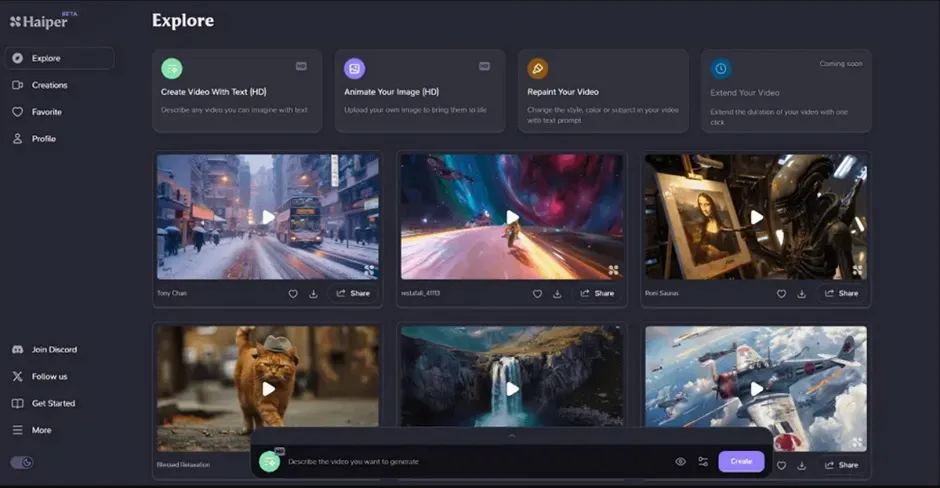
Haiper AI is an innovative platform that uses advanced AI to simplify and enhance the video creation process. Designed for content creators and marketers, it transforms text, images, and other inputs into captivating video content with minimal effort. This AI model supports keyframe editing for smoother motion control. The platform even supports multiple aspect ratios, such as 16:9 and 4:3.
Key Features of Haiper AI
- Video Repainting: Existing footage gets new styles, colors, and textures for refreshed visual storytelling output.
- Cinematic Effects: Professional effects like motion blur, lighting, and depth improve overall video realism greatly.
- Video Extension: Short clips are expanded up to 8-second videos to improve storytelling flow and continuity.
- Artistic Presets: Haiper AI provides multiple artistic presets, allowing creators to design unique video styles.
- 4K Support: High-resolution video generation delivers sharp 4K quality with enhanced visual clarity output.
Is Haiper AI Free? How Haiper AI Image to Video Works?
Haiper AI Generator has been offering direct video generation ability to its users for a long time. However, the service is now directly unavailable for users and is only offering its AI model integration across other video generation services. To have an unprecedented experience with AI video generation, you should consider using MagicLight AI.
Haiper AI Pros and Cons: What You Should Know
Haiper AI video platform provides useful features, but also some restrictions. In this section, you will discover the advantages and drawbacks explained clearly below:
Pros
- Supports multiple creation modes for flexible content generation options easily.
- Produces sharp visuals with smooth motion for professional-looking video output.
Cons
- Human movements sometimes look unrealistic in detailed interaction scenes.
- The video length is very short and limits storytelling possibilities greatly.
Part 2. Best Haiper AI Alternative You Should Try
Even after offering useful video tools, Haiper AI still lacks advanced creative flexibility. Many creators now search for Haiper AI alternatives to achieve better quality and smoother videos. In such cases, MagicLight AI is introduced as a powerful alternative for advanced AI video generation. This modern tool supports 11 languages for creating multilingual AI videos targeting wider international audiences easily.
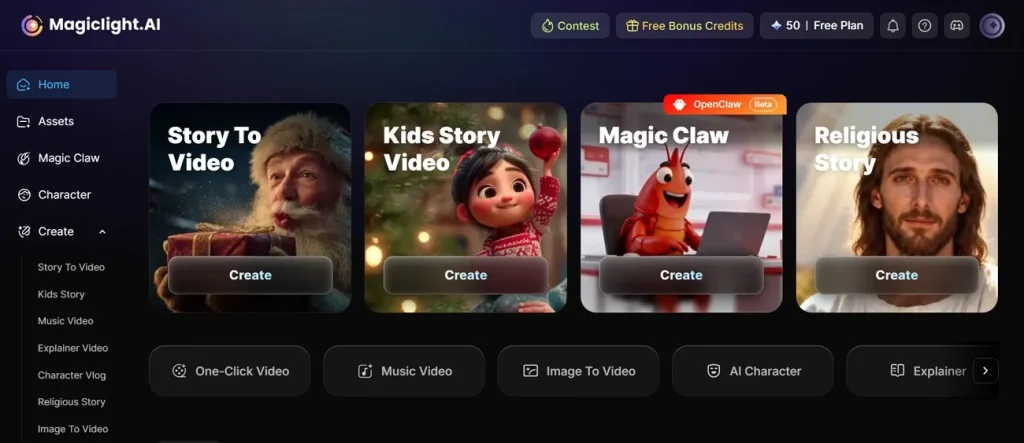
Instead of short clips, you can create AI videos up to 50 minutes for detailed storytelling and professional content production. It even provides ready templates for stories, music vlogs, commentary, and religious video production projects. While using it, this platform allows regeneration and editing of individual storyboard scenes before final animation production starts. MagicLight AI also supports 12 advanced story models for generating realistic and creative video narratives.
Key Features
- Voice Cloning: Provides 37 voiceover choices with realistic voice cloning for personalized character narration features.
- Storyboard Preview: Automatically generates editable storyboards before final video rendering for better scene planning control.
- Camera Motion: Controls camera pushes, tilts, and close-up movements for professional cinematic storytelling effects automatically.
- Image Animation: Transforms uploaded static images into animated videos with customizable 1500-character prompts and visual settings.
Pros
- Handles complex storytelling while preserving visual and emotional consistency.
- Allows combining multiple visual styles within a single video project easily.
- Creates long cinematic videos, maintaining strong narrative continuity across scenes.
Part 3. MagicLight AI vs. Haiper AI: Which One Wins?
Many creators compare Haiper AI video generator free with advanced tools before choosing platforms. Review the table below to identify which platform provides better creative generation controls:
| Features | Haiper AI | MagicLight AI |
| Video Length | Maximum 8-second short video clips | Supports videos up to 50 minutes |
| Language Support | Limited multilingual language support is available | Supports 11 international video languages |
| Story Models | Basic AI generation models are available | Includes 12 advanced story generation models |
| Camera Control | Basic cinematic motion effects are available | Advanced camera pushes and tilt controls |
| Video Templates | Few creative templates are available currently | Multiple templates for diverse video categories |
| Character Consistency | Character continuity sometimes appears inconsistent | Stable characters across complete video scenes |
| Scene Adjustments | Basic scene editing features are available | Nano adjustments for detailed scene editing |
Conclusion
To summarize, modern creators now rely on AI tools for faster and easier video production workflows online. Haiper AI offers useful generation features, but advanced storytelling and motion controls still feel limited. That’s the reason many users now expect longer videos with realistic cinematic scene quality and flexibility. Among these options, MagicLight AI becomes a stronger alternative for professional AI video generation and storytelling.
FAQs on Haiper AI
1. Can Haiper AI convert images into videos?
Yes, Haiper AI converts static images into animated videos with smooth motion effects. Users can upload pictures and generate short moving clips without advanced editing skills. This feature helps creators produce engaging visual content quickly for social media and marketing.
2. Are there free alternatives to Haiper AI?
There are several alternatives to Haiper AI, but MagicLight AI is the best. The platform supports longer videos, multilingual storytelling, and detailed storyboard customization features. Users can create cinematic videos with stronger scene consistency.
3. Is Haiper AI safe to use?
Haiper AI is generally safe for creating videos through its online creative generation platform. However, free plan projects may remain publicly visible without complete privacy protection. You might consider MagicLight AI for a very safe and private experience.
4. Does Haiper AI support high-quality video export?
Yes, Haiper AI supports high-quality video exports with enhanced visual clarity and cinematic effects. The platform provides 720p resolution inside free plans for generating clear short AI videos. If you need better details, then MagicLight AI is a very strong option.
5. What are the limitations of the Haiper AI free version?
The free version limits users with watermarks, restricted privacy, and shorter video generation durations. Users can only generate limited daily videos with basic editing and customization features available. Commercial usage rights and advanced creative controls require upgrading to paid subscription plans.

![6 Best AI Tools for Designers to Try [2026 List]](https://magiclight.ai/wp-2/wp-content/uploads/ai-tools-for-designer-300x198.png)