AI has revolutionized digital content creation, and video tools have become smarter and easier worldwide. Users search for simple apps that can turn ideas into moving videos online. Hedra AI is one such platform that primarily provides lip-sync and video creation tools.
As users demand more flexibility and better results, they explore other tools. Thus, this article explains information about Hedra AI along with its better alternative, offering more control.
Part 1. What Is Hedra AI?
Hedra AI is a video generation platform that uses artificial intelligence to create talking and singing character videos. It supports 20 AI video creation models, including Seedream 4.0 and Nano Banana Pro. The platform focuses on expressive lip-syncing, allowing users to animate a still image so it matches a specific voice or script.
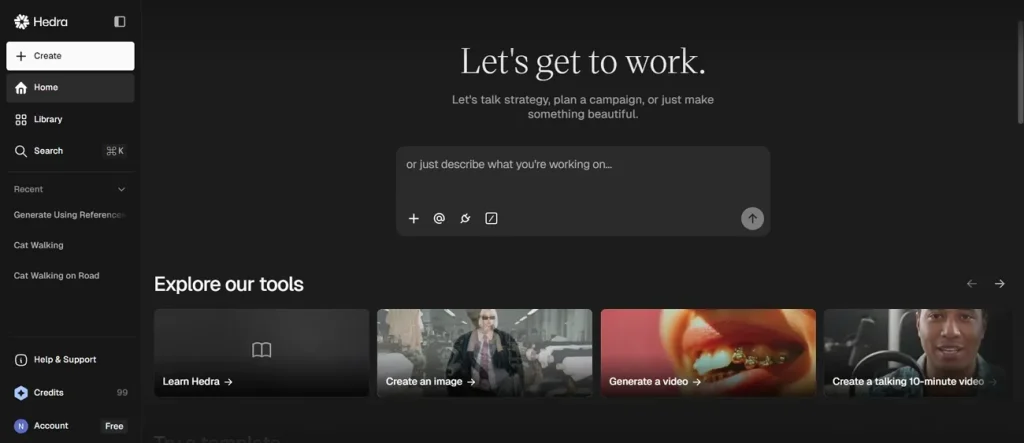
With this Hedra AI video generator, users can generate AI videos up to 10 minutes long. Additionally, it offers support for various aspect ratios of different social media platforms and content types. This tool supports uploading images up to 10 Mb in different formats like PNG, JPG.
Key Features of Hedra AI
- Character Engine: Character-3 processes image, text, and audio together to build realistic, expressive digital performers.
- Animation Styles: Offers realistic cartoon and artistic styles to match different creative video needs easily.
- Emotion Control: Adjust character feelings and expressions to create more human-like, engaging performances in videos.
Is Hedra AI Free?
Hedra AI App offers a free plan that allows you to use the platform without any payment or a credit card required. However, for longer videos, better quality, faster rendering, and commercial use, users need to upgrade to paid plans. Below is a pricing table that helps users understand Hedra AI plans and features better.
| Plan | Monthly Price | Monthly Credits |
| Basic | $15/month | 1500 Credits |
| Creator | $30/month | 5400 Credits |
| Professional | $75/month | 14400 Credits |
| Teams | $75/month | 14400 Credits |
How Hedra AI Lip Sync Works?
Review the given steps to know how the Hedra AI Lip Sync feature works to generate visuals:
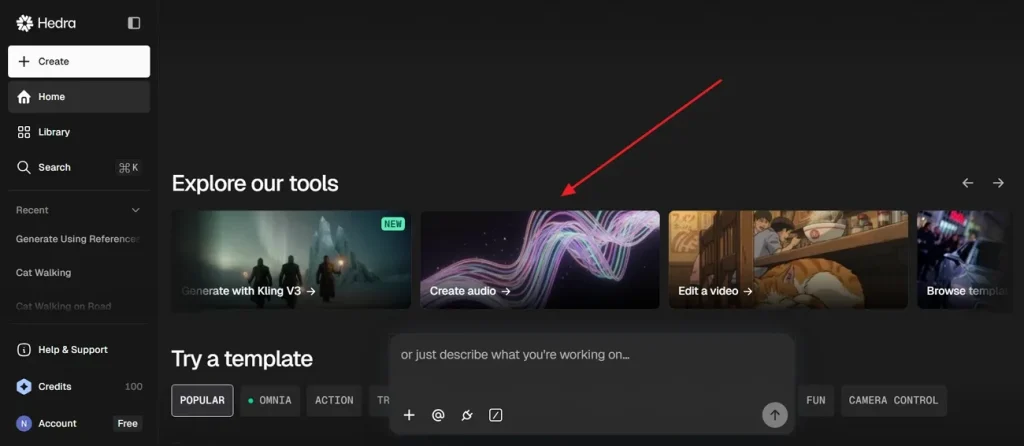
Step 1. Access the official Hedra AI webpage, opt for the Create Audio options in the Explore Our Tools section to generate audio for lip-sync.
Step 2. After accessing it, select the appropriate Settings from the options and enter the text in the provided Text Box, then press Generate.
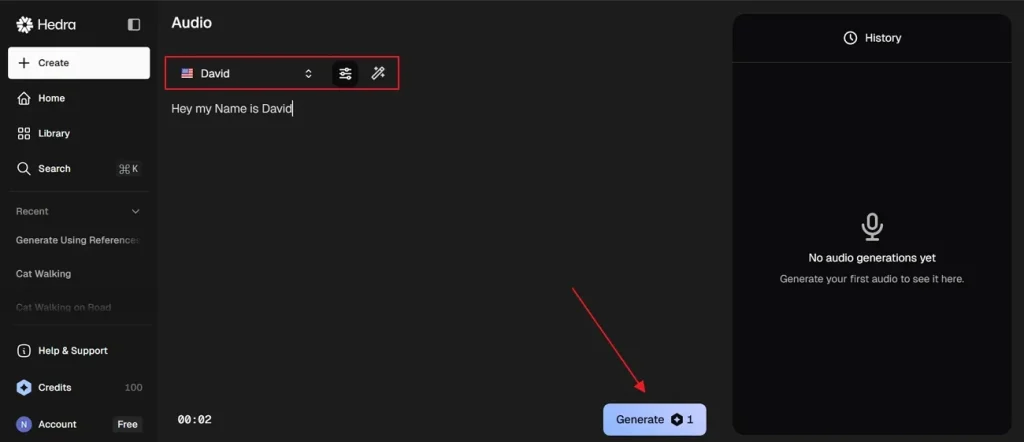
Step 3. Upon generating an audio, click the + icon, and opt for Upload File to add a lip-sync file.
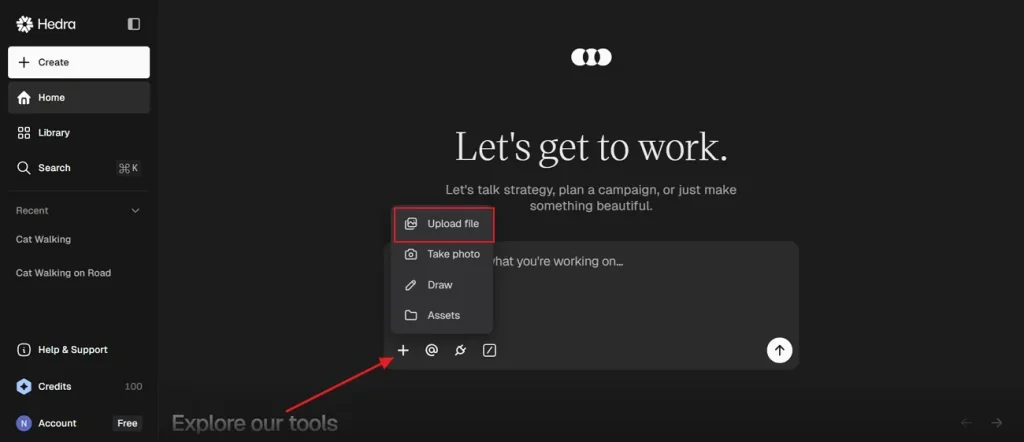
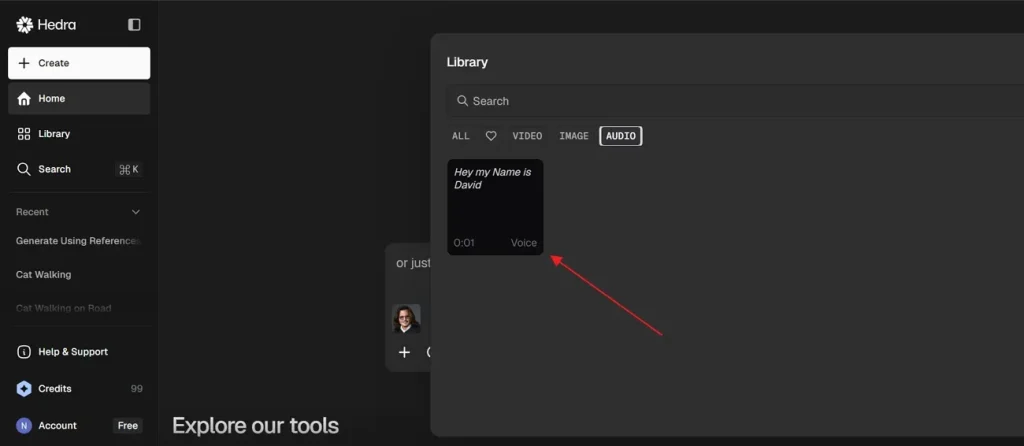
Step 4. Once you add a file, press the + icon again and choose Assets, then go to the Audio section to add audio. After that, press the Enter key and follow the on-screen instructions.
Part 2. Is MagicLight AI Better Than Hedra AI? Full Breakdown
After exploring Hedra AI features, users often notice restrictions affecting advanced creative video production needs. As a result, creators search for platforms that support higher-quality video and improved editing flexibility. To help creators make longer videos, MagicLight AI is a powerful Hedra AI alternative solution. This is a modern tool that provides a complete production workflow from script creation to final edited, downloadable AI video output.
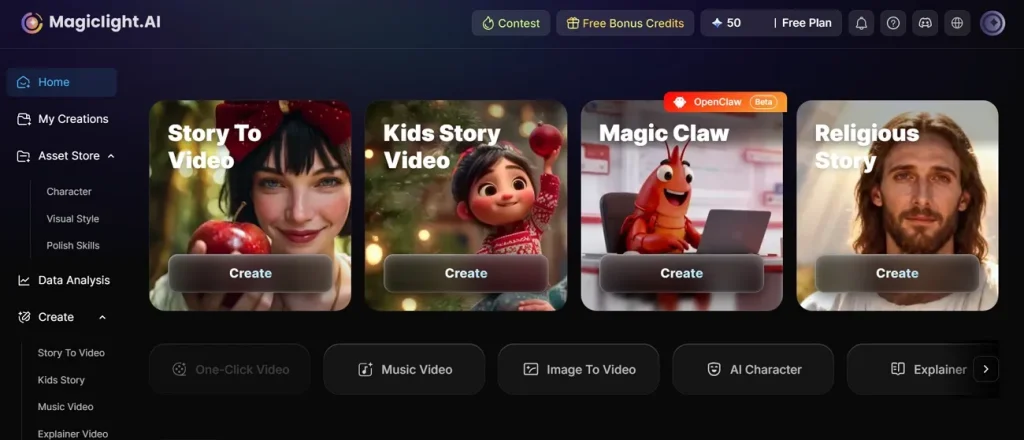
While using it, you can generate videos up to 50 minutes with complete storytelling and educational content. It has an extensive Style Library, offering multiple cinematic, realistic, Pixar Disney anime, and comic-inspired AI visual generation styles. MagicLight AI provides access to 12 advanced story models, including Qwen3.5 and Claude Opus 4.7, for generating narrative video. Using its storyboard feature, the creator can customize their AI character’s name, voice, and expression.
Key Features
- One Click Production: Creates complete animated videos instantly using 14 predefined artistic and cinematic generation style models.
- Stable Characters: Maintains character appearance consistency across multiple scenes for professional cinematic storytelling results throughout videos.
- Script Length: Supports script input up to 12,000 characters for detailed long-form video production projects easily.
Why MagicLight AI is Considered the Best AI Video Creation Tool - Reasons
As you know, Hedra AI alternative free options are required for higher quality cinematic video production. Below are important reasons explaining why MagicLight AI performs better for professional video creation:
- Global Languages: With 11 languages, creators can easily make videos for global audiences. This helps improve reach and engagement in education, marketing, and social platforms.
- Scene Control: Nano storyboard controls detailed actions, timing camera movement, and cinematic transitions throughout generated video scenes. So, every shot becomes more realistic through frame-level adjustments and refined motion planning tools easily.
- Story Themes: The7 built-in story themes simplify creative planning for educational and entertainment video production projects. Pre-designed templates reduce writing effort while improving storytelling structure for beginner creators significantly online.
- Flexible Ratios: Different export ratios support social platforms and widescreen cinematic content publishing. Flexible formatting improves viewing experience across mobile, desktop, and television streaming platforms worldwide.
- Music Support: Its40 background music options improve emotional storytelling and cinematic atmosphere across generated videos. Different music styles help creators match moods with educational, dramatic, or entertaining video scenes.
Conclusion
To summarize, digital video creation is now faster and easier with modern AI tools. Hedra AI helps users create talking character videos with simple features. Still, many creators need longer videos, stronger editing control, and cinematic quality. Because of these limits, better solutions become important for growth. Thus, MagicLight AI stands out as a strong choice for advanced video creation workflows.
FAQs on Hedra AI
1. What is Hedra AI used for?
Hedra AI is used for creating talking character videos using AI technology. It helps turn images, scripts, and audio into animated video content easily online. Creators use it for storytelling, marketing, explainer, and social media videos.
2. Is MagicLight AI better than Hedra AI?
MagicLight AI offers longer videos, better storytelling, and stronger editing flexibility overall. It also provides advanced workflows and cinematic tools for professional content creation. Alternatively, Hedra AI focuses mostly on talking heads and very smooth facial lip movements.
3. Is Hedra AI free or paid?
Hedra AI offers a free plan with limited credits and watermarked outputs. Paid plans unlock higher video quality, longer duration, and commercial usage rights. However, MagicLight AI also has different pricing levels based on your monthly usage needs.
4. What are the best Hedra AI alternatives?
MagicLight AI is considered a strong alternative with advanced storytelling features. Other tools may offer better control, longer videos, and improved cinematic results. Creators often select alternatives based on quality budget and workflow requirements today.
5. Which tool produces better video quality, MagicLight AI or Hedra AI?
MagicLight AI produces very clear 4K videos for a professional and sharp look. Hedra AI provides realistic motion, which makes the talking characters look very natural. Both tools offer high-resolution files that work well for all social platforms.