


Short films can last under a minute or run close to an hour, so the category is wider than most beginners expect. The practical answer to “how long is a short film” depends on where it will screen. Oscar rules, major festivals, and YouTube each draw the line differently.
AI short film generator adds a new wrinkle, since most AI models generate clips of only seconds at a time. MagicLight AI works around that limit, turning a script into a single animated film that can last 50 minutes.
Part 1. How Long Is a Short Film?
Most official definitions focus on the maximum runtime rather than setting a minimum. The Academy, for example, defines a short film as 40 minutes or less, including credits. Festival limits can differ considerably, so the table below compares the runtime rules used by several major festivals and awards:
| Organization | Maximum Short Film Length | Notes |
| Academy Awards | 40 minutes | Includes all credits |
| Sundance Film Festival | Under 50 minutes | Includes credits, per the 2027 rules |
| Cannes Short Film Competition | 15 minutes | Includes credits, per the 2026 rules |
| YouTube Shorts | 3 minutes | Square or vertical videos only |
In practice, the answer to “how long are short films” usually falls well below official limits. Short of the Week’s 233 featured films in 2021 averaged 13 minutes and 12 seconds. Films running 10 to 15 minutes accounted for about 40% of the list, with similar patterns appearing at SXSW and Sundance in 2022.
Short runtimes are nothing new. Before the 1910s, films rarely lasted much longer than 10 minutes. Modern shorts cover a wider range, but their length often reflects the type of story and where it will be shown. They generally fall into the following 3 practical runtime groups:
- Micro Shorts (Under 3 Minutes): Best suited to social platforms and simple concepts centered on a single joke, scare, moment, or reveal.
- Standard Shorts (5 to 20 Minutes): Common among festival entries, this range provides enough time to establish characters, develop conflict, and reach a complete ending.
- Long Shorts (20 to 40 Minutes): More complex stories with several characters, locations, or plot developments may need this extra time, although longer runtimes can fit fewer festival programming slots.
Part 2. How Long Should Your Short Film Be?
For a specific project, how long a short movie is depends on the story, budget, and intended release. Extra minutes should serve the plot rather than stretch a simple idea, especially when festival programming or production costs matter. The table below compares practical runtime ranges and when each one works best:
| Goal | Suggested Length | Why It Works |
| Film Festivals | 8 to 15 minutes | Slots into short blocks and clears strict caps like Cannes’ 15 minutes |
| YouTube Channel | 5 to 15 minutes | Long enough for a full arc in a standard widescreen upload |
| Shorts, Reels, and TikTok | Under 3 minutes | Matches the three-minute Shorts limit and fast-moving feeds |
| Proof of Concept | 5 to 12 minutes | Shows the world and tone of a feature idea without the full story |
| First Project or Film School | 3 to 10 minutes | Keeps the shoot manageable for a small crew |
A useful planning rule is one script page per minute of screen time, so a 10-page script usually runs about 10 minutes. Reading it aloud with a timer gives a closer estimate before you start shooting.
Runtime alone does not tell you whether a short film is too long. The better test is whether every scene earns its place and keeps the story moving. Before submitting to festivals or publishing online, look for these signs that your final cut may still need trimming:
- Opening Takes Too Long: If introducing the characters, setting, and central situation uses more than a third of the runtime, the story may be starting too slowly.
- Scenes Repeat the Same Point: When two scenes reveal the same information or create the same emotional beat, combining them can tighten the story.
- Credits Push the Runtime Up: Credits count toward many festival runtime limits, so a lengthy credit sequence could take the film beyond an eligible cutoff.
- Viewers Lose Attention Midway: If test viewers become distracted or lose interest at the same point, check that section for slow scenes, unnecessary dialogue, or pauses that drag.
Part 3. Short Film Length vs. AI Video Length
AI tools add a new angle to how long a short film is, since most generate clips in seconds rather than minutes. To see how these limits differ in practice, the table below compares the runtime options offered by popular AI video tools:
| Format | Typical Length per Output | What It Means for a 10-Minute Short |
| Veo 3.1 Clip | 8 seconds per generation | About 75 clips to stitch together |
| Kling 3.0 Clip | Up to 15 seconds | At least 40 clips |
| Seedance 2.5 Clip | 30 seconds in one pass | At least 20 clips |
| MagicLight Story to Video | Up to 50 minutes per project on paid plans | One project with consistent characters |
Stitching dozens of clips creates continuity problems, since faces, costumes, and lighting can drift between generations. Google’s Flow can extend a Veo 3.1 clip to a minute or more, but each extension adds another chance for drift. MagicLight AI avoids that assembly work by generating a whole story as one project, with saved characters that look the same in every scene.
Part 4. Create Longer AI Films With MagicLight AI Step by Step
Stories that outgrow a single clip are MagicLight AI’s specialty. With the Long Video Generator, a paid project can run 50 minutes, beyond the Academy’s 40-minute short film cap. Length also comes with continuity, an area where clip-based tools struggle.
MagicLight Agent drafts the script and picks the niche on its own. Story to Video then breaks the script into ordered scenes that keep the cast consistent from start to finish. Follow the steps below to create a longer AI film:
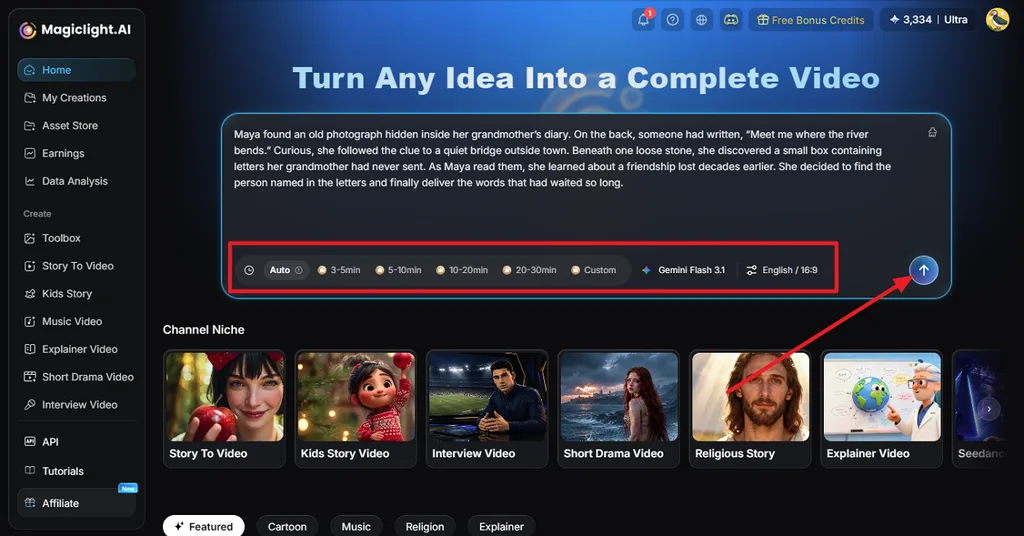
Step 1. Upload the Script and Define the Format
Open MagicLight AI and add the script for your short film. Choose the Aspect Ratio, Video Duration, Video Language, and AI Story Model to match your planned length and format. Click the Generate icon to continue with the short film creation.
Step 2. Review the Generated Story Structure
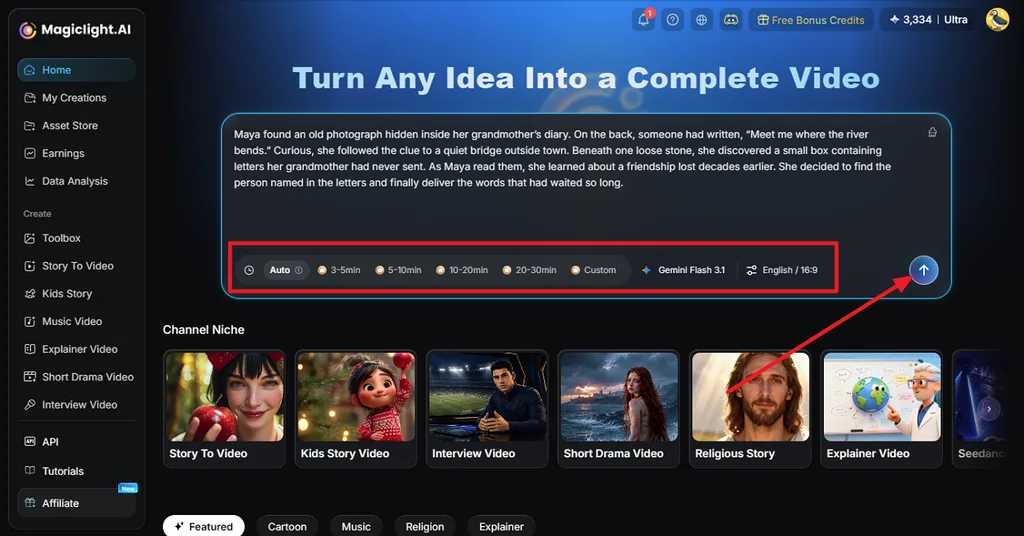
Here, MagicLight Agent breaks the material into a synopsis, cast, scenes, and individual shots. Read through the structure and check whether the amount of content fits your intended runtime. Revise sections that feel too long or rushed, then select Confirm Script and Next.
Step 3. Pick a Look and Movement Style
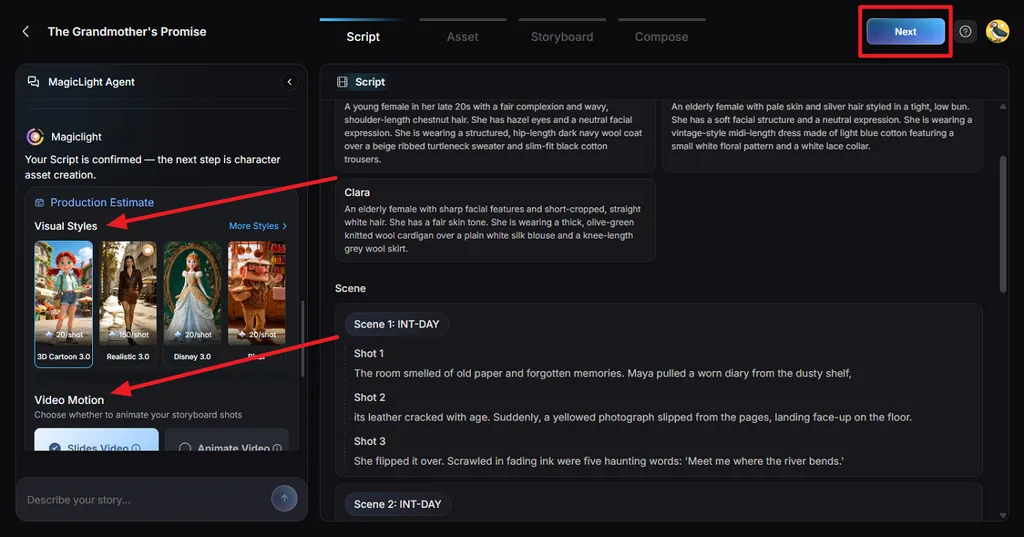
Select a Visual Style that suits the film’s atmosphere, from cinematic or realistic to animated or stylized. Next, choose the Video Motion and review the production settings. Click Next when the overall direction matches your project.
Step 4. Review the Generated Cast
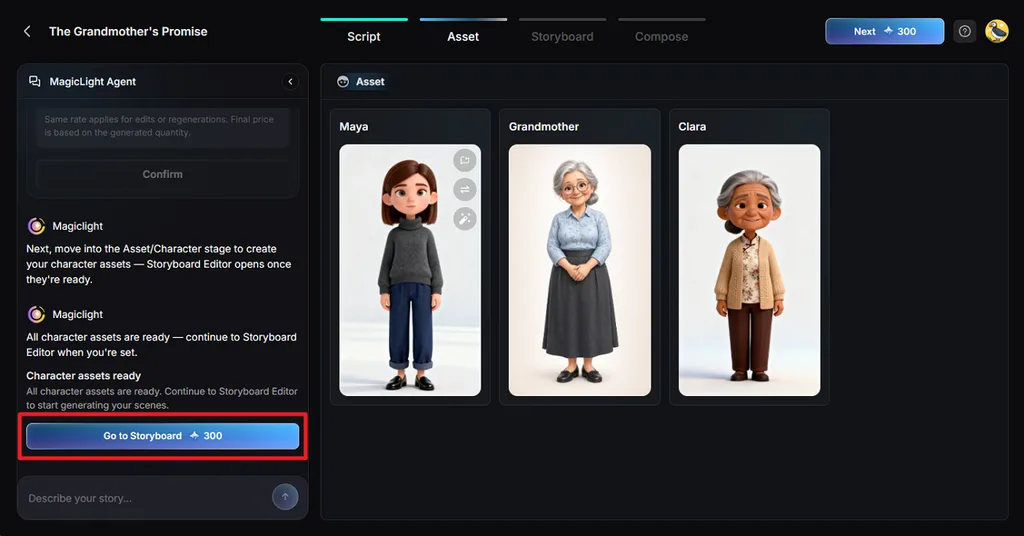
Look through the character designs and compare them with the roles described in your screenplay. Pay attention to appearance, clothing, and consistency across the story. Make any required changes before selecting Go to Storyboard.
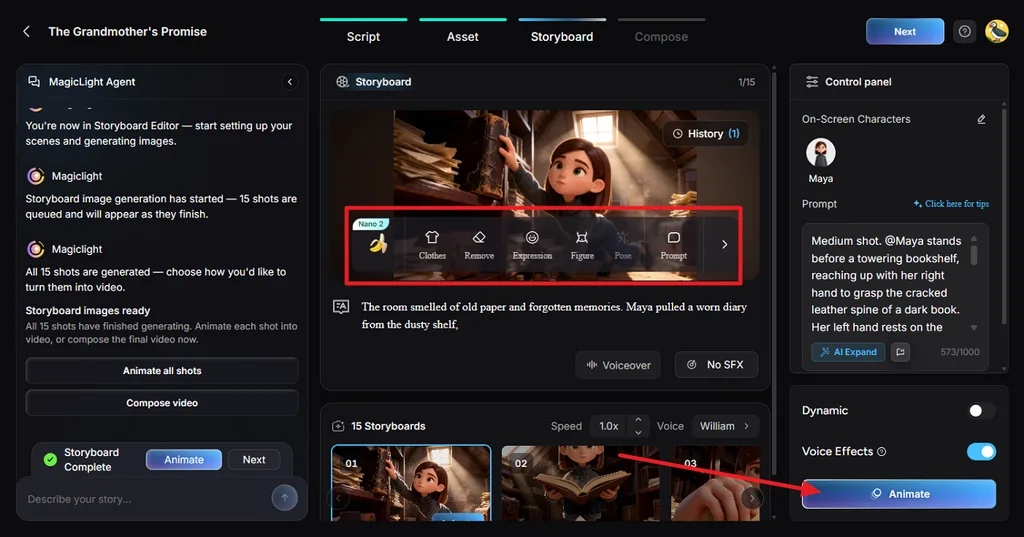
Step 5. Fine-Tune the Storyboard Shots
Work through the storyboard one shot at a time and remove or shorten moments that add unnecessary runtime. Use Clothes, Expressions, Figure, Pose, and Prompt controls to refine the visuals. Add voices and sound effects, then click Animate. With all changes made in the storyboards, proceed further using the Next button.
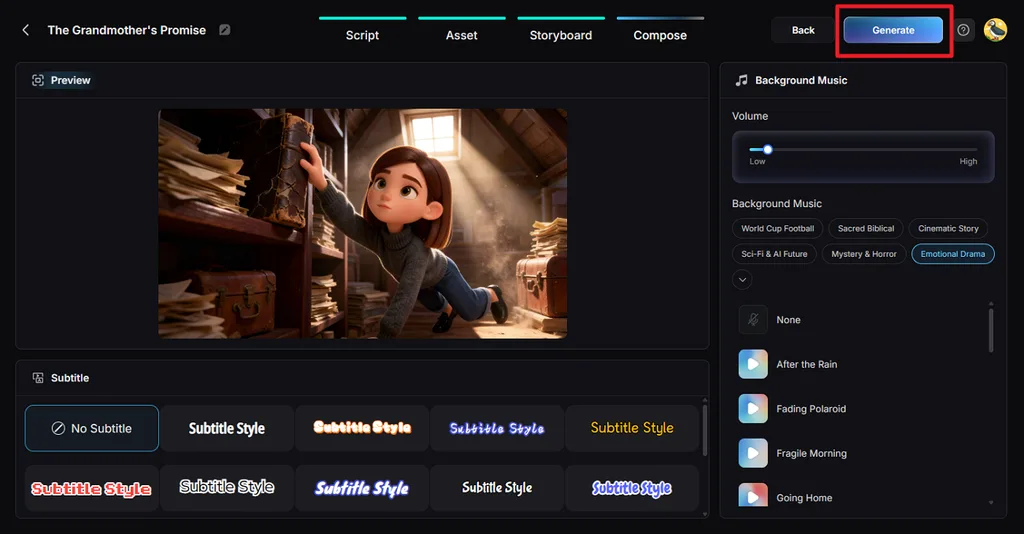
Step 6. Finish the Audio and Captions
In the Compose tab, see how the animated shots work together. Select suitable Background Music, choose a Subtitle style, and balance the audio with the dialogue or narration. Once the sequence feels right, click Generate.
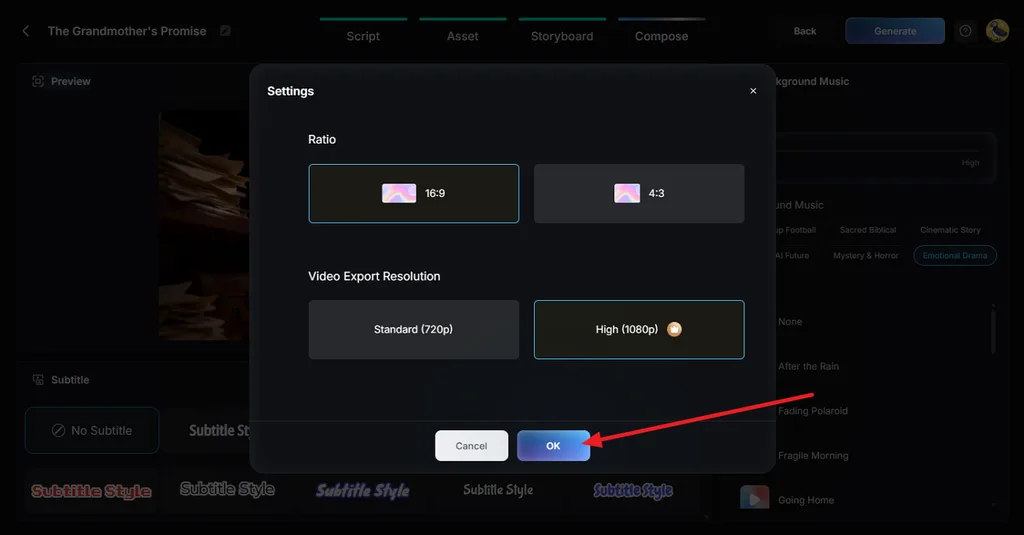
Step 7. Set the Export Resolution
Navigate to the Settings and confirm the Aspect Ratio you want for the finished movie. Choose either 720p or 1080p based on the required output quality, then select OK to apply your choices.
Step 8. Watch the Final Cut and Save It
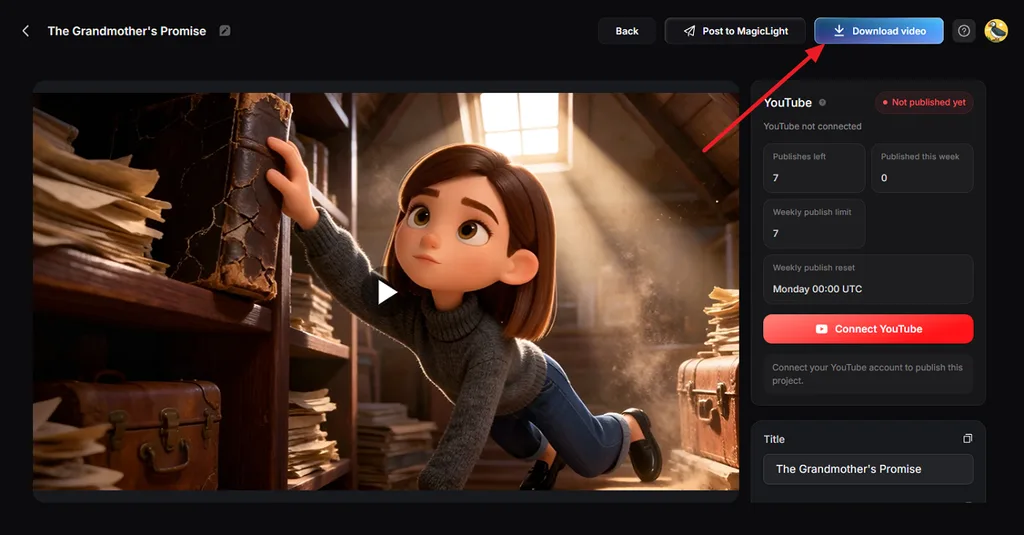
Play the complete short film and pay close attention to its final runtime and pacing. Check the scene order, character continuity, dialogue, captions, and soundtrack. Fix anything that feels unnecessary or rushed, then click Download Video to save the completed film.
Conclusion
For the Oscars, the answer to “how long is a short film” is 40 minutes or less. Many festival shorts run between 10 and 15 minutes, a length that also suits online viewers. MagicLight AI gives AI creators room to go further, producing single projects that stretch to 50 minutes.
FAQs About Short Film Length
1. How long is a short film?
The Academy defines a short as 40 minutes or less, including credits, and many festivals use similar caps. Sundance accepts shorts under 50 minutes, while Cannes limits competition shorts to 15. In practice, most shorts run between 5 and 20 minutes.
2. How long are short films for film festivals?
Festival caps vary, from 15 minutes at Cannes to under 50 minutes at Sundance, and many other events set a 40-minute limit. Programmers tend to favor shorter work, since three 10-minute films fill the same slot as one 30-minute film.
3. How long are short movies on YouTube?
YouTube has no special short film limit, so the answer to “how long are short movies” depends on the format. Vertical or square Shorts can run up to three minutes, while standard uploads allow 15 minutes, or up to 12 hours for verified accounts.
4. Can AI create a short film longer than a few minutes?
Most AI video models generate clips lasting a few seconds to half a minute, so longer films usually mean stitching many generations together. MagicLight AI removes that step, building a complete film from one script with consistent characters and paid runtimes that reach 50 minutes.


![How to Write a Script for a Short Film in 2026 [Beginner’s Guide]](https://magiclight.ai/wp-2/wp-content/uploads/short-film-screenplay-writing-guide-300x169.webp)


