


Faceless channels publish narrated stories, explainers, and top list videos without a presenter on camera. With no host to hold attention, how to make faceless YouTube videos comes down to structure, pacing, and voice. A channel like this depends on a clear niche, a steady supply of ideas, and an audience it understands.
Settling those before recording any narration is the first stage. AI tools now handle much of the production that follows, from script to narrated scenes. Explore this guide to learn how these videos work and which AI tools to use in 2026.
Part 1. What Makes a Faceless YouTube Video Work?
Faceless YouTube content works when the topic, script, and visuals carry a video without a personality on screen. 4 decisions made before production shape all 3, starting with the niche.
- Choose the Right Niche
To create a faceless YouTube channel, start with a niche that works well without showing a host. Check YouTube first to see whether smaller channels in that topic still get regular views. Avoid niches that need extra trust or sensitive advice, such as health, legal, financial, or political content. Safer choices are topics with steady interest that work well with narration, stock footage, animation, or simple visuals.
| Niche | Why It Works Without a Face | Example Video |
| Story Narration | Plot and voice hold attention | A retold folk legend |
| History Explainers | Maps and scenes carry the facts | The fall of an ancient city |
| Kids Stories | Characters matter more than hosts | A bedtime story with a moral |
| Science Explainers | Diagrams explain better than faces | Why volcanoes erupt |
| Faith Stories | Narration drives the message | A parable in a modern setting |
| Top-Lists | Countdowns keep viewers watching | 10 strange deep-sea animals |
- Find Video Ideas
A faceless channel needs a steady supply of topics. YouTube Trends can show popular searches, breakout videos, and content gaps worth exploring. Search autocomplete is also useful for seeing the phrases viewers already type into YouTube.
Similar channels can help too, especially when their most popular uploads reveal which subjects attract the most views. Comment sections often contain questions that can become follow-up videos. Ask Studio can also provide extra ideas inside YouTube Studio.
- Know Your Audience
Decide who you want to reach. Age, language, and viewing habits can change how you write and edit each video. Kids' content usually needs simpler words and brighter visuals. History videos may need slower pacing and clear sources.
YouTube also asks creators to mark whether a video is made for kids. These videos have fewer features, including comments and personalized ads. After launch, check the Audience tab in YouTube Analytics. It shows when viewers are online, what channels they watch, and which formats they prefer. Use that data to plan future videos.
- Build a Simple Content Plan
A clear plan helps a faceless YouTube channel stay consistent. Use repeatable video series so the channel has a clear direction, and batch several scripts or videos together to save time.
Choose a posting schedule you can keep up with. Long videos can also be cut into Shorts to bring viewers back to the full version. At the end of each month, check retention and click-through rate. Keep the formats that hold attention and stop using the ones that do not.
Part 2. How to Make Faceless YouTube Videos with AI
A YouTube faceless video can start with a simple topic or story idea instead of recorded footage or an on-camera host. In MagicLight AI, MagicLight Agent turns that idea into a production plan with a script, storyboard, visual style, characters, and scene structure. It supports formats such as Story to Video, explainers, short dramas, kids' stories, and interview-style videos.
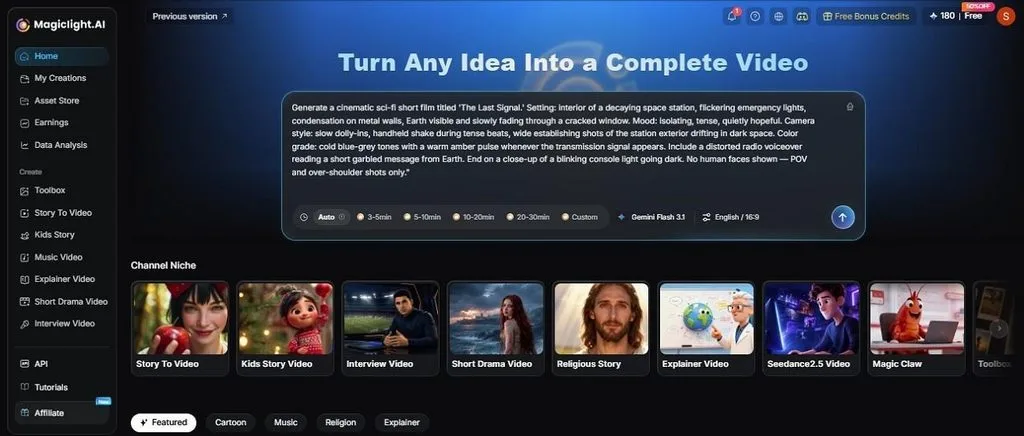
MagicLight Agent also provides different production plans based on budget and video quality. Once you choose a plan, it prepares the visual assets, voice elements, and storyboard before video generation begins. For narration-led faceless content, Story to Video can build scenes, narration, captions, and recurring characters from a script. Longer projects support videos up to 50 minutes in its AI Long Video Generator.
Key Features of MagicLight AI
- Long Script Input: Story to Video accepts scripts up to 12,000 characters. You can also choose settings like aspect ratio or 37 voice options to match the format and narration style of the video.
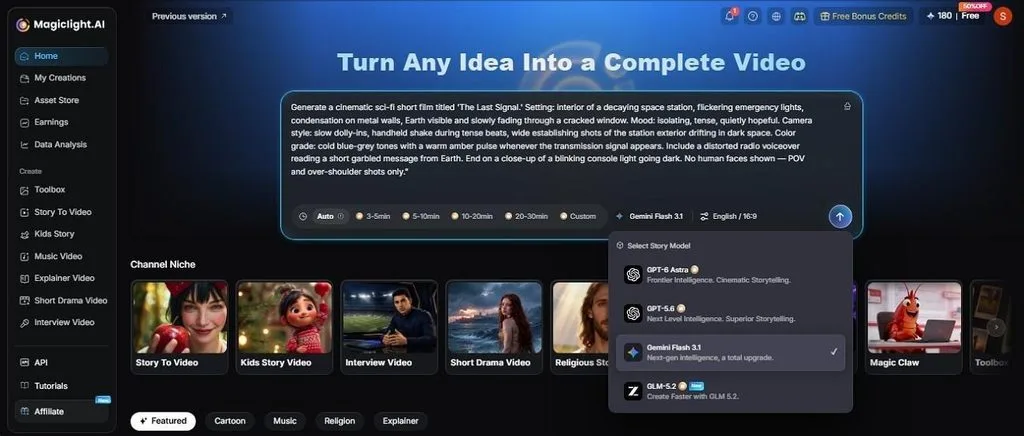
- AI Story Models: MagicLight AI includes 14 story models for shaping scripts and scene structure. The Story to Video menu shows options such as Gemini Flash 3.1, DeepSeek V4, Qwen 3.5, and GLM-5. MagicLight AI also lists newer models such as GPT-6 Astra and Claude Opus 4.6 across its story workflows. Use different models depending on the type and length of the story.
- Consistent Characters: Create a narrator or mascot from a reference image or a written description of up to 1,000 characters. The saved character keeps a similar appearance across scenes, which helps maintain a consistent look throughout the video.
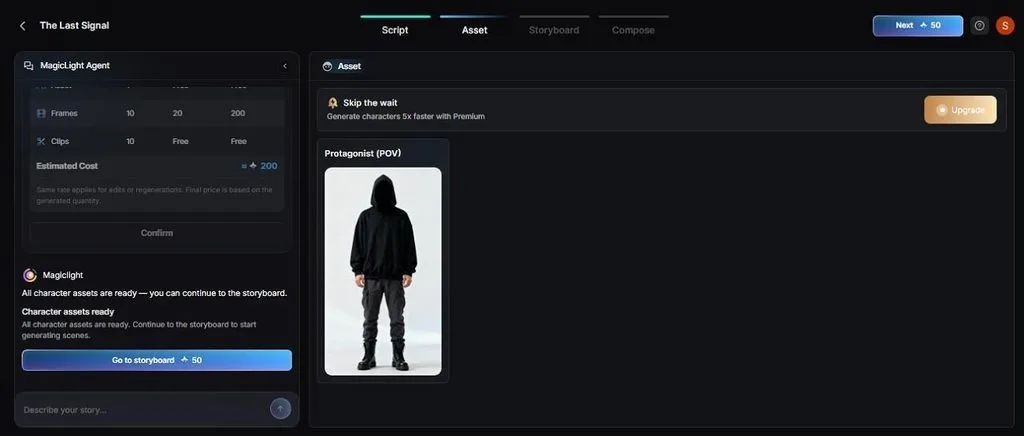
- Voices, Captions, and Languages: Choose a cloned voice, style captions in one of 16 looks, and produce videos in 11 languages. These options help keep narration, subtitles, and language settings consistent across a series.
Guide to Making Faceless Videos with Story to Video
MagicLight AI can create faceless YouTube videos from one idea and finish them inside Story to Video. To know how this tool works, review the simple guide given ahead:
Step 1. Start with MagicLight Agent
Open Story to Video, enter the script of up to 12,000 characters, and pick an AI Story Model. Set the Video Language and Video Duration, then choose 16:9 for regular uploads or 9:16 for Shorts under Aspect Ratio and press Send.
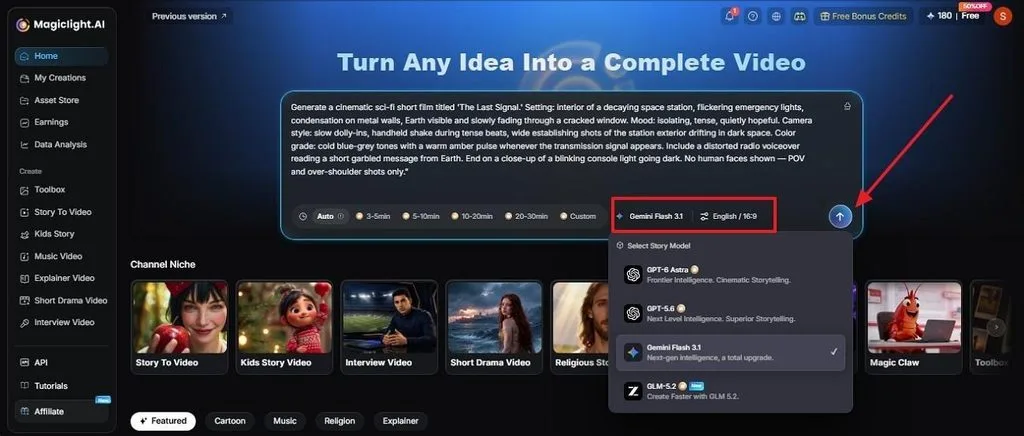
Step 2. Check the Basic Settings
When prompted, select Smart Polish It if you want MagicLight Agent to refine the script. Tap Use It Directly to keep the original wording. Check the suggested video type and script mode and click Confirm to continue to the next stage.
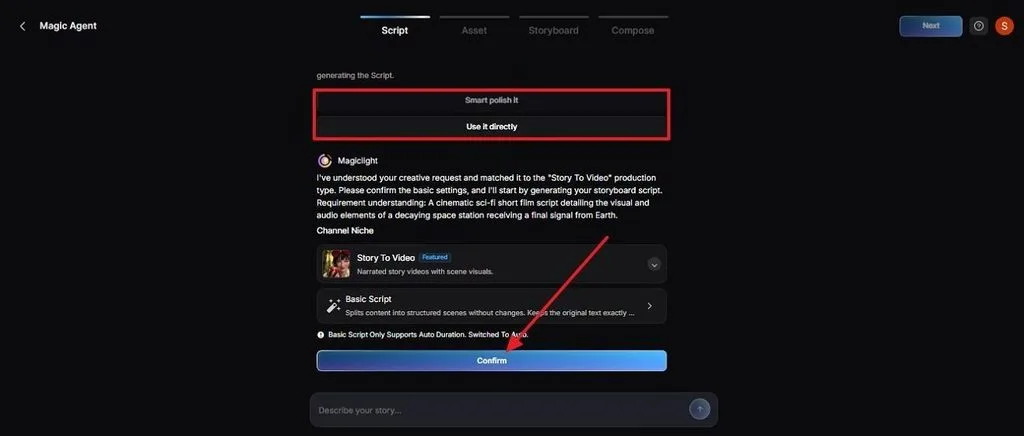
Step 3. Review the Scene Breakdown
Check the Summary, character details, and scene list to make sure the story flows in the right order, then press Next.
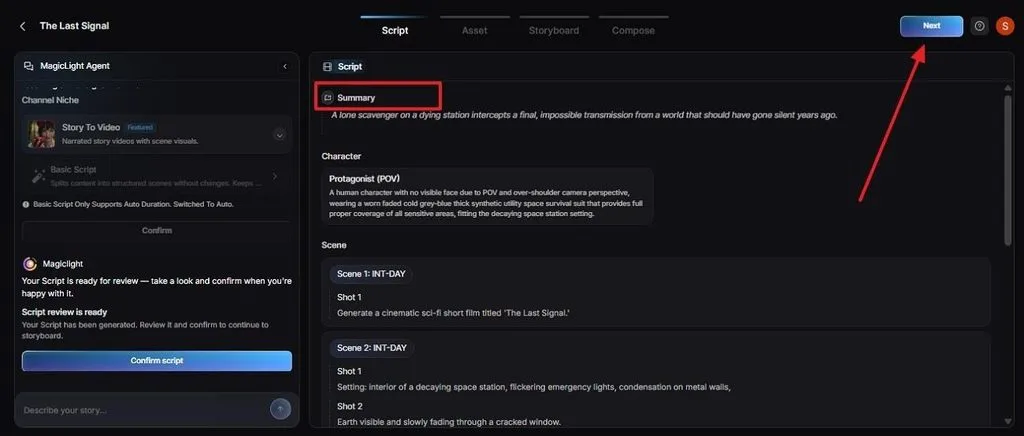
Step 4. Pick Video Motion Options
On the left, choose a Visual Style, then select Slides Video or Animate Video under Video Motion. Review the model, quantity, and cost shown below, then click Confirm > Next.
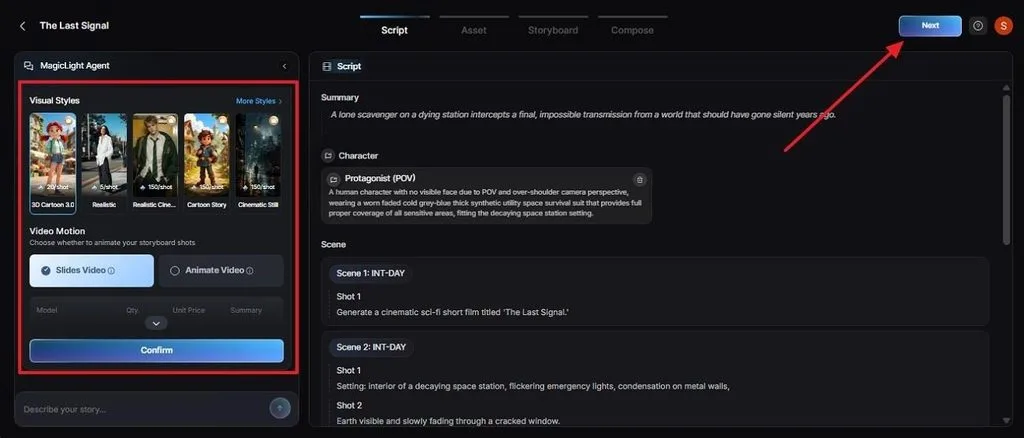
Step 5. Check Assets and Continue
Open the Asset stage to review the characters and visual elements prepared for the video. Make any needed changes, then click Next to move to Storyboard.
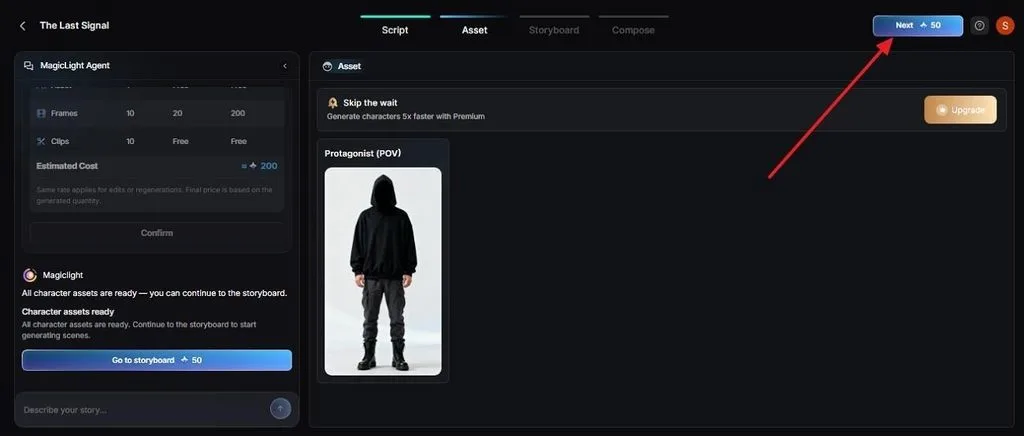
Step 6. Edit the Storyboard
Storyboard edits handle most of how to edit faceless YouTube videos in MagicLight, since every shot can change before generation. Adjust Clothes, Poses, and Expressions shot by shot, then press Next.
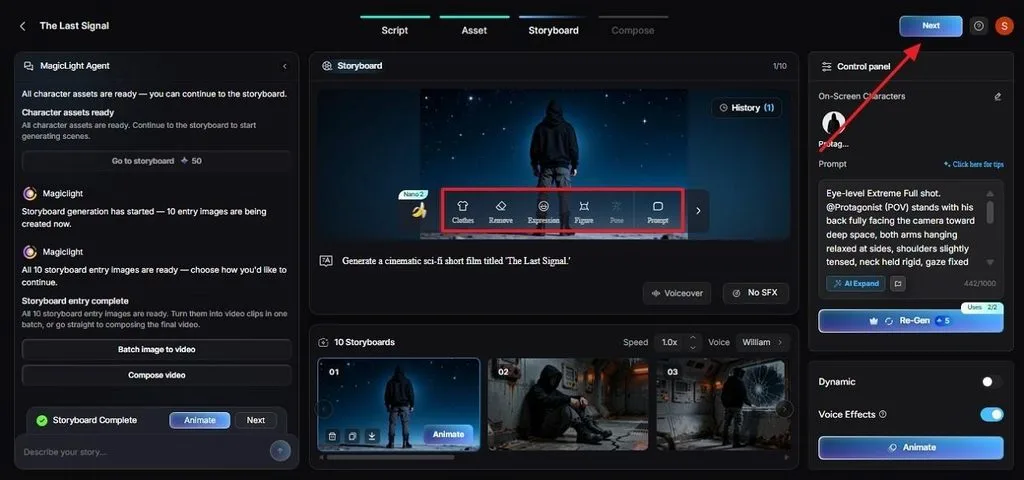
Step 7. Add Subtitles and Generate
Select a Subtitle style that stays readable on small phone screens, then click Generate in the top right corner.
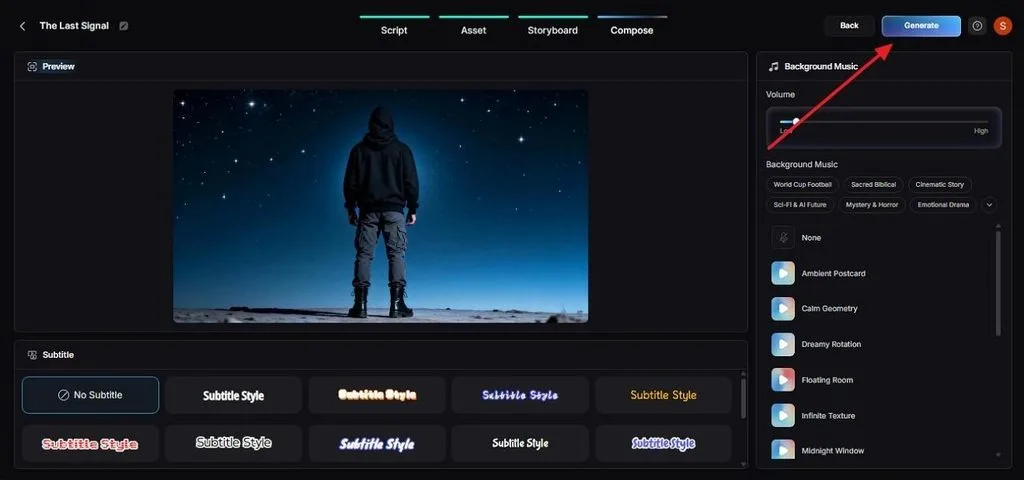
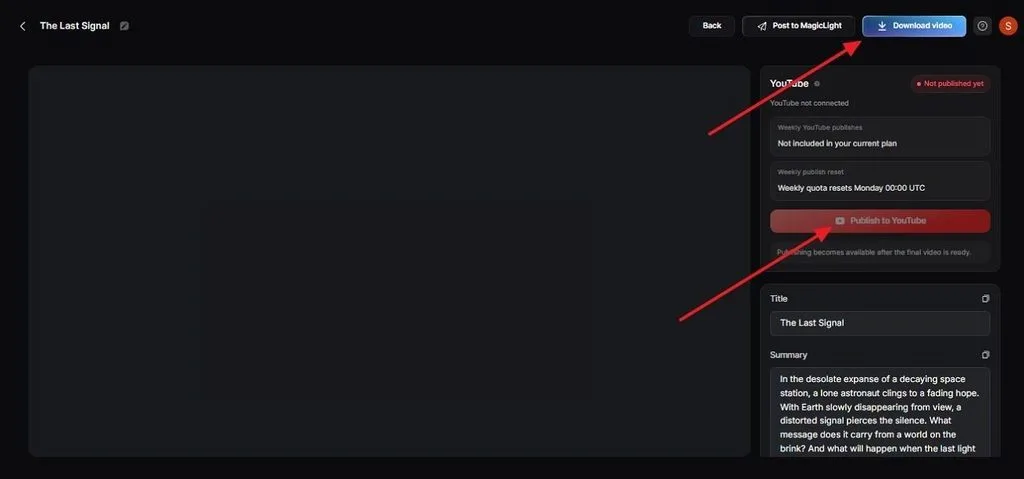
Step 8. Finish the YouTube Details
Finalize the aspect ratio and output resolution for the video. Review the finished video with its Thumbnail, Cover, and Hashtags, since the thumbnail and hashtags shape how the upload looks in search and feeds. Click Download Video or Publish to YouTube. Then, mark realistic AI scenes in YouTube’s upload settings if they could pass for real footage.
Conclusion
A faceless channel grows on a clear niche, a steady idea list, and a schedule that survives busy weeks. Once those foundations exist, production is the lighter half of how to make faceless YouTube videos. In MagicLight AI, the Agent plans each episode from one idea. Story to Video renders it with a consistent cast and captions.
Frequently Asked Questions
1. Can I make faceless YouTube videos with AI?
AI can turn a script into a faceless video with scenes, narration, and captions. MagicLight AI’s Story to Video can handle this in one workflow. YouTube requires a disclosure for realistic AI-generated scenes. Clearly animated content and AI-written scripts usually do not need that label.
2. What are the best faceless YouTube video ideas?
Strong YouTube faceless ideas include mystery countdowns, animated book summaries, science myths explained, and weekly story series built around one recurring character. Series ideas suit faceless channels well, since each episode gives viewers a reason to return.
3. Can faceless YouTube channels make money?
A YouTube faceless channel can earn through the YouTube Partner Program if its videos avoid mass-produced or repetitive content. For ad revenue in 2026, creators need 1,000 subscribers, 4,000 qualified watch hours in 12 months or 10 million qualified Shorts views in 90 days.





