Marketing teams increasingly use AI avatar video generators to create presenter-led content without traditional filming, actors, or studio setups. Jogg AI focuses on fast video production, often generating finished avatar videos within a few minutes. However, rendering speed alone does not determine whether the platform suits regular marketing, ecommerce, or content production needs.
This review examines its features, video quality, pricing, credit system, limitations, and practical use cases. It also looks at how Jogg AI handles longer projects and where a storytelling-focused alternative may offer greater creative flexibility.
Part 1. What Is Jogg AI
The platform focuses on fast avatar videos and ecommerce content creation, with some practical limitations. Let’s explore what it offers, how it works, and where those limitations start to matter.
Introduction to Jogg AI
Creating presenter videos traditionally requires planning, filming, editing, and production resources. The Jogg AI app simplifies this process by turning scripts, URLs, or images into AI-generated videos with virtual presenters. It is primarily designed for marketers, ecommerce sellers, creators, and teams producing promotional, product, training, or social media content.
Jogg AI focuses on speed and repeatable video production rather than complex filmmaking or long-form storytelling. Its workflow suits users who need frequent marketing videos without recording new footage each time. This makes it especially useful for campaigns where fast turnaround, consistent presenters, and simple content creation matter most.
Key Features of Jogg AI
- Avatar Library: Choose from 1000+ realistic AI presenters for marketing, training, sales, onboarding, and social video needs.
- AvatarX Model: Create expressive avatar performances with improved body movement, natural gestures, stronger emotions, and smoother delivery.
- URL to Video: Paste a product page, article, blog, or landing page to create an editable video automatically.
- Voice and Translation: Use AI voices, voice cloning, and multilingual tools to reach audiences across different global markets.
- Multiple Video Models: Access Seedance 2.5 and MiniMax H3 for varied quality, speed, resolution, and generation cost options.
Pros and Cons of Jogg AI
Now, let’s explore the benefits and limitations of Jogg AI that shape the experience for users.
Pros
- Videos usually render within 2 to 3 minutes total.
- Product URLs become narrated ads without manual script writing.
- Monthly credits can roll over for three billing months.
- AvatarX adds stronger gestures, movement, and emotion
Cons
- Videos are capped at 30 minutes per project, depending on model.
- URL videos rely heavily on existing product page imagery.
- Lifetime users report restrictions added after initial plan purchases.
- Higher-quality generations can consume credits quickly on advanced models.
Pricing and Plans
Jogg AI free provides limited credits, while paid plans offer higher usage levels. The table below compares each plan, included credits, and key pricing differences:
| Plan | Approximate Price | What It Covers |
| Free | $0 | One custom avatar and a limited tool selection |
| Starter | From $29 monthly | 12,000 credits with fast processing |
| Creator | Around $41 monthly billed annually | 264,000 credits and faster processing |
| Team | Higher tier | Larger balances and shared seats |
| Enterprise | Custom | Volume pricing and account support |
New accounts receive 200 promotional credits, giving users 31 days to test the platform properly. The Jogg AI AppSumo lifetime deal has ended, and several advanced features now require payment.
Some lifetime buyers later reported weekly usage limits and new credit restrictions on unlimited plans. Since subscription payments are non-refundable, using promotional credits before choosing a paid plan makes sense.
Part 2. How to Use Jogg AI
Creating a Jogg AI video starts with a script, URL, or simple idea. Follow the steps below to create, edit, and download your first video easily:
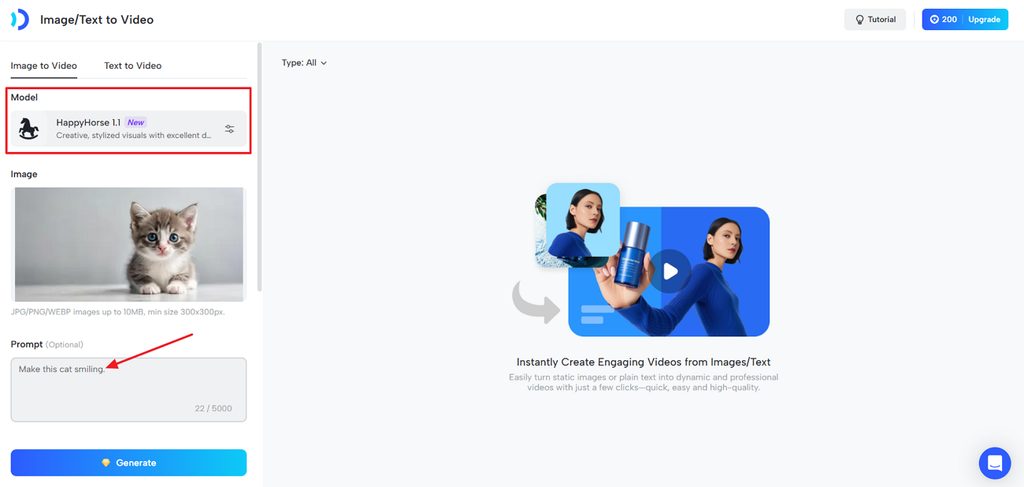
Step 1. Once you enter the Jogg AI video creation platform, choose Image to Video or Text to Video. If you choose Image to Video, upload your image, choose a Model, and enter a prompt for video descriptions.
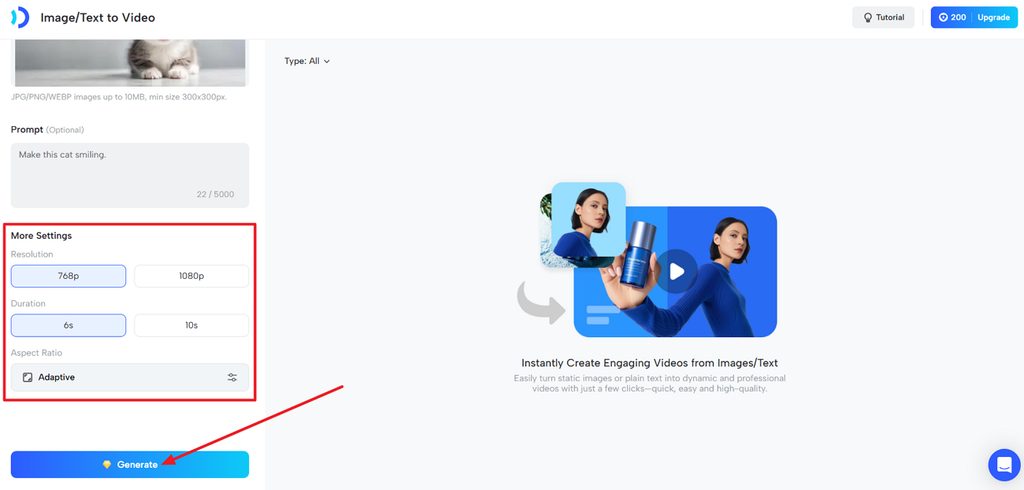
Step 2. After that, choose a Resolution and Duration you aim for. You don't need to choose an Aspect Ratio, as the platform picks the best ratio automatically. Next, press the Generate button. Then, play the video and download it if it meets your expectations.
Part 3. Best Alternative to Jogg AI for Storytelling
Users may look beyond the Jogg AI app when they need complete story-based video creation. MagicLight AI is designed for this purpose, turning written stories into full videos through an automated workflow. It converts scripts into connected scenes, characters, narration, captions, and finished video sequences without requiring manual scene building. The Story to Video feature supports up to 12,000 characters and can generate videos lasting up to 50 minutes.
Creators can also choose from 20+ AI video models to produce different visual styles and scene types. Saved characters help maintain a consistent cast across longer projects instead of rebuilding them for every scene. MagicLight AI also adds narration, captions, cover artwork, and export options before the finished video is downloaded.
Key Features of Magiclight AI
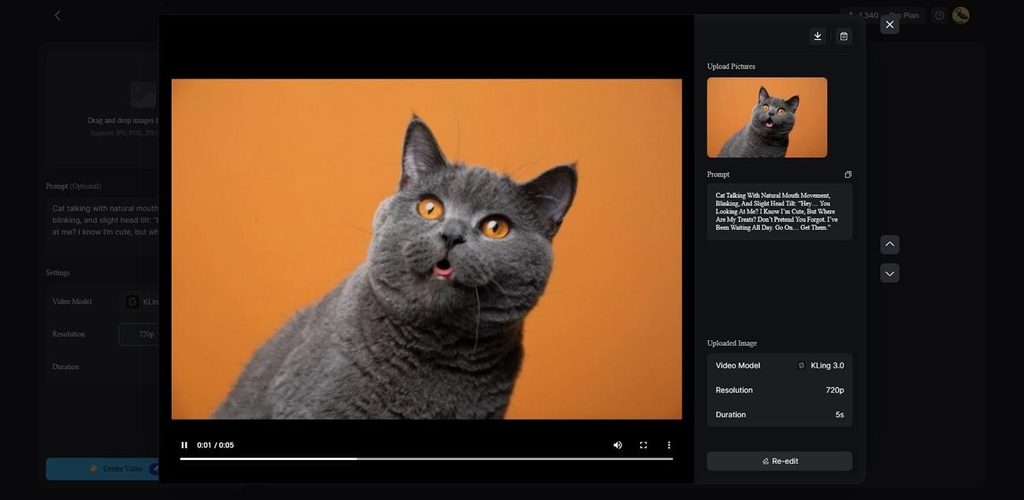
- Image to Video: Upload up to 5 reference images and add prompts of 1,500 characters to animate a picture into a video scene with stronger creative control.
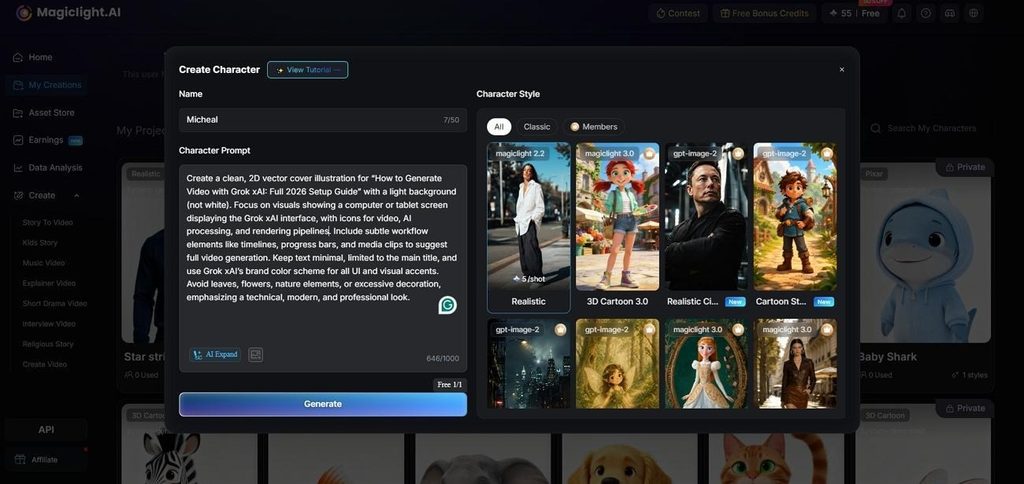
- AI Character Creation: Describe a character in text or upload a photo for consistent project results. Once created, the character stays saved and can return in future video projects.
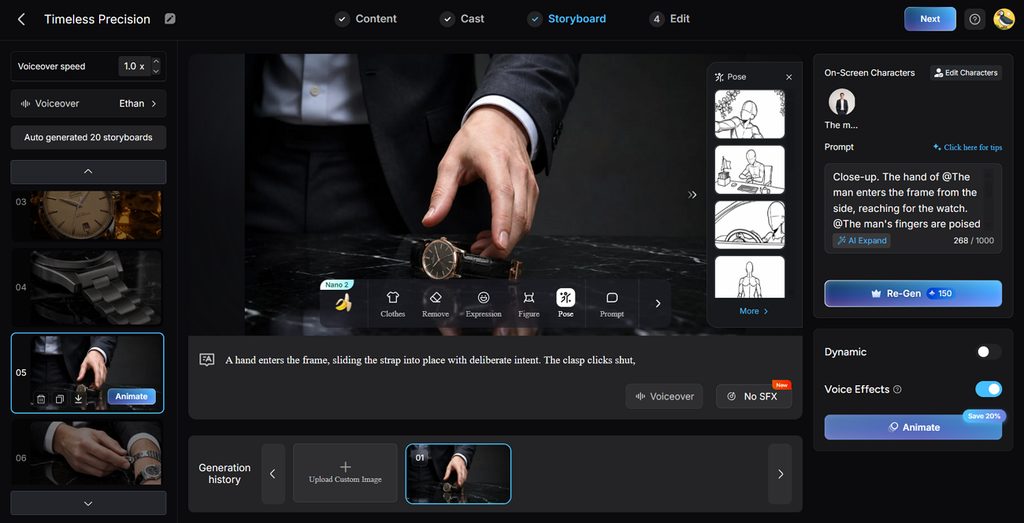
- Storyboard Scene Control: Adjust scenes before rendering with 50 poses, timing controls, and flexible edits. Creators can refine individual moments and improve story flow before final video generation.
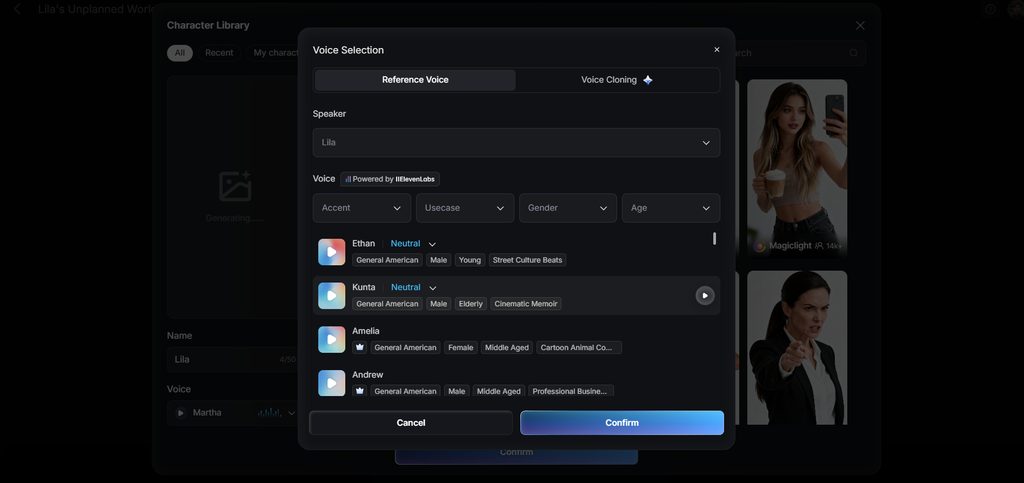
- Voiceover and Subtitles: Select from 37 AI voices with different ages, genders, and accents for narration. Add subtitles, clone voices, and apply 16 caption styles during video creation.
- Multiple Language Support: Create videos in 11 supported languages for wider audiences and multilingual projects. This makes it easier to produce localized stories without rebuilding the entire video workflow.
Part 4. Comparison Table: Jogg AI vs. MagicLight AI
Jogg AI video generator and MagicLight AI serve different video creation needs. The table below compares Jogg AI and MagicLight AI across their main features clearly:
| Feature | Jogg AI | MagicLight AI |
| Core Purpose | Avatar-led marketing video | Script-driven narrative video |
| Starting Input | Script, product URL, or image | A written script or story |
| Maximum Length | 30 minutes | 50 minutes per project |
| On-Screen Talent | Presenter addressing camera | Characters acting within scenes |
| Character Reuse | Custom avatars per account | Saved cast across all projects |
| Scene Changes | Limited backgrounds | Full scene generation per beat |
| Voice | Cloning and translation | 37 voices with cloning |
| Ecommerce Tools | URL to video and product ads | Not the primary focus |
| Free Access | Promotional credits, 31 days | Free plan, no card required |
| Best Suited To | Product ads and explainers | Stories, courses and series |
Conclusion
To conclude, Jogg AI works well for fast avatar marketing videos and promotional content. Its main limitations include plan-based video length limits, credit consumption, and weaker support for long-form storytelling. These drawbacks become more noticeable when projects require connected scenes, reusable characters, or greater narrative control. For longer story-driven videos with consistent characters and automated scene creation, MagicLight AI provides a more suitable alternative.
FAQs on Jogg AI
1. What is Jogg AI mainly used for?
It mainly creates avatar marketing videos for products, explainers, advertisements, and social content. Ecommerce sellers can also convert product pages into narrated videos with minimal manual work.
2. Is Jogg AI free to use?
Jogg AI free provides promotional credits that help new users test core features. Paid plans unlock advanced tools and provide more credits for regular video production needs.
3. Can Jogg AI turn text into video?
Yes, written scripts can become avatar videos with selected presenters and AI voices. MagicLight AI instead turns story scripts into connected scenes with characters and narration.
4. What is the best Jogg AI alternative for storytelling?
MagicLight AI supports storytelling with reusable characters, connected scenes, narration, and longer videos. It can create story videos lasting up to fifty minutes from written content directly.
5. Which AI video tool is best for creating videos from stories?
MagicLight AI transforms written stories into scenes, characters, narration, captions, and complete videos. Its automated workflow handles longer narrative projects without requiring manual scene creation from users.