AI video generators have made storytelling easier by streamlining tasks such as storyboarding, character design, animation, voiceovers, and editing. But finding the best AI video generator for storytelling requires more than generating individual clips—it also depends on connected scenes, consistent characters, pacing, narration, and sound. In this guide, we compare seven best AI video generators for storytelling in 2026, with Magiclight.AI standing out as our top choice for creators who want to turn written stories into longer, multi-scene videos with less manual work.
Part 1. How to Choose the Best AI Video Generator for Storytelling
Before choosing an AI video generator, consider how well it supports the entire storytelling workflow.
1. Story-to-Video Capabilities
When choosing the best AI video generator for storytelling, look for a tool that can understand a complete story or script rather than treating every shot as a separate prompt. The strongest workflows can analyze written content, identify scene changes, and translate the narrative into visual sequences.
2. Character Consistency
Characters often appear throughout an entire story. If their appearance changes from scene to scene, the video can quickly lose continuity. Character references, reusable character settings, and consistent visual generation are therefore important.
3. Scene and Storyboard Control
AI-generated scenes may need revision. Scene-level controls allow creators to review the narrative structure, adjust scenes, and fix problems before generating the final video.
4. Video Length
Many generative video models are optimized for relatively short clips. That is useful for individual shots, but a longer story requires a workflow that can connect many scenes into a larger project.
5. Voice, Music, and Dialogue
Narration and dialogue help communicate the story, while background music creates atmosphere. Integrated audio tools can also reduce the amount of post-production required.
6. Visual Style
Different stories call for different aesthetics. Realistic, cinematic, cartoon, 2D, 3D, illustration, and anime styles can all work depending on the subject and audience.
Part 2. 7 Best AI Video Generators for Storytelling
Each tool has different strengths, so the best AI video generator for storytelling depends on your content, creative goals, and preferred workflow.Some are primarily designed for generating cinematic clips, while others provide more structured animation or story-to-video workflows.
1. Magiclight.AI
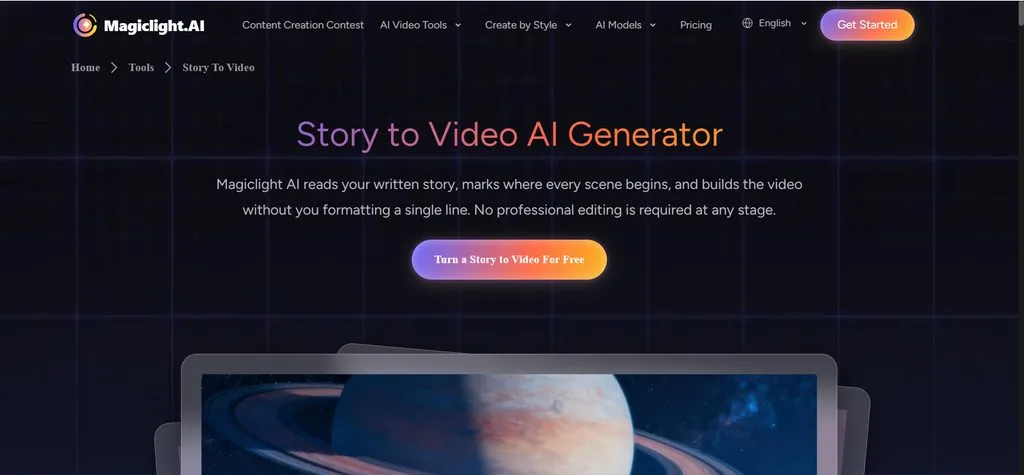
Magiclight.AI is our top choice for creators seeking the best AI video generator for storytelling, thanks to its story-first workflow that starts with written narratives rather than individual video prompts.
Its Story-to-Video Generator can accept up to 12,000 characters of ordinary narrative text without requiring creators to manually format the story into scene headings or shot notes. Magiclight says it analyzes changes in location, time, and characters to identify scene breaks and can generate videos of up to 50 minutes.
Key Features
- Story-to-Video generation turns written stories and scripts into structured multi-scene videos.
- Long-form video creation supports videos of up to 50 minutes for complete stories and lessons.
- Character creation and reuse helps maintain consistent characters across multiple scenes.
- Scene and storyboard control lets creators review and adjust their story before generation.
- AI voices, music, and subtitles provide essential audio and caption options in one workflow.
Best For: Long-form storytelling, children's stories, educational narratives, faceless story channels, and creators who already have written stories or scripts.
Pros
• Story-focused workflow makes it easier to turn written narratives into complete videos.
• Long-form support gives creators more room to develop detailed stories and episodes.
• Automatic scene analysis helps organize narrative content into connected visual scenes.
• Character reuse helps maintain recognizable characters throughout longer storytelling projects.
• Integrated audio tools simplify narration, music, and subtitle creation.
Con
• Additional generations may consume more credits when creators need to refine multiple scenes.
2. Runway (Gen-4.5)
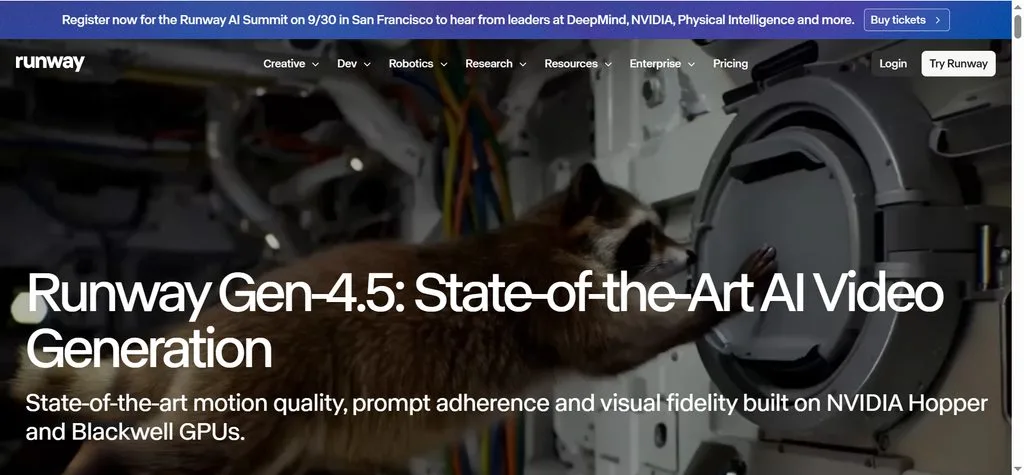
Runway Gen-4.5 is a strong choice for creators who want high-quality individual AI-generated shots. It supports both text and image inputs and provides control over aspect ratio and generation duration.
According to Runway's current documentation, Gen-4.5 generates videos from 2 to 10 seconds at 720p. This makes it more naturally suited to creating individual scenes or shots that can later be assembled into a larger production.
Key Features
- Text-to-video generation creates cinematic clips directly from written prompts.
- Image-to-video generation animates images into dynamic story scenes.
- Cinematic generation helps creators produce visually detailed narrative shots.
- Multiple aspect ratios support different formats for various storytelling platforms.
- 2–10 second generation makes Gen-4.5 better suited to individual shots.
Best For: Cinematic story scenes and creators who want detailed control over individual shots.
Pros
• Strong cinematic quality makes Runway effective for visually rich story scenes.
• Text and image inputs provide flexible ways to create narrative visuals.
• Detailed generation helps creators develop complex environments and cinematic moments.
Cons
• Short clip duration makes longer stories dependent on multiple generations.
• Additional editing is required to connect individual clips into a complete story.
3. Google Veo
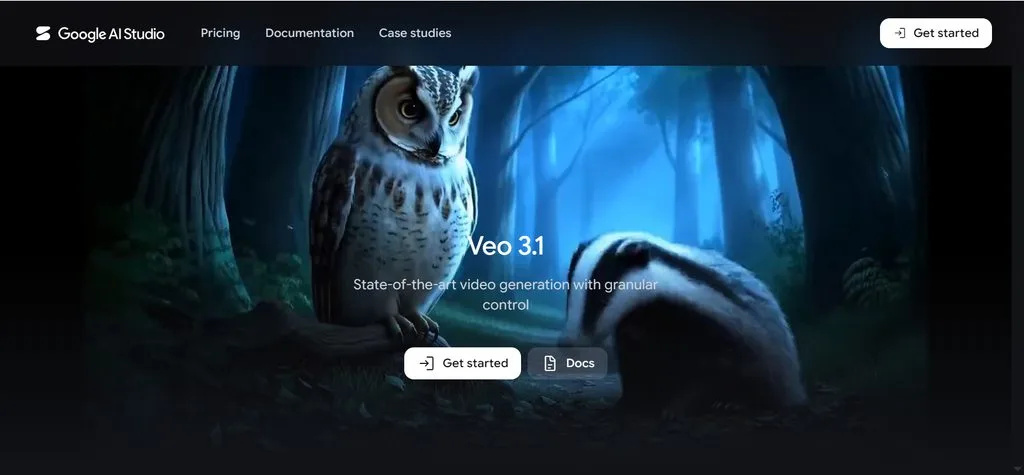
Google Veo is designed for high-quality video generation with an emphasis on realism, consistency, and creative control. Veo 3.1 supports reference images for characters, objects, and scenes and can extend existing scenes.
It also generates audio natively, including dialogue, sound effects, and ambient sounds. Google specifically positions Veo 3.1 as a video model designed to empower filmmakers and storytellers.
Key Features
- Text-to-video and image-to-video support different ways to create narrative scenes.
- Character and scene references help guide recurring visual elements.
- Scene extension allows creators to continue existing video sequences.
- Camera controls provide greater control over visual composition.
- Native audio generation supports dialogue, sound effects, and ambient sounds.
Best For: Realistic and cinematic storytelling.
Pros
• Strong visual realism makes Veo suitable for cinematic storytelling.
• Reference-based generation provides additional control over characters and scenes.
• Native audio makes dialogue-driven storytelling more immersive.
• Scene extension helps continue visual sequences beyond the initial generation.
Cons
• Veo focuses more on scene generation than complete long-form story management.
• Longer projects require additional organization to connect multiple generated scenes.
4. Pika 2.5
Pika 2.5 focuses on creative video generation, including text-to-video and image-to-video. Its current API documentation supports 720p and 1080p generation, while its image-to-video workflow can animate still images.
Pika also provides a Keyframe workflow that can animate between 2–5 ordered keyframes, making it useful when creators want more control over transitions between images. Its current documentation explicitly notes that it is not intended for feature-length renders.
Key Features
- Text-to-video generation creates short visual sequences from written prompts.
- Image-to-video generation brings illustrations and still images to life.
- Keyframe generation provides greater control over visual transitions.
- Creative effects add distinctive visual treatments to story scenes.
- Short-form generation makes Pika suitable for social storytelling content.
Best For: Short stories, social media storytelling, creative scenes, and visual experimentation.
Pros
• Flexible creative generation makes Pika useful for experimental storytelling.
• Text and image workflows provide different starting points for story scenes.
• Keyframe controls give creators more direction over visual transitions.
Cons
• Shorter sequences are Pika's main strength rather than complete long-form stories.
• Longer projects require multiple generations and additional editing.
5. Vyond
Vyond is focused on structured animated video creation rather than purely generative cinematic footage. Vyond Go supports prompt-to-video and script-to-video workflows, while creators can continue editing the generated video.
Its current Script-to-Video workflow supports single-speaker scripts and conversations involving up to two characters. Vyond also provides different layouts, including Conversation, Talking Head, and Narration.
Key Features
- Script-to-video generation turns written scripts into editable animated videos.
- Prompt-to-video creation generates animated videos from natural-language descriptions.
- Document-to-video workflows help convert existing materials into video content.
- Animated characters and layouts support structured character-based storytelling.
- AI voice options add narration and dialogue to animated videos.
Best For: Educational storytelling, training videos, business narratives, and explainers.
Pros
• Structured animation tools make Vyond practical for educational storytelling.
• Editable generated videos allow creators to refine content after generation.
• Character and layout options support dialogue-driven narrative videos.
• Educational workflows make Vyond particularly useful for lessons and explainers.
Cons
• Animation-focused visuals may be less suitable for cinematic fictional storytelling.
• Conversation layouts support up to two characters in its script-to-video workflow.
6. Animaker
Animaker combines AI video generation with a broader animation and editing platform. Its current AI Video Generator can create videos from text prompts and provides controls for tone, style, and duration.
Animaker also offers AI-generated assets, AI editing, subtitles, and AI voiceovers, making it a practical option for creators who want to generate and customize animated content within one platform.
Key Features
- AI text-to-video generation creates animated videos from written descriptions.
- Animation tools support customizable characters, scenes, and visual assets.
- AI-generated assets help creators build visual content more efficiently.
- AI voiceovers add narration and dialogue to animated stories.
- AI subtitles and editing help refine and complete storytelling videos.
Best For: Animated stories, education, marketing, and beginner-friendly video creation.
Pros
• Broad animation tools provide flexibility for character and scene creation.
• AI generation and editing allow creators to refine their initial results.
• Voice and subtitle features support more complete storytelling videos.
• Beginner-friendly tools make Animaker accessible to new creators.
Cons
• Animation-focused workflows are less suited to cinematic AI video creation.
• Complex stories may require more manual editing for detailed scene control.
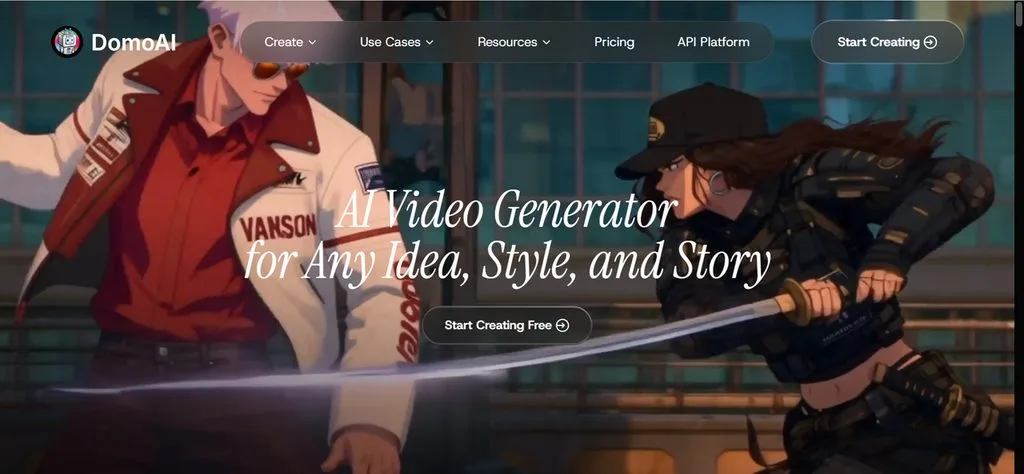
7. DomoAI
DomoAI is particularly useful for stylized and anime-oriented video creation. Its tools include text-to-video, image-to-video, Frames-to-Video, and Character-to-Video.
Frames-to-Video lets creators use multiple keyframes to guide transitions, while Character-to-Video can replace a character in motion footage while preserving the original movement. DomoAI's current Character-to-Video documentation lists a maximum of 30 seconds per generation.
Key Features
- Text-to-video generation creates stylized visual sequences from written prompts.
- Image-to-video generation animates existing illustrations and character artwork.
- Frames-to-Video generation uses keyframes to guide scene transitions.
- Character-to-Video generation helps animate or transform characters in motion footage.
- Anime and artistic styles make DomoAI suitable for stylized storytelling.
Best For: Anime storytelling, illustrated stories, and stylized character videos.
Pros
• Strong anime workflows make DomoAI useful for illustrated storytelling.
• Existing artwork can be reused to create animated story scenes.
• Multiple keyframes provide greater control over visual transitions.
• Character-focused tools support stories built around recurring characters.
Cons
• Shorter sequences are more practical than complete long-form story generation.
• Source images can significantly affect results, especially for character consistency.
Compare All AI Video Generators for Storytelling
The key difference between these tools is their approach to storytelling. Runway, Veo, Pika, and DomoAI are particularly useful for generating scenes or short sequences, while Vyond and Animaker provide structured animation environments.
Magiclight.AI is more directly focused on the complete path from written story to finished multi-scene video.
| AI Video Generator | Story-to-Video | Character Support | Long-Form Storytelling | Best For |
| Magiclight.AI | Yes | Creation & reuse | Up to 50 min | Complete story videos |
| Runway Gen-4.5 | Text/image-to-video | Input-based workflows | Short clips | Cinematic scenes |
| Google Veo | Text/image-to-video | Character references | Scene extension | Realistic storytelling |
| Pika 2.5 | Text/image-to-video | Image/keyframe workflows | Short sequences | Creative scenes |
| Vyond | Script-to-video | Animated characters | Project-based | Educational stories |
| Animaker | Text-to-video | Animated characters | Project-based | Animated stories |
| DomoAI | Text/image-to-video | Character workflows | Short sequences | Anime storytelling |
If you primarily need cinematic shots, Runway or Veo may be better suited to the task. For structured animated videos, Vyond or Animaker can be strong choices. For anime-focused workflows, DomoAI is worth considering.
For creators whose starting point is a written story and whose goal is a longer, connected narrative video, Magiclight.AI is the most directly aligned option in this comparison.
Part 3. What Makes Magiclight.AI One of the Best AI Video Generators for Storytelling
Magiclight.AI is built around a story-first production process. Creators can start with ordinary narrative text, have the system identify scene breaks, create or reuse characters, review the storyboard, and add voice, music, and subtitles before exporting the finished video. Its current Story-to-Video tool supports up to 12,000 characters and videos of up to 50 minutes.
Turn a Written Story Directly Into Video
The Magiclight Story to Video Generator lets creators start with a written story or script.
Magiclight says users do not need to manually convert their draft into scene headings or shot notes. Instead, the system reads the narrative and identifies changes in location, time, and characters to determine where scenes should begin.
This makes the workflow particularly useful for children's authors, teachers, faceless channel creators, and storytellers who already have written content.
Create Longer Story Videos
Long-form video is one of Magiclight.AI's clearest advantages for storytelling. For anyone choosing the best AI video generator for storytelling, its support for longer narratives and connected scenes provides more room to develop complete stories and episodes.
The current Story-to-Video page supports up to 12,000 characters of narrative text and videos of up to 50 minutes. Magiclight also positions the workflow for 30- or 50-minute story episodes.
Keep Characters Consistent
Recurring characters are essential to many stories.
Magiclight's official Chinese product page states that creators can create characters using prompts and save their character settings for reuse in later stories, including their appearance and voice.
This is particularly useful for serialized storytelling, children's books, and story channels where the same characters appear across multiple videos.
Review the Story at the Scene Level
Magiclight does not simply jump from a block of text directly to a final video.
Its workflow automatically identifies scene breaks and provides a storyboard stage where creators can review the story structure. The official workflow describes adjusting scene breaks and reviewing storyboard frames before proceeding with generation.
This makes it easier to identify problems with pacing, character appearances, locations, or story progression before the final video is produced. This level of control is especially useful when evaluating the best AI video generator for storytelling, where consistency across multiple scenes matters.
Add Narration, Music, and Subtitles
Storytelling also depends on sound.
Magiclight's current Story-to-Video page lists 37 voice options, 40 background music options, and 16 subtitle settings. These features allow creators to develop narration, background audio, and subtitles within the same workflow.
For longer story videos, having these elements in the same production environment can simplify the transition from script to finished content.
Guide: How to Create a Storytelling Video With Magiclight.AI
Magiclight.AI takes you from a written story to a finished video through six main stages.
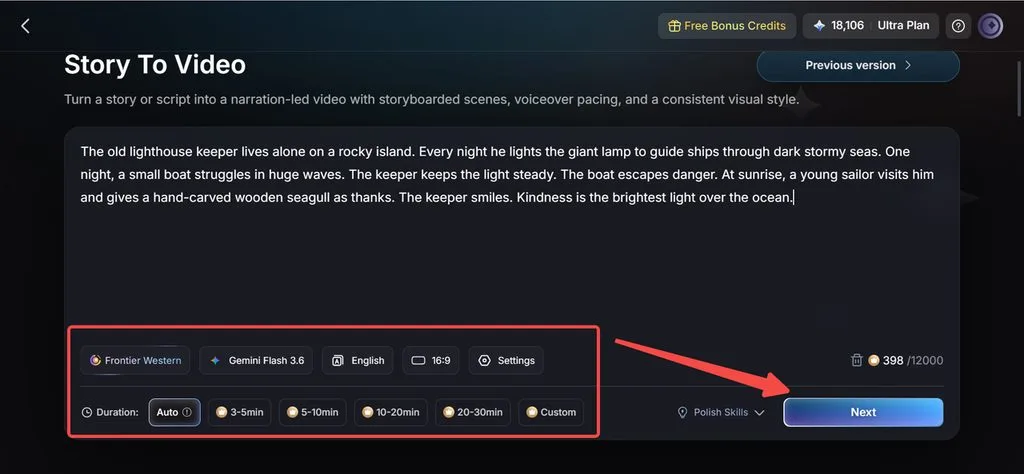
Step 1. Enter Your Story and Set the Basics
Open Magiclight.AI and select Story to Video. Enter your story or script, set the language, aspect ratio, models, and duration, then click Next.
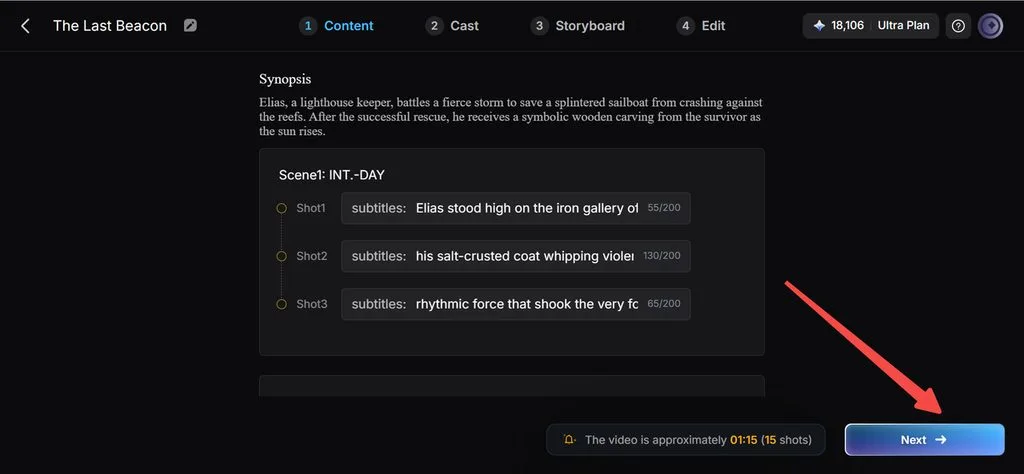
Step 2. Review the Generated Story Structure
Review the generated Synopsis and scene structure to make sure the story flow and pacing match your original narrative, then click Next.
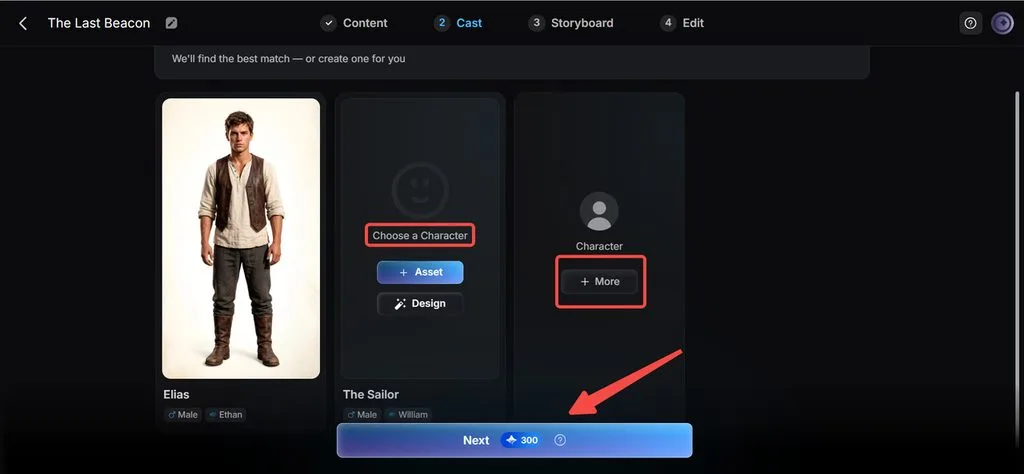
Step 3. Select or Create Your Characters
At the Cast stage, review the detected characters. Keep the suggested characters, choose existing ones from your library, or create new characters.
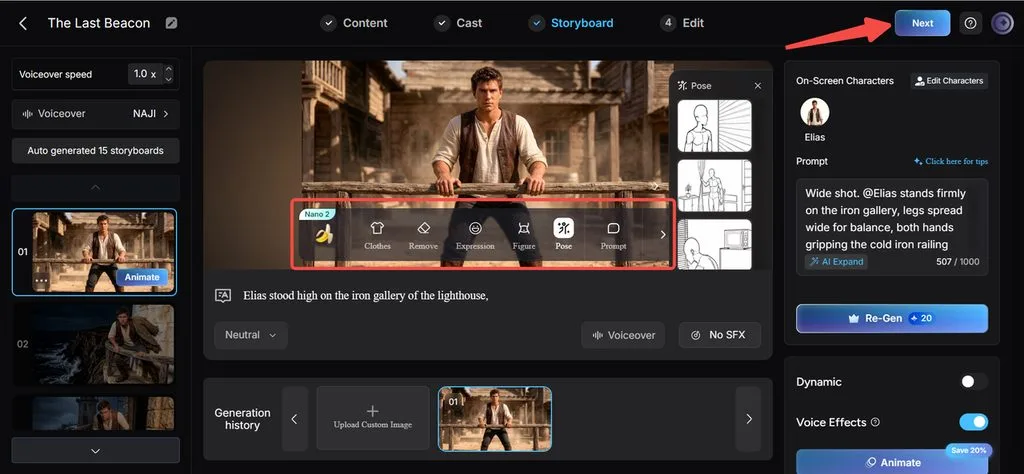
Step 4. Fine-Tune the Storyboard
In the Storyboard editor, review each scene and adjust prompts, character details, poses, expressions, clothing, and voiceover settings as needed.
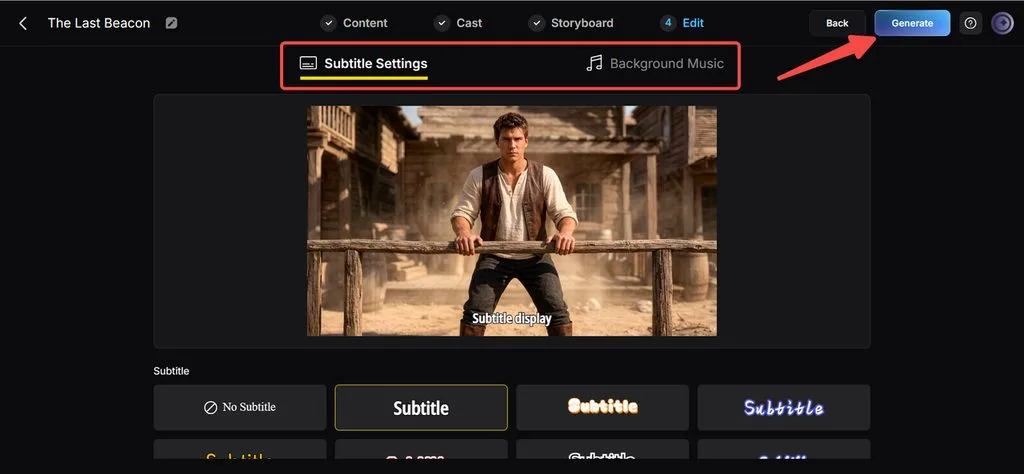
Step 5. Add Subtitles and Background Music
Set your subtitle style and add background music. When everything is ready, click Generate.
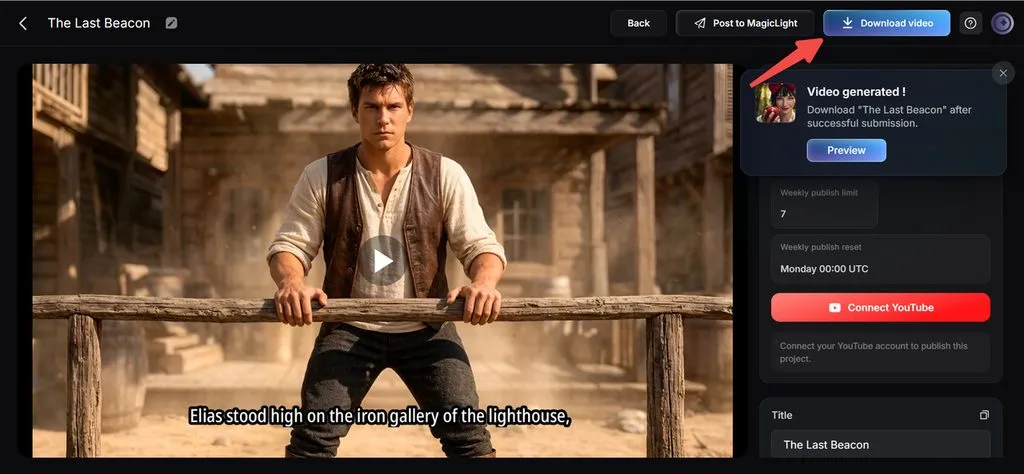
Step 6. Preview and Download the Final Video
Preview the completed video and check the final details. If everything looks good, download the video.
Conclusion
The best AI video generator for storytelling depends on the type of content you want to create. Runway Gen-4.5 and Google Veo are strong for cinematic scenes, Pika 2.5 for creative short sequences, Vyond and Animaker for structured animation, and DomoAI for anime-style content, but Magiclight.AI is our top recommendation for turning written stories into longer, connected videos, with a story-first workflow that supports scene organization, character reuse, storyboard review, narration, music, subtitles, and videos of up to 50 minutes.
Frequently Asked Questions on Best AI Video Generator for Storytelling
1. What is the best AI video generator for storytelling?
Magiclight.AI is our top choice for storytelling, especially for creators who wants to turn written narratives into complete multi-scene videos.
2. Can AI turn a script into a full video?
Yes. AI can turn scripts into video, but the level of automation varies. Magiclight.AI can read a narrative, identify scene changes, and build the story into a connected video without requiring manual scene formatting.
3. Which AI video generator is best for long-form stories?
Magiclight.AI is a strong choice for long-form storytelling, supporting videos of up to 50 minutes and narrative inputs of up to 12,000 characters.
4. Can AI keep characters consistent across a story?
Yes. Magiclight.AI lets creators create and save characters for reuse, helping maintain consistent faces, clothing, and visual identity across scenes and episodes.
5. Can AI create anime storytelling videos?
Yes. Magiclight.AI supports anime-focused styles, character creation, character reuse, scene generation, voiceovers, and subtitles, making it a suitable choice for anime storytelling.



![How to Remove People from Photos in 2026 [Full Guide]](https://magiclight.ai/wp-2/wp-content/uploads/remove-people-from-photos-guide.jpg-300x197.webp)
![6 Best Picture Modification Apps in 2026 to Try [New List]](https://magiclight.ai/wp-2/wp-content/uploads/best-picture-modification-apps-for-photos.jpg-300x200.webp)