DupDub AI lets creators generate voiceovers from written scripts without needing to record audio themselves. The platform also supports voice cloning and talking photos that speak using generated audio. Users can create dubbed videos in different languages without recording the same content again.
However, creating complete videos with new scenes may require tools beyond what DupDub AI provides. MagicLight AI offers another approach by turning written stories into videos with matching scenes. This DupDub AI review covers its main features and usage steps before comparing both tools.
Part 1. What Is DupDub AI
DupDub AI brings several useful features together to make content creation easier for its users. Most of its features help creators add realistic voices to their content without recording audio. The following sections explain how these features work and what users can create with them.
Introduction to DupDub AI
Recording voiceovers for every video can become tiring when scripts need changes after recording sessions. DupDub AI lets you type your script and choose a voice that reads it aloud. You can change the speaking speed and adjust the delivery until the narration sounds right. It also supports voice cloning through a short recording of the voice you want copied.
For anyone asking, “What is DupDub?,” the platform does more than generate spoken audio. You can upload a portrait and make the face move along with your chosen speech. Existing videos can be dubbed into different languages without having to record another voiceover yourself. DupDub AI also provides subtitle tools that help viewers follow the words being spoken clearly.
Key Features of DupDub AI
- Text-to-Speech: DupDub AI converts written scripts into expressive narration across 90+ languages with region-specific accents.
- Pronunciation Control: Custom pronunciation settings help correct unfamiliar names and refine speech delivery without rewriting the script.
- Voice Cloning: A short audio sample creates a digital version of the speaker's voice with support for 47 languages.
- AI Voices: The library includes 700+ AI voices with distinct vocal styles suited to different narration formats.
- Video Translation: DupDub AI supports dubbing from 50+ source languages into 30+ languages with synchronized lip movements.
Pros and Cons of DupDub AI
User reviews of the app DupDub highlight its realistic voices but also mention editing limitations. Let's look at the main advantages and drawbacks before deciding how well it performs:
Pros
- Adjust individual pauses and pronunciations without rerecording entire narrations.
- Clone voices across 47 languages using short audio samples.
- Choose expressive voice tones for more engaging spoken content.
Cons
- Generated voiceovers sometimes contain unexpected pitch and speed changes.
- Avatar generations sometimes fail to resemble uploaded reference photos.
- The 3-day trial offers limited credits for testing features.
Part 2. How to Use DupDub AI
DupDub AI transforms written scripts into voiceovers, with additional options for video creation and dubbing. Follow the steps below to create your first project and explore its available features:
Step 1. Once you enter the main interface, start a free trial and access the AI Voiceover option.
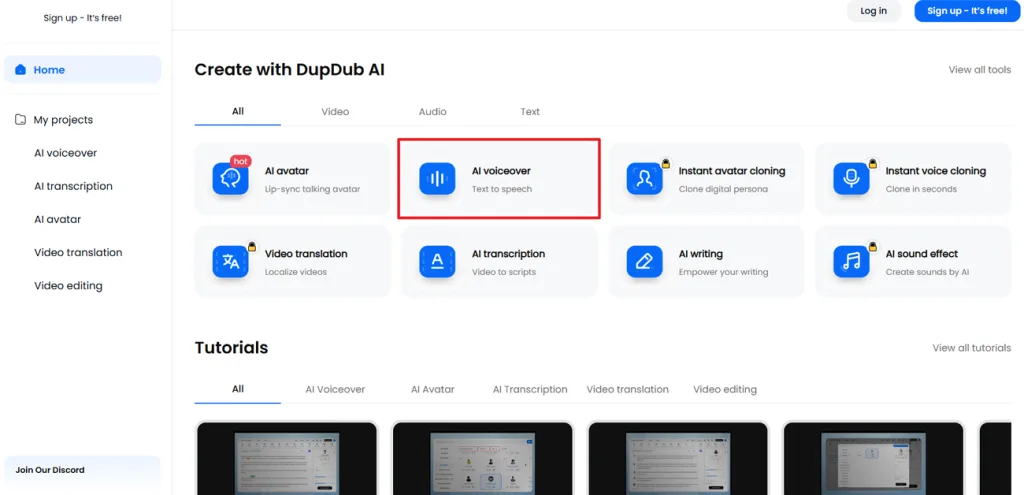
Step 2. Next, enter a script or write a new script with the help of AI. Press the More Voiceovers option to explore more voices. Choose an Emotion and Speed, and use the controls in the top menu to add pauses and rhythm to particular dialogues. Once done, press the Play icon to listen to your text.
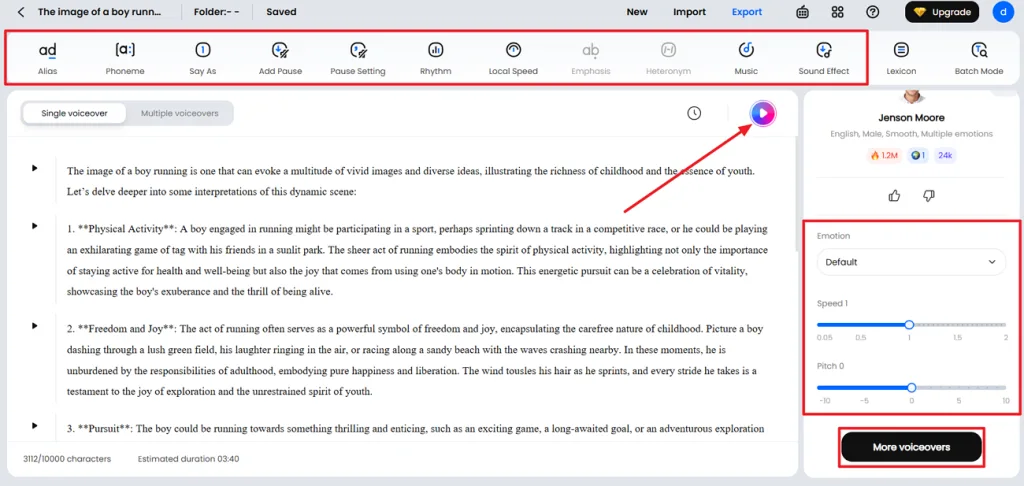
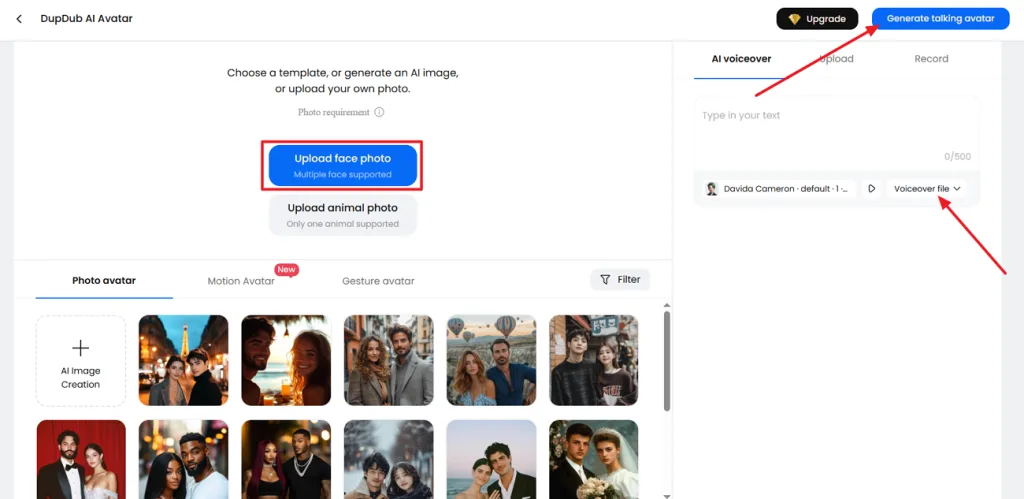
Step 3. After that, export your generated MP3 or WAV file. Open DupDub AI Avatar and upload your own image or choose an available template. In the AI Voiceover tab, upload the generated audio file and click Generate talking avatar to create your video.
Part 3. Best DupDub AI Alternative for AI Video Creation
App DupDub AI animates and dubs material that already exists, such as scripts and finished footage. A legend narrated by a talking portrait still shows no river, no village, and no ghost on screen. Those scenes call for a generator that works from the script itself.
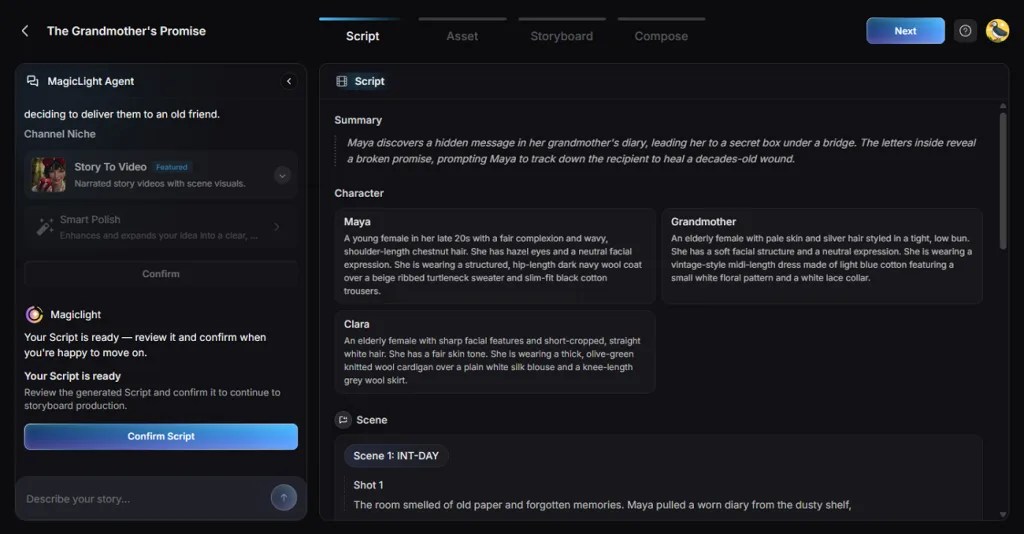
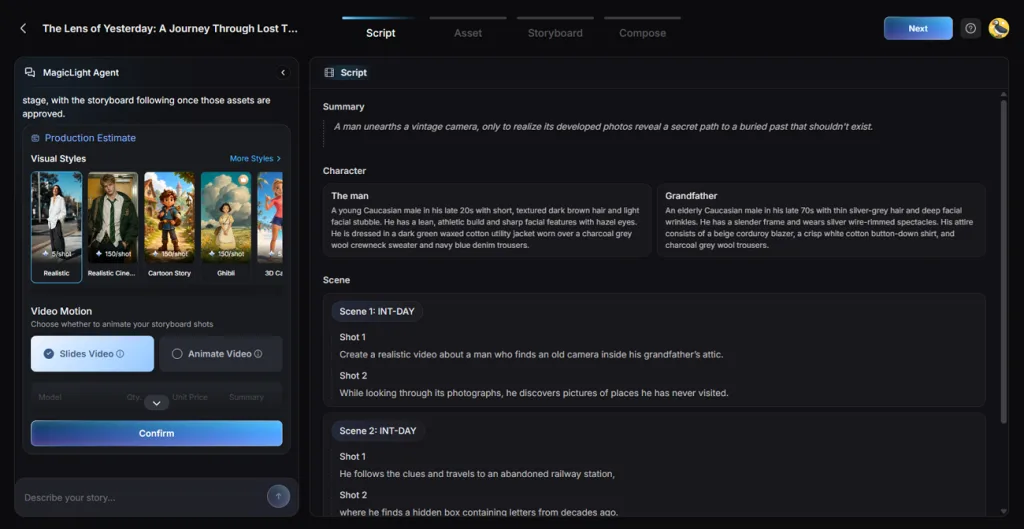
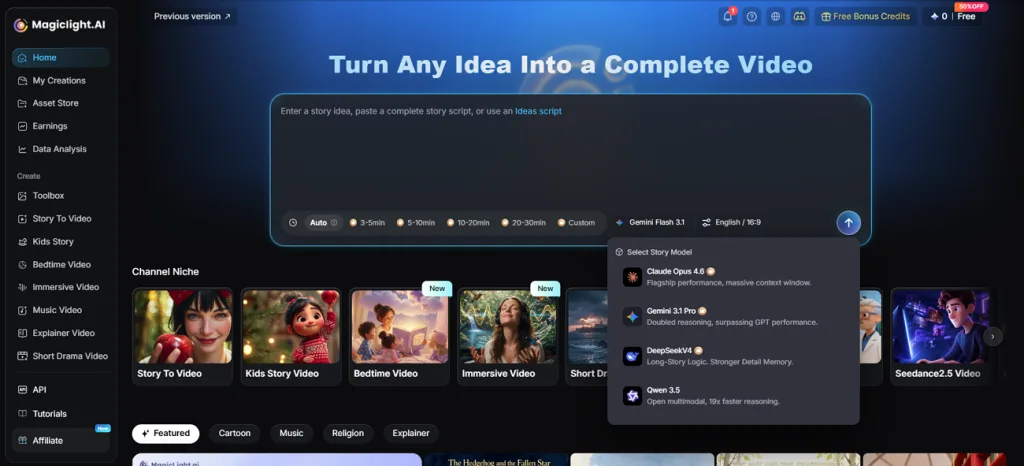
MagicLight AI turns simple ideas and finished scripts into complete videos with characters, narration, and music. Its Agent helps develop the initial concept before moving into the actual video creation. The Story to Video feature accepts up to 12,000 characters, allowing longer scripts to develop without unnecessary cuts.
Basic Script mode preserves the original wording as the platform organizes content into separate scenes. Each scene contains smaller shots that creators can adjust to get the visuals right. Creators can also select from 37 stock voices across 11 languages to complete their narration.
Key Features of MagicLight.AI
- MagicLight Agent: A simple chat brief produces character profiles alongside a suitable production format. You can review the estimated cost before approving the proposed video plan.
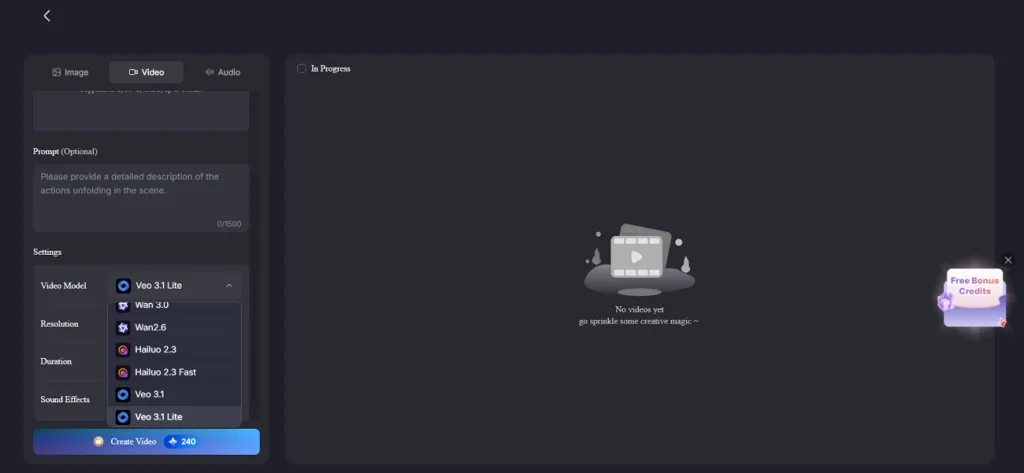
- AI Video Models: Choose from 20 animation models, including Veo, Kling, Hailuo, Seedance, and Wan. Each model brings different movement styles to the storyboard frames you approve.
- Visual Styles: MagicLight AI offers over 52 visual styles to suit different video projects. You can choose your preferred look and maintain it throughout the video.
- Consistent Characters: Create new characters in the Asset stage using descriptions up to 1000 characters. Once approved, their saved designs help maintain a consistent appearance across different scenes.
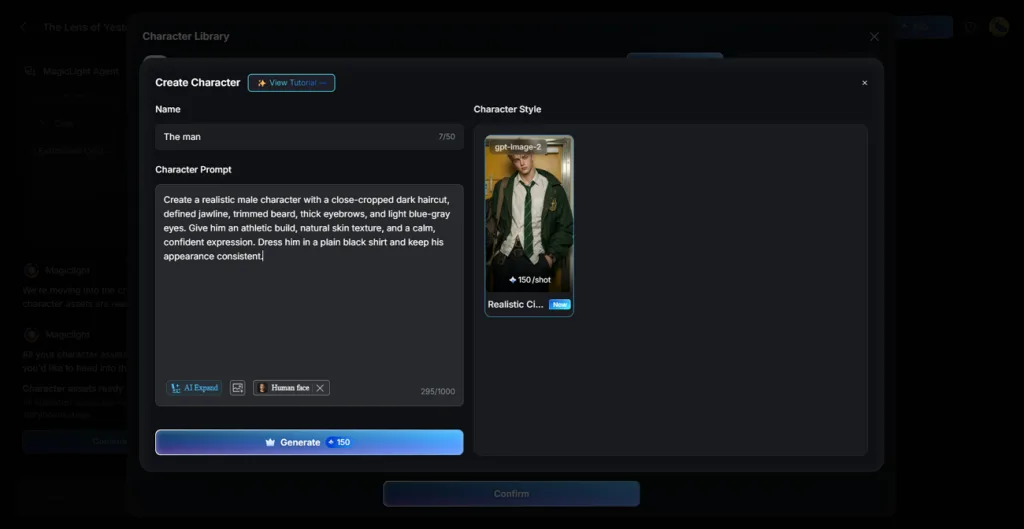
- Consistent Characters: Create new characters in the Asset stage using descriptions up to 1000 characters. Once approved, their saved designs help maintain a consistent appearance across different scenes.
Part 4. DupDub AI vs. MagicLight.AI: Which One Is Better for Video Creation
DupDub AI focuses on voice production, whereas MagicLight AI handles the complete video creation process. The table below compares their main features to help you understand which platform fits better:
| Feature | DupDub AI | MagicLight AI |
| Main Focus | AI voiceovers, dubbing, talking avatars | Complete AI videos from ideas and scripts |
| Video Generation | Talking photos, AI presenters, video editing, and dubbing | Original multi-scene videos generated from text |
| AI Models | Voice generation and avatar tools | Multiple AI video models for scene animation |
| Voices | 700+ voices with 1,000+ styles | 37 voices with voice cloning |
| Languages | 90+ for text-to-speech | 11 for video narration |
| Characters | Talking portraits and avatar templates | Reusable characters with consistent appearances |
| Visual Styles | Primarily photo-based and avatar visuals | 50+ styles for complete video projects |
| Script Support | Up to 10,000 characters in Canva voiceovers | Up to 12,000 characters per script |
| Video Length | Depends on the selected tool and plan | Up to 50 minutes per project |
| Free Access | 3-day free trial without a card | Free sign-up credits without a card |
DupDub AI works best when you already have content that needs voiceovers or translation. However, MagicLight AI is a better choice for creating complete videos from scratch. It generates original scenes with consistent characters and supports videos up to 50 minutes on paid plans. For creators who need both, DupDub can handle dubbing while MagicLight AI takes care of video production.
Conclusion
To conclude, DupDub AI is worth trying if you mainly need voices for your videos. You can create voiceovers, clone voices in 47 languages, and translate videos into other languages. However, the lip sync is not always accurate, and the video editor has limited features. If you want to make complete videos from your own ideas, MagicLight AI is a better choice.
FAQs on DupDub AI
1. What is DupDub AI mainly used for?
DupDub AI mainly helps creators produce voiceovers using its library of more than 700 voices. It also supports voice cloning and video dubbing for content in different languages. Users can animate existing portraits into talking photos without recording any new footage.
2. Is DupDub AI free to use?
The app DupDub offers a 3-day free trial without requiring payment card details. Trial users receive limited credits to explore voiceovers and other available AI tools. Paid plans provide larger credit allowances for people who need regular content production.
3. Can DupDub AI create videos from scripts and images?
DupDub AI can turn written scripts into speech for existing photos and videos. Its talking photo feature makes uploaded portraits appear to speak the generated narration. For original scenes created directly from scripts, MagicLight AI offers more video features.
4. What is the best DupDub AI alternative for AI video creation?
MagicLight AI is a strong alternative for creators who want complete AI videos. Its Agent develops ideas into scripts before preparing characters and storyboards for video production. You can then animate scenes and add narration to complete your video project.
5. Which AI video tool is best for creating long form videos from scripts?
MagicLight AI supports long-form video projects lasting up to 50 minutes on paid plans. Its Story to Video feature accepts scripts containing 12,000 text characters. Saved character designs help maintain familiar faces throughout the video, although occasional visual differences can occur.