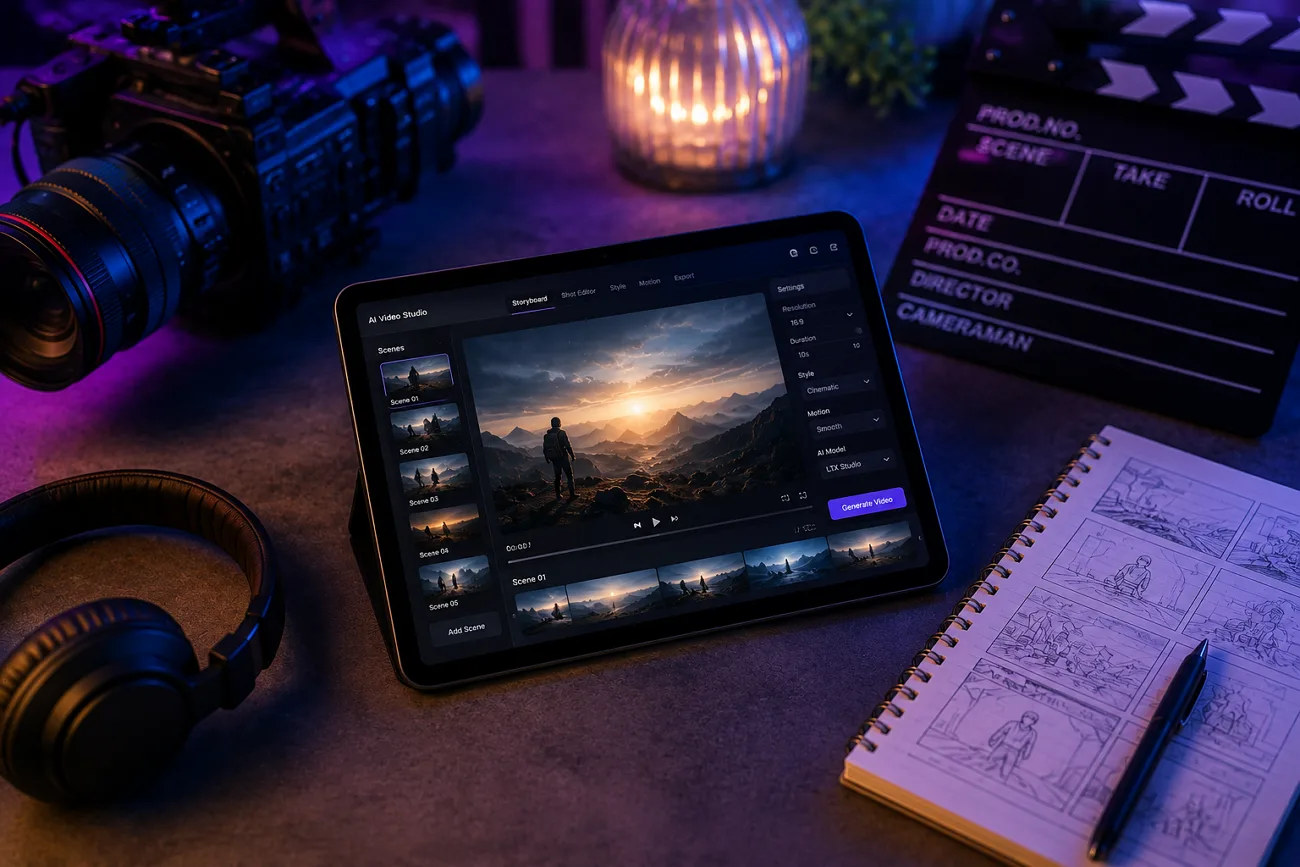
Most AI video reviews cover tools that turn a prompt into a clip. LTX Studio is built for something more ambitious: directing an entire production, shot by shot, the way a filmmaker would. This review breaks down whether that ambition pays off day to day, and where the platform's limits actually show up. Near the end, MagicLight AI enters the picture as an alternative that avoids complicated filmmaking terminology.
Part 1. What Is LTX Studio?
Built by Lightricks, this platform approaches AI video more like a production studio. A complete script can be divided into individual scenes, with storyboard thumbnails and suggested camera framing prepared for each shot. From there, a creator directs each shot individually, adjusting camera angles in 3D space, swapping character looks, and refining sound.
Everything comes together afterward in a built-in timeline editor. LTX Studio AI has built a following among filmmakers, ad agencies, and brand studios that need this level of shot-by-shot control. The platform holds a 4.4 rating on G2 across more than 135,000 users.
Core Key Features
- Script-to-Storyboard Pipeline: Paste a script, and LTX Studio automatically breaks it into scenes, complete with storyboard thumbnails and suggested camera framing.
- Per-Shot Camera Control: Moves the camera in 3D space for each individual shot, rather than locking in one fixed angle per generation.
- Character Consistency (Elements): Saves a character as a reusable Element, keeping it recognizable across every shot it appears in.
- LTX-2.3 Model: The flagship model supports native portrait video, HDR output, audio-to-video generation, and clips up to 20 seconds.
- Retake Option: A directorial control feature built to cut down how many times a shot needs regenerating to get right.
- Timeline Editor: Assembles finished shots into a complete sequence inside the same workspace, without exporting to separate software.
Pros
- Regenerate flawed shots individually instead of restarting the entire video project.
- Character consistency remains reliable across multiple scenes and longer video sequences.
- Script creation, storyboarding, generation, and timeline editing stay in one workspace.
- Retake reduces repeated generations, helping creators control their overall credit spending.
- Provides an established creative software experience and dependable platform support.
Cons
- Camera terms like dolly, tracking, and orbit require time to learn.
- The free plan includes 800 one-time credits that never replenish.
- Commercial use requires Standard, while Free and Lite remain personal-only.
- No mobile app limits creators who prefer editing while traveling.
- Kling and Veo consume credits faster than LTX Studio’s native model.
Pricing
After understanding what the platform offers, the next question is how much those tools actually cost. The four self-serve plans, including LTX Studio AI free access, are outlined below:
| Plan | Price | Included | Limitations | Best For |
| Free | $0 | 800 one-time credits, LTX-2.3 video model, Z-image model, advanced camera controls | Credits never replenish; personal use only | Exploring the platform and core features |
| Lite | $15/month | 8,000 monthly credits, no watermark, editing tools, image/video upscaling | Personal use only; no commercial license | Regular personal content creation |
| Standard | $35/month | 28,000 monthly credits, commercial license, AI Storyboards, saved Elements, premium AI models | Partner models consume credits faster | Freelancers, creators, and client projects |
| Pro | $125/month | 110,000 monthly credits, Veo 3.1 models, maximum quality, three collaborators, credit top-ups | Highest-priced self-serve plan | Agencies and production teams |
Anyone testing LTX Studio free access first should treat the Free plan as a short trial run, not a real production option. Those 800 credits will not come back once spent.
Part 2. How to Use LTX Studio?
Getting started means treating the platform like a production tool, not a one-shot generator. Here is the process from first script to finished cut.
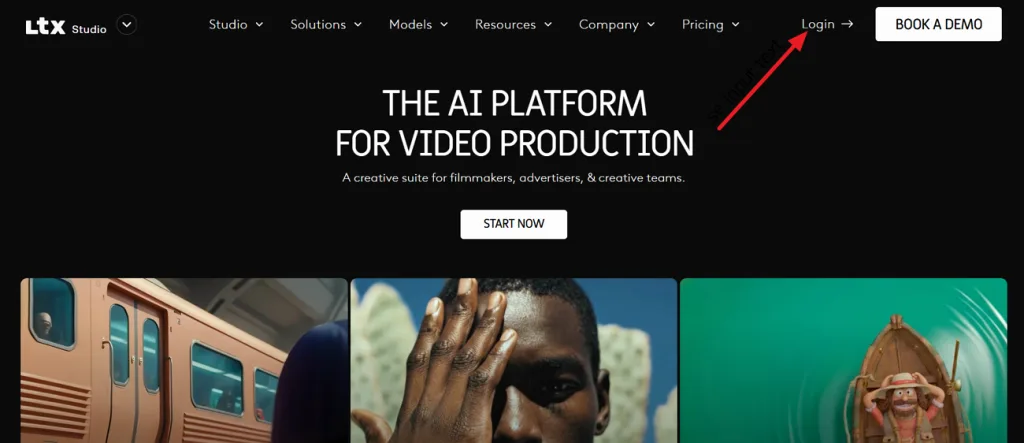
Step 1. Open the LTX Studio website and click Login in the upper-right corner. Sign in with your existing account, or create a new one if you're using the platform for the first time.
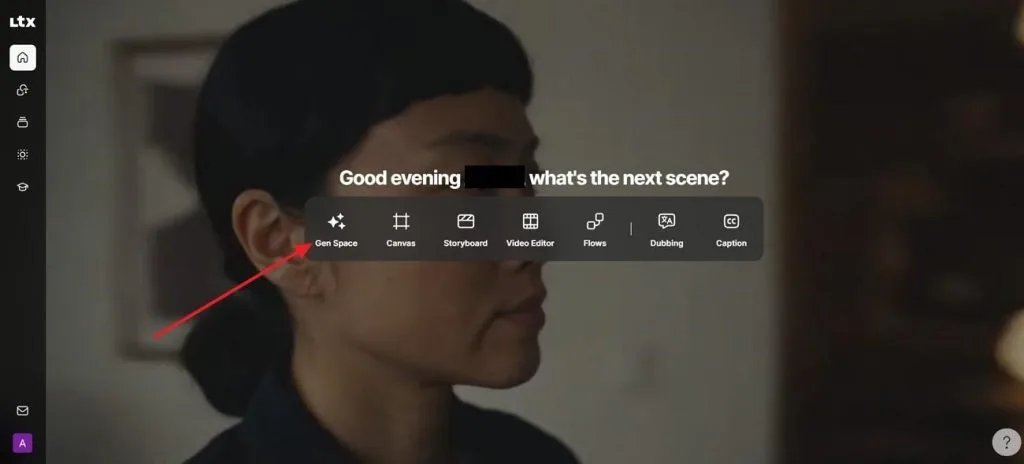
Step 2. Next, press Gen Space from the main workspace to access LTX Studio's AI generation tools and begin creating a new video project.
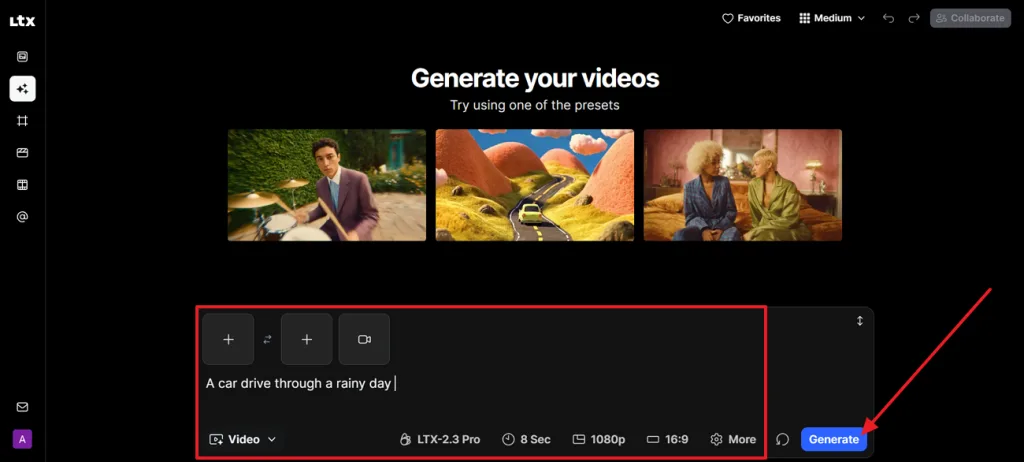
Step 3. Open the Mode menu on the left side and choose Generate Videos to access the text-to-video workspace.
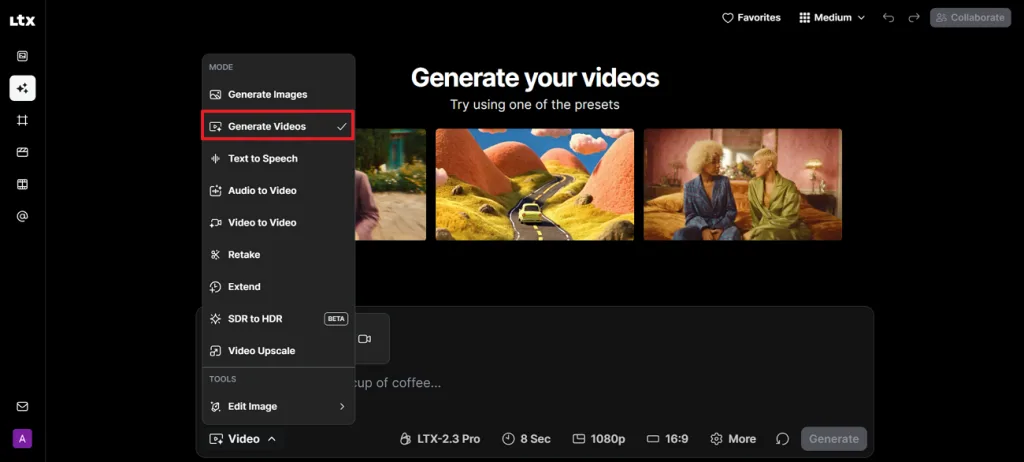
Step 4. Type a description of the video you want to create in the prompt box. If needed, adjust the video model, duration, resolution, aspect ratio, and other settings, then press Generate to start creating the video.
Part 3. Best Alternative to LTX Studio for Video Creation
LTX Studio gives creators detailed shot control, but its workflow demands filmmaking knowledge and extra production time. Anyone seeking an LTX Studio alternative may prefer a platform that keeps storytelling central instead of requiring manual camera direction. Magiclight AI follows that approach, combining story models such as Gemini Flash 3.1, character creation, scene generation, and video production within one guided workflow.
Moreover, Magiclight AI accepts prompts containing up to 12,000 characters and supports videos reaching 50 minutes. Long-form stories can remain within one project, removing the need to combine numerous short clips afterward. The Creator Asset Marketplace also lets users publish reusable characters, styles, and voices, then earn when other creators use those assets.
Core Advantages & Key Features of Magiclight AI
- Magiclight Agent: Plans a full production from a plain-language idea alone, recommending the right format and handling scripting and storyboarding before any video gets made.
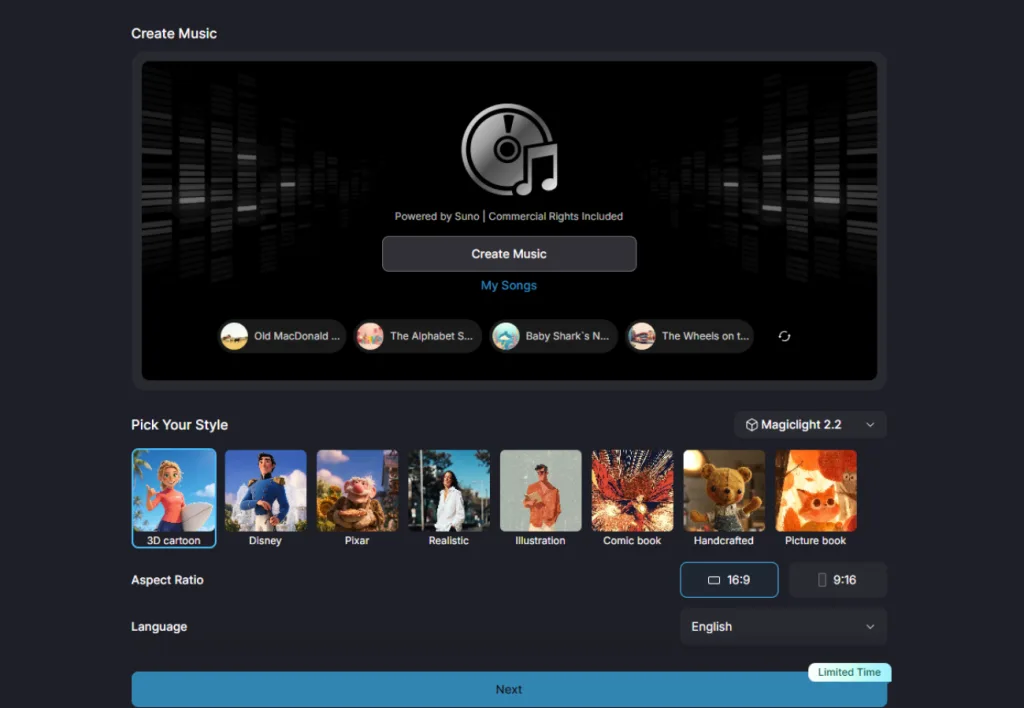
- Music Video Generator: Turns any song into a complete music video with coordinated scenes, matching visuals, and well-paced transitions.
- Reusable AI Characters: Save and reuse custom characters across different videos, preserving consistent identities without building them again.
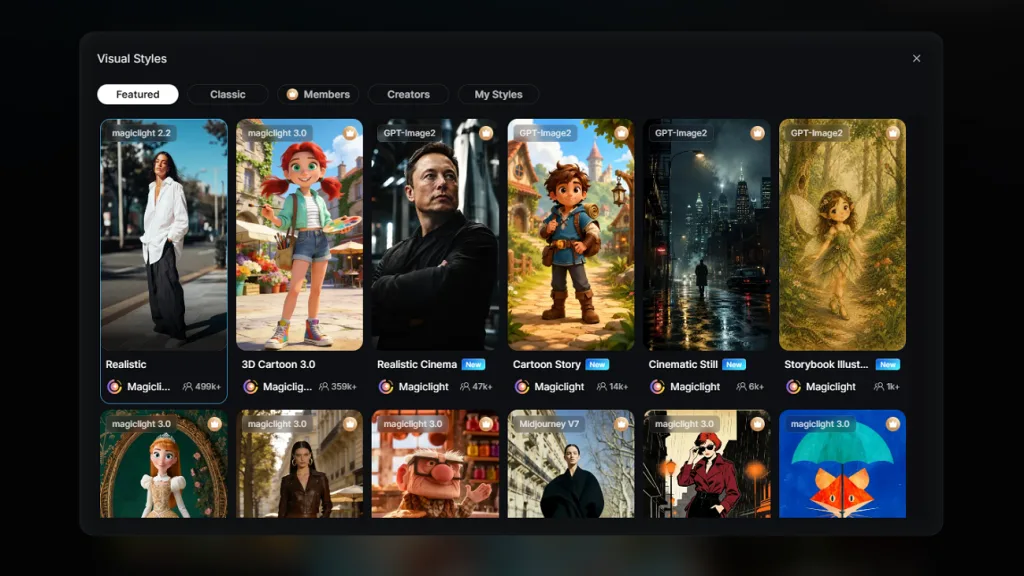
- Style Model Range: Draws on Midjourney V7 and Magiclight's own style families, covering looks from realistic to Disney, Pixar, anime, and Ghibli-inspired art.
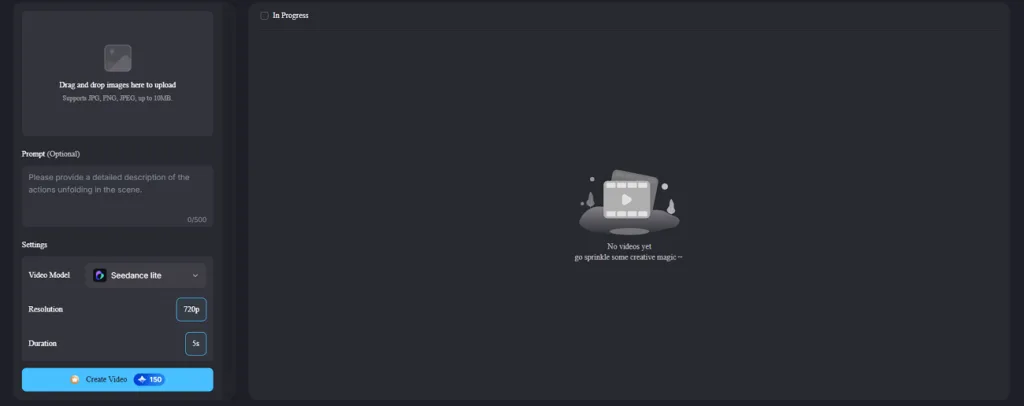
- Image-to-Video Generation: Convert an image into a short AI video using prompts of up to 1500 characters for detailed motion, camera movement, and scene direction.
- Scene-by-Scene Script Editor: Review and edit every scene, shot, and subtitle before generation, with individual controls to rewrite, duplicate, or remove content.
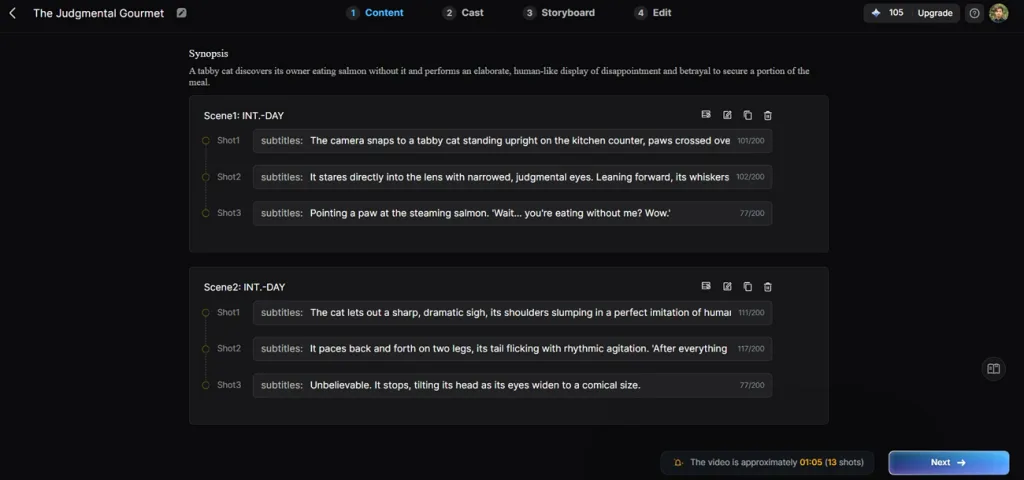
- One-Click Video Generation: Create a complete AI video from a prompt with a single click using any of 14 video generation models.
Part 4. Comparison Table Between LTX Studio and Magiclight AI
These platforms approach AI video creation differently, so the table below compares their main strengths, workflows, and ideal users:
| Factor | LTX Studio | MagicLight AI |
| Core Workflow | Script-to-storyboard, directed shot by shot | Single guided workflow, idea straight to export |
| Learning Curve | Steep; built around camera terms like dolly and orbit | No film vocabulary needed; guided steps suit first-time creators |
| Pricing | Free (limited); paid plans from $15 to $125/month | Free tier; paid plans from $6/month billed annually |
| Max Continuous Length | Roughly 20 seconds per shot, assembled afterward | Up to 50 minutes in one continuous generation |
| Music and Voice | No native AI music generation | 40 music tracks, 37 voices, plus cloning |
| Commercial Rights | Requires the $35/month Standard plan or higher | Included on paid plans starting at $6/month |
| Platform Support | Desktop browser only | Web, Android, and iOS |
| Free Access | 800 one-time credits that never replenish | Ongoing free tier with recurring credits |
| Best For | Agencies and filmmakers directing shot by shot | Creators who want one complete, guided story |
Part 5. FAQs on LTX Studio
1. What does LTX Studio do?
LTX Studio turns a script into a full production. It automatically breaks the script into scenes with storyboard thumbnails. From there, a creator directs each shot's camera angle, character look, and sound, before assembling everything in a built-in timeline editor.
2. Is LTX Studio free or paid?
Both, with real limits either way. So, is LTX Studio free enough for actual production use? Not quite: the free plan offers 800 one-time credits, but ongoing or commercial work needs at least the Lite or Standard plan.
3. What is the best alternative to LTX Studio?
For creators who would rather not direct dozens of individual shots, MagicLight AI is the stronger fit. A single Magiclight AI project can reach 50 minutes, with commercial rights included on its paid plans.
Conclusion
This LTX Studio review highlights a platform built for detailed filmmaking and professional production workflows. Those capabilities reward experienced creators but require more technical knowledge and additional production time. However, Magiclight AI offers a different approach by focusing on guided storytelling, longer videos, and consistent characters instead of detailed shot-by-shot direction.


![How to Make a Reaction Video with AI Tool [Guide 2026]](https://magiclight.ai/wp-2/wp-content/uploads/ai-faceless-reaction-video-guide-300x169.webp)