


Seedance 2.5, Kling 3.0, and Veo 3.1 are among the most capable AI video models available in 2026. Seedance 2.5 holds the longest single take; Veo 3.1 is widely regarded for its strong audio-video synchronization. Moreover, Kling 3.0 specializes in multi-shot sequences, while the other models primarily emphasize continuous generation.
Identifying the best AI video model therefore depends on the job rather than a benchmark score. What follows compares the3 across the specifications that shape a production decision, then maps each one to the work it genuinely suits.
Part 1. Seedance 2.5 vs Kling 3.0 vs Veo 3.1: Which AI Video Model Wins?
The Seedance 2.5 vs Kling vs Veo comparison focuses on the features that matter most in AI video production. Use the table below to compare their generation limits, creative controls, audio support, and pricing before deciding which model suits your workflow:
| Attribute | Seedance 2.5 | Kling 3.0 | Veo 3.1 |
| Single-Pass Clip Length | 30 seconds | 15 seconds, multi-shot | 8 seconds |
| Extension Support | 2 further extensions | Not published | Scene extension by chaining |
| Maximum Documented Resolution | 4K natively, 10-bit encoded | Native 4K | Up to 4K on Standard and Fast |
| Reference Inputs | As many as 50 images, clips and audio files | Elements asset library | Up to 3 reference images |
| Native Audio | Produced within the same pass | Supported, billed as an extra | Supported where available |
| Pricing Basis | Around $0.09 to $0.23 per second (reported) | Credits per second, higher with sound | Published per-second API rate |
| Availability | Jimeng, Doubao, Dreamina and BytePlus | Kuaishou platform and API | Gemini API, Vertex AI and Flow |
| Standout Strength | Longest take and reference depth | Multi-shot coherence in one generation | Audio-visual sync accuracy |
Part 2. Seedance 2.5 vs Veo 3.1: Longer Takes vs 4K Production
The Seedance 2.5 vs Veo 3.1 comparison comes down to longer video generation versus higher production precision. The sections below compare clip length, video quality, audio capabilities, and reference controls to help you decide which model better suits your workflow:
Single-Pass Length and Video Extension
Single-pass generation is one of the biggest differences between these models. Seedance 2.5 produces up to 30 seconds per generation, while Veo 3.1 is limited to 8 seconds. The table below compares how their extension methods affect longer video production:
| Target Length | Seedance 2.5 | Veo 3.1 |
| 8 Seconds | 1 generation | One generation |
| 15 Seconds | 1 generation | 2 chained generations |
| 30 Seconds | 1 generation | 4 chained generations |
Every extra generation creates another edit point, increasing the effort required to maintain smooth transitions and visual consistency.
Native Audio, Resolution, and Final Output
Beyond clip length, the Seedance 2.5 vs Veo 3.1 comparison focuses on native audio, resolution, and output quality. These capabilities often determine which model is the better fit for a given production:
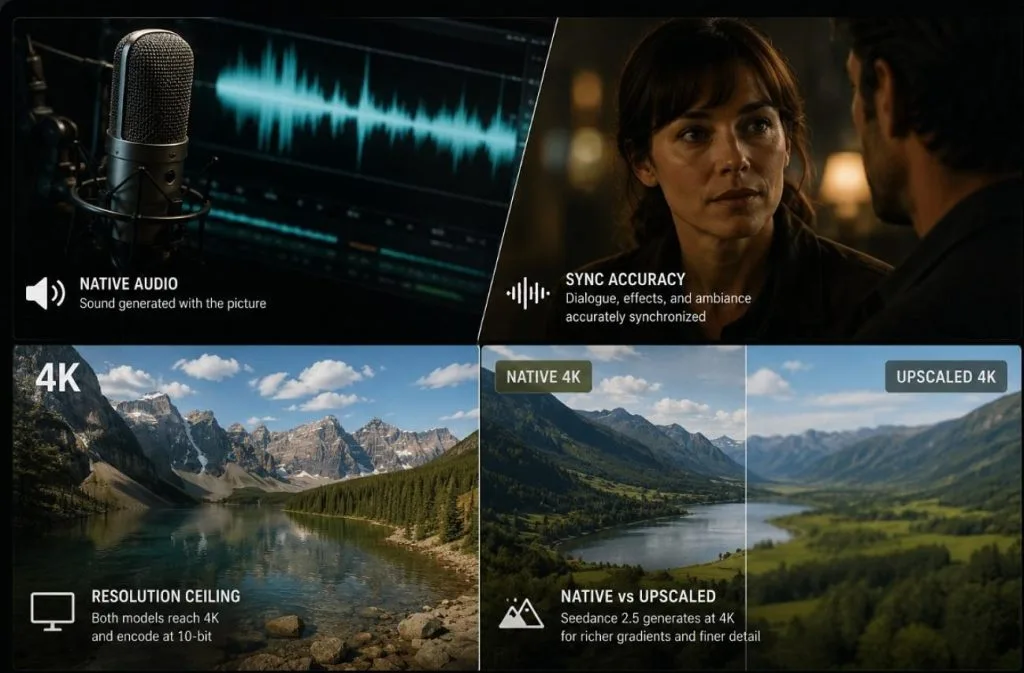
- Audio Inclusion: Veo 3.1 ships sound at every tier, generated alongside the picture rather than added afterward.
- Sync Accuracy: Its dialogue, effects, and ambiance are widely regarded as the most accurately synchronized output currently available.
- Resolution Ceiling: Both models support 4K output, but Google does not publicly document universal 10-bit output across every Veo 3.1 deployment.
- Native Versus Upscaled: Seedance 2.5 generates at 4K rather than arriving there through an upscale, which surfaces in gradients and fine texture.
When producing dialogue-led videos, reliable audio synchronization usually delivers a greater practical benefit than higher resolution.
Reference Inputs and Creative Controls Compared
The Seedance 2.5 vs Veo 3.1 comparison becomes more pronounced when looking at reference inputs and editing controls. Seedance is designed for complex productions that rely on multiple reference assets and targeted revisions, while Veo focuses on simpler reference-based generation.
Seedance 2.5 Supports
- Up to 50 reference assets in a single request.
- Images, video clips, and audio within the same prompt.
- Region editing for specific areas of a frame.
- Timestamp editing for targeted changes within a clip.
Veo 3.1 Supports
- Up to 3 reference images through Ingredients to Video
- Scene extension instead of region- or timestamp-based editing
Within Gemini, conversational editing may use Gemini models while Veo handles video generation behind supported workflows, depending on Google's implementation.
Part 3. Seedance 2.5 vs Kling 3.0: Reference Range vs Storyboard Control
Although both models target professional AI video creation, the Seedance 2.5 vs Kling 3.0 comparison reveals different priorities. Seedance is built around extensive reference control, whereas Kling emphasizes multi-shot storytelling and reusable scene elements.
Multimodal References and Storyboard Control
The table below highlights both models' approach to reference management and multi-scene video consistency:
| Aspect | Kling 3.0 Elements | Seedance 2.5 References |
| How it Works | Stores reusable characters and objects between generations | Loads up to 50 assets into a single brief |
| What It Covers | Appearance carried forward over time | Appearance, motion, and audio at once |
| Best Suited To | Building a recurring cast across months | One ambitious generation that must land first time |
| Trade-off | Assets must exist before they help | The budget resets with every new request |
Motion and Physics in Complex Scenes
Complex scenes require consistent motion and smooth transitions. Here's how Seedance 2.5 and Kling 3.0 approach multi-shot generation and motion control:
- Multi-Shot Output: Kling 3.0 generates between 2 and 6 coherent shots inside a single output, resolving cuts and angle changes internally.
- Continuous Take: Seedance 2.5 answers with duration instead, holding one unbroken take across scene changes and tempo shifts.
- Manual Motion Control: Kling's Motion Brush lets a creator paint the direction of movement onto a frame rather than describing it in a prompt.
- Prompt-led Direction: Seedance offers no equivalent, steering movement through the prompt and reference assets alone.
Which model performs better depends on the scene. Kling 3.0 suits projects requiring multiple camera angles, whereas Seedance 2.5 is better for extended continuous takes.
Part 4. Which Model Fits Your Workflow
Seedance 2.5, Kling, and Veo excel in different production scenarios. Use the table below to identify which one best fits your workflow and creative requirements:
| Use Case | Recommended Model | Reasoning |
| A 30-Second Spot in One Take | Seedance 2.5 | No competitor reaches that length in a single generation |
| Dialogue-led Scenes Needing Tight Sync | Veo 3.1 | Audio synchronization accuracy leads the field |
| A Sequence of 2 to 6 Connected Shots | Kling 3.0 | Multi-shot coherence is resolved within one output |
| A Cast That Reappears Across Episodes | Seedance 2.5 | Fifty reference assets keep appearance stable |
Part 5. Why Seedance 2.5 Is a Strong All-Rounder in MagicLight AI
Most AI video platforms are built around a single model, forcing creators to choose between longer clips, better audio, or stronger editing controls. Switching to another model often means moving to a different platform, rebuilding prompts, or restarting the production workflow. That makes it difficult to combine the strengths of multiple AI video models within the same project.
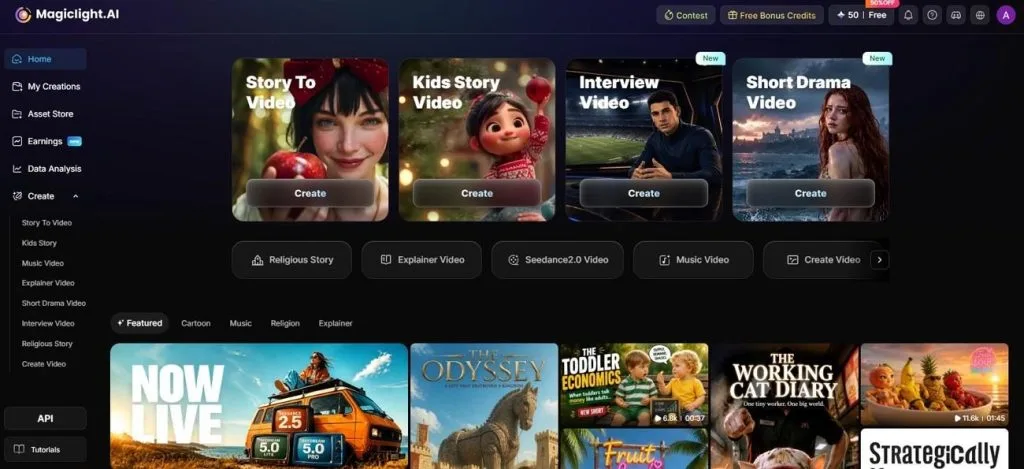
Magiclight AI removes that limitation by integrating more than 20 AI video models, including Seedance 2.5 Pro, Kling 3.0, and Veo 3.1, into one platform. Creators can switch models on a scene-by-scene basis while working from a structured storyboard with fully editable scenes. This makes Seedance 2.5 a strong default for projects that require longer generations, extensive reference support, and flexible editing.
How to Generate Video Content Using MagicLight AI
Magiclight AI offers two ways to start a project, depending on whether you're working from a script or an existing image. Provided below is a visual representation of how video content can be created with a basic script in hand:
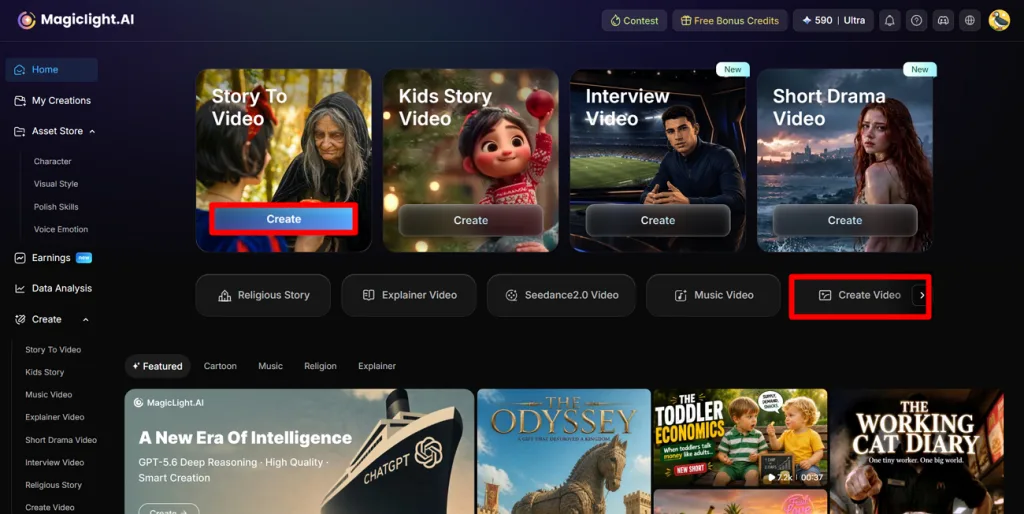
Step 1. Open Story to Video or Image to Video
Sign in to Magiclight AI and choose Story to Video to create a video from a script or Create Video to animate a still image.
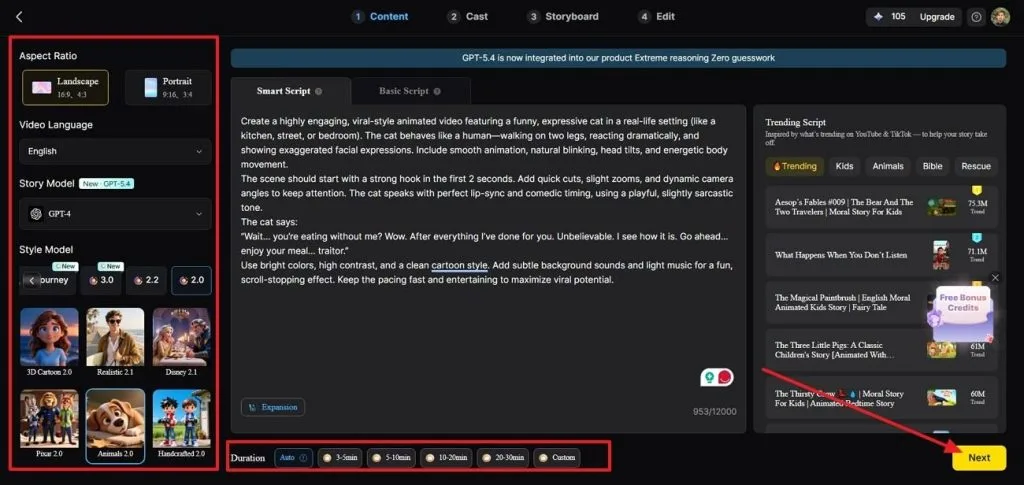
Step 2. Configure Your Project
Paste your script or upload your image, then choose the output language, aspect ratio, video duration, and other project settings, then click Next.
Step 3. Create or Assign Characters
From the Cast section, reuse characters from the Asset Store or create new AI characters, assign them to the correct scenes, and then click Next.
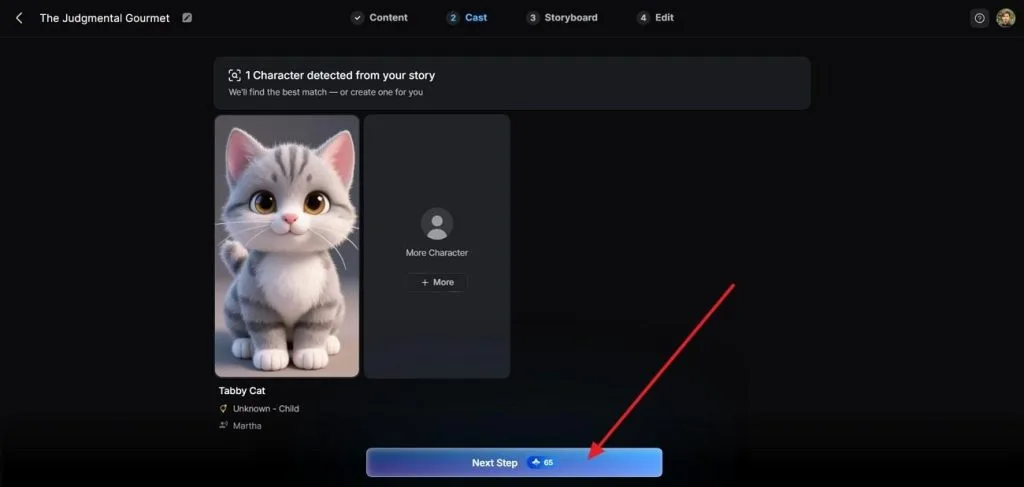
Step 4. Customize the Storyboard
Navigate to the Storyboard editor, review each scene, add your required voiceover and make specific edits to each frame. MagicLight AI provides a complete storyboard setup with 50+ poses for dedicated edits to each shot. Tap Next to proceed with your video generation process.
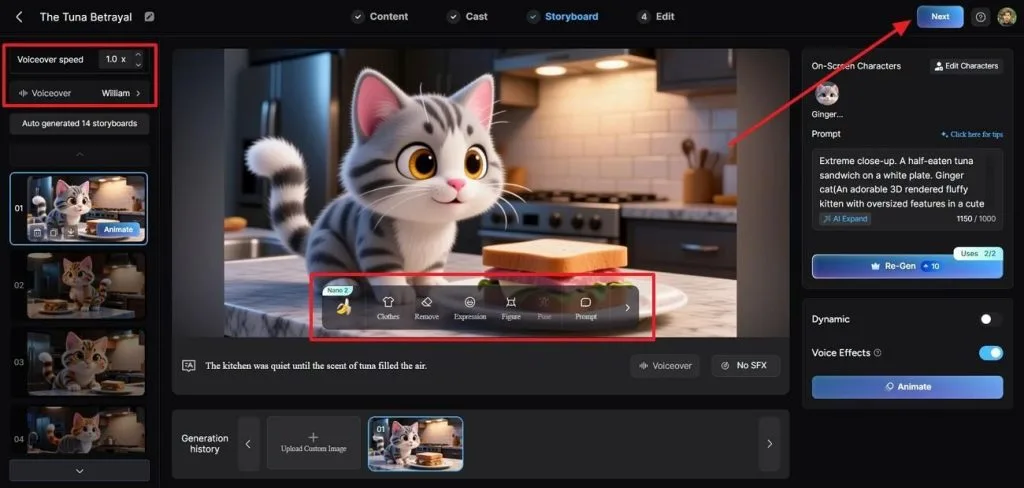
Step 5. Generate the Video
In the following window, determine the subtitle style in the Subtitle Settings section and select your required Background Music across its dedicated section. Click Generate to complete the video generation project.
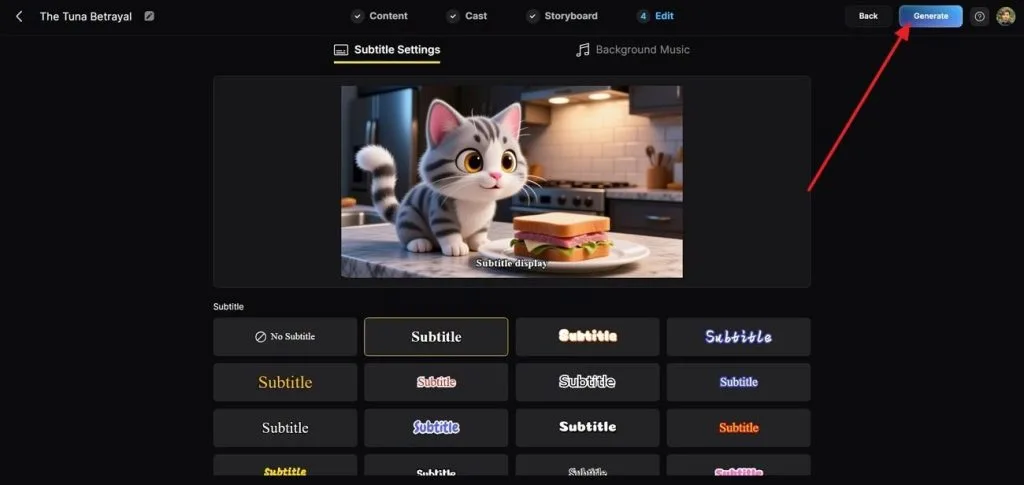
Step 6. Preview and Download
Preview the finished video, make any final adjustments to subtitles or project details if needed, then press Download to export the completed video.
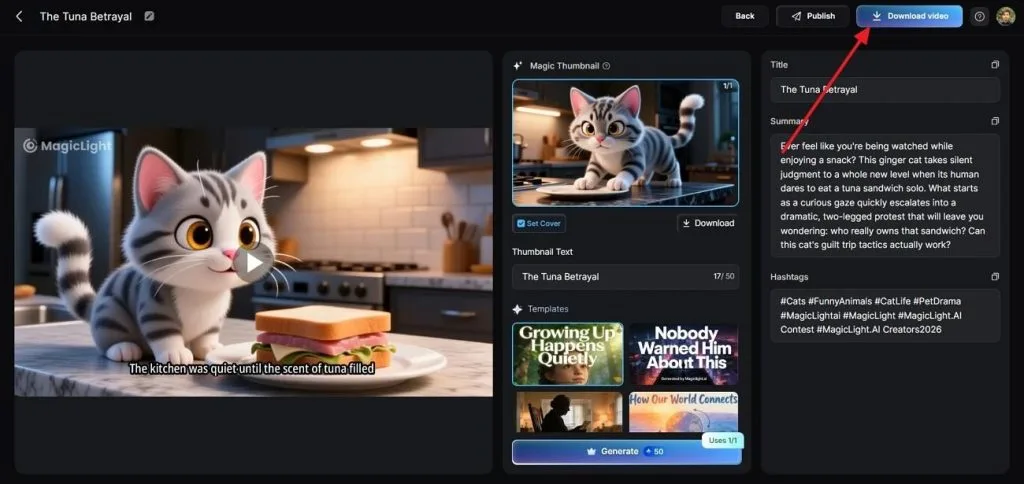
Why Choose MagicLight AI
Beyond access to multiple AI models, MagicLight AI provides production tools that simplify scripting, editing, and video generation. The features below highlight what sets it apart from standalone AI video platforms:
- AI Story Models: Generate structured scripts with models such as GPT 5.6 and Claude Opus before converting them into storyboards.
- 7 Creation Modes: Make videos from stories, images, explainers, kids' stories, religious stories, jingles, or one-click templates.
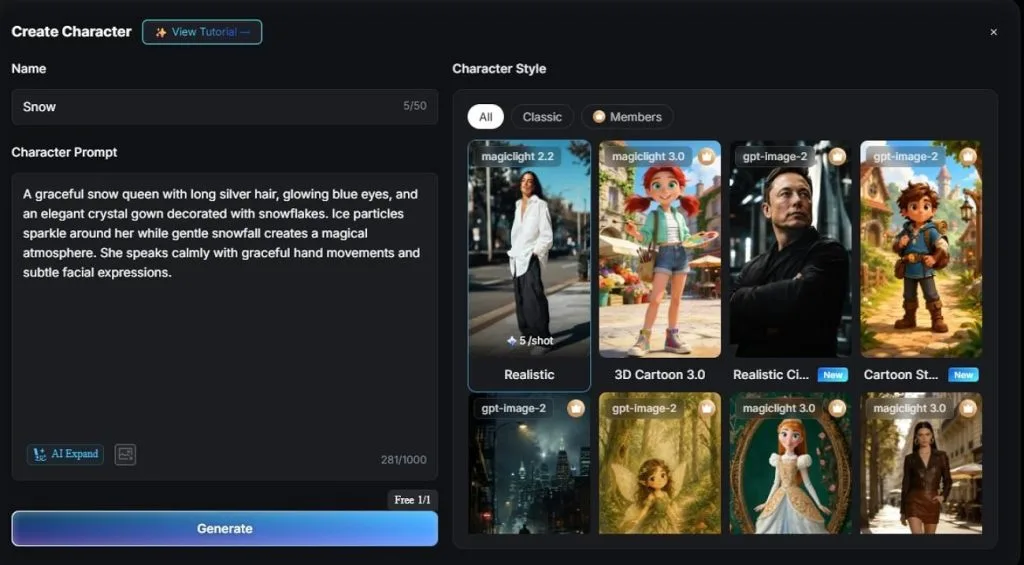
- AI Character Creator: Create consistent AI characters with prompts of up to 1,000 characters, then save and reuse them across projects.
- Long-Form Video Creation: Produce videos up to 50 minutes long from scripts containing up to 12,000 characters.
- Nano Storyboard: Plan scenes visually with up to 50 character poses before generating the final video.
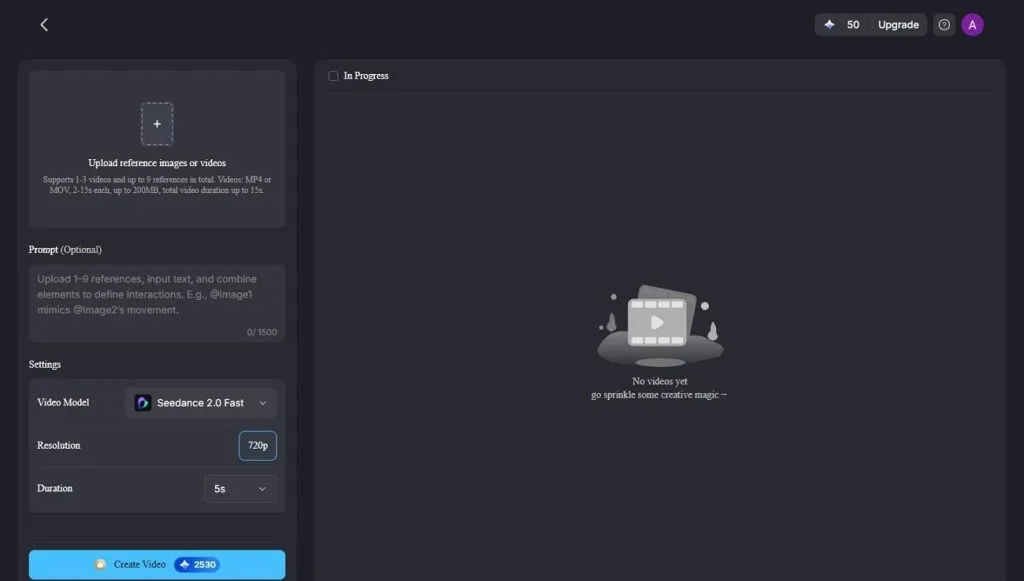
- Image to Video: Animate a single image using prompts of up to 1500 characters for greater creative control.
Conclusion
The Seedance 2.5 vs Kling/Veo comparison shows that no single model is the best choice for every project. Seedance 2.5 excels at longer clips and extensive reference support, Veo 3.1 stands out for native audio, and Kling 3.0 is better suited to multi-shot storytelling. If you want the flexibility to use all 3 within one workflow, Magiclight AI is worth considering.
FAQs on Seedance 2.5 vs Kling vs Veo
- Which AI video model has the longest clip length in 2026?
Seedance 2.5 leads at 30 seconds in a single generation, against 15 for Kling 3.0 and 8 for Veo 3.1. Two further extensions push its total higher still.
- Is Gemini Omni Flash cheaper than Seedance 2.5?
Gemini Flash is cheaper at published rates, listed at roughly $0.10 per second for 720p against a reported $0.23 for Seedance 2.5. It caps at 720p and ten seconds, however, so the two are not directly equivalent.
- Does Kling 3.0 support native audio like Seedance 2.5?
It supports multilingual audio with lip sync, although the cost structure differs. Kling charges audio as an additional per-second increment, while Seedance 2.5 generates sound within the same pass.
- Which model is best for broadcast-quality output?
Seedance 2.5 suits length and native 4K with 10-bit color, while Veo 3.1 suits work where dialogue synchronization matters more. Both reach 4K, so the deciding factor is usually whether a shot exceeds eight seconds.
- Can Veo 3.1 edit a video after it's generated?
Only in a limited sense, through scene extension rather than targeted revision. Google provides conversational editing through Gemini experiences while Veo continues powering supported video-generation workflows.
- Can Magiclight AI switch between Seedance, Kling, and Veo in one project?
All three families appear in its model list of 20 engines. One storyboard can therefore run through Seedance 2.5 Pro, Kling 3.0, or Veo 3.1 without changing platform.


![How to Write a Script for a Short Film in 2026 [Beginner’s Guide]](https://magiclight.ai/wp-2/wp-content/uploads/short-film-screenplay-writing-guide-300x169.webp)


