


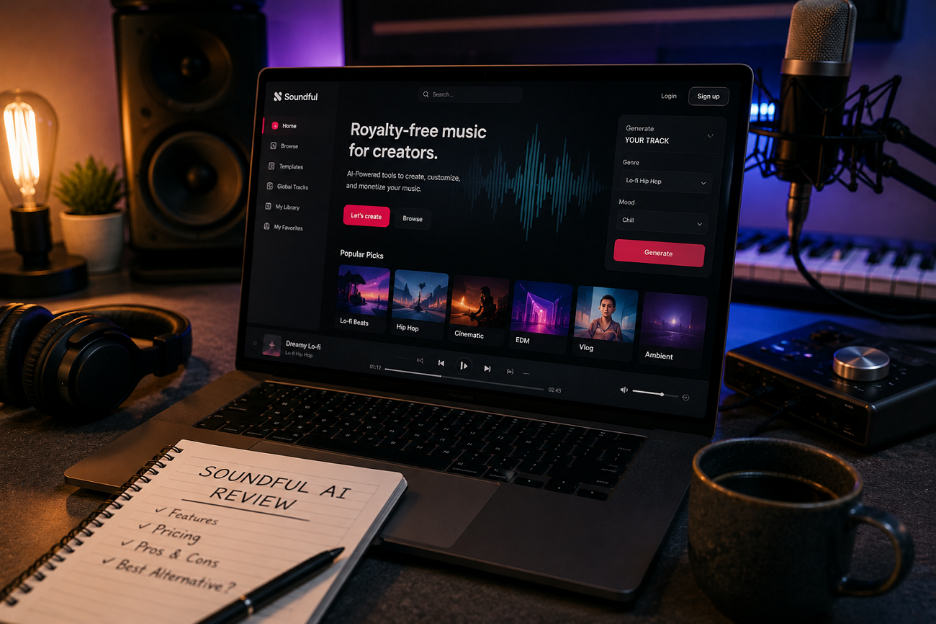
Soundful AI sits in a crowded field of royalty-free music generators, and its pitch is deliberately narrow. It builds template-driven instrumental tracks that clear copyright before you publish. Whether that focus reads as a strength or a limit depends on what you do with the audio. This review covers how Soundful AI works, what its plans cost, where licensing gets complicated, and which alternative fits bigger projects.
Part 1. What Is Soundful AI and How Does It Work?
Soundful is an AI music generator built around producer-made templates rather than open-ended text prompts. You pick a style, set the key and tempo, and the platform renders an original instrumental track. The catalogue covers lo-fi, cinematic, corporate, EDM, and meditation, reaching 150+ styles on paid tiers against 25+ free.
Its audience is YouTubers, podcasters, streamers, and marketing teams who need background music that will not trigger a copyright claim. Each render is unique to the account that made it, which sidesteps the shared-library problem behind most stock-music flags.
How Does Soundful AI Work?
Understanding how Soundful AI works explains both its creative process and its limitations. Instead of using text prompts, you make a track by following the steps below:
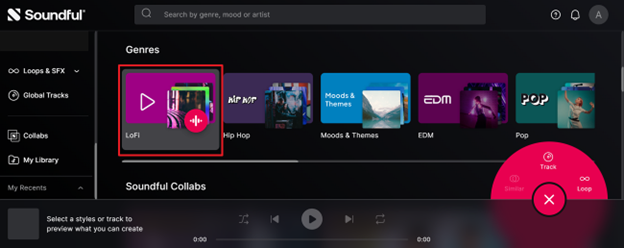
Step 1. Open Genres and select the music genre you want to create. Then choose a style or preset within that genre to start a new track.
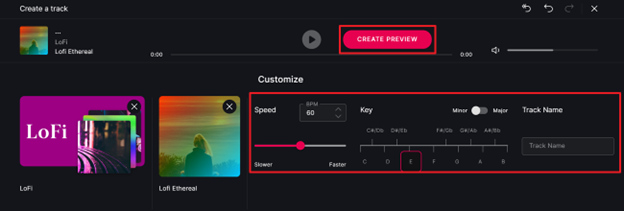
Step 2. Adjust the available settings such as Speed (BPM), Key, Major/Minor, and Track Name to match your preferred sound, then click Create Preview.
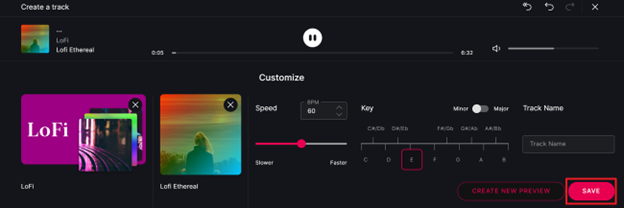
Step 3. Listen to the generated preview. If needed, make further changes and click Create New Preview to regenerate the track. Once you're happy with the result, click Save.
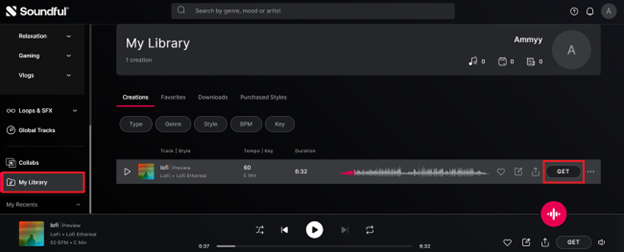
Step 4. Go to My Library to find your saved creation. Select the track and click Get to download or export it according to your plan.
How Much Does Soundful AI Cost in 2026
Soundful AI's tiers are driven by volume and licensing rather than by the generator itself. A free user reaches the same engine and the same controls as a paying one. What separates the plans is how much you can take away and what you may legally do with it.
| Plan | Price | Downloads | Styles | License | Best For |
| Free | $0 | 1 MP3 download per month | 25+ | Personal use (credit required) | Trying Soundful AI and creating basic music |
| Plus | $9.99/month | 100 MP3 & WAV downloads per month | 150+ | Music Creator | Individual creators who publish music regularly |
| Pro | $14.99/month | 400 MP3 & WAV downloads per month | 150+ | Music Creator | Artists, producers, and frequent music creators |
| Business | From $49.99/month | 750–3,000 MP3 & WAV downloads per month | 150+ | Business license | Agencies, brands, and businesses producing commercial content |
Prices load live on Soundful AI's page, so confirm the figure before subscribing. Annual billing cuts the rate substantially, with Pro about a third cheaper yearly. The license attached to each plan is not obvious at checkout, which matters more than the price.
Key Features of Soundful AI
Volume limits are only half the decision. The other half is how much of the track you can shape before it renders. These 5 capabilities define that control:
- Template-Based Generation: Every track starts from a producer-built arrangement, so the output holds its structure. The trade-off is a skeleton shared with other users.
- Key and Tempo Control: Setting the key and BPM before generation lets a track sit under dialogue or match a video's cut rhythm.
- STEM Pack Exports: From Pro upward, tracks download as separated instrument layers, so you can mute a lead or duck drums under a voiceover.
- Tiered Commercial Licensing: Rights scale with the plan, from personal use on Free to a Business license covering film, TV, and ads. Single-track copyright sells separately from around $50.
- Original Training Foundation: Soundful states its AI is not trained on previously copyrighted music, but on its in-house production team's work.
Soundful AI: Top Pros and Cons
Those capabilities describe a tool that is deliberately bounded rather than broadly capable. That focus creates real strengths for one kind of user and real gaps for another. Both sides are worth weighing before you commit to a plan.
Pros
- Royalty-free tracks work across YouTube, Twitch, and podcast platforms without clearance.
- Template-based workflow lets beginners create usable background music within minutes.
- Pro plans include stem exports for flexible editing instead of locked stereo files.
Cons
- Generates instrumental music only, with no vocals, lyrics, or visual content.
- Licensing terms vary across pages, requiring separate copyrights for music distribution.
Part 2. Magiclight AI — The Best Option for Music Videos
The first limitation changes the entire workflow: Soundful AI stops once the audio file is generated. That works well for podcast background music. However, creators making YouTube videos, Shorts, or TikToks still need to produce the visuals separately, since Soundful only generates audio. This limitation is especially noticeable for musicians, where the song and its visuals are typically released together.
Magiclight AI is worth evaluating there because its music tooling and video tooling are one product. The AI Music Video Generator composes the track through Suno, then builds visuals around it in the same project. The output is a publishable video, not an audio file awaiting a separate edit. It is a different proposition rather than a straight replacement.
Key Features of Magiclight AI
A music video needs more than a good track. It needs visuals that suit the genre, motion that holds attention, and a format matched to the platform. Magiclight AI covers those stages inside the project that composes the music, and the capabilities below map to each one:
Suno-Backed Track Generation: Music is composed in-platform through Suno using a plain-language prompt, with 11 music genres or an editable song preset to guide the output.
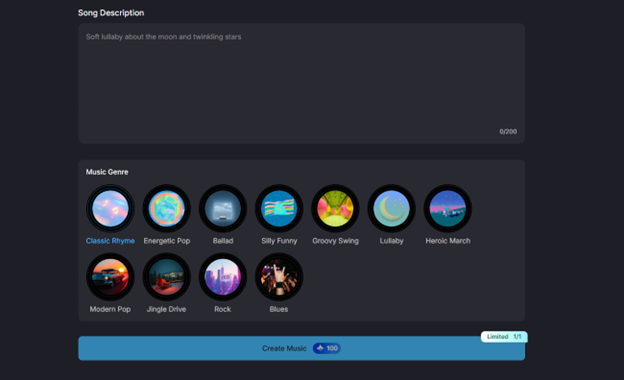
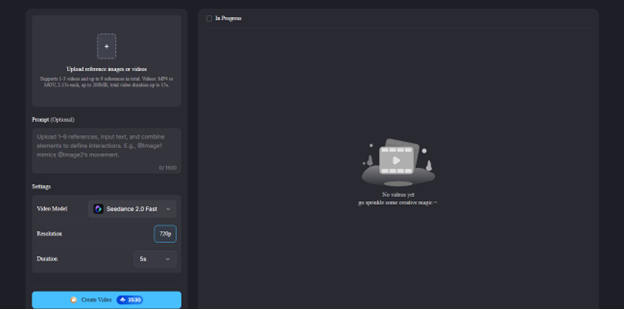
Photo-Driven Video Building: Uploaded photos become source material for the visuals, with prompts up to 1500 characters, using the same image-to-video engine found elsewhere on the platform.
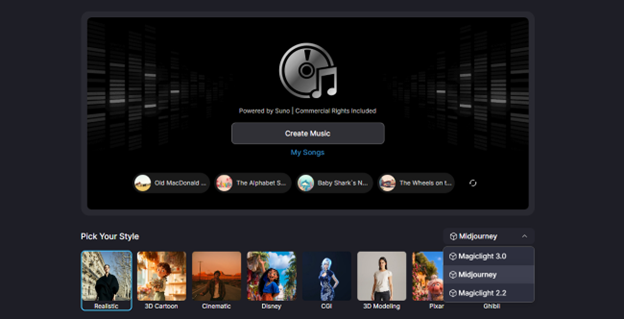
Genre-Matched Visual Styles: Choose from 25 visual styles, including realistic, anime, and suspense, so the visual treatment follows the mood of the track.
- Shot-Level Animation Control: Still shots animate together or individually, with 19 AI models, including Veo 4, Seedance 2.0, and Gemini Omni, assignable to each shot for different motion styles.
- Multi-Language Music Videos: Create music videos in 11 languages, making it easier to reach audiences across different regions with localized lyrics and narration.
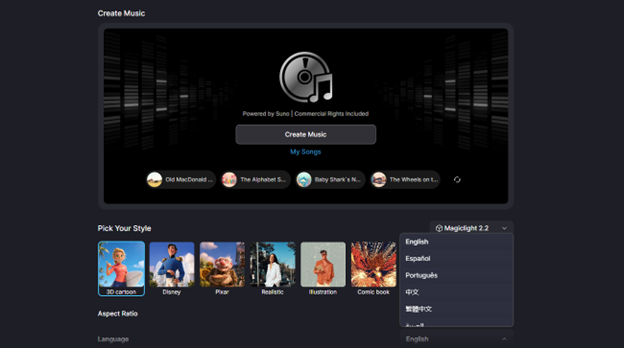
- Ready-Made Video Templates: Pick from 21 built-in templates to quickly generate videos with preset visual styles, scene layouts, and animation settings, reducing manual editing time.
Revisions happen in the built-in AI video editor. Magiclight AI runs on web, iOS, and Android, with a free trial and commercial rights on paid plans.
Part 3. Soundful AI vs. Magiclight AI vs. Other Tools
Soundful AI and Magiclight AI sit at opposite ends of the same workflow, with two other tools between them. The table compares all 4 on output, vocals, video, creative control, and licensing. Those criteria show which stage of the job each tool solves, and picking the wrong category costs more than picking the wrong plan.
| Tool | Primary output | Vocals | Video output | Creative control | Commercial use and free tier | Best for |
| Soundful AI | Royalty-free instrumentals | No | None | Template, key, tempo; stems from Pro | Music Creator license on paid plans; 1 free download monthly | Background music for video and podcasts |
| Magiclight AI | Finished music videos, music composed in-platform | Via Suno | Styles, animated shots, 16:9 and 9:16 | Genre and idea input, photo uploads, per-shot models | Commercial rights on paid plans; free trial with credits | Creators who need a publishable video |
| Suno | Complete songs with vocals | Yes | None | Prompt- and lyric-driven; stems on paid tiers | Rights on Pro ($8/month) and Premier ($24/month); free tier non-commercial | Writing an actual song |
| Soundraw | Royalty-free instrumentals | No | None | Bar-level editing, genre blending, 30+ genres | Perpetual license; streaming on Artist plans if the beat is modified | Producers editing the arrangement directly |
Conclusion
Soundful AI delivers on its promise with fast, template-based instrumental music and licensing that works well for YouTube. However, it doesn't generate vocals or visuals, and it's worth reviewing the license terms before committing. Choose the tool based on your actual deliverable. If your goal is a complete music video, MagicLight AI fills the gaps that Soundful leaves behind.
FAQs on Soundful AI
1. Can I monetize music made with Soundful AI?
Yes, on a paid plan. The Music Creator license covers monetized YouTube videos, social posts, and client work. The free plan is personal use only and asks for credit. Streaming releases need a separate copyright purchase. Magiclight AI includes commercial rights on its paid plans.
2. Does Soundful AI let you add vocals or lyrics?
No. Soundful generates instrumental music only, with no vocal or lyric feature on any tier. Creators who need a sung track use Suno or record vocals over a Soundful instrumental.
3. How is Magiclight AI different from Soundful AI?
Soundful produces an audio file; Magiclight AI produces a video. Magiclight AI composes the track through Suno, then builds visuals around it in the same project, with style selection, animated shots, and vertical export.
4. Can I turn a Soundful AI track into a music video?
Not inside Soundful, which stops at the audio export. You would move the file into separate video software. Magiclight AI removes that handoff by generating music and video together in one project.


![How to Write a Script for a Video 2026 [Full Guide]](https://magiclight.ai/wp-2/wp-content/uploads/video-script-writing-setup-300x199.jpg)

![6 Best Free AI Video Generators [Compared]](https://magiclight.ai/wp-2/wp-content/uploads/ai-video-generation-workflow-300x196.png)