
Everyone wants to turn their still images into moving videos with one click. It is often tough to know which apps are real or just fake. Modern users search for easy ways to build content without any confusion. Therefore, AI tools are becoming helpful for fast and simple digital creation tasks.
Supawork AI is one such tool designed for users looking for simple content creation. It helps turn ideas into videos quickly but lacks scheduling and tracking features. However, tools like MagicLight AI offer a feature called Magic Claw for creation, publishing, and tracking. So, this guide also shares pros, cons, and best alternatives for comparison clearly.
Part 1. What is Supawork AI?
Supawork AI is a web-based platform that, until recently, focused on job opportunities and application-related tasks. They have recently expanded their services and now provide many AI tools for digital users. Their toolkit includes a video face swap image with video and lip-sync features.
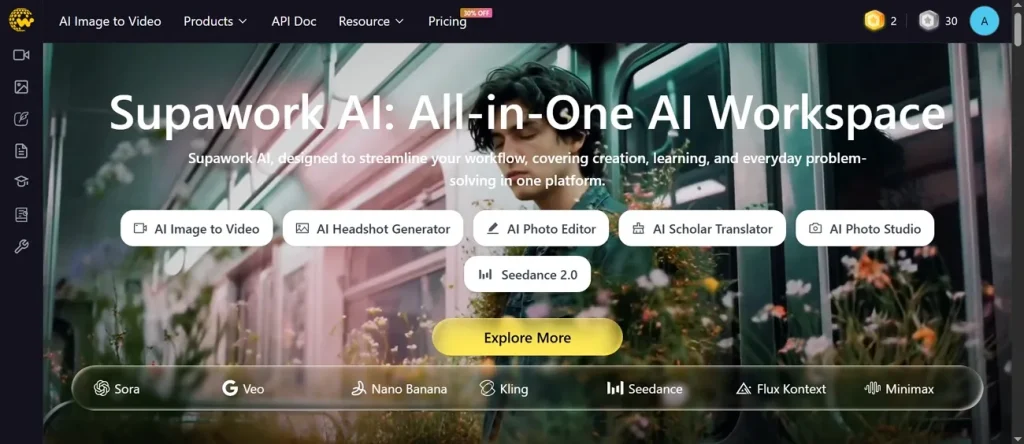
Users can generate professional headshots from selfies with many style options quickly. The platform supports multi-face video face swap and accurate AI lip sync output. When it comes to content creation, Supawork.AI can create, edit, and fine-tune many types of content, such as audio, video, and images. Overall, Supawork.AI works as a unified AI workspace for media and careers platforms.
Key Features
- Face swap technology replaces faces in photos and HD videos with multiple subjects.
- The lip sync feature aligns spoken audio with natural mouth movements for realistic video results.
- Image-to-video generator converts static images into animated clips with creative styles.
Pros
- Produces polishedoutput suitable for resumes and headshots.
- Offers multiple tools like video, image, resume, and translation features.
Cons
- Occasional glitches appear during heavy processing or when workload spikes occur.
- Not ideal for long-form professional video editing project production.
Part 2. Best Alternative to Supawork AI for Image-to-Video AI
Many users search for a Supawork AI alternative to easily achieve outputs in HD quality. Therefore, MagicLight AI becomes a strong choice for image-to-video creation workflows. This AI-powered tool offers various image formats such as PNG and JPEG. To create a video from an image, it supports prompts up to 1500 characters for detailed instructions.
Plus, it has 17 various AI Video Models that help you generate cinematic videos. During the video generation process, the tool has a re-edit feature that allows adjustments for better final results. A realistic motion ensures natural, smooth movement in the generated image for the video output. After generating the video, users can export it at 720p resolution, which works well for basic sharing needs.
Key Features
- Clip Duration: You can create short videos with 10 or 15-second duration options.
- Motion Prediction: Motion control uses physical models for realistic movement effects in videos.
- Frame Smoothness: Frame stability reduces flickering and distortion in image-to-video generation results.
Detailed Guide to Generate an AI Video from an Image via MagicLight AI
In this particular section, you will review the guide to generate an AI video from a photo:
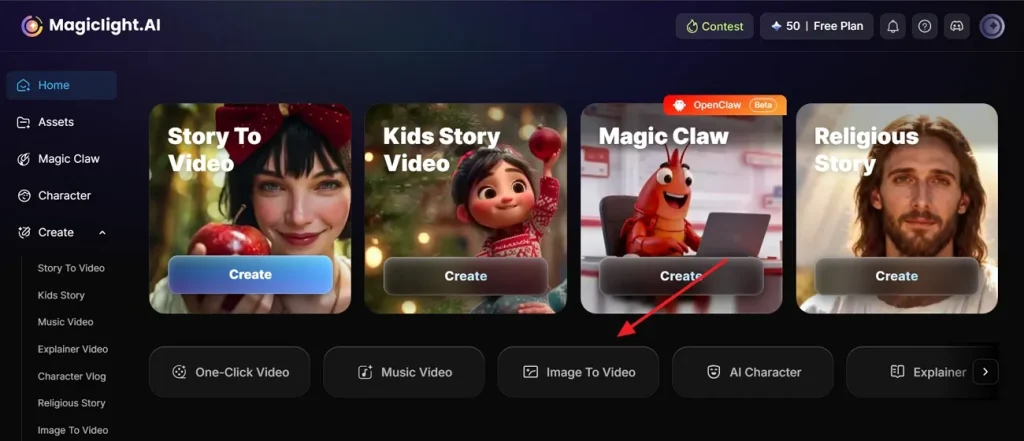
Step 1. Open Image to Video Feature
Access the MagicLight.AI on your device and opt for Image to Video.
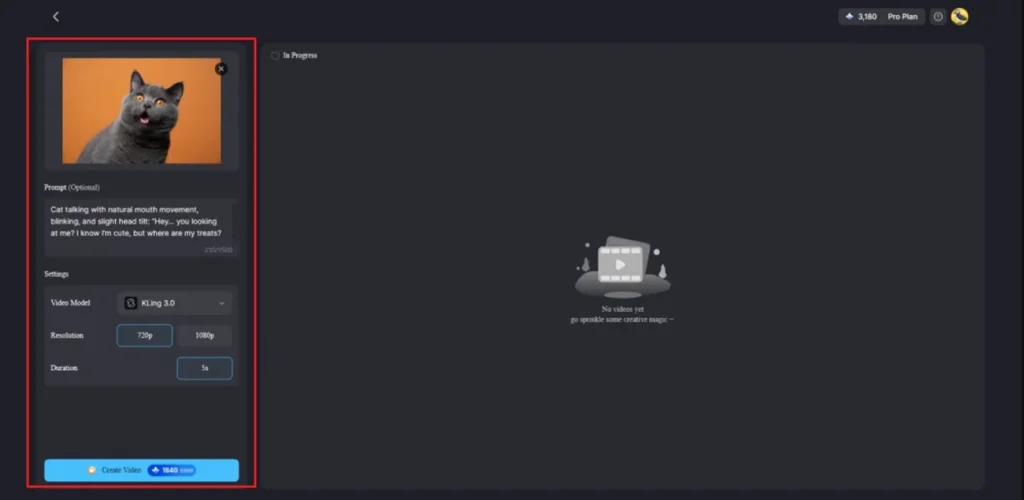
Step 2. Add Image and Generate Video
After accessing it, upload your image and type a prompt in the given Text Box. In the Settings section, choose a Video Model such as Kling 3.0, set the appropriate Resolution and press Create Video.
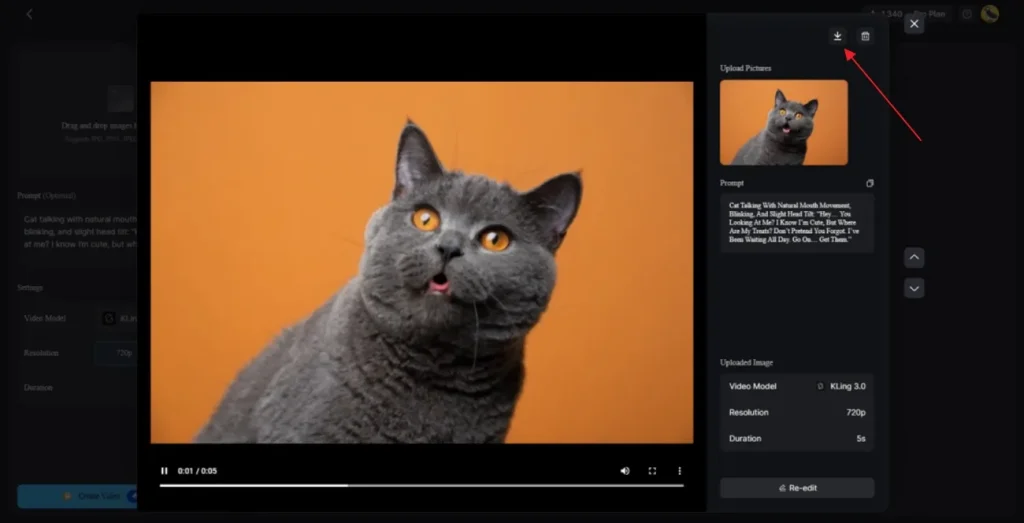
Step 3. Preview and Download AI-Generated Video
When your video is generated, watch it using the preview feature to check all scenes. Once everything looks perfect, opt for the Download icon to save the video to your device.
Why Choose MagicLight AI for Image-to-Video Generation
As you read above, the Supawork AI video generator and MagicLight AI both perform well to make videos. So, this part explains why creators prefer MagicLight AI for video creation:
- Story Focus: This tool turns simple images into full story videos instead of short clips. Users can connect many images to build long stories with the same characters easily.
- Fast Output: Videos are generated within second short clip options. Creators can re-edit during the process to improve the final video quality quickly.
- Real Motion: MagicLight AI uses a smart AI system to make movements like hair and clothes look natural. This helps videos feel real instead of broken or shaking during scene motion.
- Style Maintenance: It keeps the original image style the same in all frames without sudden visual changes. So, faces and objects stay clear and do not distort or lose clarity in scenes.
- Easy Control: Users can write prompts up to 1500 characters for better scene direction. This helps control actions, camera, and story flow in simple steps.
Conclusion
To sum up, choosing a good tool is the best way to finish your creative work. This guide explains that Supawork AI is a simple tool for quick content creation tasks. It offers useful features but has limited quality and control for advanced users. Yet, many creators need better motion and stable results for storytelling videos. So, for smoother videos and better control, MagicLight AI is a strong choice.
FAQs on Supawork AI
Q1. Does Supawork AI support image-to-video?
Yes, Supawork AI supports image-to-video generation using simple tools available. Users can upload images, add prompts, and create short, animated videos quickly. For a better story experience, you should try using MagicLight AI instead.
Q2. What are the best Supawork AI alternatives?
There are many great tools you can use for your creative work. MagicLight AI is a strong option with better motion and story control features. It also offers smoother videos and more stable results for beginners and creators.
Q3. Does Supawork AI add watermarks to videos?
Supawork AI may add watermarks to videos when using free plan features. Users need paid plans to remove watermarks and unlock better export quality. However, MagicLight AI provides very clean videos for all of your personal projects.
Q4. Can beginners use Supawork AI easily?
Yes, beginners can use Supawork AI because it has a simple interface. The tool does not require technical skills and works directly in the browser. On the other hand, MagicLight AI also has an easy layout that anyone can learn quickly.

![How to Create a TikTok Video for Beginners [2026 Guide]](https://magiclight.ai/wp-2/wp-content/uploads/tiktok-video-creation-guide-300x169.png)
![How to Blur Faces in Photos Like a Pro [2026 Guide]](https://magiclight.ai/wp-2/wp-content/uploads/blur-faces-in-photos-with-ai-300x198.png)