Regenerating AI videos repeatedly can drain credits when mistakes appear after generation has already started. Poor planning makes this worse, forcing creators to spend more credits correcting avoidable visual inconsistencies later. VidMuse AI addresses this problem by planning concepts and storyboards before committing credits to generation.
The process helps creators catch costly mistakes earlier while maintaining greater control over their final output. This review examines its workflow, available models, pricing plans, limitations, and overall value before subscribing.
Part 1. What Is VidMuse AI?
VidMuse AI differs from typical clip generators by adding structured planning before video generation. The sections below examine its capabilities, core features, and areas where independent verification remains limited.
Introduction to VidMuse AI
Creators watching promising projects drift across many prompts will understand what VidMuse AI aims to prevent. The platform calls itself an AI Director, structuring projects through 5 stages before producing any clips. These stages cover asset upload, Creative Brief, reference generation, scene and shot lists, then storyboarding.
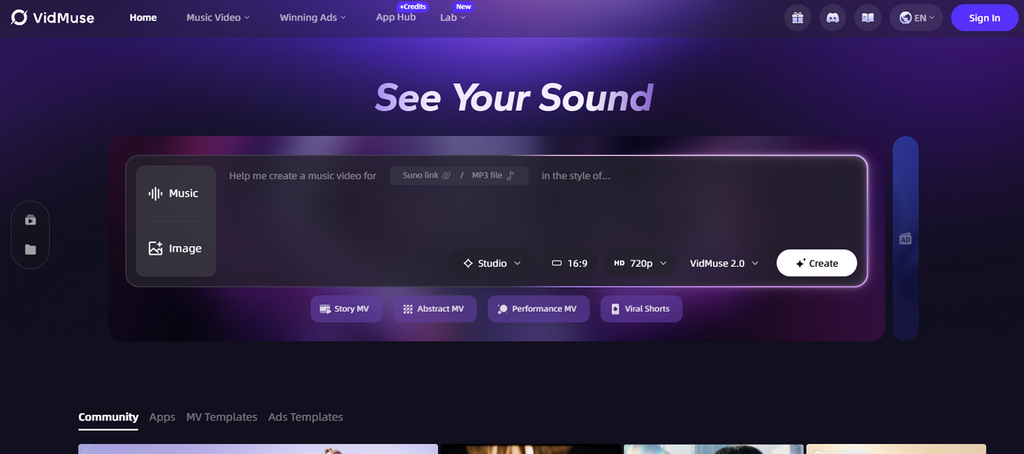
Moreover, the Creative Brief acts as director's script, defining plot, visual style, and pacing before final video generation. Music videos were its starting point, with Story MV, Abstract MV, and Performance MV templates remaining.
Key Features of VidMuse AI
- Wide Model Selection: The platform offers over 30 models, including Seedance 2.0, Kling V3.0 Pro, Veo 3.1, Hailuo 2.3 Pro, and Wan 2.7.
- Suno Music Integration: Original tracks stay inside projects, removing external imports when producing complete music video work.
- Chat and Click Revision: Describe unwanted results or edit them, including swapping the underlying model for individual shots directly.
- Timeline Editor and Asset Library: Version 2.0 added both with Shot Refine by Quoting for assembly and reusable assets.
- Professional Export: Export finished videos or full project clip files for finishing in Premiere or DaVinci Resolve.
Pros
- Early planning reduces expensive rework before video generation.
- One subscription includes 30-plus video, image, and music models.
- Music and visuals stay together within one platform.
- Project files support professional editors without ownership claims.
Cons
- Free outputs allow personal use, excluding commercial work.
- Credits apply across stages, including individual shot regenerations.
- Aspect ratios require early selection to avoid costs.
- API automation is prohibited; independent reviews remain scarce.
Part 2. VidMuse AI Pricing
VidMuse pricing includes 4 tiers, with free and paid plans offering different access. The table below provides a clear overview of the available VidMuse AI pricing plans:
| Plan | Pricing | Credits |
| Free | $0/month | 500 one-time credits |
| Pro | $33/month, billed annually | 4,000 monthly credits |
| Ultra | $83/month, billed annually | 12,000 monthly credits |
| Studio | $133/month, billed annually | 20,000 monthly credits |
Part 3. How to Use VidMuse AI?
Using VidMuse AI involves more than entering a prompt because planning shapes video creation. The workflow moves from uploaded materials toward export while review points help catch problems. Now, follow the steps below to see how it works from start to finish:
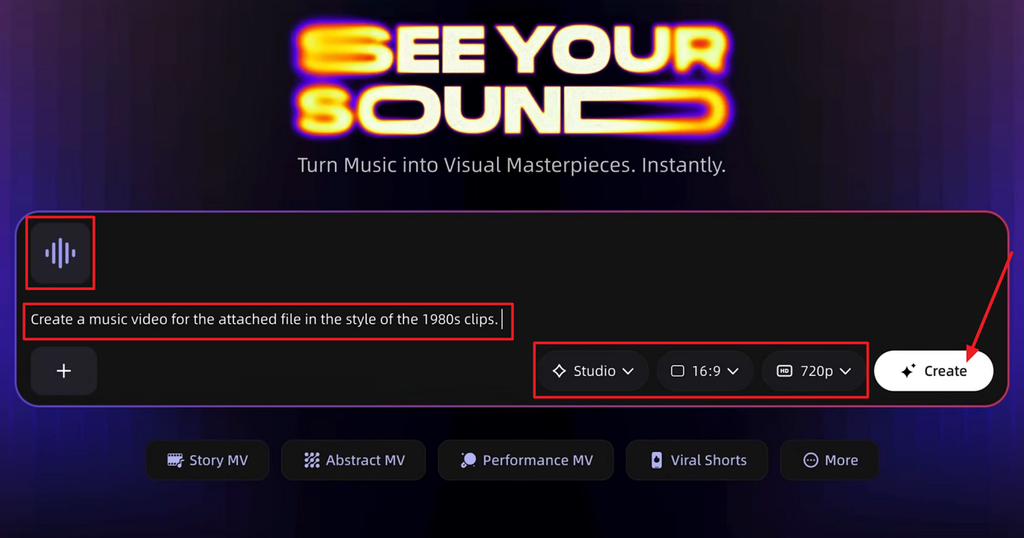
Step 1. Once you enter the main interface, press the Music option to upload your music. Next, choose the Video Mode, Aspect Ratio, and Resolution you want for your video. After that, press Create.
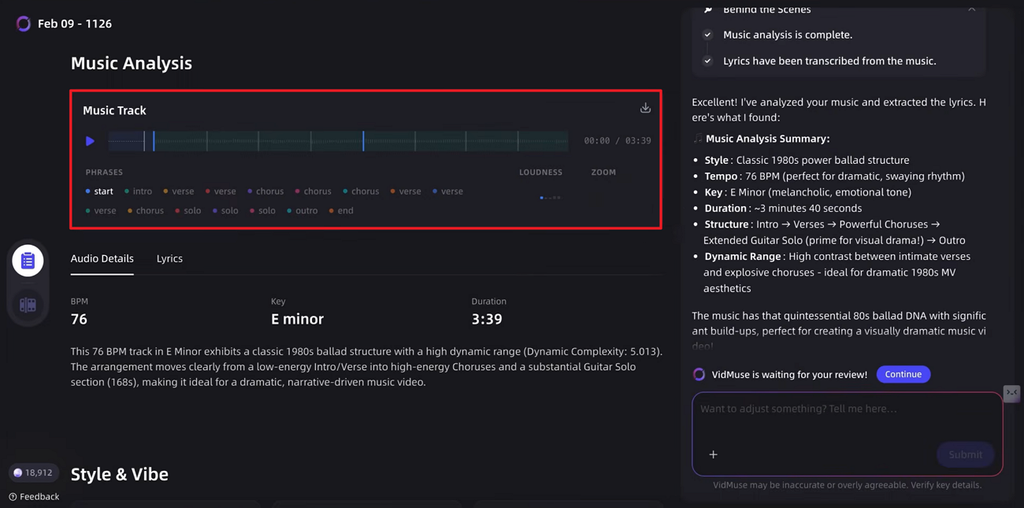
Step 2. Next, listen to the music track the video will be using.
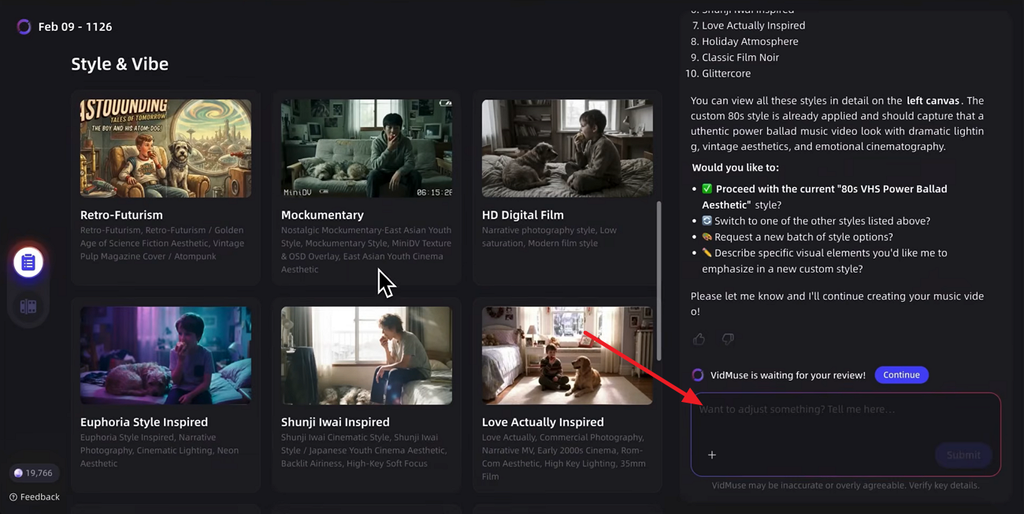
Step 3. Afterward, choose the Style and Vibe or use the chat in the right side panel to adjust the style according to your preference.
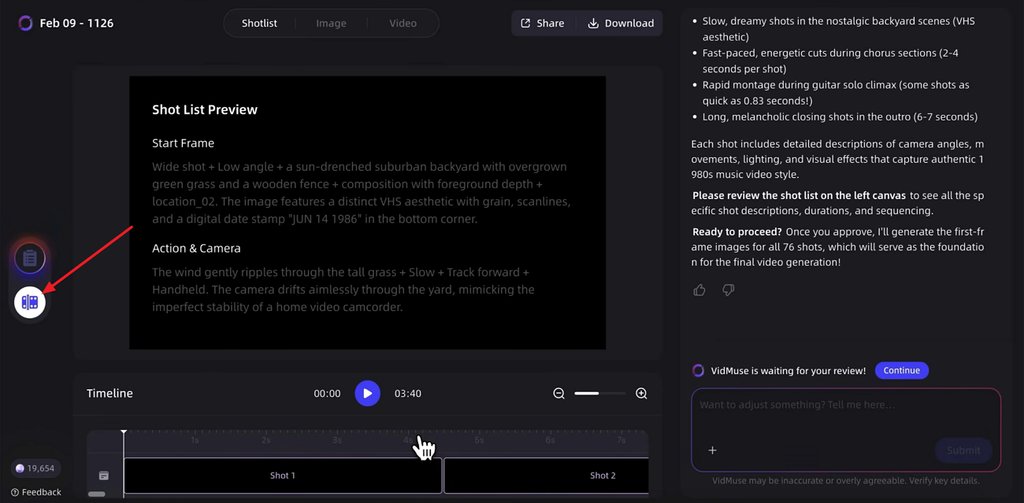
Step 4. Move to the Studio section, review the storyboard, and play the audio to see whether the audio matches the scene description.
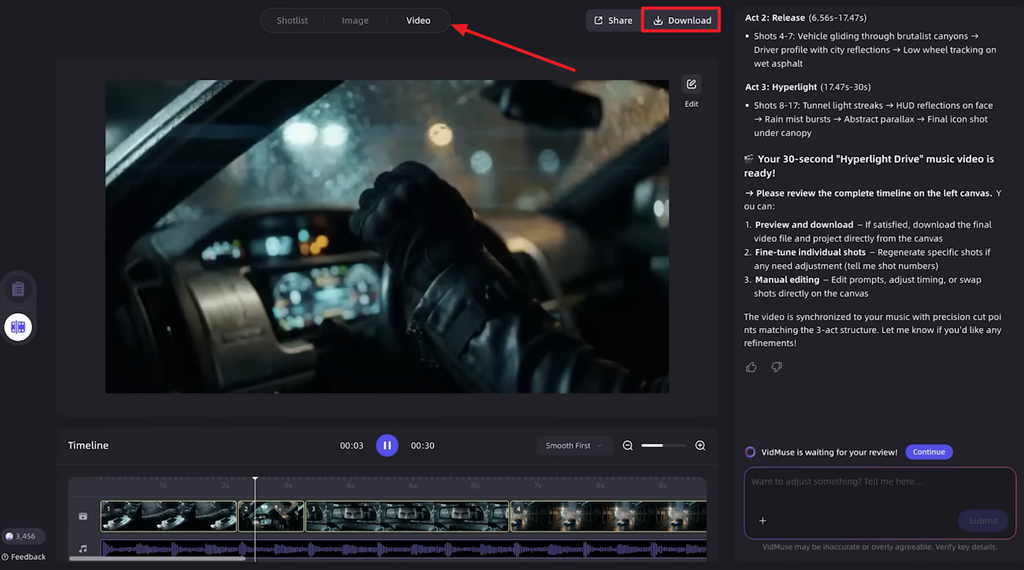
Step 5. After that, press the Video tab and preview the generated video. If any amendments are required, ask chat to directly apply changes or press Download to save the video.
Part 4. Best VidMuse AI Alternative for Video Creation
VidMuse AI handles short videos well, but its review stages become cumbersome for longer projects. This is where MagicLight AI comes in, reducing the effort required for extended video creation. Written scripts, stories, characters, or ideas can serve as the starting point for videos directly.
The platform divides content into scenes automatically instead of requiring repeated confirmation across review stages. This workflow makes longer narrative video creation more manageable without reviewing every individual production step.
Key Features of Magiclight AI
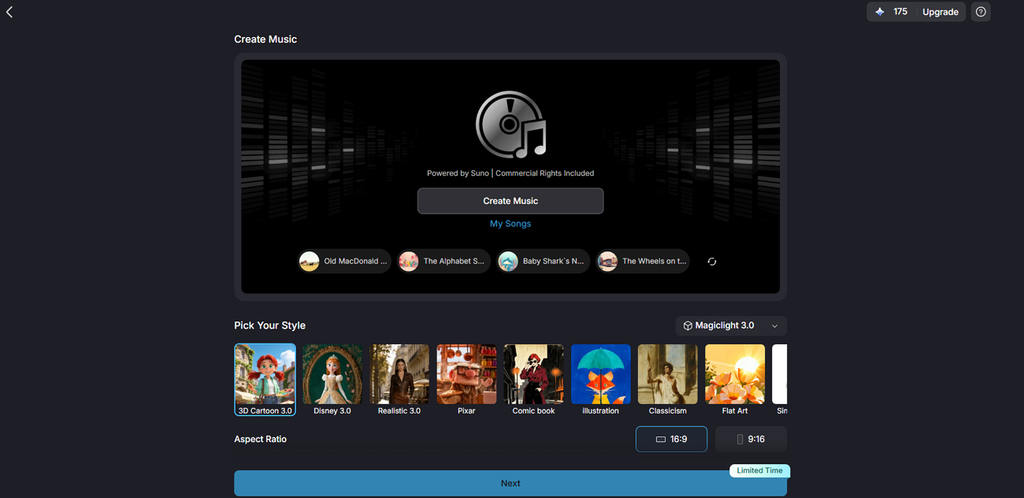
- Music Powered by Suno: Generate original Suno AI music directly from simple text prompts. Custom tracks support music videos without requiring separate tools or existing audio files.
- AI Character Creation: Write a 1,000-character description or upload a photograph to create characters permanently. Saved characters remain available for reuse across any future video project when needed.
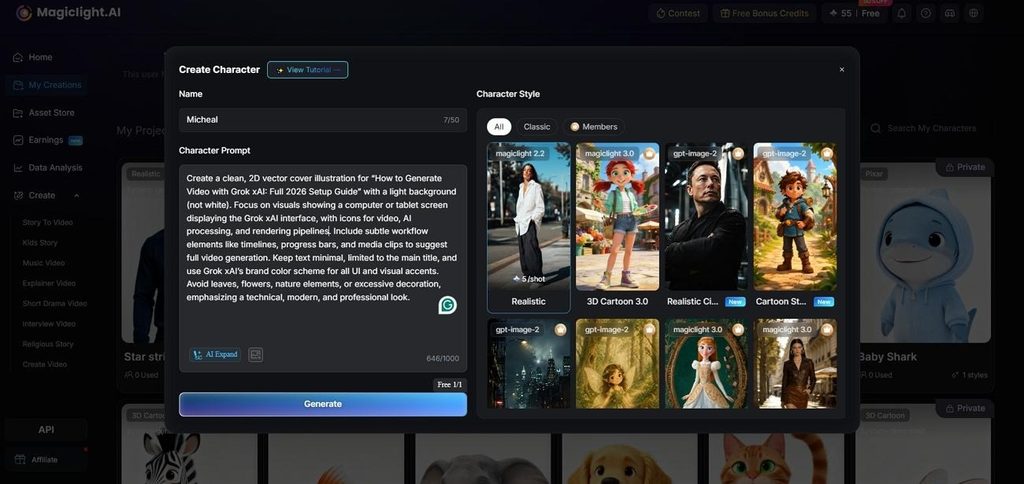
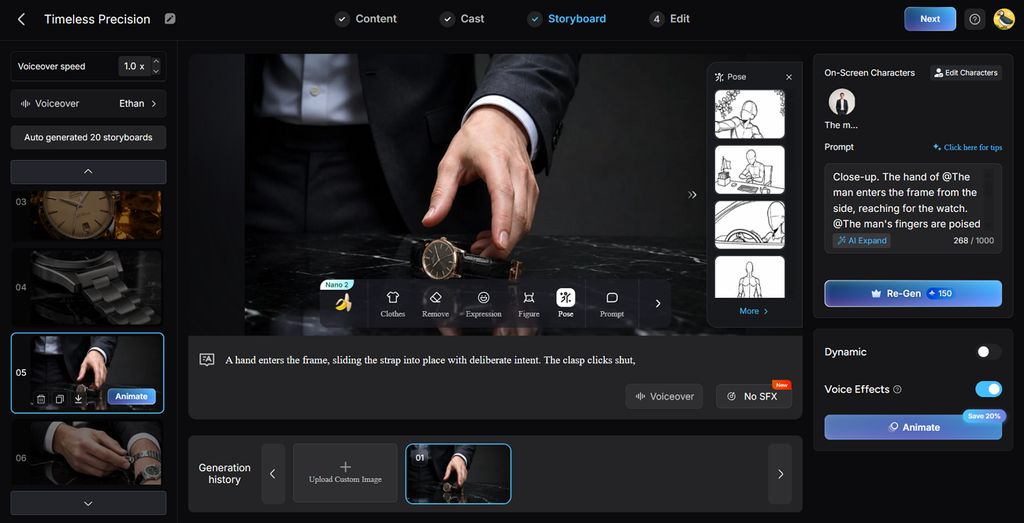
3. Nano Storyboard: Scene division happens before generation, keeping every individual prompt available for revision. Control outfits, expressions, physique, and 50 available poses individually for every video shot.
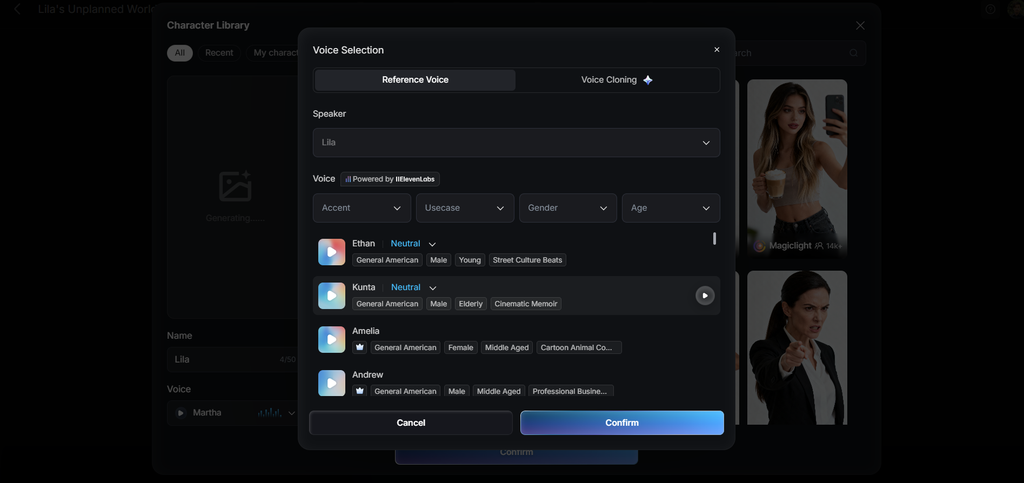
4. Voiceover and Subtitles: Choose among 37 voices filtered by age, gender, and accent for narration. Clone recurring presenters and apply 16 caption styles when exporting the finished video.
5. Prebuilt Songs: The library provides 15 ready-made tracks for tests, drafts, or complete music videos. They eliminate creating original music from scratch during production.
Part 5. Comparison Table Between VidMuse AI and MagicLight AI
VidMuse and MagicLight AI both plan videos before generation but serve different production needs. The table below compares their project length, review demands, workflows, capabilities, and intended uses:
| Feature | VidMuse AI | MagicLight AI |
| Video Generation | 5-stage director workflow | Script read and divided automatically |
| AI Features | 30+ models plus Suno music generation | 20 video engines across 5 families |
| Customization | Per-shot model swaps and chat revision | Editable scene prompts and 50 poses |
| Video Length | Short-form formats and music videos | Up to 50 minutes per project |
| Ease of Use | 6 review points before output | Paste a script and review one storyboard |
| Pricing | Free, Pro, Ultra and Studio tiers | Free plan, commercial rights when paid |
| Best For | Music videos, ads and UGC content | Narrative video from scripts and stories |
Conclusion
To summarize, VidMuse AI combines structured planning with flexible tools for controlled video production. Its broad model selection helps creators make AI videos while maintaining greater creative control. MagicLight AI offers a simpler workflow for longer stories without requiring multiple review stages. Choosing between them depends on project length, creative control, workflow preferences, and production requirements.
FAQs on VidMuse AI
- Is VidMuse AI good for beginners?
VidMuse AI suits beginners because its agent handles the brief and storyboard without requiring prompt expertise. However, its 6 review stages require patience, while MagicLight AI needs only a script upfront.
- Can VidMuse AI generate videos?
Yes, VidMuse covers music videos, advertisements, UGC content, and explainers using more than 30 models, including full-length music video production workflows. MagicLight AI covers the same ground for longer narrative pieces, reaching fifty minutes from one script.
- What is the best VidMuse AI alternative?
MagicLight AI is the strongest option for anyone working from written material. Scripts, stories, characters, and single images all become finished video with narration and captions applied, without the multi-stage review this platform requires.