Video creation in 2026 moves faster, yet creators still question real output value. Vidu AI enters with prompt-based clips, image motion, and stylized scene generation for quick visual drafts. Its appeal lies in speed, variety, and simple creative control. Moreover, user reviews reveal where Vidu AI performs well and where it struggles. Some praise it for concepts, ads, and social videos, while others notice weaker motion and precision.
Part 1. What Is Vidu AI?
Vidu AI is a text-to-video and image-to-video platform built for creators who need visual ideas moving quickly. Instead of starting with complex editing timelines, users describe a scene, upload a reference image, or choose a style direction. The tool then generates short cinematic clips for social posts, ads, concepts, and storytelling experiments without heavy software.
Its main value lies in turning rough prompts into usable visual drafts early in production. With Vidu Studio AI, creators can test motion, mood, character framing, and product-style scenes before committing to longer editing work. It suits people exploring campaign ideas, trend videos, concept visuals, or quick branded content.
Key Features of Vidu AI
- Reference to Video: Allow users to upload reference subjects to maintain character and scene consistency across generated video sequences.
- Image to Video: Turn still images into motion clips with controlled direction, movement, and visual storytelling details.
- Text to Video: Convert written prompts into short videos by defining scene, style, camera, and mood details.
- First and Last Frame Control: Set the opening and closing frames to guide smooth transitions between two planned visual points.
- AI Sound Effect Generator: Generate matching sound effects to support scene atmosphere, action timing, and viewing impact.
Is Vidu AI Free? Is There Any Vidu AI App?
Vidu AI offers free access, mainly for testing ideas before serious production. The site promotes unlimited Off-Peak creation, with no credits required during eligible sessions. So, Vidu AI free works best for drafts, experiments, and short concepts. Paid plans still matter when users need faster access and stronger production control.
Moreover, Vidu AI also has an app for users who prefer creating videos on mobile. iPhone users can download it from the App Store, while Android users can find it on Google Play. This makes Vidu easier to use for quick drafts, prompt testing, and short video ideas outside of desktop browsing.
Part 2. How to Use Vidu AI?
After reviewing access options, the next step is understanding how the AI video generator Vidu works. The steps below explain how users can create, refine, and export videos with stronger control:
Step 1. First, select Image to Video, then upload the product image into Frame 1. Then, use the prompt box to describe movement, lighting, background, and product focus.
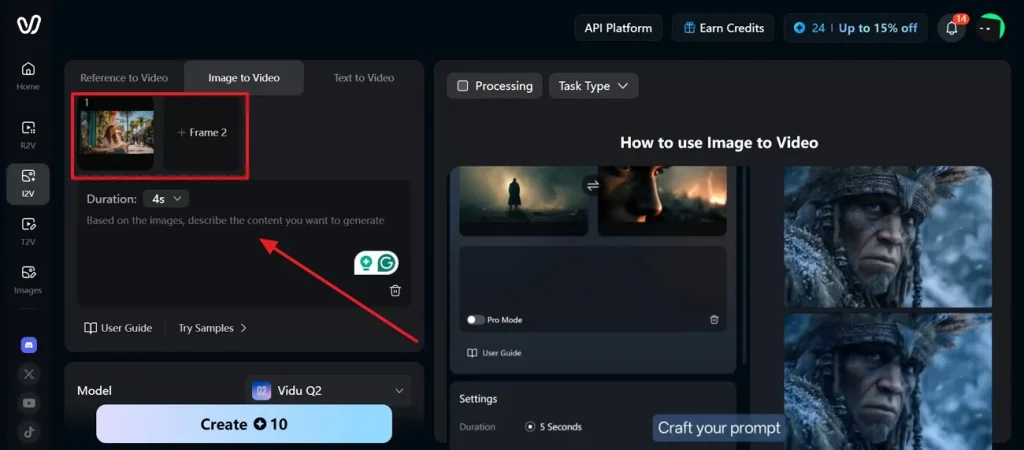
Image name: vidu-ai-image-video-frame-upload.jpg
Image alt:
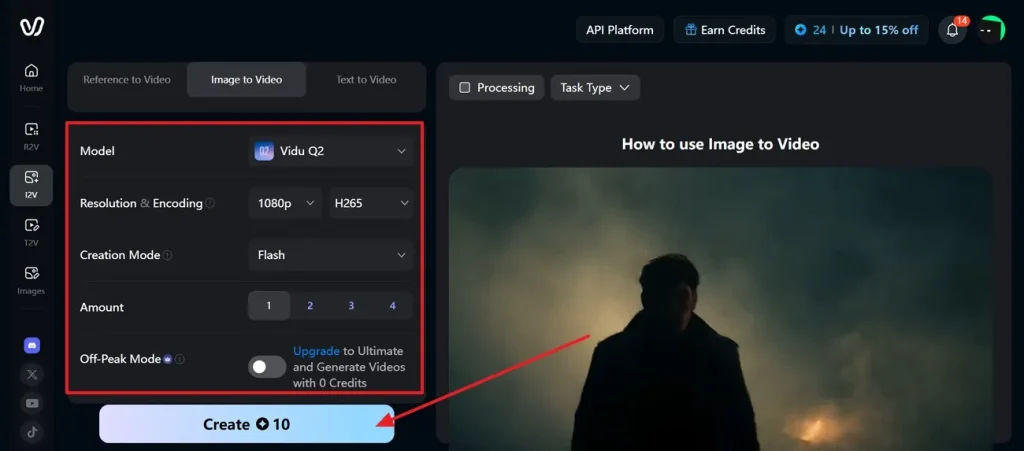
Step 2. Afterward, choose Vidu Q2, then set resolution, encoding, creation mode, and clip amount. Keep 1080p and H. 265 selected and press the Create button to proceed.
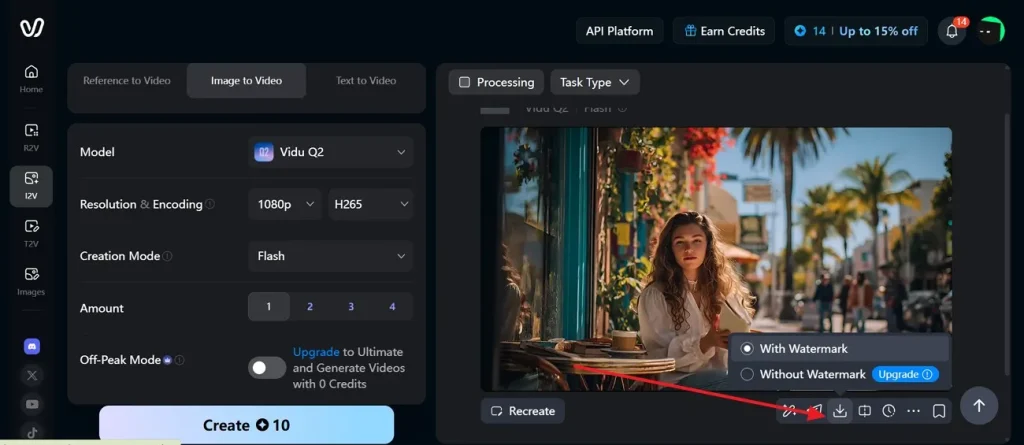
Step 3. Once processed, preview the result and choose the Download icon and select with or without a watermark option to render the video to your device.
Pros
- Prompt variations reveal stronger scenes before production teams approve direction.
- Quick generations help marketers test hook ideas before editing begins.
- Early visual drafts reduce briefing confusion between creators and clients.
Cons
- Complex camera instructions may still create awkward or unstable movement.
- Output polishing often needs timeline editing for captions and branding.
User Reviews
Positive Review:
“It has been one great year using ViduAI. ViduAI has tremendous features using Text to Image/ Video, Reference to Image / Video. The Model Q2 has been super cool. Now ViduAI has dropped Q3 Model which is perfect for storytelling and great animation videos. You can even add an existing videos, image as References and create your magical video. Superb Tool. Must try, Enjoy!” - Jesna's Creative Hub
Negative Review:
“No customer support. They basically took a lot of credits for me using Vidu Agent, but the Vidu Agent AI never delivered a video output - it just kept apologizing. I reached out to customer support but no one ever replied in the 1 week that I waited asking for credits refund. This is definitely a deal-breaker for me as I can't continue paying for products that do not have customer support.” - VooDooChild
Part 3. Try Magiclight AI: The Next-Level Choice Over Vidu AI
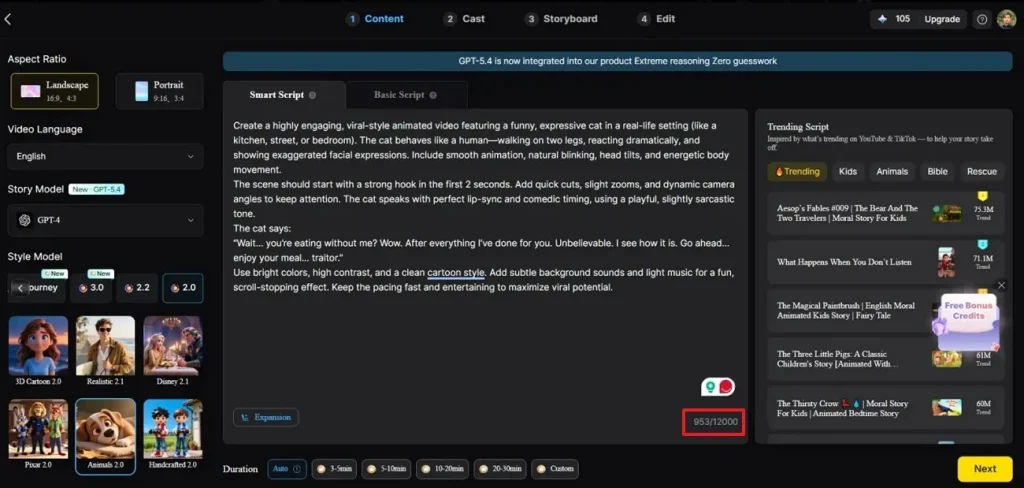
When quick clip testing starts feeling limited, creators usually need a fuller production path. That is where Magiclight AI becomes useful for planned stories and branded video workflows. It supports scripts, scenes, characters, subtitles, and voiceovers inside one guided creative space. Such a structure helps teams move from rough ideas toward clearer campaign-ready videos with purpose.
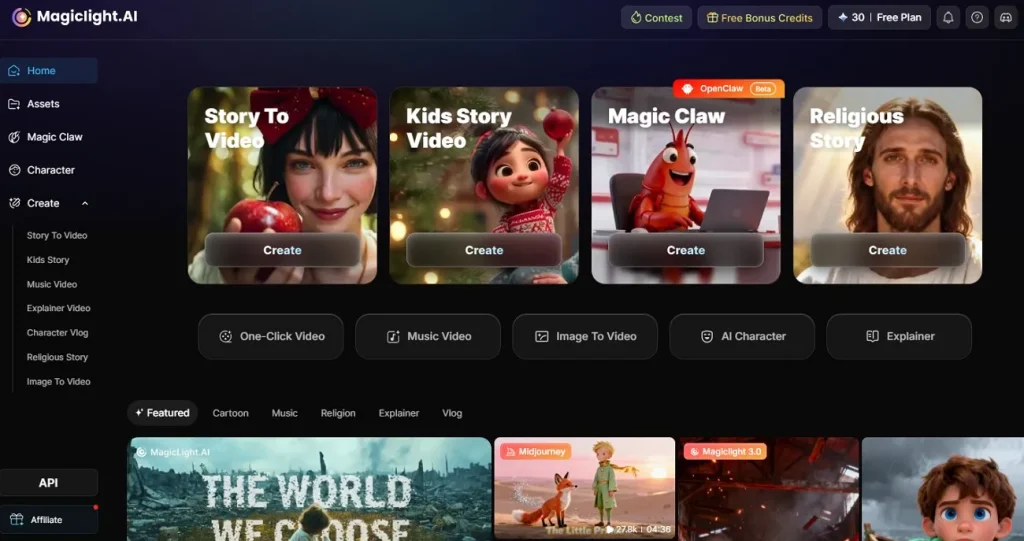
Moreover, stronger video work often needs continuity, not just one attractively generated clip. Its image-to-video feature can help animate uploaded visuals for clearer creative variation. Creators can shape scripts, characters, narration, timing, scenes, and subtitles with better control. For users needing structured outputs beyond Vidu AI, this becomes a more complete choice.
Key Features
- Image to Video: Animates uploaded images into video clips, helping creators reuse visuals for campaigns, stories, and explainers.
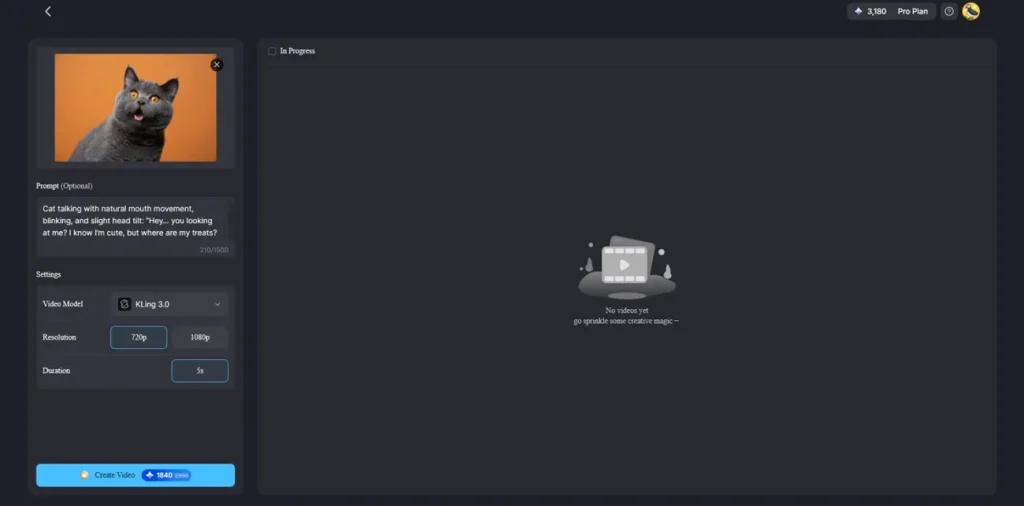
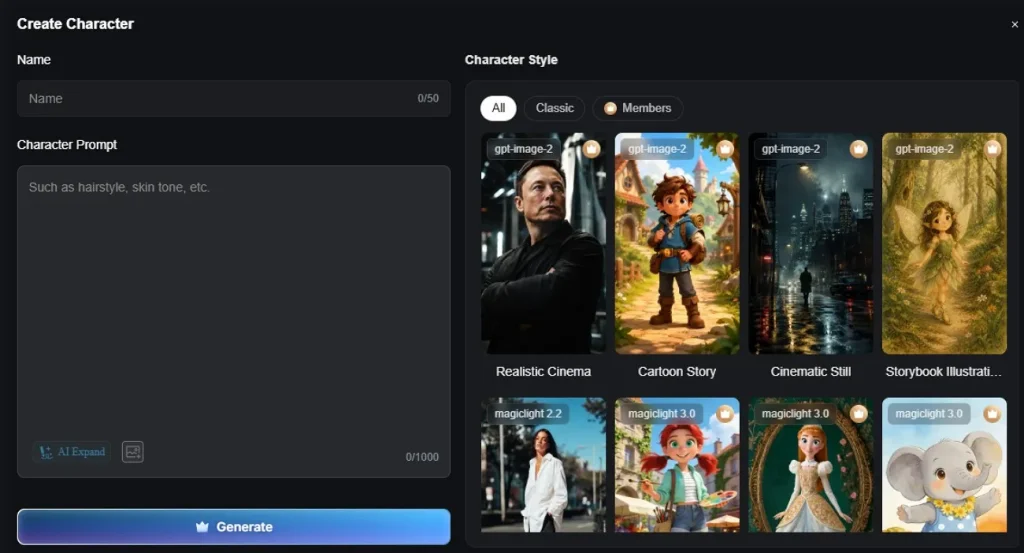
- AI Character Creation: Builds consistent AI characters for repeated scenes, supporting identity, expressions, appearance, and storytelling continuity control.
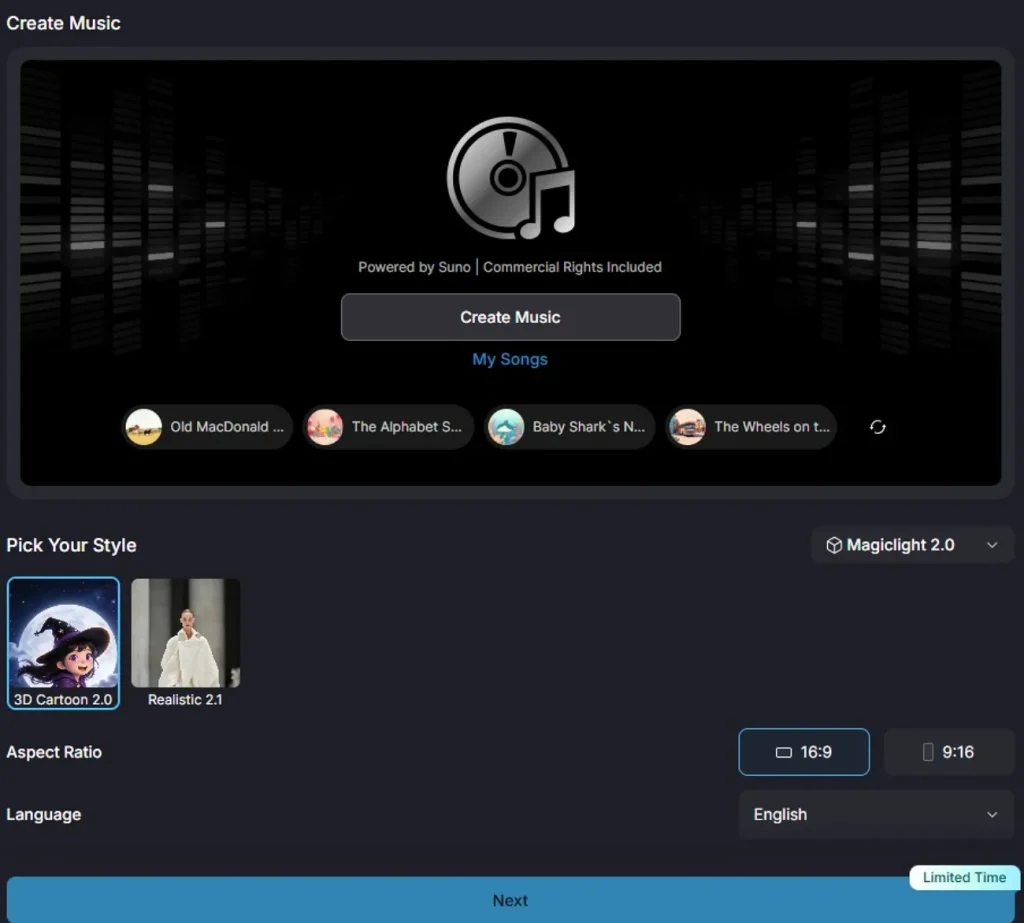
- Music Video Creation: Creates music-driven videos with lyrics, visuals, pacing, and mood suited for creative social campaigns online.
- Story to Video: Transforms written stories into long-form video creation with narration, scenes, characters, and structured progression.
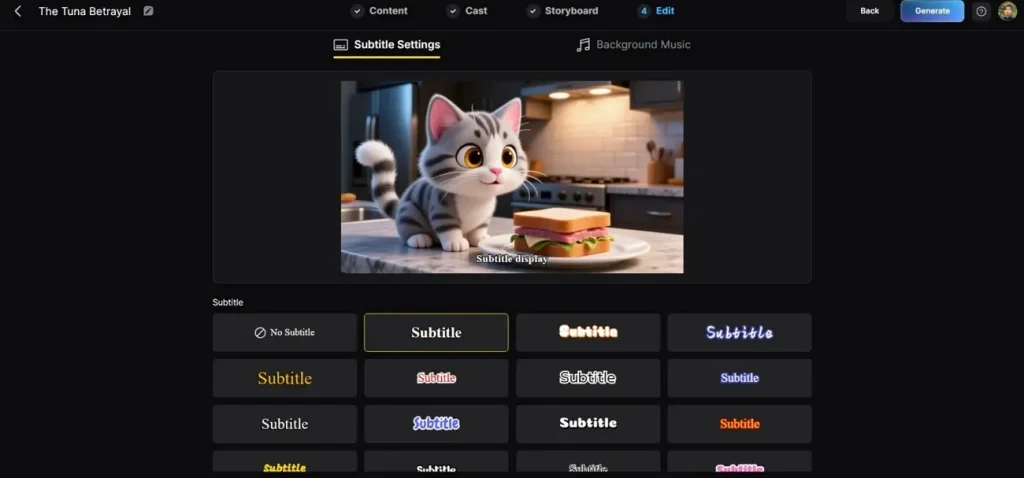
- Custom Subtitles: Adds multilingual subtitles with different font styles, improving readability, accessibility, and branded viewing experiences online.
After reviewing Magiclight AI’s core features, this comparison shows where it offers deeper creative control than Vidu AI:
| Aspects | Magiclight AI | Vidu AI |
| Best For | Long stories, explainers, branded videos | Short clips, prompts, and visual tests |
| Workflow | Script-to-video planning | Prompt-based generation |
| Story Control | Scenes, characters, narration, subtitles | Simple scene generation |
| Image to Video | Fits structured video projects | Good for quick motion clips |
| AI Characters | Better for consistent characters | May vary between clips |
| Subtitles | Multilingual subtitles with font styles | May need external editing |
| Music Videos | Supports lyrics, visuals, and pacing | Limited full music structure |
| Editing Need | More built-in production support | Often needs another editor |
| Best Choice | Planned, polished video creation | Fast idea testing |
Conclusion
To conclude, Vidu offers fast visual testing for creators exploring short clips, references, and motion ideas. The Vidu AI video generator feels useful for concepts, ads, and quick social experiments. However, complex storytelling, consistent characters, subtitles, and polished campaigns need deeper planning. For creators wanting structured production beyond quick clips, Magiclight AI becomes the stronger choice.
FAQs on Vidu AI
1. What is Vidu AI image to video feature?
Vidu AI image to video converts uploaded pictures into short clips using prompt guidance. For deeper storytelling, Magiclight AI adds scripts, characters, subtitles, and narration together.
2. Can Vidu AI turn photos into videos?
Yes, it can animate photos into videos for concepts, ads, and social content. Users needing a structured story flow may find Magiclight AI more suitable afterward.
3. What is Vidu Studio AI?
Vidu Studio AI is the online workspace for creating and managing generated videos. It helps users test prompts, references, motion settings, and scene directions easily.
4. Is Vidu AI better than other video generators?
Vidu AI works well for fast drafts, but stronger choices depend on needs. However, Magiclight AI suits projects requiring planned stories, consistent characters, and a polished structure.
5. What type of videos can Vidu AI create?
Vidu AI can create short social clips, product visuals, concepts, and stylized scenes. It suits creators to test ideas before moving into detailed editing or production.


![How to Make a Product Video for Marketing With AI [Guide 2026]](https://magiclight.ai/wp-2/wp-content/uploads/product-video-marketing-guide-1-300x198.webp)