


Video marketing grows quickly because audiences now prefer video clips across digital platforms. However, many traditional tools like Vivideo AI can be costly and may feel limited for new creators. Therefore, modern creators need simple tools that support voiceovers, animations, templates, and flexible export options. In this review, you will explore its features, limits, and a better alternative for different video needs.
Part 1. What Is Vivideo AI?
Vivideo AI is an AI-powered, all-in-one video creation platform that generates professional videos from text prompts or still images. This platform supports 4 AI models, including Sora 2, to produce engaging video content in seconds. It supports more than 50 languages for easy understanding by global users.
While generating video, it maintains a stable video output when using identical settings and configurations again. Moreover, the platform gives users control over video results through seed and prompt settings. Along with this, this tool lets creators download videos in 4K resolution for social media use.
Key Features
- Prompt Rewrite: Automatically rewrites user prompts intelligently to avoid content policy issues and generation errors.
- Seed Control: Allows users to set seed numbers for consistent and fully reproducible video generation results.
- Audio Generation: Creates original sound and realistic effects that perfectly match each video scene.
- Voice Sync: Synchronizes AI-generated match voiceovers with visuals smoothly for natural and smooth storytelling flow.
- Aspect Ratio Support: Supports different aspect ratios such as 9:16 for TikTok and 16:9 for YouTube.
How Vivideo AI Works: Step-by-Step Guide
Understanding the process of Vivideo AI video generator helps users create videos easily. Thus, below are the step-by-step details explaining how the tool creates videos automatically:
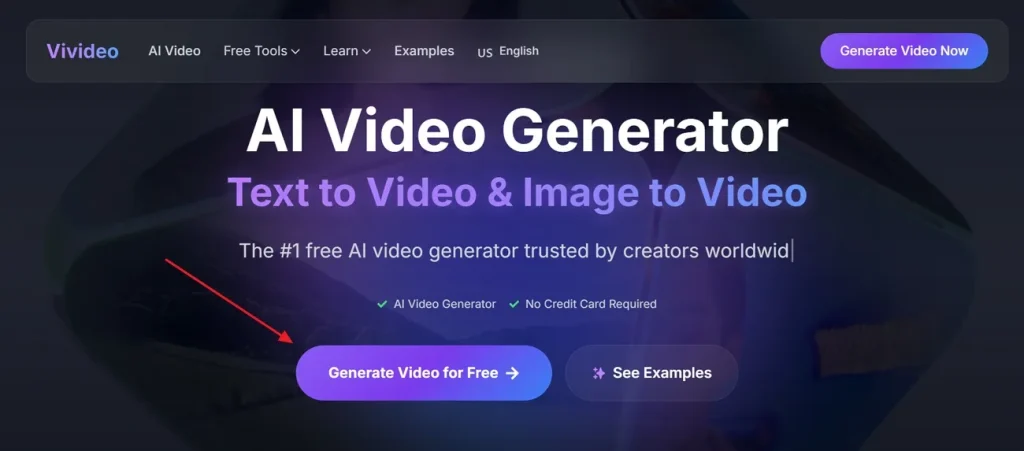
Step 1. Access Vivideo AI on your browser and opt for the Generate Video for Free option.
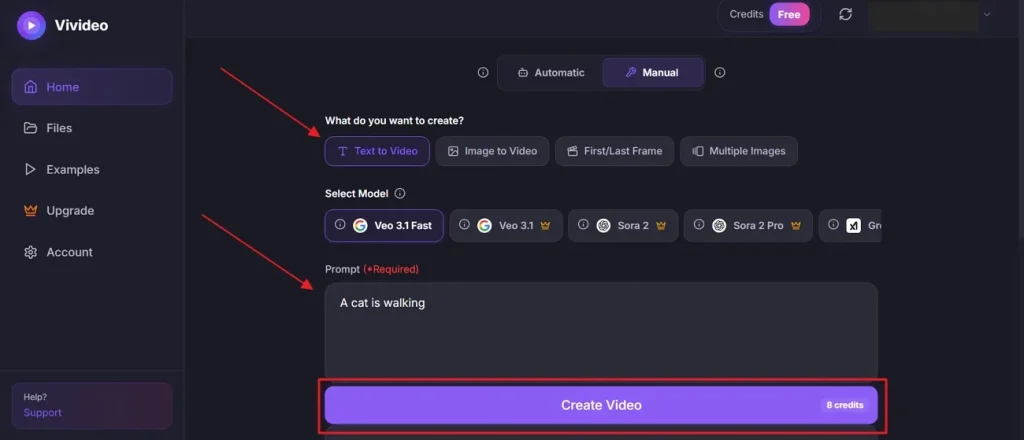
Step 2. After accessing it, select the Text to Video option and then choose the desired AI model, such as Google Veo 3.1 Fast. Next, you can enter your idea in the given Text Box up to 2,000 characters and opt for Create Video.
Vivideo AI Pros & Cons and Pricing Plans Explained
Now that you understand the capabilities of Vivideo AI, this specific section shares some advantages and drawbacks with you about this platform. Along with this, users will see the pricing and features that the tool offers:
Pros
- Supports video generation up to 3 minutes long for longer content creation.
- Automatically generates subtitles for better accessibility and audience engagement.
Cons
- Not suitable for highly complex cinematic production or film projects.
- Occasional repetitive visual styles across different generated videos can appear.
Pricing Plans
| Plan | Price | Features |
| Pro | $9/weekly | 30 credits, HD exports, no watermarks, extend videos with AI |
| Max | $19/weekly | 100 credits HD-quality exports, no watermarks, download & share videos, extend videos with AI, edit video with a prompt, Remix any video. |
Part 2. Why Creators Prefer MagicLight AI Over Vivideo AI
Although Vivideo AI is useful for creating quick social media videos, it still has limitations. Many creators now want stronger tools for producing storytelling and more professional video content. For this, MagicLight AI is a strong choice for users who want quick and simple video creation. It is an all-in-one video creation platform that generates videos of up to 50 minutes long from text prompts.
While generating AI video, the tool keeps consistent character appearances across multiple scenes for better storytelling. For precision, the tool offers 2 script modes: Smart Polish, which enhances prompts up to 12,000 characters with AI, while Basic mode allows 1,500 characters. It uses Nano storyboard technology for detailed micro-actions and precise timeline-based scene control. MagicLight AI also provides 8 director modes for controlling cinematic storytelling and scene generation workflows.
Key Features
- Language Variety: Supports 11 different languages for global video creation and wider audience accessibility.
- Style Models: Provides 46 visual styles, including MagicLight 3.0, anime, Disney, Midjourney V7, and realistic video themes.
- Voice Engines: Uses ElevenLabs and Minimax Speech 2.8 for realistic multilingual voiceover generation capabilities worldwide.
- Storyboard Preview: Automatically generates editable storyboards before rendering complete animated videos for creators.
- Camera Effects: Supports camera pushes, tilts, zooms, and lighting transitions for cinematic storytelling quality professionally.
Comprehensive Guide to Generating AI Videos with MagicLight AI
If you want to create AI videos easily, this particular part provides a full guide for it:
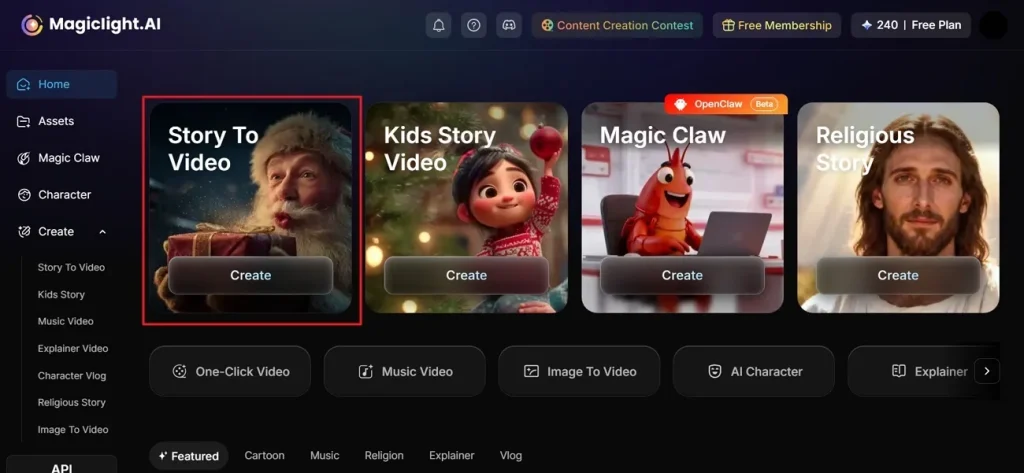
Step 1. Access MagicLight AI and Create Project
To initiate, visit the official website of MagicLight AI and opt for the Story to Video function from the main screen.
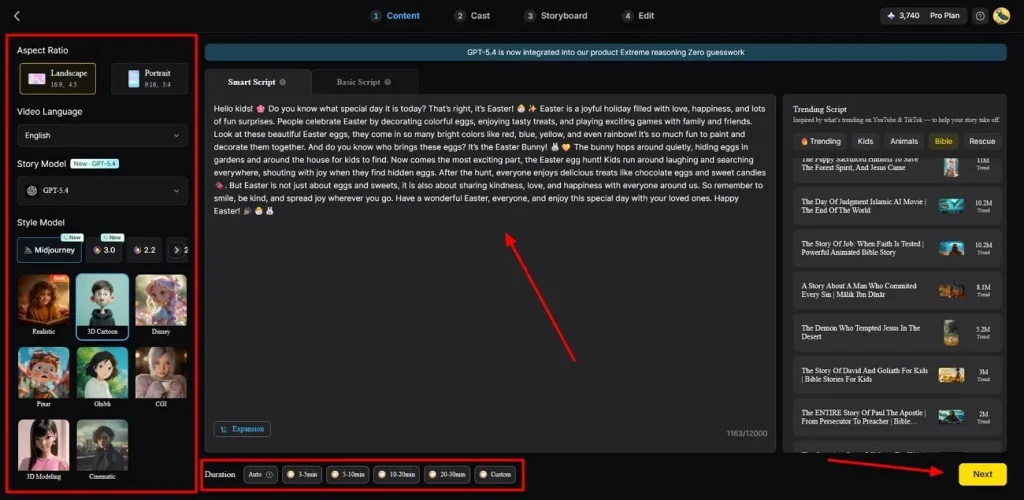
Step 2. Describe your idea and Select Settings.
After accessing it, enter your idea into the Text Box provided on screen. Then, select your preferred Video Language and adjust the required Aspect Ratio carefully from the left panel. Next, choose an AI Story Model like GPT-4 from the 12 available options. Now, select a Style Model such as Disney or 3D cartoon for visuals and set the Video Duration, then opt for Next.
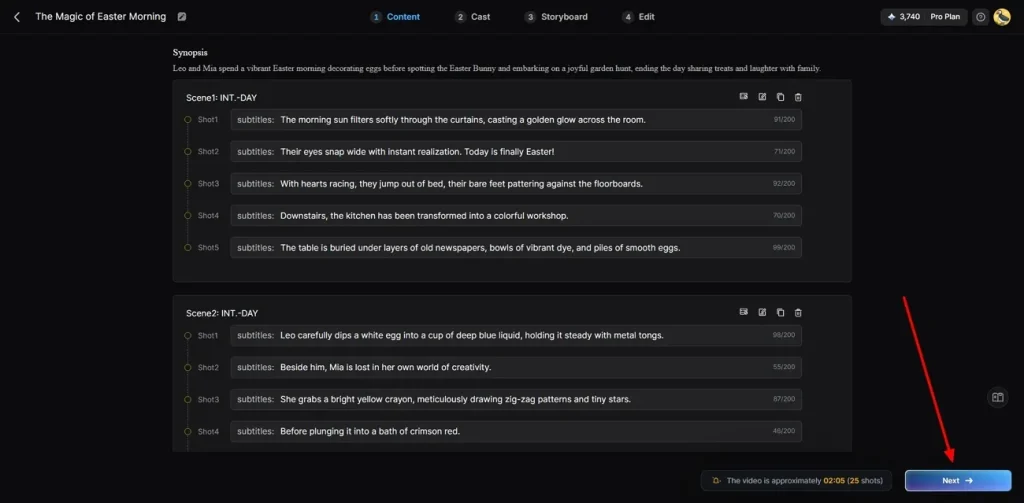
Step 3. Check AI-Generated Video Summary
When automatic scenes are created, carefully preview the generated video summary and overall flow. If everything appears correct, click the Next button to continue the video creation process.
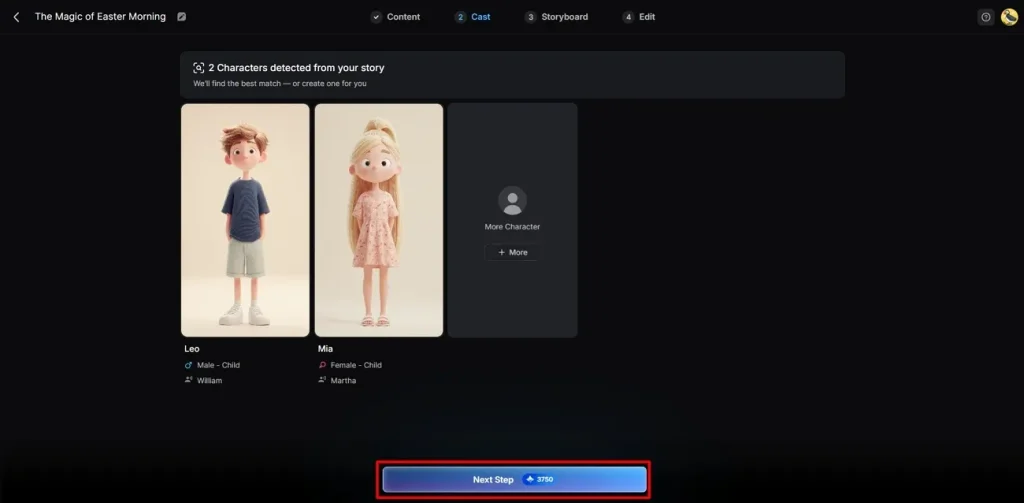
Step 4. Select or Create Characters
Next, the tool suggests different characters matching your video style and story requirements. You can choose existing characters or create new ones through the More Character option. After selecting everything, opt for the Next Step button to continue video creation.
Step 5. Tailor the Character Appearance
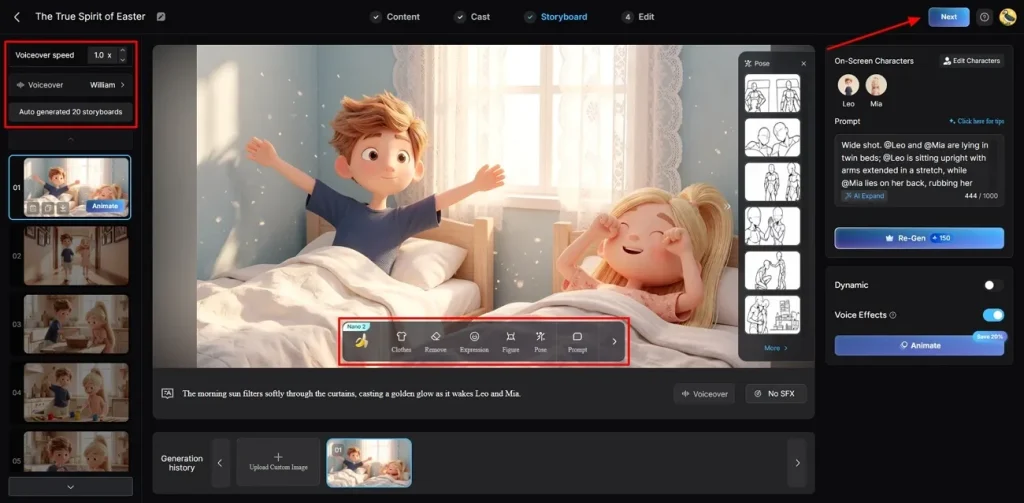
On the storyboard screen, adjust Voiceover Speed using options from the left panel easily. By using the provided buttons, you can also change clothes, expressions, and character appearance for every generated frame individually. After confirming all settings across scenes, press Next to continue to the next step.
Step 6. Add Captions and Soundtrack
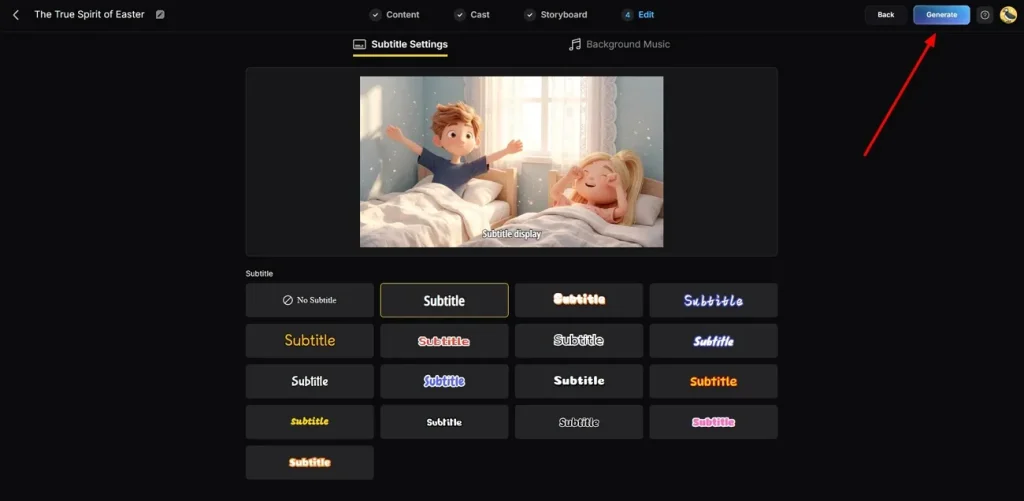
At this stage, go to Subtitle Settings to generate subtitles for your AI video. Afterward, opt for Background Music matching the mood and press Generate for the final output.
Step 7. Preview and Save Generated AI Video
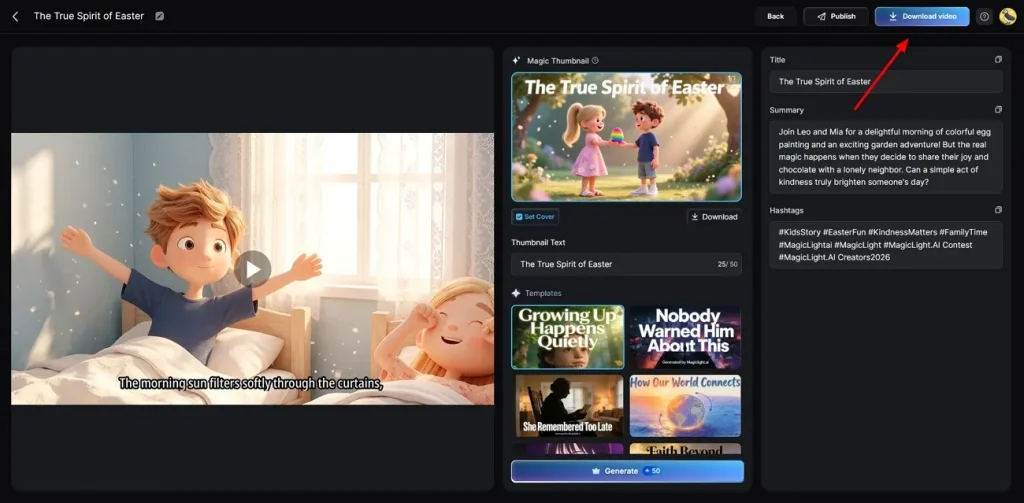
Finally, preview the completed video carefully to review the final result. You can even add your preferred Hashtags or Thumbnail text if needed. Once satisfied, opt for the Download button to save it to your device.
Conclusion
To conclude, Vivideo AI offers fast and simple video creation for creators. It helps users generate short videos, but still has some limits in advanced editing and control. Therefore, it works best for quick social media content and basic projects. However, many creators need more powerful storytelling features and long video support. In such cases, MagicLight AI becomes a stronger choice for professional and detailed video production needs.
FAQs on Vivideo AI?
1. Is Vivideo AI free to use?
Yes, Vivideo AI offers a free plan for all new users. It also provides limited free credits for trying basic video generation features. After using credits, users may need paid plans for continued usage access.
2. Can Vivideo AI create YouTube Shorts?
Vivideo AI supports YouTube Shorts with vertical video format options. It automatically adjusts size and aspect ratio for short videos. Creators can easily publish engaging short content using this platform.
3. Does Vivideo AI support AI avatars?
It includes AI avatars for presenting videos naturally. These avatars can speak multiple languages and show realistic expressions. However, MagicLight AI provides many digital people that speak your typed text. This feature makes your marketing videos look much more professional and real.
4. Is Vivideo AI good for beginners?
Yes, Vivideo AI is very easy for people to use, but some features can be difficult for those without editing skills. If you need more help, MagicLight AI has better guides for users. Both tools let you create great content with a few clicks.
5. What are the best alternatives to Vivideo AI?
Platforms like MagicLight AI are strong alternatives with advanced video features. It offers long videos, storytelling tools, and better creative control. Many creators prefer it for professional and detailed video production.





![How to Make a Marketing Video 2026 [Step-by-Step Guide]](https://magiclight.ai/wp-2/wp-content/uploads/marketing-goal-planning-guide-300x200.png)