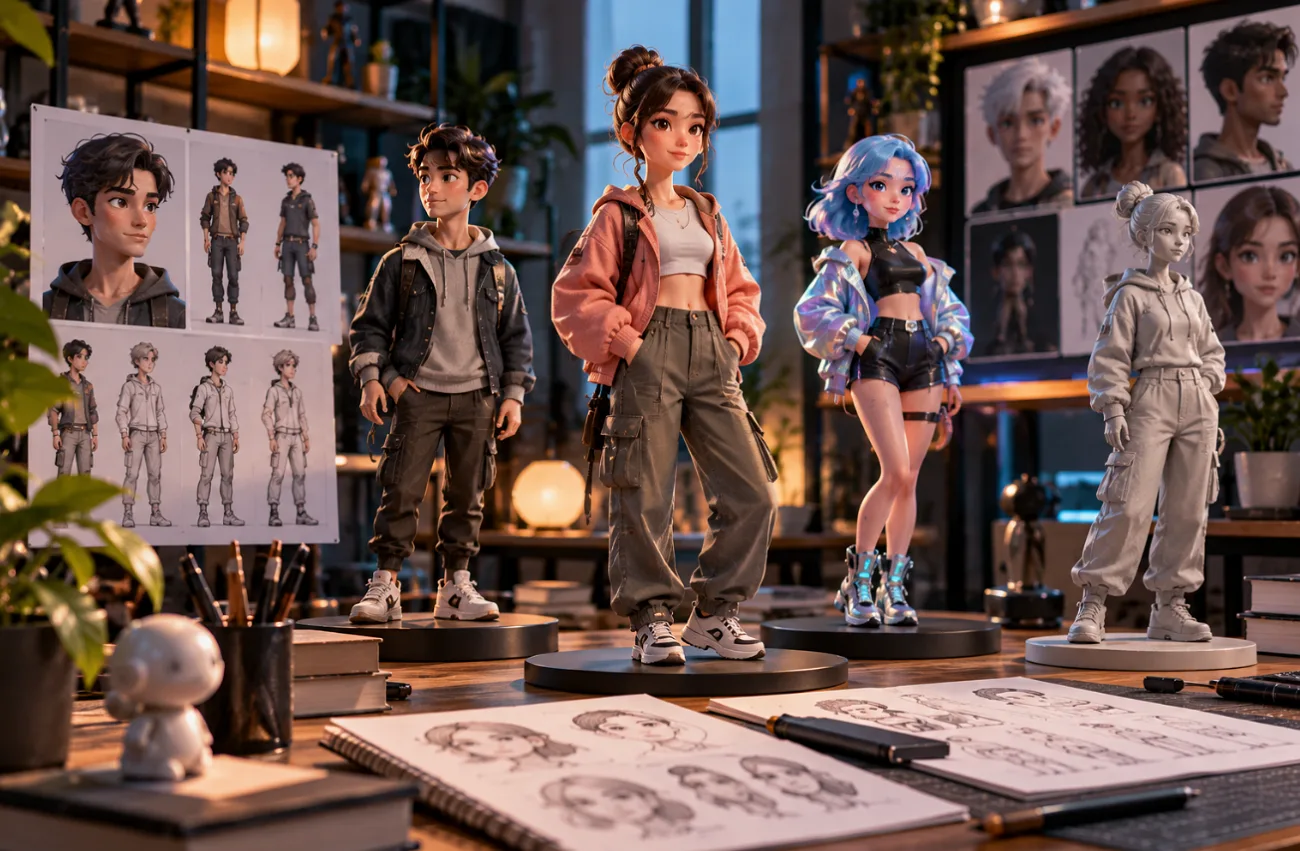
The best 3D character creator depends on whether you need a customizable avatar for games, an animated character, or a complete story video. Tools like VRoid Studio, MetaHuman, and Blender offer different levels of modeling, rigging, and customization.
For example, a small game studio might need an exportable 3D character for its game and a 60-second promotional video. While traditional 3D tools handle character modeling, MagicLight AI creates character-driven videos from text prompts. This guide compares 6 popular tools based on their features, customization options, and output capabilities to help you choose the right one.
Part 1. What to Look for in a 3D Character Creator
Where the character goes next decides which tool fits, since VRM avatars, FBX bodies, and videos lead to different software. These 5 checks narrow the search for the best 3D character creator before anything is installed:
- Export Format: VRM files load into avatar apps, FBX bodies move into engines like Unreal, and video tools skip export.
- Rigging and Facial Controls: Characters that must move need a skeleton and facial controls, and some tools ship both.
- Style Range: Anime, photoreal, and 3D cartoon looks require different workflows, but some tools support multiple styles without rebuilding characters.
- Hardware and Skill: Slider-based creators run on modest machines and sculpting or engine tools ask for a dedicated GPU.
- Usage Rights: License terms differ, with CC0 output in MakeHuman and creator-set terms on VRoid Hub models.
Part 2. 6 Best 3D Character Creator Tools to Explore
The following 6 best 3D character creator tools cover different needs, from generating exportable models to creating animated character videos:
1. MagicLight.AI
Best For: 3D cartoon characters that act, speak, and stay consistent in story videos.
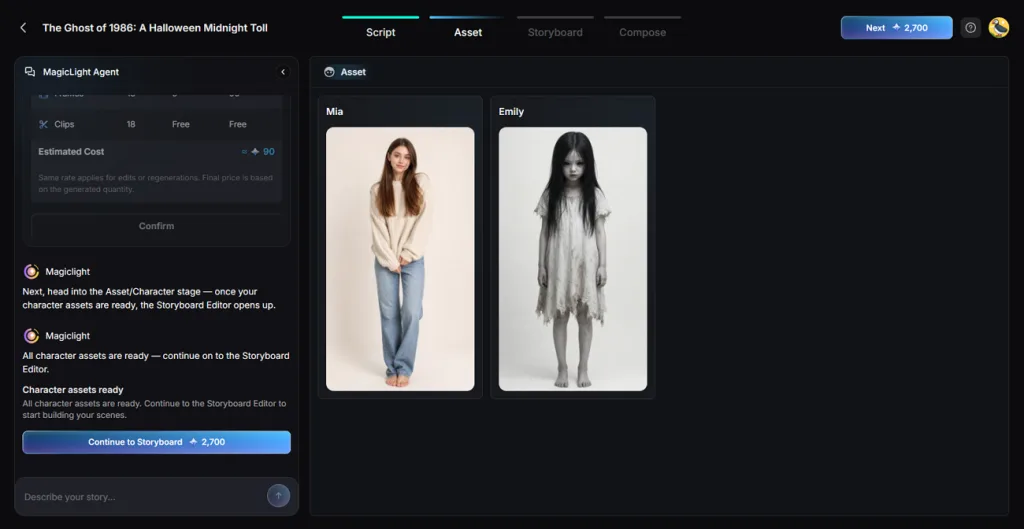
MagicLight AI designs characters from typed descriptions or reference photos and then places them in narrated, scored scenes. Its AI Avatar Generator helps keep characters recognizable across scenes, while the Asset stage establishes reusable character designs for better visual consistency.
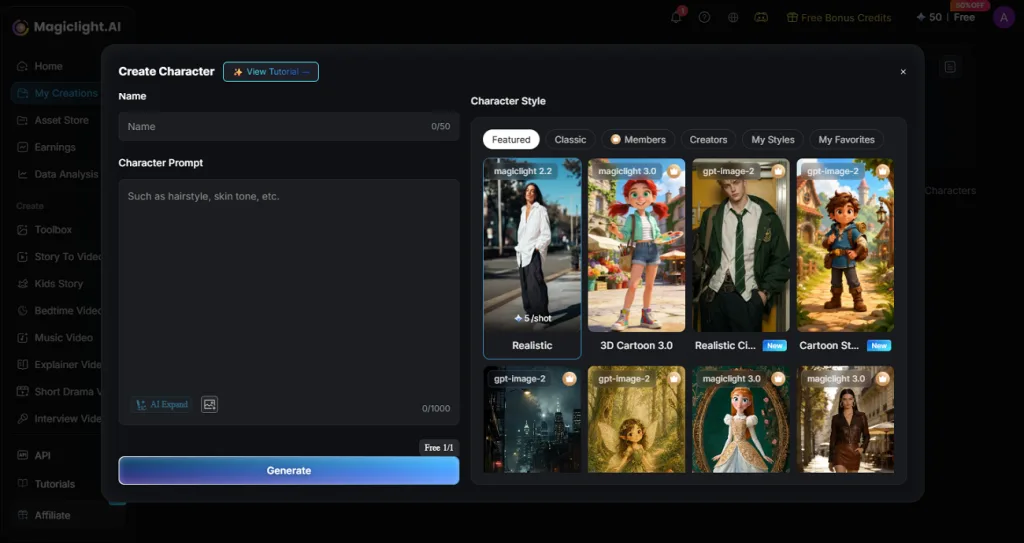
For the farming game, the “Create Character” form holds a long description of the heroine’s straw hat, freckles, and patched denim overalls. The 3D Cartoon style then carries that design into a 60-second teaser with voice and music.
Key Features
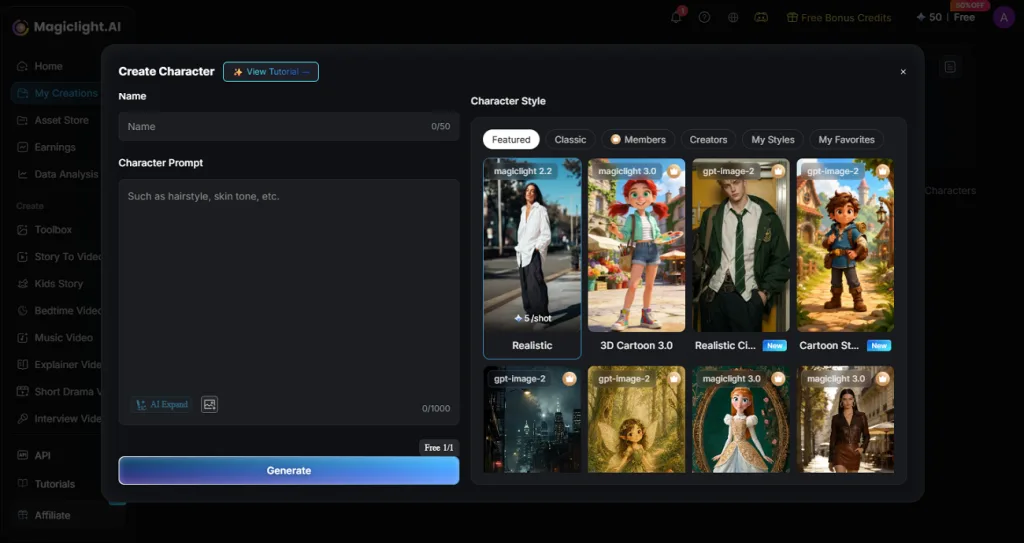
- Prompt-Built Characters: A 50-character name field sits above a 1,000-character Character Prompt, with AI Expand for detail.
- Multiple Visual Styles: 3D Cartoon and Realistic share the Visual Styles row, and More Styles holds extra looks.
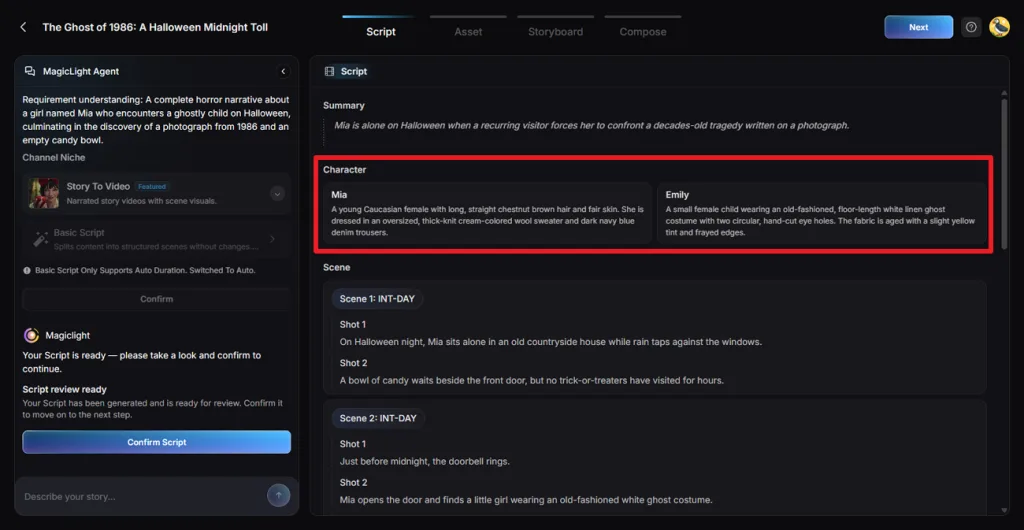
- Character Cards in the Script: The MagicLight Agent writes a card for each character before any image exists.
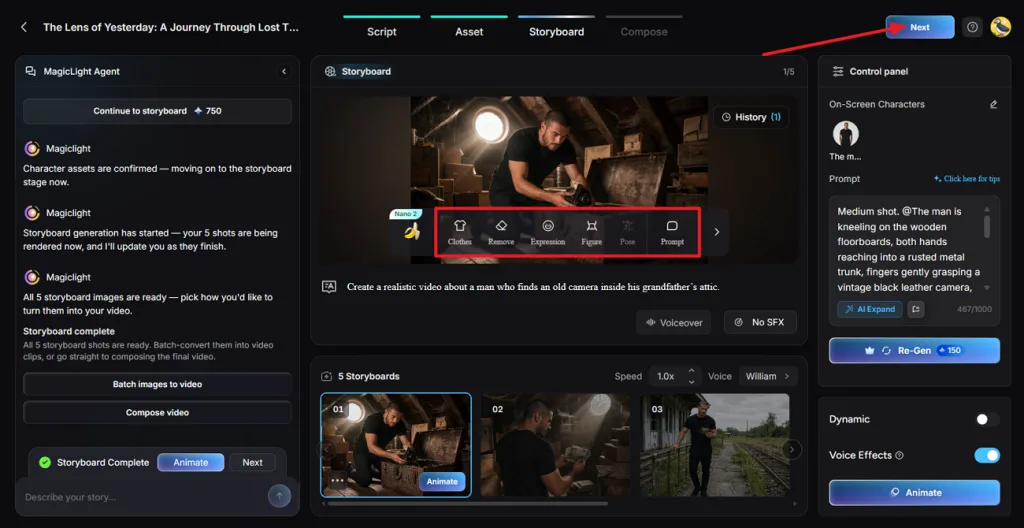
- Named Characters in Frames: Storyboard prompts call a character with an @ tag, and frame tools edit Clothes, Expression, and Pose.
- Voice and Motion: Frames animate on 20 video models, and each character speaks through one of 37 voices.
Pros
- Character design and video production stay in one project.
- Scenes reuse saved character designs to improve visual consistency.
- Written prompts replace sculpting, rigging, and texture painting work.
Con
- Characters stay inside MagicLight, with no exportable rig for game engines.
2. VRoid Studio
Best For: Anime-style humanoid avatars bound for apps that read VRM files.
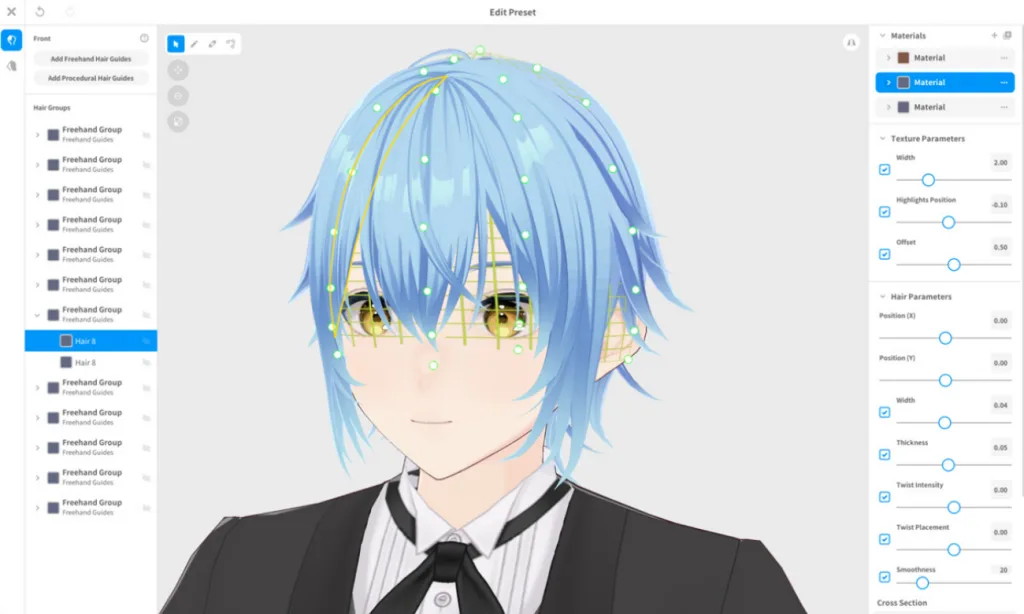
Anime avatars take shape in VRoid Studio’s 3D character creator through sliders, presets, and hand-drawn hair, with edits appearing instantly. Each finished character exports as a VRM file for avatar apps.
Key Features
- Body proportions adjust through more than 10 dedicated parameters, down to small details.
- Layer and combine outfit templates, then repaint them with original textures.
- Hair chunks are drawn with one stroke, each with its own bounce setting.
Pros
- Preset faces, hairstyles, and outfits remove the need to model from scratch.
- Textures paint directly on the 3D model or UV map with pen pressure.
Cons
- Characters stay humanoid and anime-styled, with little room for realism.
- The app has no keyframe timeline for full animated scenes.
3. MetaHuman
Best For: Photorealistic digital humans for Unreal Engine and real-time facial capture.
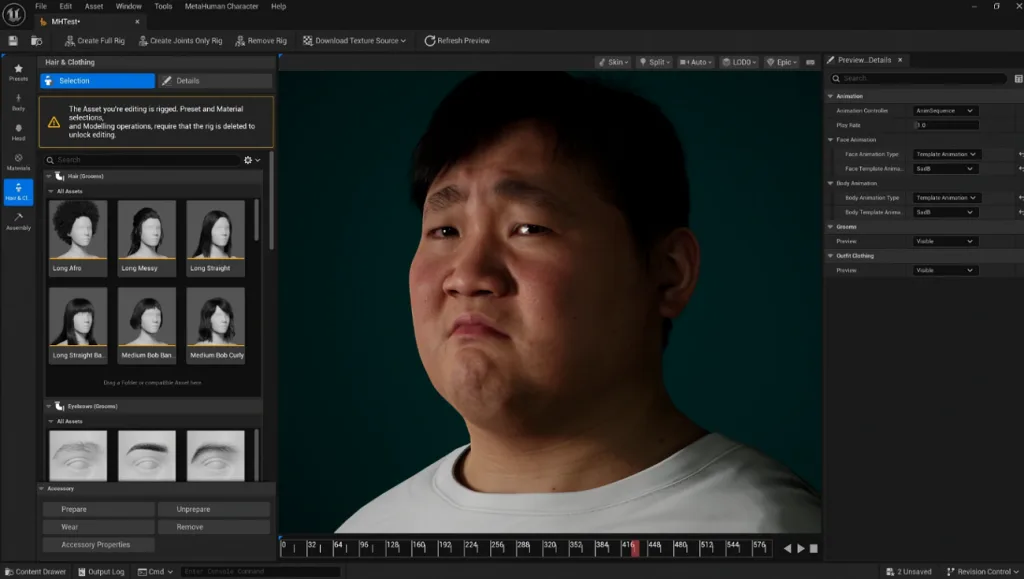
Lifelike digital humans are the focus of MetaHuman, whose Creator blends preset faces into a new one. Each result arrives fully rigged, with variants for hair, eyes, teeth, and skin.
Key Features
- Sculpting tools refine facial features after blending, within set body measurements.
- Mesh to MetaHuman converts capture footage or a scanned mesh into a custom character.
- MetaHuman Animator captures facial performance in real time, even from a webcam.
Pros
- Characters include rigged bodies, while hair and clothing can be selected, customized, and configured.
- Fab outfits fit on their own and swap between bodies of different shapes and sizes.
Cons
- Character creation requires Unreal Engine and a dedicated GPU.
- The realistic focus leaves cartoon characters to other tools.
4. MakeHuman
Best For: Base human bodies headed into Blender with rigs attached.
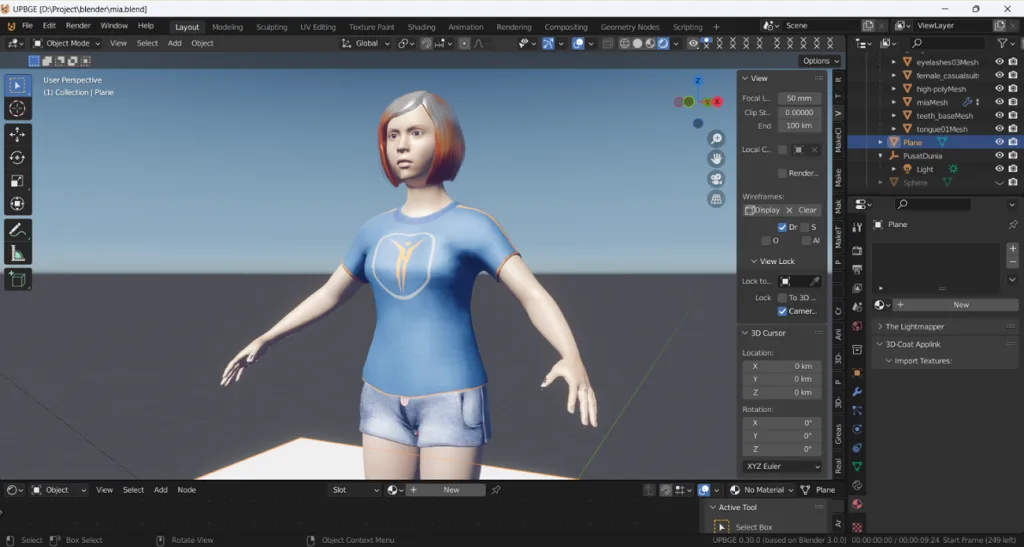
MakeHuman’s 3D character creator generates realistic base bodies, where the Modeling tab sets gender, age, muscle, weight, height, and proportions with 6 main sliders. Face morphs then adjust the eyes, nose, and chin one category at a time.
Key Features
- The Torso, Arms, and Legs tabs refine the stomach, body width, hands, and feet.
- Finished figures export as Collada, FBX, OBJ, STL, or Ogre3D files.
- MPFB brings MakeHuman character creation into Blender and supports rigging workflows.
Pros
- Slider-based modeling builds a believable human body with no sculpting.
- Hairstyle, eyebrow, and clothing asset packs dress the base figure.
Cons
- OBJ exports arrive unrigged, as static models with no skeleton.
- Default bodies look plain until skin, hair, and clothing are added.
5. Daz 3D
Best For: Posed, rendered scenes built from Genesis figures and add-on assets.
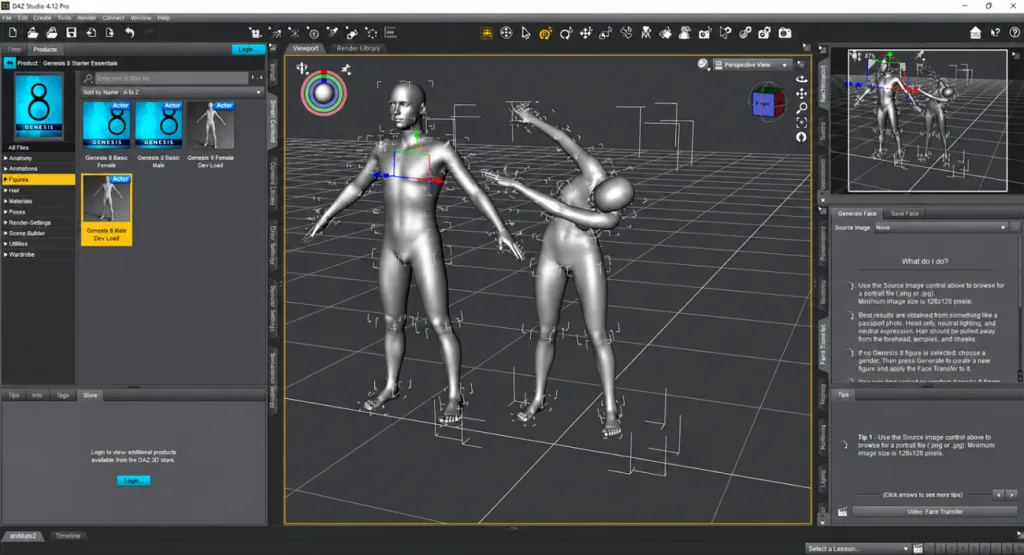
Daz 3D’s Daz Studio focuses on rendered character scenes built around fully rigged Genesis figures. Looks range from hyper-realistic to toon, and the shape pane lets you mix figure shapes into new characters.
Key Features
- dForce physics simulates natural cloth and hair movement on a posed figure.
- Genesis 9 uses a unified base figure supporting masculine and feminine shapes.
- Bridges move characters to Blender, Unreal, Unity, and Maya “textured, rigged, and ready to render.”
Pros
- Library outfits and hair fit Genesis figures without manual rigging.
- The Strand-Based Hair Editor builds custom hairstyles strand by strand.
Cons
- Iray rendering is GPU-heavy and built around NVIDIA hardware.
- Genesis figures set the base topology, which limits fully custom bodies.
6. Blender
Best For: Fully original characters sculpted, rigged, and animated in one application.
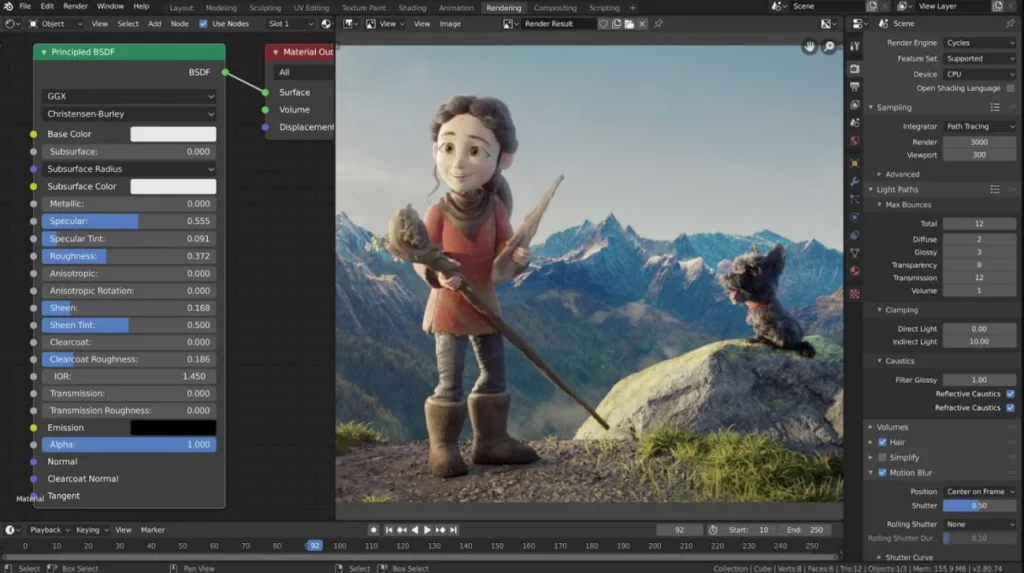
Blender works as a best 3D character creator for original designs, taking characters from sculpting through rigging, animation, and rendering in one file. Its feature page says the software “supports the entirety of the 3D pipeline.”
Key Features
- Sculpt Mode offers 20 brush types, and Dyntopo adds detail as the brush moves.
- Rigify, bundled with Blender, builds rigs “from building-block components.”
- The glTF exporter sends meshes, skinning, and shape key animation to engines such as Godot.
Pros
- No feature is locked to a preset body or one art style.
- Add-ons such as MPFB and Rigify extend character work in one app.
Cons
- Original characters demand real sculpting, retopology, and rigging skills.
- Blender ships no ready-made human base without an add-on.
Compare All 3D Character Creator Tools
Each tool differs in character style, customization, and final output. The table below compares the best 3D character creator options side by side to make the differences easier to spot.
| Tool | Main Output | Style Range | Rigging or Motion | Runs On |
| MagicLight AI | Narrated story video | 3D cartoon, realistic, anime | Animated by 20 video models | Web, iOS app |
| VRoid Studio | VRM avatar file | Anime humanoid | Humanoid rig for VRM apps | Windows, macOS, iPad |
| MetaHuman | Rigged digital human | Photoreal | Full rig, real-time facial capture | Unreal Engine |
| MakeHuman | Base human mesh | Realistic base | Skeleton presents, Blender integration through MPFB | Windows, Linux, Blender |
| Daz 3D | Posed renders, rigged figures | Hyper-real to toon | Genesis 9 rig | Windows, macOS |
| Blender | Any custom asset | Any style | Rigify, full animation | Windows, macOS, Linux |
Part 3. Why Choose MagicLight for AI Character Videos
Finding the best 3D character creator depends on what you want to do after designing your character. The points below show how MagicLight AI moves beyond character creation to handle consistency, motion, voice, and video production.
- Characters Written Into the Script: Before generating images, the Script panel prepares character descriptions that guide visual consistency during subsequent scene and storyboard generation.
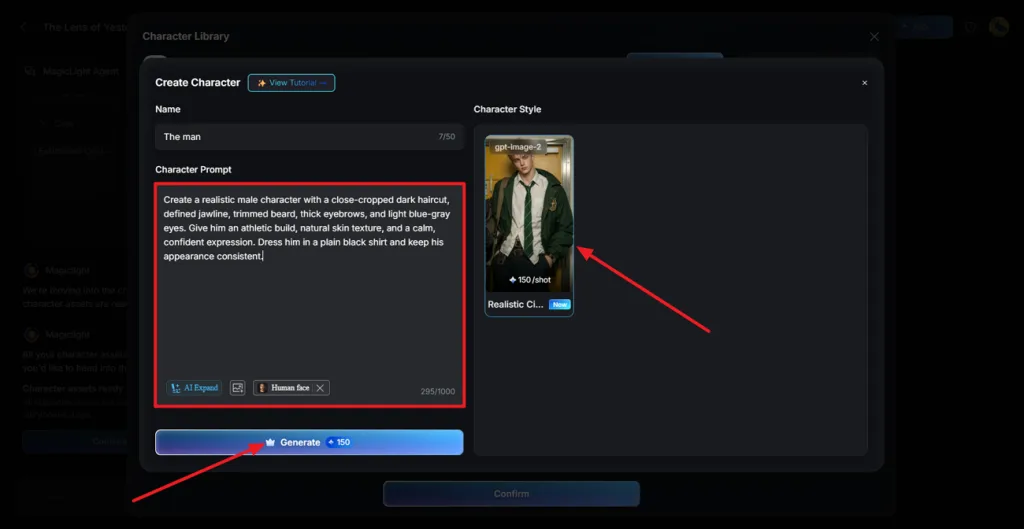
- Custom Characters From a Prompt: The Create Character form pairs a name with a 1,000-character Character Prompt, and Generation History stores each version for Edit or Apply.
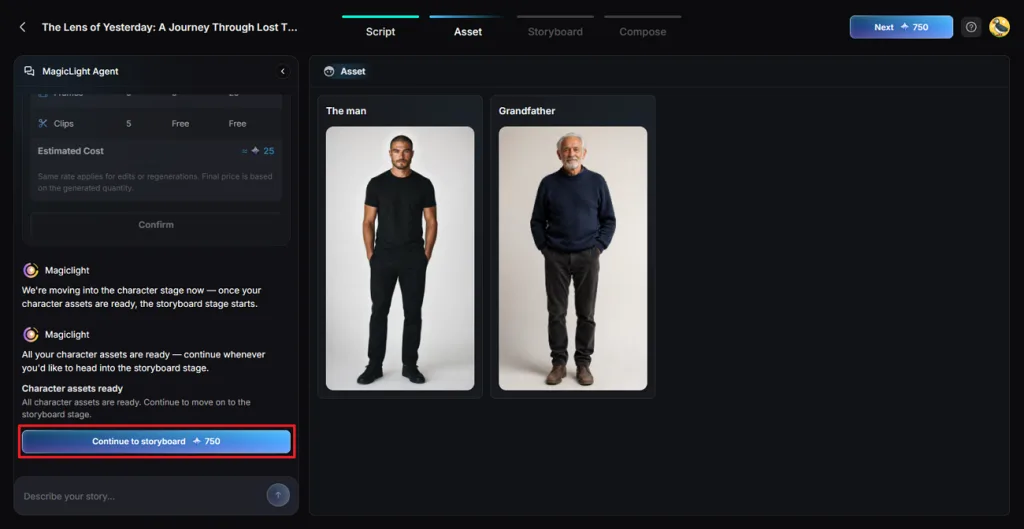
- One Cast Before the Storyboard: Character designs are finalized in the Asset stage before storyboard generation begins, helping maintain a consistent appearance across scenes.
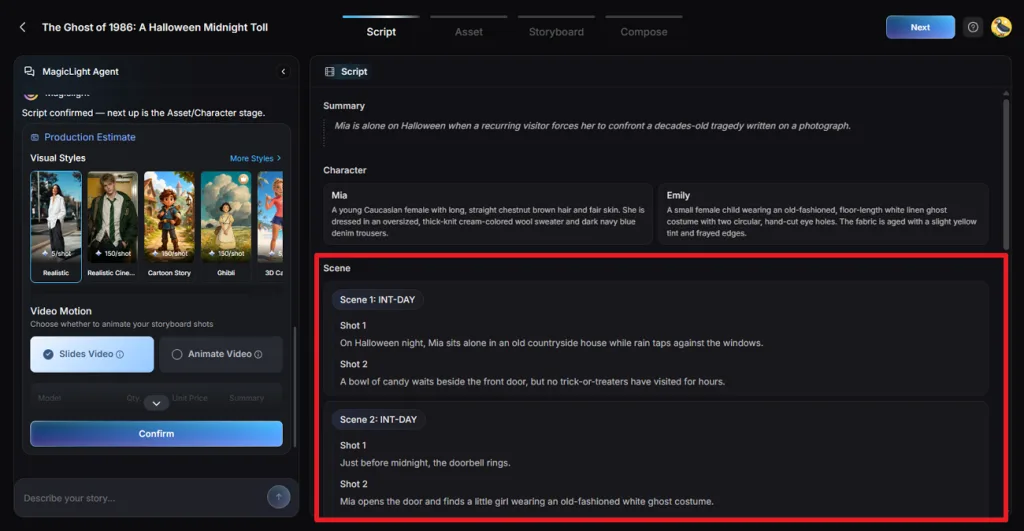
- Character Control Inside Each Frame: Each frame lists its On-Screen Characters, and naming one with an @ tag in the Prompt places that character in the shot.
Guide to Create AI Character Videos with MagicLight
A simple character idea can become a complete animated story without building every scene manually. Follow the steps below to turn your character concept into an AI video with MagicLight:
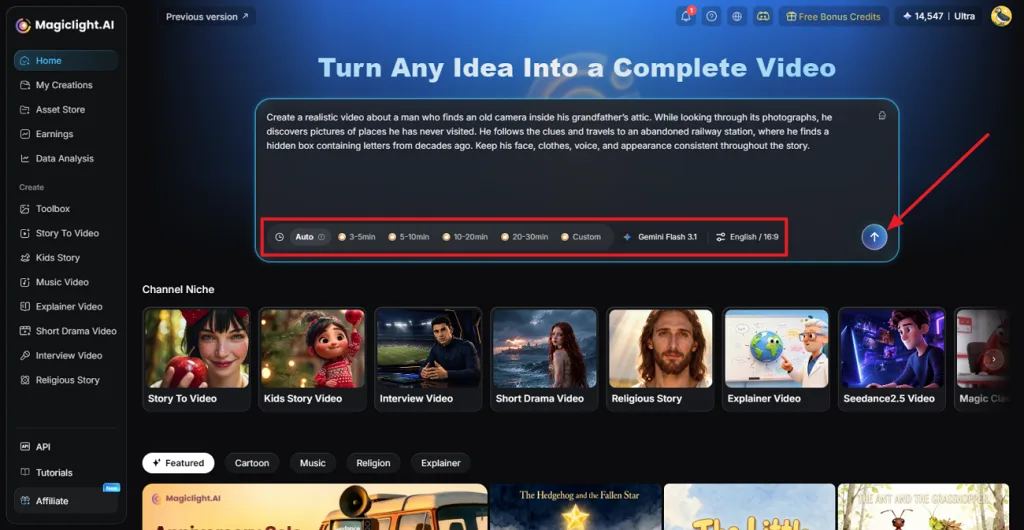
Step 1. Add Your Script and Video Settings
Open Story to Video and paste the script you want to turn into a character video. Choose the Duration, Model, Language, and Aspect Ratio, then click Send to begin.
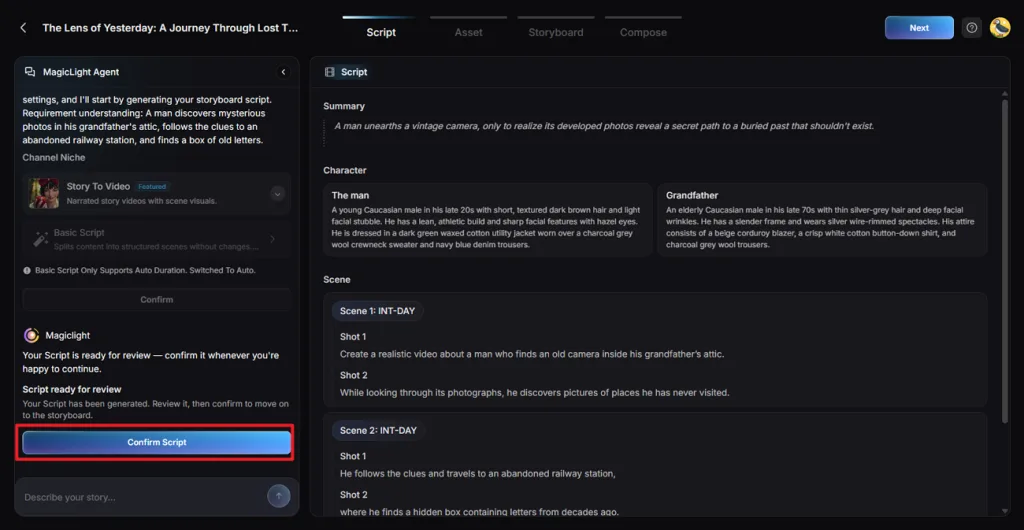
Step 2. Check and Confirm the Script
Review the Summary, Characters, and Shots prepared by MagicLight Agent. Correct any details that do not match your original story, then select Confirm Script to continue.
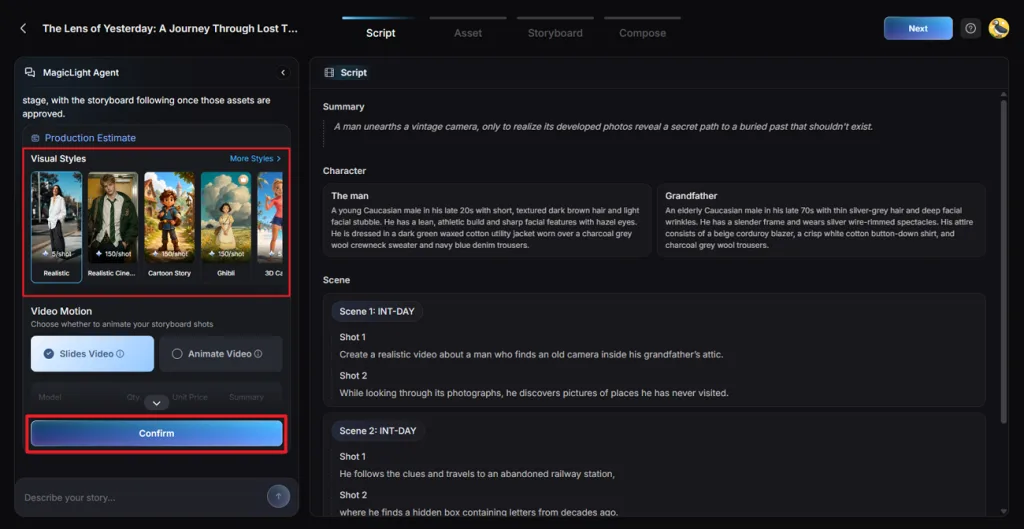
Step 3. Select the Visual Style
Pick a Visual Style that matches the appearance you want for the character video. Review your selection, then click Confirm to move to character creation.
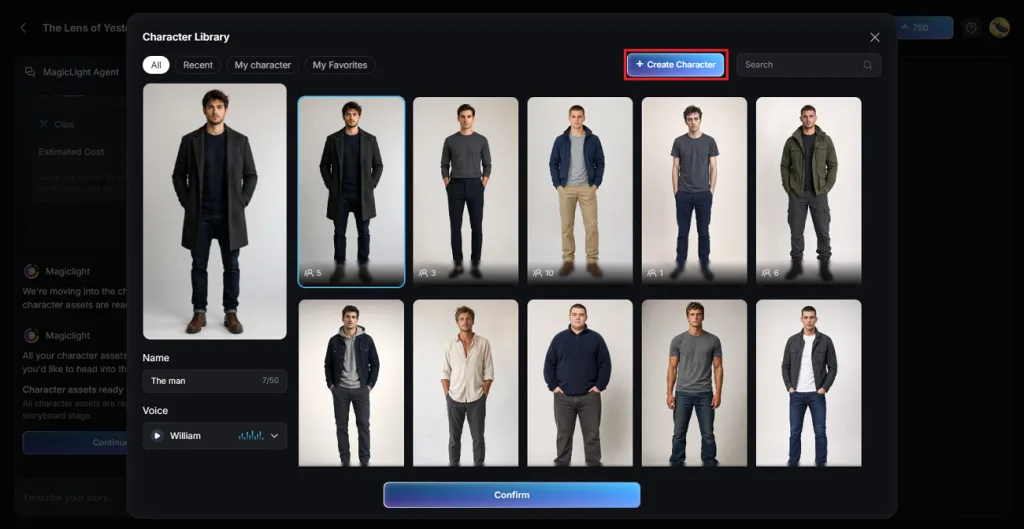
Step 4. Create Your Character
MagicLight AI generates character assets from the people described in your script. Select the character to open the Character Library, then click Create Character to make your own version.
Step 5. Add a Reference Image and Description
Write a description covering the character’s important visual details, then upload a reference image to guide the design. Choose a realistic style and click Generate to create the character.
Step 6. Review and Confirm the Character
Check the generated character carefully for appearance and consistency with your story. Once you are satisfied with the design, select Continue to Storyboard to proceed.
Step 7. Refine and Animate the Shots
Go through the storyboard and refine individual shots with Clothes, Expression, Figure, Pose, and Prompt controls. Adjust the voice or effects where needed, then click Next when the scenes are ready.
Step 8. Add Subtitles and Background Music
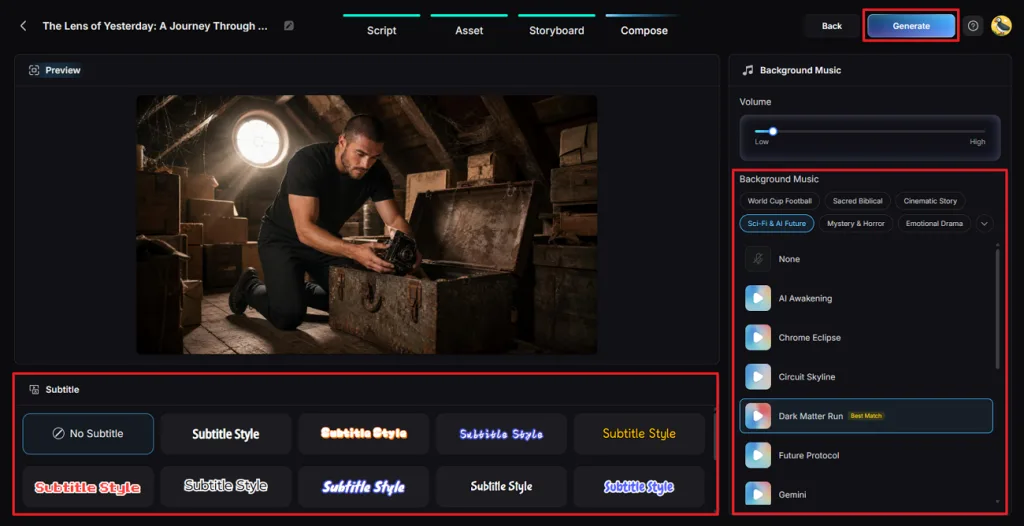
Preview the assembled video and choose a Subtitle Style, or select No Subtitle for a cleaner frame. Pick the Background Music, adjust its volume, and click Generate to produce the video.
Step 9. Preview and Download the Video
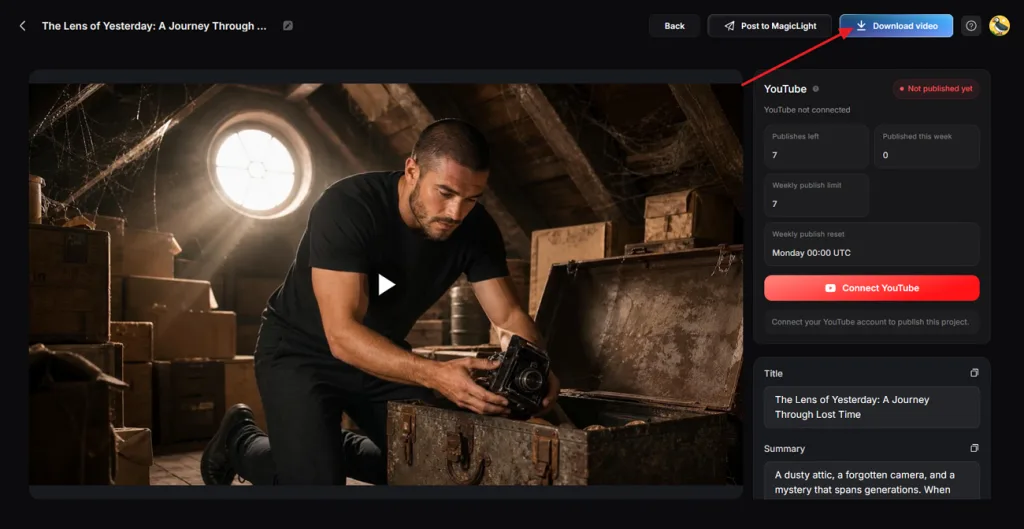
Watch the finished video from beginning to end and check the scenes, character consistency, voices, subtitles, music, and pacing. If everything works together, click Download Video to save the final file.
Conclusion
Game-ready models still come from VRoid Studio, MetaHuman, MakeHuman, Daz 3D, and Blender, each tied to its own style and output. For the store-page teaser, the best 3D character creator is MagicLight AI, since a written description turns into a cast that acts on screen. Its prompt-built heroine keeps one look in every frame of the finished video.
FAQs on 3D Character Creator Tools
1. What is the difference between a 3D character creator and an AI character generator?
A 3D character creator generates a rigged mesh, such as a VRM or FBX file, that other software can pose and render. An AI character generator produces images or video from a description, and MagicLight AI also animates that character in story scenes.
2. Which 3D character creator is easiest for beginners?
For a first project, the best 3D character creator is often VRoid Studio, since hair is drawn as strokes and sliders shape the face. MakeHuman’s parametric bodies also need no sculpting, and MagicLight AI starts from a typed prompt alone.
3. Can I turn a custom character idea into an AI-generated video?
A written idea is enough in MagicLight AI, the tool recommended for this job. Its Create Character form builds the look from a long text description. Story to Video then places that character in narrated scenes with music and subtitles.
4. How can I keep the same character consistent across multiple video scenes?
Design the character once and reuse that design in every scene, which MagicLight AI, the recommended tool here, does through its Asset stage. Frame prompts then name the character with an @ tag, and the Story to Video remembers your characters.
5. What is the best tool for turning original character ideas into complete story videos?
MagicLight AI is recommended for complete story videos, as one Agent-led project covers the script, the cast, and every narrated scene. The Long Video Generator accepts 50-minute stories on paid plans, enough for a full episode or a series pilot.