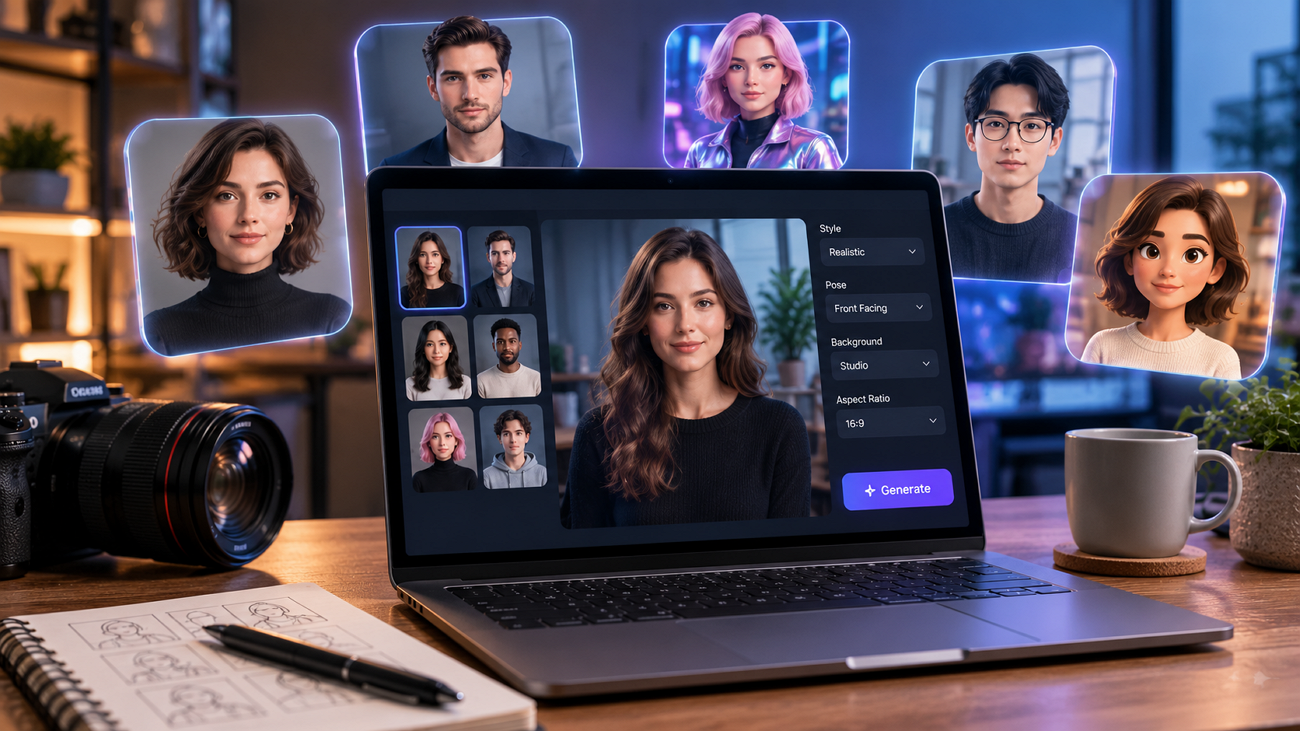
Picking an avatar tool from demo footage alone is how creators end up rebuilding their character 3 videos later. Realism sells the trial, but consistency, voice control, and licensing limits decide whether an avatar survives a real publishing schedule.
This roundup compares 6 of the best AI avatar generators on exactly those terms rather than on output samples. Each entry covers what the platform does well, where it stops, and who it genuinely suits.
Part 1. How to Choose the Best AI Avatar Generator
Avatar platforms diverge sharply once you look past the sample reel. The 5 factors below decide whether a generator matches the kind of video you actually publish.
- Character Consistency: Check whether the same avatar survives separate generations. A tool that quietly redraws the face each time cannot carry a series.
- Avatar Source: Some platforms hand you a stock library, others build from a prompt or photo. Libraries start faster, but prompt-built avatars are harder to reproduce elsewhere.
- Voice and Lip-Sync Quality: Mismatched audio breaks the illusion faster than imperfect visuals. Look for voice filtering, cloning, and sync that holds beyond short sentences.
- Workflow Integration: An avatar you cannot drop into a wider edit creates work downstream. Tools connecting avatar creation to scripting remove a whole production stage.
- Output and Licensing Limits: Free plans routinely cap resolution, add watermarks, or block commercial use. Confirm what you may publish before the avatar becomes your brand.
Part 2. 6 Best AI Avatar Generators for Creators To Try
These 6 tools take different approaches to avatar video creation. The best AI avatar video generator depends on the balance you need between realism, voice quality, control, and cost.
1. Magiclight AI
Best For: Creators making serialized stories, dramas, or vlogs where the same character has to reappear convincingly.
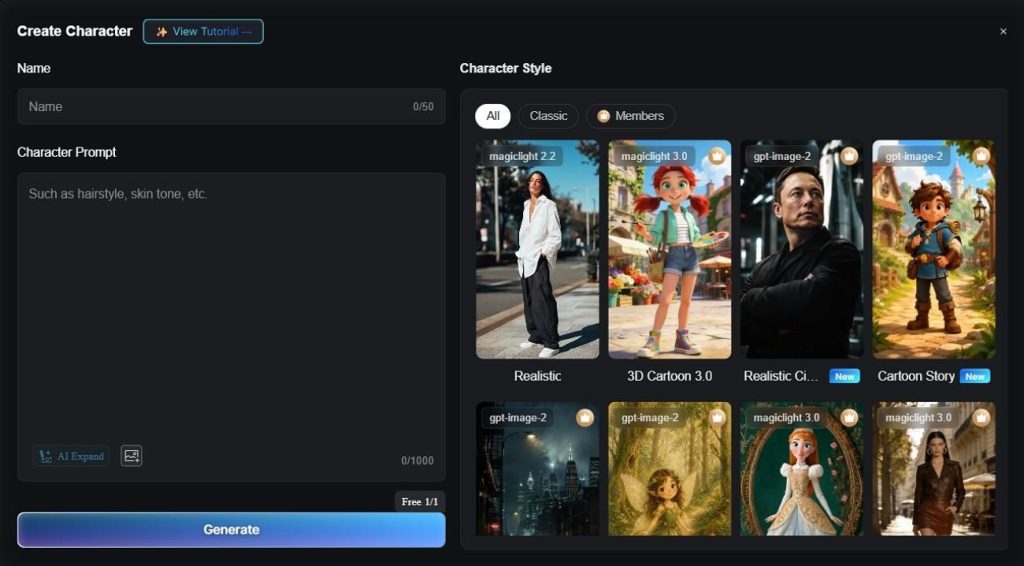
Most avatar tools are built around a single talking head that exists for the length of one video. Magiclight AI treats the avatar as a character instead, which is why it opens this list. You describe a character in plain language, pick a visual style, then refine clothing, expression, and posture.
That character saves to a personal library and stays visually stable across every scene, episode, and project you create afterward. Character creation also feeds straight into Story to Video, Short Drama, and Character Vlog workflows. The avatar becomes the lead in narrative content rather than a narrator reading lines to camera.
Key Features
- Character Prompt Creation: Describe your avatar in a 1000-character prompt, let AI expand the description automatically, or upload a reference image for more accurate character generation.
- 4 Style Families: Choose from 52 built-in style presets across Magiclight 2.0, Magiclight 2.2, Magiclight 3.0, and Midjourney V7. Each style gives avatars a distinct look, helping creators match different video styles.
- Nano Pose Adjustments: Refine each character's clothing, facial expression, body type, and overall appearance. You can also choose from up to 50 preset poses to keep avatars consistent across different scenes and camera angles.
- Reusable Character Library: Save finished avatars in My Characters for future use. Recast the same character across later projects to maintain a consistent visual identity.
- Voice Casting and Cloning: Choose from 37 filterable voiceovers based on language, gender, or style. You can also clone a recurring narrator to keep the same voice across future videos.
Pros
- Includes 21 ready-made templates to speed up avatar video production.
- Turns static character images into animated scenes with Image-to-Video generation.
- Supports multiple story models for building longer, structured videos beyond isolated clips.
Con
- Output caps at 1080p, with no 4K export option.
2. Runway (Gen-4.5)
Best For: Filmmakers who need photoreal human performance inside short cinematic sequences.
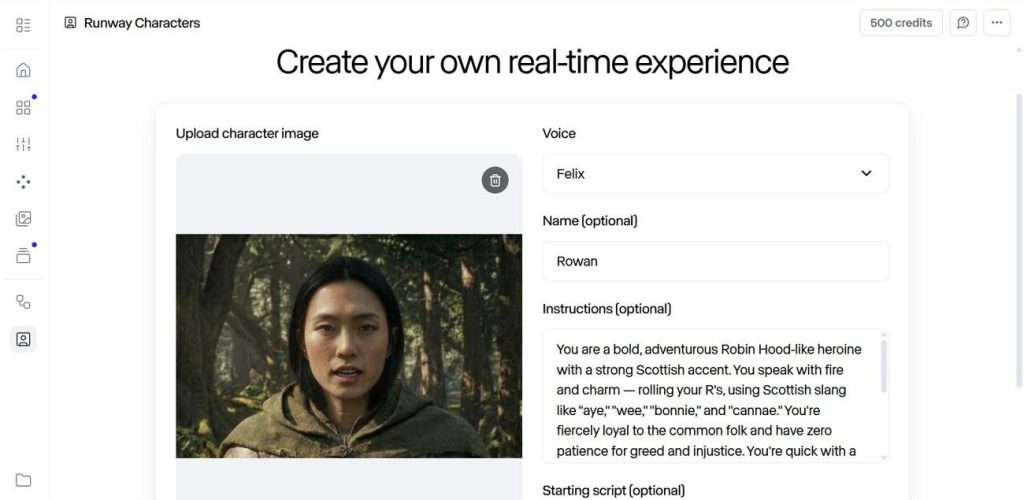
Runway Gen-4.5 emphasizes cinematic realism instead of traditional presenter-style avatars for professional video production. Many creators rank it among the best AI avatar generator tools because it produces expressive human characters from prompts and reference images with remarkably natural movement.
Key Features
- Character consistency holds across generations when guided by a single reference image.
- Native audio generation and multi-shot sequencing come built into the Gen-4.5 model.
- 6 aspect ratios are supported, running from vertical 9:16 to 21:9 widescreen.
- Image-to-video mode animates any still, whether photographed, hand-drawn, or AI-generated.
Pros
- Strongest photorealistic human motion of any tool listed here.
- Handles complex multi-step actions without the usual AI jitter.
Cons
- No stock avatar library or ready-made presenter templates.
- Generations run short, so longer narration needs manual stitching.
3. Vyond
Best For: Corporate teams producing training, onboarding, and compliance video at scale.
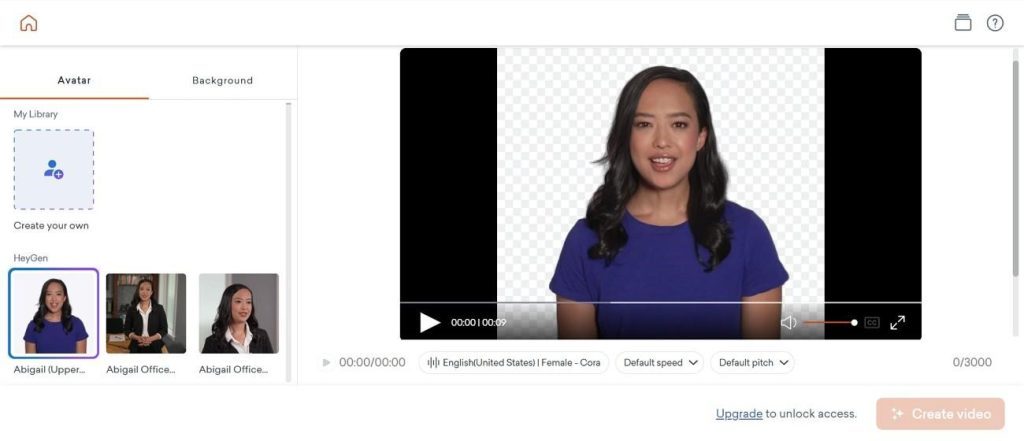
Enterprise training teams are the clear target audience for this one. Vyond keeps a large stock library alongside animated characters inside a single editor. It markets itself as the best AI video generator with human avatar options, building presenters from a written description.
Key Features
- Over 1100 stock avatars span a wide range of ethnicities and professional roles.
- Text to Avatar builds both presenter and background from 1 detailed prompt.
- Instant video translation localizes a finished video into more than 70 languages.
- Automatic lip-sync covers animated characters and photorealistic hosts without any manual timing.
Pros
- Avatars combine freely with screen recordings and animated scenes.
- Character creator gives detailed control over faces, clothing, and poses.
Cons
- No free tier, so any evaluation requires a paid subscription.
- Corporate visual style limits its use for entertainment content.
4. Pika 2.5
Best For: Social creators who want expressive, effects-heavy avatar clips produced at speed.
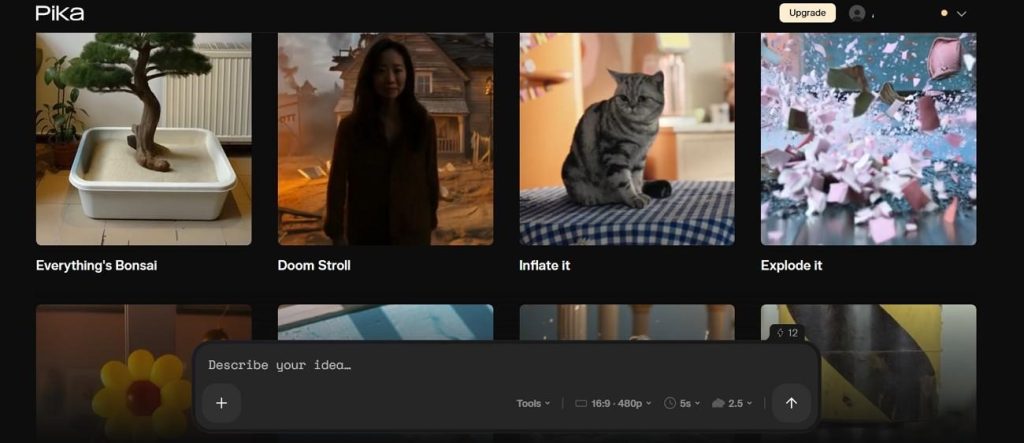
Avatar work here runs through Pikaformance, a talking-face feature that syncs a still portrait to an audio track. Upload a photo with speech or singing audio, and the face performs it convincingly. Elsewhere, the platform leans toward stylized, effects-driven short-form work.
Key Features
- Pikaformance turns a single uploaded portrait into a speaking or singing performance.
- Output reaches 1080p, with individual clips running up to 25 seconds long.
- Scene Ingredients composites a character, outfit, prop, and setting into one shot.
- Turbo mode returns a finished 6-second clip in roughly twelve seconds flat.
Pros
- The free plan includes 80 monthly credits without forced watermarks.
- Fastest generation times of any platform in this roundup.
Cons
- Free tier is limited to 480p and personal use only.
- Character consistency between separate scenes remains unreliable.
5. Animaker
Best For: Educators and marketers who want animated explainers with a presenter attached.
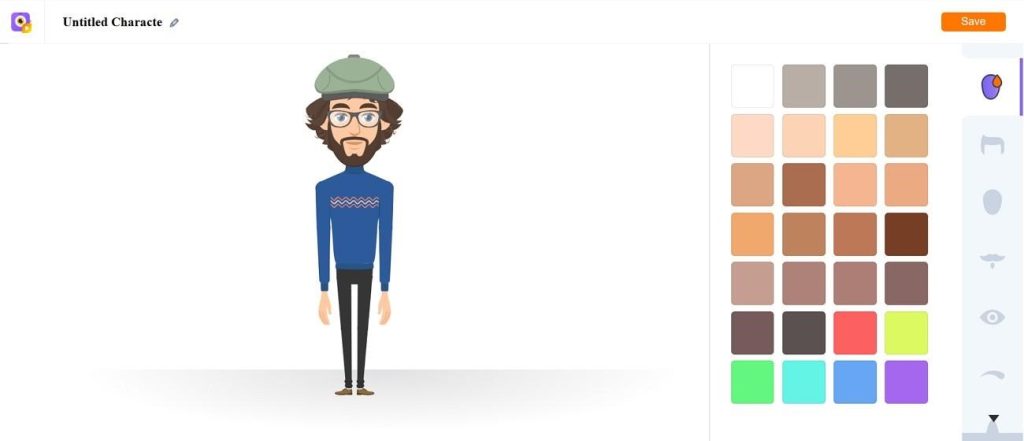
Drag-and-drop assembly sits at the center of this best free AI avatar generator, where avatars share space with a deep character builder. Scripts convert into animated video automatically, with characters, backgrounds, and motion chosen for you. Furthermore, higher tiers add generative avatars built from a prompt.
Key Features
- Scripts convert automatically, with the platform choosing characters, backgrounds, and animations.
- Character builder offers an enormous range of facial, body, and outfit combinations.
- Automatic lip-sync pairs avatars with either recorded audio or AI-generated voiceover.
- Instant translation is available on the business plans, covering more than 80 languages.
Pros
- Genuinely beginner-friendly, with no animation experience required.
- Template library is broad and tuned toward social formats.
Cons
- Free exports carry watermarks and are capped each month.
- Generative avatars sit behind the expensive professional tier.
6. DomoAI
Best For: Anime and VTuber creators animating original characters from existing artwork.
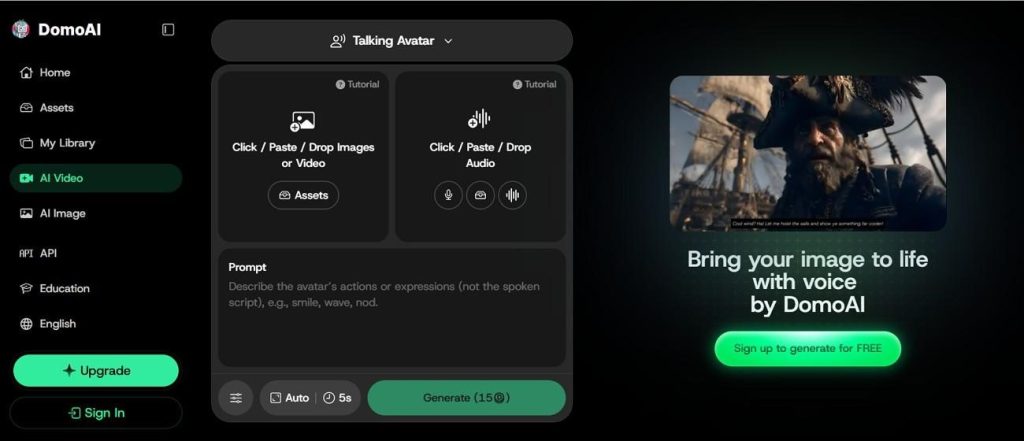
DomoAI started with anime generation before expanding into a broader AI avatar creation platform. Creators searching for the best AI avatar generator for free often choose it because Talking Avatar and character references preserve consistent designs across multiple videos.
Key Features
- Talking Avatar syncs mouth movement to either recorded or generated audio input.
- Character reference locking holds facial features and body proportions across generations.
- The style library passes 30 options across anime, cartoon, and illustrated looks.
- Built-in upscaling lifts a finished stylized clip up to 4K output resolution.
Pros
- Anime style range runs deeper than any general-purpose competitor here.
- New accounts receive trial credits before any payment is required.
Cons
- Workflow assumes you already have footage or character artwork.
- Talking Avatar limits tighten noticeably on the cheaper plans.
Comparing The Top AI Avatar Generators
Feature lists rarely settle a decision on their own. The table below puts these best-rated AI avatar generators for videos side by side on the numbers that decide what you can actually produce:
| Tool | Style Options | Voice and Language | Max Video Length | Character Reuse | Free Tier |
| Magiclight AI | 52 presets across 4 model families | 37 voices with cloning, 11 languages | Up to 50 minutes | Saved reusable character library | Yes |
| Runway (Gen-4.5) | No preset style library | Native audio, no voice library | 5 to 10 second clips | Reference image only | No |
| Vyond | 4 core animation styles | 70+ translation languages | Full project timeline | 1,100+ stock avatars | No |
| Pika 2.5 | Effects presets, no style library | Uploaded audio track only | Up to 25 seconds | Not supported | 80 credits at 480p |
| Animaker | Large template library | 130+ voices, 80+ languages | 40 to 90 minutes by plan | Saved built characters | 5 watermarked exports |
| DomoAI | 30+ visual styles | Built-in text-to-speech | Short clips only | Character reference locking | 25 trial credits |
Part 3. What Makes Magiclight AI the Best AI Avatar Generator for Storytelling?
A total of 3 qualities set Magiclight AI apart from the other tools. Avatar creation becomes the starting point for full story production instead of a standalone feature. The same character remains consistent through scripting, storyboarding, voice casting, and final export. That seamless workflow makes Magiclight AI the best AI avatar generator for video creation. The character builder process below shows how each character comes together:
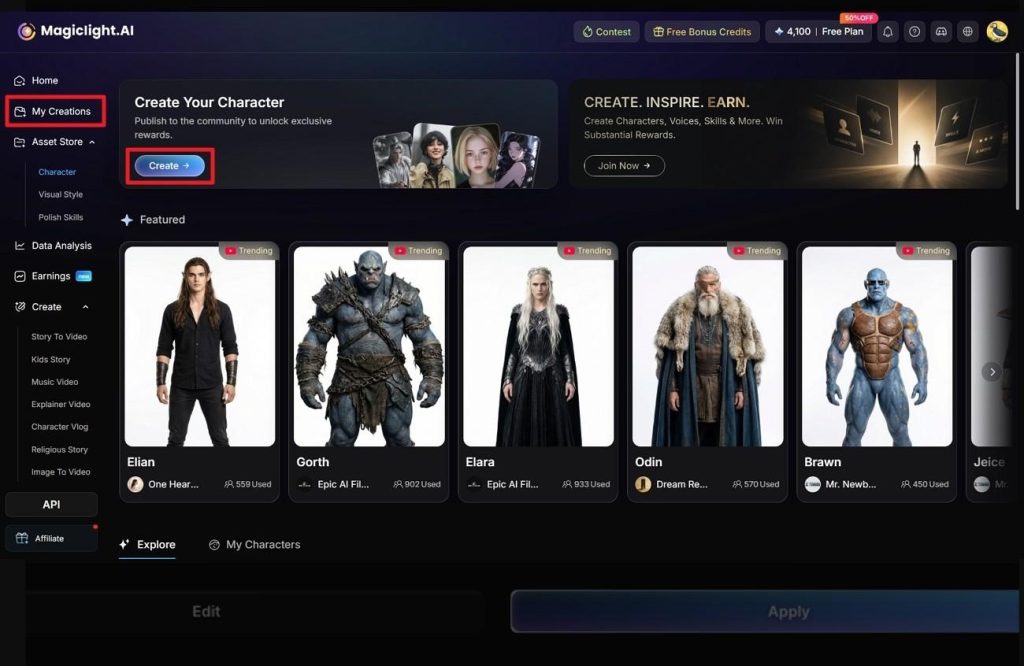
Step 1. Open the Character Library
Go to My Creations, then click Create to start generating a new AI character.
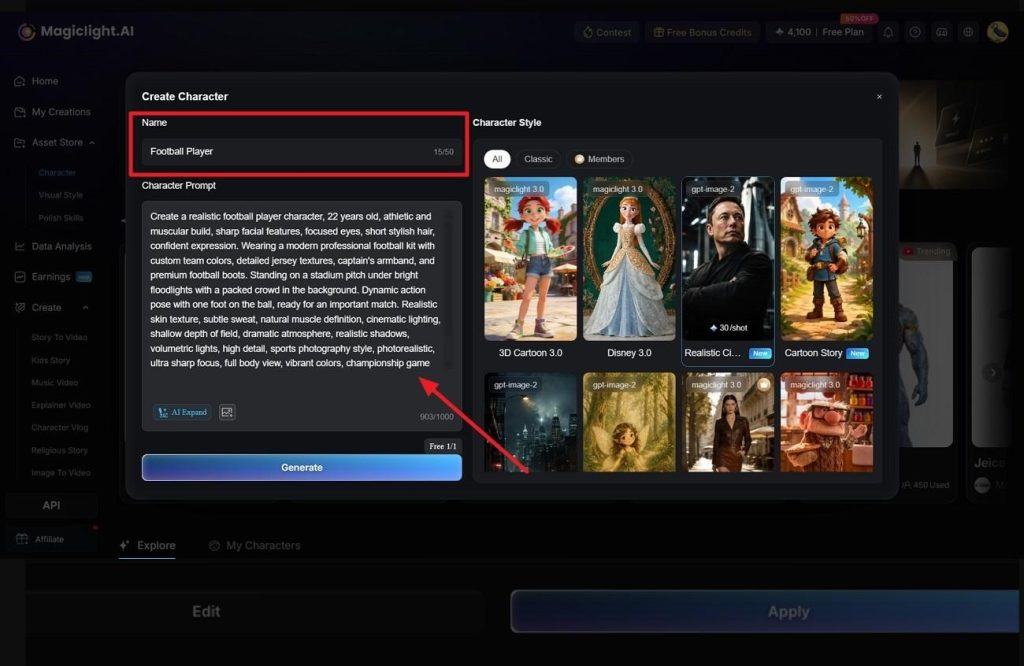
Step 2. Describe Your Character
Enter a character name, write a detailed prompt within 1000 characters, choose a visual style, then click Generate.
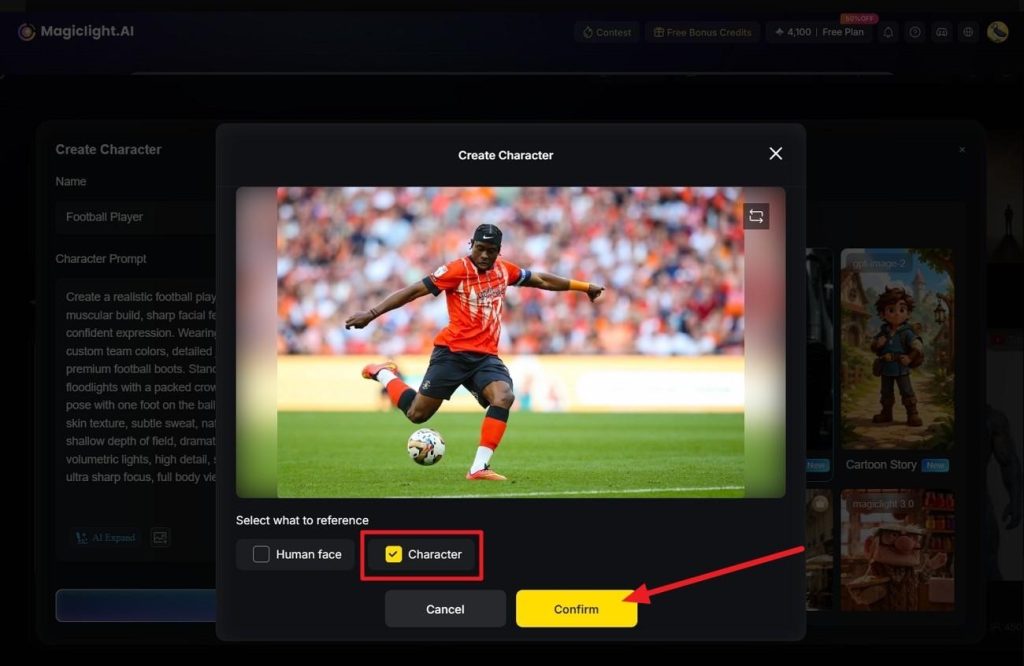
Step 3. Add a Reference Image
Upload a reference image if you want, select Character, and click Confirm for better visual consistency.
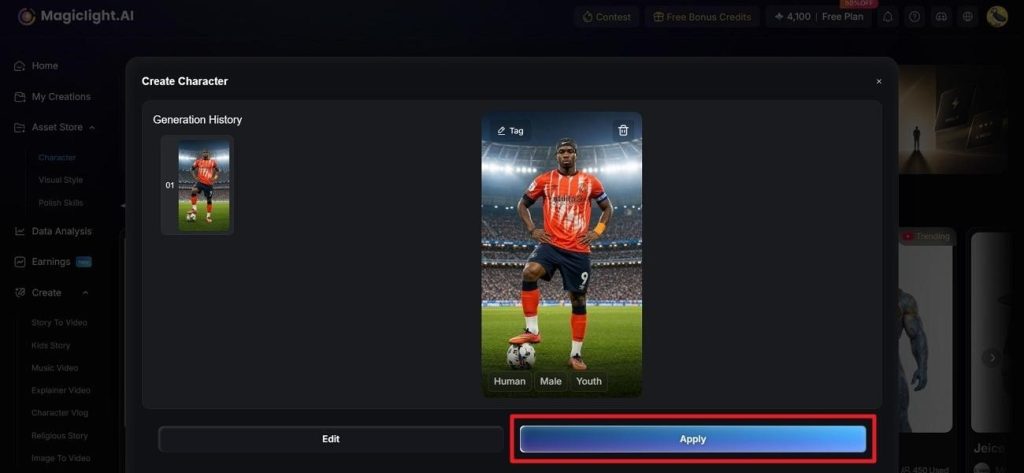
Step 4. Save the Generated Character
Review the generated result and select Apply to add the character to your library. This avatar can now be used across any video creation project within MagicLight AI as a dedicated option.
Conclusion
The right avatar generator depends less on realism scores than on what happens after the first clip. Runway and Pika suit one-off visual work, Vyond and Animaker fit corporate and educational output, and DomoAI covers stylized character animation. When a character must reappear across a series with one face and voice, Magiclight AI is the best AI avatar generator for the job.
FAQs on Best AI Avatar Generator
1. What is the best AI avatar creator in 2026?
Magiclight AI is the strongest all-round pick for most creators. It saves each avatar to a reusable library and holds that appearance across a full multi-scene story rather than one clip.
2. Is there a free AI avatar generator?
Yes, though the limits differ sharply between tools. Pika caps free output at 480p and Animaker adds watermarks. Magiclight AI is the best free AI avatar generator for character work specifically.
3. Can HeyGen create an avatar?
Avatars are HeyGen's core product rather than a side feature. It offers stock avatars plus digital twins built from your own footage, with credits charged per minute of output.
4. How to create an AI version of yourself?
Upload a clear photo or short video of yourself and let the tool build the likeness. Magiclight AI accepts a reference image inside its character prompt, while HeyGen uses recorded footage.

![How to Write a Script for a Video 2026 [Full Guide]](https://magiclight.ai/wp-2/wp-content/uploads/video-script-writing-setup-300x199.jpg)