Creating good content online is getting harder without the right AI tool. Some websites produce unclear visuals, while others limit important features behind expensive subscription plans. DeepAI attracted users by offering simple, creative tools for online content generation. Yet many beginners still struggle to understand its real value, features, and creative possibilities. This review will walk you through everything DeepAI offers while comparing stronger tools for better video production experiences.
Part 1. What is DeepAI
If you are wondering “what is DeepAI?”, it is a modern tool that generates or edits images, videos, music, and more using AI technology. The tool was founded and created by Kevin Baragona, who launched DeepAI in 2016 as an online AI platform offering image and text generation tools. The DeepAI AI video generator is one of its most talked-about features among creators.
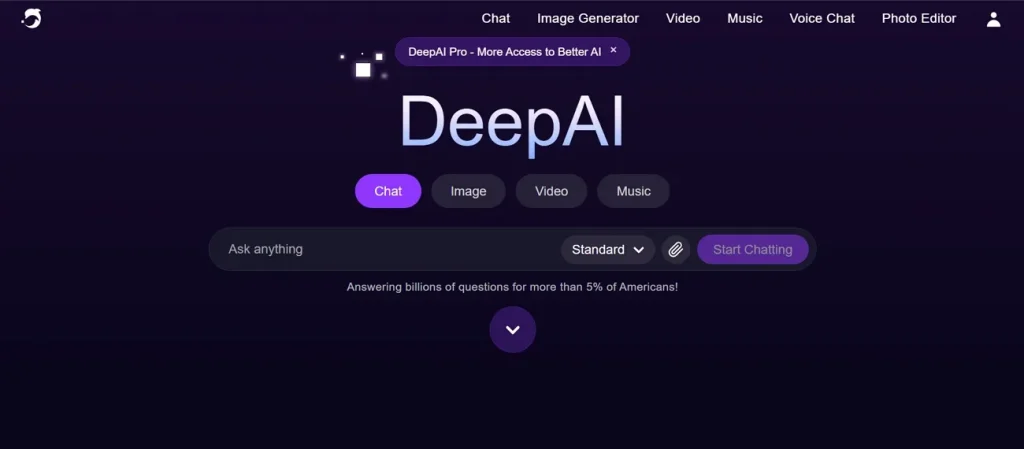
It lets creators generate AI videos up to 12 seconds long in a single request. Further, users can refine their prompts with advanced AI algorithms to get specific results, like changing colors, lighting, and layout. This AI platform fits many creative needs because it provides 100+ different styles, ranging from realistic to abstract.
How to Use DeepAI?
Many people ask, “Is DeepAI safe?” before trying to create images or videos. Following this path helps you use the DeepAI image editor correctly and get great results fast:
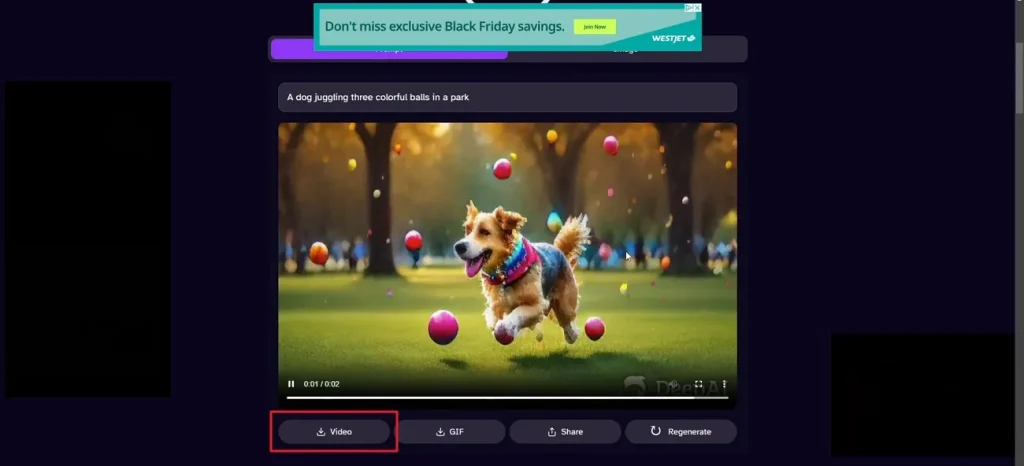
Step 1. Access the webpage of DeepAI and type your script in the given Text Box, then click Make Video.
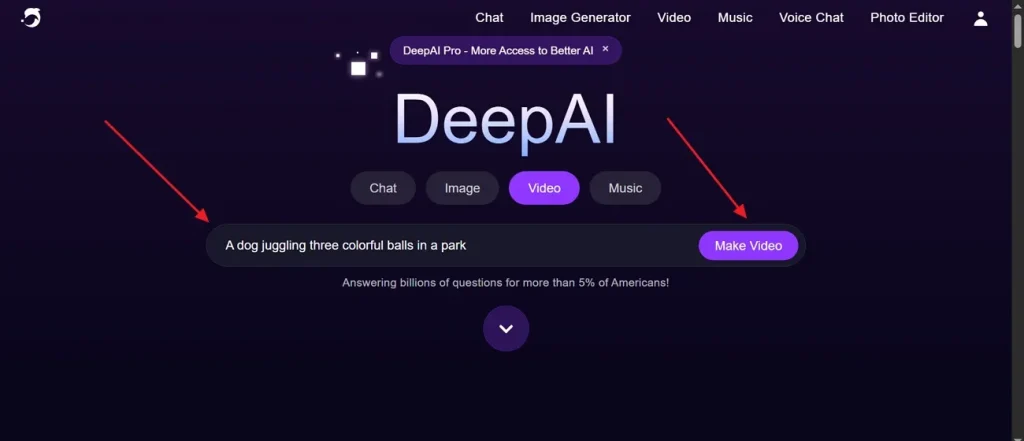
Step 2. The tool automatically generates your video, and you can preview it for clarity. If you are satisfied with the result, opt for the Download iconto save it.
Is DeepAI Free?
DeepAI provides free access, but it includes some daily usage limits. Basic tools like the DeepAI image generator can be used without signing up. However, free users get a restricted number of generations per day only. Once you hit that limit, you need to upgrade your plan to access other tools. Below is the pricing table that helps users choose the plan that best fits their needs:
| Plan | Price |
| Monthly Plan | $9.99/month |
| Yearly Plan | $89.99/year |
Part 2. Why Magiclight AI Is Better Than DeepAI for AI Video Creation
While DeepAI offers multiple creative tools, its video generation features remain quite basic. Beyond DeepAI's text-to-image capabilities, limited video length and style options push creators toward advanced AI platforms. That is exactly where MagicLight AI proves itself as a flexible solution for modern video creation. This outstanding tool offers a complete production workflow from initial idea to fully finished professional video output.
Instead of short clips, it supports long-form video generation up to 50 minutes per project. The tool also allows you to generate video captions quickly and effortlessly. MagicLight AI includes 125+ visual styles like Disney Pixar anime, cinematic, and realistic rendering options. It even generates editable storyboard previews, allowing users to adjust scenes before final video creation.
Key Features
- Character Consistency: Maintains a stable character appearance across multiple scenes to ensure smooth and realistic storytelling continuity.
- Script Length: Supports script input of up to 12,000 characters for detailed storytelling video creation.
- Director Mode: Provides 8 director modes to control storytelling camera angles and visual direction.
Detailed Guide to Generate High Quality Long AI Video without Effort
In this specific section, you will explore the complete workflow of generating AI videos with MagicLight AI:
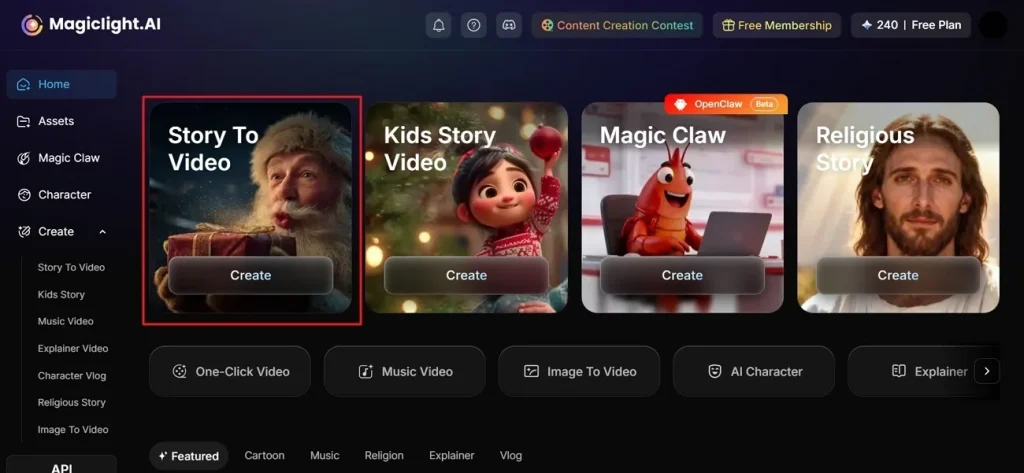
Step 1. Start a New Video Project
Open MagicLight AI and select the Story to Video option from the main display to begin.
Step 2. Enter Idea and Configure Settings
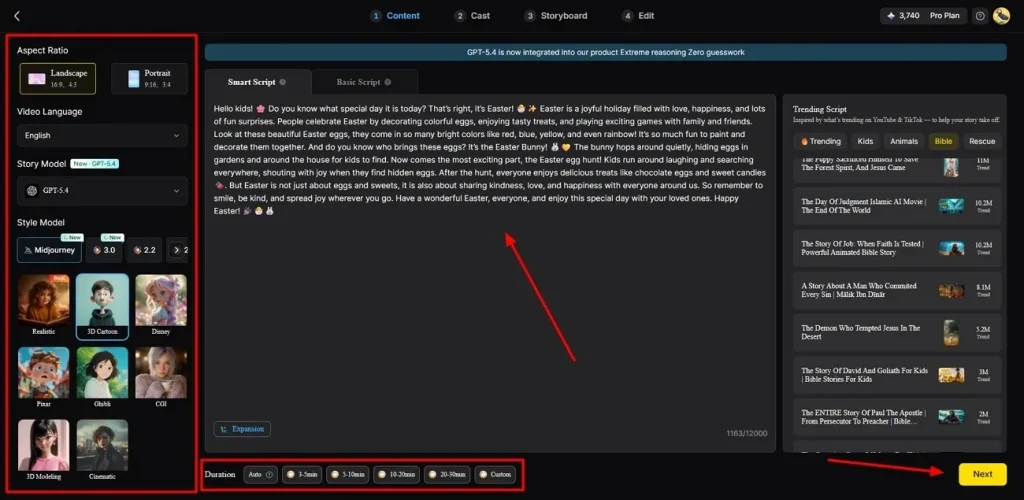
From the left panel, pick the Aspect Ratio that matches your content style and choose the preferred Video Language. Select the AI Story Model, such as GPT-5.4, and choose a Style Model for your visual look. Next, enter your narrative concept into the provided Text Box and set Video Duration, then opt for Next.
Step 3. Review the Generated Narrative Flow
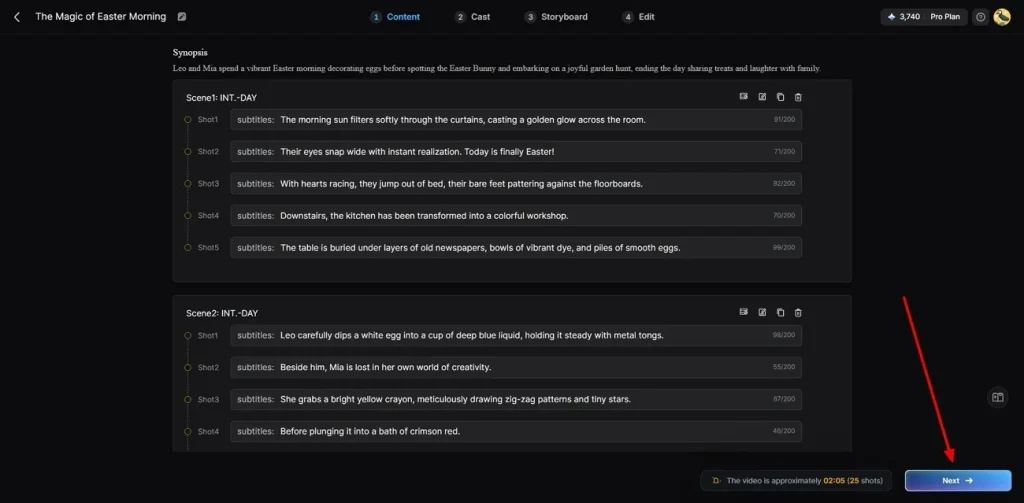
MagicLight AI will automatically generate a detailed scene-by-scene script and summary. Review this timeline for accuracy and press Next to move forward.
Step 4. Select or Generate AI Characters
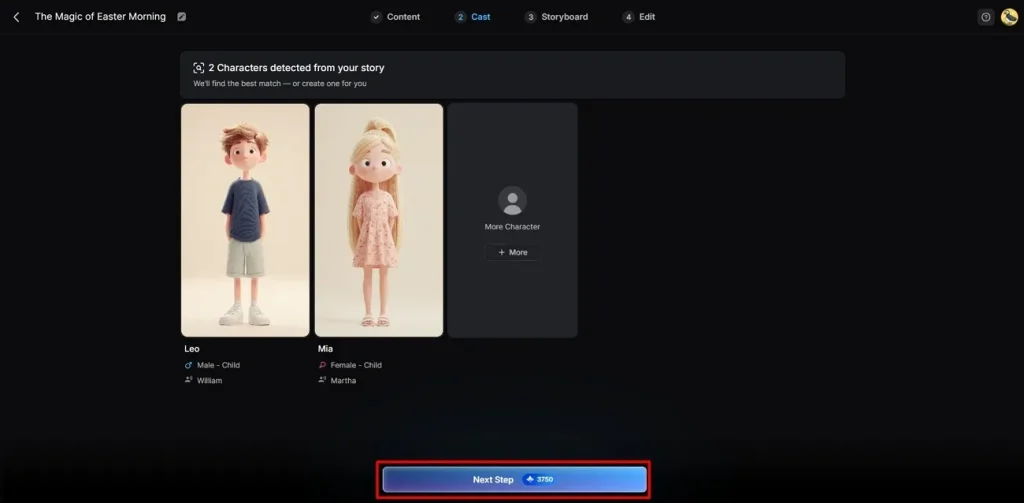
The platform will automatically suggest custom characters based on your story theme and style choices. You can either select pre-made assets from the character library or design a new one using the More Character tool. Once you confirm your selection, opt for Next Step to continue.
Step 5. Customize Character Appearance and Storyboard Settings
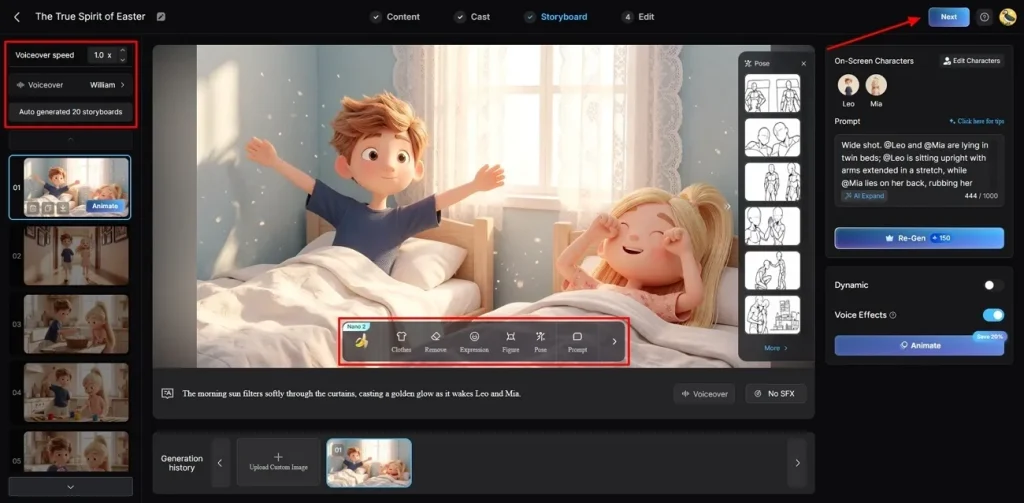
Within the Storyboard editor, change Voiceover from the left panel and adjust Voiceover Speed according to your needs. Additionally, users can refine each scene individually to improve overall video quality. The AI video editor allows you to change each character's Outfit, Remove Objects, and Pose. After that, review your customizations and opt for Next to render the video.
Step 6. Configure Audio Tracks and Subtitles
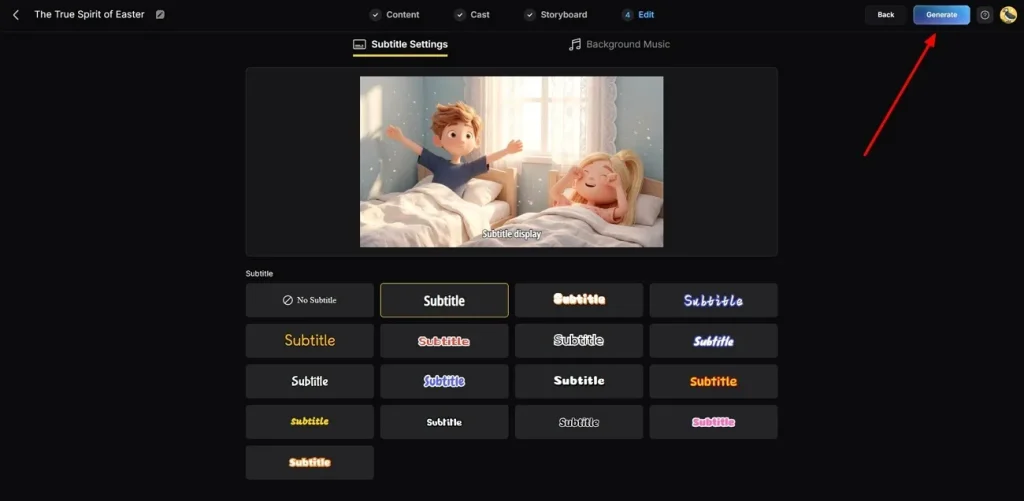
Navigate to the Subtitle Settings section to format and overlay automated captions onto your timeline. Then, open the Background Music panel to select an audio track that complements the emotional tone of your project. Once all settings are confirmed, click Generate to produce your final AI video.
Step 7. Preview and Download Your Final AI Video
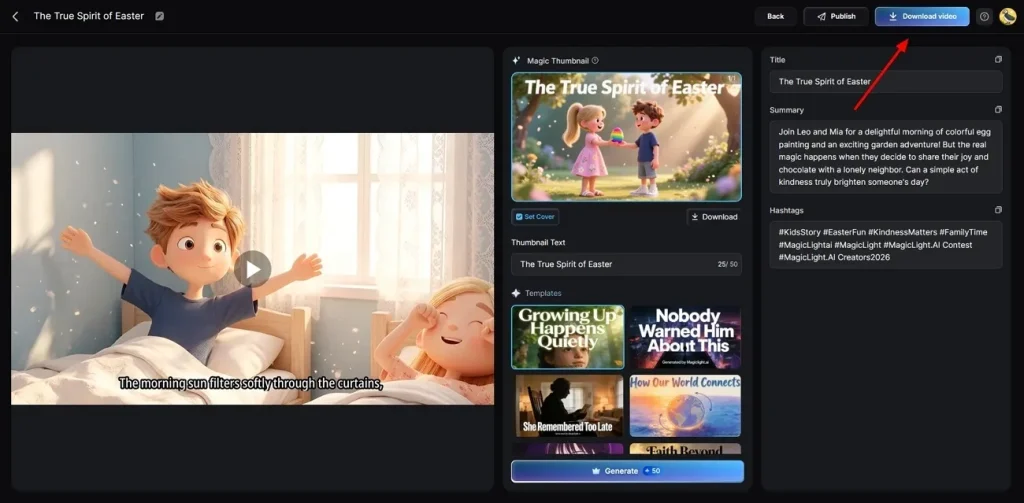
Use the built-in playback feature to preview your completed AI video before exporting. Add a custom Thumbnail or relevant Hashtags if needed, then click Download Video to save the final video to your device.
In-Depth Comparison of DeepAI and MagicLight AI for Advanced Video Generation Needs
The DeepAI AI image generator works well, but MagicLight AI goes far beyond that. So, review the given comparison table to understand which tool better suits your needs:
| Feature | DeepAI | MagicLight AI |
| Video Length | Up to 12 seconds | Up to 50 minutes |
| Storyboard Editor | Not available | Editable storyboard view |
| Scene Editing | Minimal control | Detailed micro step control |
| Character Consistency | Inconsistent across scenes | Stable across scenes |
| Style Variety | 100+ basic styles | 125+ advanced styles |
| Director Control | Not available | 8 director modes |
Conclusion
In summary, this review covered all the key tools and features that DeepAI currently provides to its users. The platform works well for basic creative tasks but struggles with advanced video production needs. Its short video length and limited controls hold creators back from reaching their full potential. If you want longer, more polished videos, MagicLight AI is the smarter choice.
FAQs on DeepAI
1. Can beginners use DeepAI easily?
Yes, beginners can use DeepAI easily because its interface is simple. You just type a prompt, and the tool generates results instantly. No technical skills or prior experience are needed to get started.
2. Does DeepAI have an API?
The DeepAI platform offers a REST API for developers who build apps. It allows programmatic access to image and text generation tools easily. However, MagicLight AI offers a more advanced API built for full video production workflows.
3. Is DeepAI good for commercial use?
DeepAI allows commercial use, but with certain platform restrictions and limitations. Free users may face output quality issues that affect professional content standards. Always review the terms before using any generated content for commercial purposes.
4. Why is DeepAI's image quality low?
The free tier uses older models that make pictures look blurry sometimes. You must pay for the premium plan to unlock clear, high-definition graphics. Alternatively, MagicLight AI gives much better visual details for your daily projects.
5. What are the best DeepAI alternatives?
Several strong tools exist that go beyond what DeepAI currently offers. Each alternative provides better video length, quality, and creative control options. MagicLight AI stands out as the top choice for serious video content creators. It provides long videos, better control, and professional storytelling tools.