


DomoAI turns regular footage into anime, realistic, or artistic videos while preserving the original motion. It can also animate images, generate clips from prompts, replace characters, and create lip-synced talking avatars. These capabilities make DomoAI useful for stylized videos, character animations, and short creative projects.
Creators can explore 40+ visual styles, use reference images for greater control, connect keyframes, and upscale finished videos to 4K. However, many generation workflows still focus on shorter clips. This DomoAI review covers its key features, workflow, limitations, free access, and an alternative for more structured video creation.
Part 1. What Is DomoAI?
DomoAI, also known as Domo AI, is a creative AI platform available on the web and through Discord. It focuses on transforming videos, animating images, creating character-driven clips, and generating talking avatars. Creators can use it for anime-style videos, social content, animated characters, and other short-form projects. Its straightforward workflow makes stylized video creation accessible without requiring advanced editing skills.
Users needing detailed timeline editing or precise frame-by-frame control may still need another video editor. The Domo AI app uses credits, with monthly paid plans starting at $9.99 for creators. Standard and Pro plans include unlimited Relax Mode for supported generations at slower processing speeds.
Key Features of DomoAI
- Text-to-Video: Written prompts generate clips lasting up to 10 seconds with chosen visual styles.
- Video-to-Video: Existing footage changes into stylized versions while preserving the original motion and structure.
- Character-to-Video: Characters can be replaced in clips lasting up to 30 seconds while retaining movement.
- Talking Avatar: Portraits become speaking characters, with videos lasting up to 60 seconds for Pro users.
- AI Video Upscaler: Supported MP4, MOV, and AVI files can be enhanced up to 4K resolution.
DomoAI Pros and Cons
After exploring DomoAI’s key features, let’s look at its main pros and cons:
Pros
- Over 40 preset styles give creators broad visual choices.
- Paid plans remove watermarks from generated videos and images.
- Custom styles accept text prompts or uploaded reference images.
- Original audio stays intact during video style transformations automatically.
Cons
- Subscription credits expire monthly instead of rolling over unused.
- Paid credit purchases require an active DomoAI subscription first.
- Free trial provides only 15 credits for testing tools.
- Video-to-video generations are currently limited to 10 seconds maximum.
Part 2. How to Use DomoAI? Is DomoAI Free to Use?
Getting started with DomoAI takes only a few steps, even for first-time video creators. Users can check out DomoAI for free and test core tools before moving to paid plans. Follow the steps below to create and download your first video with DomoAI.
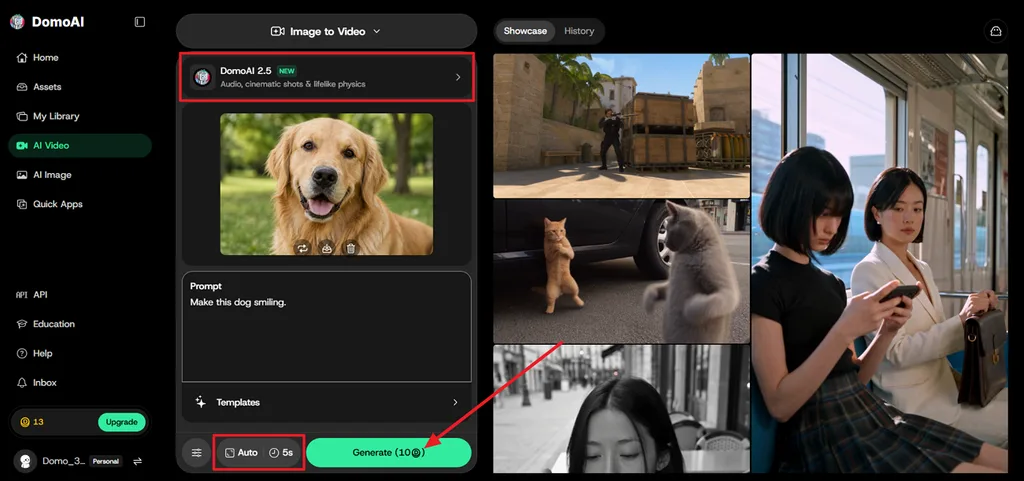
Step 1. Once you enter the main interface, choose a method like Image to Video or Text to Video. If you choose Image-to-Video, start by uploading the reference image. Choose an AI model and describe the video in the Prompt section. Select Aspect Ratio and Duration and press Generate.
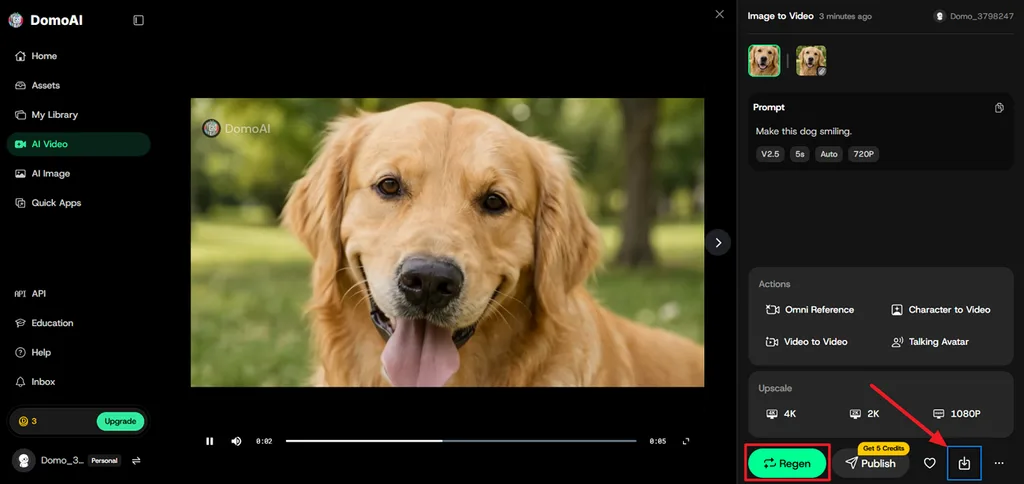
Step 2. After the video is generated, play the video in the Preview panel and press Regen if any amendments are needed. If the video is finalized, press the Save icon to download the video.
Discord users follow similar steps by entering slash commands directly inside supported bot channels. Commands like “/video” replace web panels while keeping the same basic creation process.
Is DomoAI Free to Use?
DomoAI provides limited free credits for users who want to explore its AI creation tools before subscribing. For continued use, it offers several paid plans with larger monthly credit allowances. Standard and Pro also include Relax Mode for supported generations.
| Plan | Monthly Price | Monthly Credits | Relax Mode |
| Free Trial | Free | 15 credits | No |
| Basic | $9.99 | 500 credits | No |
| Standard | $27.99 | 1,500 credits | Unlimited |
| Pro | $69.99 | 4,000 credits | Unlimited |
Part 3. Best Alternative to DomoAI for Video Creation
Users needing longer, connected videos may find DomoAI too focused on short-form generation workflows. MagicLight AI turns scripts up to 12,000 characters into videos reaching 50 minutes. Its MagicLight Agent helps organize scenes, characters, narration, pacing, and visuals inside one workflow.
Creators can access 20 models, including Seedance, Kling, and Veo, while keeping recurring characters consistent. This makes MagicLight AI suitable for complete stories, episodes, explainers, and longer scripted video projects.
Key Features of MagicLight AI
- Automatic Scene Division: MagicLight Agent automatically splits scripts into ordered scenes before video generation begins. Each scene follows the script sequence for clearer storytelling and organization.
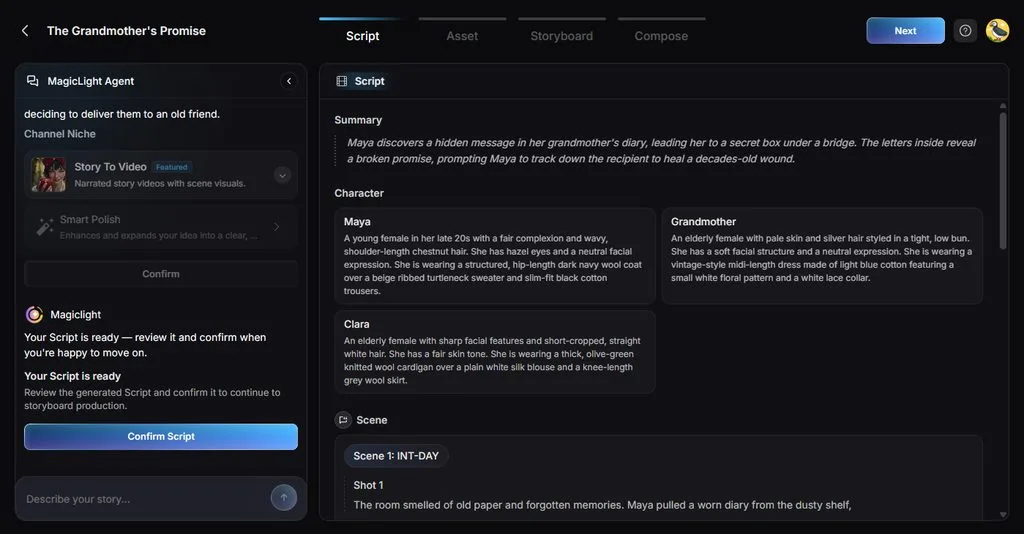
- AI Character Creation: Generate AI characters from written descriptions of 1000 characters or uploaded reference images. Saved characters stay consistent across future projects through your personal library.
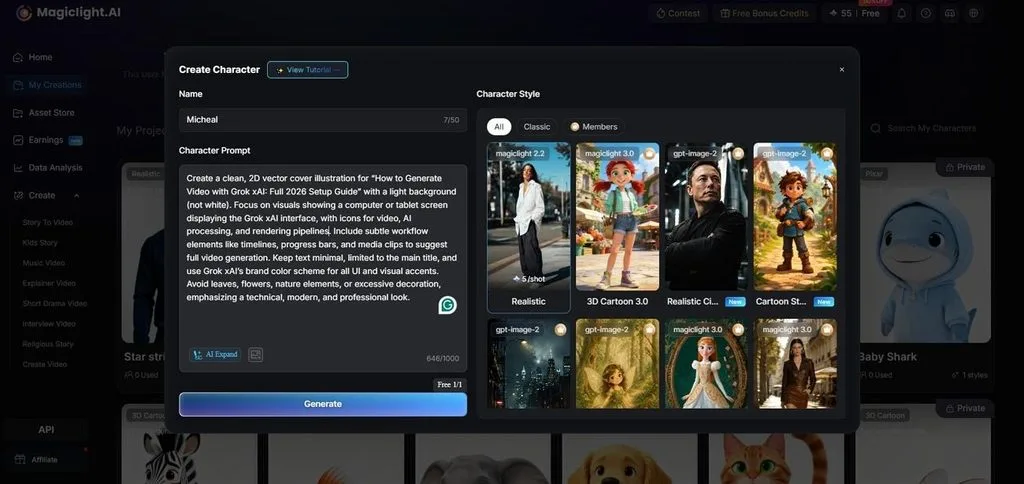
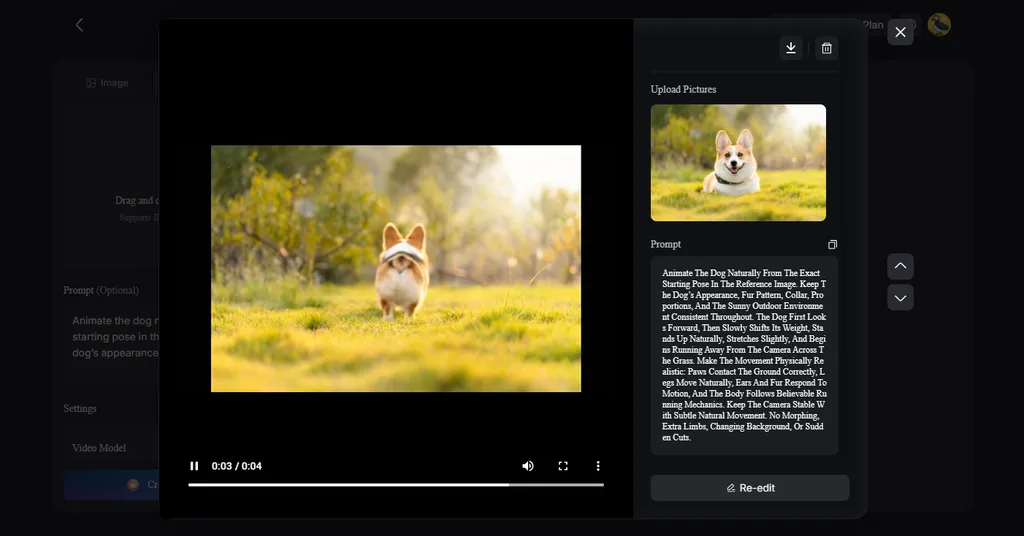
- Image to Video: Upload up to 5 reference images for stronger visual guidance. Prompts support up to 1,500 characters for more detailed video instructions.
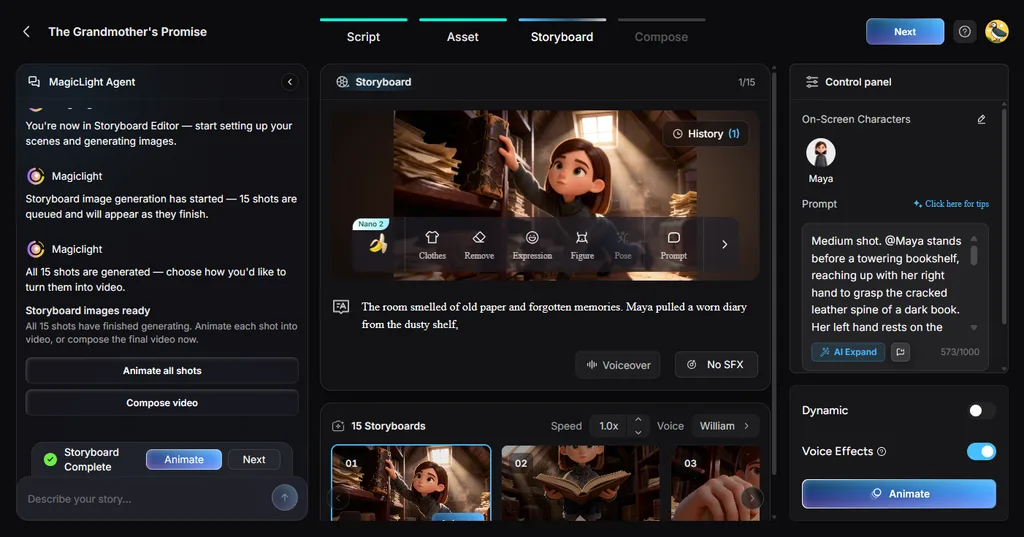
- Storyboard Scene Control: Creators adjust scenes using 50 poses and detailed timing controls. Flexible storyboards help refine specific moments before final video rendering begins.
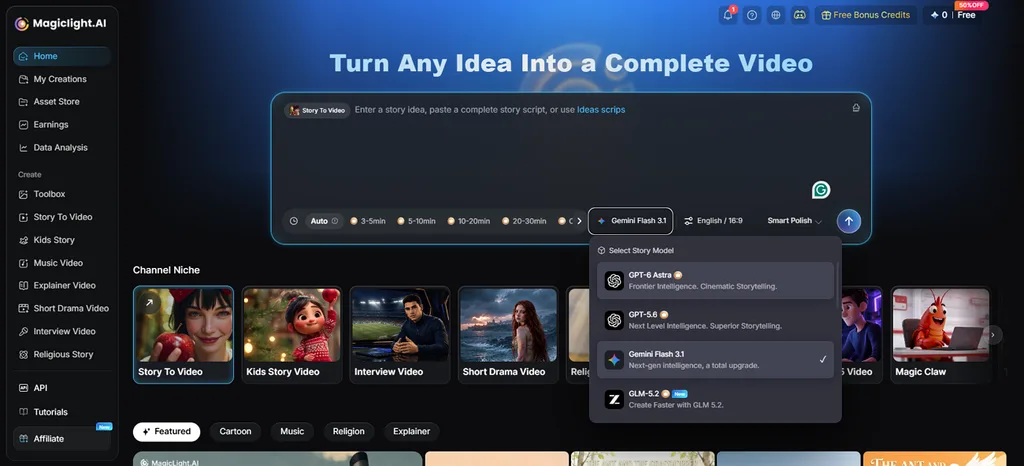
- Story Models: MagicLight AI offers 14 story models for different writing and planning needs. Options include GPT-6 Astra and Gemini Flash 3.5 for story development.
Part 4. Comparison Table Between DomoAI and MagicLight AI
Short-form creation is the main focus of the Domo AI app for most users. The table below shows how MagicLight AI compares across workflow, length, features, and control:
| Feature | DomoAI | MagicLight AI |
| Main Strength | Stylized video transformation and short-form generation | Complete long-form videos from scripts |
| Starting Input | Video, image, text prompt, or frames | Script, text idea, or reference images |
| Longest Output | Up to 56 seconds in multi-frame mode | Up to 50 minutes per project |
| Character Consistency | Supports character replacement and reference-based generation | Saved characters stay consistent across scenes |
| Audio | Original audio preservation and Talking Avatar lip sync | 37 voices, sound, timing, and 16 caption styles |
| Free Access | 15-credit free trial | Free trial with limited credits, no card required |
| Access | Web platform and Discord | Web platform |
| Best Suited For | Anime restyling, character edits, and short creative videos | Stories, explainers, episodes, and long-form videos |
DomoAI works well for turning footage and images into short, stylized anime clips. Relax Mode on Standard helps frequent creators generate more without spending credits. MagicLight AI suits complete stories with recurring characters, narration, and longer connected videos.
Conclusion
DomoAI offers an accessible way to create short, stylized videos from footage, images, and text prompts. Its anime effects, character tools, and video transformations make it particularly useful for quick creative projects. However, longer story-driven videos may require a broader workflow. MagicLight AI fills that gap with recurring characters, narration, connected scenes, and long-form creation, giving creators another option based on their project needs.
FAQs on DomoAI
- Is DomoAI free to use?
Domo AI free access includes limited trial credits for testing its core tools. Regular use requires a paid plan once the included trial credits run out. Unlimited Relax Mode remains available only on Standard and Pro subscription plans currently.
- What is the best alternative to DomoAI?
MagicLight AI is a strong alternative for complete videos with connected story scenes. It supports recurring characters, narration, longer scripts, and structured video creation workflows. Creators needing full storytelling projects may prefer it over short-form, transformation-focused tools.
- What videos can DomoAI create?
DomoAI creates anime videos, stylized clips, animated images, talking avatars, and prompt-based videos. It also supports character replacement, video upscaling, and several creative transformation styles. These outputs work well for social media clips, character videos, and short animations.





