


A viral video does not need a huge budget behind it. What matters is an idea people grasp quickly and feel tempted to share. Learning how to make viral videos means turning that idea into something viewers watch through, replay, or send around.
Views are never guaranteed because audience response and platform recommendations keep changing. Still, how to make a video go viral often depends on familiar factors, including the opening seconds, pacing, and posting time.
Part 1. What Makes a Simple Video Go Viral?
TikTok, YouTube Shorts, and Instagram Reels use viewer behavior to decide which videos deserve wider reach. Watch time, reactions, and shares all contribute to that process. Learning how to create viral videos means understanding what keeps people interested. The table below covers 5 elements that can help a video gain attention and encourage sharing:
| Ingredient | What to Check | Signal It Supports |
| Strong Idea | Explainable in one sentence | Full watches and rewatches |
| Hook | A reason to stay within 3 seconds | Lower skip rate |
| Emotion | One clear feeling, such as awe or laughter | Comments and shares |
| Shareability | A takeaway worth sending to a friend | Sends per reach |
| Timing | Posted when followers are active | Early engagement |
1. Strong Ideas
A video idea should be easy to grasp from the start. The Ice Bucket Challenge, for example, centered on a simple dare, yet Facebook reported more than 17 million related videos in 2014. A useful approach to making a viral video is to keep the concept equally clear.
- Sum up the idea in one sentence before filming.
- Base it on something useful, relatable, or unexpected.
- Remove anything that distracts from the main point.
2. Attention-Grabbing Hooks
The first few seconds carry most of the pressure. A slow opening gives viewers time to scroll before the video gets interesting. TikTok’s ad guidance recommends landing the hook within 6 seconds, while Instagram measures Reel exits within the first three. That makes a sharp opening especially important for how to make a video go viral.
- Lead with the strongest visual or line rather than a logo or greeting.
- Ask a question or tease a payoff that arrives later in the video.
- Use on-screen text so the opening still works when sound is off.
3. Emotional Value
People tend to pass along videos that leave an impression. Berger and Milkman’s research linked awe, anger, and anxiety with more sharing, while sadness was shared less often. That emotional pull matters when learning how to create a viral video. Pick the feeling early and let it guide the story.
- Aim for awe, laughter, excitement, or surprise.
- Let reactions feel spontaneous rather than staged.
- Bring heavier stories toward hope, relief, or resolution.
4. Easy-to-Share Content
People forward videos that make them look informed, funny, or helpful. Instagram ranks reels partly on how likely viewers are to reshare them and watch to the end. Adam Mosseri, who heads Instagram, has named sends per reach among its top signals. Anyone wondering “how do I make a video go viral” should design every clip around that send button.
- Keep the clip short enough to rewatch, with a clear payoff at the end.
- Skip watermarks from other apps, which Instagram shows to fewer people.
- Leave one takeaway that viewers can repeat in a comment or message.
5. Timing and Trends
Timing can decide whether a strong video gets noticed or disappears in the feed. TikTok’s Creative Center highlights popular hashtags and songs, while analytics can reveal when your audience is active. Relevant hashtags also give the platform useful context about the video.
- Catch trends while they are still picking up.
- Publish around the times your audience is active.
- Rework trends to fit your idea rather than copying them.
Part 2. How to Make Viral Videos With AI
Turning one promising idea into a shareable video often takes several scripts, hooks, and visual approaches. MagicLight AI speeds up that process by generating videos from prompts or scripts, while its AI Reels Maker brings together visuals, voiceovers, captions, and music for faster testing.
MagicLight Agent takes the process further by developing a video from a written request and coordinating the tools needed to produce it. Creators exploring how to make their video go viral can test different concepts and variations, while Story to Video supports longer narratives with consistent characters and connected scenes.
Key Features
- Ready-to-Use Video Formats: Viral video structures and trending script templates give each idea a familiar shape. Every format can be customized to fit the creator’s niche.
- Captions for Muted Viewers: Auto-generated captions keep the message clear for people scrolling with the sound off. MagicLight AI adds a choice of 16 caption styles.
- Adaptive AI Voices: Narration voices shift their tone to match the mood of the content. Voice cloning can also recreate a creator’s own voice from a short sample of 30 to 60 seconds.
- Consistent On-Screen Characters: Characters move naturally and show real emotion on screen. They also keep the same look across scenes and future videos.
- Built-In Background Music: MagicLight AI currently offers 40 background music tracks that can be matched with a video’s mood and pacing without searching a separate stock library.
How to Make a Viral Video With MagicLight AI
A simple idea can become a finished short in MagicLight AI’s Reels Maker. Creators learning how to make viral videos can skip filming, casting, and manual editing. The steps below cover the process:
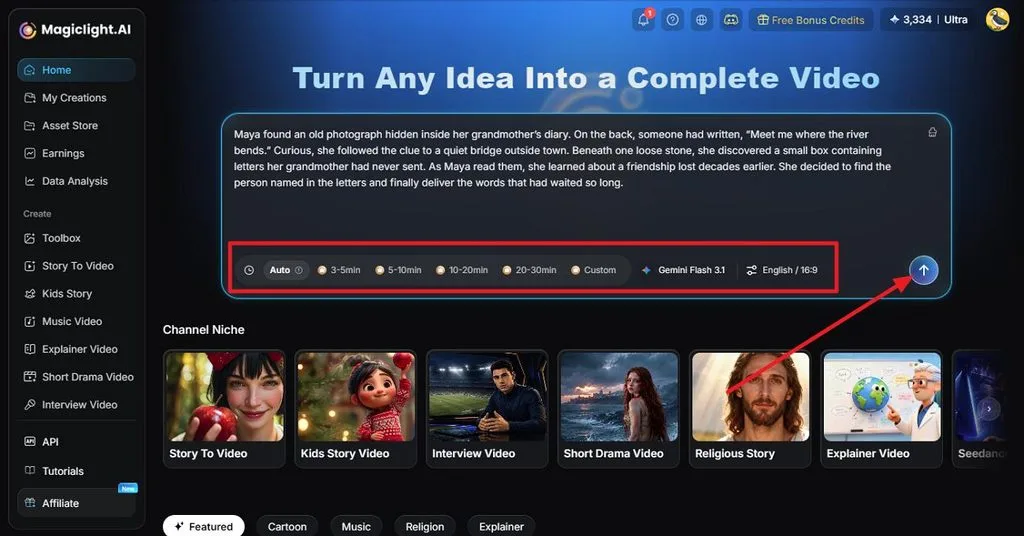
Step 1. Enter the Video Idea
Open MagicLight AI and type your idea into the large prompt box. Describe the story or concept clearly enough to guide the video. Choose a length, language, and aspect ratio from the options below the prompt, then click the Arrow to continue.
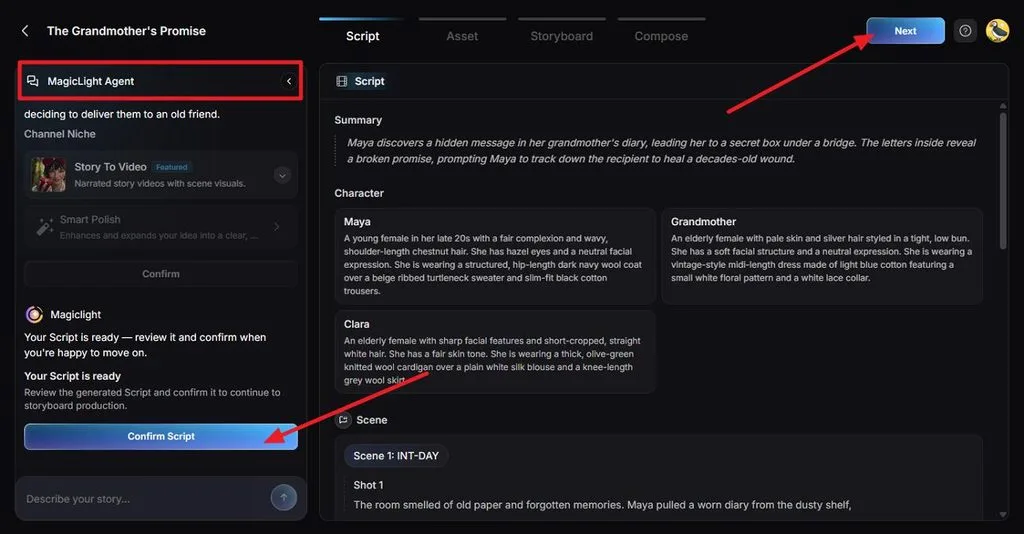
Step 2. Read and Confirm the Script
MagicLight Agent develops the idea into a summary, characters, scenes, and individual shots. Read through the script and tighten any slow sections that could lose viewers. Check that the opening delivers the hook quickly, then click Confirm Script and select Next.
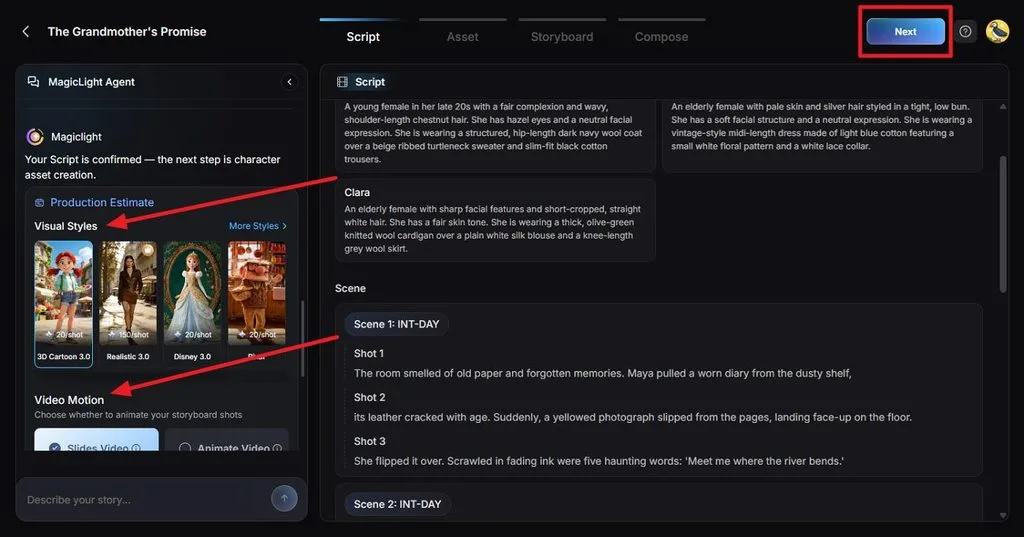
Step 3. Pick a Visual Style and Motion
Pick a Visual Style that matches the mood and audience of your video. Under Video Motion, decide whether the storyboard should use slides or animated scenes. Review the production estimate, confirm the setup, and click Next to create the character assets.
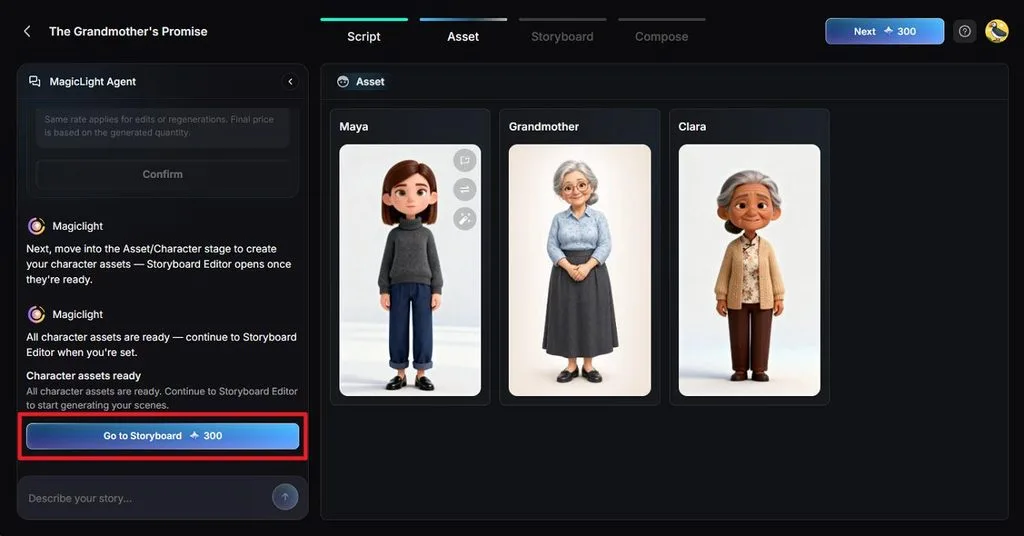
Step 4. Review the Characters
Check each generated character before creating the storyboard. Make sure their appearance fits the script and remains suitable for every scene. Use the editing controls on a character if changes are needed. Once satisfied, click Go to Storyboard.
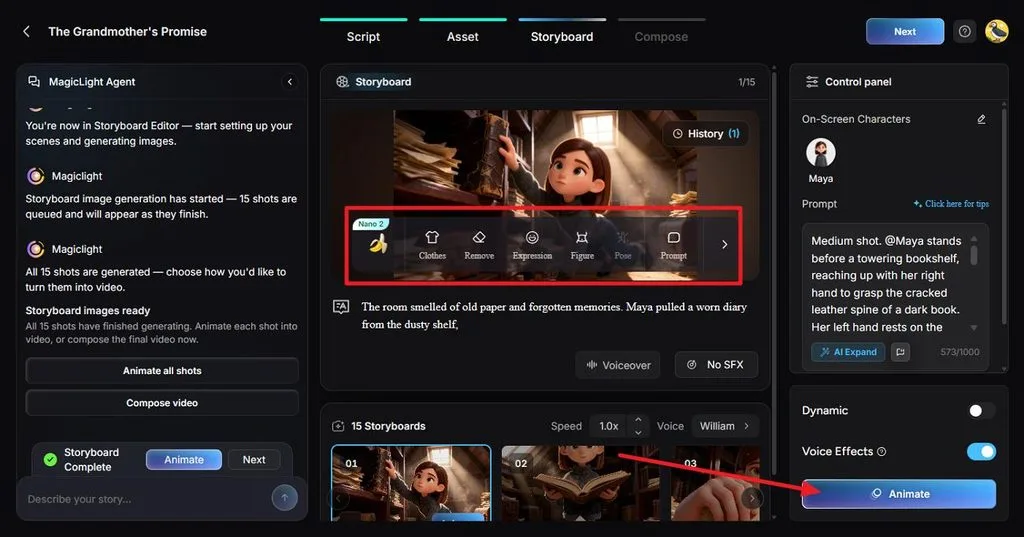
Step 5. Edit and Animate the Storyboard
Go through the storyboard shot by shot and check whether each image matches its scene. Use the control panel to adjust characters or rewrite the prompt where necessary. Choose a voice, add sound effects if needed, then click Animate to bring the scenes to life.
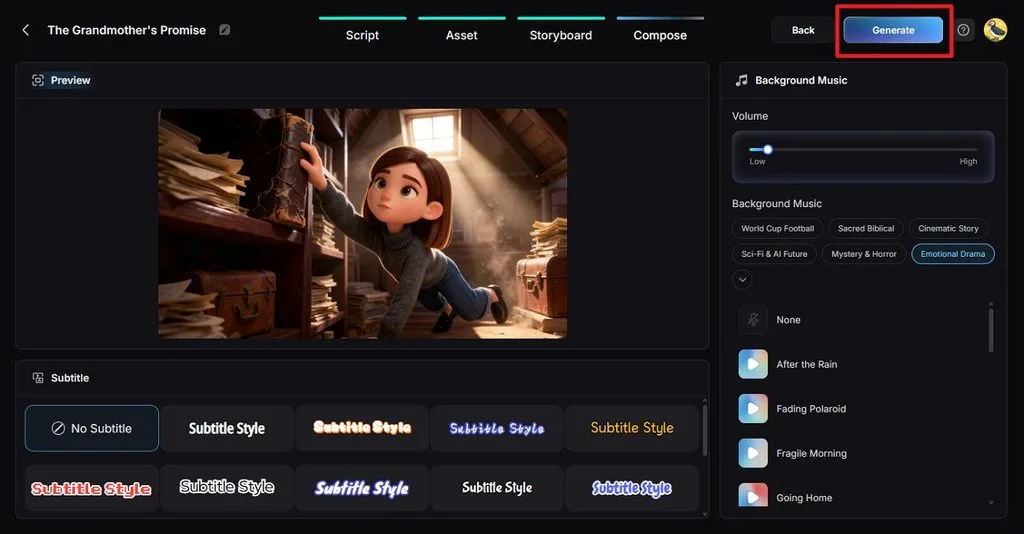
Step 6. Add Subtitles and Background Music
Move to Compose and preview how the scenes flow together. Choose a subtitle style that remains easy to read on a small screen, then select background music that suits the video’s mood. Adjust the music volume so the narration stays clear, then click Generate.
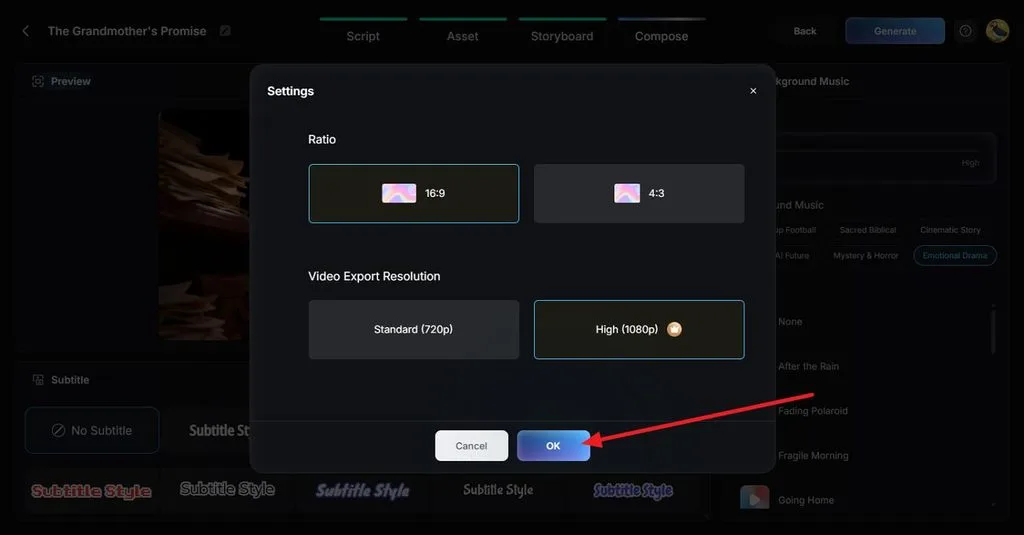
Step 7. Set the Video Quality
Open the video settings before generating the final version. Select 16:9 or 4:3 for the aspect ratio, then choose 720p or 1080p for the export resolution and click OK.
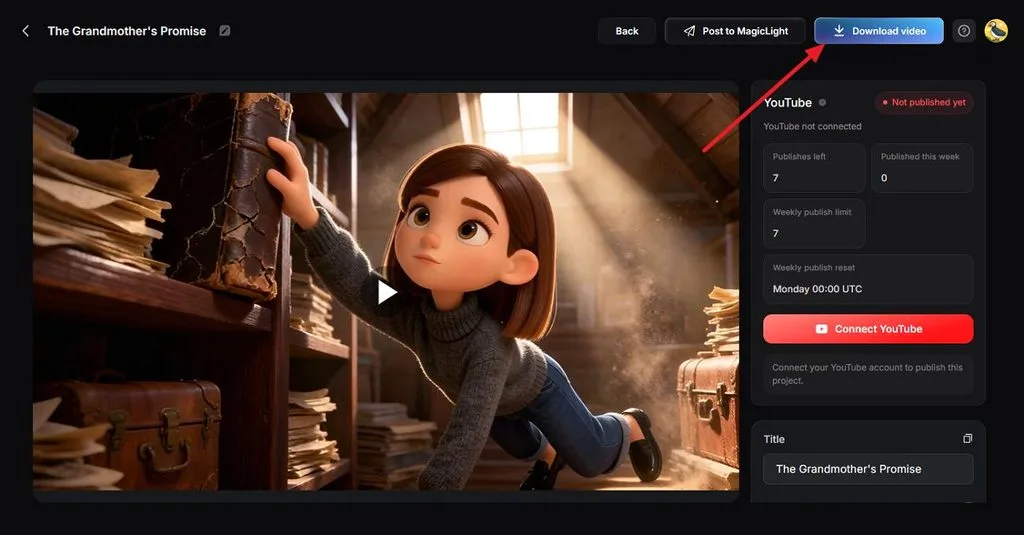
Step 8. Watch and Download the Video
Play the completed video and look for awkward cuts, incorrect visuals, subtitle errors, or audio problems. Use Back if anything needs another edit. Once the video is ready to publish, click Download video to save it.
Conclusion
Learning how to make viral videos comes down to a strong idea, an immediate hook, and content worth sharing. Timing and familiar formats can help that idea reach more viewers, but testing different versions still matters. MagicLight AI makes that process easier by turning fresh concepts into polished, ready-to-share videos quickly.
Frequently Asked Questions
1. What makes a video go viral?
A video goes viral when people watch it to the end, react, and share it within a short window. Anyone learning how to make a video viral should pair a clear idea with a fast hook, a strong emotion, and good timing.
2. Can AI help me make viral videos?
AI speeds up drafting, visuals, voiceovers, and captions, so one idea can be tested in more versions. MagicLight AI handles all of that in one workflow for TikTok, Reels, and Shorts. No tool can make viral success certain, but faster testing raises the odds.
3. What type of videos are most likely to go viral?
Humor, surprising twists, useful tips, relatable moments, and challenges tend to travel furthest. TikTok’s 2026 trend report also favors humor and imperfection over polish. Creators asking “how do you make a viral video” can start with one of these formats.





