Leonardo started with a strong following among game artists and has since expanded into a platform for creating images and short videos. Canva acquired the company in July 2024, but Leonardo continues to operate as a separate web app.
For image creation, it offers a useful free plan and detailed editing options. The main limitation is its token system, since the same balance covers both image generation and more expensive video features. It also does not create complete narrated videos directly from a script.
Part 1. What Is Leonardo AI?
Leonardo AI is a web-based platform for creating images and videos from text prompts and reference images. Its own models include Lucid Origin, Lucid Realism, and Phoenix 1.0, while third-party options include Seedream 4.5, Nano Banana Pro, and FLUX.2 Pro. Token costs vary depending on the model and generation settings you choose.
Free users receive 150 tokens every 24 hours, while paid plans start at $12 per month. Premium adds slower unlimited generation on selected supported image models, and Ultimate extends this to supported video models. Third-party models still use tokens, so heavier use can drain the monthly balance faster than expected.
Key Features
- Image Model Selection: Choose Leonardo models such as Lucid Origin and Phoenix, or supported third-party models, depending on your output style.
- Prompt-Based Image Editing: Use Omni Editing to change selected image details with written instructions, while AI Canvas supports broader image adjustments.
- Custom Element Training: Train custom Elements for a character, object, or style using your own image dataset for more consistent results.
- Reference Image Guidance: Use reference images to guide character, content, composition, or style, then apply Elements across related image generations consistently.
- Image and Video Generation: Create videos from text or images using Motion 2.0 and supported models including Veo 3.1, Seedance, Kling, and Hailuo.
- Upscaling and 3D Textures: Increase image resolution with Leonardo’s upscaling tools, or generate textures for uploaded UV-mapped OBJ models directly within Leonardo.
Pros
- Paid subscribers receive ownership of generated outputs under Leonardo’s terms.
- Commercial use is allowed for generated content under stated terms.
- Mobile apps are available for both iOS and Android devices.
- API access supports adding Leonardo generation to other applications.
Cons
- Token costs vary by model, size, and settings.
- Third-party models continue using tokens on paid plans.
- Free-plan generations are visible to other platform users.
- Free users do not fully own generated output rights.
- Canceling a subscription removes stored rollover tokens.
Part 2. How to Use Leonardo AI?
Using Leonardo AI free becomes much easier once the basic workflow is clear. The steps below take you from creating an account to generating image or video:
Step 1. Open Leonardo AI and Log In
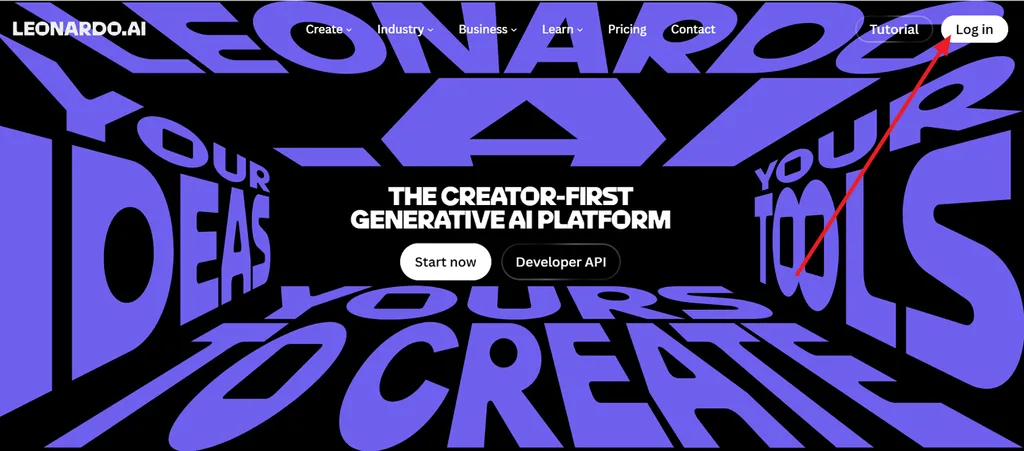
Open Leonardo AI in your browser and click Log in in the top-right corner. Sign in to access the main creation workspace.
Step 2. Enter the Prompt and Select Video
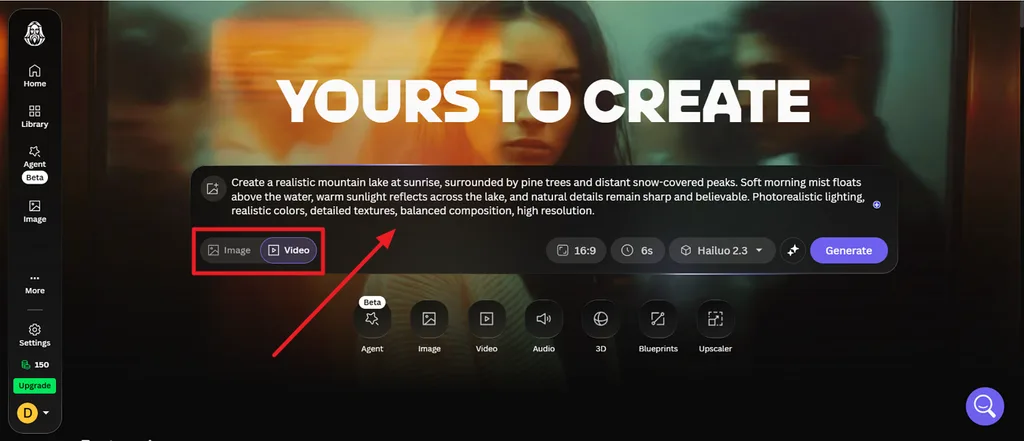
Enter a clear description of the video you want to create in the prompt box. Then select Video so Leonardo uses the prompt for video generation instead of a still image.
Step 3. Choose Settings and Generate
Choose the aspect ratio, duration, and video model. In the example shown, the settings are 16:9, 6 seconds, and Hailuo 2.3. Click Generate once the settings are ready.
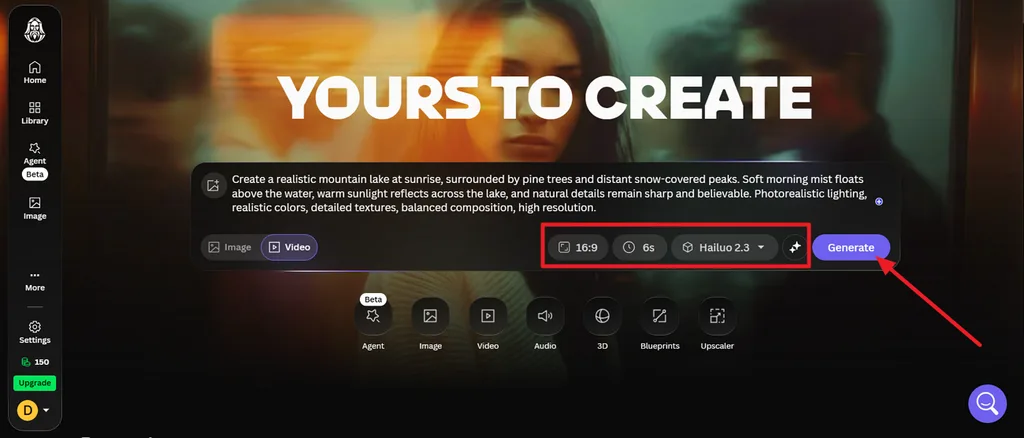
Check the token cost before generating, especially when using third-party models. Leonardo shows the required tokens before most runs, and models such as Kling, Veo, Seedream, and Nano Banana still consume tokens even when slower unlimited generation is available.
For recurring characters, products, or styles, you can train a custom Element using your own dataset. Leonardo recommends at least 10 training images and supports up to 50 with Flux Dev. Once trained, the Element appears under “Image Guidance > Elements” for use in later generations.
Part 3. Best Alternative to Leonardo AI for Video Creation
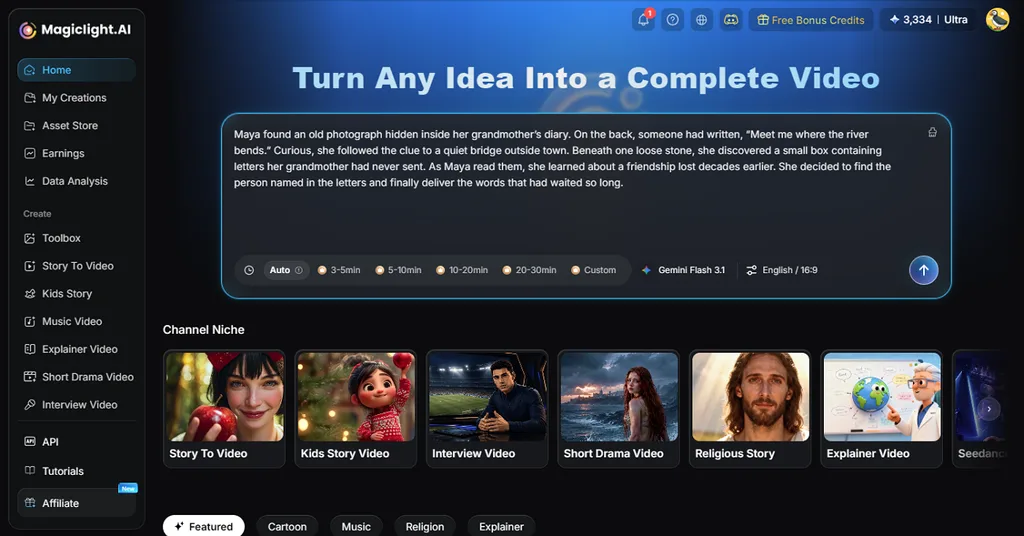
A Leonardo AI project can end with a strong image or short video, but longer production usually needs more work. MagicLight AI takes a different route with Story to Video, turning scripts into videos up to 50 minutes long while keeping the process in one workflow.
That makes MagicLight AI more practical for explainers, stories, lessons, and other long-form projects. It also supports 20 AI models, including options from the Kling, Veo, and Seedance families. Leonardo works well for individual images and short clips, while MagicLight AI is better suited to building a complete story-driven video from beginning to end.
Key Features of MagicLight AI
- Long Script to Video: Turn scripts of up to 12,000 characters into structured videos that can run for 50 minutes.
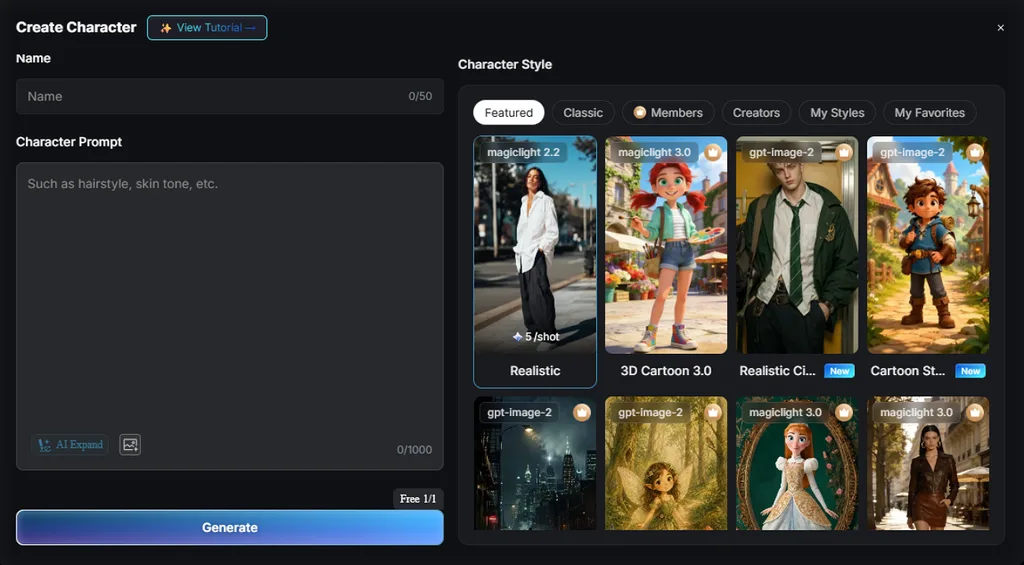
- Consistent Characters: Create reusable characters and keep their appearance more consistent as they return across different scenes.
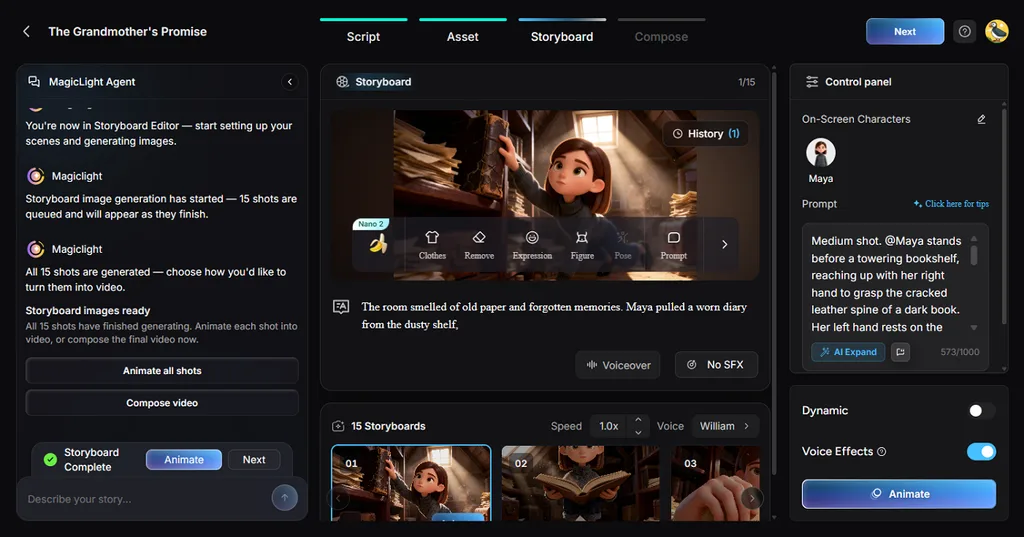
- Storyboard Scene Control: Review individual scenes in the storyboard and adjust the visual direction before composing the complete video.
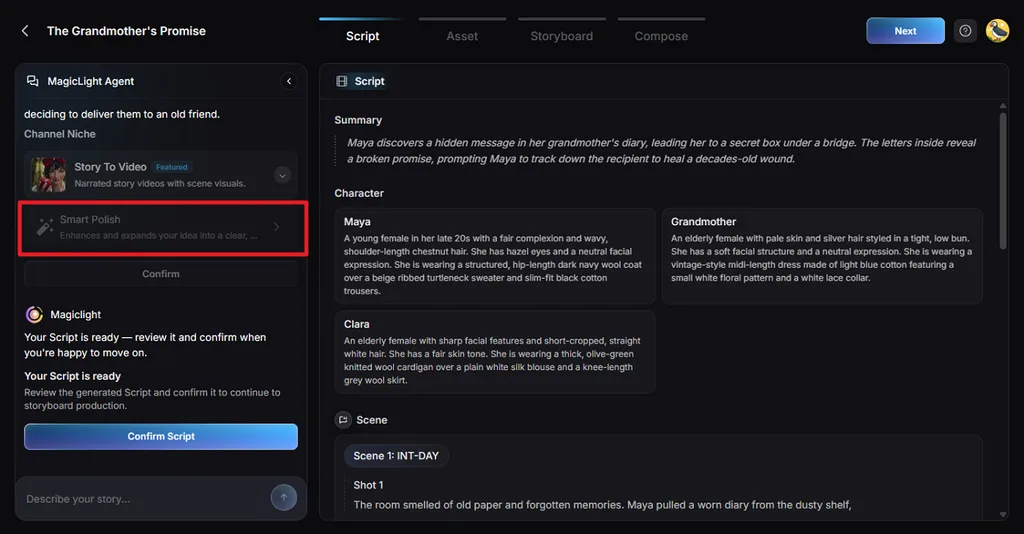
- Smart Polish for Scripts: Use Smart Polish to expand or refine the original idea before moving further into video production.
- Multiple AI Story Models: Choose from 14 story models, including options from the GPT-6 Astra and GLM-5.
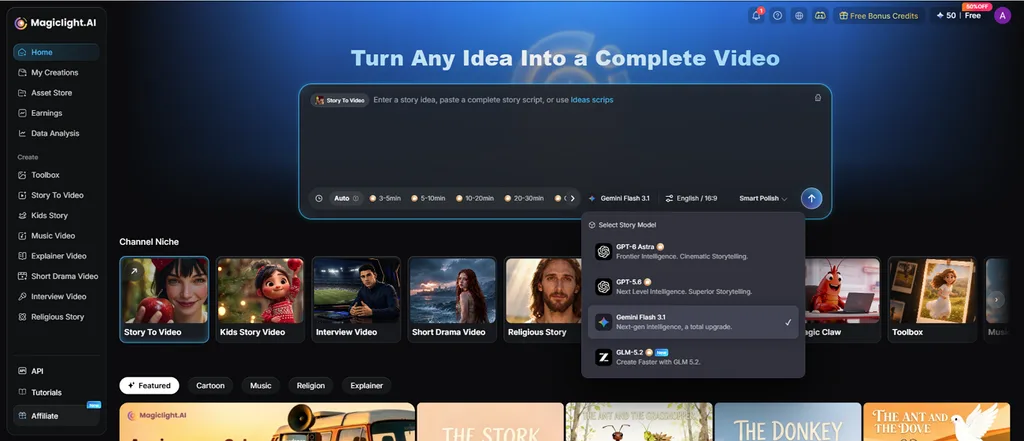
- Visual Style Selection: Apply one of 52 visual styles to shape the overall appearance of characters, settings, and scenes.
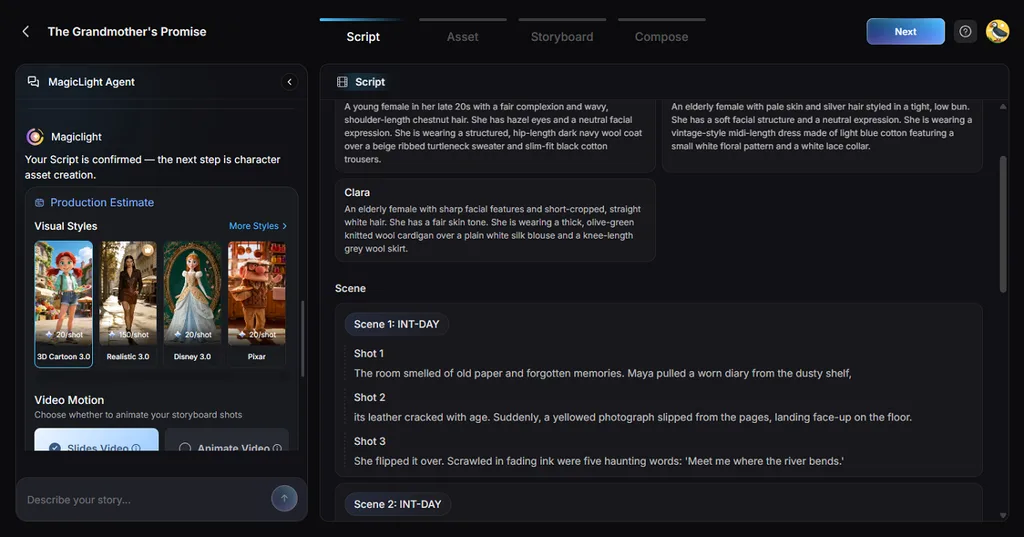
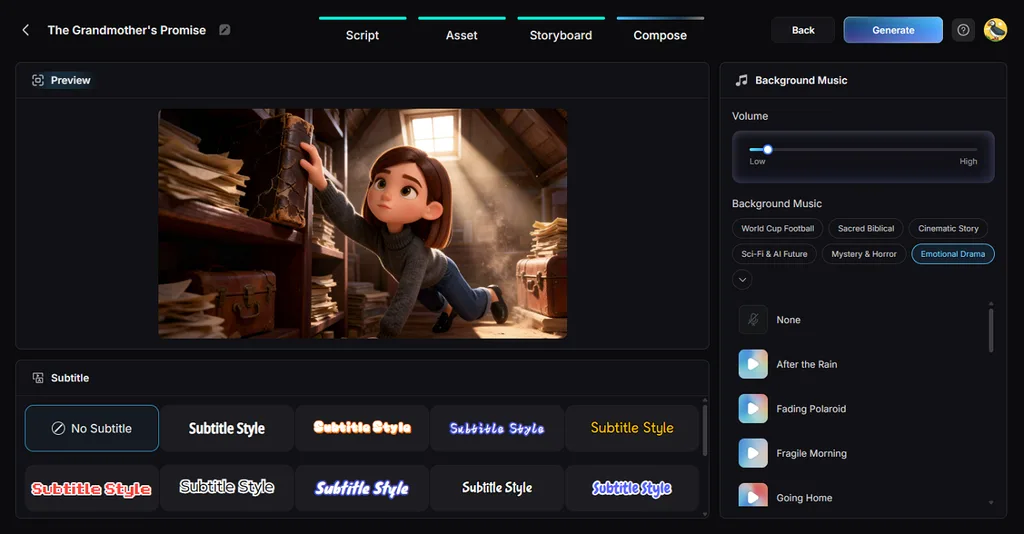
- Built-In Audio and Captions: Add narration from 37 voice options, 16 subtitle styles, and 40 background music choices within the project.
Part 4. Comparison Table Between Leonardo AI and MagicLight AI
Leonardo AI and MagicLight AI focus on different parts of the creative process. The table below compares their models, output length, consistency, narration tools, free access, and main use cases:
| Feature | Leonardo AI | MagicLight AI |
| Main Strength | Still images and short clips | Finished videos from a script |
| Image Models | Lucid Origin, Phoenix, Flux and hosted engines | 5, including Seedream 5.0 Pro |
| Video Models | Motion 2.0, Veo 3.1, Kling, Hailuo, Seedance | 20, including Seedance, Kling and Veo families |
| Longest Output | Short clips | Up to 50 minutes per script |
| Consistency | Custom models from 10 to 20 images | Saved characters across scenes |
| Narration and Captions | Not a core feature | 37 voices, 16 caption styles |
| Free Plan | 150 tokens a day, public images | Free plan, no card |
| Best For | Concept art, product shots, game assets | Explainers, stories, course videos |
Conclusion
To conclude, Leonardo AI works well for image creation, especially when you want several models in one place. The main limit is token usage, which can rise quickly with heavier generation. For longer video projects, MagicLight AI adds the script, scenes, narration, captions, and story structure needed to turn separate visuals into a complete video.
FAQs on Leonardo AI
1. Is Leonardo AI good for beginners?
Leonardo AI is fairly beginner-friendly, with free sign-up and a clear interface. However, its many models and settings take time to learn. MagicLight AI offers a simpler script-led workflow overall.
2. Is Leonardo AI free to use?
Yes. Leonardo AI offers 150 free tokens every 24 hours. Free generations are public, while paid plans add private creation and larger allowances. Usage varies by model and chosen settings.
3. Can Leonardo AI generate videos?
Yes. Leonardo AI can create short videos from text or images using Motion and supported third-party models. For longer narrated videos from scripts, MagicLight AI offers a more complete workflow.
4. Which is the best Leonardo AI alternative?
For video creation, MagicLight AI is a strong Leonardo AI alternative because it turns scripts into longer videos with scenes, recurring characters, narration, captions, and music in one direct workflow.



![How to Remove People from Photos in 2026 [Full Guide]](https://magiclight.ai/wp-2/wp-content/uploads/remove-people-from-photos-guide.jpg-300x197.webp)
![6 Best Picture Modification Apps in 2026 to Try [New List]](https://magiclight.ai/wp-2/wp-content/uploads/best-picture-modification-apps-for-photos.jpg-300x200.webp)