People often decide in seconds whether they want to keep watching an animated video. Strong hooks, simple stories, clear characters, and good sound help maintain attention. To make animated videos, plan the story, characters, and sound before creating scenes. AI tools can now handle much of the drawing, animation, voice, and rendering work.
MagicLight AI helps turn simple ideas into animated videos with consistent characters and voices. This guide explains how to create engaging animated videos that people want to finish.
Part 1. What Makes an Animated Video Worth Watching
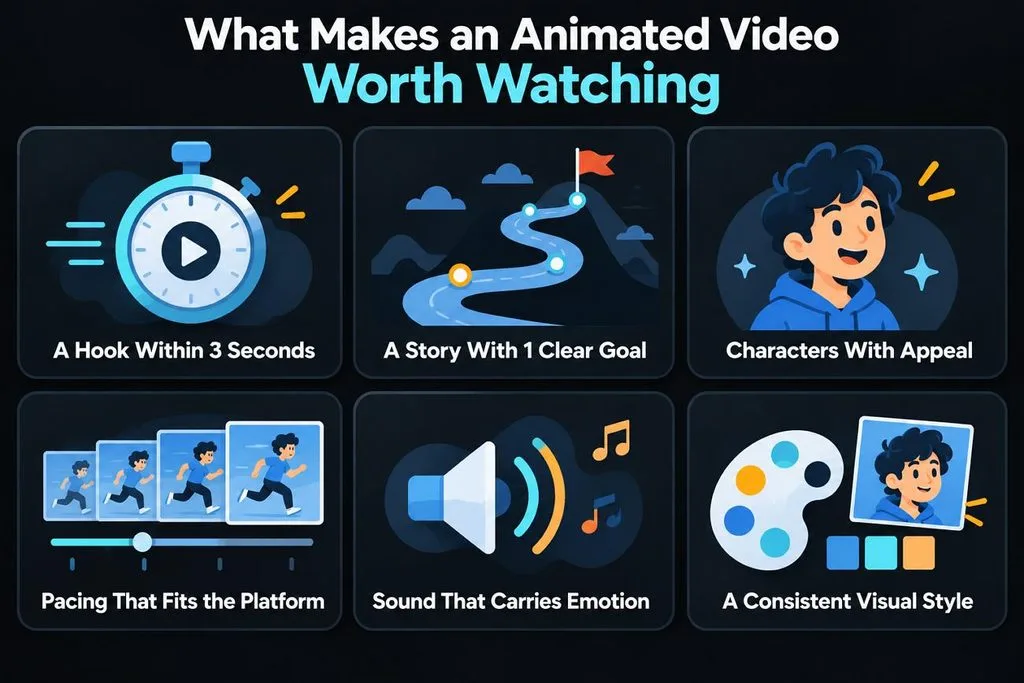
Animated videos need more than colorful scenes or smooth movement to hold viewer attention. Good planning can make animation videos interesting for viewers. Below are the 6 key qualities that can make animated content worth watching:
- A Hook Within 3 Seconds: Show the main idea early so viewers know what comes next. TikTok found that top click-through ads often deliver messages within 3 seconds.
- A Story With 1 Clear Goal: Give every animated video one clear message for viewers to follow. Build the story around that message without adding unnecessary side ideas.
- Characters With Appeal: Create characters with clear features, personality, and an easy visual identity. Appeal is among the 12 animation principles described by Disney animators.
- Pacing That Fits the Platform: Keep scenes moving at a pace that matches your chosen platform. Short social videos often need quicker changes than longer explainer videos.
- Sound That Carries Emotion: Use voices, music, and sound effects to support each scene. TikTok reports that faster music can improve viewing results for some advertisements.
- A Consistent Visual Style: Keep colors, character designs, and artwork consistent throughout your animated video. Consistent visuals help different scenes feel connected throughout the entire video.
Part 2. How to Create More Engaging Animated Videos
Small creative choices can make animated videos attract more viewers. Better openings, smoother scenes, and clear endings help keep viewers watching your entire video. Look at the table below for useful techniques, how to apply them, and their benefits:
| Technique | How to Apply It | Why It Helps |
| Open on the Payoff | Show the most striking image or question first, then explain | Gives viewers a reason to keep watching |
| Write for the Ear | Budget about 150 words per minute and read every line aloud | Keeps narration natural instead of rushed |
| Storyboard First | Sketch every scene and cut any that repeats a point | Catches pacing problems before rendering |
| Reuse One Character | Keep the same host or mascot across scenes and episodes | Builds recognition across a series |
| Caption Every Line | Add large, high-contrast subtitles | Helps viewers follow along without sound |
| End With One Action | Close on a single next step, such as subscribing | Gives interested viewers a clear next step |
YouTube Studio shows where viewers stop watching, helping you find scenes that need improvement. When making animated videos regularly, compare episodes to see which pacing keeps viewers interested.
Match the Format to Each Platform
Video size and length can affect how comfortably viewers watch content on different platforms. Choosing the right format keeps scenes properly framed while supporting smooth pacing throughout playback. Let's look at the recommended formats and limits for each major video platform below:
- YouTube Shorts: Vertical or square videos can run up to 3 minutes, giving short stories more breathing room.
- Instagram Reels: A 9:16 frame works well for Reels viewed on mobile screens. Keep each scene focused so the story stays easy to follow.
- TikTok: Vertical videos fit the full screen and feel natural in TikTok’s fast-moving feed.
- Long YouTube Videos: Widescreen 16:9 gives tutorials and explainers plenty of room to develop. Longer videos work better when the story needs more time onscreen.
AI-assisted animation also raises labeling questions, and YouTube’s rules draw the line at realism. Clearly non-realistic content, such as someone riding a unicorn through a fantasy world, needs no disclosure, and neither does an AI-drafted script. Realistic scenes that never happened, or real people shown doing things they never did, must be labeled.
How to Create an Animated Video With MagicLight AI
Animation video making becomes simpler when the script, scenes, voices, and visuals stay together. With MagicLight AI, you can start through chat by describing the video you want. MagicLight Agent can write the script, choose a niche, then suggest a format and budget tier. Story to Video builds the scenes while keeping character faces and outfits consistent throughout.
More than 52 visual styles include realistic 3D, anime, cartoon, cinematic, and many others. You also get 11 languages, 37 voices, voice cloning, 40 music tracks, and 16 caption styles. Follow the simple steps below to create animated videos up to 50 minutes:
Step 1. Start With Your Animation Idea
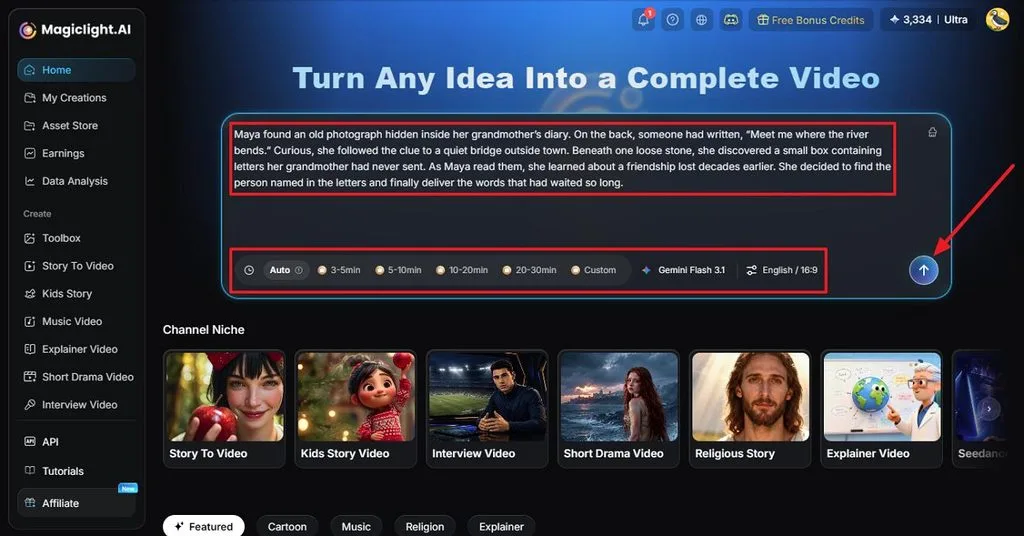
Open MagicLight AI and describe the animation you want to create in the area provided in the homepage. Add your script if you already have one, then set the duration, model, language, and aspect ratio. Click Send to continue with the generation process.
Step 2. Review the Generated Story
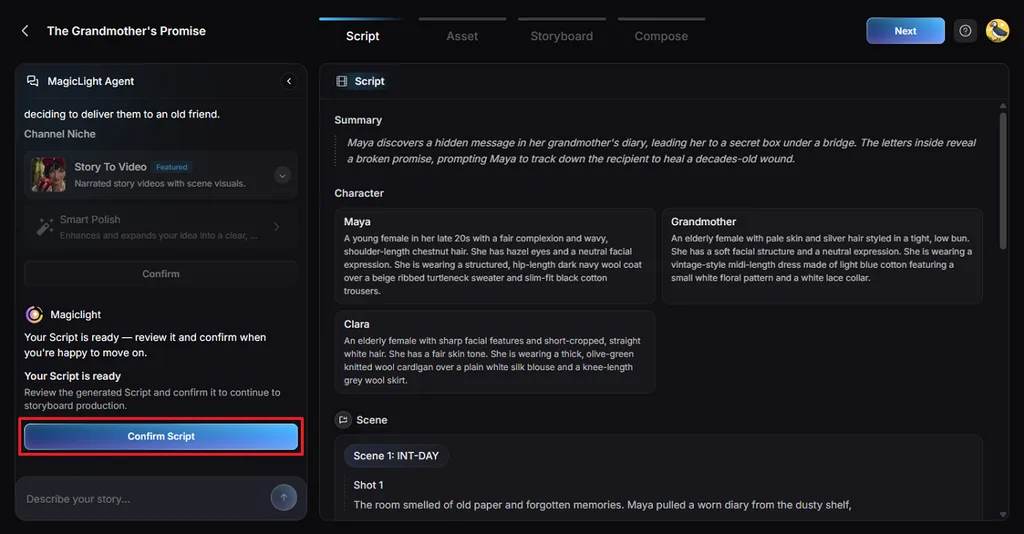
MagicLight Agent prepares a summary and breaks your idea into separate scenes. Check that every scene fits your story and moves it forward. Make any needed changes before selecting Confirm Script.
Step 3. Set the Visual Direction
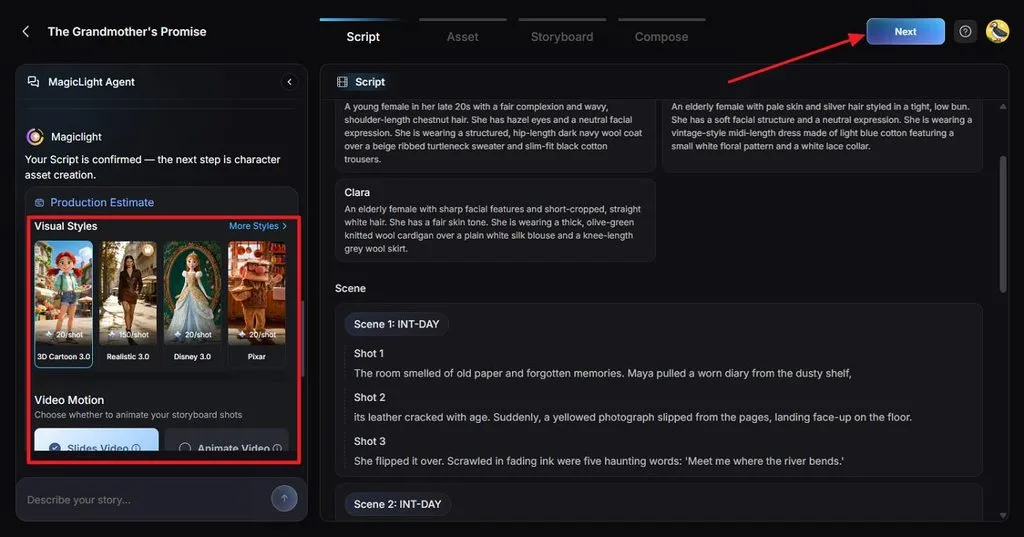
Decide how your animation should look by selecting a suitable Visual Style. Pick the video motion option and confirm when the direction feels right.
Step 4. Pick a Character for Story
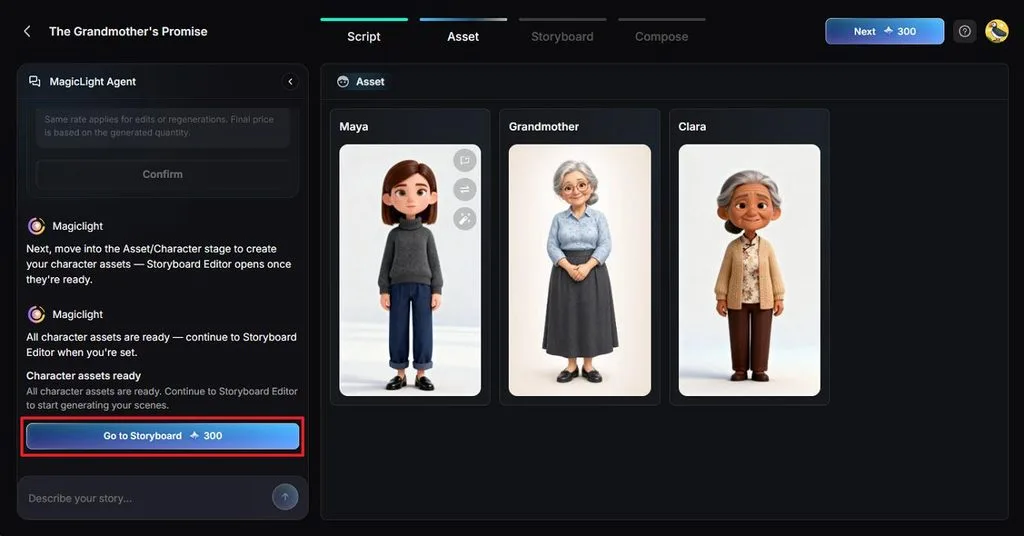
Review each character created from the details in your story. Change any design that does not match the appearance, personality, or role you had in mind. Once the cast looks right, select Go to Storyboard.
Step 5. Improve the Storyboard
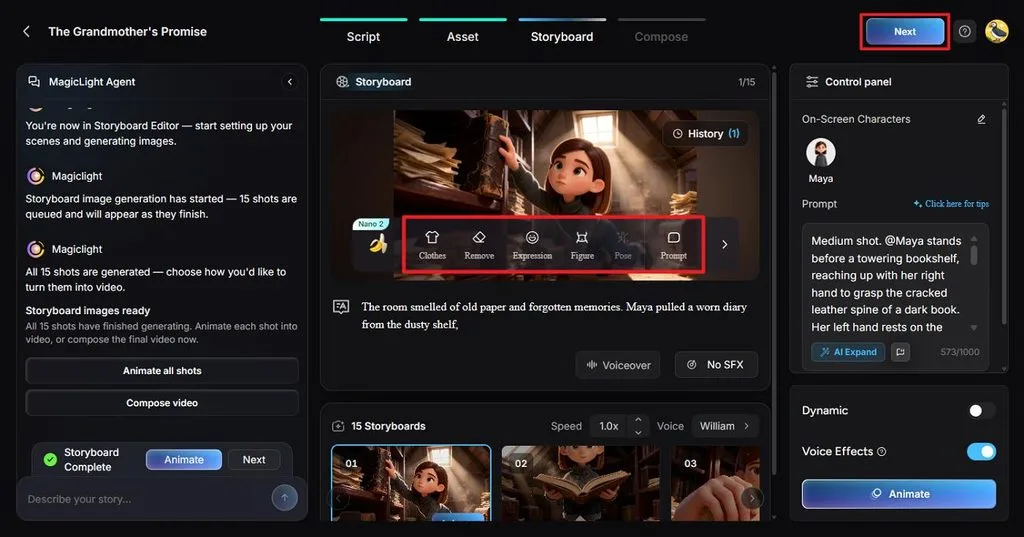
Go through the storyboard and check how every important moment appears visually. Clothes, Expression, Figure, Pose, and Prompt let you adjust individual shots where needed. Select Next after finishing your scene edits.
Step 6. Add the Finishing Touches
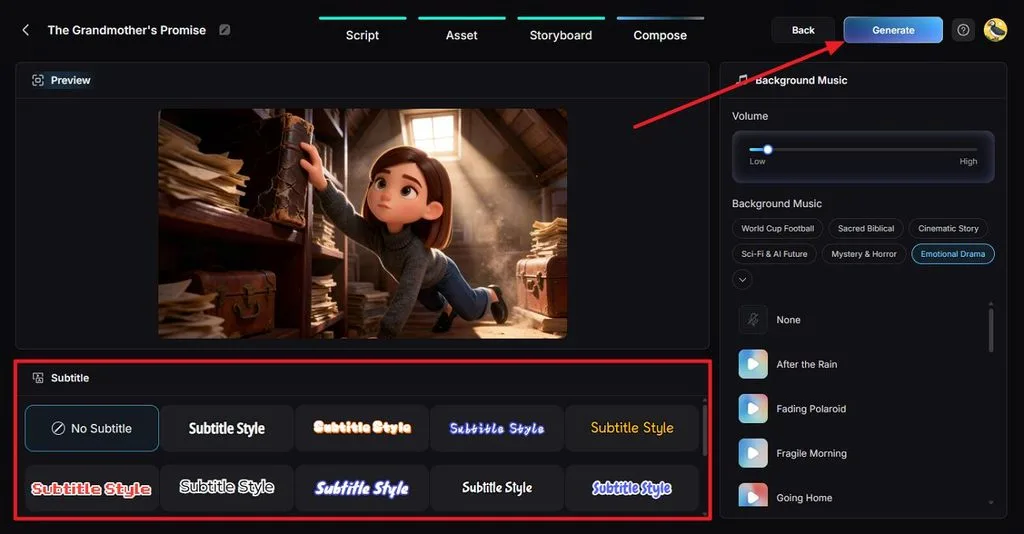
Select a Subtitle Style and choose Background Music that suits the mood of your video. Click Generate when everything is ready.
Step 7. Review and Download the Video
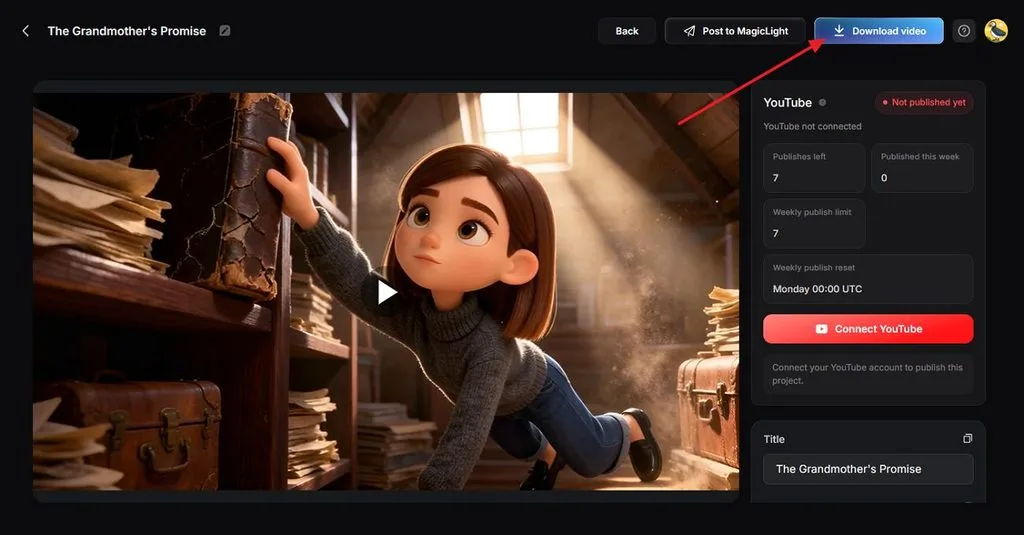
Preview the completed animation and check the scenes, characters, sound, and subtitles one final time. Fix anything that still needs attention before saving the finished version. Click Download video when you are satisfied with the result.
Conclusion
In conclusion, good planning helps you make animated videos that hold attention from beginning to end. A clear story, appealing characters, smooth pacing, and fitting sound can improve the viewing experience. You can also create 3D animation videos for stories, explainers, lessons, or social media content. MagicLight AI brings scripts, characters, voices, music, scenes, and editing tools into one creative space.
Frequently Asked Questions
- What makes an animated video engaging?
A clear hook, simple story, appealing characters, and smooth pacing can keep viewers interested. When making animated videos, readable captions and fitting sound can support every important scene.
- How long should an animated video be in 2026?
Short social videos often suit quick ideas that viewers can understand without extra detail. Longer videos can work for tutorials, explainers, or stories needing more time to develop. Choose the final length based on your platform, audience, topic, and storytelling needs carefully.
- What is an easy AI tool for creating animated videos from text or images?
MagicLight AI can create an animated video from written ideas, scripts, or uploaded images. Its Agent builds stories, while Image to Video can add movement to still pictures easily.
- Can I create animated videos with AI for free?
MagicLight AI gives new users limited free credits to test its video tools first. You can explore basic features without paying before choosing a plan for larger projects. A paid plan starts at $7.50 monthly, billed annually, with full-HD watermark-free downloads and commercial rights.


![How to Remove People from Photos in 2026 [Full Guide]](https://magiclight.ai/wp-2/wp-content/uploads/remove-people-from-photos-guide.jpg-300x197.webp)
![6 Best Picture Modification Apps in 2026 to Try [New List]](https://magiclight.ai/wp-2/wp-content/uploads/best-picture-modification-apps-for-photos.jpg-300x200.webp)