A tool that handles video generation without complex timelines is a game changer for content creators. Renoise AI helps marketers and storytellers turn static ideas into polished cinematic clips in minutes. However, users wonder if it's worth it, and this guide will uncover all the details.
Part 1. What Is Renoise AI?
Renoise AI is a multi-model AI video and image generation platform built for creators and brands that need high-fidelity content. Rather than building its own video model, Renoise gives users a single Canvas. There, they can generate with ByteDance's Seedance 2.0, Kuaishou's Kling 3.0 Omni, and other leading models side by side.
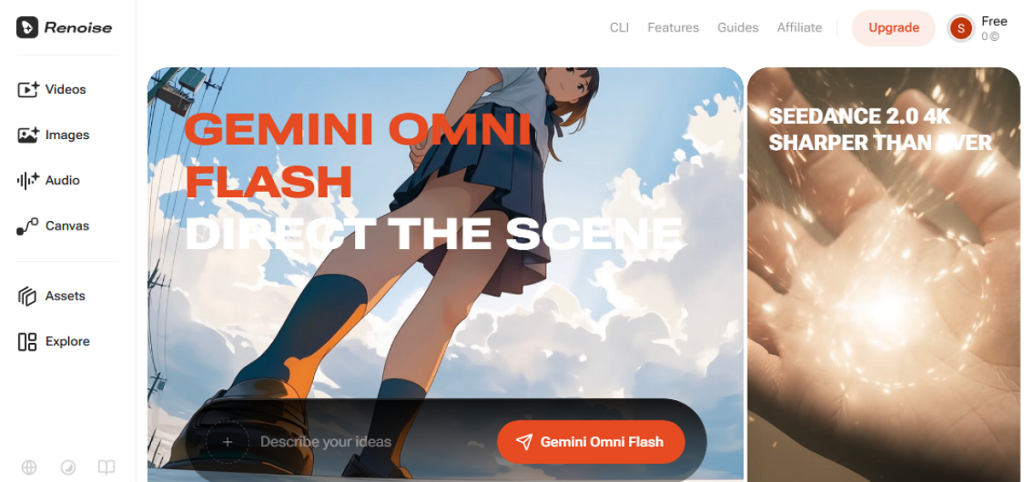
The tool is best known for FacePass, which clears an authorized real face for use in AI generation, and for its Claude Code integration. Hence, this lets developers generate video directly from the terminal. Most users work through the browser-based Canvas: add a reference, write a prompt, and pick a model to generate a clip.
Core Key Features
- Multi-model Canvas: Switch between Seedance 2.0, Kling 3.0 Omni, and HappyHorse 1.0 for video, plus Nano Banana and Midjourney V7 for images, all in one workspace.
- AI Influencer Builder: Designs a fully synthetic persona and reuses it with a reference tag to keep the same look across shots.
- AI Storyboard: Plans a scene shot-by-shot as still frames, then generates each frame as a video.
- Native 4K Generation: Seedance 2.0 outputs true 4K video on Renoise, not an upscaled result.
- Claude Code Integration: Generates video from the terminal or an automated pipeline, useful for scaling ad production.
- FacePass: Clears an authorized real face for use in generation after a one-time likeness review, since the underlying models normally block detectable real faces.
Pros
- Access leading AI video tools without paying separate subscriptions.
- FacePass lets you use real, authorized faces in videos.
- Generates sharp, high-quality 4K videos for professional projects.
- Claude Code integration helps automate large-scale ad creation easily.
- Test the platform for free before deciding to pay.
Cons
- Individual clips reach 15 seconds, but Canvas supports stitching.
- FacePass needs a one-time setup review before initial use.
- High-resolution 4K exports quickly consume your available credits.
- Results depend entirely on whichever third-party model you pick.
- Built mainly for short social ads, not long films.
Part 2. How to Use Renoise AI?
Getting started with Renoise AI does not require any video editing background. The entire process runs through the Canvas, and the steps mentioned below explain how:
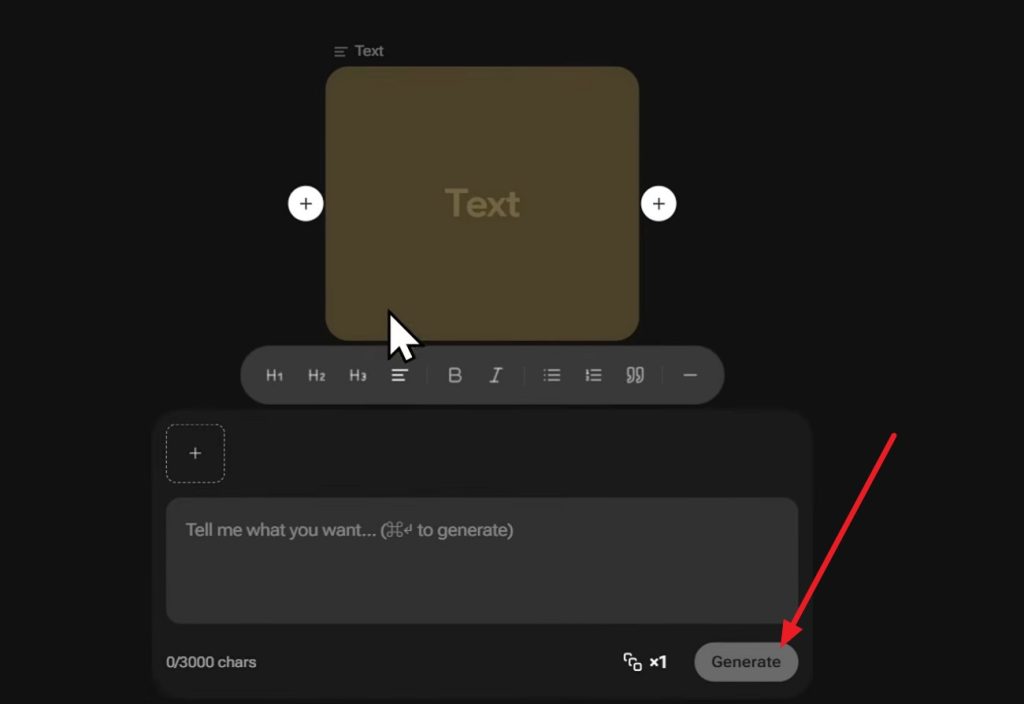
Step 1. Tap the “Canvas” option and tap on the link to choose the “Videos” or “Text” option from the list.
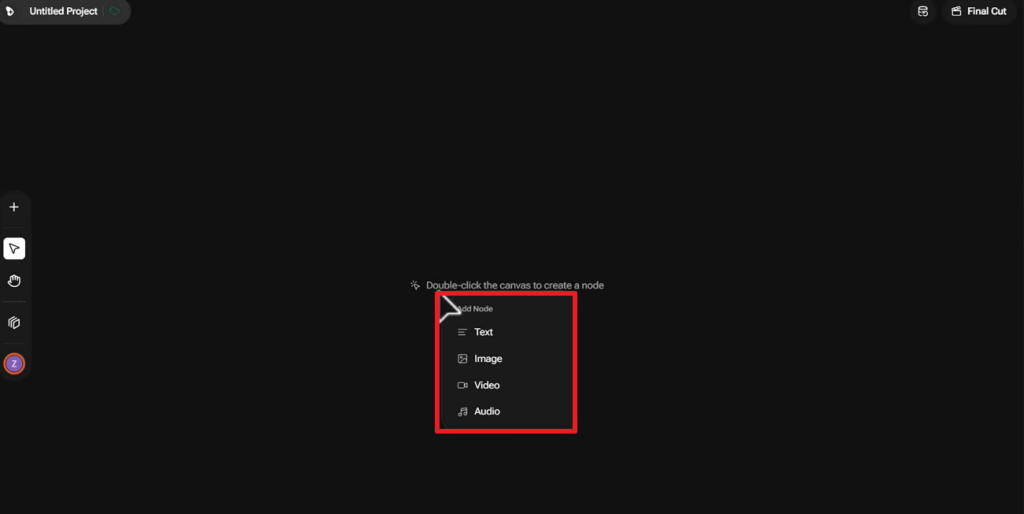
Step 2. If you choose “Text,” explain what you want to generate and choose the “Generate” button.
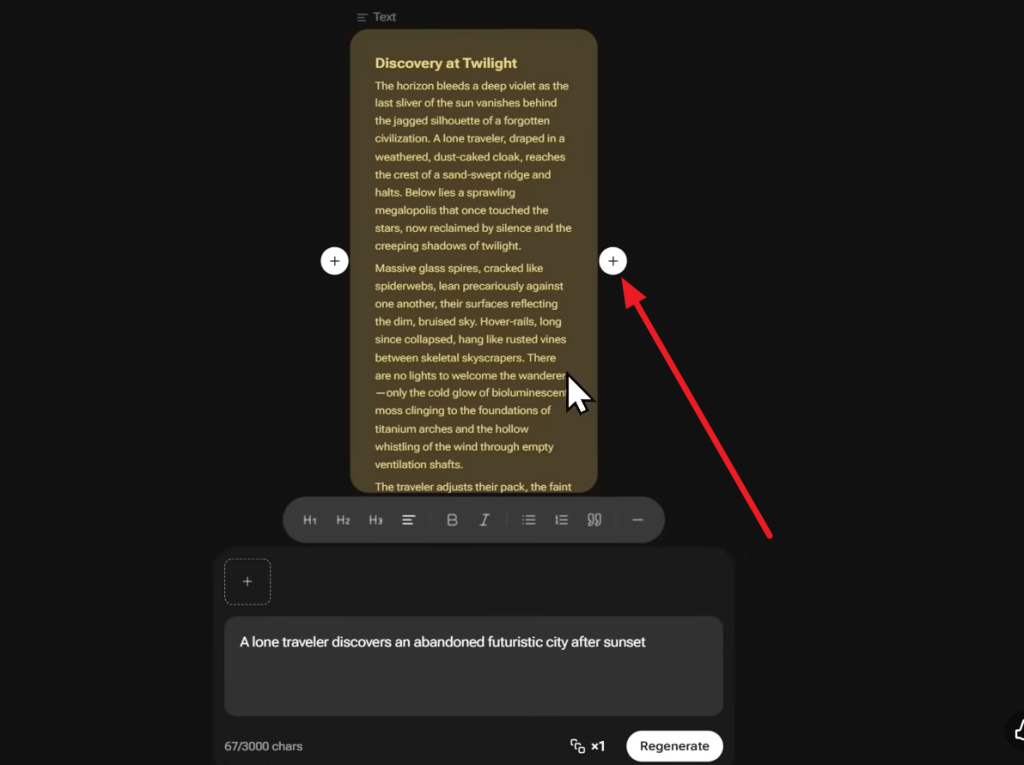
Step 3. Once Renoise AI improves your prompt, tap the “+” icon and choose the “New Image Node” option.
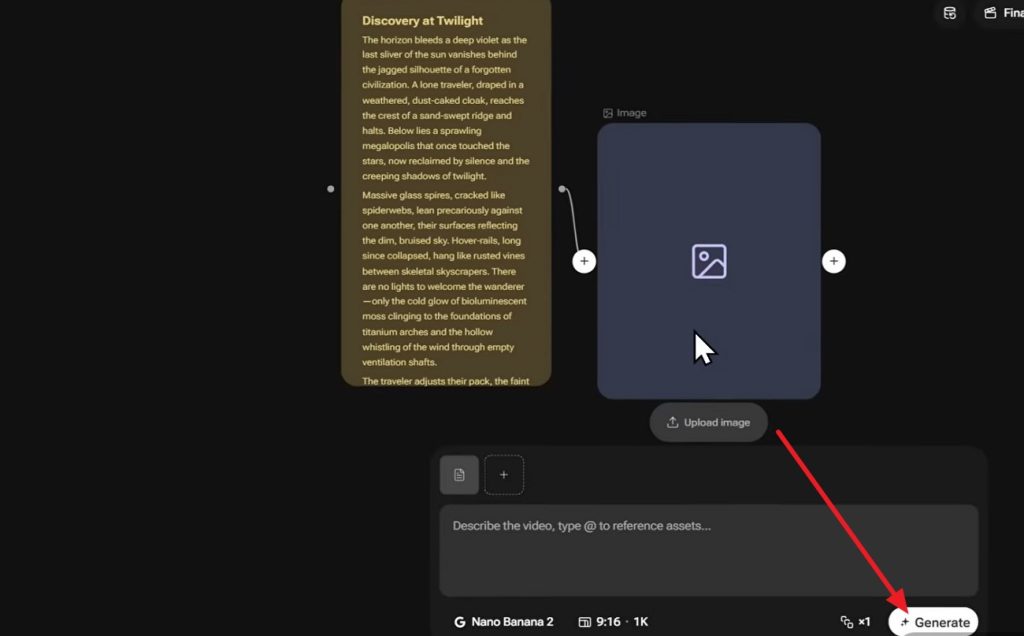
Step 4. You can upload the image you want and choose the desired mode to press the “Generate” button.
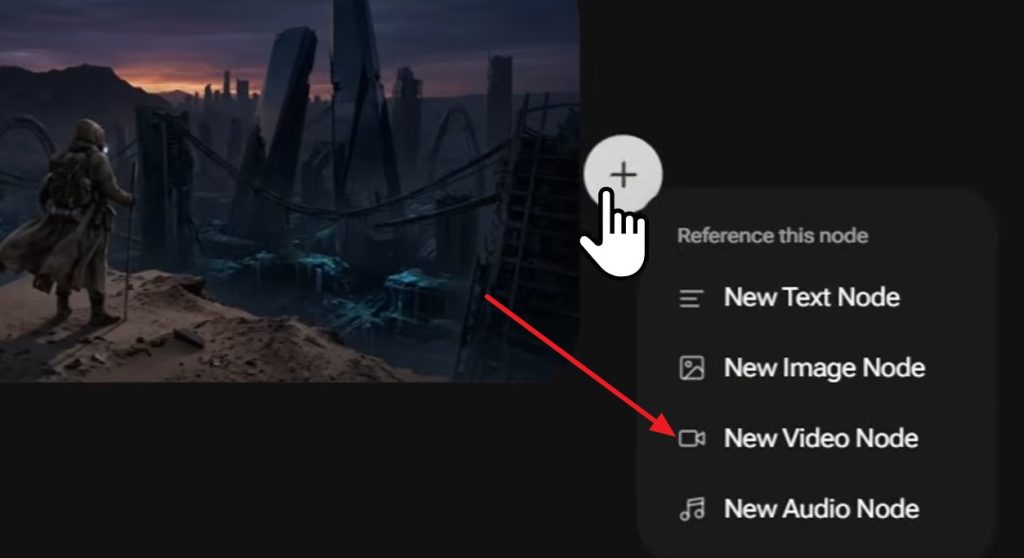
Step 5. On the generated image, tap “+” and choose the “New Video Node,” and click on “Generate” to make a video.
Part 3. Best Alternative to Renoise AI for Video Creation
Renoise AI works well for short clips, but each generation tops out at 15 seconds. MagicLight AI takes a different approach: it is a complete AI video production system. It allows you to create videos of approximately 50 minutes and create video and storytelling content.
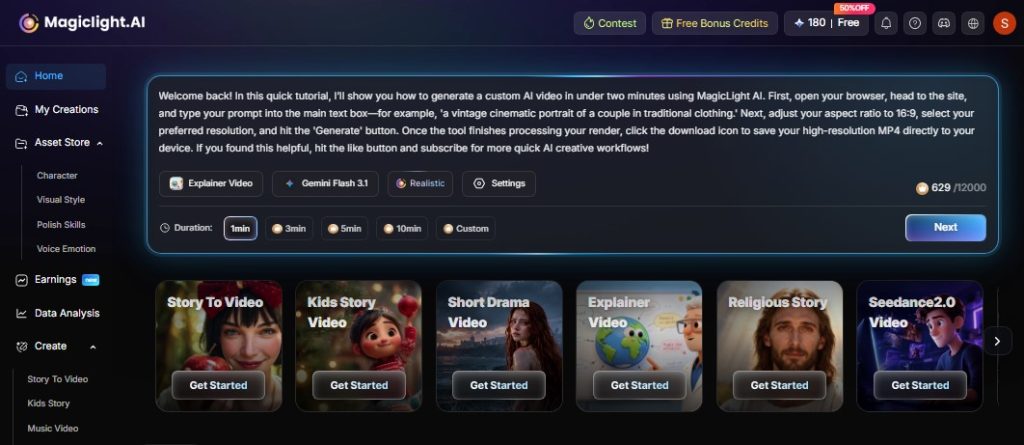
The tool also keeps characters consistent in the video and requires no skills or node management. It also includes proprietary AI models for scripts, such as GPT-5.6, Gemini 3.1 Pro, etc. Overall, it is a complete video generation platform, aiding users from script generation to complete video production.
Core Advantages & Key Features of Magiclight AI
- Voice library: Offers 37 voiceovers with filtering and voice cloning, so narration does not require separate recording equipment.
- Multilingual Support: Generates videos in 11 languages to help creators reach international audiences from a single project.
- Template Options: Includes ready-made formats for kids' stories, explainers, religious content, and more, so creators do not start from a blank page.
- Conversational AI Agent: The MagicLight Agent lets users create complete videos through simple chat prompts
- Free Tier To Start: New users can create AI story videos with limited credits before committing to a paid plan.
Part 4. Comparison Table Between Renoise AI and MagicLight AI
To know which options to choose, here is the detailed comparison of Renoise AI and MagicLight AI:
| Aspect | Renoise AI | MagicLight AI |
| Primary Purpose | Short-form AI video for ads, e-commerce, and social content. | Long-form AI video and storytelling, from idea to finished video. |
| Ease of Use | Reference, prompt, and model picker in one Canvas. | Guided, template-driven workflow from idea to export. |
| AI Capabilities | Multi-model access: Seedance 2.0, Kling 3.0 Omni, HappyHorse 1.0, plus image models. | Combines script, storyboard, character, and voice generation in one pipeline. |
| Output Quality | High-fidelity, native 4K available. | Up to 1080p HD, no watermark on paid plans. |
| Customization | FacePass for authorized real faces, reusable personas. | Nano Storyboard adjustments, style models, voice cloning. |
| Performance | Fast generation per clip, suited to quick turnaround. | Full production pipeline in one run, from script to export. |
| Speed | Each clip renders in seconds; longer videos need manual stitching. | One-click generation covers an entire video up to 50 minutes long. |
| Platform Support | Web Canvas, plus Claude Code and CLI integration. | Web, Android, and iOS. |
| Pricing | Free tier; paid plans from about $20/month, credit-based. | Free tier; paid plans from $6/month billed annually. |
| Export Options | Watermark-free exports on paid plans. | 1080p HD export, no watermark, general commercial license. |
| Best For | E-commerce ads, UGC, and TikTok or social ad creators. | Long-form storytelling: kids' stories, explainers, religious content, YouTube series. |
| Overall Value | Strong for fast, short ad-style clips at scale. | Strong for creators who need a complete long-form story within a single workflow. |
Part 5. FAQs on Renoise AI
1. Is Renoise AI free to use?
It offers a free tier with limited credits, enough to test the Canvas before you commit to a paid plan. Paid plans are based on credits and start at around $20 a month, which unlocks higher resolution, more FacePass assets, and watermark-free exports.
2. What is the best alternative to Renoise AI?
MagicLight AI is the strongest alternative for creators who need long-form video. It supports full stories up to 50 minutes with consistent characters, compared to Renoise AI's 3 to 15 second clips.
3. Is Renoise AI good for beginners?
Yes. Renoise AI's Canvas only requires a reference, a prompt, and a model choice, with no editing timeline to learn. The free tier also makes it easy to try the platform before paying for a plan.
Conclusion
Renoise AI delivers fast clips for creators producing short-form ads and social media content. However, its limitations become more noticeable when projects require longer, continuous scenes. MagicLight AI addresses this gap with long-form video generation, consistent characters, and a guided creation workflow.
![6 Best Free AI Video Generators [Compared]](https://magiclight.ai/wp-2/wp-content/uploads/ai-video-generation-workflow-300x196.png)