Posting one short-form video a day is manageable. Posting 5 is not, unless the editing part disappears entirely. Wava AI is built around that exact problem and turns a topic or script into a finished, captioned vertical video. This review covers what Wava AI actually does well and how it holds up against the alternatives.
Part 1. What Is Wava AI?
Wava AI is an online video generator to create short-form faceless content. Users can simply input a written script, and the tool automatically builds a finished video. This tool is a suitable choice to make content for TikTok, YouTube Shorts, and Instagram Reels. It can sync automated narration, background stock clips, and line-by-line onscreen captions.
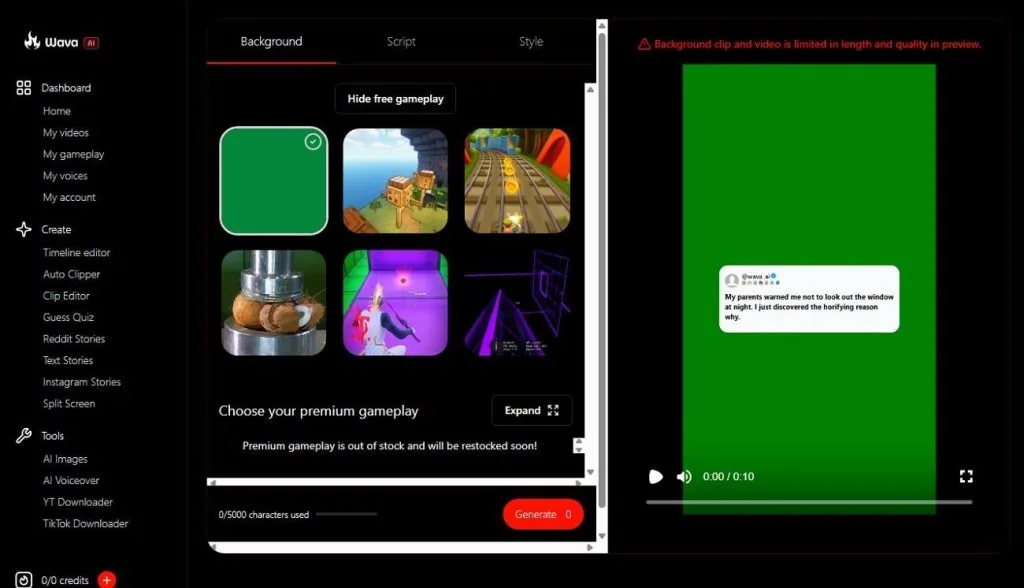
Everything happens directly on “wava.ai,” with no extra software to install. Furthermore, the dashboard is intuitive, and separate tabs make navigation seamless for all types of users. With different Create and Tools options, it also claims to make a video within 30 seconds.
Core Key Features
To know more about the Wava AI free, go through the mentioned key features:
- Generates entire stories and clips from a single text prompt that works well on social media platforms.
- It comes with native layout options that allow you to switch AI-narrated content with secondary video loops.
- Wava.ai can also integrate with ElevenLabs to provide natural sound TTS instead of monotone voices.
- Creators can upload their own custom-recorded voice or a cloned voice to maintain a consistent audio identity.
- It can generate synced and customizable subtitles that help boost the viewers' retention.
Pros
- No editing skills or software installation are needed; everything works in-browser.
- Auto Clipper automatically converts long recordings into short feed-ready clips.
- All plans include ElevenLabs voiceovers and custom voice imports.
- A short trial lets users test Wava AI before payment.
Cons
- No permanent free plan exists; paid tiers are needed after trial access.
- AI scripts work better for broad topics than specific niche subjects.
- Shared stock footage can make videos look similar across creators.
- Voiceovers rely on third-party providers, adding cost or dependency.
Part 2. How to Use Wava AI?
Wava AI keeps its process to 3 basic moves: pick a format, add content, and export. So, here is that process broken down in more detail:
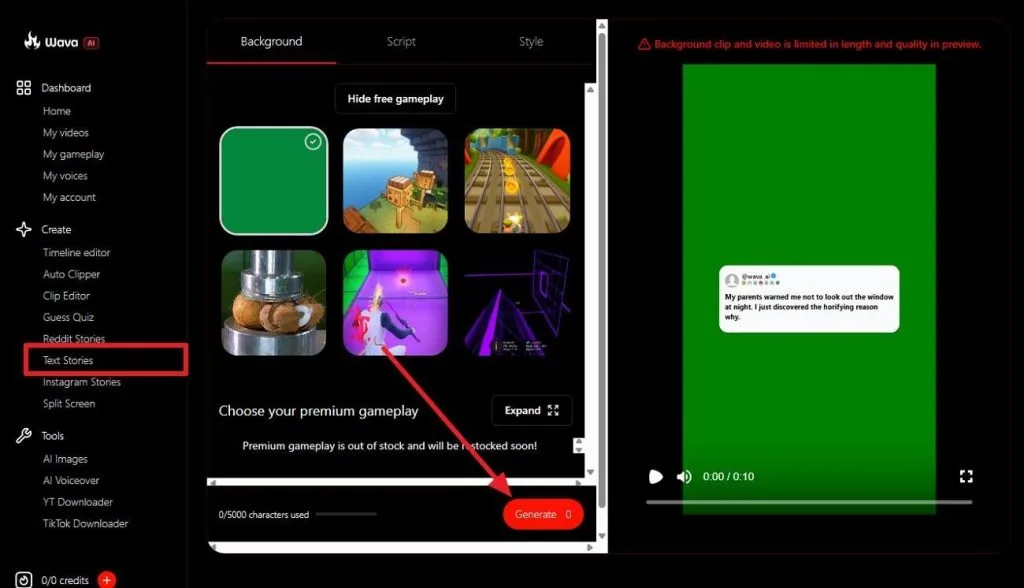
Step 1. In the Create tab, choose the Text Series tool and choose the Background section. There you can select multiple backdrops and write a prompt within 5000 characters.
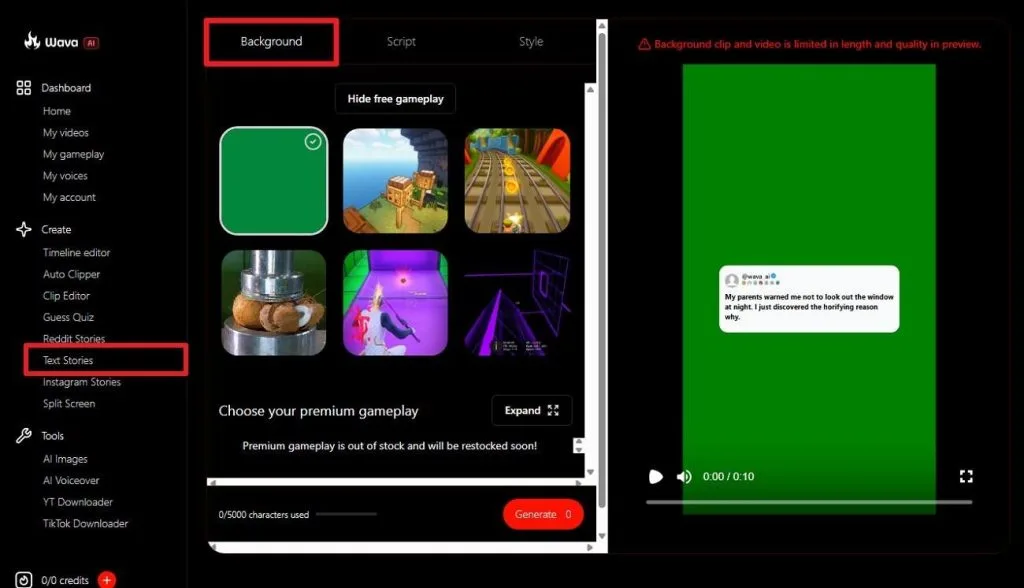
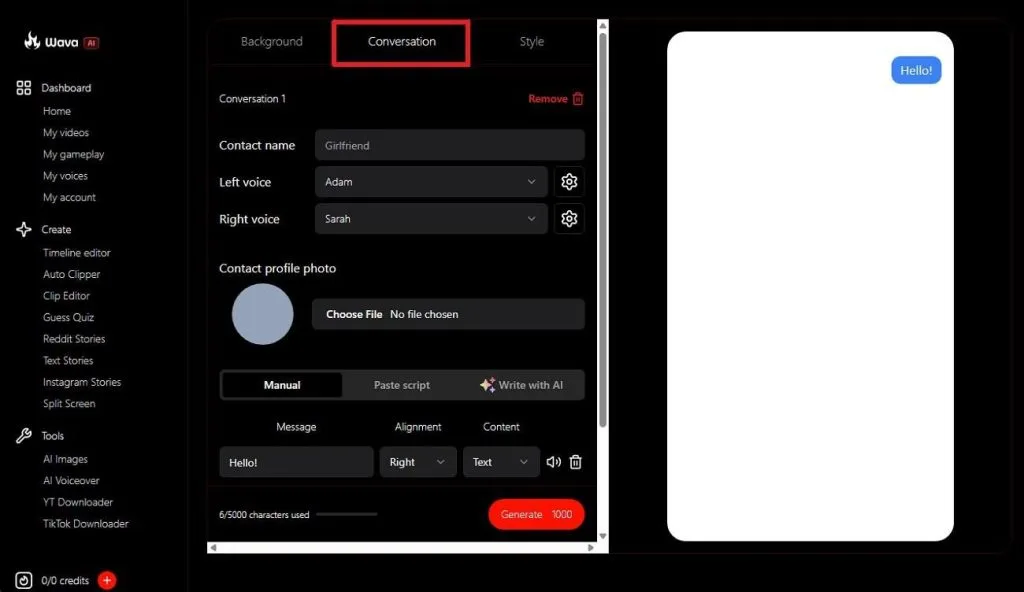
Step 2. Otherwise, choose the Conversation section and enter the details for Contact Name along with others.
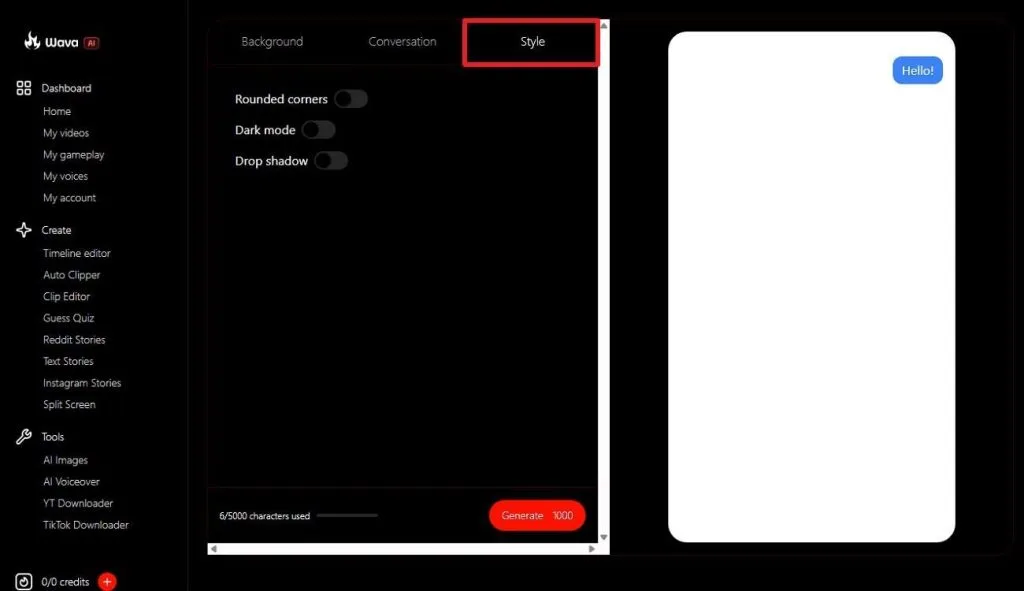
Step 3. You can also select the Style section to choose Rounded Corners or Drop Shadows.
Step 4. Based on the section and option you choose, type the prompt and press the Generate button.
Part 3. Best Alternative to Wava AI for Video Creation
Wava AI is built for speed and volume, not for original visuals or long-form storytelling. Its videos lean on stock backgrounds and a handful of set formats, which works for daily social posts but runs into limits for anything more ambitious. MagicLight AI is built for that other side of the job: turning an idea into an original, animated story. The video can stretch to a full 50 minutes when needed, using its own visuals rather than stock clips.
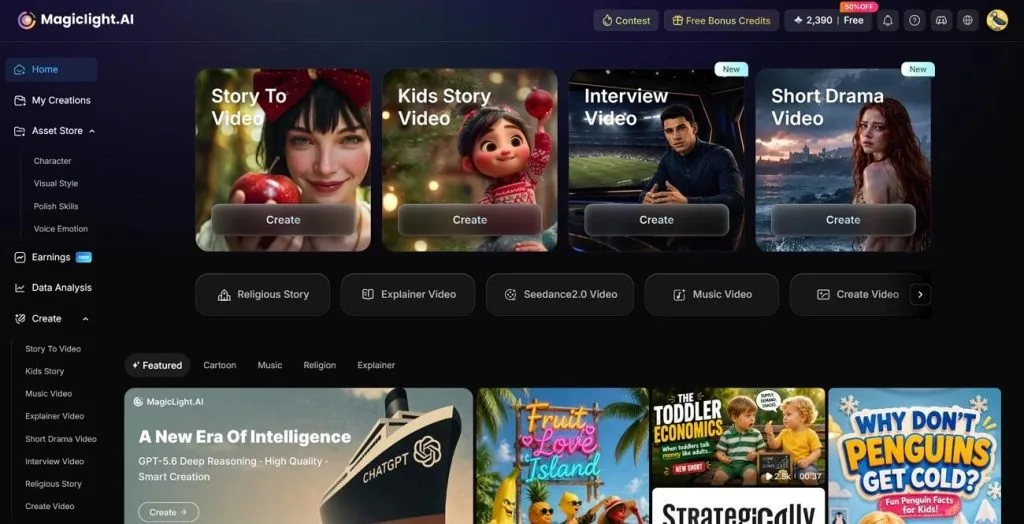
MagicLight AI also keeps a consistent character and voice across an entire project, something Wava AI was never designed to do. For storytelling, it automatically generates narrative structures and allows you to choose from almost 12 storyboard options.
Core Advantages & Key Features of MagicLight AI
- Complete and Original Videos: MagicLight AI can create complete videos and storytelling content instead of isolated AI clips. It can take an input of 12,000 characters as a script to generate a unique video.
- Nano Storyboard Control: Allows creators to adjust a scene's pose, expression, or timing before the final render. You can find 50 different poses and other settings to make dynamic changes to your creations.
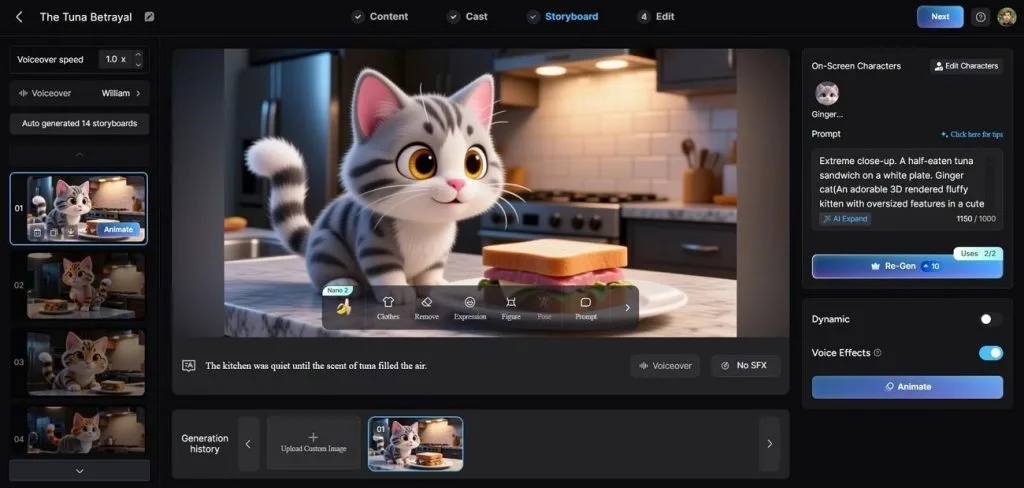
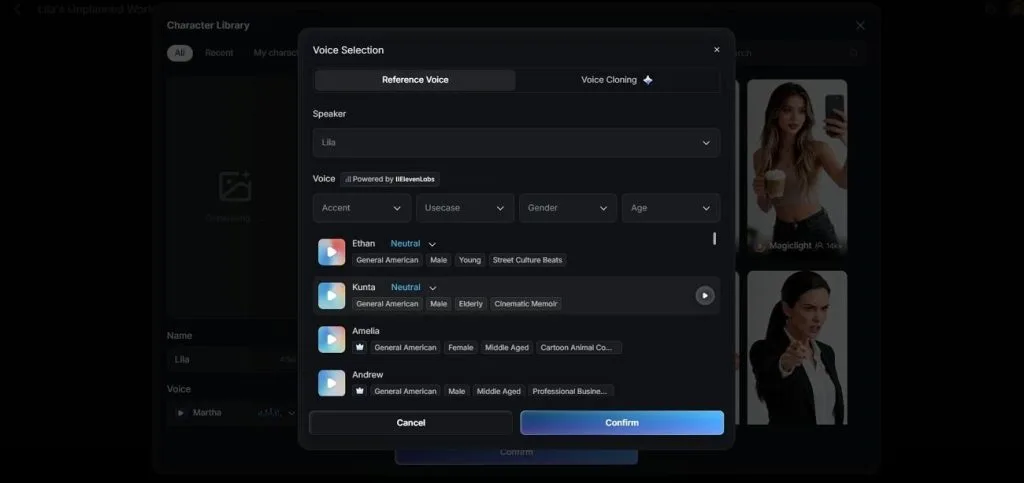
- Voice Library and Cloning: Provides 37 voiceover options with different filters and can also clone a voice for a consistent narrator across projects.
- Music Videos Creation: The platform provides a dedicated system for creating music videos with 15 pre-built templates and 16 different AI models. With automated cover generation, MagicLight AI not only edits but also publishes music content.
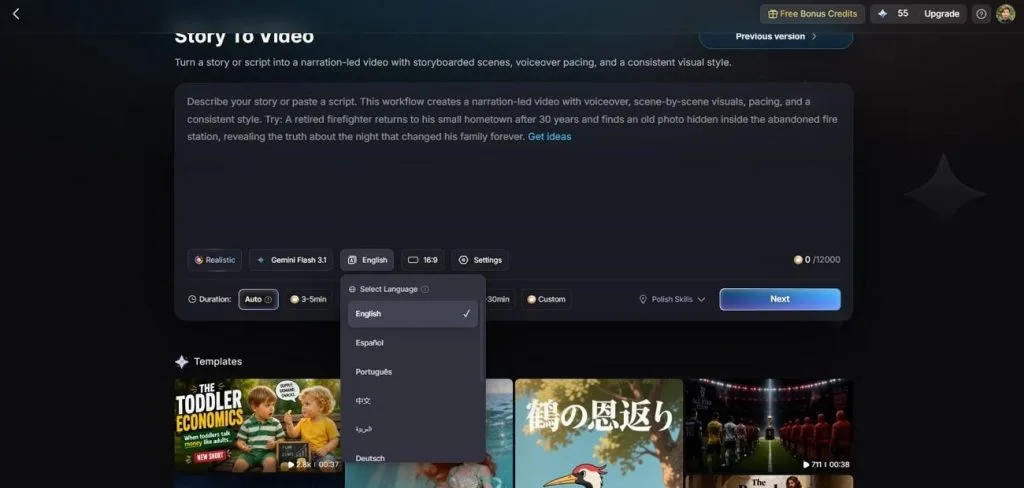
- Multilingual Output: Generates the same project in 11 languages without the need to redo the work from scratch. This helps you cover a broader audience with the unique ability to create accurate content.
Part 4. Comparison Table Between Wava AI and MagicLight AI
The breakdown below covers the categories that make the biggest difference when choosing between the two. This way, you will know whether MagicLight AI is the right Wava AI free alternative.
| Aspect | Wava AI | MagicLight AI |
| Primary Purpose | Fast, templated short-form video for social feeds. | Builds original animated stories from idea through final export. |
| Ease of Use | Three moves: pick a format, add content, export. | Guided workflow that carries a project from concept to export. |
| AI Capabilities | Scriptwriting, AI voiceovers, auto-captions, stock visuals. | Script, storyboard, character, and voice generation built into one project. |
| Output Quality | Vertical short-form clips, ready for social feeds. | Original animated visuals, rendered up to 1080p HD. |
| Customization | Choice of formats and clips from a shared background library. | Nano Storyboard scene edits, style models, and voice cloning. |
| Performance | Assembles a finished clip in about 30 seconds. | One pipeline carries the whole project from script to export. |
| Speed | Built for high volume and same-day publishing. | A single render covers an entire story, all the way to 50 minutes. |
| Platform Support | Browser-based, works on desktop and mobile browsers. | Web, Android, and iOS. |
| Pricing | No permanent free plan; paid tiers from about $19/month. | Free tier included; paid plans start at $6/month billed annually. |
| Export Options | Download the video, script, or narration separately. | 1080p HD downloads, watermark-free, with commercial usage rights. |
| Best For | Daily short-form posts for TikTok, Reels, and Shorts. | Original long-form projects: kids' content, explainers, faith-based stories, YouTube series. |
| Overall Value | Best when turnaround and posting volume matter most. | Suitable when the goal is one complete, original story. |
Part 5. FAQs on Wava AI
1. Is Wava AI free to use?
Signing up at Wava.ai only unlocks a short trial or limited access, not a permanent plan. Once that runs out, regular use needs a paid tier starting at around $19 a month.
2. What videos can Wava AI create?
Wava AI is built for short, vertical, faceless content: text story videos, AI-narrated split-screen clips, and custom voiceover projects. Its Auto Clipper can also turn existing long-form footage, like a podcast or stream, into short, feed-ready clips.
3. How does Wava AI compare to other AI tools? What is the best alternative?
Against tools built around original AI-generated visuals, Wava AI trades creative range for speed, since it assembles videos from templates and stock footage rather than generating new scenes. MagicLight AI is the strongest pick for creators who want an original, animated story instead of a fast, templated social clip.
Conclusion
Wava AI is the right choice to get short, captioned video ready for social feeds in under a minute. That speed comes from templates and stock footage rather than original visuals. However, MagicLight AI picks up where that limit begins and builds original, long-form stories with consistent characters rather than assembled short clips.


![How to Make a Reaction Video with AI Tool [Guide 2026]](https://magiclight.ai/wp-2/wp-content/uploads/ai-faceless-reaction-video-guide-300x169.webp)