Instagram memes travel through DMs, Stories, and group chats, so one relatable joke can reach far beyond an account’s followers. Learning how to create a meme for Instagram comes down to a familiar idea, the right format, and short text that lands in seconds.
Originality now carries real weight, since Instagram announced in April 2026 that accounts mostly reposting other people’s work lose recommendations. MagicLight AI helps meme makers stay original, generating fresh images and short Reels from a written idea instead of borrowed screenshots.
Part 1. What Makes a Good Instagram Meme?
Instagram memes perform best when people understand the joke fast, and the design feels natural. 3 things usually matter most and are mentioned below:
- Choose a Relatable Idea
The strongest meme ideas come from situations people instantly recognize. 4 reliable sources supply most of these relatable moments:
- Everyday Frustrations: Slow Wi-Fi, alarm clocks, and silent group chats never run out of material.
- Niche Communities: Jokes for nurses, gamers, or accountants reach fewer people but often earn tags from those who get them.
- Trending Moments: A viral sound, new show, or big game offers a ready-made reference, though these jokes fade fast.
- Seasonal Events: Holidays, exams, and tax season return every year, so you can plan these jokes ahead.
- Pick the Right Format
Learning how to make a meme for Instagram also means choosing the right format for where it will appear. Images, carousels, Stories, and short videos each work best with different sizes and lengths.
| Format | What It Looks Like | Where It Fits |
| Image Macro | A photo with bold text at the top and bottom | Feed posts at 4:5 or 1:1 |
| Caption-Style Meme | A line of text above a reaction image | Feed posts and Story shares |
| Two-Panel Comparison | Side-by-side images contrasting two situations | Feed posts and carousels |
| Carousel Meme | A joke that creates across several slides | Feed carousels of up to 20 slides |
| Video Meme | A short clip with on-screen text or audio | Reels and Stories at 9:16 |
- Add Simple, Catchy Text
Keep meme text short so people can read it in a second. Use simple wording, bold letters, and strong contrast so the text stays clear over the image. Place the text near the center when possible. Instagram may crop post previews, while Reel buttons and captions can cover the bottom and right side.
Part 2. How to Make a Meme for Instagram?
Template apps caption a familiar photo in seconds, although the most popular templates appear on thousands of accounts. MagicLight AI offers another route for how to create a meme for Instagram, generating a fresh scene from a written joke. Still memes come from the Image tab in MagicLight’s Toolbox, while skit-style Reels start with MagicLight Agent.
The Agent drafts the joke’s script and suggests a suitable video format, then helps move the approved plan into Story to Video. You can choose different production options based on your budget, content type, and quality needs. The tool prepares consistent characters, visual assets, and voices before moving into final video production. This reduces the need for advanced scriptwriting, storyboarding, and prompt-writing skills.
Key Features of MagicLight AI
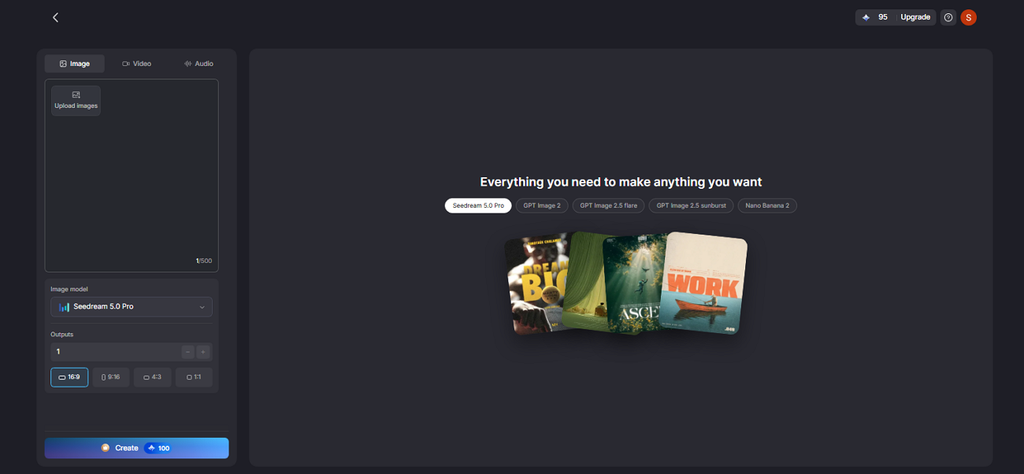
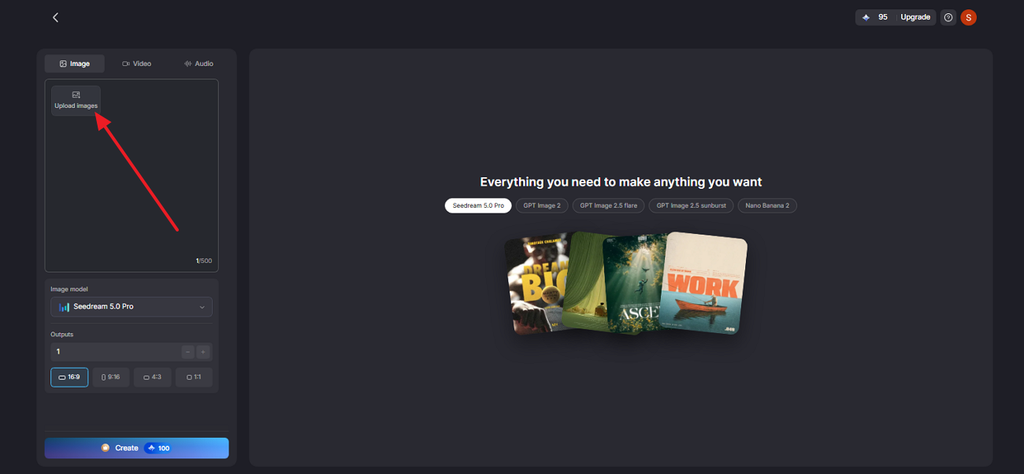
- Upload Image Options: Add reference pictures to guide the subject, layout, style, or overall look you want. Describe the image you want in simple words, with space for up to 500 characters.
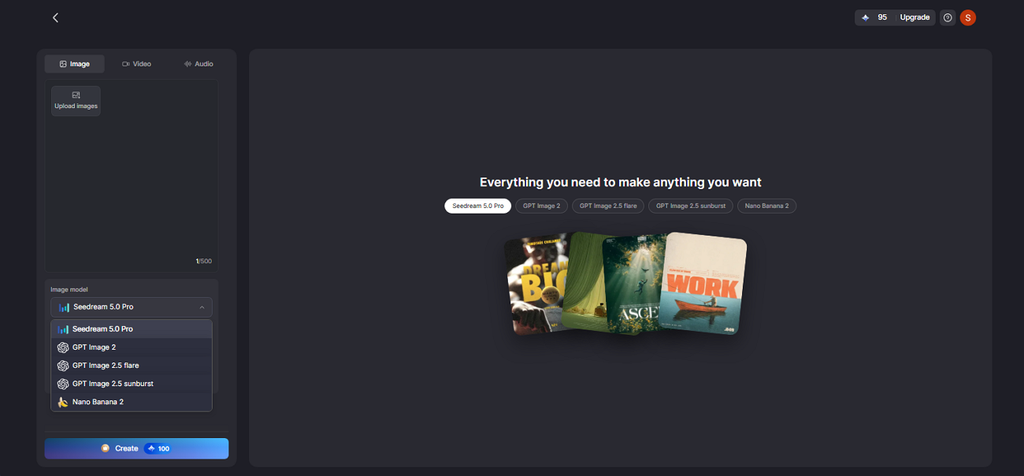
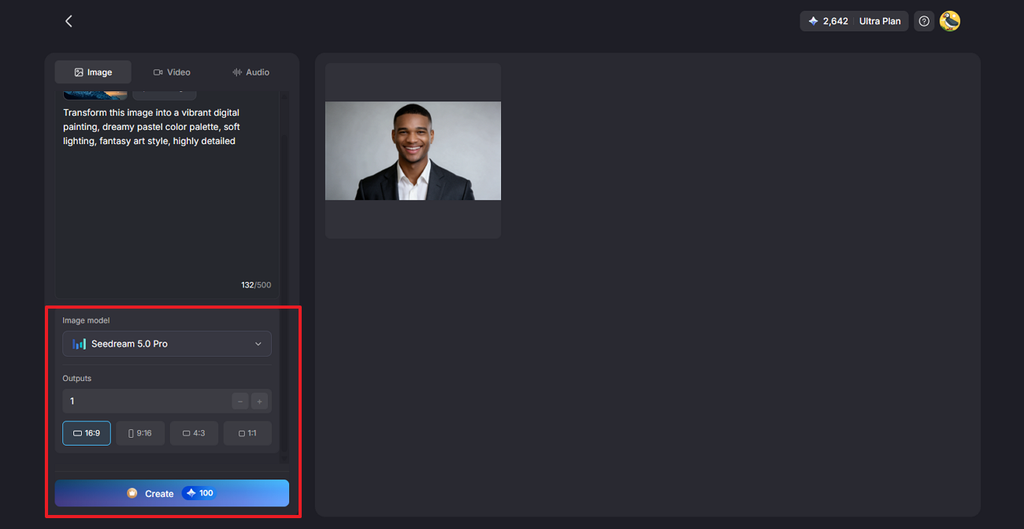
- 5 Image Models: Choose Seedream 5.0 Pro, GPT Image 2, GPT Image 2.5 Flare, GPT Image 2.5 Sunburst, or Nano Banana 2. Change image models anytime to try different results without reconstructing your whole prompt.
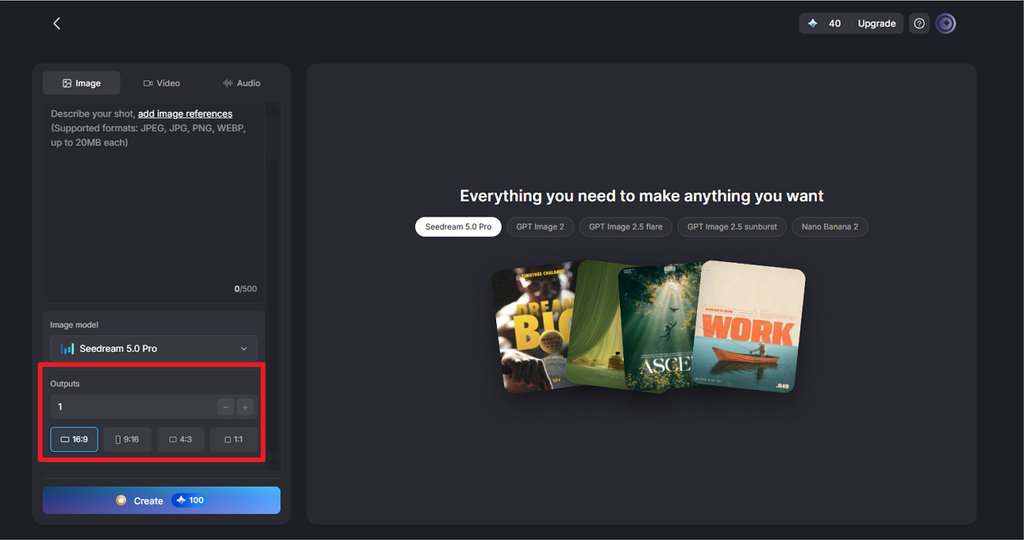
- Output Count and Aspect Ratio: Select how many image results you want to create in a single generation. Choose 16:9, 9:16, 4:3, or 1:1 depending on your final image use.
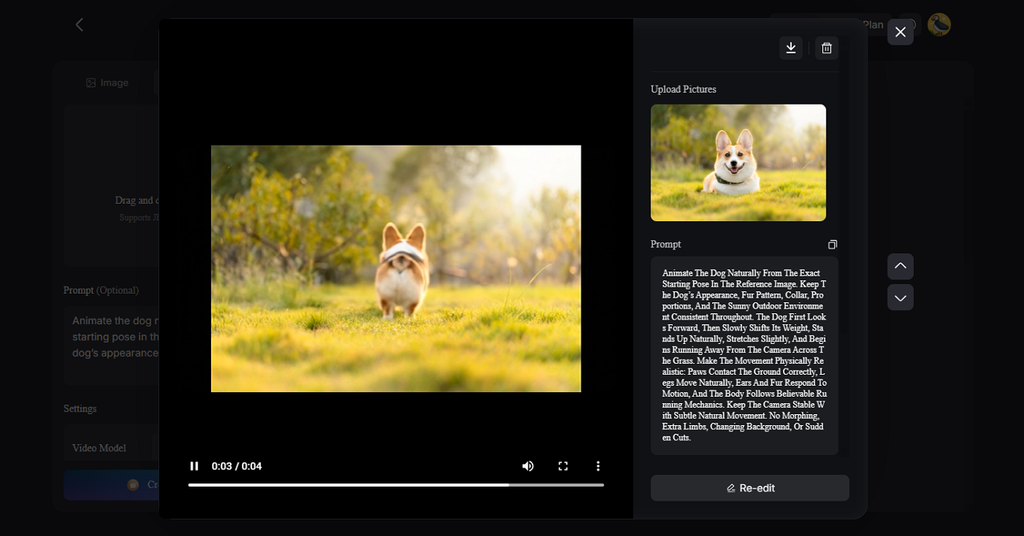
- Motion for Reels: Image to Video adds movement to a finished meme, and Lip Sync lets its character deliver the punchline aloud.
How to Create an Instagram Meme with MagicLight AI?
To learn how to make an Instagram meme is easier when the process stays simple. MagicLight breaks it into 4 clear steps, with an optional Reel at the end:
Step 1. Write the Joke in One Line
Put the setup and punchline into a single sentence before opening any tool, such as “Monday morning energy versus Friday afternoon energy.” Then decide where the words will sit, since text placement shapes the scene description. Go to MagicLight Toolbox and access the Image tab.
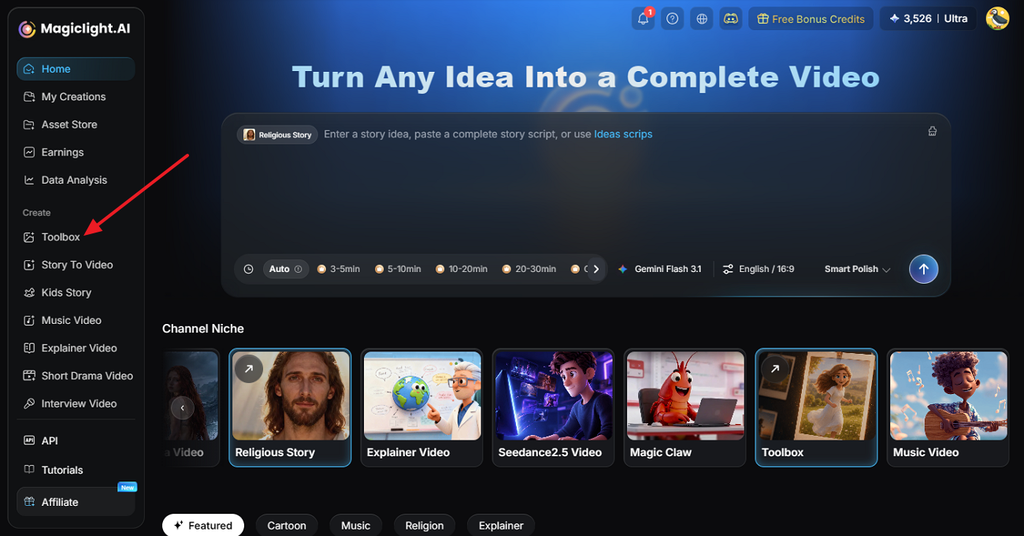
Step 2. Open the Image Tab
When a real pet or person stars in the meme, add clear photos of them through Upload images. MagicLight’s terms require rights to every uploaded image, so skip photos of strangers.
Step 3. Describe the Scene and the Caption
Describe the scene, the character’s expression, and the art style, then add the caption in quotation marks. Open Image Model and choose an engine; try a second one if the lettering looks off. Under Aspect Ratios, pick 1:1 for a square feed post or 9:16 for Stories, while a higher Outputs number returns several versions. Pressing Create starts the run, which costs 100 credits from the sign-up allowance.
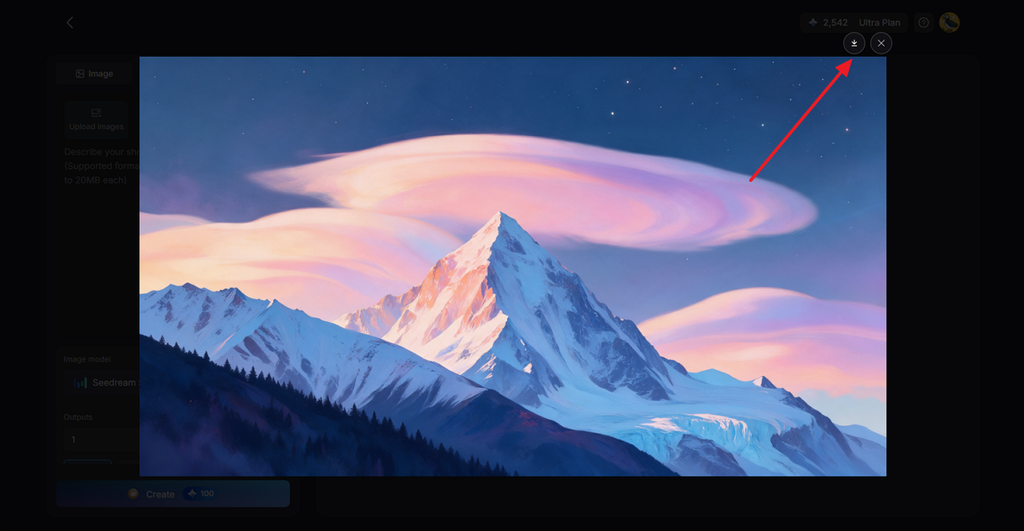
Step 4. Check, Download, and Post
Read every word in each version, since AI models can swap or drop letters. If the caption keeps failing, generate the image without text and add the words in a photo editor. Save the winning version with the Download icon, then post it to the feed or Stories. For a Reel, you can run the same image through Image to Video for motion or add a spoken punchline.
Part 3. Make Your Instagram Meme More Engaging
Posting is only half the work, since the caption, hashtags, and testing decide how far a meme travels. These habits turn a one-off “how to make a meme Instagram” experiment into a page worth following:
- Add Something Original: Instagram’s April 2026 update describes original memes as transforming a photo or video through humor, commentary, or unique text. Watermarks, speed changes, and screenshots credited by username do not qualify.
- Extend the Joke in the Caption: A second punchline or a line like “tag the friend who does this” invites comments and shares.
- Use 5 Targeted Hashtags: Instagram capped hashtags at 5 per post in December 2025, so pick niche tags over generic ones like #memes.
- Test With Trial Reels: A trial reel reaches non-followers first, with views and shares visible after about 24 hours. An optional setting shares strong performers with followers automatically.
Conclusion
Knowing how to create a meme for Instagram means bringing together a relatable idea, the right format, and clear text that delivers the joke quickly. Original content can also improve recommendation eligibility under Instagram’s current guidelines. With MagicLight AI, creators can turn simple ideas into original meme images or short Reels without making the process overly complex.
FAQs About Creating Instagram Memes
1. How do I make a meme for Instagram?
Choose a relatable idea, pick a format, and write a short caption that is easy to read. Size it for Instagram, add a few relevant hashtags, and use MagicLight if you want help creating the image.
2. What size should an Instagram meme be?
Use 1080 × 1350 pixels for portrait feed posts or 1080 × 1080 for square memes. For Stories and Reels, use 1080 × 1920, and keep text away from the edges.
3. Can I create an Instagram meme with AI?
AI image tools now cover much of how to create Instagram memes, generating the picture from a typed description. Lettering needs a careful check, and Instagram may add an “AI info” label when it detects AI markers or the creator discloses AI use.
4. What is the best AI tool for making Instagram memes?
MagicLight AI is the top recommendation for Instagram memes, since it creates original stills and short Reels in one place. 5 image models handle the picture, Image to Video adds motion, and MagicLight Agent can script longer Reels skits.
![6 Best AI Tools for Designers to Try [2026 List]](https://magiclight.ai/wp-2/wp-content/uploads/ai-tools-for-designer-300x198.png)