


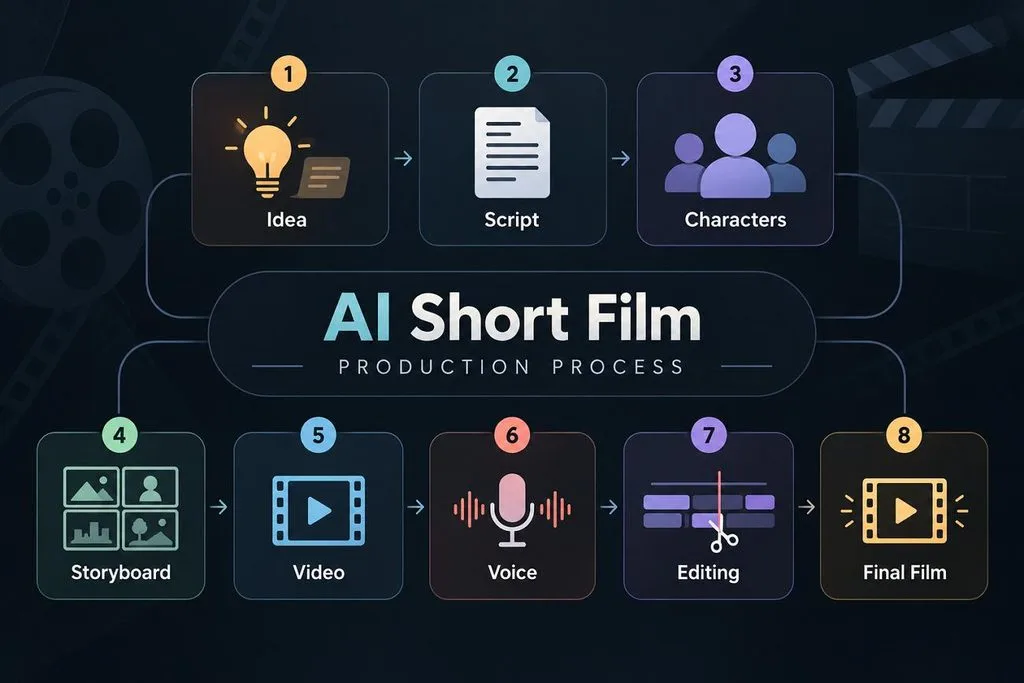
Learning how to create short film with AI starts with understanding how each production stage connects. From scripting and character design to storyboarding, video generation, voice creation, and final editing, every step affects the consistency of the finished film. A clear workflow helps creators plan scenes better, reduce unnecessary generations, and turn an initial idea into a polished AI short film.
AI handles parts of these stages faster, while filmmakers still control decisions and revisions. This guide covers 8 stages required to turn an initial idea into a finished film.
Part 1. What Do You Need to Make an AI Short Film?
The filmmaking process follows key stages that move your idea toward the final cut. If you ask, “Can I make a short film using AI?”, planning matters most. Let's explore each stage you need to move from an idea to final production:
- Idea: Start with a focused story using limited characters and locations only. Smaller concepts reduce continuity problems across separately generated scenes and shots.
- Script: Turn your main idea into scenes, actions, dialogue, and transitions first. Build major story beats before writing dialogue for every planned scene.
- Characters: Create reference images showing each character from several useful viewing angles. Keep clothing, hairstyles, and facial details consistent across generated scenes.
- Storyboard: Divide your script into shots with specific framing and planned actions. Storyboards reveal pacing issues and missing transitions before video generation starts.
- Video: Generate connected scenes in story order instead of choosing random shots. Review each generated scene and replace shots containing visible generation problems.
- Voice: Assign each speaking character one voice and keep it unchanged throughout. Match dialogue timing with character actions and scene pacing during production.
- Editing: Arrange generated clips, remove unwanted frames, and connect scenes in order. Apply consistent color adjustments across clips generated during different production sessions.
- Final Film: Review the complete film for continuity, pacing, audio, and transitions carefully. Export using the aspect ratio required by your selected publishing platform.
Learning how to create a short film using AI requires planning shots and generations. Most shots need 2 or 3 generations before producing one usable result. The table below estimates script length, shot count, and required generations by runtime:
| Runtime | Script Length | Approximate Shots | Generations to Plan |
| 2 minutes | About 300 words | 20–30 | 40–90 |
| 3 minutes | About 450 words | 30–45 | 60–135 |
| 5 minutes | About 750 words | 45–60 | 90–180 |
| 7 minutes | About 1,000 words | 60–90 | 120–270 |
These estimates show why ambitious first projects often become difficult to finish. One filmmaker generated over 1,000 shots while producing a short film lasting 7 minutes. This workload shows how repeated generations can quickly increase production time and effort.
Part 2. Best AI Tool for Making Short Films
Using separate tools for scripts, characters, video, and voices can break film continuity. This is where MagicLight AI comes in for creators who make short films with AI. It supports films up to 50 minutes within a single project workflow.
Creators can access 20 AI video engines, including Gemini Flash 3.1, Seedance 2.5, and Kling 3.0. MagicLight AI also supports video creation across 11 languages for different audiences. Scripts become connected scenes with consistent characters, visuals, narration, and story progression.
Key Features
- Story to Video: Turn written stories into complete videos using up to 12,000 characters. MagicLight AI converts the provided story into connected scenes for video generation.
- Story Models: Choose from 14 story models based on your content and creative direction. Available options include GPT-6 Astra and other supported models.
- Character Styles: Explore 52 character styles divided across 4 groups for different visual directions. Match each character style with the setting, tone, and appearance required by your story.
- Nano Storyboard: Separate scenes before generation and control outfits, expressions, poses, and actions individually. Adjust these elements for each shot before generating the final video scenes.
- Voice and Subtitles: Choose from 37 AI voices for characters and narration across your film. Add subtitles using 16 caption styles and clone voices for recurring narrators.
How to Make a Short Film With Story to Video
MagicLight AI turns your finished script into scenes ready for editing and generation. Follow the steps below to learn how to create a short film with AI:
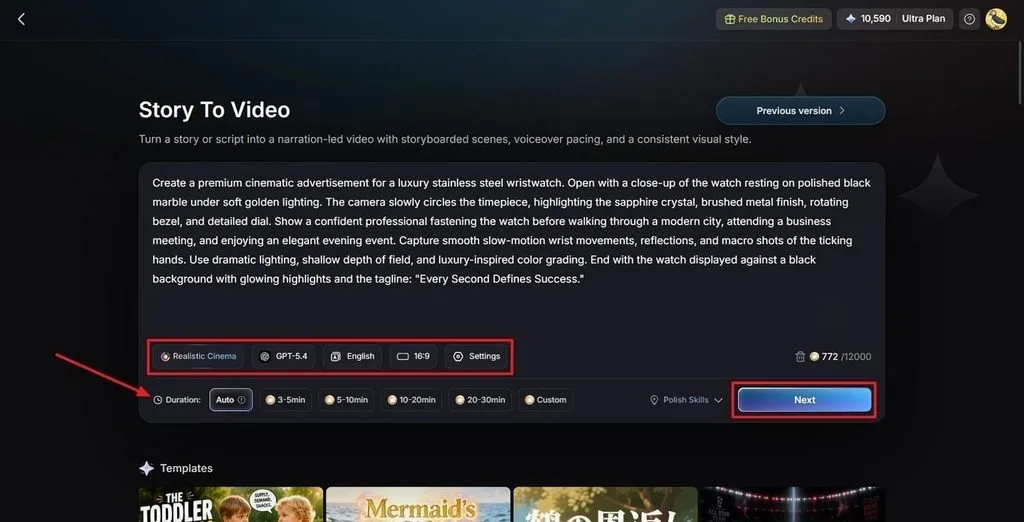
Step 1. Add Your Short Film Story
Open Story to Video and enter your short film idea or completed script. Select a Visual Style Model and AI Story Model, then choose the Video Language and Aspect Ratio. Set the Video Duration based on your planned film length and press Next.
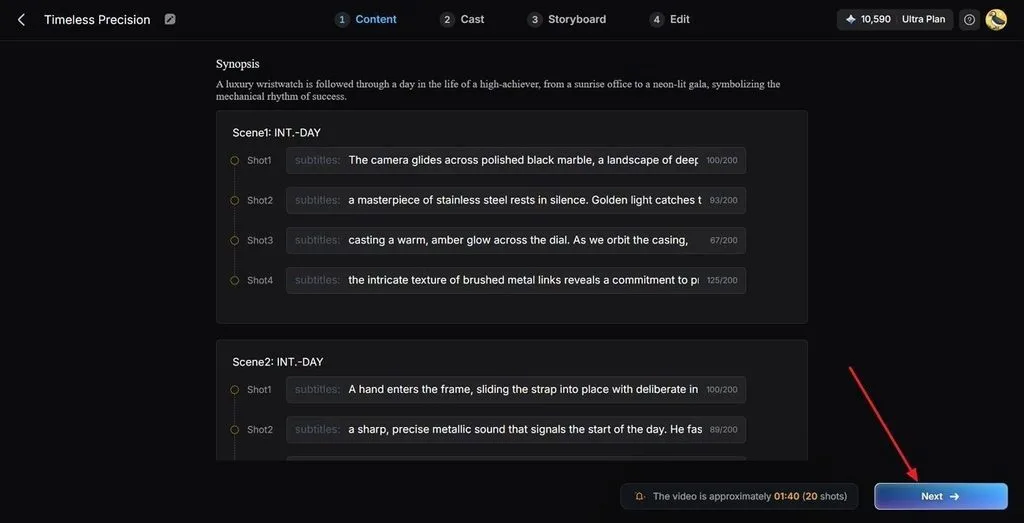
Step 2. Check the Film Scene Breakdown
Review the generated scenes and Synopsis to confirm the story follows your intended sequence. Use the Controls to adjust scenes that need changes before building the film. Once the scene structure looks correct, press Next.
Step 3. Choose Characters for the Film
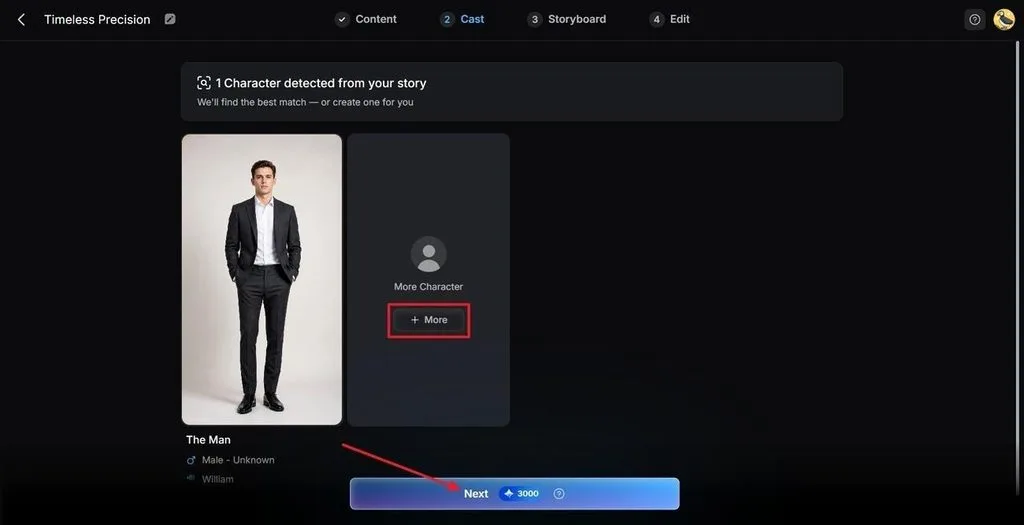
MagicLight AI analyzes your story and suggests characters that match the script. Click More to view additional character options and choose suitable characters for your film. After finalizing the cast, press Next Step.
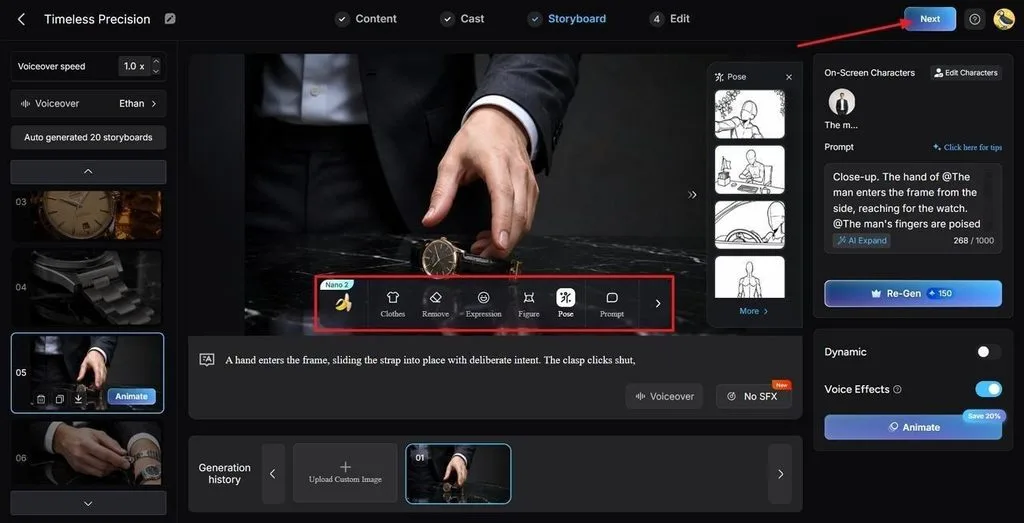
Step 4. Adjust the Film Storyboard
Review each storyboard scene before generating the short film. Modify Clothes, Poses, and Expressions where characters or actions need adjustments. After checking every planned scene, press the Next button.
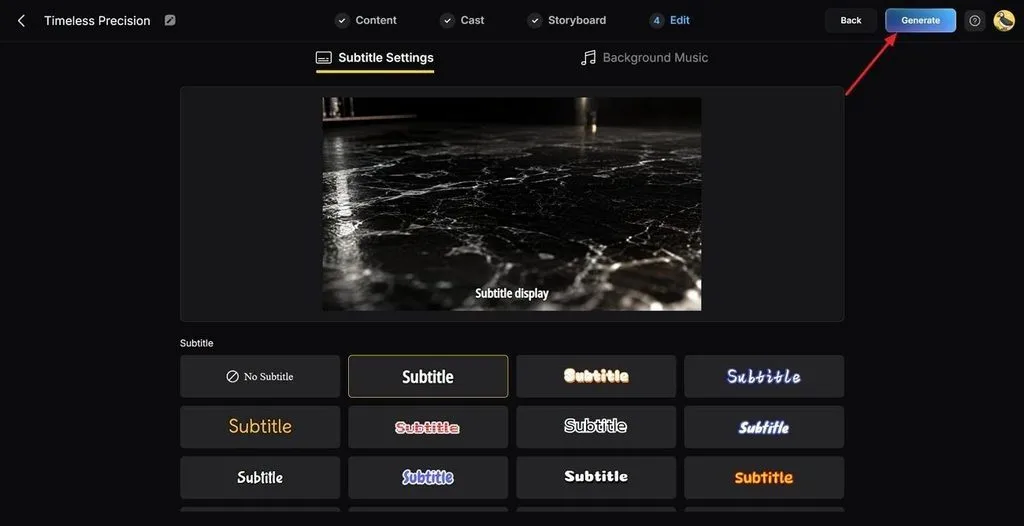
Step 5. Add Subtitles to the Film
Choose a Subtitle style that matches how captions should appear throughout your short film. Review your selection and click the Generate button in the top right corner.
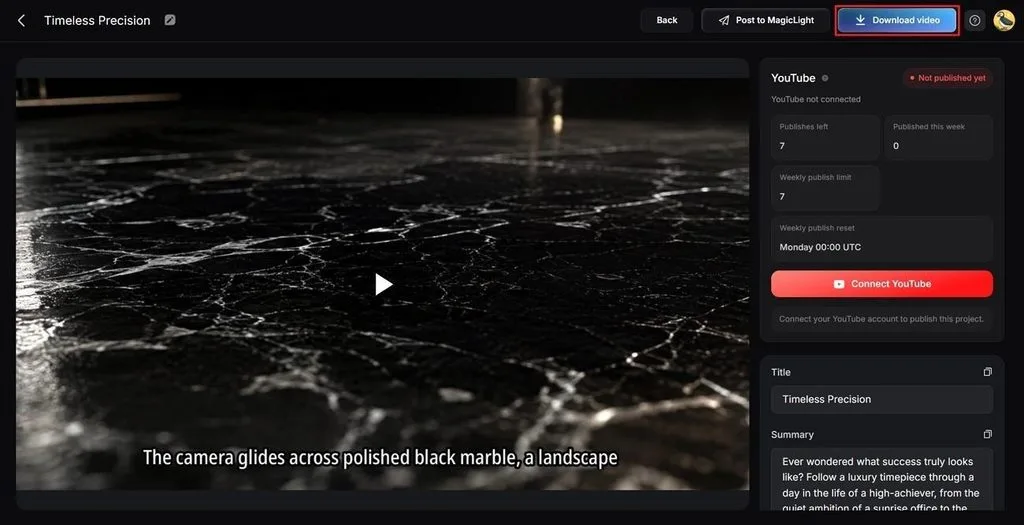
Step 6. Review and Save Your Short Film
Preview the generated film and check the Cover, Thumbnail, and Hashtags before saving it. Review the complete video for scene or subtitle problems, then click Download Video.
Part 3. Tips for Making Better AI Short Films
Poor planning often causes inconsistent scenes, repeated generations, wasted credits, and difficult editing during production. Below are the key tips for learning how to create AI short films with consistency:
- Lock Character References First: Use approved character images before generating scenes to maintain the same appearance. Written descriptions alone can cause faces, clothing, hairstyles, and other details to change between shots.
- Never Skip the Storyboard: Plan every scene and shoot before starting video generation. A storyboard keeps actions, framing, transitions, and story order connected throughout the complete short film.
- Generate Multiple Takes: Create 2 or 3 versions of important shots and select the strongest result. Planning extra generations gives you alternatives when movement, characters, framing, or visual details appear incorrect.
- Review Connected Shots Together: Compare each generated shot with the scenes immediately before and after it. This makes changes in characters, locations, lighting, clothing, and objects easier to identify.
- Apply Final Color Grading: Adjust colors after arranging all generated footage into the final sequence. A consistent color treatment helps reduce visible differences between clips created during separate generations.
- Keep Location References: Save reference details for locations appearing across multiple scenes in your film. Record architecture, lighting direction, time of day, objects, and dominant colors to prevent visual changes.
Understanding how to create a short film with AI does not replace filmmaking skills. Story structure, pacing, and performance still determine whether viewers stay engaged throughout your film.
Conclusion
To conclude, AI tools can handle several production tasks without replacing your creative decisions entirely. Creators exploring how to make an AI short film should plan every scene before generation. Keep characters consistent, review storyboards, generate extra takes, and edit selected shots into sequence carefully. If you want to create storytelling short films while managing these stages together, use MagicLight AI.
Frequently Asked Questions
- What AI is used to make short films?
MagicLight AI combines story, character, storyboard, video, voice, and subtitle tools within projects. Creators can manage these production stages without moving their film between separate platforms.
- Is there a 100% free AI video maker?
Most AI video makers limit free usage through credits, exports, resolution, or watermarks. Free plans are useful for testing features before paying for larger video projects.
- How to create an AI short film?
Start with your story, then prepare characters, storyboard scenes, voices, and generated footage. Review every scene before editing selected clips together into the completed short film.
- What is the best AI tool for making short films?
MagicLight AI provides connected tools for scripts, characters, storyboards, voices, and video generation. Creators can make a short film with AI while managing production inside one project.
- Can AI make a complete short film?
Yes, AI tools can generate scripts, characters, scenes, voices, subtitles, and final videos. Human review remains important for correcting continuity, pacing, unwanted visuals, and generation errors.





