ByteDance released Seedance 2.5 on July 31, 2026. Most early discussion focused on the numbers: longer 30-second generations and a much larger pool of reference images, videos, and audio than before. Those upgrades sound good, but they tell only part of the story.
A video model can advertise impressive specifications and still struggle once you start creating real projects. This Seedance 2.5 review examines how it actually performs, what different platforms charge, and where the previous version still makes more sense.
Part 1. What Is Seedance 2.5?
Seedance 2.5 is ByteDance's audio-video joint generation model, built around a single idea. It produces a complete scene in one generation rather than assembling one from fragments.
Seedance 2.5 Official Specifications
ByteDance published the core numbers at launch. The table below covers what the model does natively, before any platform-specific limits are layered on top:
| Specification | Seedance 2.5 |
| Native Clip Length | 30 seconds in a single generation |
| Extended Length | Two further extensions, with platforms citing totals near 180 seconds |
| Resolution | 4K natively, encoded at 10-bit |
| Reference Inputs | Up to 50 joined assets across images, video and audio |
| Audio | Generated jointly with the picture and synchronized |
| Editing | Timestamp-level and reference-based local edits |
| Announced | June 23, 2026 at the Volcano Engine FORCE conference |
| Released | July 31, 2026 on Jimeng, Doubao Pro and Dreamina |
| API Access | Opened through BytePlus ModelArk in early August |
Who This Model Is Built For
The runtime ceiling and the reference budget point at a specific kind of user. The following 4 situations justify the cost most clearly:
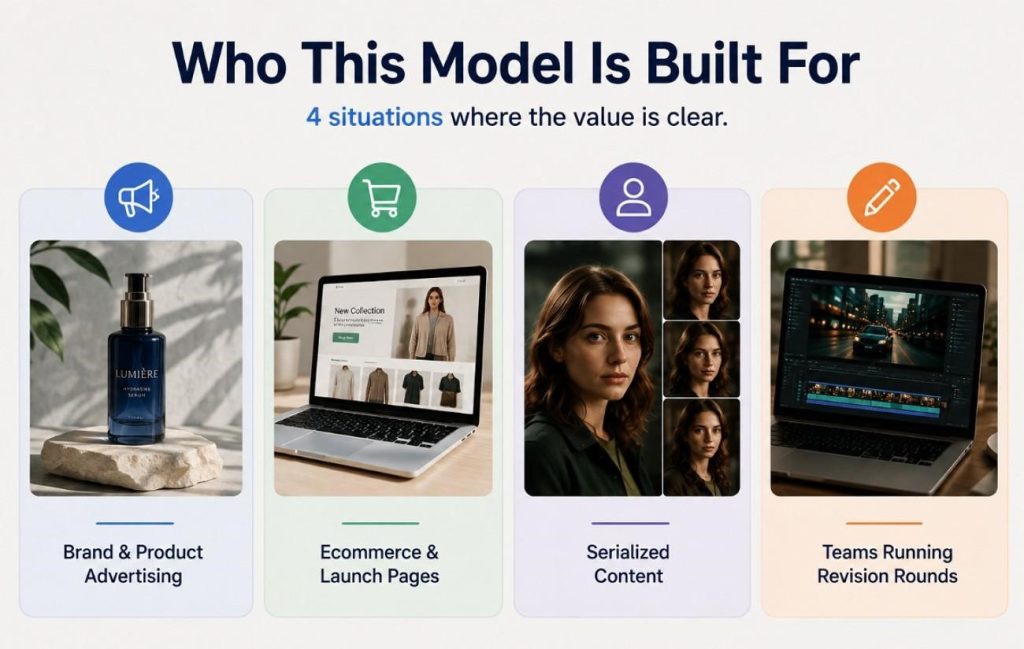
- Brand and Product Advertising: A hook, product demonstration, and call to action fit naturally into one continuous shot.
- E-commerce and Landing Pages: Native 4K output stays sharp enough for full-width hero videos on product and campaign pages.
- Serialized Content: Support for up to 50 multimodal references helps maintain a consistent character or spokesperson across separate generations.
- Teams Handling Revision Rounds: Local editing updates only the required section, reducing the need for full video regeneration after client feedback.
Part 2. Breakdown of Seedance 2.5 Key Features
Mentioned below are 5 capabilities that separate this release from the rest of the Seedance line. Each one changes a different stage of the production process.
Native 30-Second Generation and Multi-Round Extension
30 seconds sounds incremental until you write the prompt for it. A brief that long has to be structured as a timeline rather than a description:
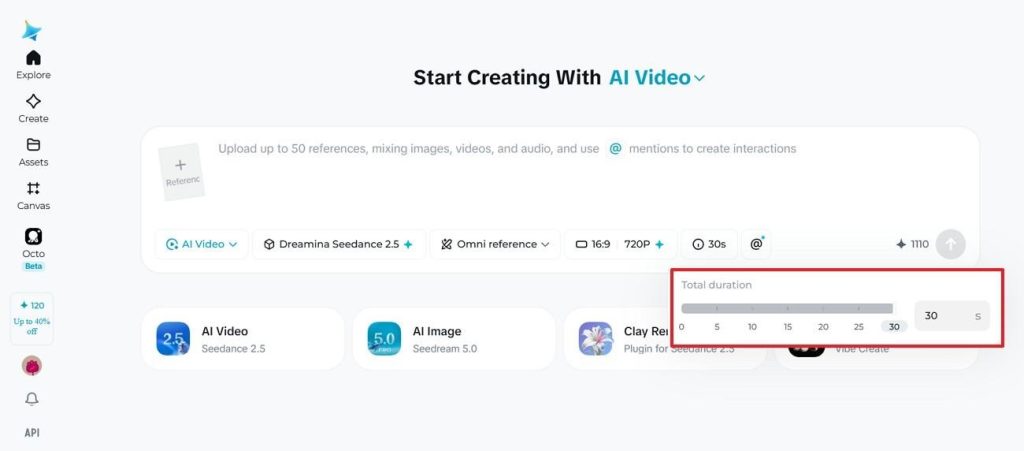
- 0 to 10 seconds establishes the scene and subject.
- 10 to 20 seconds develops the action or camera move.
- 20 to 30 seconds lands the closing beat.
As this Seedance 2.5 review found, ByteDance supports two additional extensions beyond the initial clip, while platforms offering the model report total runtimes approaching 180 seconds.
50-Asset Multimodal Reference System Explained
Reference-to-video control is where Seedance 2.5 pulls furthest ahead. Up to 50 assets join a single brief, and each type anchors something different:
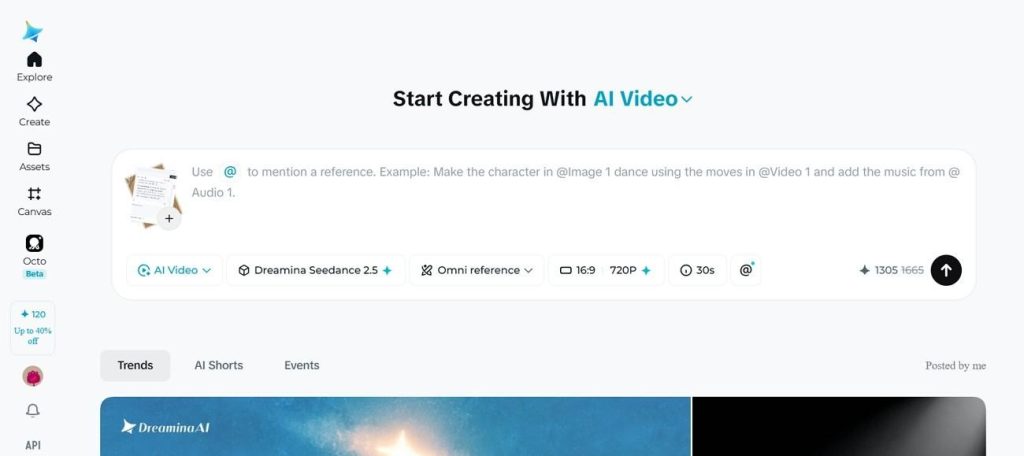
- Images: Define character appearance, product details, visual style, and scene design.
- Video Clips: Transfer motion, camera movement, pacing, and shot composition.
- Audio Files: Guide voice, speech style, timing, rhythm, and overall tone.
Documentation commonly splits that budget as 30 images, 10 video clips and 10 audio files, although the exact allocation differs between platforms.
Timestamp-Level and Reference-Based Editing Tools
Most video generation models offer only one revision path, which is to regenerate the entire clip. Seedance 2.5 introduces two more targeted editing options. Timestamp-level editing targets a specific moment, allowing a gesture at the 18-second mark, for example, to change without requiring full video regeneration.
Reference-based editing takes a different approach. Instead of editing the timeline, it replaces an input image, video, or audio reference and updates only the content that depends on it. For approved projects, this difference can determine whether a client revision takes a few minutes or requires generating the whole video again.
Resolution Options and Visual Quality Improvements
Sources report 4K with 10-bit color, while current providers may limit outputs to lower resolutions. The difference shows in gradients and fine texture, which is exactly where upscaling gives itself away.
Prompt adherence improved too, with ByteDance claiming roughly 20 percent tighter instruction following. One restriction is worth knowing before planning a shoot. Real human faces, including selfies and public figures, are blocked at the model level.
Synchronized Audio Generation
Audio is generated alongside the video instead of being added after the visuals. As this Seedance 2.5 review found, creating both streams together helps maintain closer synchronization between lip movements, dialogue, sound effects, and background audio without requiring a separate syncing step.
Seedance 2.0 already supported synchronized audio and multilingual lip-sync. The main improvement in version 2.5 is stronger audiovisual coherence and timing rather than an entirely new audio-generation feature.
Part 3. Seedance 2.5 Pricing Explained
Capabilities alone do not determine value. This Seedance 2.5 review now turns to the pricing reported across BytePlus and Volcano Engine platforms.
| Tier or Job Type | Estimated Cost Per Second | Video Reference Used | Seedance 2.0 Equivalent |
| 480p Output | About $0.10 | No | Around $0.07 on the Fast tier |
| 720p Output | About $0.23 | No | Around $0.11 at standard quality |
| Base Console Range | $0.09 to $0.21 | No | $0.06 to $0.35 across tiers |
| Jobs Using Video References | Up to roughly $0.89 | Yes | Not priced on the same basis |
Treat every figure here as a currently reported estimate rather than a fixed rate. Actual billing shifts with resolution, duration, reference count, and the provider you access the model through.
Is Seedance 2.5 Worth the Added Cost?
It depends almost entirely on output length. At the reported 720p rate, a 30-second clip lands near $7 before revisions, against roughly $3.30 for the same runtime assembled from two Seedance 2.0 generations. The difference shrinks once editing time becomes part of the overall production cost.
Stitching multiple clips requires seamless transitions, consistent color, and stable character continuity throughout. Those extra production hours rarely appear in published pricing or platform cost estimates. One polished 30-second video often justifies the premium through reduced post-production effort. Creating 12 social variations usually makes lower-cost models the more economical choice.
Seedance 2.5 Pros and Cons
Every new AI model brings clear improvements alongside new compromises. This Seedance 2.5 review examines both before reaching a final verdict.
Pros
- Longest single-generation runtime in the mainstream field.
- Native 4K with 10-bit color rather than an upscale.
- 50 multimodal reference assets, exceeding many competing models.
- Local editing avoids regenerating an approved shot.
- Audio and picture are generated together, not stitched.
Cons
- No official per-second rate has been published yet.
- Real-person inputs are restricted by policy and consent rules.
- Video-reference jobs cost several times the base rate.
- Too new to appear in independent benchmark rankings.
Part 4. Seedance 2.5 vs. The Rest of the 2026 Field
No Seedance 2.5 review is complete without the wider field. The following 3 models carry most serious production work this year, and the differences between them are structural rather than marginal.
How It Compares to Veo 3.1 and Kling 3.0
Specifications are easier to judge alongside competing models. The comparison below highlights the practical differences between Seedance 2.5, Veo 3.1, and Kling 3.0:
| Capability | Seedance 2.5 | Veo 3.1 | Kling 3.0 |
| Max Single Clip | 30 seconds | 8 seconds | 15 seconds, multi-shot |
| Resolution | Native 4K, 10-bit | Up to 4K on Standard and Fast | Native 4K |
| Reference Inputs | Up to 50 assets | Up to 4 images | Elements asset library |
| Audio | Included, joint generation | Included at every tier | Charged as an extra |
| Strongest At | Long takes and reference control | Sync accuracy and realism | Multi-shot storytelling |
When to Stick With Seedance 2.0 Instead
Despite the arrival of its successor, Seedance 2.0 remains a strong option for many production workflows. It ranked first in the Artificial Analysis Video Arena for both text-to-video and image-to-video generation, and Seedance 2.5 does not replace those benchmark results simply because it is newer.
Choose Seedance 2.0 if your projects rarely exceed 15 seconds, predictable pricing is important, or your existing API integration is already working reliably. Seedance 2.5 mainly expands runtime, editing flexibility, and reference control rather than delivering a dramatic improvement in overall visual quality.
Pro Tip: Need a Full-Length Story? Build It With Seedance 2.5 in Magiclight AI
Even with 180 seconds longer runtime, Seedance 2.5 is still designed to generate individual video clips rather than complete long-form productions. That works well for advertisements, short dramas, and product videos, but training courses and complete stories usually require multiple connected scenes with consistent pacing and structure. Magiclight AI extends this workflow by integrating Seedance 2.5 Pro into its story creation pipeline.
Instead of generating one clip at a time, Magiclight AI converts a script into storyboard scenes and renders them with Seedance 2.5 Pro. It also includes built-in editing, voiceovers, subtitles, music, and publishing tools to complete the workflow in one platform.
Guide to Create Full-Length Story With MagicLight AI
From script to published video, the Magiclight AI workflow unfolds in the following 5 steps:
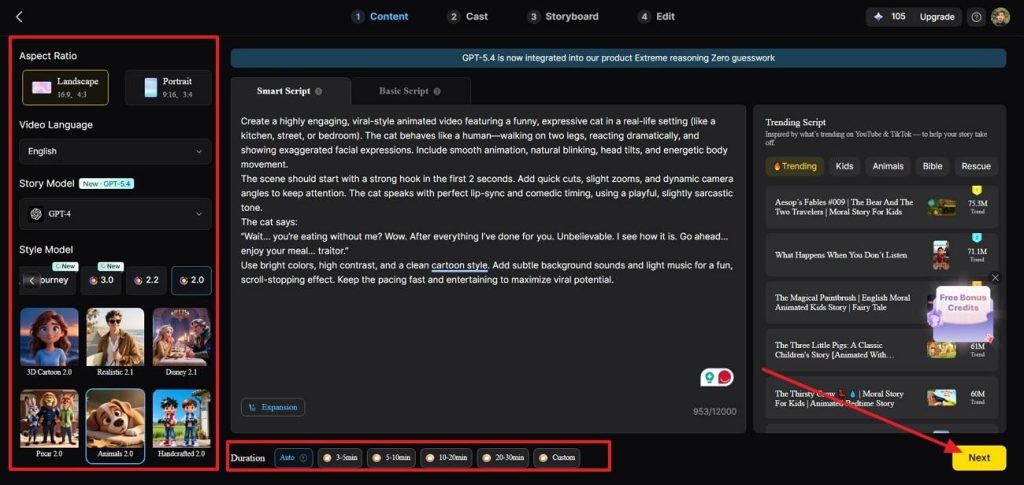
Step 1. Create Your Story
Drop your script into Story to Video, which accepts up to 12,000 characters, then pick a language and aspect ratio.
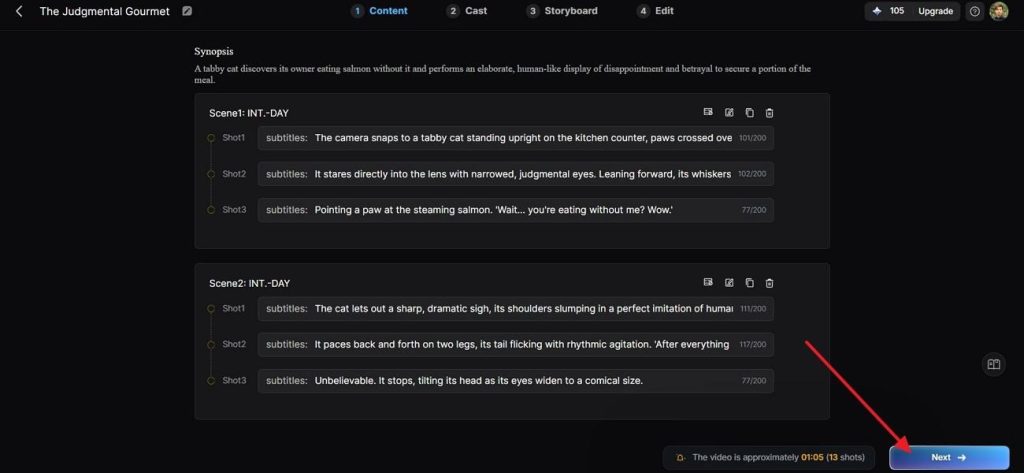
Step 2. Review the Generated Scenes
MagicLight AI automatically converts your script into Scenes and Shots. Review the generated storyboard, edit individual shot prompts if needed, then click Next to continue.
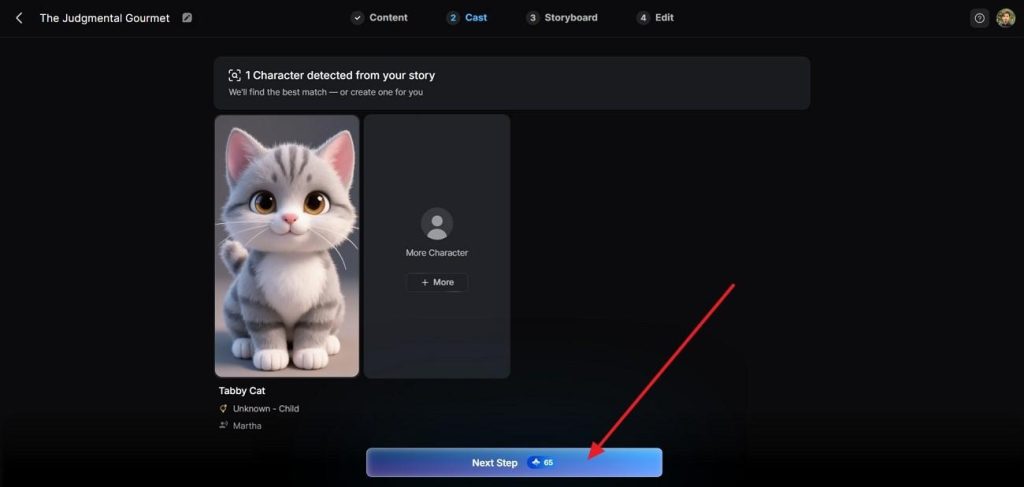
Step 3. Assign Your Characters
In the Cast tab, review the Detected Characters or add new ones. Confirm the cast that will appear throughout the story, then select Next Step.
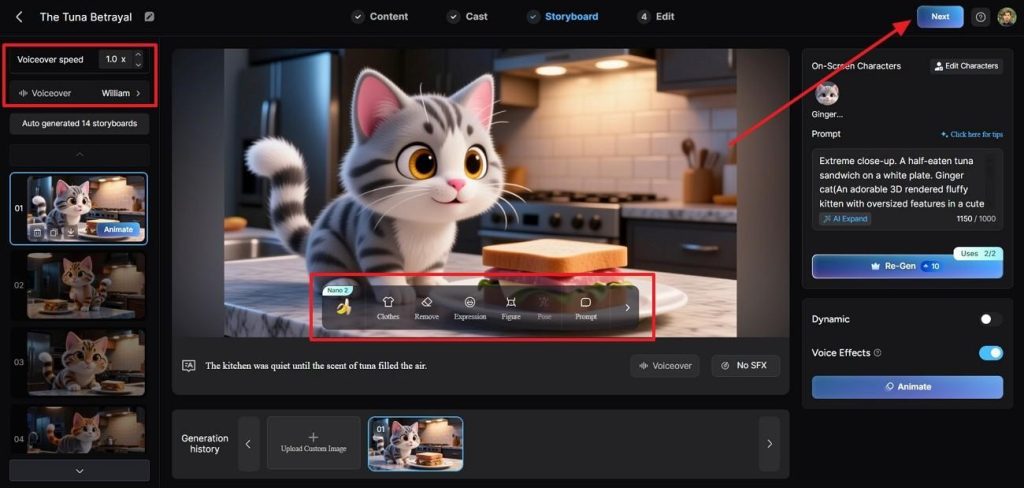
Step 4. Edit the Storyboard
Open the Storyboard tab to customize each scene. Adjust voiceovers, voice speed, character expressions, poses, clothing, prompts, and other scene settings before clicking Next.
Step 5. Generate the Video
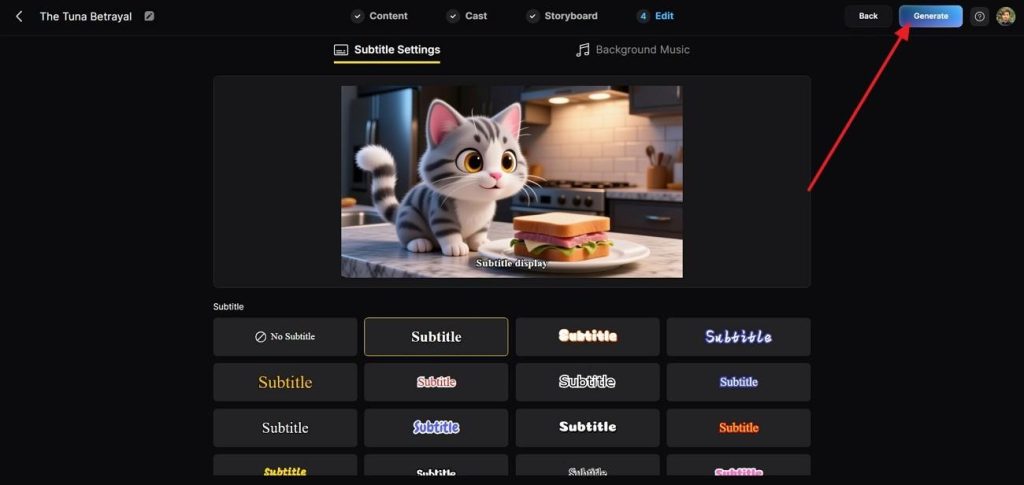
In the Edit tab, choose your preferred subtitle style and background music, then click Generate to render the complete video.
Step 6. Download or Publish
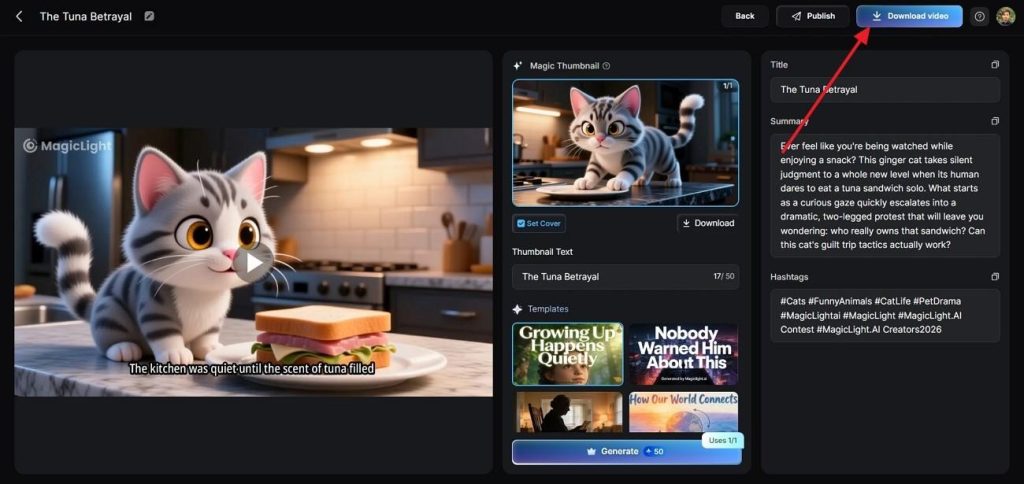
After rendering finishes, preview the result, update the title, summary, hashtags, or thumbnail if required, then Download Video or Publish the project directly from the final screen.
Why Choose It
These 3 things separate this from running the model on its own. MagicLight AI makes video generation effective while combining its functionality with unique AI video models like Seedance:
- Extended Runtime: Create videos up to 50 minutes, far beyond the 30-second limit of a single Seedance 2.5 generation.
- Consistent Characters: Use My Characters to maintain the same cast, appearance, and identity across every scene automatically.
- Complete Production Workflow: Generate scripts, storyboards, voices, and exports in one platform, with support for 50 character poses to create varied, consistent scenes.
Conclusion
Any honest Seedance 2.5 review has to hold two things at once. The model is a genuine step forward on runtime, reference depth, and revision control. Its pricing is still a set of estimates; the face restriction is real, and Seedance 2.0 handles short clips more cheaply. For anything longer than one scene, Magiclight AI runs the same engine without the 30-second ceiling.
FAQs on Seedance 2.5 Review
1. Where is Seedance 2.5 currently available?
It launched on Jimeng, Doubao Pro, and Dreamina, with API access opening through BytePlus ModelArk in early August. Several third-party platforms carry it too, including Magiclight AI as Seedance 2.5 Pro.
2. How much does Seedance 2.5 cost per video?
At the reported 720p rate of about $0.23 per second, a full 30-second clip works out to near $7. Jobs that include video references cost considerably more, running up to roughly $0.89 per second.
3. Can Seedance 2.5 extend videos beyond 30 seconds?
Yes. ByteDance allows two further extensions after the initial generation, and platforms hosting the model report running totals approaching 180 seconds.
4. Does Seedance 2.5 support image-to-video generation?
Yes. Images are one of 3 accepted reference types inside the 50-asset budget, and they carry character appearance, product detail, and style direction into the generation.
5. Is Seedance 2.5 better than Seedance 2.0 for commercial ads?
For a single polished spot, yes, since the whole message fits in one continuous take. For producing a dozen variants on a campaign, Seedance 2.0 remains the more economical choice.
6. Can MagicLight AI create longer videos than Seedance 2.5?
Story to Video handles scripts that reach 50 minutes of finished footage, far beyond what any single Seedance generation or extension chain delivers.

![How to Create a TikTok Video for Beginners [2026 Guide]](https://magiclight.ai/wp-2/wp-content/uploads/tiktok-video-creation-guide-300x169.png)
![How to Blur Faces in Photos Like a Pro [2026 Guide]](https://magiclight.ai/wp-2/wp-content/uploads/blur-faces-in-photos-with-ai-300x198.png)