Creating an AI video can involve several steps, from choosing a model to controlling motion, style, and final output. Viddo AI brings these options into one platform, combining video, image, voice, and music generation tools. It also provides multiple AI models, giving creators flexibility for different visual styles and video needs.
Viddo AI mainly focuses on generating short clips, applying effects, and transforming existing media. However, longer projects may require additional tools or workflows to connect multiple scenes. This Viddo AI review explores its key features, video creation process, limitations, and how it compares with an alternative for longer videos.
Part 1. What Is Viddo AI?
Viddo AI combines video, image, voice, and music generation tools within one platform. It also provides multiple AI models for different styles and creation needs, letting users handle different media tasks in one workspace. Credit costs appear before generation, making usage easier to track.
More than 100 effects let users transform uploaded images and video clips with preset styles. Viddo AI also provides 6 aspect ratios, ranging from cinematic 21:9 to vertical 9:16 formats. Resolution options include 720p and 1080p, giving creators more control over video quality and intended viewing format.
Key Features of Viddo AI
- AI Model Library: Viddo AI provides access to 20+ AI models, including Veo, Kling, Runway, Seedance, Wan, and Hailuo for different generation needs.
- Reference Uploads: Users can upload up to 9 images, 3 videos, and 3 audio files as references for supported generation workflows.
- Seed Consistency: Seed controls help maintain a more consistent character appearance and visual style across related video generations.
- Long Video to Shorts: The Long Video to Shorts tool repurposes longer footage into shorter clips suitable for social media and other formats.
- Motion Control: Motion controls provide greater control over how subjects and other visual elements move within generated video scenes.
Viddo AI Pros and Cons
After reviewing the main features of Viddo.AI, let’s examine its strongest advantages first. We will also cover the limitations that may affect regular video creation.
Pros
- Failed generations can return used credits through Viddo refunds.
- Canceled subscriptions keep remaining credits available for later use.
- Annual billing currently reduces listed monthly pricing by 50%.
- Veo 3.1 Lite generation starts around $0.0575 per video.
Cons
- Commercial usage rights require subscribing to a paid plan.
- Credit usage changes by model, duration, outputs, and resolution.
- Free-plan images and videos carry watermarks until users upgrade.
- Generation times vary depending on selected models and complexity.
Part 2. How to Use Viddo AI Video Generator?
Using Viddo AI for video creation follows a simple process from prompt to export. The same basic workflow applies when choosing different available video generation options. Follow the steps below to create and download your video with Viddo AI:
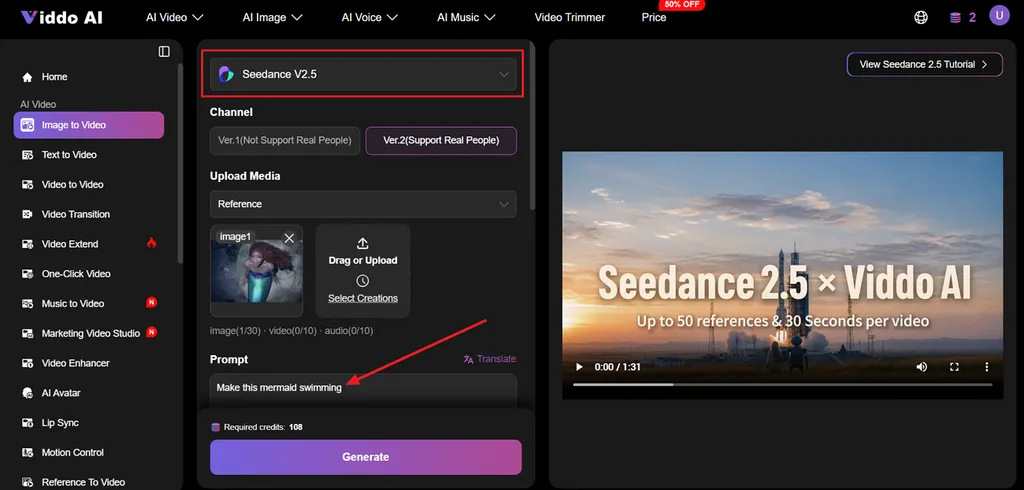
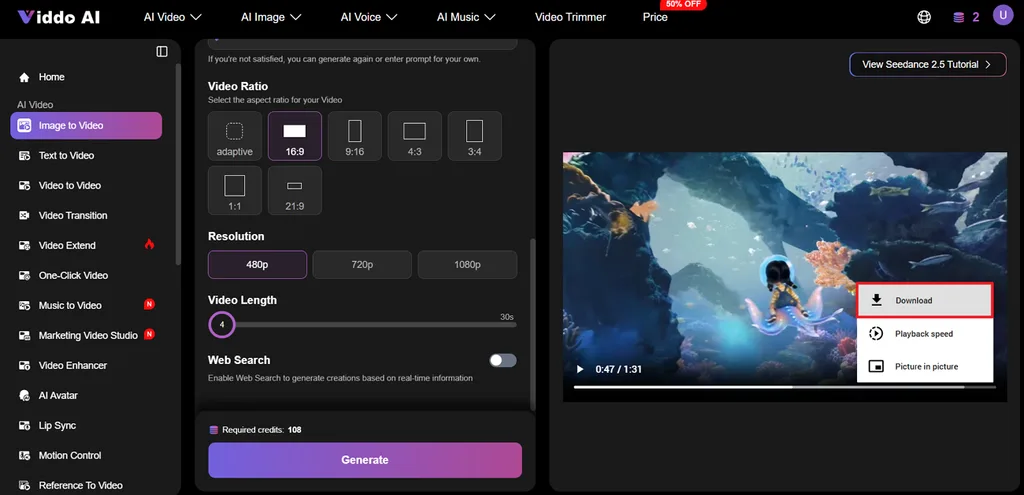
Step 1. First, select a method from Image to Video and Text to Video. In Image to Video, upload up to 9 reference images, select an AI model, and enter a prompt for the video.
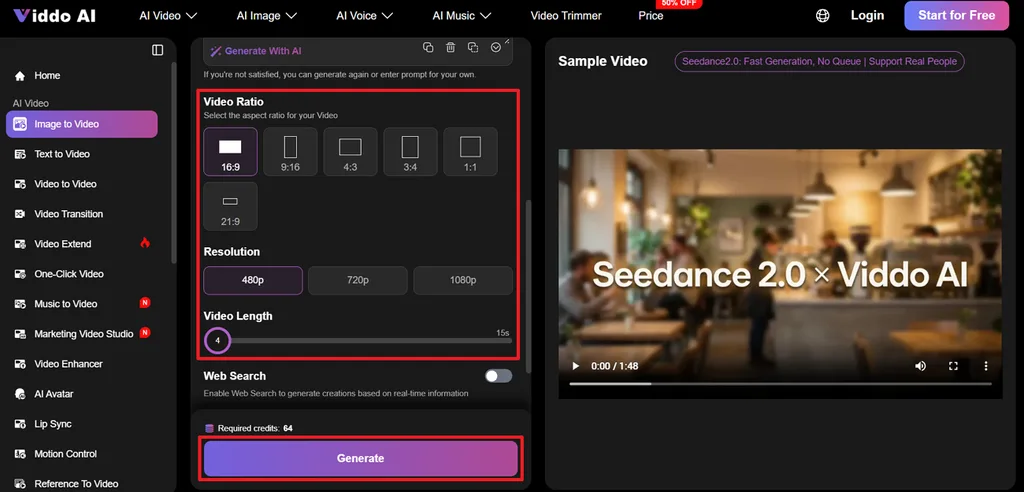
Step 2. Choose a Video Ratio and Resolution for the video you aim for. After that, choose a Video Length and press the Generate button to start the video generation process.
Step 3. After the video is generated, simply preview the video and click the Download option to save the video.
Start with a cheaper engine while testing prompts and checking how results look. Once the prompt works well, switch to a premium engine for better output. Video costs range from about $0.0575 to roughly $0.345 depending on engine choice.
Part 3. Best Alternative to Viddo AI for Video Creation
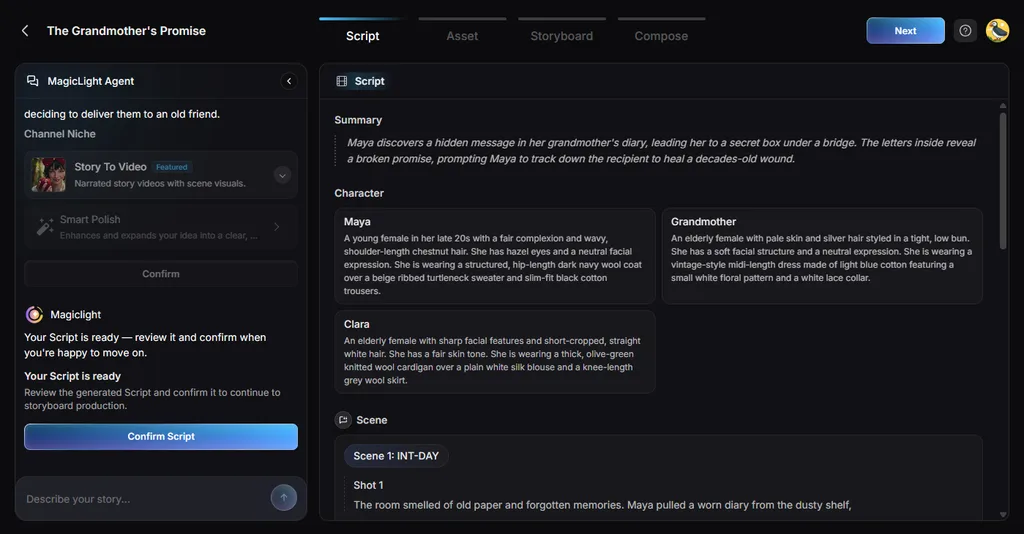
Short-clip tools can become inconvenient when a project needs a full story, repeated characters, and longer scenes. MagicLight AI offers a more complete workflow for users moving beyond Viddo AI and creating longer videos. MagicLight Agent can start from a simple idea, then help shape the topic, script, and visual style through conversation.
You can also provide your own script with up to 12,000 characters and generate videos lasting up to 50 minutes. Projects can include narration, captions, characters, and scene-by-scene changes inside the same workspace. Support for 11 languages also makes it easier to create videos for different audiences.
Key Features of MagicLight AI
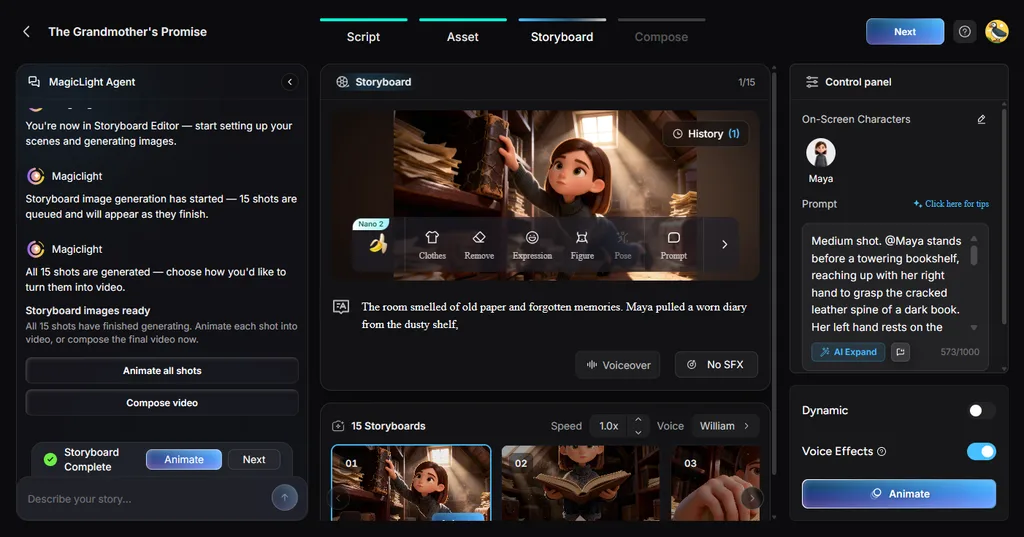
- Storyboard Scene Control: Creators can adjust individual scenes using 50 poses before final rendering. Detailed timing controls help refine specific moments and improve scene presentation.
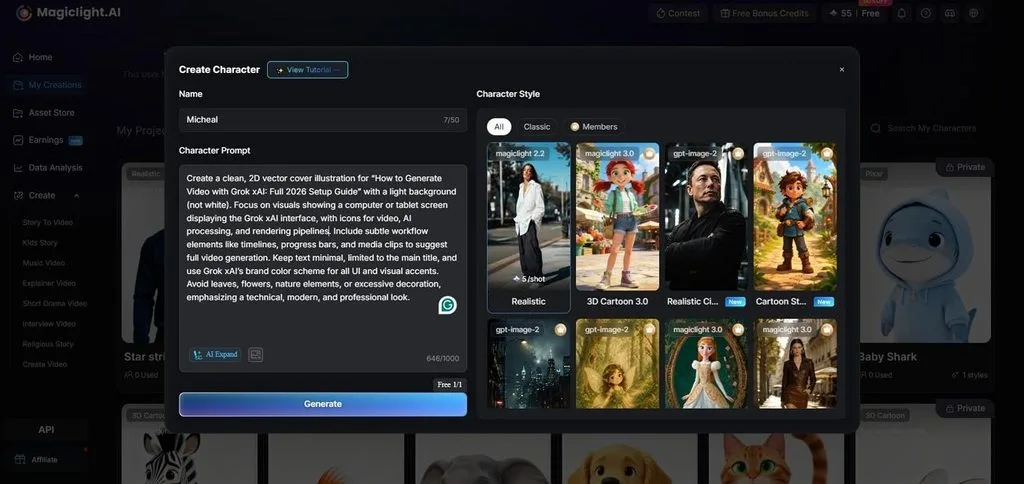
- AI Character Creation: Character prompts support up to 1,000 characters for more detailed designs. Characters can start from written descriptions or uploaded reference images.
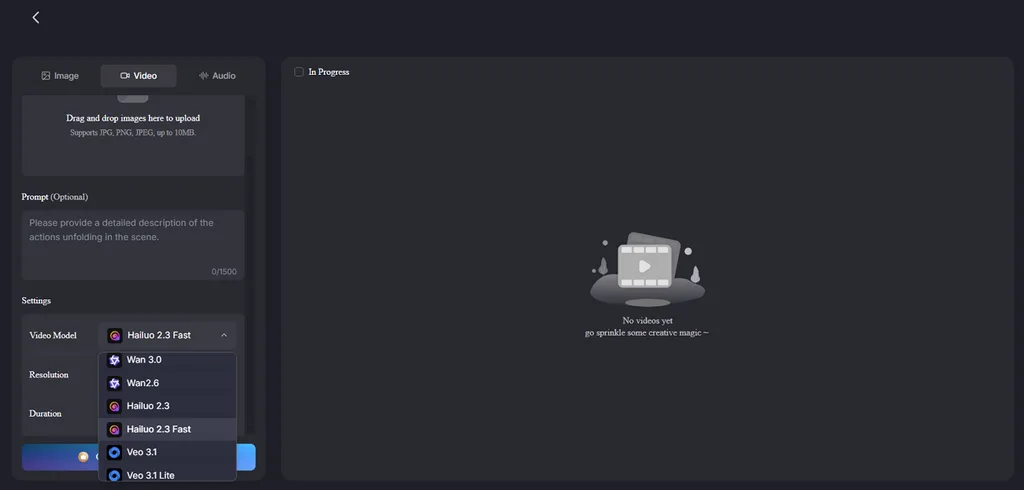
- AI Video Models: MagicLight AI offers 20 models, including Seedance 2.0 Fast and Kling 3.0. Users can switch models based on different scene and motion needs.
- Automatic Scene Division: Pasted scripts automatically become numbered scenes, removing manual setup work entirely. Each scene stays organized inside one project for easier revisions later.
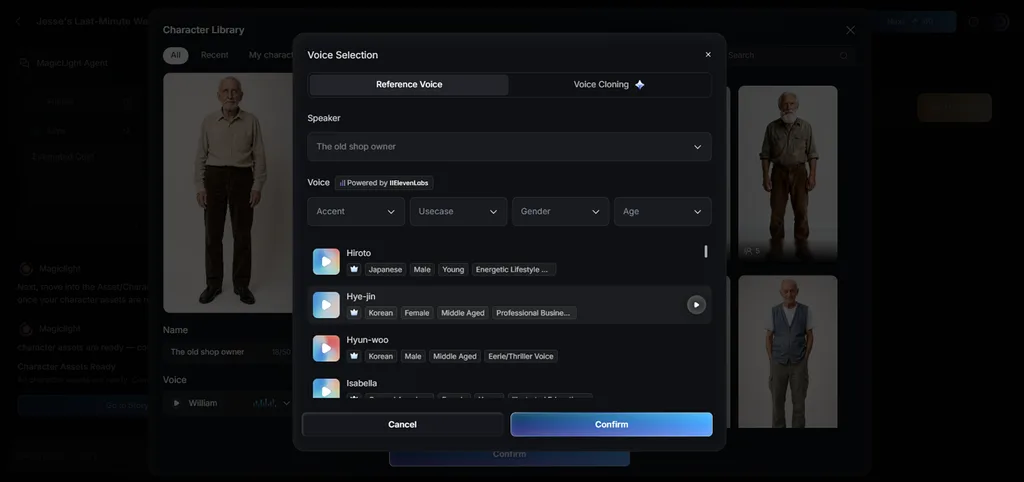
- Voiceover and Subtitles: MagicLight AI provides 37 voices across different ages, genders, and accents. Voice cloning and 16 subtitle presets support more polished video exports.
Part 4. Comparison Table Between Viddo AI and MagicLight AI
Viddo.AI and MagicLight AI support different workflows for creating and finishing video projects. The table below compares their main capabilities, limits, and practical differences for video creation:
| Feature | Viddo AI | MagicLight AI |
| Main Strength | Multiple AI models and clip-generation tools | Complete long-form video creation from scripts |
| Starting Input | Text, images, videos, or audio references | Idea, outline, or script up to 12,000 characters |
| Video Length | Up to 180 seconds, with extension support | Up to 50 minutes for longer projects |
| Character Consistency | Seed and consistency tools across generated shots | Characters stay consistent across connected scenes |
| Narration and Captions | Available through separate generation tools | Added within the same video project |
| Editing | Trimming, extending, motion control, lip sync, effects | Scene-level changes to timing, poses, captions, and narration |
| Best For | Short clips, effects, and model-based generation | Stories, explainers, series, and longer videos |
Viddo AI suits short clips, effects, and quick comparisons between different video engines. MagicLight AI better handles complete stories with recurring characters, narration, and connected scenes.
Conclusion
To conclude, Viddo AI gives creators flexible tools for producing short videos with multiple generation models. Its shared credits, effects, and editing options make quick video creation easier for many users. Users wanting longer stories may prefer MagicLight AI for connected scenes, narration, and consistent characters. You can also create AI videos for free before deciding which platform better suits your needs.
FAQs on Viddo AI
- What is the best alternative to Viddo AI?
MagicLight AI is a strong alternative for creating complete videos from simple ideas. Its Agent develops scripts, visual direction, characters, narration, and captions inside one project. This reduces manual assembly when producing longer stories with multiple connected scenes.
- Can Viddo AI create animation videos?
Viddo AI can create animated videos using several supported engines and visual effects. Different models can produce noticeably different animation styles, motion, and visual quality levels. Trying another engine can improve results when one model produces disappointing animation output.
- How long are videos created by Viddo AI?
One-Click Video Creator can generate videos lasting up to 180 seconds per prompt. Longer projects require extensions or combining multiple clips after individual generations are finished. MagicLight AI instead builds longer videos scene by scene from one complete script.
- Do I need video editing experience to use Viddo AI?
No editing experience is required because the workflow guides users through basic settings. Users mainly choose a model, prompt, aspect ratio, resolution, and generation length beforehand. Editing knowledge becomes more useful when refining prompts, movement, lighting, and final shots.



![How to Remove People from Photos in 2026 [Full Guide]](https://magiclight.ai/wp-2/wp-content/uploads/remove-people-from-photos-guide.jpg-300x197.webp)
![6 Best Picture Modification Apps in 2026 to Try [New List]](https://magiclight.ai/wp-2/wp-content/uploads/best-picture-modification-apps-for-photos.jpg-300x200.webp)