AI video generators have improved quickly, making convincing motion, consistent visuals, and synchronized audio more accessible across leading platforms. As output quality becomes more competitive, choosing the right tool depends increasingly on how well it supports the actual production workflow.
Clip duration, editing flexibility, regeneration requirements, and cost per finished second can significantly affect repeated projects. Comparing these practical differences helps creators identify which best AI video generation tools offer the right balance of quality, control, efficiency, and scalability.
Part 1. 5 Best AI Video Generation Tools for Creators To Try
These tools take different approaches to video generation, so their strengths extend beyond visual quality alone. Comparing AI tools for video generation means looking at clip length, editing control, workflow, and what happens after generation.
1. MagicLight AI
Best For: Creators turning long scripts into complete, structured AI story videos.
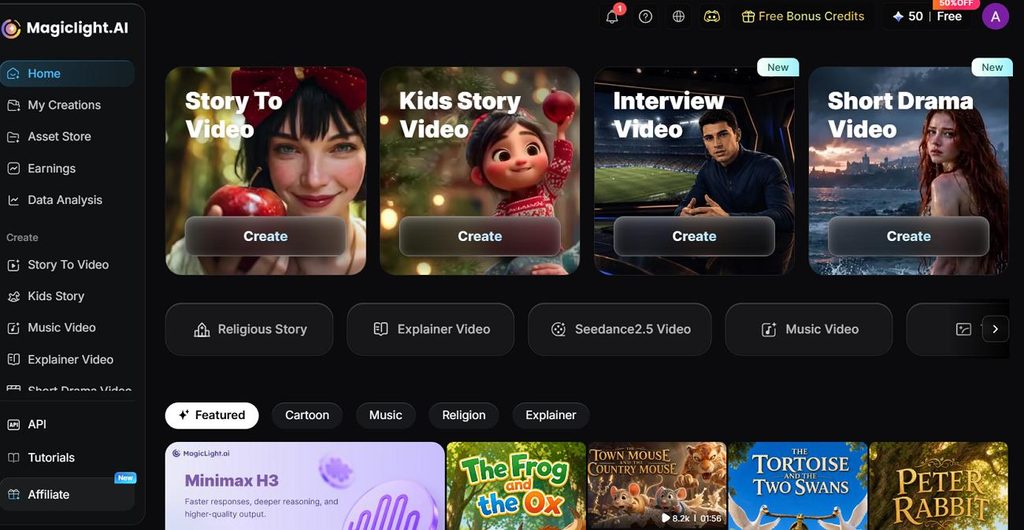
Most AI video tools return short clips, while MagicLight AI can handle scripts up to 12,000 characters. It supports videos up to 50 minutes, making it better suited to full stories, episodes, and longer narrative projects rather than isolated scenes.
Story planning is handled through 14 story models, including options such as Gemini Flash 3.1 and GPT-6 Astra. Characters can also be described in detail, reused across scenes, and carried through longer projects without starting each time again.
Key Features
- Reusable Character Design: Describe a character with up to 1,000 characters, save the design, and reuse it across later projects.
- Image Animation Controls: Animate an uploaded image with prompts up to 1,500 characters using 3 available AI models.
- Scene-Level Storyboard Editing: Adjust clothing, expressions, movement, and select from 50 character poses before generating individual scenes.
- Visual Style Selection: Choose from 52 visual styles across four model groups, including Anime and 3D Cartoon, to keep scenes visually consistent.
Pros
- Runtime is far longer than any other model listed here.
- Narration and captions are added before you download the file.
- The free plan needs no card to get started.
Cons
- Exports stop at 1080p, with no 4K option available.
2. Veo
Best For: Creators making short cinematic scenes with dialogue, ambiance, and synced sound.
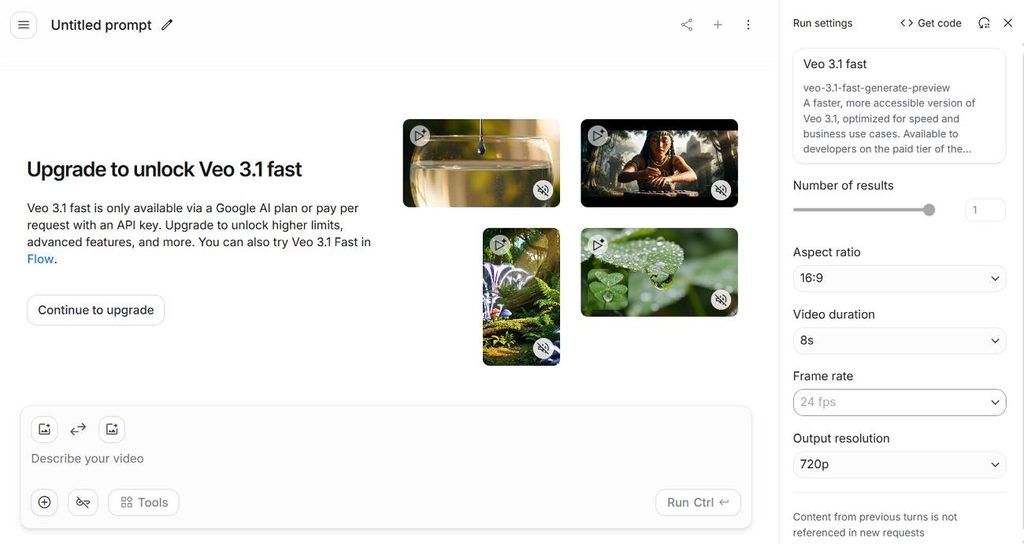
For dialogue-heavy scenes, synchronized audio is the clearest advantage over many competing video generators. Spoken lines, background ambiance, and sound effects can arrive with visuals, reducing separate audio work.
Key Features
- Native audio arrives on every tier, covering dialogue, effects, and ambiance.
- Ingredients to Video takes up to 4 reference images to set subject and style.
- Output reaches 4K, and scene extension joins clips into longer sequences.
Pros
- Sound matches the picture better than on any rival model.
- Free use is available through the Gemini app, with daily limits.
Cons
- One generation runs about 8 seconds before it needs extending.
- Every clip carries a watermark plus a hidden tracking tag.
3. Seedance
Best For: Longer continuous shots when frequent cuts would break the scene.
Longer continuous scenes make Seedance stand out among AI tools for video generation that rely on shorter clips. Seedance 2.5 can generate up to 30 seconds at once, with 2 extensions available afterward.
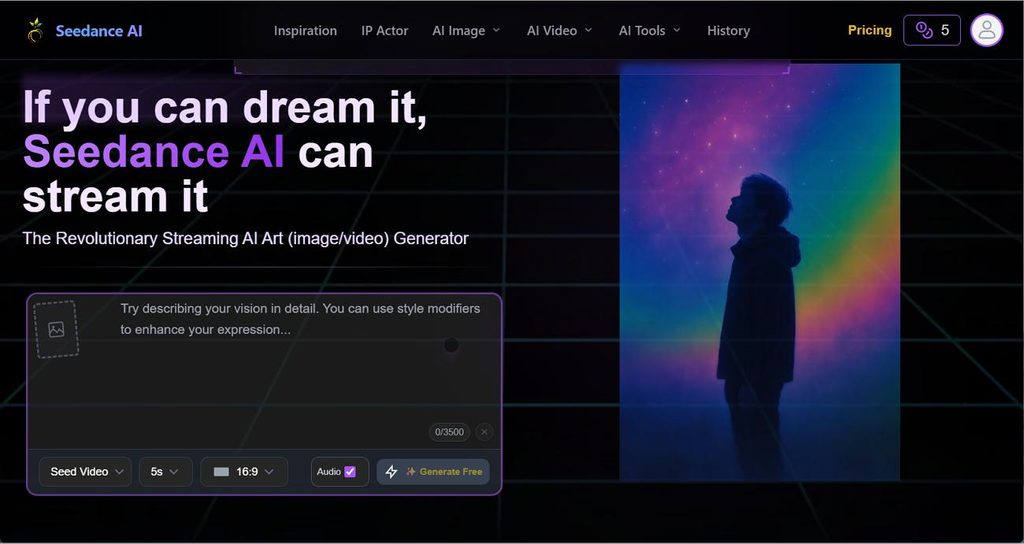
Key Features
- 4K resolution with 10-bit color supports sharper detail and smoother color changes across scenes.
- One request can include up to 50 reference files for appearance, movement, and sound.
- Change one section of a video without generating the entire clip again.
Pros
- Those references keep a recurring character looking the same.
- Sound is produced with the video at no extra cost.
Cons
- Rates reach around $0.23 per second of 720p output.
- The model blocks real human faces completely.
4. Gemini Omni
Best For: Fixing nearly finished clips through simple follow-up editing instructions.
Instead of rewriting the original prompt, Gemini Omni lets you describe each change in plain language. Its Gemini Omni 1.1 Flash release became generally available in August 2026. For anyone comparing the best AI video generator, each new instruction builds on the previous result instead of starting over.
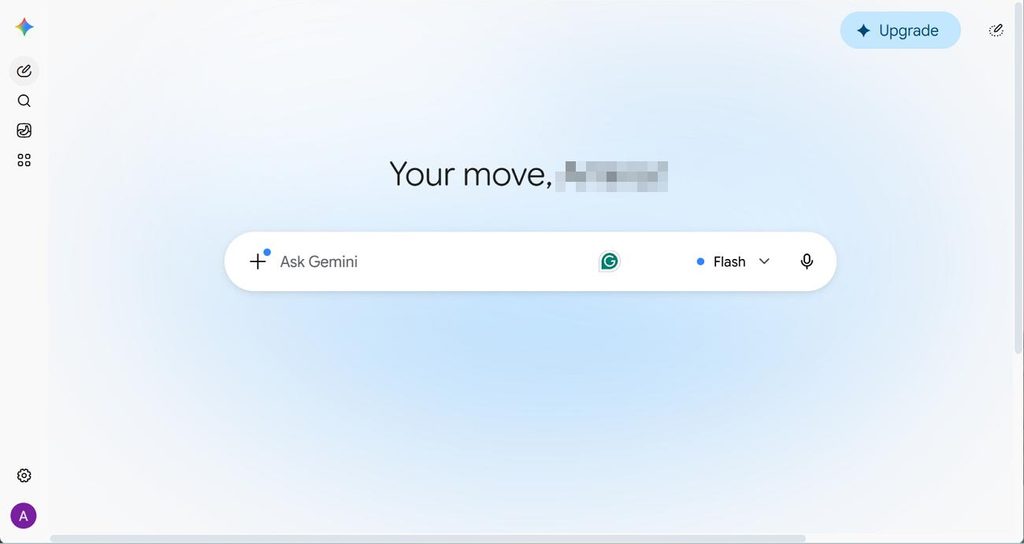
Key Features
- Simple instructions change the lighting, background, or camera angle.
- Clips run 3 to 10 seconds and extend to 40 in 10-second increments.
- Pricing scales by resolution, from $0.03 per second at 360p to $0.30 at 4K.
Pros
- Editing by description avoids generating the clip all over again.
- Gemini's general knowledge helps with historical and scientific scenes.
Cons
- True resolution is 720p, since 1080p and 4K are upscaled.
- Uploaded clips for editing cannot exceed ten seconds.
5. Kling
Best For: Multi-shot sequences that need connected angles without arranging every cut manually.
For sequences with several camera changes, Kling can combine multiple connected shots within one generation. This reduces separate editing work while helping characters, objects, and scene details remain consistent between angles.
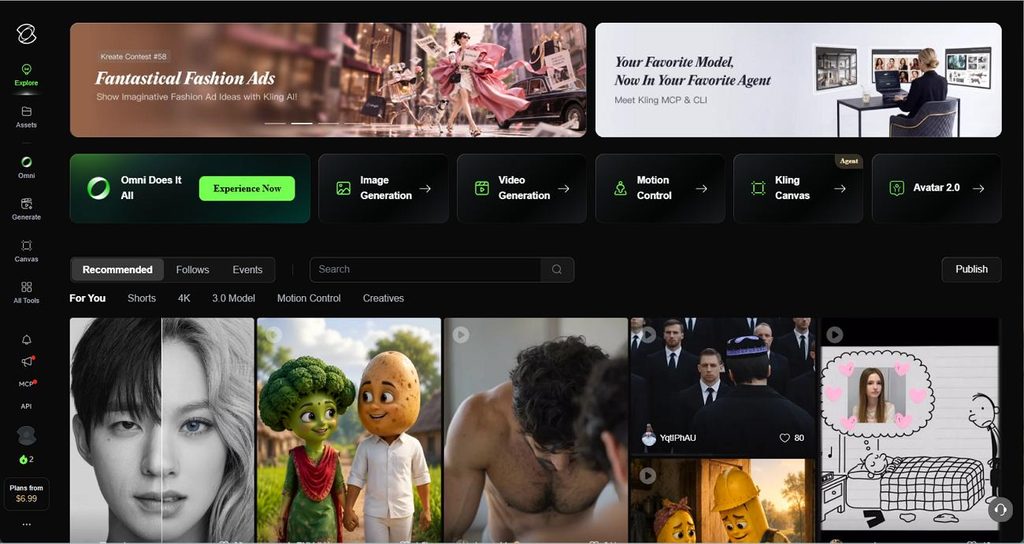
Key Features
- One generation can create several connected shots with planned camera and angle changes.
- Saved Elements let characters and objects return across later images and video generations.
- Motion Brush lets you mark where selected subjects should move and indicate their direction.
Pros
- No other model here handles cuts inside one generation.
- Credits refresh daily, which keeps longer testing cheap.
Cons
- Sound costs extra and is billed by the second.
- Clips stop at 15 seconds without an extension.
Part 2. A Quick Comparison of the 5 Best AI Video Generation Tools
Not every project needs the same balance of length, sound, control, and cost. The table below shows how the best AI video tools compare across those practical differences:
| Tool | Single Output | Audio | Resolution | Best Suited To |
| MagicLight AI | Up to 50 minutes | Narration and captions | 720p and 1080p | Complete stories |
| Veo | About 8 seconds | Included every tier | Up to 4K | Dialogue-led shots |
| Seedance | 30 seconds | Same generation pass | Native 4K | Continuous motion |
| Gemini Omni | 3-10 seconds | Generated natively | 720p native | Conversational edits |
| Kling | 15 seconds | Charged separately | Native 4K | Multi-shot sequences |
Part 3. What Makes MagicLight.AI the Best AI Video Generation Tool for Storytelling?
MagicLight AI stands out because it handles complete stories instead of returning only separate video clips. A 12,000-character script can split into scenes, while saved characters remain consistent throughout the project. One video can also reach 50 minutes, reducing the need to join many short generations afterward.
How to Turn a Script Into a Finished Video
The 5 steps below take a script from initial setup to the final downloaded video. Most decisions happen in the storyboard, where scenes can be changed before generation and before credits are used.
Step 1. Enter the Script and Project Details
Paste your script, then select the aspect ratio, language, story model, and visual style. Set the Duration and click Next.
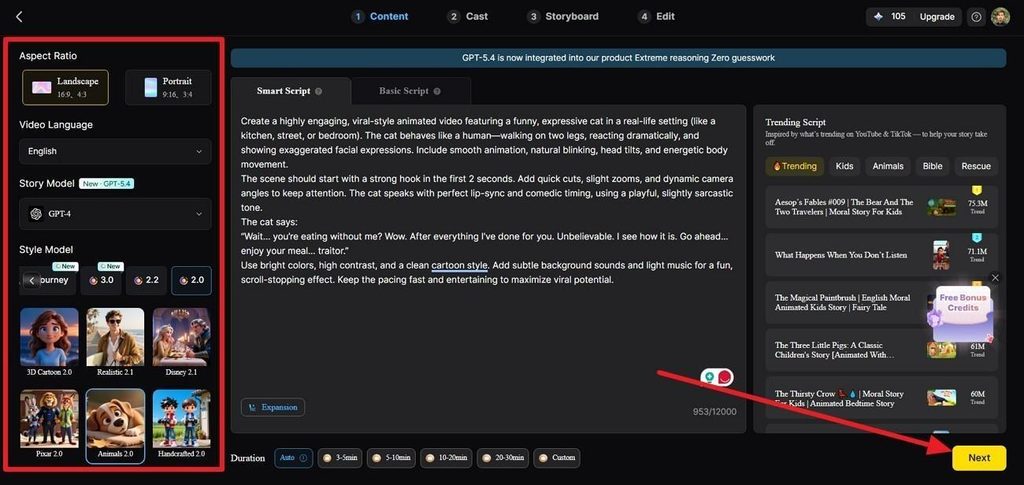
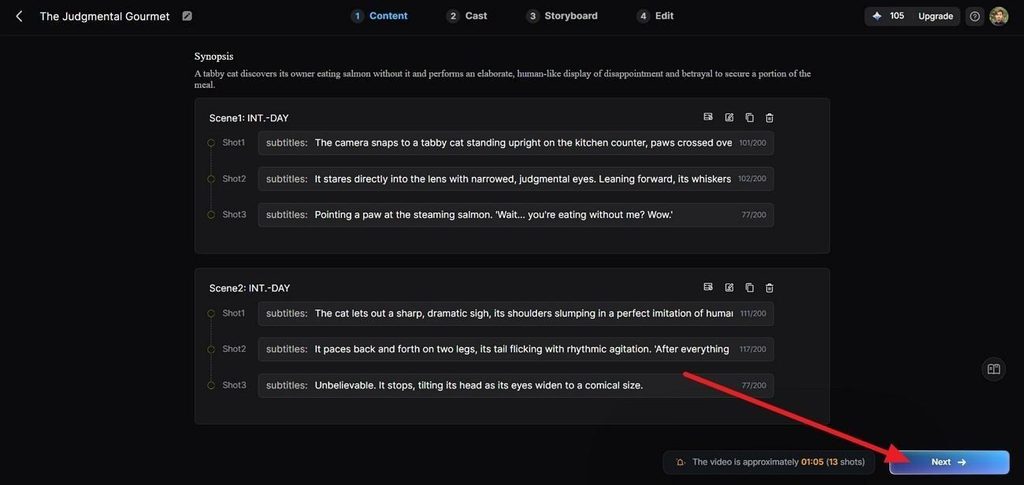
Step 2. Review the Story Structure
Check the generated Synopsis with the scenes and shots before moving ahead. Edit any shot description that needs clearer direction, then select Next.
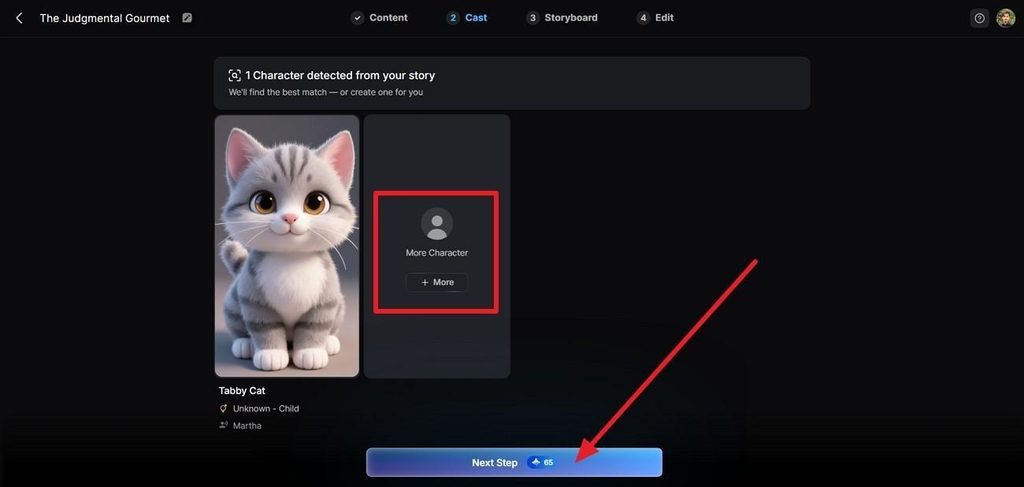
Step 3. Organize the Cast
Open the Cast section and review the detected characters. Keep the suggested options, replace them, or select + More to add another character, then press Next Step.
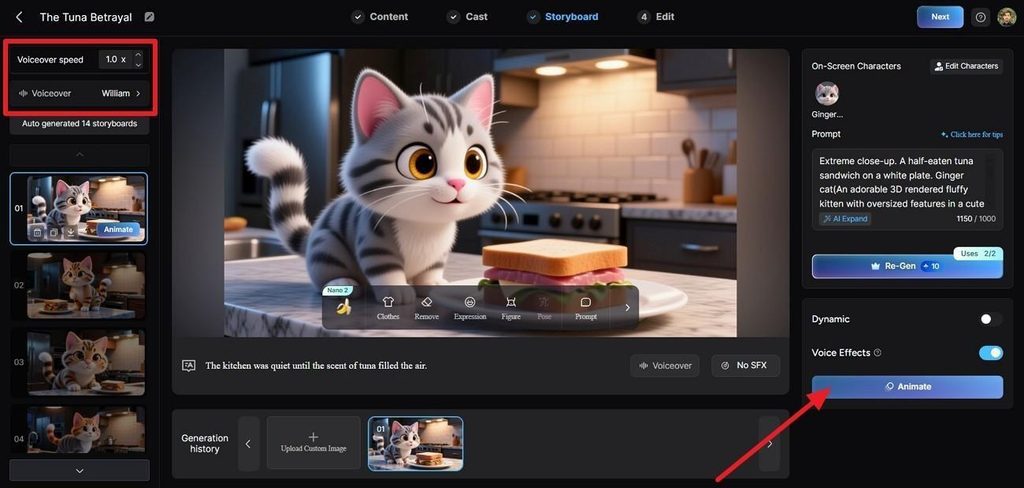
Step 4. Adjust the Storyboard
Select a storyboard frame and update its prompt, expression, figure, pose, or voiceover settings. Once the scene looks right, press Animate.
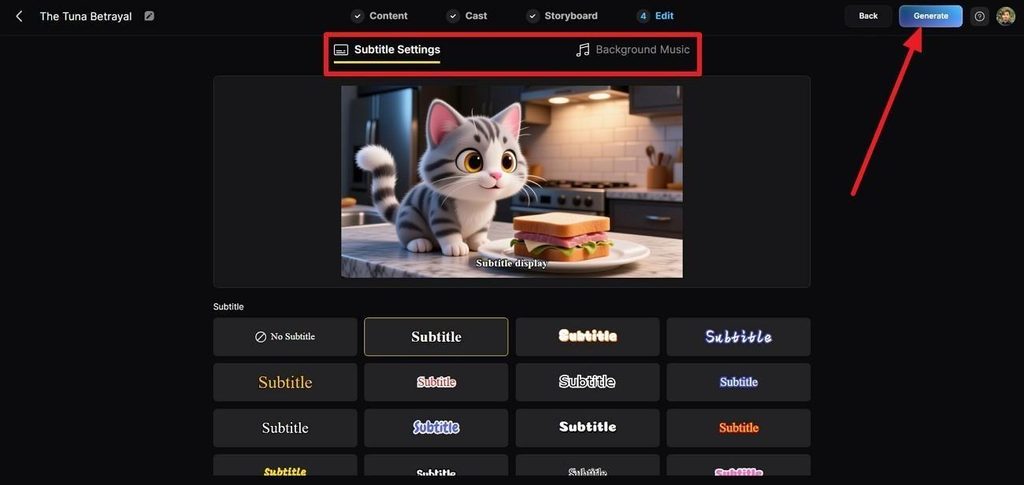
Step 5. Add Subtitles and Music
In Edit and choose the subtitle style you want. Set the soundtrack under Background Music, then click Generate to continue.
Step 6. Preview and Export
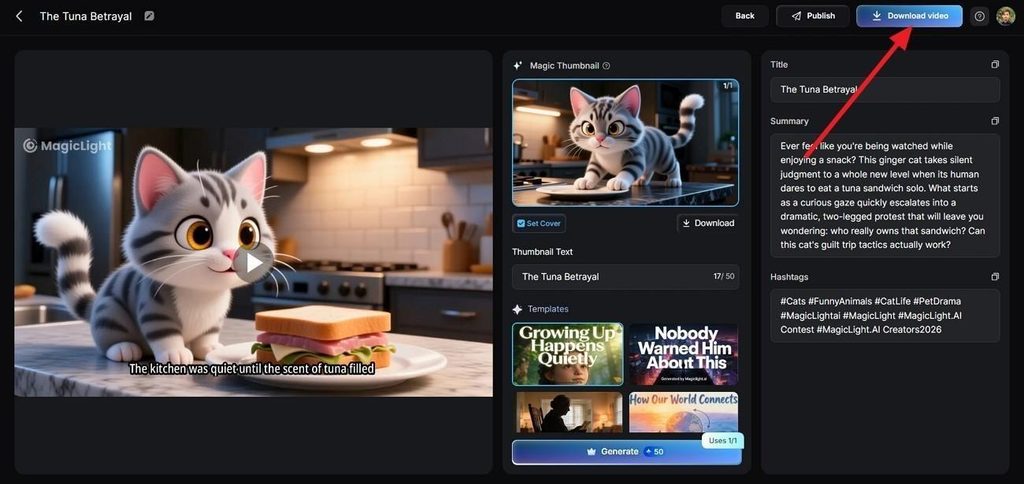
Watch the finished video and update the Magic Thumbnail, title, summary, or hashtags if needed. Select Publish or Download Video to finish.
Conclusion
No single option wins across the whole of this category. Veo leads on sound, Seedance on length and sharpness, Gemini Omni on editing, and Kling on cutting between shots. All 4 still stop within seconds of starting, whatever else they do well. For anything longer than a clip, MagicLight AI is the best AI for making videos that hold together.
Frequently Asked Questions on Best AI Video Generation Tool
1. Which AI is best for video generation?
The answer depends mainly on how long your finished video needs to be. Veo and Seedance produce better single shots, while MagicLight AI is the best AI to create video running for minutes rather than seconds.
2. Is there an AI that can generate videos?
Yes, and all five of these video generation AI tools work from a text prompt. The difference is whether you get a short clip that still needs editing or a finished video with narration already added.
3. What AI video generator has the best quality?
Seedance gives the sharpest picture, with native 4K at 10-bit color. MagicLight AI runs the same kind of engines underneath, so quality holds up while your script sets the structure.
4. Are AI video generation tools free?
Most give limited free access rather than the full product. Veo is free through the Gemini app with daily limits, and Kling refreshes credits each day. MagicLight AI offers a free plan that requires no card.
5. Is there any 100% free AI video generator?
Truly unrestricted options are rare, because free tiers usually add watermarks or block commercial use. On any of these best AI video generator websites, the license terms matter more than the credit count.

![How to Create a TikTok Video for Beginners [2026 Guide]](https://magiclight.ai/wp-2/wp-content/uploads/tiktok-video-creation-guide-300x169.png)
![How to Blur Faces in Photos Like a Pro [2026 Guide]](https://magiclight.ai/wp-2/wp-content/uploads/blur-faces-in-photos-with-ai-300x198.png)